Switched Port Analyzer (SPAN), RSPAN and ERSPAN Guide
Table of Contents
- What is Switched Port Analyzer (SPAN)? ‹
- How to configure local SPAN? ‹
- How to configure RSPAN? ‹
- How to configure ERSPAN? ‹
- Download section ‹
What is Switched Port Analyzer (SPAN)?
Switched Port Analyzer (SPAN) is a network analysis and monitoring feature that captures frames received on a particular network device port, and transmits a copy of those frames out another port. SPAN is also called port mirroring because traffic received on a port is duplicated and the copy is sent elsewhere for analysis. In essence, a copy of network traffic is retransmitted towards a monitoring device that collects that traffic.
Variations of SPAN can be configured, such as local SPAN, remote SPAN (RSPAN), and encapsulated remote SPAN (ERSPAN). Local SPAN mirrors traffic to a directly connected monitoring station, RSPAN uses a remote SPAN VLAN to pass mirrored traffic between subnets, and ERSPAN automatically creates a GRE tunnel to send mirrored traffic across an IP routed network. Filtering of source traffic can be configured.
How to configure local SPAN?
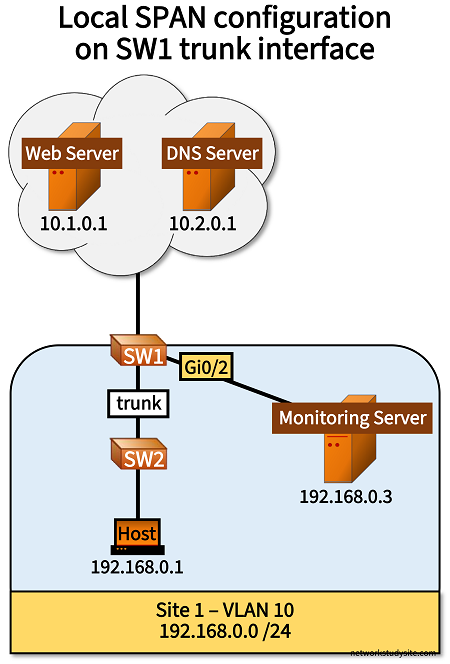
In the following example scenario, all incoming and outgoing traffic on the trunk link on SW1 is replicated, and a copy is sent to the Monitoring Server (out on SW1 interface Gi0/2). The Monitoring Server is a Linux machine that uses TCPDUMP to capture only DNS (UDP/53) and HTTP (TCP/80) traffic. In this scenario, the following is captured on the Monitoring-Server.
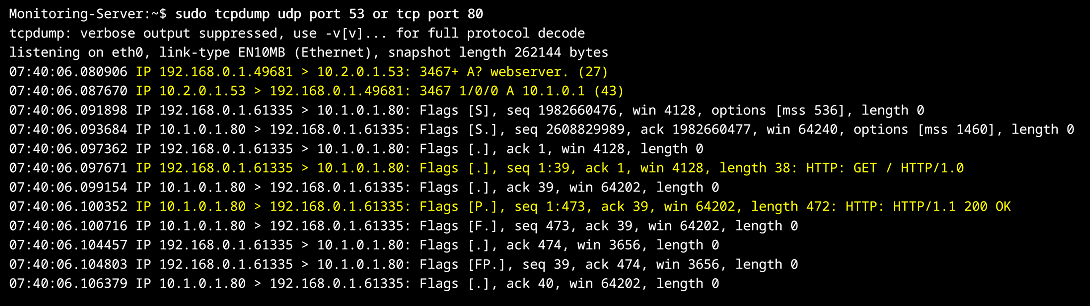
The above output is received because the Host has an HTTP IP SLA configured together with a DNS server address. This way, the Host first contacts the DNS Server (10.2.0.1) to query for the domain name "webserver". The DNS Server answers the query by sending the corresponding IP address 10.1.0.1. Thereafter, the Host can send an HTTP GET request directly to the Web Server.
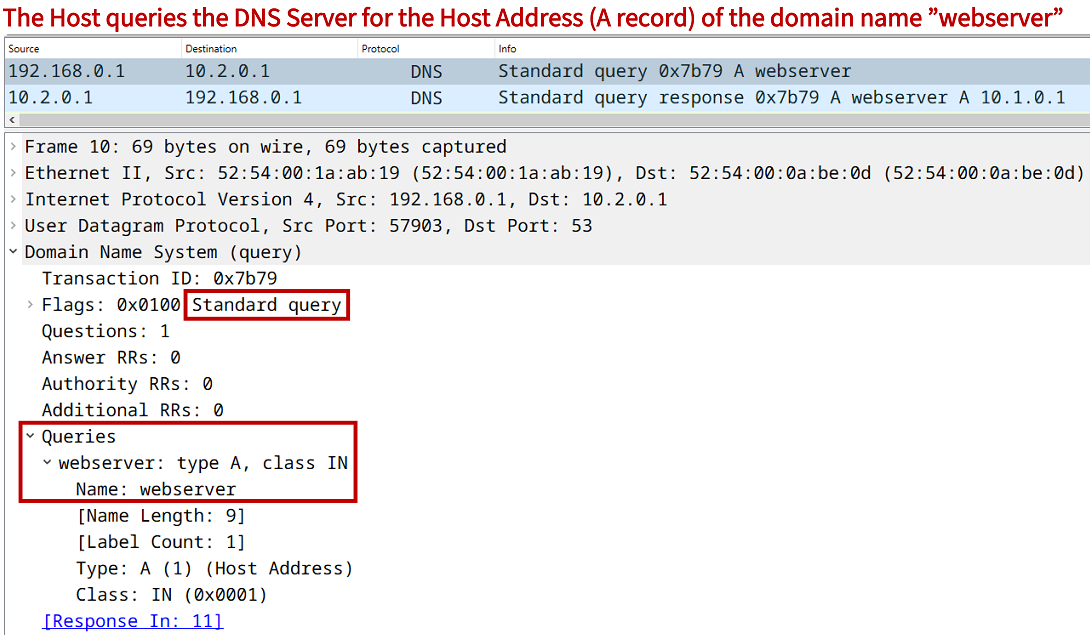
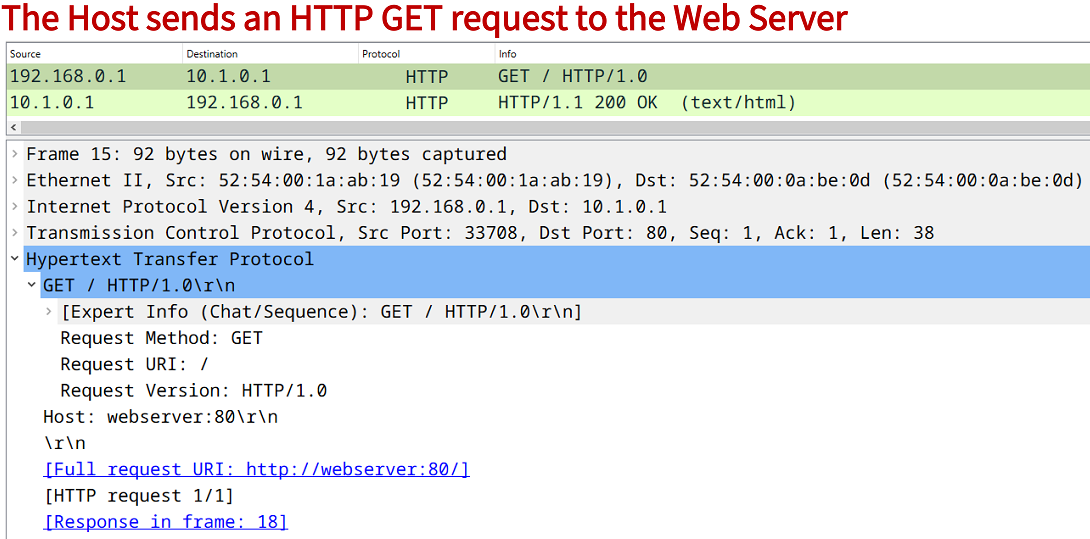
On SW1 the keyword encapsulation replicate is added to the local SPAN destination command. This ensures that the VLAN ID is copied into mirrored frames that are sent out on SW1 interface Gi0/2 to the Monitoring Server. The keywords are needed because the SPAN source port is a trunk interface on SW1 and the VLAN ID is not copied automatically for mirrored traffic.
Configuration:
SW1
SW1#show run | sec ^monitor
monitor session 1 source interface Gi0/1
monitor session 1 destination interface Gi0/2 encapsulation replicate

SW1#show run int Gi0/0 | sec int
interface GigabitEthernet0/0
 description ** to Cloud Resources **
 no switchport
 ip address 10.0.0.1 255.255.255.252
 negotiation auto

SW1#show run int Gi0/1 | sec int
interface GigabitEthernet0/1
 description ** to SW2 **
 switchport trunk allowed vlan 10
 switchport trunk encapsulation dot1q
 switchport mode trunk
 negotiation auto

SW1#show run int Gi0/2 | sec int
interface GigabitEthernet0/2
 description ** to Monitoring Server **
 switchport access vlan 10
 switchport mode access
 negotiation auto

SW1#show run int Vlan10 | sec int
interface Vlan10
 description ** SVI for VLAN 10 **
 ip address 192.168.0.4 255.255.255.0

SW1#show run | sec ^ip route
ip route 0.0.0.0 0.0.0.0 GigabitEthernet0/0 10.0.0.2
SW2
SW2#show run int Gi0/0 | sec int
interface GigabitEthernet0/0
 description ** to SW1 **
 switchport trunk allowed vlan 10
 switchport trunk encapsulation dot1q
 switchport mode trunk
 negotiation auto

SW2#show run int Gi0/1 | sec int
interface GigabitEthernet0/1
 description ** to Host **
 switchport access vlan 10
 switchport mode access
 negotiation auto
Host
Host#show run int Gi0/0 | sec int
interface GigabitEthernet0/0
 description ** to SW1 **
 ip address 192.168.0.1 255.255.255.0
 duplex auto
 speed auto
 media-type rj45

Host#show run | sec ^ip route
ip route 0.0.0.0 0.0.0.0 GigabitEthernet0/0 192.168.0.4

Host#show run | sec ^ip sla
ip sla 10
 http get http://webserver:80 name-server 10.2.0.1
 threshold 1000
 timeout 1000
ip sla schedule 10 life forever start-time now
DNS Server
DNS-Server#show run int Gi0/0 | sec int
interface GigabitEthernet0/0
 description ** to SW1 **
 ip address 10.2.0.1 255.255.255.252
 duplex auto
 speed auto
 media-type rj45

DNS-Server#show run | sec ^ip route
ip route 0.0.0.0 0.0.0.0 GigabitEthernet0/0 10.2.0.2

DNS-Server#show run | sec ^ip host
ip host webserver 10.1.0.1

DNS-Server#show run | sec ^ip dns
ip dns server
Web Server
Web-Server#show run int Gi1 | sec int
interface GigabitEthernet1
 description ** to SW1 **
 ip address 10.1.0.1 255.255.255.252
 negotiation auto
 no mop enabled
 no mop sysid

Web-Server#show run | sec ^ip route
ip route 0.0.0.0 0.0.0.0 GigabitEthernet1 10.1.0.2

Web-Server#show run | sec ^ip http
ip http server
SW1#show monitor session  1
Session 1
---------
Type                     : Local Session
Source Ports             :
    Both                 : Gi0/1
Destination Ports      : Gi0/2
    Encapsulation      : Replicate               « VLAN ID is copied into mirrored frames


SW1#show ip int brief
Interface              IP-Address      OK? Method Status                Protocol
GigabitEthernet0/0     10.0.0.1        YES manual up                    up
GigabitEthernet0/1     unassigned      YES unset  up                    up
GigabitEthernet0/2     unassigned      YES unset  up                    down        « Interface is in the monitoring state
GigabitEthernet0/3     unassigned      YES unset  up                    up
Vlan10                 192.168.0.4     YES manual up                    up


SW1#show interface Gi0/2 status

Port      Name               Status       Vlan       Duplex  Speed Type
Gi0/2     ** to Monitoring S monitoring   10         a-full   auto RJ45
How to configure RSPAN?
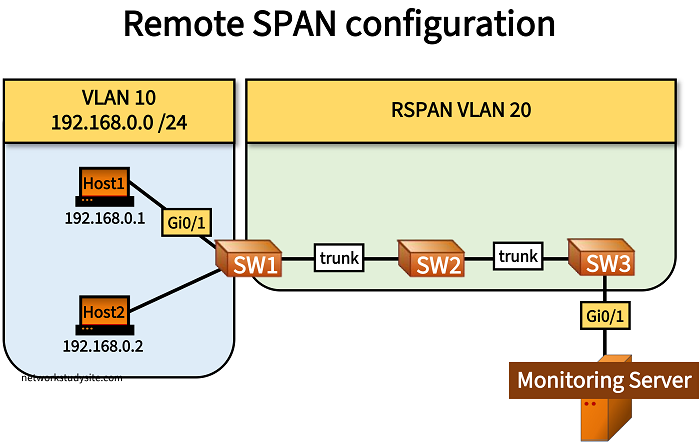
In the following example scenario, a remote SPAN VLAN is configured on SW1, SW2 and on SW3. This RSPAN VLAN carries incoming and outgoing traffic that is mirrored from SW1 interface Gi0/1. In other words, a copy is made of all ingress and egress traffic transmitted through SW1 port Gi0/1, and the copied traffic is sent along the RSPAN VLAN across SW2 and SW3 to the destination Monitoring Server.
SW1>
SW1>enable
SW1#configure terminal
Enter configuration commands, one per line.  End with CNTL/Z.
SW1(config)#
SW1(config)#vlan 20
SW1(config-vlan)#remote-span
SW1(config-vlan)#
SW1(config-vlan)#exit
SW1(config)#
SW1(config)#monitor session 1 source interface Gi0/1
SW1(config)#monitor session 1 destination remote vlan 20
SW1(config)#
SW1(config)#end
SW1#

-------------------------------------------------------------

SW2>
SW2>enable
SW2#configure terminal
Enter configuration commands, one per line.  End with CNTL/Z.
SW2(config)#
SW2(config)#vlan 20
SW2(config-vlan)#remote-span
SW2(config-vlan)#
SW2(config-vlan)#exit
SW2(config)#exit
SW2#

-------------------------------------------------------------

SW3>
SW3>enable
SW3#configure terminal
Enter configuration commands, one per line.  End with CNTL/Z.
SW3(config)#
SW3(config)#vlan 20
SW3(config-vlan)#remote-span
SW3(config-vlan)#
SW3(config-vlan)#exit
SW3(config)#
SW3(config)#monitor session 1 destination interface Gi0/1
SW3(config)#monitor session 1 source remote vlan 20
SW3(config)#
SW3(config)#exit
SW3#
Configuration:
SW1
SW1#show run int Gi0/1 | sec int
interface GigabitEthernet0/1
 description ** to Host1 **
 switchport access vlan 10
 switchport mode access
 negotiation auto

SW1#show run int Gi0/2 | sec int
interface GigabitEthernet0/2
 description ** to Host2 **
 switchport access vlan 10
 switchport mode access
 negotiation auto

SW1#show run int Gi0/0 | sec int
interface GigabitEthernet0/0
 description ** to SW2 **
 switchport trunk allowed vlan 20
 switchport trunk encapsulation dot1q
 switchport mode trunk
 negotiation auto

SW1#show run | sec ^monitor
monitor session 1 source interface Gi0/1
monitor session 1 destination remote vlan 20
SW2
SW2#show run int Gi0/0 | sec int
interface GigabitEthernet0/0
 description ** to SW1 **
 switchport trunk allowed vlan 20
 switchport trunk encapsulation dot1q
 switchport mode trunk
 negotiation auto

SW2#show run int Gi0/1 | sec int
interface GigabitEthernet0/1
 description ** to SW3 **
 switchport trunk allowed vlan 20
 switchport trunk encapsulation dot1q
 switchport mode trunk
 negotiation auto
SW3
SW3#show run int Gi0/0 | sec int
interface GigabitEthernet0/0
 description ** to SW2 **
 switchport trunk allowed vlan 20
 switchport trunk encapsulation dot1q
 switchport mode trunk
 negotiation auto

SW3#show run int Gi0/1 | sec int
interface GigabitEthernet0/1
 description ** to Monitoring Server **
 switchport mode access
 negotiation auto

SW3#show run | sec ^monitor
monitor session 1 destination interface Gi0/1
monitor session 1 source remote vlan 20
Host1
Host1#show run int Gi0/0 | sec int
interface GigabitEthernet0/0
 description ** to SW1 **
 ip address 192.168.0.1 255.255.255.0
 duplex auto
 speed auto
 media-type rj45
SW1#show monitor session 1
Session 1
---------
Type                     : Remote Source Session
Source Ports             :
    Both                 : Gi0/1
Dest RSPAN VLAN        : 20


SW3#show monitor session 1
Session 1
---------
Type                     : Remote Destination Session
Source RSPAN VLAN      : 20
Destination Ports      : Gi0/1
    Encapsulation      : Native


SW1#show vlan

VLAN Name                             Status    Ports
---- -------------------------------- --------- -------------------------------
1    default                          active    Gi0/3
10   VLAN0010                         active    Gi0/1, Gi0/2
20   VLAN0020                         active
1002 fddi-default                     act/unsup
1003 token-ring-default               act/unsup
1004 fddinet-default                  act/unsup
1005 trnet-default                    act/unsup

VLAN Type  SAID       MTU   Parent RingNo BridgeNo Stp  BrdgMode Trans1 Trans2
---- ----- ---------- ----- ------ ------ -------- ---- -------- ------ ------
1    enet  100001     1500  -      -      -        -    -        0      0
10   enet  100010     1500  -      -      -        -    -        0      0
20   enet  100020     1500  -      -      -        -    -        0      0
1002 fddi  101002     1500  -      -      -        -    -        0      0
1003 tr    101003     1500  -      -      -        -    -        0      0
1004 fdnet 101004     1500  -      -      -        ieee -        0      0
1005 trnet 101005     1500  -      -      -        ibm  -        0      0

Remote SPAN VLANs
------------------------------------------------------------------------------
20

Primary Secondary Type              Ports
------- --------- ----------------- ------------------------------------------
How to configure ERSPAN?
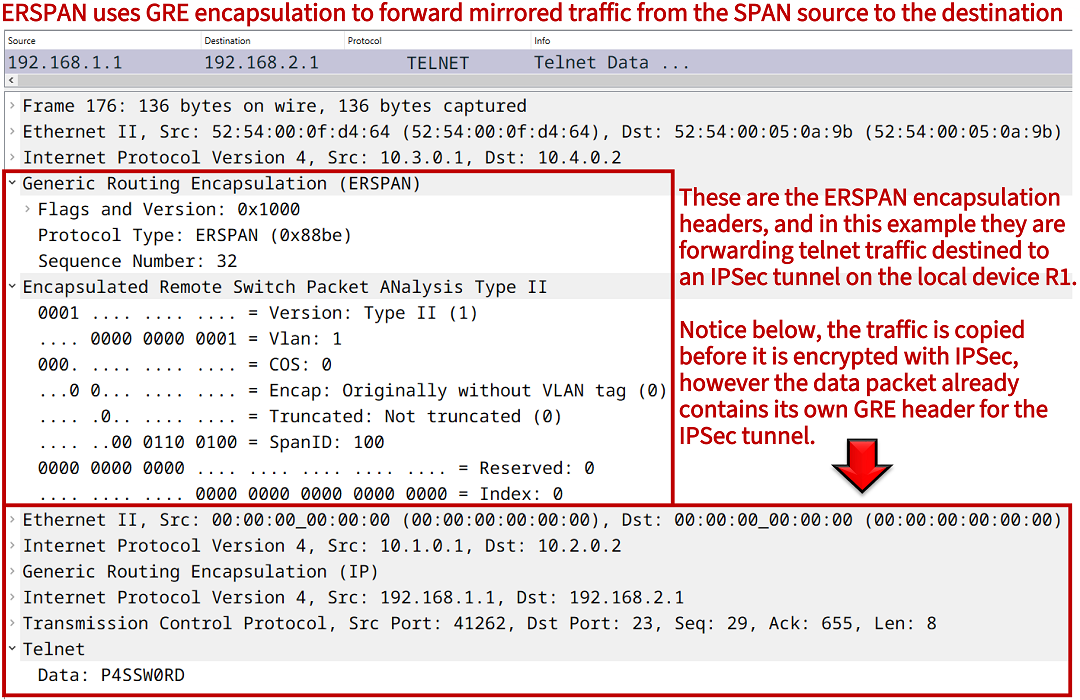
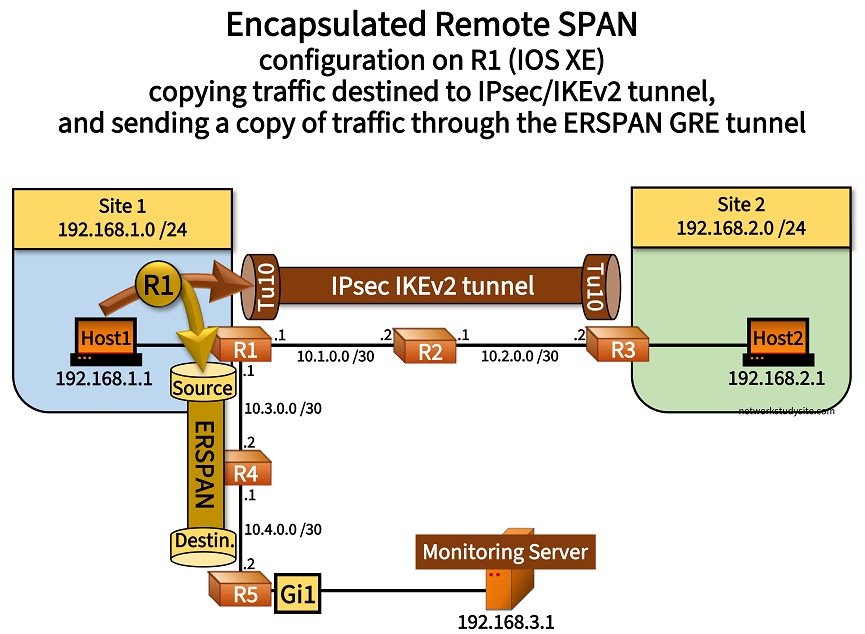
In the following example, traffic from Host1 destined to the IPSec/IKEv2 tunnel is copied on R1 before the data packets get encrypted. A copy of the plaintext (unencrypted) traffic is sent with ERSPAN from R1 to R5. The ERSPAN destination device R5 forwards the mirrored traffic to the Monitoring Server.
The ERSPAN configuration contains a source traffic filter. A standard ACL is applied, which ensures that only traffic from the single source Host1 is copied, and sent through the ERSPAN GRE tunnel between R1 and R5. ERSPAN automatically creates a GRE encapsulated tunnel to forward mirrored traffic from the SPAN source to the destination device.
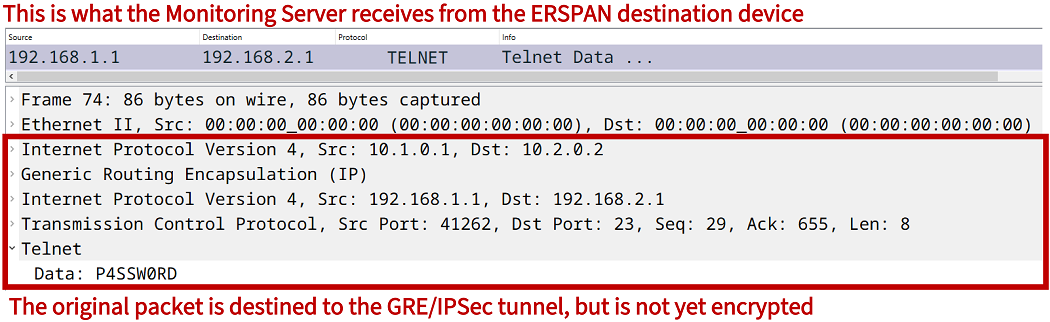
Note that on R1 the traffic is copied by ERSPAN before it is encrypted by IPSec. Thus, the Monitoring Server receives a copy of traffic that is sent from Host1, and which is destined to enter the IPSec/GRE tunnel. The following ERSPAN configuration is applied on R1 (source) and on R5 (destination). It is important that the no shutdown command is issued to enable the ERSPAN session.
R1>
R1>enable
R1#configure terminal
Enter configuration commands, one per line.  End with CNTL/Z.
R1(config)#
R1(config)#ip access-list standard EXAMPLE-ACL
R1(config-std-nacl)#permit 192.168.1.1
R1(config-std-nacl)#
R1(config-std-nacl)#exit
R1(config)#
R1(config)#monitor session 1 type erspan-source
R1(config-mon-erspan-src)#source interface Tu10
R1(config-mon-erspan-src)#filter access-group EXAMPLE-ACL
R1(config-mon-erspan-src)#destination
R1(config-mon-erspan-src-dst)#erspan-id 100
R1(config-mon-erspan-src-dst)#ip address 10.4.0.2
R1(config-mon-erspan-src-dst)#origin ip address 10.3.0.1
R1(config-mon-erspan-src-dst)#
R1(config-mon-erspan-src-dst)#exit
R1(config-mon-erspan-src)#
R1(config-mon-erspan-src)#no shutdown
R1(config-mon-erspan-src)#
R1(config-mon-erspan-src)#exit
R1(config)#
R1(config)#exit
R1#

------------------------------------------------------------

R5>
R5>enable
R5#configure terminal
Enter configuration commands, one per line.  End with CNTL/Z.
R5(config)#
R5(config)#monitor session 1 type erspan-destination
R5(config-mon-erspan-dst)#destination interface Gi1
R5(config-mon-erspan-dst)#source
R5(config-mon-erspan-dst-src)#erspan-id 100
R5(config-mon-erspan-dst-src)#ip address 10.4.0.2
R5(config-mon-erspan-dst-src)#
R5(config-mon-erspan-dst-src)#exit
R5(config-mon-erspan-dst)#
R5(config-mon-erspan-dst)#no shutdown
R5(config-mon-erspan-dst)#
R5(config-mon-erspan-dst)#exit
R5(config)#exit
R5#
Configuration:
R1 (ERSPAN source)
R1#show run int Gi1 | sec int
interface GigabitEthernet1
 description to ** Host1 **
 ip address 192.168.1.2 255.255.255.0
 negotiation auto
 no mop enabled
 no mop sysid

R1#show run int Gi2 | sec int
interface GigabitEthernet2
 description to ** R2 **
 ip address 10.1.0.1 255.255.255.252
 negotiation auto
 no mop enabled
 no mop sysid

R1#show run int Gi3 | sec int
interface GigabitEthernet3
 description to ** R4 **
 ip address 10.3.0.1 255.255.255.252
 negotiation auto
 no mop enabled
 no mop sysid

R1#show run int Tu10 | sec int
interface Tunnel10
 description ** IPSec tunnel to Site 2 **
 ip address 172.16.0.1 255.255.255.252
 tunnel source GigabitEthernet2
 tunnel destination 10.2.0.2
 tunnel protection ipsec profile CRYPTO-IPSEC-PROFILE

R1#show run | sec ^monitor
monitor session 1 type erspan-source
 source interface Tu10
 filter access-group EXAMPLE-ACL
 destination
  erspan-id 100
  mtu 1464
  ip address 10.4.0.2
  ipv6 dscp 0
  ipv6 ttl 0
  origin ip address 10.3.0.1

R1#show run | sec ^ip access
ip access-list standard EXAMPLE-ACL
 10 permit 192.168.1.1

R1#show run | sec ^crypto ipsec|^crypto ike
crypto ikev2 proposal CRYPTO-PROPOSAL
 encryption aes-cbc-256
 integrity sha256
 group 1
crypto ikev2 policy CRYPTO-POLICY
 match address local 10.1.0.1
 proposal CRYPTO-PROPOSAL
crypto ikev2 keyring CRYPTO-KEYRING
 peer KEY-PEER
  address 10.2.0.2
  pre-shared-key p4ssw0rd.123
 !
crypto ikev2 profile CRYPTO-IKEV2-PROFILE
 match identity remote address 10.2.0.2 255.255.255.255
 authentication remote pre-share
 authentication local pre-share
 keyring local CRYPTO-KEYRING
crypto ipsec transform-set CRYPTO-TRANSFORM esp-aes
 mode transport
crypto ipsec profile CRYPTO-IPSEC-PROFILE
 set transform-set CRYPTO-TRANSFORM
 set ikev2-profile CRYPTO-IKEV2-PROFILE

R1#show run | sec ^ip route
ip route 0.0.0.0 0.0.0.0 GigabitEthernet2 10.1.0.2

R1#show run | sec ^router
router eigrp 10
 network 10.3.0.0 0.0.0.3
 eigrp router-id 1.1.1.1
router ospf 10
 router-id 1.1.1.1
 network 172.16.0.0 0.0.0.3 area 0
 network 192.168.1.0 0.0.0.255 area 0
R2
R2#show run int Gi0/0 | sec int
interface GigabitEthernet0/0
 description to ** R1 **
 ip address 10.1.0.2 255.255.255.252
 duplex auto
 speed auto
 media-type rj45

R2#show run int Gi0/1 | sec int
interface GigabitEthernet0/1
 description to ** R3 **
 ip address 10.2.0.1 255.255.255.252
 duplex auto
 speed auto
 media-type rj45
R3
R3#show run int Gi0/0 | sec int
interface GigabitEthernet0/0
 description to ** Host2 **
 ip address 192.168.2.2 255.255.255.0
 duplex auto
 speed auto
 media-type rj45

R3#show run int Gi0/1 | sec int
interface GigabitEthernet0/1
 description to ** R2 **
 ip address 10.2.0.2 255.255.255.252
 duplex auto
 speed auto
 media-type rj45

R3#show run int Tu10 | sec int
interface Tunnel10
 description ** IPSec tunnel to Site 1 **
 ip address 172.16.0.2 255.255.255.252
 tunnel source GigabitEthernet0/1
 tunnel destination 10.1.0.1
 tunnel protection ipsec profile CRYPTO-IPSEC-PROFILE

R3#show run | sec ^crypto ipsec|^crypto ike
crypto ikev2 proposal CRYPTO-PROPOSAL
 encryption aes-cbc-256
 integrity sha256
 group 1
crypto ikev2 policy CRYPTO-POLICY
 match address local 10.2.0.2
 proposal CRYPTO-PROPOSAL
crypto ikev2 keyring CRYPTO-KEYRING
 peer KEY-PEER
  address 10.1.0.1
  pre-shared-key p4ssw0rd.123
 !
crypto ikev2 profile CRYPTO-IKEV2-PROFILE
 match identity remote address 10.1.0.1 255.255.255.255
 authentication remote pre-share
 authentication local pre-share
 keyring local CRYPTO-KEYRING
crypto ipsec transform-set CRYPTO-TRANSFORM esp-aes
 mode transport
crypto ipsec profile CRYPTO-IPSEC-PROFILE
 set transform-set CRYPTO-TRANSFORM
 set ikev2-profile CRYPTO-IKEV2-PROFILE

R3#show run | sec ^ip route
ip route 0.0.0.0 0.0.0.0 GigabitEthernet0/1 10.2.0.1

R3#show run | sec ^router
router ospf 10
 router-id 3.3.3.3
 network 172.16.0.0 0.0.0.3 area 0
 network 192.168.2.0 0.0.0.255 area 0
R4
R4#show run int Gi0/0 | sec int
interface GigabitEthernet0/0
 description to ** R5 **
 ip address 10.4.0.1 255.255.255.252
 duplex auto
 speed auto

R4#show run int Gi0/1 | sec int
interface GigabitEthernet0/1
 description to ** R1 **
 ip address 10.3.0.2 255.255.255.252
 duplex auto
 speed auto

R4#show run | sec ^router
router eigrp 10
 network 10.3.0.0 0.0.0.3
 network 10.4.0.0 0.0.0.3
 eigrp router-id 4.4.4.4
R5 (ERSPAN destination)
R5#show run int Gi1 | sec int
interface GigabitEthernet1
 description to ** Monitoring Server **
 ip address 192.168.3.2 255.255.255.0
 negotiation auto
 no mop enabled
 no mop sysid

R5#show run int Gi2 | sec int
interface GigabitEthernet2
 description to ** R4 **
 ip address 10.4.0.2 255.255.255.252
 negotiation auto
 no mop enabled
 no mop sysid

R5#show run | sec ^monitor
monitor session 1 type erspan-destination
 destination interface Gi1
 source
  erspan-id 100
  ip address 10.4.0.2

R5#show run | sec ^router
router eigrp 10
 network 10.4.0.0 0.0.0.3
 network 192.168.3.0
 passive-interface GigabitEthernet1
 eigrp router-id 5.5.5.5
R1#show monitor session 1
Session 1
---------
Type                     : ERSPAN Source Session
Status                   : Admin Enabled
Source Ports             :
    Both                 : Tu10
Filter access-group      : EXAMPLE-ACL
Destination IP Address   : 10.4.0.2
MTU                      : 1464
Destination ERSPAN ID    : 100
Origin IP Address        : 10.3.0.1
IPv6 DSCP                : 0
IPV6 TTL                 : 0


R5#show monitor session 1
Session 1
---------
Type                     : ERSPAN Destination Session
Status                   : Admin Enabled
Destination Ports        : Gi1
Source IP Address        : 10.4.0.2
Source ERSPAN ID         : 100


R1#show crypto session
Crypto session current status

Interface: Tunnel10
Profile: CRYPTO-IKEV2-PROFILE
Session status: UP-ACTIVE
Peer: 10.2.0.2 port 500
  Session ID: 1
  IKEv2 SA: local 10.1.0.1/500 remote 10.2.0.2/500 Active
  IPSEC FLOW: permit 47 host 10.1.0.1 host 10.2.0.2
        Active SAs: 2, origin: crypto map


administrator@monitoring:/$ sudo tcpdump
tcpdump: verbose output suppressed, use -v[v]... for full protocol decode
listening on ens2, link-type EN10MB (Ethernet), snapshot length 262144 bytes
20:11:45.519424 IP 10.1.0.1 > 10.2.0.2: GREv0, length 48: IP 192.168.1.1.62286 > 192.168.2.1.telnet: Flags [S], seq 506132621, win 4128, options [mss 536], length 0
20:11:45.525362 IP 10.1.0.1 > 10.2.0.2: GREv0, length 44: IP 192.168.1.1.62286 > 192.168.2.1.telnet: Flags [.], ack 1850556029, win 4128, length 0
20:11:45.525362 IP 10.1.0.1 > 10.2.0.2: GREv0, length 53: IP 192.168.1.1.62286 > 192.168.2.1.telnet: Flags [P.], seq 0:9, ack 1, win 4128, length 9 [telnet DO SUPPRESS GO AHEAD, WILL NAWS, WILL LFLOW]
20:11:45.525362 IP 10.1.0.1 > 10.2.0.2: GREv0, length 44: IP 192.168.1.1.62286 > 192.168.2.1.telnet: Flags [.], ack 1, win 4128, length 0
20:11:45.533862 IP 10.1.0.1 > 10.2.0.2: GREv0, length 47: IP 192.168.1.1.62286 > 192.168.2.1.telnet: Flags [P.], seq 9:12, ack 13, win 4116, length 3 [telnet DO ECHO]
20:11:45.534801 IP 10.1.0.1 > 10.2.0.2: GREv0, length 47: IP 192.168.1.1.62286 > 192.168.2.1.telnet: Flags [P.], seq 12:15, ack 13, win 4116, length 3 [telnet WONT TERMINAL TYPE]
20:11:45.536729 IP 10.1.0.1 > 10.2.0.2: GREv0, length 53: IP 192.168.1.1.62286 > 192.168.2.1.telnet: Flags [P.], seq 15:24, ack 13, win 4116, length 9 [telnet SB NAWS IS 0x50 0 0x18 SE]
20:11:45.536729 IP 10.1.0.1 > 10.2.0.2: GREv0, length 44: IP 192.168.1.1.62286 > 192.168.2.1.telnet: Flags [.], ack 538, win 4128, length 0
20:11:45.552429 IP 10.1.0.1 > 10.2.0.2: GREv0, length 44: IP 192.168.1.1.62286 > 192.168.2.1.telnet: Flags [.], ack 666, win 4000, length 0
20:11:45.555603 IP 10.1.0.1 > 10.2.0.2: GREv0, length 44: IP 192.168.1.1.62286 > 192.168.2.1.telnet: Flags [.], ack 675, win 3991, length 0
20:11:47.015925 IP 10.1.0.1 > 10.2.0.2: GREv0, length 45: IP 192.168.1.1.62286 > 192.168.2.1.telnet: Flags [P.], seq 24:25, ack 675, win 3991, length 1
20:11:47.175193 IP 10.1.0.1 > 10.2.0.2: GREv0, length 45: IP 192.168.1.1.62286 > 192.168.2.1.telnet: Flags [P.], seq 25:26, ack 675, win 3991, length 1
20:11:47.255553 IP 10.1.0.1 > 10.2.0.2: GREv0, length 45: IP 192.168.1.1.62286 > 192.168.2.1.telnet: Flags [P.], seq 26:27, ack 675, win 3991, length 1
20:11:47.355259 IP 10.1.0.1 > 10.2.0.2: GREv0, length 45: IP 192.168.1.1.62286 > 192.168.2.1.telnet: Flags [P.], seq 27:28, ack 675, win 3991, length 1
20:11:47.495571 IP 10.1.0.1 > 10.2.0.2: GREv0, length 45: IP 192.168.1.1.62286 > 192.168.2.1.telnet: Flags [P.], seq 28:29, ack 675, win 3991, length 1
20:11:47.635927 IP 10.1.0.1 > 10.2.0.2: GREv0, length 46: IP 192.168.1.1.62286 > 192.168.2.1.telnet: Flags [P.], seq 29:31, ack 675, win 3991, length 2
20:11:47.642869 IP 10.1.0.1 > 10.2.0.2: GREv0, length 44: IP 192.168.1.1.62286 > 192.168.2.1.telnet: Flags [.], ack 1211, win 4128, length 0
20:11:47.854720 IP 10.1.0.1 > 10.2.0.2: GREv0, length 44: IP 192.168.1.1.62286 > 192.168.2.1.telnet: Flags [.], ack 1291, win 4048, length 0
^C
18 packets captured
18 packets received by filter
0 packets dropped by kernel
administrator@monitoring:/$