Configure OSPF Stub Router and Graceful Shutdown Features
Table of Contents
- What is OSPF Stub Router? ‹
- How to configure OSPF Stub Router? ‹
- OSPF Stub Router Summary-LSA configuration ‹
- OSPF Graceful Shutdown configuration ‹
- Download section ‹
What is OSPF Stub Router?
The OSPF stub router feature allows a device to be removed gracefully from the OSPF topology and without causing packet loss for transiting traffic. This is achieved by informing OSPF neighbors in advance about a topology change. As a result, other OSPF routers rerun the SPF algorithm and can divert traffic to an alternative path (if available). Once traffic is diverted away from the stub router, it can be removed from the network for administrative or other purposes.
The OSPF stub router feature can also be used when newly inserting a router into the OSPF topology. There is an option to wait for a specific amount of time before a router accepts transit traffic. Additionally, an OSPF stub router may wait for BGP to converge before advertising itself in the OSPF topology. This method can mitigate black hole routing, and the following are relevant commands on a Cisco router.
R3>enable
R3#configure terminal
Enter configuration commands, one per line.  End with CNTL/Z.
R3(config)#router ospf 10
R3(config-router)#max-metric router-lsa on-startup ?
  <5-86400>     Time, in seconds, router-LSAs are originated with max-metric
  wait-for-bgp  Let BGP decide when to originate router-LSA with normal metric
How to configure OSPF Stub Router?
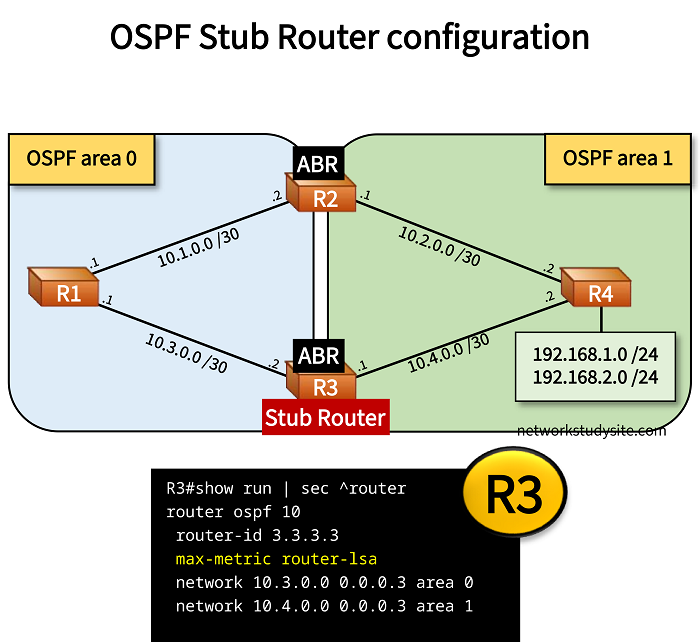
In this example scenario the Area Border Routers (ABR) R2 and R3 connect OSPF area 0 and area 1. R2 is assigned a less desirable cost, this makes R3 the primary ABR for traffic passing between the two areas. However, R3 is undergoing maintenance and needs to be taken offline. To avoid any packet loss the traffic is gracefully switched over to R2.
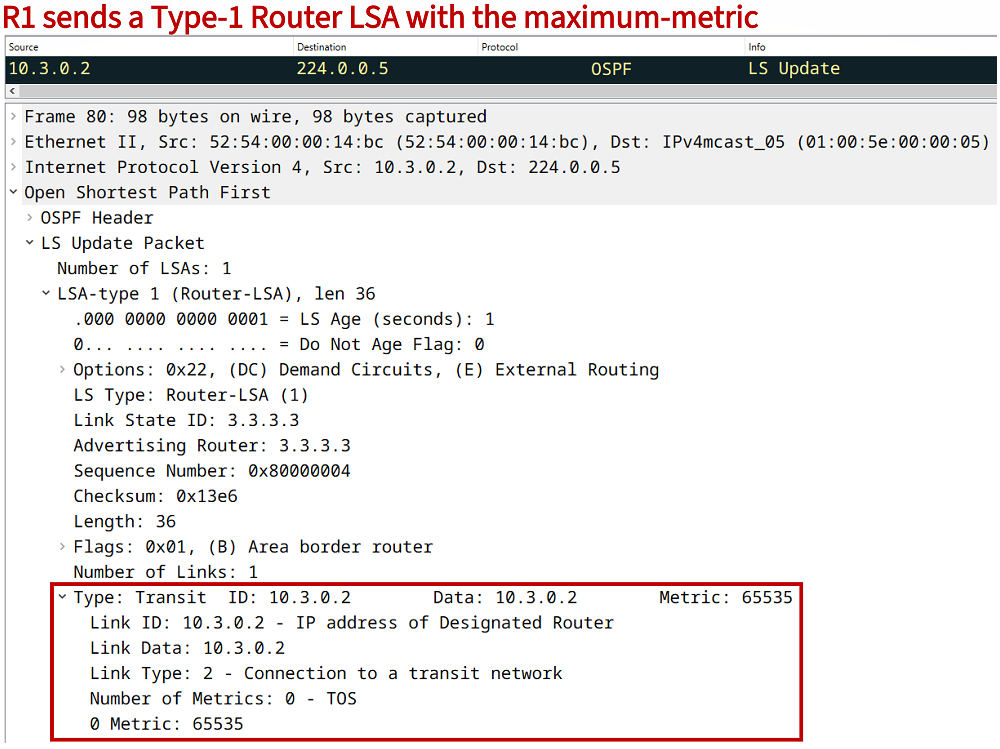
This is accomplished with the command max-metric router-lsa issued on R3. As a result, R3 advertises an OSPF Type-1 Router LSA with the maximum metric 65535 to its neighbors. This effectively removes R3 from the OSPF topology and triggers a reconvergence of the network. Due to this process there is no packet loss.
Configuration:
R1
R1#show run | sec ^router
router ospf 10
 router-id 1.1.1.1
 network 10.1.0.0 0.0.0.3 area 0
 network 10.3.0.0 0.0.0.3 area 0

R1#show run int Gi0/0 | sec int
interface GigabitEthernet0/0
 description ** to R2 **
 ip address 10.1.0.1 255.255.255.252
 duplex auto
 speed auto
 media-type rj45

R1#show run int Gi0/1 | sec int
interface GigabitEthernet0/1
 description ** to R3 **
 ip address 10.3.0.1 255.255.255.252
 duplex auto
 speed auto
 media-type rj45
R2
R2#show run | sec ^router
router ospf 10
 router-id 2.2.2.2
 network 10.1.0.0 0.0.0.3 area 0
 network 10.2.0.0 0.0.0.3 area 1

R2#show run int Gi0/0 | sec int
interface GigabitEthernet0/0
 description ** to R1 **
 ip address 10.1.0.2 255.255.255.252
 duplex auto
 speed auto
 media-type rj45

R2#show run int Gi0/1 | sec int
interface GigabitEthernet0/1
 description ** to R3 **
 ip address 10.2.0.1 255.255.255.252
 ip ospf cost 10
 duplex auto
 speed auto
 media-type rj45
R3
R3#show run | sec ^router
router ospf 10
 router-id 3.3.3.3
 max-metric router-lsa
 network 10.3.0.0 0.0.0.3 area 0
 network 10.4.0.0 0.0.0.3 area 1

R3#show run int Gi0/0 | sec int
interface GigabitEthernet0/0
 description ** to R1 **
 ip address 10.3.0.2 255.255.255.252
 duplex auto
 speed auto
 media-type rj45

R3#show run int Gi0/1 | sec int
interface GigabitEthernet0/1
 description ** to R4 **
 ip address 10.4.0.1 255.255.255.252
 duplex auto
 speed auto
 media-type rj45
R4
R4#show run | sec ^router
router ospf 10
 router-id 4.4.4.4
 network 10.2.0.0 0.0.0.3 area 1
 network 10.4.0.0 0.0.0.3 area 1
 network 192.168.1.0 0.0.0.255 area 1
 network 192.168.2.0 0.0.0.255 area 1

R4#show run int Gi0/0 | sec int
interface GigabitEthernet0/0
 description ** to R2 **
 ip address 10.2.0.2 255.255.255.252
 duplex auto
 speed auto
 media-type rj45

R4#show run int Gi0/1 | sec int
interface GigabitEthernet0/1
 description ** to R3 **
 ip address 10.4.0.2 255.255.255.252
 duplex auto
 speed auto
 media-type rj45

R4#show run int Lo10 | sec int
interface Loopback10
 ip address 192.168.1.1 255.255.255.0
 ip ospf network point-to-point

R4#show run int Lo20 | sec int
interface Loopback20
 ip address 192.168.2.1 255.255.255.0
 ip ospf network point-to-point
R1#show ip ospf database router 3.3.3.3

            OSPF Router with ID (1.1.1.1) (Process ID 10)

                Router Link States (Area 0)

  LS age: 15
  Options: (No TOS-capability, DC)
  LS Type: Router Links
  Link State ID: 3.3.3.3
  Advertising Router: 3.3.3.3
  LS Seq Number: 8000000E
  Checksum: 0xFEF0
  Length: 36
  Area Border Router
  Number of Links: 1

    Link connected to: a Transit Network
     (Link ID) Designated Router address: 10.3.0.2
     (Link Data) Router Interface address: 10.3.0.2
      Number of MTID metrics: 0
       TOS 0 Metrics: 65535


R1#show ip ospf nei

Neighbor ID     Pri   State           Dead Time   Address         Interface
3.3.3.3           1   FULL/DR         00:00:39    10.3.0.2        GigabitEthernet0/1
2.2.2.2           1   FULL/DR         00:00:37    10.1.0.2        GigabitEthernet0/0


R1#show ip route ospf | beg Ga
Gateway of last resort is not set

      10.0.0.0/8 is variably subnetted, 6 subnets, 2 masks
O IA     10.2.0.0/30 [110/11] via 10.1.0.2, 00:00:32, GigabitEthernet0/0
O IA     10.4.0.0/30 [110/12] via 10.1.0.2, 00:00:32, GigabitEthernet0/0
O IA  192.168.1.0/24 [110/12] via 10.1.0.2, 00:00:32, GigabitEthernet0/0
O IA  192.168.2.0/24 [110/12] via 10.1.0.2, 00:00:32, GigabitEthernet0/0
As visible in the outputs taken from R1, the OSPF neighborship with R3 is not lost. The Type-1 Router LSA is received by R1 and stored in the OSPF Database with its metric of 65535. The following packet capture shows the LSA sent from R3 to its OSPF neighbors.
OSPF Stub Router Summary-LSA configuration
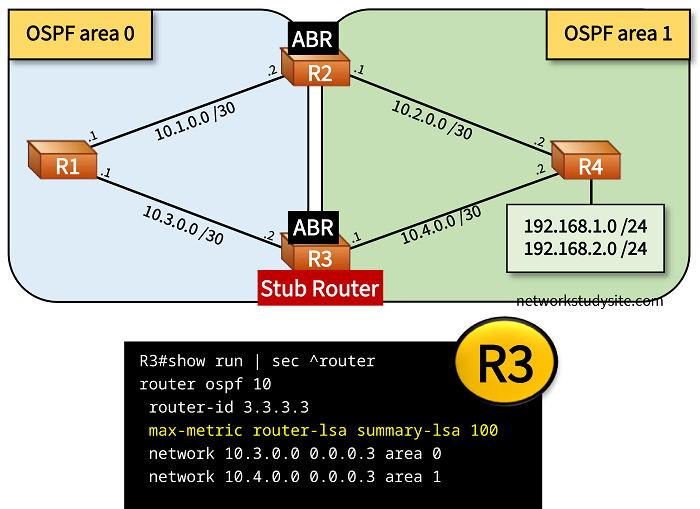
In the following scenario, R3 is the primary ABR that connects OSPF area 0 and area 1. To assign a metric of 100 to only OSPF Type-3 summary-LSAs (inter-area routes) the command max-metric router-lsa summary-lsa 100 is issued on R3. This makes it less preferred than R2, and as a result R2 becomes the primary ABR for traffic passing between the two OSPF areas.
Importantly, the switchover of traffic from R3 to R2 happens gracefully, without packet loss.
Configuration:
R1
R1#show run | sec ^router
router ospf 10
 router-id 1.1.1.1
 network 10.1.0.0 0.0.0.3 area 0
 network 10.3.0.0 0.0.0.3 area 0

R1#show run int Gi0/0 | sec int
interface GigabitEthernet0/0
 description ** to R2 **
 ip address 10.1.0.1 255.255.255.252
 duplex auto
 speed auto
 media-type rj45

R1#show run int Gi0/1 | sec int
interface GigabitEthernet0/1
 description ** to R3 **
 ip address 10.3.0.1 255.255.255.252
 duplex auto
 speed auto
 media-type rj45
R2
R2#show run | sec ^router
router ospf 10
 router-id 2.2.2.2
 network 10.1.0.0 0.0.0.3 area 0
 network 10.2.0.0 0.0.0.3 area 1

R2#show run int Gi0/0 | sec int
interface GigabitEthernet0/0
 description ** to R1 **
 ip address 10.1.0.2 255.255.255.252
 duplex auto
 speed auto
 media-type rj45

R2#show run int Gi0/1 | sec int
interface GigabitEthernet0/1
 description ** to R3 **
 ip address 10.2.0.1 255.255.255.252
 ip ospf cost 10
 duplex auto
 speed auto
 media-type rj45
R3
R3#show run | sec ^router
router ospf 10
 router-id 3.3.3.3
 max-metric router-lsa summary-lsa 100
 network 10.3.0.0 0.0.0.3 area 0
 network 10.4.0.0 0.0.0.3 area 1

R3#show run int Gi0/0 | sec int
interface GigabitEthernet0/0
 description ** to R1 **
 ip address 10.3.0.2 255.255.255.252
 duplex auto
 speed auto
 media-type rj45

R3#show run int Gi0/1 | sec int
interface GigabitEthernet0/1
 description ** to R4 **
 ip address 10.4.0.1 255.255.255.252
 duplex auto
 speed auto
 media-type rj45
R4
R4#show run | sec ^router
router ospf 10
 router-id 4.4.4.4
 network 10.2.0.0 0.0.0.3 area 1
 network 10.4.0.0 0.0.0.3 area 1
 network 192.168.1.0 0.0.0.255 area 1
 network 192.168.2.0 0.0.0.255 area 1

R4#show run int Gi0/0 | sec int
interface GigabitEthernet0/0
 description ** to R2 **
 ip address 10.2.0.2 255.255.255.252
 duplex auto
 speed auto
 media-type rj45

R4#show run int Gi0/1 | sec int
interface GigabitEthernet0/1
 description ** to R3 **
 ip address 10.4.0.2 255.255.255.252
 duplex auto
 speed auto
 media-type rj45

R4#show run int Lo10 | sec int
interface Loopback10
 ip address 192.168.1.1 255.255.255.0
 ip ospf network point-to-point

R4#show run int Lo20 | sec int
interface Loopback20
 ip address 192.168.2.1 255.255.255.0
 ip ospf network point-to-point
R1#show ip ospf database summary 192.168.1.0

            OSPF Router with ID (1.1.1.1) (Process ID 10)

                Summary Net Link States (Area 0)

  LS age: 1122
  Options: (No TOS-capability, DC, Upward)
  LS Type: Summary Links(Network)
  Link State ID: 192.168.1.0 (summary Network Number)
  Advertising Router: 2.2.2.2
  LS Seq Number: 80000006
  Checksum: 0xF4C5
  Length: 28
  Network Mask: /24
        MTID: 0         Metric: 11

  LS age: 622
  Options: (No TOS-capability, DC, Upward)
  LS Type: Summary Links(Network)
  Link State ID: 192.168.1.0 (summary Network Number)
  Advertising Router: 3.3.3.3
  LS Seq Number: 8000000A
  Checksum: 0x4C0D
  Length: 28
  Network Mask: /24
        MTID: 0         Metric: 100       « New metric advertised by R3
OSPF Graceful Shutdown configuration
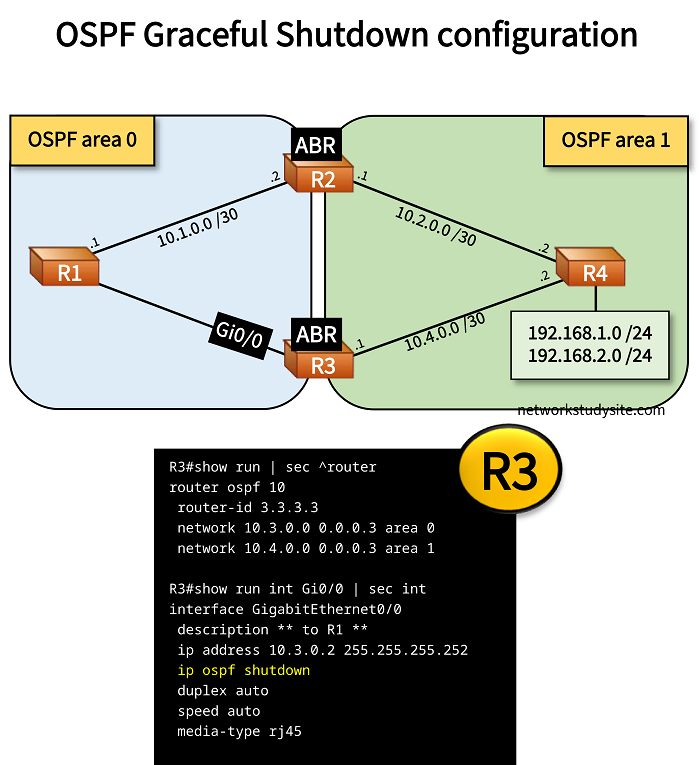
In the following scenario R3 is the primary ABR connecting two areas, and needs to undergo maintenance. R3 is removed from traffic without packet loss with by gracefully shutting down the OSPF process on a single interface with the ip ospf shutdown command.
Configuration:
R1
R1#show run | sec ^router
router ospf 10
 router-id 1.1.1.1
 network 10.1.0.0 0.0.0.3 area 0
 network 10.3.0.0 0.0.0.3 area 0

R1#show run int Gi0/0 | sec int
interface GigabitEthernet0/0
 description ** to R2 **
 ip address 10.1.0.1 255.255.255.252
 duplex auto
 speed auto
 media-type rj45

R1#show run int Gi0/1 | sec int
interface GigabitEthernet0/1
 description ** to R3 **
 ip address 10.3.0.1 255.255.255.252
 duplex auto
 speed auto
 media-type rj45
R2
R2#show run | sec ^router
router ospf 10
 router-id 2.2.2.2
 network 10.1.0.0 0.0.0.3 area 0
 network 10.2.0.0 0.0.0.3 area 1

R2#show run int Gi0/0 | sec int
interface GigabitEthernet0/0
 description ** to R1 **
 ip address 10.1.0.2 255.255.255.252
 duplex auto
 speed auto
 media-type rj45

R2#show run int Gi0/1 | sec int
interface GigabitEthernet0/1
 description ** to R3 **
 ip address 10.2.0.1 255.255.255.252
 ip ospf cost 10
 duplex auto
 speed auto
 media-type rj45
R3
R3#show run | sec ^router
router ospf 10
 router-id 3.3.3.3
 network 10.3.0.0 0.0.0.3 area 0
 network 10.4.0.0 0.0.0.3 area 1

R3#show run int Gi0/0 | sec int
interface GigabitEthernet0/0
 description ** to R1 **
 ip address 10.3.0.2 255.255.255.252
 ip ospf shutdown
 duplex auto
 speed auto
 media-type rj45

R3#show run int Gi0/1 | sec int
interface GigabitEthernet0/1
 description ** to R4 **
 ip address 10.4.0.1 255.255.255.252
 duplex auto
 speed auto
 media-type rj45
R4
R4#show run | sec ^router
router ospf 10
 router-id 4.4.4.4
 network 10.2.0.0 0.0.0.3 area 1
 network 10.4.0.0 0.0.0.3 area 1
 network 192.168.1.0 0.0.0.255 area 1
 network 192.168.2.0 0.0.0.255 area 1

R4#show run int Gi0/0 | sec int
interface GigabitEthernet0/0
 description ** to R2 **
 ip address 10.2.0.2 255.255.255.252
 duplex auto
 speed auto
 media-type rj45

R4#show run int Gi0/1 | sec int
interface GigabitEthernet0/1
 description ** to R3 **
 ip address 10.4.0.2 255.255.255.252
 duplex auto
 speed auto
 media-type rj45

R4#show run int Lo10 | sec int
interface Loopback10
 ip address 192.168.1.1 255.255.255.0
 ip ospf network point-to-point

R4#show run int Lo20 | sec int
interface Loopback20
 ip address 192.168.2.1 255.255.255.0
 ip ospf network point-to-point
R1#show ip ospf neighbor

Neighbor ID     Pri   State           Dead Time   Address         Interface
2.2.2.2           1   FULL/DR         00:00:33    10.1.0.2        GigabitEthernet0/0
Notice that this command gracefully brings down the OSPF neighborship with R1 only. This is achieved by sending an OSPF Hello Packet to the All OSPF Routers address 224.0.0.5 with the following information shown below. When received by R1, this packet shuts down the OSPF neighborship gracefully.
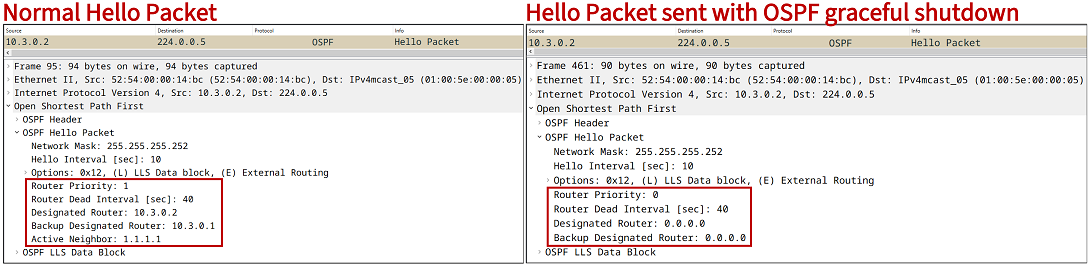
To configure a graceful shutdown of the OSPF process globally on a router, the following can be configured. This has the effect of bringing down all OSPF neighborships.
R3>enable
R3#configure terminal
Enter configuration commands, one per line.  End with CNTL/Z.
R3(config)#router ospf 10
R3(config-router)#shutdown
R3(config-router)#exit
R3(config)#end
R3#