How to Configure Spanning Tree PortFast and BPDU Guard?
Table of Contents
- What is Spanning Tree PortFast? ‹
- What is STP BPDU Guard? ‹
- PortFast configuration globally or per-interface ‹
- BPDU Guard configuration and err-disable state ‹
- BPDU Filter configuration ‹
- Download section ‹
What is Spanning Tree PortFast?
The STP PortFast feature enables a port to transition into the forwarding state immediately when a device is connected. This feature ensures that end user devices have instant access to a network and applications run smoothly without timing out.
Without PortFast, a port would go through the listening and learning states during which traffic is not forwarded. The listening and learning port states are part of the Forward Delay. The Forward Delay is 15 seconds by default, and it ensures that an STP topology fully converges. The following outputs show the listening and learning states that are skipped by PortFast.
SW2#show spanning-tree int Gi0/1

Vlan                Role Sts Cost      Prio.Nbr Type
------------------- ---- --- --------- -------- --------------------------------
VLAN0010            Desg LIS 4         128.2    P2p


SW2#show spanning-tree int Gi0/1

Vlan                Role Sts Cost      Prio.Nbr Type
------------------- ---- --- --------- -------- --------------------------------
VLAN0010            Desg LRN 4         128.2    P2p
However, the Forward Delay may not be necessary on edge ports of access switches, where end user equipment is commonly attached. End-user equipment does not generate BPDUs, and is commonly not part of the STP topology. Therefore, the PortFast feature may be enabled on edge ports, ensuring that these ports immediately forward traffic when end users connect to them.
Another benefit is that PortFast enabled ports do not trigger the transmission of a Topology Change Notification (TCN). Without PortFast, the default behavior is to send a TCN frame every time a port transitions from the blocking state to forwarding, or vice versa.
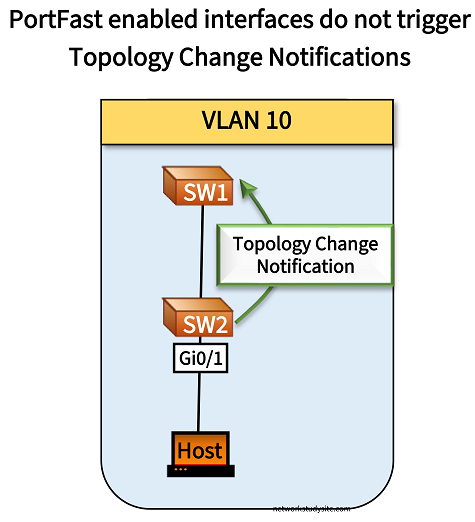
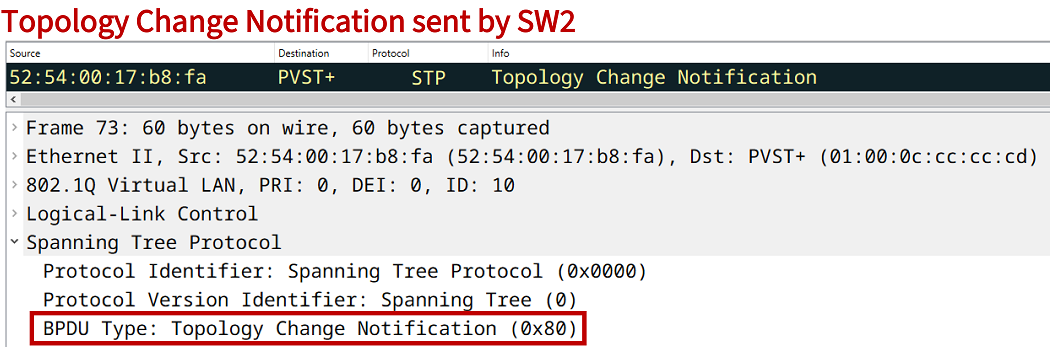
The following packet capture shows the TCN frame sent from SW2 to SW1. In a large network where end-user devices frequently connect and disconnet on access switches, these packets may impact the stability of the STP topology.
What is STP BPDU Guard?
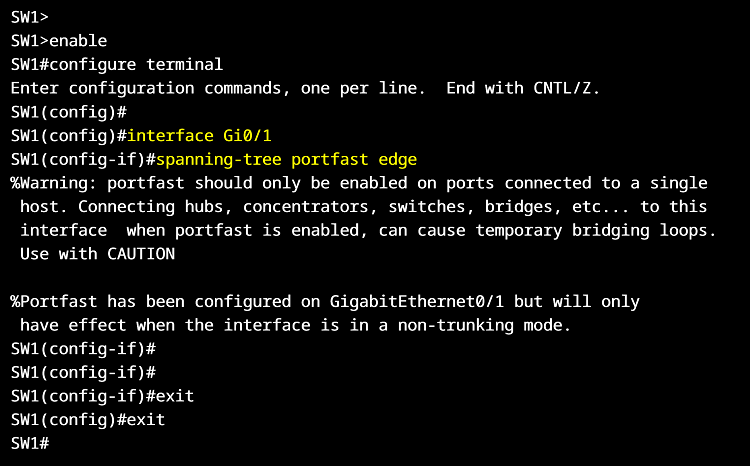
BPDU Guard is configured on edge ports where BPDUs should not be received, and it is commonly configured together with PortFast. BPDU Guard can be enabled in two way, either globally (together with PortFast) or per-interface. The feature puts an interface in the err-disable state if a BPDU is received. This effectively disables the port and prevents an unauthorized switch from manipulating the existing STP topology.
| Method | Configuration |
|---|---|
| Globally enabled with PortFast | SW2> SW2>enable SW2#configure terminal Enter configuration commands, one per line. End with CNTL/Z. SW2(config)# SW2(config)#interface Gi0/2 SW2(config-if)#spanning-tree portfast edge %Warning: portfast should only be enabled on ports connected to a single host. Connecting hubs, concentrators, switches, bridges, etc... to this interface when portfast is enabled, can cause temporary bridging loops. Use with CAUTION %Portfast has been configured on GigabitEthernet0/2 but will only have effect when the interface is in a non-trunking mode. SW2(config-if)# SW2(config-if)# SW2(config-if)#exit SW2(config)# SW2(config)# SW2(config)#interface Gi0/3 SW2(config-if)#spanning-tree portfast edge %Warning: portfast should only be enabled on ports connected to a single host. Connecting hubs, concentrators, switches, bridges, etc... to this interface when portfast is enabled, can cause temporary bridging loops. Use with CAUTION %Portfast has been configured on GigabitEthernet0/3 but will only have effect when the interface is in a non-trunking mode. SW2(config-if)# SW2(config-if)# SW2(config-if)#exit SW2(config)# SW2(config)#spanning-tree portfast edge bpduguard default SW2(config)# SW2(config)# SW2(config)#exit SW2# |
| Enabled per interface | SW2> SW2>enable SW2#configure terminal Enter configuration commands, one per line. End with CNTL/Z. SW2(config)# SW2(config)#interface Gi0/1 SW2(config-if)# SW2(config-if)#spanning-tree bpduguard enable SW2(config-if)# SW2(config-if)#exit SW2(config)#exit SW2# |
PortFast configuration globally or per-interface
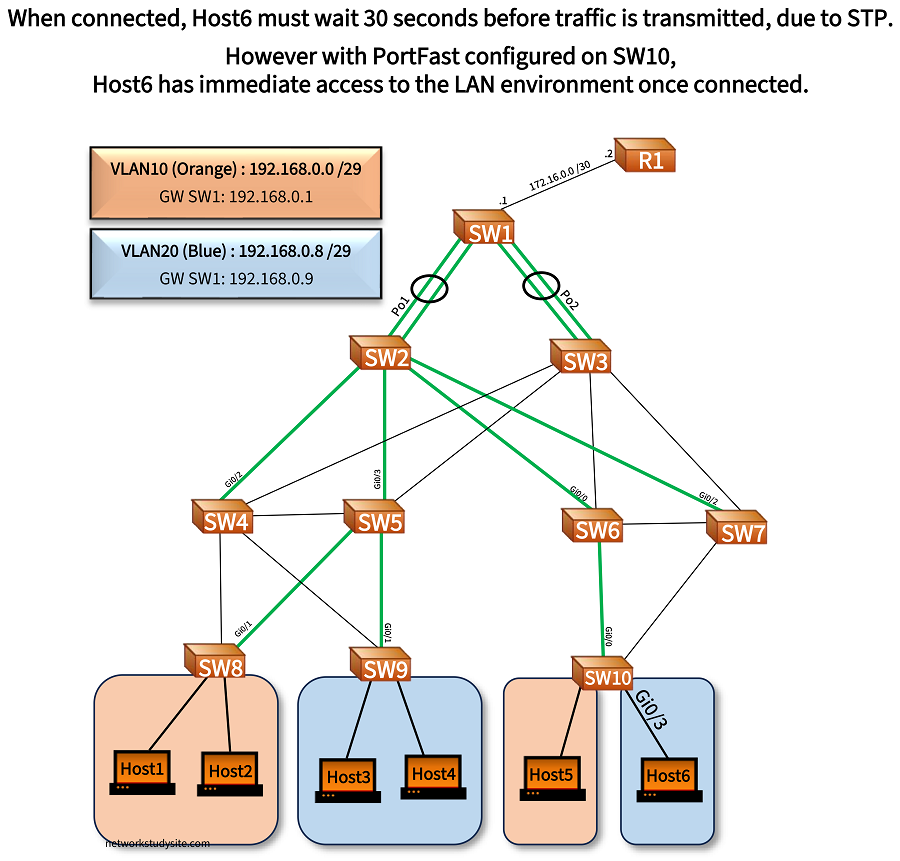
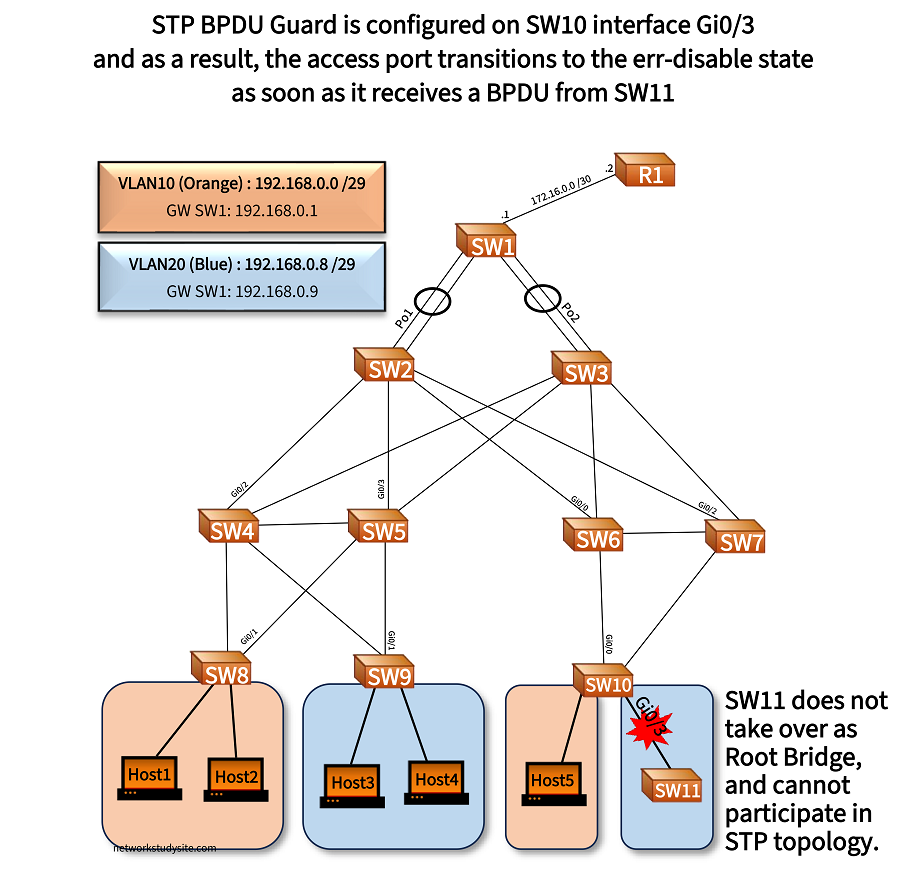
In this example topology RPVST is configured, and PortFast is enabled with the spanning-tree portfast edge default global configuration command, however it can also be enabled per interface. When PortFast is enabled globally with the displayed command, it will apply to all access ports and not apply to trunk ports.
SW10#show run int Gi0/3 | sec int
interface GigabitEthernet0/3
 switchport access vlan 20                      « Access port in VLAN 20
 switchport mode access
 negotiation auto


SW10>
SW10>enable
SW10#configure terminal
Enter configuration commands, one per line.  End with CNTL/Z.
SW10(config)#
SW10(config)#spanning-tree portfast edge default
%Warning: this command enables portfast by default on all interfaces. You
 should now disable portfast explicitly on switched ports leading to hubs,
 switches and bridges as they may create temporary bridging loops.

SW10(config)#
SW10(config)#


SW10#show spanning-tree detail | section GigabitEthernet0/3
 Port 4 (GigabitEthernet0/3) of VLAN0020 is designated forwarding
   Port path cost 4, Port priority 128, Port Identifier 128.4.
   Designated root has priority 32788, address 5254.001d.7f61
   Designated bridge has priority 32788, address 5254.001d.7f61
   Designated port id is 128.4, designated path cost 0
   Timers: message age 0, forward delay 0, hold 0
   Number of transitions to forwarding state: 1
   The port is in the portfast edge mode by default
   Link type is point-to-point by default
   BPDU: sent 20, received 0


SW10(config)#do show spanning-tree int Gi0/3

Vlan                Role Sts Cost      Prio.Nbr Type
------------------- ---- --- --------- -------- --------------------------------
VLAN0020            Desg FWD 4         128.4    P2p Edge   « Portfast edge port enabled
BPDU Guard configuration and err-disable state
To avoid an unauthorized switch interfering with the STP topology, BPDU Guard is configured on SW10 interface Gi0/3. Consequently, SW10 Gi0/3 transitions to the err-disable state as soon as it receives a BPDU. The interface level command spanning-tree bpduguard enable is issued on SW10 interface Gi0/3 to enable the feature.
SW10#show log | beg Log Buffer
Log Buffer (8192 bytes):

%SYS-5-CONFIG_I: Configured from console by console
%SYS-5-CONFIG_I: Configured from console by console
%LINK-3-UPDOWN: Interface GigabitEthernet0/3, changed state to up
%SPANTREE-2-BLOCK_BPDUGUARD: Received BPDU on port Gi0/3 with BPDU Guard enabled. Disabling port.    « BPDU received
%PM-4-ERR_DISABLE: bpduguard error detected on Gi0/3, putting Gi0/3 in err-disable state             « Port transitions to err-disable status
%LINK-3-UPDOWN: Interface GigabitEthernet0/3, changed state to down


SW10#show interface status

Port      Name               Status       Vlan       Duplex  Speed Type
Gi0/0     ** SW6 **          connected    trunk      a-full   auto RJ45
Gi0/1     ** SW7 **          connected    trunk      a-full   auto RJ45
Gi0/2                        connected    10         a-full   auto RJ45
Gi0/3                        err-disabled 20           auto   auto RJ45     « Interface in err-disable status
Gi1/0                        disabled     1            auto   auto RJ45
Gi1/1                        connected    1          a-full   auto RJ45
Gi1/2                        connected    1          a-full   auto RJ45
Gi1/3                        connected    1          a-full   auto RJ45


SW10#show spanning-tree int Gi0/3
no spanning tree info available for GigabitEthernet0/3        « Err-disabled port does not participate in STP


SW10#conf t
Enter configuration commands, one per line.  End with CNTL/Z.
SW10(config)#int Gi0/3
SW10(config-if)#shutdown
SW10(config-if)#no shutdown                             « Clearing err-disable state
SW10(config-if)#
BPDU Filter configuration
To avoid err-disable mode, and also avoid SW11 taking over as root bridge for VLAN 20, the BPDU Filter feature is used. BPDU Filter is configured with the interface level command spanning-tree bpdufilter enable, and disables the sending or receiving of BPDUs on an interface. Before enabling BPDU Filter, below tcpdump output on Host5 shows BPDUs received every 2 seconds from SW10:
SW10#show spanning-tree vlan 10 bridge id
VLAN0010         800A.5254.0011.e4e5            « Bridge ID of SW10


Host5:~$ sudo tcpdump -i eth0 stp --number -c 3
tcpdump: verbose output suppressed, use -v[v]... for full protocol decode
listening on eth0, link-type EN10MB (Ethernet), snapshot length 262144 bytes
    1  13:13:29.517093 STP 802.1w, Rapid STP, Flags [Learn, Forward], bridge-id 800a.52:54:00:11:e4:e5.8003, length 36 « SW10
    2  13:13:31.531856 STP 802.1w, Rapid STP, Flags [Learn, Forward], bridge-id 800a.52:54:00:11:e4:e5.8003, length 36
    3  13:13:33.553896 STP 802.1w, Rapid STP, Flags [Learn, Forward], bridge-id 800a.52:54:00:11:e4:e5.8003, length 36
3 packets captured
3 packets received by filter
0 packets dropped by kernel