CE Device Monitoring and Network Management in MPLS L3VPN
Table of Contents
- Describing CE device management in an MPLS L3VPN ‹
- Configuring management VRF to access CE Loopback address ‹
- Download section ‹
Describing CE device management in an MPLS L3VPN
A Service Provider (SP) offering a managed MPLS L3VPN solution requires access to its Customer Edge (CE) devices. There are two important underlying purposes as to why a SP needs access to its CEs.
The main purpose is network monitoring which is contractually bound by the Service Level Agreement (SLA). This means, network protocols such as SNMP and AAA are configured on a CE device. As a result, the SP can provision a network management station (NMS) to access the CEs. Many NMS provide a GUI dashboard for improved visibility, and trouble tickets may be automatically generated and assigned to the responsible network operations teams.
Another purpose of remote management is network administration which includes the SP's change management and service request management processes. These are central to any managed service (such as MPLS L3VPN or L2VPN) because the SP is responsible for the entire solution up until the customer User Network Interface (UNI) or provider demarcation points.
So, if a customer orders more bandwidth for a site, or wishes to adjust the QoS policy to allow for more voice traffic, these need to be addressed by change management which includes remotely accessing and configuring the CE devices.
| Method | Description |
|---|---|
| No dedicated VRF | In this scenario management traffic and customer traffic are not separated logically and share the same subinterface and customer VRF routing table. Either a CE router Loopback address is configured or the PE-CE subnet can be used for remote access. To advertise the CE router's management IP address to the SP network monitoring station a VRF import map or export map can be configured on the PE routers. |
| With dedicated VRF | In such a scenario, a dedicated VRF is configured on the CE (and PE) only for the purpose of CE device management. As a result, the customer traffic and management traffic are logically separated. This option provides clear separation of traffic and responsibilities. |
| Customer needs access | In addition to the Service Provider, often the customer also requests device monitoring with SNMP read access or SSH access to view basic show commands on the CE router. In such a scenario this needs to be configured in addition to the SP management access. |
Configuring management VRF to access CE Loopback address
In the following example topology Site 1 and Site 2 are connected through a Service Provider (SP) MPLS Layer-3 VPN. The SP manages this solution which includes the Customer Edge (CE) devices located at Site 1 and Site 2. This means, it is important that the SP has access to the CEs for network monitoring and administration. A solution is deployed which involves a dedicated management VRF.
The CE R1 and CE R6 have a /32 Loopback interface configured and assigned to the VRF Management. This VRF is also configured on the PE routers with dedicated Route Distinguisher and Route Target values to advertise only the CE Loopback IP address to the location called "Monitoring". As a result, the Jump Server has access to the CE routers through their Loopback IP address.
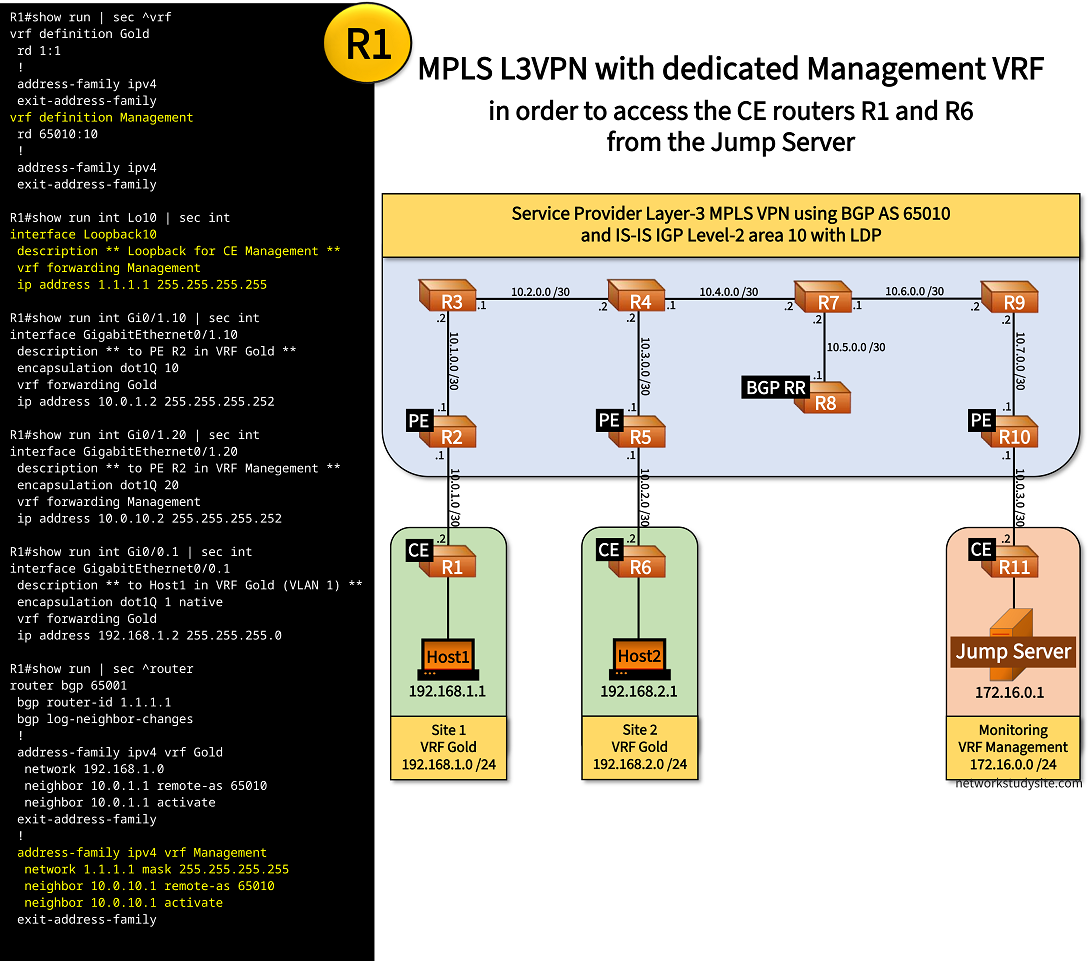
Configuration:
R1 (CE)
R1#show run | sec ^vrf
vrf definition Gold
 rd 1:1
 !
 address-family ipv4
 exit-address-family
vrf definition Management
 rd 2:2
 !
 address-family ipv4
 exit-address-family

R1#show run int Lo10 | sec int
interface Loopback10
 description ** Loopback for CE Management **
 vrf forwarding Management
 ip address 1.1.1.1 255.255.255.255

R1#show run int Gi0/1 | sec int
interface GigabitEthernet0/1
 description ** to PE R2 **
 no ip address
 duplex auto
 speed auto
 media-type rj45

R1#show run int Gi0/1.10 | sec int
interface GigabitEthernet0/1.10
 description ** to PE R2 in VRF Gold **
 encapsulation dot1Q 10
 vrf forwarding Gold
 ip address 10.0.1.2 255.255.255.252

R1#show run int Gi0/1.20 | sec int
interface GigabitEthernet0/1.20
 description ** to PE R2 in VRF Manegement **
 encapsulation dot1Q 20
 vrf forwarding Management
 ip address 10.0.10.2 255.255.255.252

R1#show run int Gi0/0 | sec int
interface GigabitEthernet0/0
 description ** to Host1 **
 no ip address
 duplex auto
 speed auto
 media-type rj45

R1#show run int Gi0/0.1 | sec int
interface GigabitEthernet0/0.1
 description ** to Host1 in VRF Gold (VLAN 1) **
 encapsulation dot1Q 1 native
 vrf forwarding Gold
 ip address 192.168.1.2 255.255.255.0

R1#show run | sec ^router
router bgp 65001
 bgp router-id 1.1.1.1
 bgp log-neighbor-changes
 !
 address-family ipv4 vrf Gold
  network 192.168.1.0
  neighbor 10.0.1.1 remote-as 65010
  neighbor 10.0.1.1 activate
 exit-address-family
 !
 address-family ipv4 vrf Management
  network 1.1.1.1 mask 255.255.255.255
  neighbor 10.0.10.1 remote-as 65010
  neighbor 10.0.10.1 activate
 exit-address-family
R6 (CE)
R6#show run | sec ^vrf
vrf definition Gold
 rd 1:1
 !
 address-family ipv4
 exit-address-family
vrf definition Management
 rd 2:2
 !
 address-family ipv4
 exit-address-family

R6#show run int Lo10 | sec int
interface Loopback10
 description ** Loopback for CE Management **
 vrf forwarding Management
 ip address 6.6.6.6 255.255.255.255

R6#show run int Gi0/1 | sec int
interface GigabitEthernet0/1
 description ** to PE R5 **
 no ip address
 duplex auto
 speed auto
 media-type rj45

R6#show run int Gi0/1.10 | sec int
interface GigabitEthernet0/1.10
 description ** to PE R5 in VRF Gold **
 encapsulation dot1Q 10
 vrf forwarding Gold
 ip address 10.0.2.2 255.255.255.252

R6#show run int Gi0/1.20 | sec int
interface GigabitEthernet0/1.20
 description ** to PE R5 in VRF Management **
 encapsulation dot1Q 20
 vrf forwarding Management
 ip address 10.0.20.2 255.255.255.252

R6#show run int Gi0/0 | sec int
interface GigabitEthernet0/0
 description ** to Host2 **
 no ip address
 duplex auto
 speed auto
 media-type rj45

R6#show run int Gi0/0.1 | sec int
interface GigabitEthernet0/0.1
 description ** to Host2 in VRF Gold (VLAN 1) **
 encapsulation dot1Q 1 native
 vrf forwarding Gold
 ip address 192.168.2.2 255.255.255.0

R6#show run | sec ^router
router bgp 65002
 bgp router-id 6.6.6.6
 bgp log-neighbor-changes
 !
 address-family ipv4 vrf Gold
  network 192.168.2.0
  neighbor 10.0.2.1 remote-as 65010
  neighbor 10.0.2.1 activate
 exit-address-family
 !
 address-family ipv4 vrf Management
  network 6.6.6.6 mask 255.255.255.255
  neighbor 10.0.20.1 remote-as 65010
  neighbor 10.0.20.1 activate
 exit-address-family
R11 (CE)
R11#show run | sec ^vrf
vrf definition Management
 rd 1:1
 !
 address-family ipv4
 exit-address-family

R11#show run int Gi0/1 | sec int
interface GigabitEthernet0/1
 description ** to PE R10 **
 no ip address
 duplex auto
 speed auto
 media-type rj45

R11#show run int Gi0/1.10 | sec int
interface GigabitEthernet0/1.10
 description ** to PE R10 in VRF Management **
 encapsulation dot1Q 10
 vrf forwarding Management
 ip address 10.0.3.2 255.255.255.252

R11#show run int Gi0/0 | sec int
interface GigabitEthernet0/0
 description ** to Jump Server **
 no ip address
 duplex auto
 speed auto
 media-type rj45

R11#show run int Gi0/0.10 | sec int
interface GigabitEthernet0/0.10
 description ** to Jump Server in VRF Management (VLAN 10) **
 encapsulation dot1Q 10
 vrf forwarding Management
 ip address 172.16.0.2 255.255.255.0

R11#show run | sec ^router
router bgp 65003
 bgp router-id 11.11.11.11
 bgp log-neighbor-changes
 !
 address-family ipv4 vrf Management
  network 172.16.0.0 mask 255.255.255.0
  neighbor 10.0.3.1 remote-as 65010
  neighbor 10.0.3.1 activate
 exit-address-family
R2 (PE)
R2#show run all | sec ^mpls ip__
mpls ip

R2#show run | sec ^mpls
mpls label range 200 299
mpls ldp router-id Loopback10 force

R2#show run int Lo10 | sec int
interface Loopback10
 ip address 2.2.2.2 255.255.255.255

R2#show run | sec ^vrf
vrf definition Gold
 rd 65010:1
 !
 address-family ipv4
  route-target export 65010:1
  route-target import 65010:2
 exit-address-family
vrf definition Management
 rd 65010:10
 !
 address-family ipv4
  route-target export 65010:10
  route-target import 65010:30
 exit-address-family

R2#show run int Gi0/0 | sec int
interface GigabitEthernet0/0
 description ** to CE R1 **
 no ip address
 duplex auto
 speed auto
 media-type rj45

R2#show run int Gi0/0.10 | sec int
interface GigabitEthernet0/0.10
 description ** to CE R1 in VRF Gold **
 encapsulation dot1Q 10
 vrf forwarding Gold
 ip address 10.0.1.1 255.255.255.252

R2#show run int Gi0/0.20 | sec int
interface GigabitEthernet0/0.20
 description ** to CE R1 in VRF Management **
 encapsulation dot1Q 20
 vrf forwarding Management
 ip address 10.0.10.1 255.255.255.252

R2#show run int Gi0/1 | sec int
interface GigabitEthernet0/1
 description ** to R3 **
 ip address 10.1.0.1 255.255.255.252
 ip router isis
 duplex auto
 speed auto
 media-type rj45
 mpls ip
 isis circuit-type level-2-only
 isis network point-to-point

R2#show run | sec ^router
router isis
 net 49.0010.0000.0000.0002.00
 is-type level-2-only
 advertise passive-only
 metric-style wide
 log-adjacency-changes
 passive-interface Loopback10
router bgp 65010
 bgp router-id 2.2.2.2
 bgp log-neighbor-changes
 bgp scan-time 5
 neighbor 8.8.8.8 remote-as 65010
 neighbor 8.8.8.8 update-source Loopback10
 !
 address-family vpnv4
  neighbor 8.8.8.8 activate
  neighbor 8.8.8.8 send-community both
 exit-address-family
 !
 address-family ipv4 vrf Gold
  network 10.0.1.0 mask 255.255.255.252
  neighbor 10.0.1.2 remote-as 65001
  neighbor 10.0.1.2 activate
 exit-address-family
 !
 address-family ipv4 vrf Management
  neighbor 10.0.10.2 remote-as 65001
  neighbor 10.0.10.2 activate
 exit-address-family
R5 (PE)
R5#show run all | sec ^mpls ip__
mpls ip

R5#show run | sec ^mpls
mpls label range 500 599
mpls ldp router-id Loopback10 force

R5#show run int Lo10 | sec int
interface Loopback10
 ip address 5.5.5.5 255.255.255.255

R5#show run | sec ^vrf
vrf definition Gold
 rd 65010:2
 !
 address-family ipv4
  route-target export 65010:2
  route-target import 65010:1
 exit-address-family
vrf definition Management
 rd 65010:20
 !
 address-family ipv4
  route-target export 65010:20
  route-target import 65010:30
 exit-address-family

R5#show run int Gi0/0 | sec int
interface GigabitEthernet0/0
 description ** to CE R6 **
 no ip address
 duplex auto
 speed auto
 media-type rj45

R5#show run int Gi0/0.10 | sec int
interface GigabitEthernet0/0.10
 description ** to CE R6 in VRF Gold **
 encapsulation dot1Q 10
 vrf forwarding Gold
 ip address 10.0.2.1 255.255.255.252

R5#show run int Gi0/0.20 | sec int
interface GigabitEthernet0/0.20
 description ** to CE R6 in VRF Management **
 encapsulation dot1Q 20
 vrf forwarding Management
 ip address 10.0.20.1 255.255.255.252

R5#show run int Gi0/1 | sec int
interface GigabitEthernet0/1
 description ** to R4 **
 ip address 10.3.0.1 255.255.255.252
 ip router isis
 duplex auto
 speed auto
 media-type rj45
 mpls ip
 isis circuit-type level-2-only
 isis network point-to-point

R5#show run | sec ^router
router isis
 net 49.0010.0000.0000.0005.00
 is-type level-2-only
 advertise passive-only
 metric-style wide
 log-adjacency-changes
 passive-interface Loopback10
router bgp 65010
 bgp router-id 5.5.5.5
 bgp log-neighbor-changes
 neighbor 8.8.8.8 remote-as 65010
 neighbor 8.8.8.8 update-source Loopback10
 !
 address-family vpnv4
  neighbor 8.8.8.8 activate
  neighbor 8.8.8.8 send-community both
 exit-address-family
 !
 address-family ipv4 vrf Gold
  network 10.0.2.0 mask 255.255.255.252
  neighbor 10.0.2.2 remote-as 65002
  neighbor 10.0.2.2 activate
 exit-address-family
 !
 address-family ipv4 vrf Management
  neighbor 10.0.20.2 remote-as 65002
  neighbor 10.0.20.2 activate
 exit-address-family
R10 (PE)
R10#show run all | sec ^mpls ip__
mpls ip

R10#show run | sec ^mpls
mpls label range 1000 1099
mpls ldp router-id Loopback10 force

R10#show run int Lo10 | sec int
interface Loopback10
 ip address 10.10.10.10 255.255.255.255

R10#show run | sec ^vrf
vrf definition Management
 rd 65010:30
 !
 address-family ipv4
  route-target export 65010:30
  route-target import 65010:20
  route-target import 65010:10
 exit-address-family

R10#show run int Gi0/0 | sec int
interface GigabitEthernet0/0
 description ** to CE R11 (Network Management) **
 no ip address
 duplex auto
 speed auto
 media-type rj45

R10#show run int Gi0/0.10 | sec int
interface GigabitEthernet0/0.10
 description ** to CE R11 in VRF Management **
 encapsulation dot1Q 10
 vrf forwarding Management
 ip address 10.0.3.1 255.255.255.252

R10#show run int Gi0/1 | sec int
interface GigabitEthernet0/1
 description ** to R9 **
 ip address 10.7.0.1 255.255.255.252
 ip router isis
 duplex auto
 speed auto
 media-type rj45
 mpls ip
 isis circuit-type level-2-only
 isis network point-to-point

R10#show run | sec ^router
router isis
 net 49.0010.0000.0000.0010.00
 is-type level-2-only
 advertise passive-only
 metric-style wide
 log-adjacency-changes
 passive-interface Loopback10
router bgp 65010
 bgp router-id 10.10.10.10
 bgp log-neighbor-changes
 neighbor 8.8.8.8 remote-as 65010
 neighbor 8.8.8.8 update-source Loopback10
 !
 address-family vpnv4
  neighbor 8.8.8.8 activate
  neighbor 8.8.8.8 send-community extended
 exit-address-family
 !
 address-family ipv4 vrf Management
  neighbor 10.0.3.2 remote-as 65003
  neighbor 10.0.3.2 activate
 exit-address-family
R8 (BGP RR)
R8#show run int Lo10 | sec int
interface Loopback10
 ip address 8.8.8.8 255.255.255.255

R8#show run int Gi0/0 | sec int
interface GigabitEthernet0/0
 description ** to R7 **
 ip address 10.5.0.1 255.255.255.252
 ip router isis
 duplex auto
 speed auto
 media-type rj45
 isis circuit-type level-2-only
 isis network point-to-point

R8#show run | sec ^router
router isis
 net 49.0010.0000.0000.0008.00
 is-type level-2-only
 advertise passive-only
 metric-style wide
 log-adjacency-changes
 passive-interface Loopback10
router bgp 65010
 bgp router-id 8.8.8.8
 bgp log-neighbor-changes
 neighbor 2.2.2.2 remote-as 65010
 neighbor 2.2.2.2 update-source Loopback10
 neighbor 5.5.5.5 remote-as 65010
 neighbor 5.5.5.5 update-source Loopback10
 neighbor 10.10.10.10 remote-as 65010
 neighbor 10.10.10.10 update-source Loopback10
 !
 address-family vpnv4
  neighbor 2.2.2.2 activate
  neighbor 2.2.2.2 send-community extended
  neighbor 2.2.2.2 route-reflector-client
  neighbor 5.5.5.5 activate
  neighbor 5.5.5.5 send-community extended
  neighbor 5.5.5.5 route-reflector-client
  neighbor 10.10.10.10 activate
  neighbor 10.10.10.10 send-community extended
  neighbor 10.10.10.10 route-reflector-client
 exit-address-family
R7
R7#show run all | sec ^mpls ip__
mpls ip

R7#show run | sec ^mpls
mpls label range 700 799
mpls ldp router-id Loopback10 force

R7#show run int Lo10 | sec int
interface Loopback10
 ip address 7.7.7.7 255.255.255.255

R7#show run int Gi0/0 | sec int
interface GigabitEthernet0/0
 description ** to RR R8 **
 ip address 10.5.0.2 255.255.255.252
 ip router isis
 duplex auto
 speed auto
 media-type rj45
 isis circuit-type level-2-only
 isis network point-to-point

R7#show run int Gi0/1 | sec int
interface GigabitEthernet0/1
 description ** to R4 **
 ip address 10.4.0.2 255.255.255.252
 ip router isis
 duplex auto
 speed auto
 media-type rj45
 mpls ip
 isis circuit-type level-2-only
 isis network point-to-point

R7#show run int Gi0/2 | sec int
interface GigabitEthernet0/2
 description ** to R9 **
 ip address 10.6.0.1 255.255.255.252
 ip router isis
 duplex auto
 speed auto
 media-type rj45
 mpls ip
 isis circuit-type level-2-only
 isis network point-to-point

R7#show run | sec ^router
router isis
 net 49.0010.0000.0000.0007.00
 is-type level-2-only
 advertise passive-only
 metric-style wide
 log-adjacency-changes
 passive-interface Loopback10
Host1
Host1#show run int Gi0/0 | sec int
interface GigabitEthernet0/0
 description ** to CE R1 **
 ip address 192.168.1.1 255.255.255.0
 duplex auto
 speed auto
 media-type rj45

Host1#show run | sec ^ip route
ip route 0.0.0.0 0.0.0.0 192.168.1.2
Jump Server
Jump-Server#show run int Gi0/0 | sec int
interface GigabitEthernet0/0
 description description ** to CE R11 **
 no ip address
 duplex auto
 speed auto
 media-type rj45

Jump-Server#show run int Gi0/0.10 | sec int
interface GigabitEthernet0/0.10
 description ** to CE R11 in VLAN 10 **
 encapsulation dot1Q 10
 ip address 172.16.0.1 255.255.255.0

Jump-Server#show run | sec ^ip route
ip route 0.0.0.0 0.0.0.0 172.16.0.2
R10#show ip bgp vpnv4 all | beg Ne
     Network          Next Hop            Metric LocPrf Weight Path
Route Distinguisher: 65010:10
 *>i  1.1.1.1/32       2.2.2.2                  0    100      0 65001 i
Route Distinguisher: 65010:20
 *>i  6.6.6.6/32       5.5.5.5                  0    100      0 65002 i
Route Distinguisher: 65010:30 (default for vrf Management)
 *>i  1.1.1.1/32       2.2.2.2                  0    100      0 65001 i         « PE R10 imports Loopback of CE R1 into VRF Management
 *>i  6.6.6.6/32       5.5.5.5                  0    100      0 65002 i         « PE R10 imports Loopback of CE R6 into VRF Management
 *>   172.16.0.0/24    10.0.3.2                 0             0 65003 i


R11#show ip route vrf Management bgp | beg Ga
Gateway of last resort is not set

      1.0.0.0/32 is subnetted, 1 subnets
B        1.1.1.1 [20/0] via 10.0.3.1, 01:44:35               « Router R11 receives the Loopback IP address of customer location CEs
      6.0.0.0/32 is subnetted, 1 subnets
B        6.6.6.6 [20/0] via 10.0.3.1, 01:54:33


Jump-Server#ping 1.1.1.1
Type escape sequence to abort.
Sending 5, 100-byte ICMP Echos to 1.1.1.1, timeout is 2 seconds:
!!!!!
Success rate is 100 percent (5/5), round-trip min/avg/max = 48/49/51 ms          « Jump Server can reach CE R1 in Management VRF


Jump-Server#trace 1.1.1.1 probe 1
Type escape sequence to abort.
Tracing the route to 1.1.1.1
VRF info: (vrf in name/id, vrf out name/id)
  1 172.16.0.2 2 msec
  2 10.0.3.1 24 msec
  3 10.7.0.2 [MPLS: Labels 906/210 Exp 0] 51 msec
  4 10.6.0.1 [MPLS: Labels 707/210 Exp 0] 49 msec
  5 10.4.0.1 [MPLS: Labels 407/210 Exp 0] 52 msec
  6 10.2.0.1 [MPLS: Labels 306/210 Exp 0] 50 msec
  7 10.0.10.1 [MPLS: Label 210 Exp 0] 29 msec             « VPN Service Label assigned by PE R2
  8 10.0.10.2 52 msec


Jump-Server#ping 6.6.6.6
Type escape sequence to abort.
Sending 5, 100-byte ICMP Echos to 6.6.6.6, timeout is 2 seconds:
!!!!!
Success rate is 100 percent (5/5), round-trip min/avg/max = 47/48/49 ms


Jump-Server#trace 6.6.6.6 probe 1
Type escape sequence to abort.
Tracing the route to 6.6.6.6
VRF info: (vrf in name/id, vrf out name/id)
  1 172.16.0.2 1 msec
  2 10.0.3.1 23 msec
  3 10.7.0.2 [MPLS: Labels 907/500 Exp 0] 47 msec
  4 10.6.0.1 [MPLS: Labels 708/500 Exp 0] 47 msec
  5 10.4.0.1 [MPLS: Labels 408/500 Exp 0] 47 msec
  6 10.0.20.1 [MPLS: Label 500 Exp 0] 27 msec
  7 10.0.20.2 51 msec
From the above outputs it is visible that the location called "Monitoring" only receives the /32 Loopback IP address of CE R1 and CE R6. As a result, these CE routers are now reachable, can be configured with SSH or Telnet access, and can use SNMP to transmit network monitoring data to an application configured on a Network Monitoring Server (NMS).
The managed CE routers only receive the /24 prefix of the "Monitoring" location in the Management VRF. This is shown in the following outputs. This is how the customer traffic in VRF Gold is separated end-to-end from the management traffic which is transmitted in the VRF Management.
R1#show ip route vrf Management bgp | beg Ga
Gateway of last resort is not set

      172.16.0.0/24 is subnetted, 1 subnets
B        172.16.0.0 [20/0] via 10.0.10.1, 01:50:55


R6#show ip route vrf Management bgp | beg Ga
Gateway of last resort is not set

      172.16.0.0/24 is subnetted, 1 subnets
B        172.16.0.0 [20/0] via 10.0.20.1, 02:01:06