How to Create Configurations with BGP Peer Templates?
Table of Contents
Jump to section:
What is a BGP peer template?
BGP peer templates provide a framework for configuring BGP in an organized way. Two types of templates are used, peer-session and peer-policy templates. The templates are assigned to a BGP neighbor with the inherit command.
As a result, a single template can be used to define a common policy or a session characteristic of multiple BGP neighborships. When a change is needed the template is reconfigured, and all the neighbors inherit the change.
The following table compares BGP configurations with and without peer templates. If there are multiple BGP neighbors with a variety of policies, BGP peer templates can also make it easier to group and overview the policies.
| Without template | With template |
|---|---|
Router#show run | sec router router bgp 65001 bgp router-id 1.1.1.1 bgp log-neighbor-changes network 192.168.1.0 network 192.168.2.0 neighbor 10.0.0.2 remote-as 65002 neighbor 10.0.0.2 password p4ssw0rd neighbor 10.0.0.2 ttl-security hops 1 neighbor 10.0.0.2 fall-over bfd neighbor 10.0.0.2 default-originate neighbor 10.0.0.2 route-map RM-ASPATH out neighbor 10.0.0.2 maximum-prefix 10 |
Router#show run | sec router router bgp 65001 template peer-policy POLICY-TEMP route-map RM-ASPATH out default-originate maximum-prefix 10 exit-peer-policy ! template peer-session SESSION-TEMP remote-as 65002 password p4ssw0rd ttl-security hops 1 fall-over bfd exit-peer-session ! bgp router-id 1.1.1.1 bgp log-neighbor-changes network 192.168.1.0 network 192.168.2.0 neighbor 10.0.0.2 inherit peer-session SESSION-TEMP neighbor 10.0.0.2 inherit peer-policy POLICY-TEMP |
How to configure a BGP peer template?
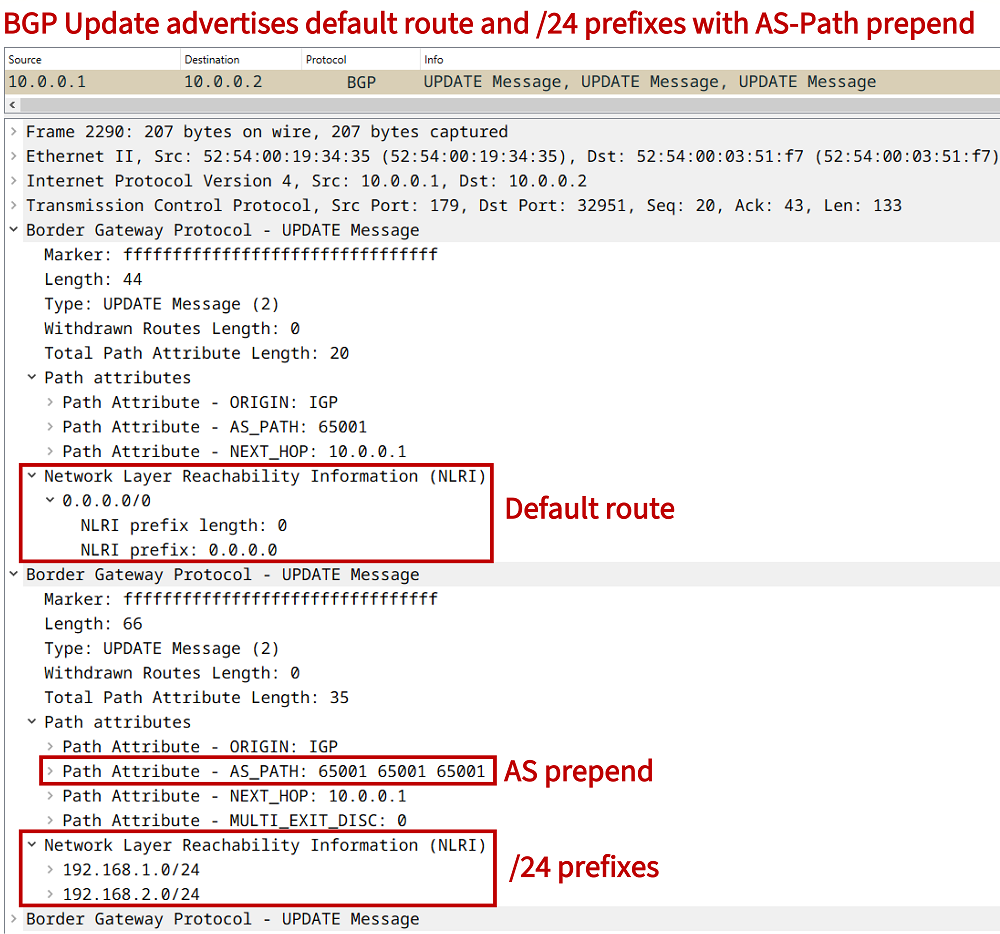
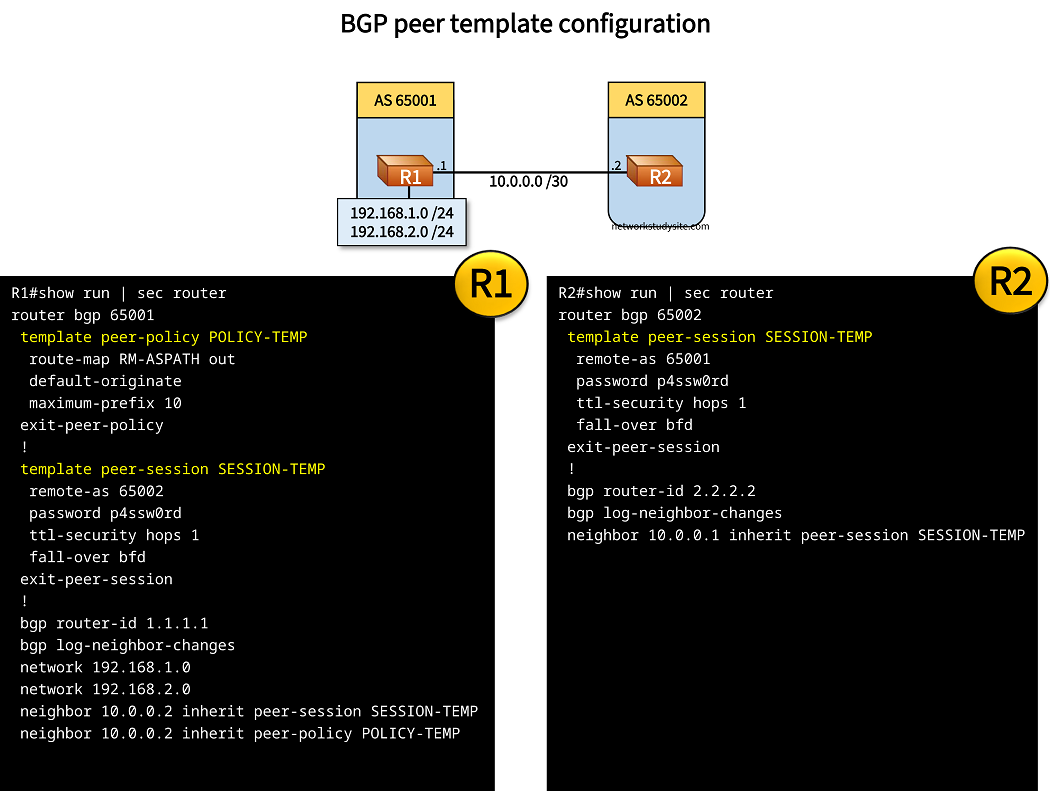
In the following example topology an eBGP neighborship is configured between R1 and R2 using peer templates. R1 advertises two /24 prefixes to R2 in addition to a default route. R1 prepends the AS-Path for the two /24 prefixes it advertises.
BFD is configured between the two routers for fast failover, and the BGP neighborship is password protected. TTL-Security is also configured between R1 and R2. Finally, R1 accepts a maximum of 10 BGP prefixes from R2, this is configured with the maximum-prefix 10 command under the peer-policy template called POLICY-TEMP.
Configuration:
R1
R1#show run int Gi0/0 | sec int
interface GigabitEthernet0/0
 description ** to R2 **
 ip address 10.0.0.1 255.255.255.252
 duplex auto
 speed auto
 media-type rj45
 bfd interval 100 min_rx 100 multiplier 3

R1#show run int Lo10 | sec int
interface Loopback10
 ip address 192.168.1.1 255.255.255.0

R1#show run int Lo20 | sec int
interface Loopback20
 ip address 192.168.2.1 255.255.255.0

R1#show run | sec router
router bgp 65001
 template peer-policy POLICY-TEMP
  route-map RM-ASPATH out
  default-originate
  maximum-prefix 10
 exit-peer-policy
 !
 template peer-session SESSION-TEMP
  remote-as 65002
  password p4ssw0rd
  ttl-security hops 1
  fall-over bfd
 exit-peer-session
 !
 bgp router-id 1.1.1.1
 bgp log-neighbor-changes
 network 192.168.1.0
 network 192.168.2.0
 neighbor 10.0.0.2 inherit peer-session SESSION-TEMP
 neighbor 10.0.0.2 inherit peer-policy POLICY-TEMP

R1#show run | sec ^route-map
route-map RM-ASPATH permit 10
 set as-path prepend 65001 65001
R2
R2#show run int Gi0/0 | sec int
interface GigabitEthernet0/0
 description ** to R1 **
 ip address 10.0.0.2 255.255.255.252
 duplex auto
 speed auto
 media-type rj45
 bfd interval 100 min_rx 100 multiplier 3

R2#show run | sec router
router bgp 65002
 template peer-session SESSION-TEMP
  remote-as 65001
  password p4ssw0rd
  ttl-security hops 1
  fall-over bfd
 exit-peer-session
 !
 bgp router-id 2.2.2.2
 bgp log-neighbor-changes
 neighbor 10.0.0.1 inherit peer-session SESSION-TEMP
R2#show ip bgp summary | beg Neighbor
Neighbor        V           AS MsgRcvd MsgSent   TblVer  InQ OutQ Up/Down  State/PfxRcd
10.0.0.1        4        65001      35      34       14    0    0 00:27:17        3


R2#show ip bgp | beg Network
     Network          Next Hop            Metric LocPrf Weight Path
 *>   0.0.0.0          10.0.0.1                               0 65001 i
 *>   192.168.1.0      10.0.0.1                 0             0 65001 65001 65001 i
 *>   192.168.2.0      10.0.0.1                 0             0 65001 65001 65001 i