Analysis of OSPF Options Field with Packet Captures
- What is the OSPF options field? ‹
- What is the E-bit in OSPF Hello packets? ‹
- What is the difference between E-bit Option and E-bit Flag? ‹
- What is the B-bit in OSPF Type-1 LSA? ‹
- What is the P-bit in OSPF Type-7 LSA? ‹
- Download section ‹
What is the OSPF options field?
The OSPF options field is included in all LSA types, Hello packets, and Database Description packets. OSPF uses different options to signal capabilities and functions of an advertising router within the OSPF domain. For example, a stub router, an Area Border Router (ABR) or a router configured in a Not-So-Stubby Area (NSSA) will advertise these characteristics in the options field. Some OSPF options need to match for a neighborship to form. OSPF options are an important aspect of the routing protocol's control plane operations.
The OSPF options field is used differently in Hello packets and in Database Description packets. The corresponding RFC 2328 highlights the difference, and it is summarized in the following quote from the RFC.
When used in Hello packets, the Options field allows a router to reject a neighbor because of a capability mismatch. Alternatively, when capabilities are exchanged in Database Description packets a router can choose not to forward certain LSAs to a neighbor because of its functionality.
RFC 2328, OSPF Version 2
What is the E-bit in OSPF Hello packets?
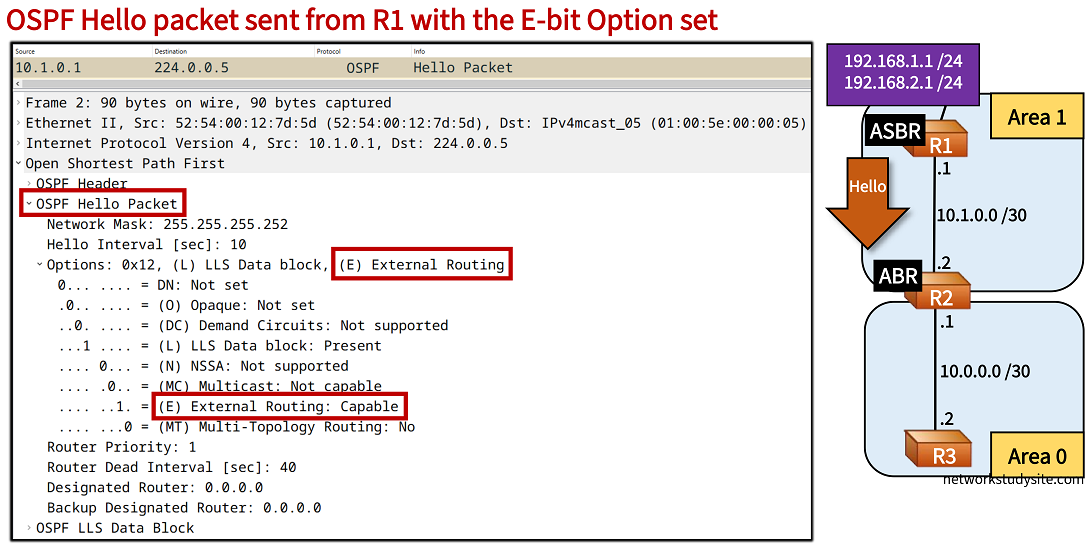
The following capture shows how R1 sets the E-bit in its Hello packet. This indicates that R1 is capable of sending and receiving OSPF Type-5 external LSAs. In other words, R1 can handle prefixes redistributed into OSPF. However, the E-bit set also signals that R1 is not part of a stub area or of an NSSA. This is important because an OSPF neighborship can only form if the connected routers have identical E-bit settings (either set or not set).
In this example topology, R1 redistributes two connected prefixes into OSPF area 1. This makes R1 and Autonomous System Boundary Router (ASBR). The redistributed prefixes are advertised as Type-5 LSAs. This is possible because area 1 is a normal area, and not a stub area or an NSSA. An OSPF stub area or NSSA does not support Type-5 LSAs therefore the E-bit would not be set in Hello packets.
Configuration:
R1 (ASBR)
R1#show run int Lo10 | sec int
interface Loopback10
 ip address 192.168.1.1 255.255.255.0

R1#show run int Lo20 | sec int
interface Loopback20
 ip address 192.168.2.1 255.255.255.0

R1#show run int Gi0/0 | sec int
interface GigabitEthernet0/0
 description ** to R2 **
 ip address 10.1.0.1 255.255.255.252
 ip ospf network point-to-point
 duplex auto
 speed auto
 media-type rj45

R1#show run | sec router
router ospf 10
 router-id 1.1.1.1
 redistribute connected subnets route-map RM-REDIST
 network 10.1.0.0 0.0.0.3 area 1

R1#show run | sec ^route-map
route-map RM-REDIST permit 10
 match ip address prefix-list PL-REDIST

R1#show run | sec ip prefix
ip prefix-list PL-REDIST seq 5 permit 192.168.1.0/24
ip prefix-list PL-REDIST seq 10 permit 192.168.2.0/24
R2 (ABR)
R2#show run int Gi0/0 | sec int
interface GigabitEthernet0/0
 description ** to R1 **
 ip address 10.1.0.2 255.255.255.252
 ip ospf network point-to-point
 duplex auto
 speed auto
 media-type rj45

R2#show run int Gi0/1 | sec int
interface GigabitEthernet0/1
 description ** to R3 **
 ip address 10.0.0.1 255.255.255.252
 ip ospf network point-to-point
 duplex auto
 speed auto
 media-type rj45

R2#show run | sec router
router ospf 10
 router-id 2.2.2.2
 network 10.0.0.0 0.0.0.3 area 0
 network 10.1.0.0 0.0.0.3 area 1
R3
R3#show run int Gi0/0 | sec int
interface GigabitEthernet0/0
 description ** to R2 **
 ip address 10.0.0.2 255.255.255.252
 ip ospf network point-to-point
 duplex auto
 speed auto
 media-type rj45


R3#show run | sec ^router
router ospf 10
 router-id 3.3.3.3
 network 10.0.0.0 0.0.0.3 area 0
R1#show ip protocols | section ospf
Routing Protocol is "ospf 10"
  Outgoing update filter list for all interfaces is not set
  Incoming update filter list for all interfaces is not set
  Router ID 1.1.1.1
  It is an autonomous system boundary router           « R1 is an ASBR
 Redistributing External Routes from,
    connected, includes subnets in redistribution
  Number of areas in this router is 1. 1 normal 0 stub 0 nssa
  Maximum path: 4
  Routing for Networks:
    10.1.0.0 0.0.0.3 area 1
  Routing Information Sources:
    Gateway         Distance      Last Update
    2.2.2.2              110      00:30:44
  Distance: (default is 110)


R2#show ip ospf neighbor 1.1.1.1
 Neighbor 1.1.1.1, interface address 10.1.0.1
    In the area 1 via interface GigabitEthernet0/0
    Neighbor priority is 0, State is FULL, 12 state changes
    DR is 0.0.0.0 BDR is 0.0.0.0
    Options is 0x12 in Hello (E-bit, L-bit)           « R1 sets the E-bit in Hello packets
    Options is 0x52 in DBD (E-bit, L-bit, O-bit)
    LLS Options is 0x1 (LR)
    Dead timer due in 00:00:31
    Neighbor is up for 00:32:23
    Index 1/1/1, retransmission queue length 0, number of retransmission 0
    First 0x0(0)/0x0(0)/0x0(0) Next 0x0(0)/0x0(0)/0x0(0)
    Last retransmission scan length is 0, maximum is 0
    Last retransmission scan time is 0 msec, maximum is 0 msec


R2#show ip route ospf | begin Ga
Gateway of last resort is not set

O E2  192.168.1.0/24 [110/20] via 10.1.0.1, 00:31:01, GigabitEthernet0/0       « Type-5 LSA External routes received on R2
O E2  192.168.2.0/24 [110/20] via 10.1.0.1, 00:31:01, GigabitEthernet0/0


R3#show ip ospf database external

            OSPF Router with ID (3.3.3.3) (Process ID 10)

                Type-5 AS External Link States                     « Type-5 LSA received on R3 in area 0

  LS age: 39
  Options: (No TOS-capability, DC, Upward)
  LS Type: AS External Link
  Link State ID: 192.168.1.0 (External Network Number )
  Advertising Router: 1.1.1.1
  LS Seq Number: 80000002
  Checksum: 0xB26
  Length: 36
  Network Mask: /24
        Metric Type: 2 (Larger than any link state path)
        MTID: 0
        Metric: 20
        Forward Address: 0.0.0.0
        External Route Tag: 0

  LS age: 39
  Options: (No TOS-capability, DC, Upward)
  LS Type: AS External Link
  Link State ID: 192.168.2.0 (External Network Number )
  Advertising Router: 1.1.1.1
  LS Seq Number: 80000002
  Checksum: 0xFF30
  Length: 36
  Network Mask: /24
        Metric Type: 2 (Larger than any link state path)
        MTID: 0
        Metric: 20
        Forward Address: 0.0.0.0
        External Route Tag: 0
What is the difference between E-bit Option and E-bit Flag?
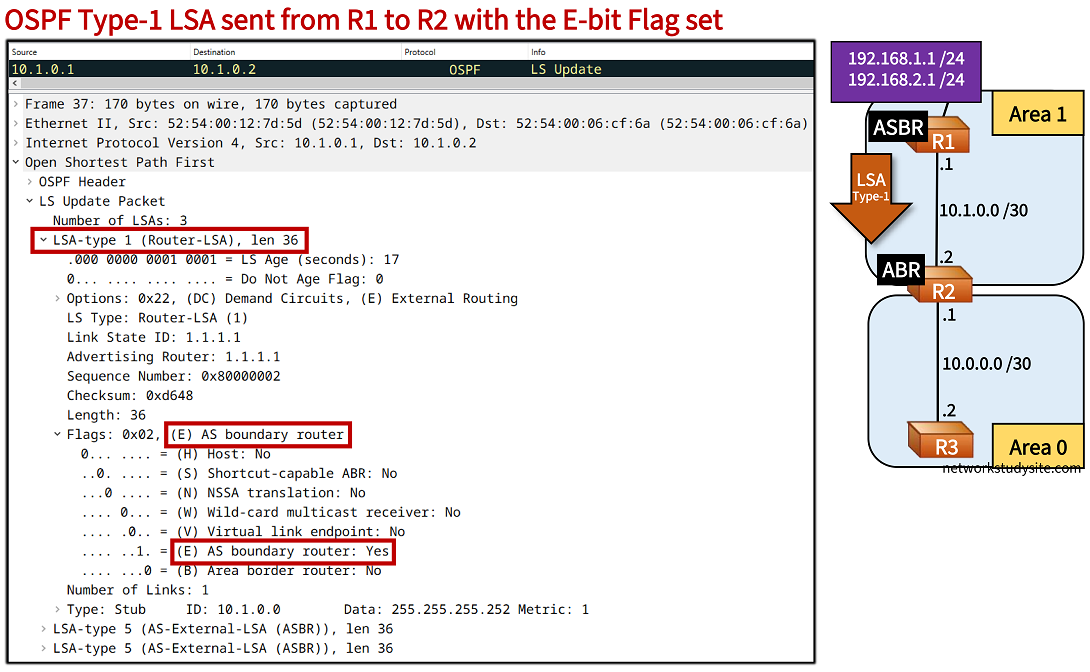
The previous section introduced the OSPF E-bit Option field which indicates the External Routing capability (Type-5 LSA) of an advertising router's interface. However, there is also an E-bit Flag field found in Type-1 LSAs which indicates whether an advertising router is an Autonomous System Boundary Router (ASBR). This is shown in the following example, where ASBR R1 sets the E-bit Flag in its Type-1 LSA advertised to R2.
R2#show ip ospf database router 1.1.1.1

            OSPF Router with ID (2.2.2.2) (Process ID 10)

                Router Link States (Area 1)

  LS age: 1925
  Options: (No TOS-capability, DC)
  LS Type: Router Links
  Link State ID: 1.1.1.1
  Advertising Router: 1.1.1.1
  LS Seq Number: 80000002
  Checksum: 0x7388
  Length: 48
  AS Boundary Router             « R1 is an ASBR
  Number of Links: 2

    Link connected to: another Router (point-to-point)
     (Link ID) Neighboring Router ID: 2.2.2.2
     (Link Data) Router Interface address: 10.1.0.1
      Number of MTID metrics: 0
       TOS 0 Metrics: 1

    Link connected to: a Stub Network
     (Link ID) Network/subnet number: 10.1.0.0
     (Link Data) Network Mask: 255.255.255.252
      Number of MTID metrics: 0
       TOS 0 Metrics: 1
What is the B-bit in OSPF Type-1 LSA?
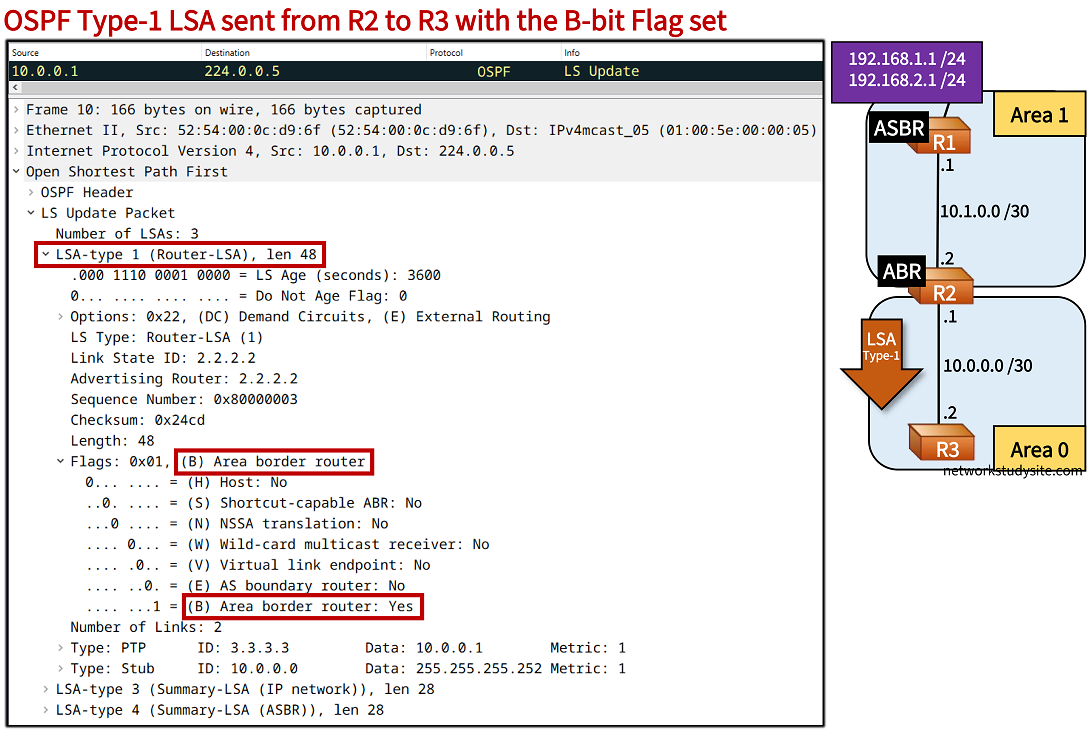
In the following example packet capture, the Area Border Router (ABR) R2 advertises a Type-1 LSA with the B-bit Flag set. This indicates that R2 is an ABR between the backbone area and a normal area. Note that if area 1 were an NSSA than R2 would set the B-bit and also the E-bit in its Type-1 LSAs.
R3#show ip ospf database router 2.2.2.2

            OSPF Router with ID (3.3.3.3) (Process ID 10)

                Router Link States (Area 0)

  LS age: 428
  Options: (No TOS-capability, DC)
  LS Type: Router Links
  Link State ID: 2.2.2.2
  Advertising Router: 2.2.2.2
  LS Seq Number: 80000002
  Checksum: 0x26CC
  Length: 48
  Area Border Router
  Number of Links: 2

    Link connected to: another Router (point-to-point)
     (Link ID) Neighboring Router ID: 3.3.3.3
     (Link Data) Router Interface address: 10.0.0.1
      Number of MTID metrics: 0
       TOS 0 Metrics: 1

    Link connected to: a Stub Network
     (Link ID) Network/subnet number: 10.0.0.0
     (Link Data) Network Mask: 255.255.255.252
      Number of MTID metrics: 0
       TOS 0 Metrics: 1
What is the P-bit in OSPF Type-7 LSA?
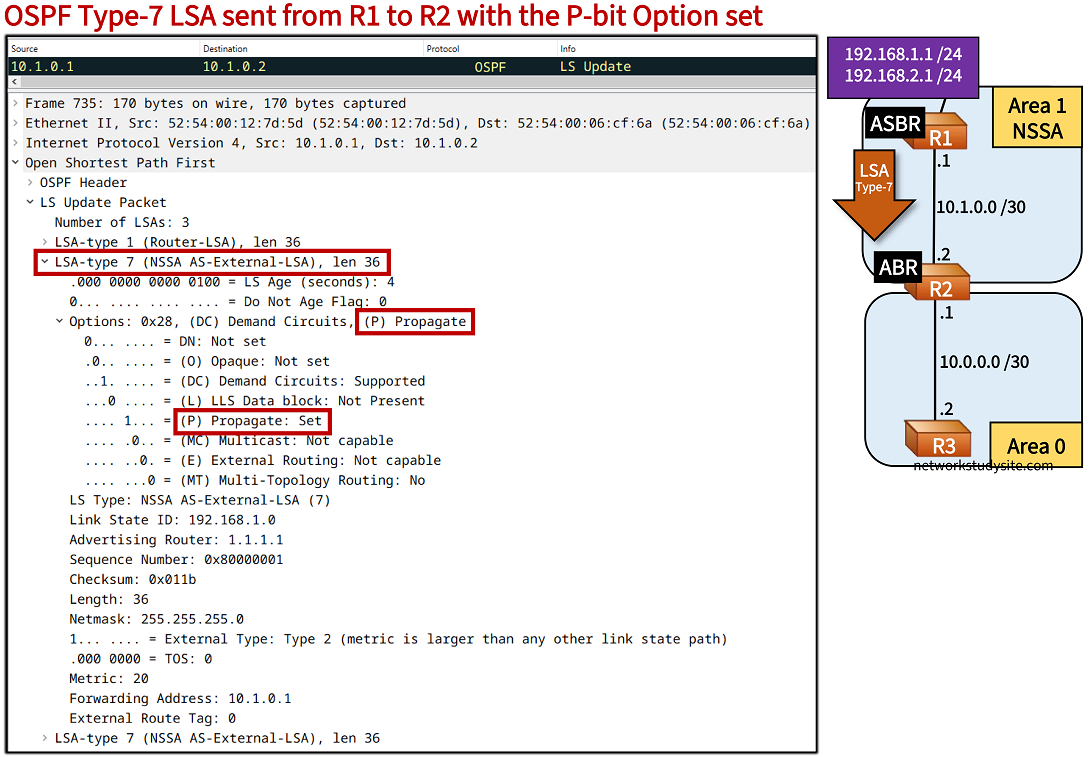
In the following scenario, area 1 is a NSSA with the ASBR R1 redistributing two prefixes into the OSPF domain. Because area 1 is a NSSA, the redistributed prefixes are advertised as Type-7 LSAs and then translated by the ABR R2 into Type-5 LSAs. The ABR knows it should translate the received Type-7 LSAs because R2 has set the P-bit (Propagate). This is shown in the following packet capture.
R2#show ip ospf database nssa-external

            OSPF Router with ID (2.2.2.2) (Process ID 10)

                Type-7 AS External Link States (Area 1)

  LS age: 821
  Options: (No TOS-capability, Type 7/5 translation, DC, Upward)      « The Propagate bit is set by R1
  LS Type: AS External Link
  Link State ID: 192.168.1.0 (External Network Number )
  Advertising Router: 1.1.1.1
  LS Seq Number: 80000001
  Checksum: 0x11B
  Length: 36
  Network Mask: /24
        Metric Type: 2 (Larger than any link state path)
        MTID: 0
        Metric: 20
        Forward Address: 10.1.0.1
        External Route Tag: 0

  LS age: 821
  Options: (No TOS-capability, Type 7/5 translation, DC, Upward)
  LS Type: AS External Link
  Link State ID: 192.168.2.0 (External Network Number )
  Advertising Router: 1.1.1.1
  LS Seq Number: 80000001
  Checksum: 0xF525
  Length: 36
  Network Mask: /24
        Metric Type: 2 (Larger than any link state path)
        MTID: 0
        Metric: 20
        Forward Address: 10.1.0.1
        External Route Tag: 0


R2#show ip ospf neighbor 1.1.1.1
 Neighbor 1.1.1.1, interface address 10.1.0.1
    In the area 1 via interface GigabitEthernet0/0
    Neighbor priority is 0, State is FULL, 18 state changes
    DR is 0.0.0.0 BDR is 0.0.0.0
    Options is 0x18 in Hello (N/P-bit, L-bit)                      « This signals the presence of the P-bit in options
    Options is 0x58 in DBD (N/P-bit, L-bit, O-bit)
    LLS Options is 0x1 (LR)
    Dead timer due in 00:00:39
    Neighbor is up for 00:14:32
    Index 1/1/1, retransmission queue length 0, number of retransmission 0
    First 0x0(0)/0x0(0)/0x0(0) Next 0x0(0)/0x0(0)/0x0(0)
    Last retransmission scan length is 0, maximum is 0
    Last retransmission scan time is 0 msec, maximum is 0 msec