IPSec VPN with PKI - Cisco Router IOS Certificate Authority
- How is IPSec VPN established with Digital Certificate? ‹
- IPSec VPN with PKI terminology ‹
- IPSec VPN crypto map with Certificate Authority ‹
- IPSec VPN IKEv1 with CA, NTP and DNS ‹
- IPSec VPN IKEv2 with CA, IPv6 and CoPP ‹
- Download section ‹
How is IPSec VPN established with Digital Certificate?
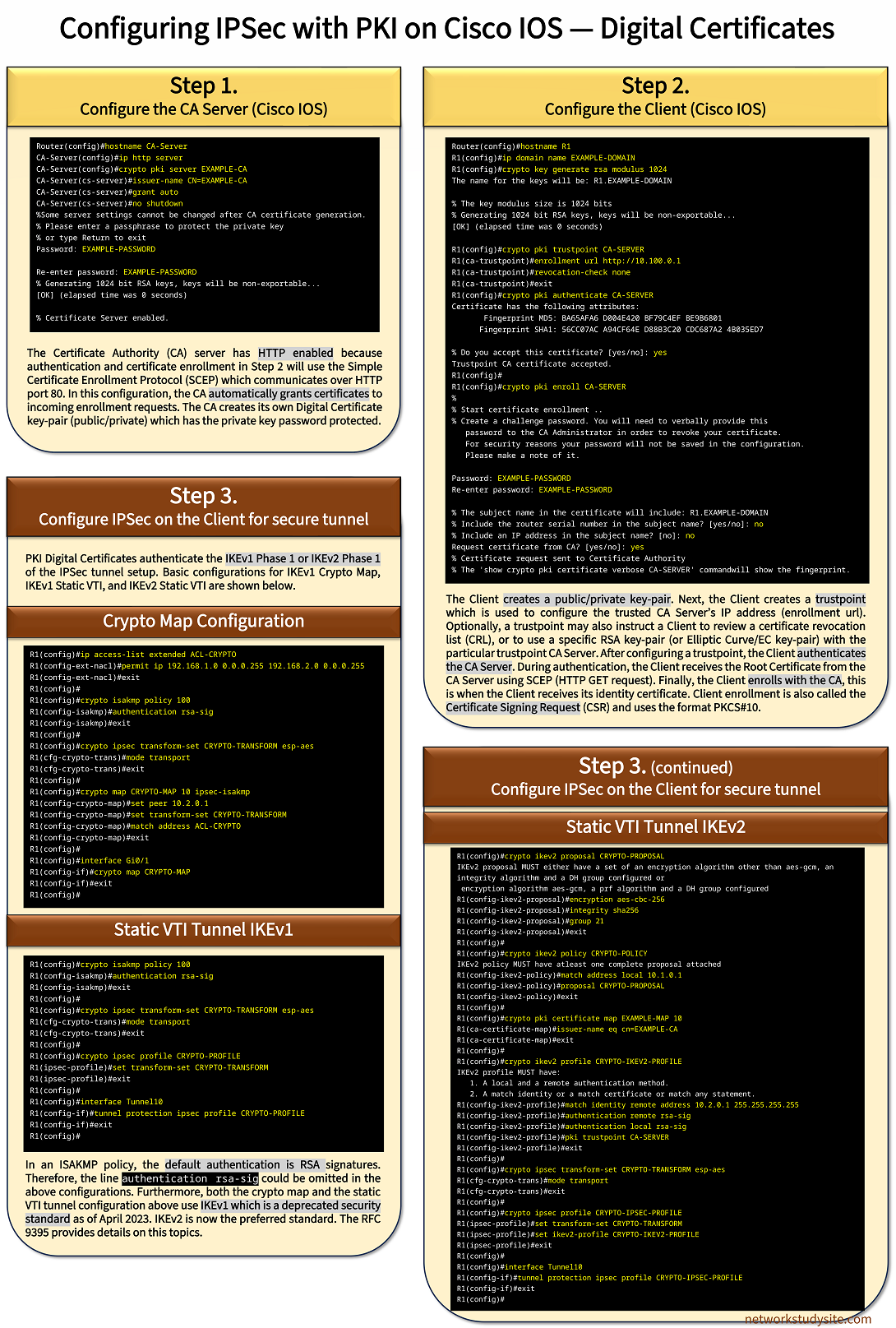
Download following image in high resolution PDF format, see Download section.
Configuration:
CA Server (PKI)
Router(config)#hostname CA-Server
CA-Server(config)#ip http server
CA-Server(config)#crypto pki server EXAMPLE-CA
CA-Server(cs-server)#issuer-name CN=EXAMPLE-CA
CA-Server(cs-server)#grant auto
CA-Server(cs-server)#no shutdown
%Some server settings cannot be changed after CA certificate generation.
% Please enter a passphrase to protect the private key
% or type Return to exit
Password:

Re-enter password:
% Generating 1024 bit RSA keys, keys will be non-exportable...
[OK] (elapsed time was 0 seconds)

% Certificate Server enabled.
Client (PKI)
Router(config)#hostname R1
R1(config)#ip domain name EXAMPLE-DOMAIN
R1(config)#crypto key generate rsa modulus 1024
The name for the keys will be: R1.EXAMPLE-DOMAIN

% The key modulus size is 1024 bits
% Generating 1024 bit RSA keys, keys will be non-exportable...
[OK] (elapsed time was 0 seconds)

R1(config)#crypto pki trustpoint CA-SERVER
R1(ca-trustpoint)#enrollment url http://10.100.0.1
R1(ca-trustpoint)#revocation-check none
R1(ca-trustpoint)#exit
R1(config)#crypto pki authenticate CA-SERVER
Certificate has the following attributes:
       Fingerprint MD5: BA65AFA6 D004E420 BF79C4EF BE9B6801
      Fingerprint SHA1: 56CC07AC A94CF64E D88B3C20 CDC687A2 4B035ED7

% Do you accept this certificate? [yes/no]: yes
Trustpoint CA certificate accepted.
R1(config)#
R1(config)#crypto pki enroll CA-SERVER
%
% Start certificate enrollment ..
% Create a challenge password. You will need to verbally provide this
   password to the CA Administrator in order to revoke your certificate.
   For security reasons your password will not be saved in the configuration.
   Please make a note of it.

Password:
Re-enter password:

% The subject name in the certificate will include: R1.EXAMPLE-DOMAIN
% Include the router serial number in the subject name? [yes/no]: no
% Include an IP address in the subject name? [no]: no
Request certificate from CA? [yes/no]: yes
% Certificate request sent to Certificate Authority
% The 'show crypto pki certificate verbose CA-SERVER' commandwill show the fingerprint.
Client (Crypto map)
R1(config)#ip access-list extended ACL-CRYPTO
R1(config-ext-nacl)#permit ip 192.168.1.0 0.0.0.255 192.168.2.0 0.0.0.255
R1(config-ext-nacl)#exit
R1(config)#
R1(config)#crypto isakmp policy 100
R1(config-isakmp)#authentication rsa-sig
R1(config-isakmp)#exit
R1(config)#
R1(config)#crypto ipsec transform-set CRYPTO-TRANSFORM esp-aes
R1(cfg-crypto-trans)#mode transport
R1(cfg-crypto-trans)#exit
R1(config)#
R1(config)#crypto map CRYPTO-MAP 10 ipsec-isakmp
R1(config-crypto-map)#set peer 10.2.0.1
R1(config-crypto-map)#set transform-set CRYPTO-TRANSFORM
R1(config-crypto-map)#match address ACL-CRYPTO
R1(config-crypto-map)#exit
R1(config)#
R1(config)#interface Gi0/1
R1(config-if)#crypto map CRYPTO-MAP
R1(config-if)#exit
R1(config)#
Client (IKEv1 VTI)
R1(config)#crypto isakmp policy 100
R1(config-isakmp)#authentication rsa-sig
R1(config-isakmp)#exit
R1(config)#
R1(config)#crypto ipsec transform-set CRYPTO-TRANSFORM esp-aes
R1(cfg-crypto-trans)#mode transport
R1(cfg-crypto-trans)#exit
R1(config)#
R1(config)#crypto ipsec profile CRYPTO-PROFILE
R1(ipsec-profile)#set transform-set CRYPTO-TRANSFORM
R1(ipsec-profile)#exit
R1(config)#
R1(config)#interface Tunnel10
R1(config-if)#tunnel protection ipsec profile CRYPTO-PROFILE
R1(config-if)#exit
R1(config)#
Client (IKEv2 VTI)
R1(config)#crypto ikev2 proposal CRYPTO-PROPOSAL
IKEv2 proposal MUST either have a set of an encryption algorithm other than aes-gcm, an integrity algorithm and a DH group configured or
 encryption algorithm aes-gcm, a prf algorithm and a DH group configured
R1(config-ikev2-proposal)#encryption aes-cbc-256
R1(config-ikev2-proposal)#integrity sha256
R1(config-ikev2-proposal)#group 21
R1(config-ikev2-proposal)#exit
R1(config)#
R1(config)#crypto ikev2 policy CRYPTO-POLICY
IKEv2 policy MUST have atleast one complete proposal attached
R1(config-ikev2-policy)#match address local 10.1.0.1
R1(config-ikev2-policy)#proposal CRYPTO-PROPOSAL
R1(config-ikev2-policy)#exit
R1(config)#
R1(config)#crypto pki certificate map EXAMPLE-MAP 10
R1(ca-certificate-map)#issuer-name eq cn=EXAMPLE-CA
R1(ca-certificate-map)#exit
R1(config)#
R1(config)#crypto ikev2 profile CRYPTO-IKEV2-PROFILE
IKEv2 profile MUST have:
   1. A local and a remote authentication method.
   2. A match identity or a match certificate or match any statement.
R1(config-ikev2-profile)#match identity remote address 10.2.0.1 255.255.255.255
R1(config-ikev2-profile)#authentication remote rsa-sig
R1(config-ikev2-profile)#authentication local rsa-sig
R1(config-ikev2-profile)#pki trustpoint CA-SERVER
R1(config-ikev2-profile)#exit
R1(config)#
R1(config)#crypto ipsec transform-set CRYPTO-TRANSFORM esp-aes
R1(cfg-crypto-trans)#mode transport
R1(cfg-crypto-trans)#exit
R1(config)#
R1(config)#crypto ipsec profile CRYPTO-IPSEC-PROFILE
R1(ipsec-profile)#set transform-set CRYPTO-TRANSFORM
R1(ipsec-profile)#set ikev2-profile CRYPTO-IKEV2-PROFILE
R1(ipsec-profile)#exit
R1(config)#
R1(config)#interface Tunnel10
R1(config-if)#tunnel protection ipsec profile CRYPTO-IPSEC-PROFILE
R1(config-if)#exit
R1(config)#
The above are minimal configurations that enable the Certificate Authority (CA) Server, the CA Client, and IPSec. The client configurations will need to be mirrored on each device participating in the Public Key Infrastructure (PKI). Also, the GRE/IPSec Tunnel configurations will need to be completed (tunnel IP, tunnel source/destination etc).
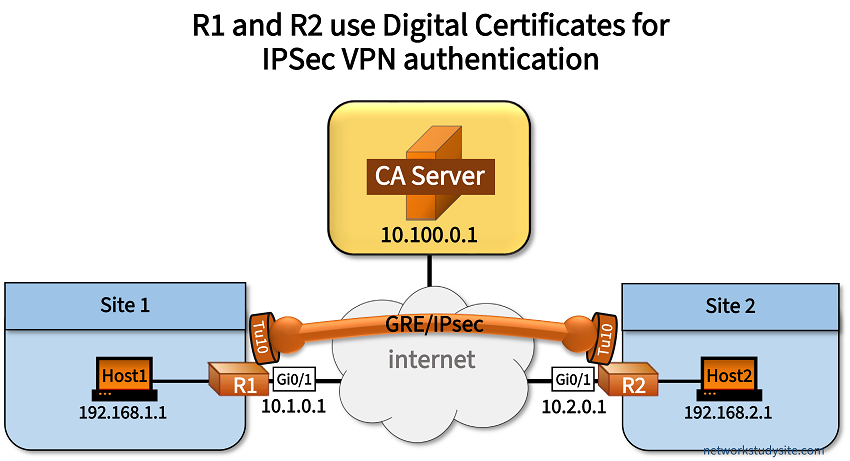
There are many more options that can be added to the above CA Server/CA Client settings, some of which are shown in the following sections of this blog post. The basic topology displayed below is used to practice these configurations.
IPSec VPN with PKI terminology
The following table describes several components that make up the Public Key Infrastructure (PKI) in context of Cisco IOS router Certificate Authority and PKI Client configuration.
| Component | Description |
|---|---|
| CA Server | The Certificate Authority (CA) Server signs and issues digital certificates to Clients that want to participate in the Public Key Infrastructure (PKI). A primary function of the CA Server is to create a self-signed Root Certificate which is essentially a private/public key-pair. The Root Certificate is at the center of the chain of trust which relies on the originating CA Server. In order to authenticate each other, PKI Clients need to trust and install the CA Server's Root Certificate.
In fact, you can verify that the PKI Client installs the CA-Server's root certificate by comparing the Fingerprint hash value of the downloaded certificate. Additionally, the CA Server issues identity certificates to requesting PKI Clients. This is also called the Client enrollment process or the Certificate Signing Request (CSR). Identity certificates include information which is specific to the PKI Client. |
| PKI Client | PKI Clients use the CA Server issued Root Certificate as well as the Client identity certificate to verify and authenticate each other. PKI Clients are devices that participate in the process of authenticating with digital certificates. Within IPSec, this happens during the IKE Phase 1 authentication, and can be configured using either IKEv1 or IKEv2. |
| Asymmetric authentication | Digital Certificates are an asymmetric method of authentication because they rely on a private/public key-pair to encrypt and decrypt data. Two main operations are performed.
This is in contrast to how shared-key (symmetric) authentication works, which relies on a single common password shared between devices. |
| SCEP | The Simple Certificate Enrollment Protocol is described in RFC 8894 and uses HTTP to communicate between devices that participate in the PKI. It enables CA Server authentication and the Client enrollment process. SCEP transfers digital certificates between a CA Server and a PKI Client through the use of HTTP messages, such as the GetCACert or GetCACaps message types. |
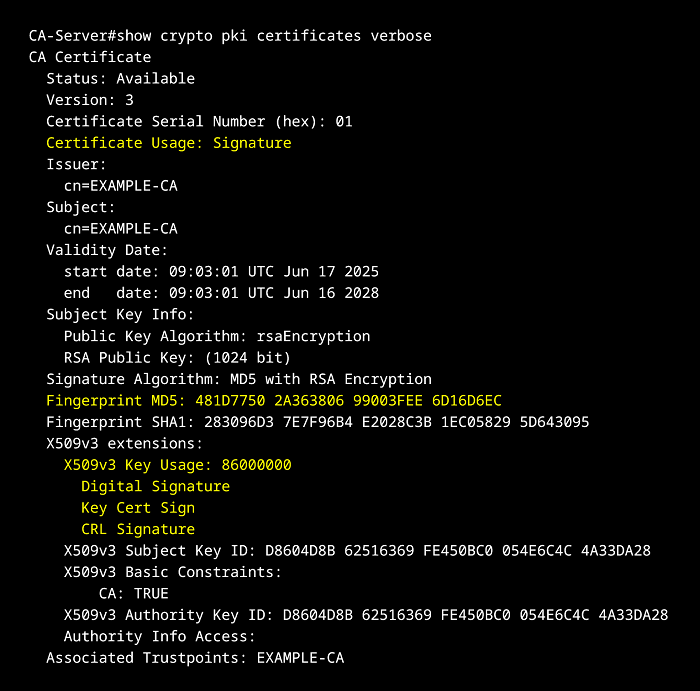
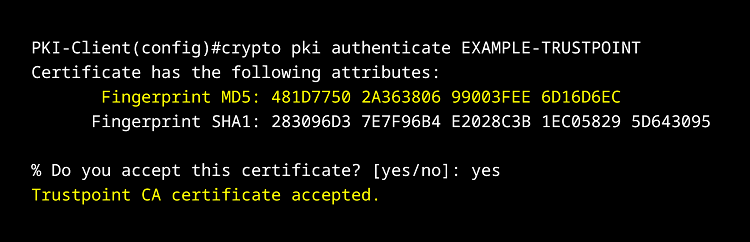
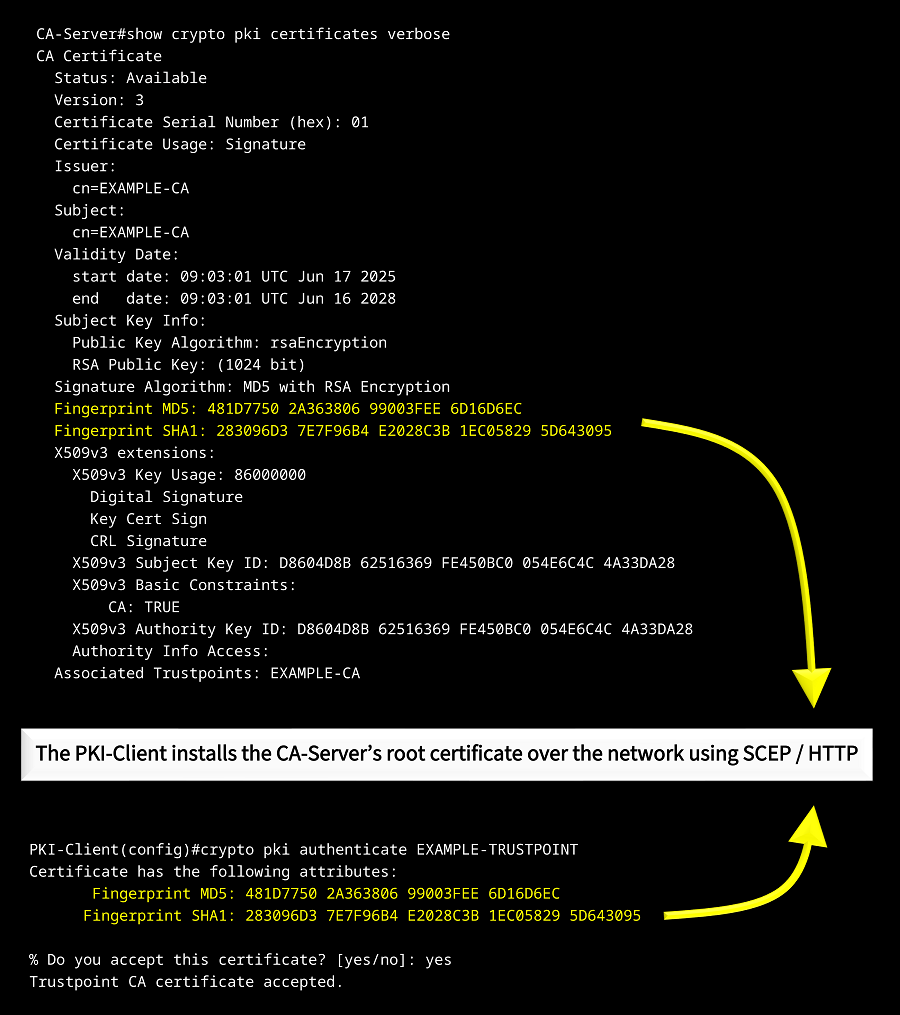
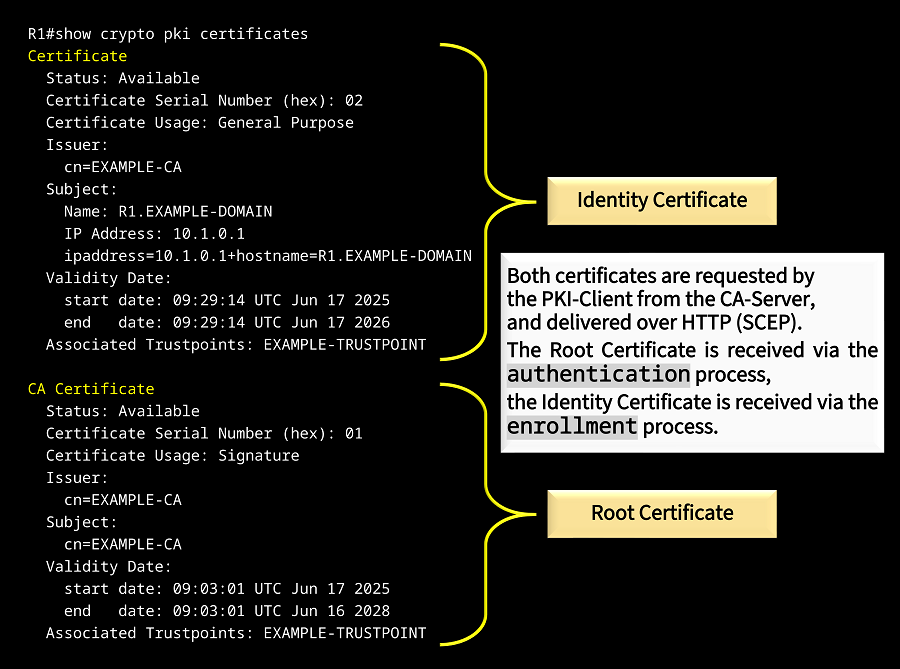
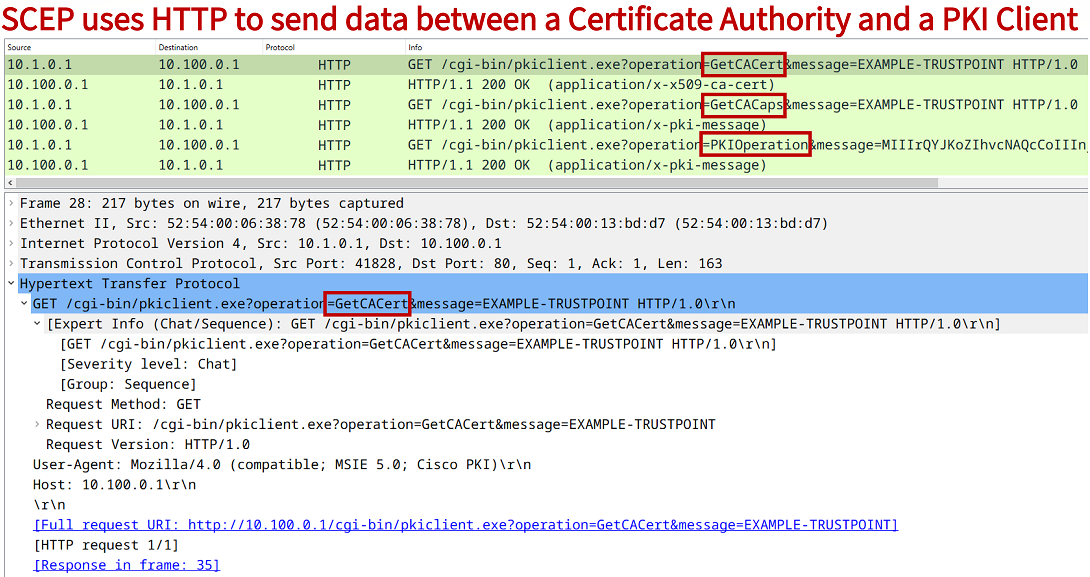
The above capture shows the process of certificate authentication and certificate enrollment. When the PKI-Client authenticates with the CA-Server, it requests the Root Certificate using the "GetCACert" message exchange. Subsequently, when the PKI-Client enrolls with the CA-Server, it requests an Identity Certificate using the "GetCACaps" and "PKIOperation" messages.
IPSec VPN crypto map with Certificate Authority
In the following example scenario, the PKI Clients generate a labeled RSA key-pair which is referenced in the PKI trustpoint configuration section. The trustpoint instructs a client to use a specific key-pair with the CA-Server, this is shown below.
R1(config)#crypto key generate rsa modulus 2048 label EXAMPLE-KEYPAIR
The name for the keys will be: EXAMPLE-KEYPAIR

% The key modulus size is 2048 bits
% Generating 2048 bit RSA keys, keys will be non-exportable...
[OK] (elapsed time was 0 seconds)

R1(config)#
R1(config)#crypto pki trustpoint EXAMPLE-TRUSTPOINT
R1(ca-trustpoint)#enrollment url http://10.100.0.1
R1(ca-trustpoint)#revocation-check none
R1(ca-trustpoint)#ip-address 10.1.0.1
R1(ca-trustpoint)#rsakeypair EXAMPLE-KEYPAIR
R1(ca-trustpoint)#source interface GigabitEthernet 0/1
R1(ca-trustpoint)#exit
R1(config)#
It is also visible in the above trustpoint configuration that the PKI Client R1 includes the IP address 10.1.0.1 in the subject name of the certificate during enrollment. This is accomplished with the command ip-address 10.1.0.1 displayed in the above configuration.
Furthermore, the Certificate Authority (CA) Server uses an access-list to allow HTTP traffic from authorized clients only. The CA-Server needs to accept HTTP traffic from PKI Clients, because the certificate authentication and enrollment process relies on HTTP.
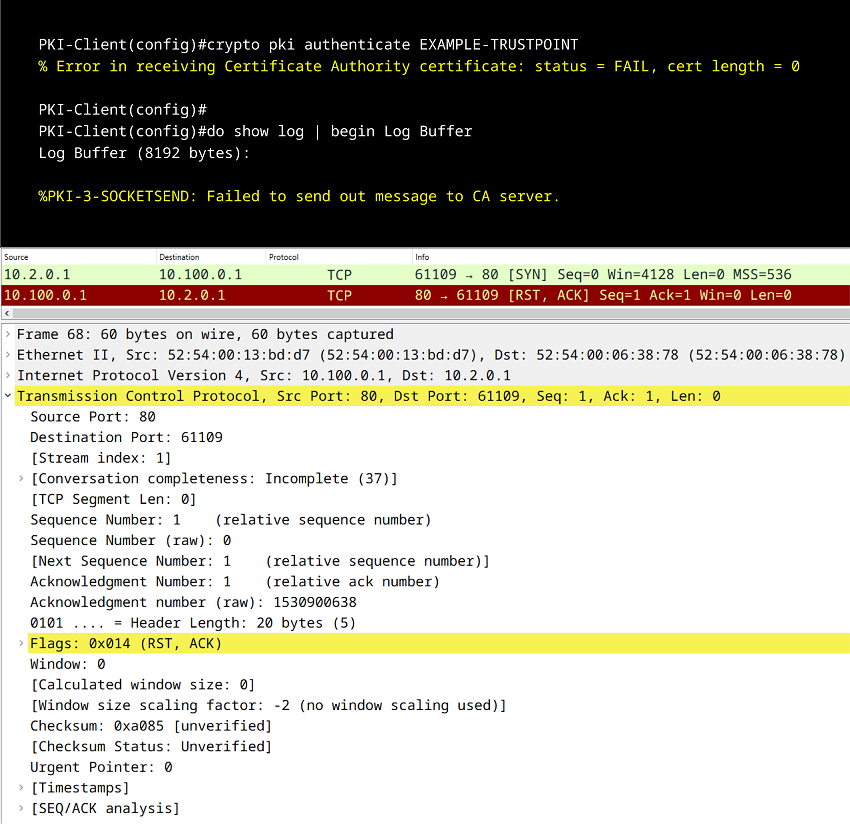
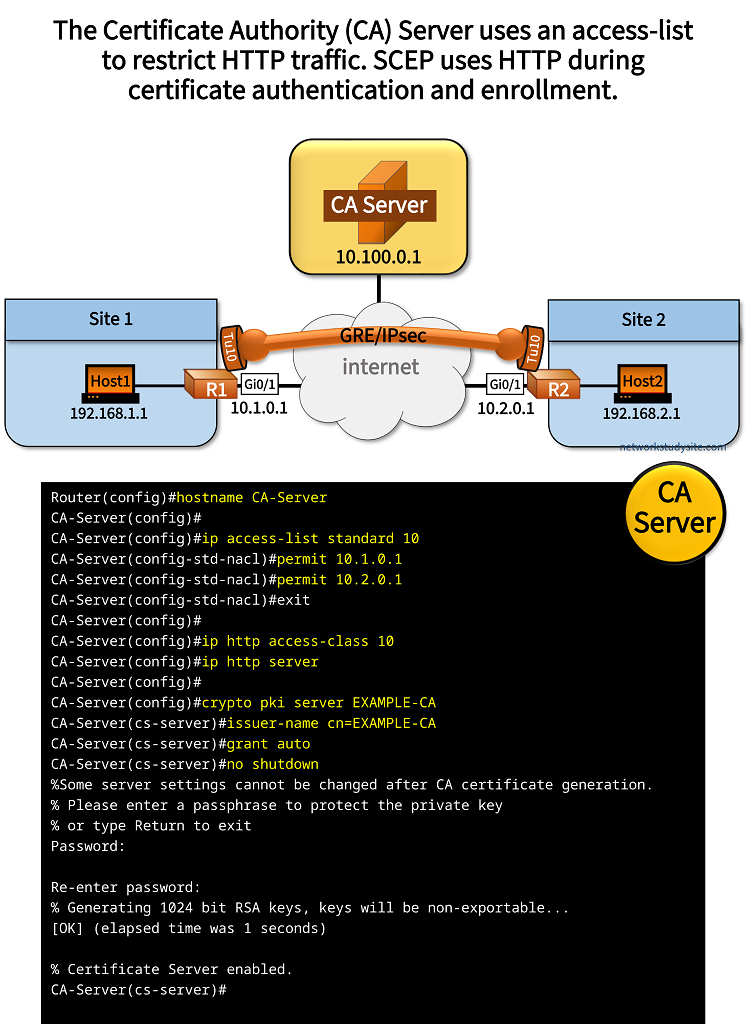
Configuration:
CA-Server
Router(config)#hostname CA-Server
CA-Server(config)#
CA-Server(config)#ip access-list standard 10
CA-Server(config-std-nacl)#permit 10.1.0.1
CA-Server(config-std-nacl)#permit 10.2.0.1
CA-Server(config-std-nacl)#exit
CA-Server(config)#
CA-Server(config)#ip http access-class 10
CA-Server(config)#ip http server
CA-Server(config)#
CA-Server(config)#crypto pki server EXAMPLE-CA
CA-Server(cs-server)#issuer-name cn=EXAMPLE-CA
CA-Server(cs-server)#grant auto
CA-Server(cs-server)#no shutdown
%Some server settings cannot be changed after CA certificate generation.
% Please enter a passphrase to protect the private key
% or type Return to exit
Password:

Re-enter password:
% Generating 1024 bit RSA keys, keys will be non-exportable...
[OK] (elapsed time was 1 seconds)

% Certificate Server enabled.
CA-Server(cs-server)#


#################################################
##                                             ##
##  Interface and routing configuration below  ##
##                                             ##
#################################################


CA-Server#show run int Gi0/0 | sec int
interface GigabitEthernet0/0
 description ** to internet **
 ip address 10.100.0.1 255.255.255.252
 duplex auto
 speed auto
 media-type rj45

CA-Server#show run | sec ^ip route
ip route 0.0.0.0 0.0.0.0 GigabitEthernet0/0 10.100.0.2
R1
Router(config)#hostname R1
R1(config)#ip domain name EXAMPLE-DOMAIN
R1(config)#crypto key generate rsa modulus 2048 label EXAMPLE-KEYPAIR
The name for the keys will be: EXAMPLE-KEYPAIR

% The key modulus size is 2048 bits
% Generating 2048 bit RSA keys, keys will be non-exportable...
[OK] (elapsed time was 0 seconds)

R1(config)#
R1(config)#crypto pki trustpoint EXAMPLE-TRUSTPOINT
R1(ca-trustpoint)#enrollment url http://10.100.0.1
R1(ca-trustpoint)#revocation-check none
R1(ca-trustpoint)#ip-address 10.1.0.1
R1(ca-trustpoint)#rsakeypair EXAMPLE-KEYPAIR
R1(ca-trustpoint)#source interface GigabitEthernet 0/1
R1(ca-trustpoint)#exit
R1(config)#
R1(config)#
R1(config)#crypto pki authenticate EXAMPLE-TRUSTPOINT
Certificate has the following attributes:
       Fingerprint MD5: F0FCA6FB 67763F09 A1FFC6BC C5B78FF6
      Fingerprint SHA1: A4FB9569 9730AADB 036ED9C8 01DF28E9 5642F869

% Do you accept this certificate? [yes/no]: yes
Trustpoint CA certificate accepted.
R1(config)#
R1(config)#
R1(config)#crypto pki enroll EXAMPLE-TRUSTPOINT
%
% Start certificate enrollment ..
% Create a challenge password. You will need to verbally provide this
   password to the CA Administrator in order to revoke your certificate.
   For security reasons your password will not be saved in the configuration.
   Please make a note of it.

Password:
Re-enter password:

% The subject name in the certificate will include: R1.EXAMPLE-DOMAIN
% Include the router serial number in the subject name? [yes/no]: no
% The IP address in the certificate is 10.1.0.1

Request certificate from CA? [yes/no]: yes
% Certificate request sent to Certificate Authority
% The 'show crypto pki certificate verbose EXAMPLE-TRUSTPOINT' commandwill show the fingerprint.

R1(config)#


############################################
##                                        ##
##  IPSec crypto-map configuration below  ##
##                                        ##
############################################


R1(config)#ip access-list extended ACL-CRYPTO
R1(config-ext-nacl)#permit ip 192.168.1.0 0.0.0.255 192.168.2.0 0.0.0.255
R1(config-ext-nacl)#exit
R1(config)#
R1(config)#crypto isakmp policy 100
R1(config-isakmp)#authentication rsa-sig
R1(config-isakmp)#encryption aes 256
R1(config-isakmp)#hash sha512
R1(config-isakmp)#lifetime 14400
R1(config-isakmp)#group 24
R1(config-isakmp)#exit
R1(config)#
R1(config)#crypto ipsec transform-set CRYPTO-TRANSFORM esp-aes
R1(cfg-crypto-trans)#mode tunnel
R1(cfg-crypto-trans)#exit
R1(config)#
R1(config)#crypto map CRYPTO-MAP 10 ipsec-isakmp
% NOTE: This new crypto map will remain disabled until a peer
        and a valid access list have been configured.
R1(config-crypto-map)#set peer 10.2.0.1
R1(config-crypto-map)#set transform-set CRYPTO-TRANSFORM
R1(config-crypto-map)#match address ACL-CRYPTO
R1(config-crypto-map)#exit
R1(config)#
R1(config)#interface GigabitEthernet 0/1
R1(config-if)#crypto map CRYPTO-MAP
R1(config-if)#exit
R1(config)#
R1(config)#exit


#################################################
##                                             ##
##  Interface and routing configuration below  ##
##                                             ##
#################################################


R1#show run int Gi0/1 | sec int
interface GigabitEthernet0/1
 description ** to internet **
 ip address 10.1.0.1 255.255.255.252
 duplex auto
 speed auto
 media-type rj45
 crypto map CRYPTO-MAP

R1#show run int Gi0/0 | sec int
interface GigabitEthernet0/0
 description ** to Site 1 **
 ip address 192.168.1.2 255.255.255.0
 duplex auto
 speed auto
 media-type rj45

R1#show run | sec ^ip route
ip route 0.0.0.0 0.0.0.0 GigabitEthernet0/1 10.1.0.2
R2
Router(config)#hostname R2
R2(config)#ip domain name EXAMPLE-DOMAIN
R2(config)#crypto key generate rsa modulus 2048 label EXAMPLE-KEYPAIR
The name for the keys will be: EXAMPLE-KEYPAIR

% The key modulus size is 2048 bits
% Generating 2048 bit RSA keys, keys will be non-exportable...
[OK] (elapsed time was 0 seconds)

R2(config)#
R2(config)#crypto pki trustpoint EXAMPLE-TRUSTPOINT
R2(ca-trustpoint)#enrollment url http://10.100.0.1
R2(ca-trustpoint)#revocation-check none
R2(ca-trustpoint)#ip-address 10.2.0.1
R2(ca-trustpoint)#rsakeypair EXAMPLE-KEYPAIR
R2(ca-trustpoint)#source interface GigabitEthernet 0/1
R2(ca-trustpoint)#exit
R2(config)#
R2(config)#
R2(config)#crypto pki authenticate EXAMPLE-TRUSTPOINT
Certificate has the following attributes:
       Fingerprint MD5: F0FCA6FB 67763F09 A1FFC6BC C5B78FF6
      Fingerprint SHA1: A4FB9569 9730AADB 036ED9C8 01DF28E9 5642F869

% Do you accept this certificate? [yes/no]: yes
Trustpoint CA certificate accepted.
R2(config)#
R2(config)#
R2(config)#crypto pki enroll EXAMPLE-TRUSTPOINT
%
% Start certificate enrollment ..
% Create a challenge password. You will need to verbally provide this
   password to the CA Administrator in order to revoke your certificate.
   For security reasons your password will not be saved in the configuration.
   Please make a note of it.

Password:
Re-enter password:

% The subject name in the certificate will include: R1.EXAMPLE-DOMAIN
% Include the router serial number in the subject name? [yes/no]: no
% The IP address in the certificate is 10.1.0.1

Request certificate from CA? [yes/no]: yes
% Certificate request sent to Certificate Authority
% The 'show crypto pki certificate verbose EXAMPLE-TRUSTPOINT' commandwill show the fingerprint.

R2(config)#


############################################
##                                        ##
##  IPSec crypto-map configuration below  ##
##                                        ##
############################################


R2(config)#ip access-list extended ACL-CRYPTO
R2(config-ext-nacl)#permit ip 192.168.2.0 0.0.0.255 192.168.1.0 0.0.0.255
R2(config-ext-nacl)#exit
R2(config)#
R2(config)#crypto isakmp policy 100
R2(config-isakmp)#authentication rsa-sig
R2(config-isakmp)#encryption aes 256
R2(config-isakmp)#hash sha512
R2(config-isakmp)#lifetime 14400
R2(config-isakmp)#group 24
R2(config-isakmp)#exit
R2(config)#
R2(config)#crypto ipsec transform-set CRYPTO-TRANSFORM esp-aes
R2(cfg-crypto-trans)#mode tunnel
R2(cfg-crypto-trans)#exit
R2(config)#
R2(config)#crypto map CRYPTO-MAP 10 ipsec-isakmp
% NOTE: This new crypto map will remain disabled until a peer
        and a valid access list have been configured.
R2(config-crypto-map)#set peer 10.1.0.1
R2(config-crypto-map)#set transform-set CRYPTO-TRANSFORM
R2(config-crypto-map)#match address ACL-CRYPTO
R2(config-crypto-map)#exit
R2(config)#
R2(config)#interface GigabitEthernet 0/1
R2(config-if)#crypto map CRYPTO-MAP
R2(config-if)#exit
R2(config)#


#################################################
##                                             ##
##  Interface and routing configuration below  ##
##                                             ##
#################################################


R2#show run int Gi0/1 | sec int
interface GigabitEthernet0/1
 description ** to internet **
 ip address 10.2.0.1 255.255.255.252
 duplex auto
 speed auto
 media-type rj45
 crypto map CRYPTO-MAP

R2#show run int Gi0/0 | sec int
interface GigabitEthernet0/0
 description ** to Site 2 **
 ip address 192.168.2.2 255.255.255.0
 duplex auto
 speed auto
 media-type rj45

R2#show run | sec ^ip route
ip route 0.0.0.0 0.0.0.0 GigabitEthernet0/1 10.2.0.2
CA-Server#show control-plane host open-ports
Active internet connections (servers and established)
Prot               Local Address             Foreign Address                  Service    State
 tcp                        *:22                         *:0               SSH-Server   LISTEN
 tcp                        *:23                         *:0                   Telnet   LISTEN
 tcp                        *:80                         *:0                HTTP CORE   LISTEN      « HTTP port 80 open
 tcp                        *:80                         *:0                HTTP CORE   LISTEN


CA-Server#show crypto pki server
Certificate Server EXAMPLE-CA:
    Status: enabled                                                « CA Server is enabled
    State: enabled
    Server's configuration is locked  (enter "shut" to unlock it)
    Issuer name: cn=EXAMPLE-CA
    CA cert fingerprint: F0FCA6FB 67763F09 A1FFC6BC C5B78FF6       « Fingerprint of CA Root Certificate used for signing
    Granting mode is: auto
    Last certificate issued serial number (hex): 3
    CA certificate expiration timer: 16:20:38 UTC Nov 6 2027
    CRL NextUpdate timer: 22:20:38 UTC Nov 6 2024
    Current primary storage dir: nvram:
    Database Level: Minimum - no cert data written to storage


R1#show crypto pki trustpoints EXAMPLE-TRUSTPOINT status
Trustpoint EXAMPLE-TRUSTPOINT:
  Issuing CA certificate configured:
    Subject Name:
     cn=EXAMPLE-CA
    Fingerprint MD5: F0FCA6FB 67763F09 A1FFC6BC C5B78FF6           « CA Root Certificate is installed on R1 (PKI Client) after authentication
    Fingerprint SHA1: A4FB9569 9730AADB 036ED9C8 01DF28E9 5642F869
  Router General Purpose certificate configured:
    Subject Name:
     ipaddress=10.1.0.1+hostname=R1.EXAMPLE-DOMAIN
    Fingerprint MD5: 8DF6B348 C36379C9 01A2F6D4 ADD4A6DF
    Fingerprint SHA1: 58F0CA90 56C72204 E160C3FE BB577108 A1F9B0DB
  Last enrollment status: Granted
  State:
    Keys generated ............. Yes (General Purpose, non-exportable)
    Issuing CA authenticated ....... Yes
    Certificate request(s) ..... Yes


R1#show crypto pki certificates
Certificate
  Status: Available
  Certificate Serial Number (hex): 02
  Certificate Usage: General Purpose                               « This is R1's identity certificate received after enrollment
  Issuer:
    cn=EXAMPLE-CA
  Subject:
    Name: R1.EXAMPLE-DOMAIN
    IP Address: 10.1.0.1
    ipaddress=10.1.0.1+hostname=R1.EXAMPLE-DOMAIN
  Validity Date:
    start date: 16:30:00 UTC Nov 6 2024
    end   date: 16:30:00 UTC Nov 6 2025
  Associated Trustpoints: EXAMPLE-TRUSTPOINT

CA Certificate
  Status: Available
  Certificate Serial Number (hex): 01
  Certificate Usage: Signature                                     « This is the CA Root Certificate received on R1 after authentication
  Issuer:
    cn=EXAMPLE-CA
  Subject:
    cn=EXAMPLE-CA
  Validity Date:
    start date: 16:20:38 UTC Nov 6 2024
    end   date: 16:20:38 UTC Nov 6 2027
  Associated Trustpoints: EXAMPLE-TRUSTPOINT


R1#show crypto isakmp sa detail
Codes: C - IKE configuration mode, D - Dead Peer Detection
       K - Keepalives, N - NAT-traversal
       T - cTCP encapsulation, X - IKE Extended Authentication
       psk - Preshared key, rsig - RSA signature
       renc - RSA encryption
IPv4 Crypto ISAKMP SA

C-id  Local           Remote          I-VRF  Status Encr Hash   Auth DH Lifetime Cap.

1001  10.1.0.1        10.2.0.1               ACTIVE aes  sha512 rsig 24 02:59:58       « RSA-Signature displayed for ISAKMP authentication
       Engine-id:Conn-id =  SW:1

IPv6 Crypto ISAKMP SA


R1#show crypto session brief
Status: A- Active, U - Up, D - Down, I - Idle, S - Standby, N - Negotiating
        K - No IKE
ivrf = (none)
Peer            I/F          Username        Group/Phase1_id          Uptime   Status
10.2.0.1        Gi0/1                        10.2.0.1                 01:03:39 UA      « IPSec crypto-map security association is established
IPSec VPN IKEv1 with CA, NTP and DNS
In this example scenario, the PKI network CA-Server and Clients rely on the NTP Server (10.200.0.1) for time synchronization. The NTP Server uses an access-list to allow time synchronization for only authorized Clients. The command ntp access-group serve 10 attaches the ACL to the NTP configuration so the NTP server will reply to only permitted hosts.
Furthermore, a DNS Server (also 10.200.0.1) is configured to provide name resolution for the PKI network. This means, instead of using an IP address in the trustpoint enrollment configuration, now a domain name can be used.
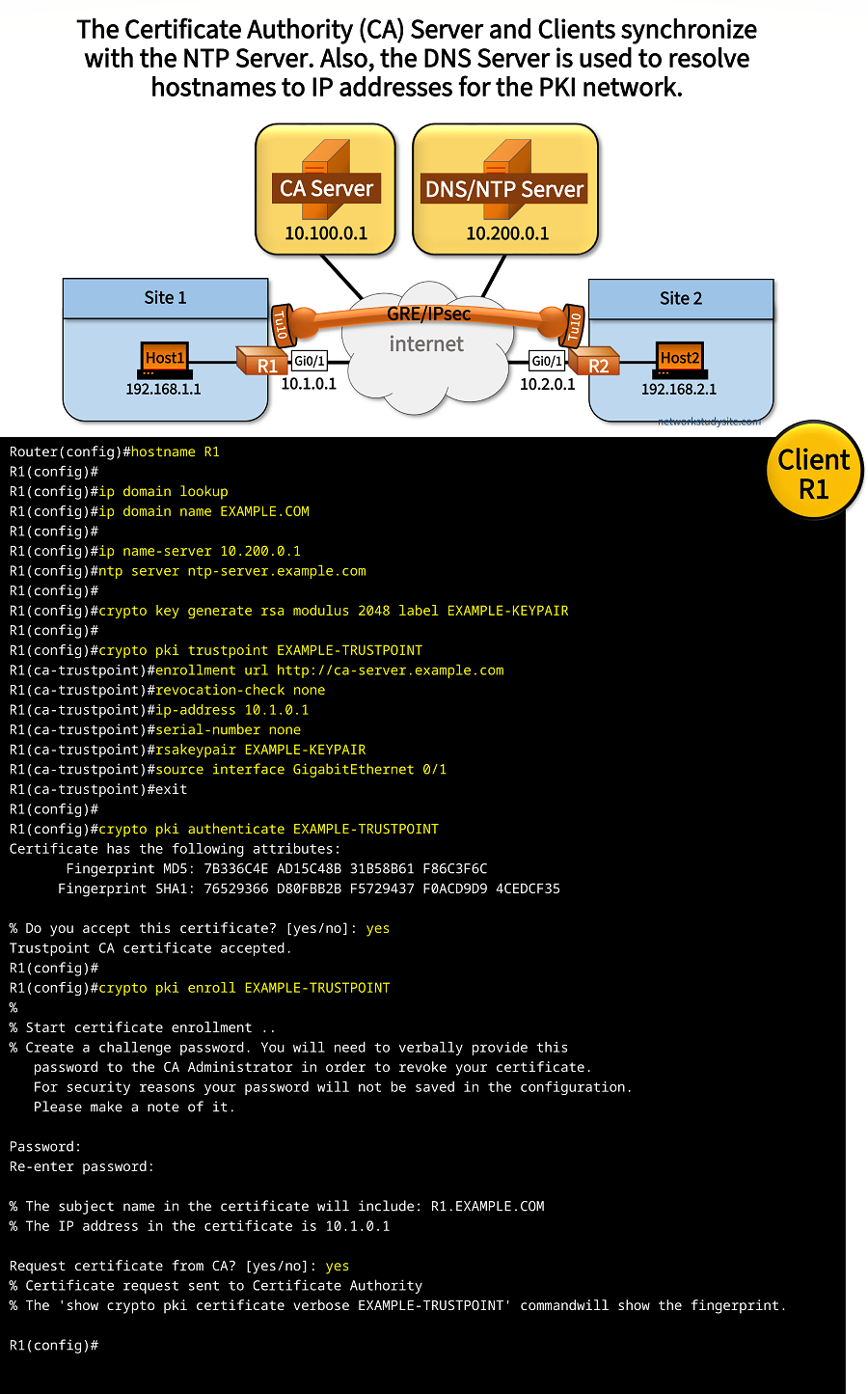
Configuration:
CA-Server
Router(config)#hostname CA-Server
CA-Server(config)#ip http server
CA-Server(config)#
CA-Server(config)#ip domain lookup
CA-Server(config)#ip name-server 10.200.0.1
CA-Server(config)#ntp server ntp-server.example.com
CA-Server(config)#
CA-Server(config)#
CA-Server(config)#crypto pki server EXAMPLE-CA
CA-Server(cs-server)#issuer-name CN=EXAMPLE.COM, O=EXAMPLE-ORGANIZATION, OU=EXAMPE-ORGUNIT
CA-Server(cs-server)#grant auto
CA-Server(cs-server)#lifetime ca-certificate 360
CA-Server(cs-server)#lifetime certificate 180
CA-Server(cs-server)#no shutdown
%Some server settings cannot be changed after CA certificate generation.
% Please enter a passphrase to protect the private key
% or type Return to exit
Password:

Re-enter password:
% Generating 1024 bit RSA keys, keys will be non-exportable...
[OK] (elapsed time was 0 seconds)

% Certificate Server enabled.
CA-Server(cs-server)#
CA-Server(cs-server)#exit
CA-Server(config)#


#################################################
##                                             ##
##  Interface and routing configuration below  ##
##                                             ##
#################################################


CA-Server#show run int Gi0/0 | sec int
interface GigabitEthernet0/0
 description ** to internet **
 ip address 10.100.0.1 255.255.255.252
 duplex auto
 speed auto
 media-type rj45

CA-Server#show run | sec ^ip route
ip route 0.0.0.0 0.0.0.0 GigabitEthernet0/0 10.100.0.2
NTP/DNS Server
DNS-NTP(config)#
DNS-NTP(config)#access-list 10 permit 10.1.0.1
DNS-NTP(config)#access-list 10 permit 10.2.0.1
DNS-NTP(config)#access-list 10 permit 10.100.0.1
DNS-NTP(config)#access-list 10 deny   any
DNS-NTP(config)#
DNS-NTP(config)#ntp access-group serve 10
DNS-NTP(config)#ntp source GigabitEthernet0/0
DNS-NTP(config)#ntp master 5
DNS-NTP(config)#
DNS-NTP(config)#
DNS-NTP(config)#ip dns server
DNS-NTP(config)#ip host ca-server.example.com 10.100.0.1
DNS-NTP(config)#ip host ntp-server.example.com 10.200.0.1
DNS-NTP(config)#


#################################################
##                                             ##
##  Interface and routing configuration below  ##
##                                             ##
#################################################


DNS-NTP#show run int Gi0/0 | sec int
interface GigabitEthernet0/0
 description ** to internet **
 ip address 10.200.0.1 255.255.255.252
 duplex auto
 speed auto
 media-type rj45

DNS-NTP#show run | sec ^ip route
ip route 0.0.0.0 0.0.0.0 GigabitEthernet0/0 10.200.0.2


###################################################
##                                               ##
##  Locally verifying DNS and NTP service below  ##
##                                               ##
###################################################


DNS-NTP#show host
Default domain is not set
Name/address lookup uses static mappings

Codes: UN - unknown, EX - expired, OK - OK, ?? - revalidate
       temp - temporary, perm - permanent
       NA - Not Applicable None - Not defined

Host                      Port  Flags      Age Type   Address(es)
ca-server.example.com     None  (perm, OK)  0   IP    10.100.0.1
ntp-server.example.com    None  (perm, OK)  0   IP    10.200.0.1

DNS-NTP#show control-plane host open-ports
Active internet connections (servers and established)
Prot               Local Address             Foreign Address                  Service    State
 tcp                        *:23                         *:0                   Telnet   LISTEN
 tcp                        *:53                         *:0               DNS Server   LISTEN
 tcp                        *:53                         *:0               DNS Server   LISTEN
 udp                        *:53                         *:0               DNS Server   LISTEN
 udp                       *:123                         *:0                      NTP   LISTEN

DNS-NTP#
R1
Router(config)#hostname R1
R1(config)#
R1(config)#ip domain lookup
R1(config)#ip domain name EXAMPLE.COM
R1(config)#
R1(config)#ip name-server 10.200.0.1
R1(config)#ntp server ntp-server.example.com
R1(config)#
R1(config)#crypto key generate rsa modulus 2048 label EXAMPLE-KEYPAIR
The name for the keys will be: EXAMPLE-KEYPAIR

% The key modulus size is 2048 bits
% Generating 2048 bit RSA keys, keys will be non-exportable...
[OK] (elapsed time was 0 seconds)

R1(config)#
R1(config)#crypto pki trustpoint EXAMPLE-TRUSTPOINT
R1(ca-trustpoint)#enrollment url http://ca-server.example.com
R1(ca-trustpoint)#revocation-check none
R1(ca-trustpoint)#ip-address 10.1.0.1
R1(ca-trustpoint)#serial-number none
R1(ca-trustpoint)#rsakeypair EXAMPLE-KEYPAIR
R1(ca-trustpoint)#source interface GigabitEthernet 0/1
R1(ca-trustpoint)#exit
R1(config)#
R1(config)#crypto pki authenticate EXAMPLE-TRUSTPOINT
Certificate has the following attributes:
       Fingerprint MD5: 7B336C4E AD15C48B 31B58B61 F86C3F6C
      Fingerprint SHA1: 76529366 D80FBB2B F5729437 F0ACD9D9 4CEDCF35

% Do you accept this certificate? [yes/no]: yes
Trustpoint CA certificate accepted.
R1(config)#
R1(config)#crypto pki enroll EXAMPLE-TRUSTPOINT
%
% Start certificate enrollment ..
% Create a challenge password. You will need to verbally provide this
   password to the CA Administrator in order to revoke your certificate.
   For security reasons your password will not be saved in the configuration.
   Please make a note of it.

Password:
Re-enter password:

% The subject name in the certificate will include: R1.EXAMPLE.COM
% The IP address in the certificate is 10.1.0.1

Request certificate from CA? [yes/no]: yes
% Certificate request sent to Certificate Authority
% The 'show crypto pki certificate verbose EXAMPLE-TRUSTPOINT' commandwill show the fingerprint.

R1(config)#


#######################################
##                                   ##
##  IPSec IKEv1 configuration below  ##
##                                   ##
#######################################


R1(config)#
R1(config)#crypto isakmp policy 10
R1(config-isakmp)#encr aes 256
R1(config-isakmp)#hash sha256
R1(config-isakmp)#group 24
R1(config-isakmp)#lifetime 43200
R1(config-isakmp)#exit
R1(config)#
R1(config)#
R1(config)#crypto ipsec transform-set CRYPTO-TRANSFORM esp-aes 256
R1(cfg-crypto-trans)#mode transport
R1(cfg-crypto-trans)#exit
R1(config)#
R1(config)#
R1(config)#crypto ipsec profile IPSEC-PROFILE
R1(ipsec-profile)#set transform-set CRYPTO-TRANSFORM
R1(ipsec-profile)#set pfs group21
R1(ipsec-profile)#exit
R1(config)#
R1(config)#
R1(config)#interface Tunnel10
R1(config-if)#tunnel protection ipsec profile IPSEC-PROFILE
R1(config-if)#exit
R1(config)#


#################################################
##                                             ##
##  Interface and routing configuration below  ##
##                                             ##
#################################################


R1#show run interface Tunnel10 | sec int
interface Tunnel10
 description ** IPsec tunnel to Site 2 **
 ip address 192.168.100.1 255.255.255.252
 tunnel source GigabitEthernet0/1
 tunnel destination 10.2.0.1
 tunnel protection ipsec profile IPSEC-PROFILE

R1#show run int Gi0/1 | sec int
interface GigabitEthernet0/1
 description ** to internet **
 ip address 10.1.0.1 255.255.255.252
 duplex auto
 speed auto
 media-type rj45

R1#show run int Gi0/0 | sec int
interface GigabitEthernet0/0
 description ** to Site 1 **
 ip address 192.168.1.2 255.255.255.0
 duplex auto
 speed auto
 media-type rj45

R1#show run | sec ^ip route
ip route 0.0.0.0 0.0.0.0 GigabitEthernet0/1 10.1.0.2
R2
Router(config)#hostname R2
R2(config)#
R2(config)#ip domain lookup
R2(config)#ip domain name EXAMPLE.COM
R2(config)#
R2(config)#ip name-server 10.200.0.1
R2(config)#ntp server ntp-server.example.com
R2(config)#
R2(config)#crypto key generate rsa modulus 2048 label EXAMPLE-KEYPAIR
The name for the keys will be: EXAMPLE-KEYPAIR

% The key modulus size is 2048 bits
% Generating 2048 bit RSA keys, keys will be non-exportable...
[OK] (elapsed time was 2 seconds)

R2(config)#
R2(config)#
R2(config)#crypto pki trustpoint EXAMPLE-TRUSTPOINT
R2(ca-trustpoint)#enrollment url http://ca-server.example.com
R2(ca-trustpoint)#revocation-check none
R2(ca-trustpoint)#ip-address 10.2.0.1
R2(ca-trustpoint)#serial-number none
R2(ca-trustpoint)#rsakeypair EXAMPLE-KEYPAIR
R2(ca-trustpoint)#source interface GigabitEthernet 0/1
R2(ca-trustpoint)#exit
R2(config)#
R2(config)#crypto pki authenticate EXAMPLE-TRUSTPOINT
Certificate has the following attributes:
       Fingerprint MD5: 7B336C4E AD15C48B 31B58B61 F86C3F6C
      Fingerprint SHA1: 76529366 D80FBB2B F5729437 F0ACD9D9 4CEDCF35

% Do you accept this certificate? [yes/no]: yes
Trustpoint CA certificate accepted.
R2(config)#
R2(config)#crypto pki enroll EXAMPLE-TRUSTPOINT
%
% Start certificate enrollment ..
% Create a challenge password. You will need to verbally provide this
   password to the CA Administrator in order to revoke your certificate.
   For security reasons your password will not be saved in the configuration.
   Please make a note of it.

Password:
Re-enter password:

% The subject name in the certificate will include: R2.EXAMPLE.COM
% The IP address in the certificate is 10.2.0.1

Request certificate from CA? [yes/no]: yes
% Certificate request sent to Certificate Authority
% The 'show crypto pki certificate verbose EXAMPLE-TRUSTPOINT' commandwill show the fingerprint.

R2(config)#


#######################################
##                                   ##
##  IPSec IKEv1 configuration below  ##
##                                   ##
#######################################


R2(config)#
R2(config)#crypto isakmp policy 10
R2(config-isakmp)#encr aes 256
R2(config-isakmp)#hash sha256
R2(config-isakmp)#group 24
R2(config-isakmp)#lifetime 43200
R2(config-isakmp)#exit
R2(config)#
R2(config)#
R2(config)#crypto ipsec transform-set CRYPTO-TRANSFORM esp-aes 256
R2(cfg-crypto-trans)#mode transport
R2(cfg-crypto-trans)#exit
R2(config)#
R2(config)#
R2(config)#crypto ipsec profile IPSEC-PROFILE
R2(ipsec-profile)#set transform-set CRYPTO-TRANSFORM
R2(ipsec-profile)#set pfs group21
R2(ipsec-profile)#exit
R2(config)#
R2(config)#
R2(config)#interface Tunnel10
R2(config-if)#tunnel protection ipsec profile IPSEC-PROFILE
R2(config-if)#exit
R2(config)#


#################################################
##                                             ##
##  Interface and routing configuration below  ##
##                                             ##
#################################################


R2#show run interface Tunnel10 | sec int
interface Tunnel10
 description ** IPsec tunnel to Site 1 **
 ip address 192.168.100.2 255.255.255.252
 tunnel source GigabitEthernet0/1
 tunnel destination 10.1.0.1
 tunnel protection ipsec profile IPSEC-PROFILE

R2#show run int Gi0/1 | sec int
interface GigabitEthernet0/1
 description ** to internet **
 ip address 10.2.0.1 255.255.255.252
 duplex auto
 speed auto
 media-type rj45

R2#show run int Gi0/0 | sec int
interface GigabitEthernet0/0
 description ** to Site 2 **
 ip address 192.168.2.2 255.255.255.0
 duplex auto
 speed auto
 media-type rj45

R2#show run | sec ^ip route
ip route 0.0.0.0 0.0.0.0 GigabitEthernet0/1 10.2.0.2
R1#show ntp associations

  address         ref clock       st   when   poll reach  delay  offset   disp
*~10.200.0.1      127.127.1.1      5     59     64     1  2.123  -1.468 7937.5     « Client R1 receives time information from the NTP Server
 * sys.peer, # selected, + candidate, - outlyer, x falseticker, ~ configured


R1#show ntp status
Clock is synchronized, stratum 6, reference is 10.200.0.1                    « R1 and the NTP Server are synchronized
nominal freq is 1000.0003 Hz, actual freq is 999.6091 Hz, precision is 2**17
ntp uptime is 614400 (1/100 of seconds), resolution is 1001
reference time is EAD871E5.26EA4CE2 (11:17:57.152 UTC Fri Nov 8 2024)
clock offset is -8.7342 msec, root delay is 1.23 msec
root dispersion is 64.45 msec, peer dispersion is 5.89 msec
loopfilter state is 'CTRL' (Normal Controlled Loop), drift is 0.000391158 s/s
system poll interval is 64, last update was 301 sec ago.


CA-Server#show ntp status
Clock is synchronized, stratum 6, reference is 10.200.0.1                    « The CA Server and the NTP Server are synchronized
nominal freq is 1000.0003 Hz, actual freq is 999.9950 Hz, precision is 2**17
ntp uptime is 589900 (1/100 of seconds), resolution is 1001
reference time is EAD87142.3EB6DA2D (11:15:14.244 UTC Fri Nov 8 2024)
clock offset is 69.2716 msec, root delay is 0.92 msec
root dispersion is 101.75 msec, peer dispersion is 3.06 msec
loopfilter state is 'CTRL' (Normal Controlled Loop), drift is 0.000005244 s/s
system poll interval is 256, last update was 480 sec ago.


R1#show crypto pki certificates
Certificate
  Status: Available
  Certificate Serial Number (hex): 02
  Certificate Usage: General Purpose
  Issuer:                              « CA Server includes additional information which is also added to the identity certificate
    cn=EXAMPLE.COM
    o=EXAMPLE-ORGANIZATION
    ou=EXAMPE-ORGUNIT
  Subject:
    Name: R1.EXAMPLE.COM
    IP Address: 10.1.0.1
    ipaddress=10.1.0.1+hostname=R1.EXAMPLE.COM
  Validity Date:
    start date: 09:45:23 UTC Nov 8 2024
    end   date: 09:45:23 UTC May 7 2025
  Associated Trustpoints: EXAMPLE-TRUSTPOINT

CA Certificate
  Status: Available
  Certificate Serial Number (hex): 01
  Certificate Usage: Signature
  Issuer:
    cn=EXAMPLE.COM
    o=EXAMPLE-ORGANIZATION
    ou=EXAMPE-ORGUNIT
  Subject:
    cn=EXAMPLE.COM
    o=EXAMPLE-ORGANIZATION
    ou=EXAMPE-ORGUNIT
  Validity Date:
    start date: 09:44:34 UTC Nov 8 2024
    end   date: 09:44:34 UTC Nov 3 2025
  Associated Trustpoints: EXAMPLE-TRUSTPOINT


R1#show crypto session br
Status: A- Active, U - Up, D - Down, I - Idle, S - Standby, N - Negotiating
        K - No IKE
ivrf = (none)
Peer            I/F          Username        Group/Phase1_id          Uptime   Status
10.2.0.1        Tu10                         10.2.0.1                 01:34:49 UA       « IPSec Security Associations are Up and Active
10.2.0.1        Tu10                         10.2.0.1                 01:34:49 UA


R1#show crypto isakmp sa detail
Codes: C - IKE configuration mode, D - Dead Peer Detection
       K - Keepalives, N - NAT-traversal
       T - cTCP encapsulation, X - IKE Extended Authentication
       psk - Preshared key, rsig - RSA signature
       renc - RSA encryption
IPv4 Crypto ISAKMP SA

C-id  Local           Remote          I-VRF  Status Encr Hash   Auth DH Lifetime Cap.

1001  10.1.0.1        10.2.0.1               ACTIVE aes  sha256 rsig 24 10:25:04        « PKI is used to authenticate with RSA-Signature
       Engine-id:Conn-id =  SW:1

1002  10.1.0.1        10.2.0.1               ACTIVE aes  sha256 rsig 24 10:25:11
       Engine-id:Conn-id =  SW:2

IPv6 Crypto ISAKMP SA


Host1#ping 192.168.2.1                 « Host1 can reach Host2 over the IPSec tunnel
Type escape sequence to abort.
Sending 5, 100-byte ICMP Echos to 192.168.2.1, timeout is 2 seconds:
!!!!!
Success rate is 100 percent (5/5), round-trip min/avg/max = 4/4/5 ms


Host1#trace 192.168.2.1 probe 1
Type escape sequence to abort.
Tracing the route to 192.168.2.1
VRF info: (vrf in name/id, vrf out name/id)
  1 192.168.1.2 2 msec
  2 192.168.100.2 4 msec              « The IPSec tunnel is used between the two sites
  3 192.168.2.1 5 msec
IPSec VPN IKEv2 with CA, IPv6 and CoPP
The following example scenario uses IPSec IKEv2 over IPv6, and together with Digital Certificate authentication. The virtual tunnel interface (VTI) on R1 and R2 is configured with the command tunnel mode ipsec ipv6. The underlay physical interface as well as the overlay virtual tunnel interface both use IPv6.
The Certificate Authority (CA) Server only allows the authorized PKI Clients R1 and R2 to authenticate and enroll via HTTP (SCEP). This optional security feature is implemented with Control Plane Policing (CoPP) which filters traffic destined to the CA-Server. Specifically, the ACL deny statement when used together with the service-policy drop statement will actually allow (permit) particular host addresses. In turn, the ACL permit tcp any any eq www statement attached to the service-policy drop statement will drop all other traffic destined to the HTTP port 80.
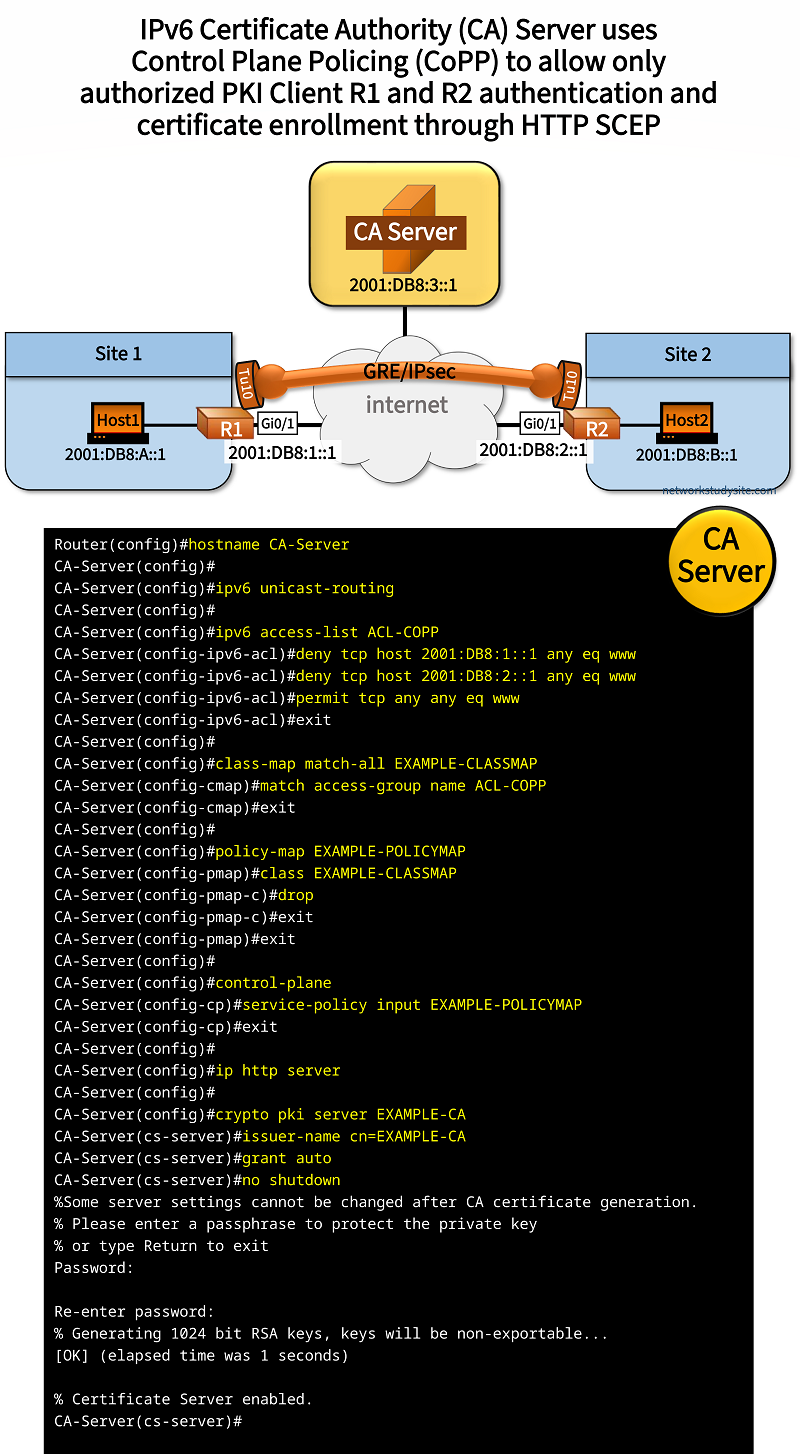
Configuration:
CA-Server
Router(config)#hostname CA-Server
CA-Server(config)#
CA-Server(config)#ipv6 unicast-routing
CA-Server(config)#
CA-Server(config)#ipv6 access-list ACL-COPP
CA-Server(config-ipv6-acl)#deny tcp host 2001:DB8:1::1 any eq www
CA-Server(config-ipv6-acl)#deny tcp host 2001:DB8:2::1 any eq www
CA-Server(config-ipv6-acl)#permit tcp any any eq www
CA-Server(config-ipv6-acl)#exit
CA-Server(config)#
CA-Server(config)#class-map match-all EXAMPLE-CLASSMAP
CA-Server(config-cmap)#match access-group name ACL-COPP
CA-Server(config-cmap)#exit
CA-Server(config)#
CA-Server(config)#policy-map EXAMPLE-POLICYMAP
CA-Server(config-pmap)#class EXAMPLE-CLASSMAP
CA-Server(config-pmap-c)#drop
CA-Server(config-pmap-c)#exit
CA-Server(config-pmap)#exit
CA-Server(config)#
CA-Server(config)#control-plane
CA-Server(config-cp)#service-policy input EXAMPLE-POLICYMAP
CA-Server(config-cp)#exit
CA-Server(config)#
CA-Server(config)#ip http server
CA-Server(config)#
CA-Server(config)#crypto pki server EXAMPLE-CA
CA-Server(cs-server)#issuer-name cn=EXAMPLE-CA
CA-Server(cs-server)#grant auto
CA-Server(cs-server)#no shutdown
%Some server settings cannot be changed after CA certificate generation.
% Please enter a passphrase to protect the private key
% or type Return to exit
Password:

Re-enter password:
% Generating 1024 bit RSA keys, keys will be non-exportable...
[OK] (elapsed time was 1 seconds)

% Certificate Server enabled.
CA-Server(cs-server)#
CA-Server(cs-server)#exit
CA-Server(config)#
CA-Server(config)#exit
CA-Server#
CA-Server#show crypto pki server
Certificate Server EXAMPLE-CA:
    Status: enabled
    State: enabled
    Server's configuration is locked  (enter "shut" to unlock it)
    Issuer name: CN=EXAMPLE-CA
    CA cert fingerprint: B144E085 07187BEB FEC82C8A CB0FE728
    Granting mode is: auto
    Last certificate issued serial number (hex): 3
    CA certificate expiration timer: 14:08:31 UTC Nov 11 2027
    CRL NextUpdate timer: 20:08:31 UTC Nov 11 2024
    Current primary storage dir: nvram:
    Database Level: Minimum - no cert data written to storage
CA-Server#


#################################################
##                                             ##
##  Interface and routing configuration below  ##
##                                             ##
#################################################


CA-Server#show run int Gi0/0 | sec int
interface GigabitEthernet0/0
 description ** to internet  **
 no ip address
 duplex auto
 speed auto
 media-type rj45
 ipv6 address FE80::1 link-local
 ipv6 address 2001:DB8:3::1/64

CA-Server#show run | sec ^ipv6 route
ipv6 route ::/0 GigabitEthernet0/0 2001:DB8:3::2
R1 (PKI Client and IPSec IKEv2)
Router(config)#hostname R1
R1(config)#ip domain name EXAMPLE-DOMAIN
R1(config)#crypto key generate rsa modulus 4096
The name for the keys will be: R1.EXAMPLE-DOMAIN

% The key modulus size is 1024 bits
% Generating 1024 bit RSA keys, keys will be non-exportable...
[OK] (elapsed time was 0 seconds)

R1(config)#crypto pki trustpoint CA-SERVER
R1(ca-trustpoint)#enrollment url http://[2001:DB8:3::1]:80
R1(ca-trustpoint)#serial-number none
R1(ca-trustpoint)#ip-address none
R1(ca-trustpoint)#revocation-check none
R1(ca-trustpoint)#exit
R1(config)#crypto pki authenticate CA-SERVER
Certificate has the following attributes:
       Fingerprint MD5: BA65AFA6 D004E420 BF79C4EF BE9B6801
      Fingerprint SHA1: 56CC07AC A94CF64E D88B3C20 CDC687A2 4B035ED7

% Do you accept this certificate? [yes/no]: yes
Trustpoint CA certificate accepted.
R1(config)#
R1(config)#crypto pki enroll CA-SERVER
%
% Start certificate enrollment ..
% Create a challenge password. You will need to verbally provide this
   password to the CA Administrator in order to revoke your certificate.
   For security reasons your password will not be saved in the configuration.
   Please make a note of it.

Password:
Re-enter password:

% The subject name in the certificate will include: R1.EXAMPLE-DOMAIN
Request certificate from CA? [yes/no]: yes
% Certificate request sent to Certificate Authority
% The 'show crypto pki certificate verbose CA-SERVER' commandwill show the fingerprint.

R1(config)#


#######################################
##                                   ##
##  IPSec IKEv2 configuration below  ##
##                                   ##
#######################################


R1(config)#
R1(config)#crypto ikev2 proposal CRYPTO-PROPOSAL
IKEv2 proposal MUST either have a set of an encryption algorithm other than aes-gcm, an integrity algorithm and a DH group configured or
 encryption algorithm aes-gcm, a prf algorithm and a DH group configured
R1(config-ikev2-proposal)#encryption aes-cbc-256
R1(config-ikev2-proposal)#integrity sha256
R1(config-ikev2-proposal)#group 24
R1(config-ikev2-proposal)#exit
R1(config)#
R1(config)#crypto ikev2 policy CRYPTO-POLICY
IKEv2 policy MUST have atleast one complete proposal attached
R1(config-ikev2-policy)#match address local 2001:DB8:1::1
R1(config-ikev2-policy)#proposal CRYPTO-PROPOSAL
R1(config-ikev2-policy)#exit
R1(config)#
R1(config)#crypto pki certificate map EXAMPLE-MAP 10
R1(ca-certificate-map)#issuer-name eq cn=EXAMPLE-CA
R1(ca-certificate-map)#exit
R1(config)#
R1(config)#crypto ikev2 profile CRYPTO-IKEV2-PROFILE
IKEv2 profile MUST have:
   1. A local and a remote authentication method.
   2. A match identity or a match certificate or match any statement.
R1(config-ikev2-profile)#match identity remote address 2001:DB8:2::1/128
R1(config-ikev2-profile)#authentication remote rsa-sig
R1(config-ikev2-profile)#authentication local rsa-sig
R1(config-ikev2-profile)#pki trustpoint CA-SERVER
R1(config-ikev2-profile)#exit
R1(config)#
R1(config)#crypto ipsec transform-set CRYPTO-TRANSFORM esp-aes
R1(cfg-crypto-trans)#mode transport
R1(cfg-crypto-trans)#exit
R1(config)#
R1(config)#crypto ipsec profile CRYPTO-IPSEC-PROFILE
R1(ipsec-profile)#set transform-set CRYPTO-TRANSFORM
R1(ipsec-profile)#set ikev2-profile CRYPTO-IKEV2-PROFILE
R1(ipsec-profile)#exit
R1(config)#
R1(config)#interface Tunnel10
R1(config-if)#tunnel protection ipsec profile CRYPTO-IPSEC-PROFILE
R1(config-if)#exit
R1(config)#


#################################################
##                                             ##
##  Interface and routing configuration below  ##
##                                             ##
#################################################


R1#show run interface Tunnel10 | sec int
interface Tunnel10
 description ** IPsec tunnel to Site 2 **
 no ip address
 ipv6 address FE80::1 link-local
 ipv6 address 2001:DB8:AB::1/64
 ospfv3 10 ipv6 area 0
 tunnel source GigabitEthernet0/1
 tunnel mode ipsec ipv6
 tunnel destination 2001:DB8:2::1
 tunnel protection ipsec profile CRYPTO-IPSEC-PROFILE

R1#show run interface Gi0/0 | sec int
interface GigabitEthernet0/0
 description ** to Site 1 **
 no ip address
 duplex auto
 speed auto
 media-type rj45
 ipv6 address FE80::1 link-local
 ipv6 address 2001:DB8:A::2/64
 ospfv3 10 ipv6 area 0

R1#show run interface Gi0/1 | sec int
interface GigabitEthernet0/1
 description ** to internet **
 no ip address
 duplex auto
 speed auto
 media-type rj45
 ipv6 address FE80::1 link-local
 ipv6 address 2001:DB8:1::1/64

R1#show run | sec ^ipv6 route
ipv6 route ::/0 GigabitEthernet0/1 2001:DB8:1::2

R1#show run | sec ^router
router ospfv3 10
 router-id 1.1.1.1
 !
 address-family ipv6 unicast
 exit-address-family
R2 (PKI Client and IPSec IKEv2)
R2(config)#hostname R2
R2(config)#ip domain name EXAMPLE-DOMAIN
R2(config)#crypto key generate rsa modulus 4096
The name for the keys will be: R2.EXAMPLE-DOMAIN

% The key modulus size is 4096 bits
% Generating 4096 bit RSA keys, keys will be non-exportable...
[OK] (elapsed time was 2 seconds)

R2(config)#crypto pki trustpoint CA-SERVER
R2(ca-trustpoint)#enrollment url http://[2001:DB8:3::1]:80
R2(ca-trustpoint)#serial-number none
R2(ca-trustpoint)#ip-address none
R2(ca-trustpoint)#revocation-check none
R2(ca-trustpoint)#exit
R2(config)#
R2(config)#crypto pki authenticate CA-SERVER
Certificate has the following attributes:
       Fingerprint MD5: B144E085 07187BEB FEC82C8A CB0FE728
      Fingerprint SHA1: 743A592D 8C0B1C7F E9F5BFCD D600DC2C FB816792

% Do you accept this certificate? [yes/no]: yes
Trustpoint CA certificate accepted.
R2(config)#
R2(config)#crypto pki enroll CA-SERVER
%
% Start certificate enrollment ..
% Create a challenge password. You will need to verbally provide this
   password to the CA Administrator in order to revoke your certificate.
   For security reasons your password will not be saved in the configuration.
   Please make a note of it.

Password:
Re-enter password:

% The subject name in the certificate will include: R2.EXAMPLE-DOMAIN
Request certificate from CA? [yes/no]: yes
% Certificate request sent to Certificate Authority
% The 'show crypto pki certificate verbose CA-SERVER' commandwill show the fingerprint.

R2(config)#


#######################################
##                                   ##
##  IPSec IKEv2 configuration below  ##
##                                   ##
#######################################


R2(config)#
R2(config)#crypto ikev2 proposal CRYPTO-PROPOSAL
IKEv2 proposal MUST either have a set of an encryption algorithm other than aes-gcm, an integrity algorithm and a DH group configured or
 encryption algorithm aes-gcm, a prf algorithm and a DH group configured
R2(config-ikev2-proposal)#encryption aes-cbc-256
R2(config-ikev2-proposal)#integrity sha256
R2(config-ikev2-proposal)#group 24
R2(config-ikev2-proposal)#exit
R2(config)#
R2(config)#crypto ikev2 policy CRYPTO-POLICY
IKEv2 policy MUST have atleast one complete proposal attached
R2(config-ikev2-policy)#match address local 2001:DB8:2::1
R2(config-ikev2-policy)#proposal CRYPTO-PROPOSAL
R2(config-ikev2-policy)#exit
R2(config)#
R2(config)#crypto pki certificate map EXAMPLE-MAP 10
R2(ca-certificate-map)#issuer-name eq cn=EXAMPLE-CA
R2(ca-certificate-map)#exit
R2(config)#
R2(config)#crypto ikev2 profile CRYPTO-IKEV2-PROFILE
IKEv2 profile MUST have:
   1. A local and a remote authentication method.
   2. A match identity or a match certificate or match any statement.
R2(config-ikev2-profile)#match identity remote address 2001:DB8:1::1/128
R2(config-ikev2-profile)#authentication remote rsa-sig
R2(config-ikev2-profile)#authentication local rsa-sig
R2(config-ikev2-profile)#pki trustpoint CA-SERVER
R2(config-ikev2-profile)#exit
R2(config)#
R2(config)#crypto ipsec transform-set CRYPTO-TRANSFORM esp-aes
R2(cfg-crypto-trans)#mode transport
R2(cfg-crypto-trans)#exit
R2(config)#
R2(config)#crypto ipsec profile CRYPTO-IPSEC-PROFILE
R2(ipsec-profile)#set transform-set CRYPTO-TRANSFORM
R2(ipsec-profile)#set ikev2-profile CRYPTO-IKEV2-PROFILE
R2(ipsec-profile)#exit
R2(config)#
R2(config)#interface Tunnel10
R2(config-if)#tunnel protection ipsec profile CRYPTO-IPSEC-PROFILE
R2(config-if)#exit
R2(config)#


#################################################
##                                             ##
##  Interface and routing configuration below  ##
##                                             ##
#################################################


R2#show run interface Tunnel10 | sec int
interface Tunnel10
 description ** IPsec tunnel to Site 1 **
 no ip address
 ipv6 address FE80::2 link-local
 ipv6 address 2001:DB8:AB::2/64
 ospfv3 10 ipv6 area 0
 tunnel source GigabitEthernet0/1
 tunnel mode ipsec ipv6
 tunnel destination 2001:DB8:1::1
 tunnel protection ipsec profile CRYPTO-IPSEC-PROFILE

R2#show run interface Gi0/0 | sec int
interface GigabitEthernet0/0
 description ** to Site 2 **
 no ip address
 duplex auto
 speed auto
 media-type rj45
 ipv6 address FE80::1 link-local
 ipv6 address 2001:DB8:B::2/64
 ospfv3 10 ipv6 area 0

R2#show run interface Gi0/1 | sec int
interface GigabitEthernet0/1
 description ** to internet **
 no ip address
 duplex auto
 speed auto
 media-type rj45
 ipv6 address FE80::1 link-local
 ipv6 address 2001:DB8:2::1/64

R2#show run | sec ^ipv6 route
ipv6 route ::/0 GigabitEthernet0/1 2001:DB8:2::2

R2#show run | sec ^router
router ospfv3 10
 router-id 2.2.2.2
 !
 address-family ipv6 unicast
 exit-address-family
R1#show crypto session brief
Status: A- Active, U - Up, D - Down, I - Idle, S - Standby, N - Negotiating
        K - No IKE
ivrf = (none)
Peer            I/F          Username        Group/Phase1_id          Uptime   Status
2001:DB8:2::1   Tu10                         2001:DB8:2::1            01:48:25 UA         « IKEv2 Security Association Up and Active


R1#show crypto session
Crypto session current status

Interface: Tunnel10
Profile: CRYPTO-IKEV2-PROFILE
Session status: UP-ACTIVE
Peer: 2001:DB8:2::1 port 500
  Session ID: 2
  IKEv2 SA: local 2001:DB8:1::1/500               « IKEv2 is being used
          remote 2001:DB8:2::1/500 Active
  IPSEC FLOW: permit ipv6 ::/0 ::/0
        Active SAs: 2, origin: crypto map


R1#show crypto pki trustpoints
Trustpoint CA-SERVER:
    Subject Name:
    cn=EXAMPLE-CA
          Serial Number (hex): 01
    Certificate configured.
    SCEP URL: http://[2001:DB8:3::1]:80/cgi-bin   « Trustpoint enrollment URL has IPv6 address


R1#show crypto ikev2 sa
 IPv4 Crypto IKEv2  SA

 IPv6 Crypto IKEv2  SA

Tunnel-id    fvrf/ivrf              Status
2          none/none             READY
Local  2001:DB8:1::1/500
Remote  2001:DB8:2::1/500
      Encr: AES-CBC, keysize: 256, PRF: SHA256, Hash: SHA256, DH Grp:24, Auth sign: RSA, Auth verify: RSA    « Digital Certificates used
      Life/Active Time: 86400/6468 sec