Protect Your Network with a BGP Maximum Prefix Limit
Table of Contents
- What is the purpose of the BGP Maximum Prefix feature? ‹
- Configuring warning only ‹
- Configuring threshold warning and BGP down ‹
- Configuring BGP session restart ‹
- Download section ‹
What is the purpose of the BGP Maximum Prefix feature?
The BGP Maximum-Prefix feature automatically disrupts a BGP neighborship if the number of received prefixes exceeds a defined limit. In practice, a threshold is configured which defines the maximum number of BGP prefixes a local router can accept from a particular neighbor. If this threshold is exceeded the local router can take action, such as issue a warning message and/or bring down the involved BGP neighborship.
The corresponding RFC 7454 mentions a recommendation for the use of this feature, quoted below.
From peers, it is RECOMMENDED to have a limit lower than the number of routes in the Internet. This will shut down the BGP peering if the peer suddenly advertises the full table.
RFC 7454, BGP Operations and Security
The BGP Maximum-Prefix feature can safeguard a local router's resources, or can be used in an MPLS L3VPN network on the PE routers to ensure the core network is not flooded with routes. The feature can be implemented for both eBGP and iBGP neighborships.
Configuring warning only
In the following example scenario R2 advertises 8 BGP prefixes to R1. Meanwhile, R1 has a BGP prefix-limit 10 configured which generates a warning but does not terminate the BGP session. As per the default setting, the warning message is generated when 75% of the prefix-limit is reached.
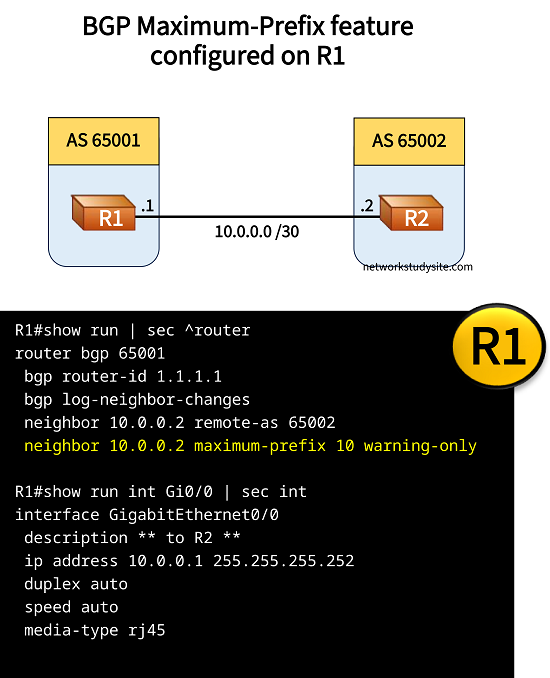
Configuration:
R1
R1#show run | sec ^router
router bgp 65001
 bgp router-id 1.1.1.1
 bgp log-neighbor-changes
 neighbor 10.0.0.2 remote-as 65002
 neighbor 10.0.0.2 maximum-prefix 10 warning-only

R1#show run int Gi0/0 | sec int
interface GigabitEthernet0/0
 description ** to R2 **
 ip address 10.0.0.1 255.255.255.252
 duplex auto
 speed auto
 media-type rj45
R2
R2#show run | sec ^router
router bgp 65002
 bgp router-id 2.2.2.2
 bgp log-neighbor-changes
 network 192.168.1.0
 network 192.168.2.0
 network 192.168.3.0
 network 192.168.4.0
 network 192.168.5.0
 network 192.168.6.0
 network 192.168.7.0
 network 192.168.8.0
 neighbor 10.0.0.1 remote-as 65001

R2#show run int Gi0/0 | sec int
interface GigabitEthernet0/0
 description ** to R1 **
 ip address 10.0.0.2 255.255.255.252
 duplex auto
 speed auto
 media-type rj45

R2#show run int Lo10 | sec int
interface Loopback10
 ip address 192.168.1.1 255.255.255.0

R2#show run int Lo20 | sec int
interface Loopback20
 ip address 192.168.2.1 255.255.255.0
[...]
R1#show ip bgp sum |  beg Ne
Neighbor        V           AS MsgRcvd MsgSent   TblVer  InQ OutQ Up/Down  State/PfxRcd
10.0.0.2        4        65002      27      25       21    0    0 00:18:51        8     « 8 prefixes received from R2


R1#show log | begin Log Buffer
Log Buffer (8192 bytes):

%BGP-4-MAXPFX: Number of prefixes received from 10.0.0.2 (afi 0) reaches 8, max 1     « Warning generated because 75% of prefix-limit is reached
Configuring threshold warning and BGP down
In the following example, R1 has a BGP maxium prefix-limit 10 configured with a warning message generated when 80% of the allowed prefixes is exceeded. When 100% is exceeded (above 10 prefixes) then the BGP session is terminated by R1.
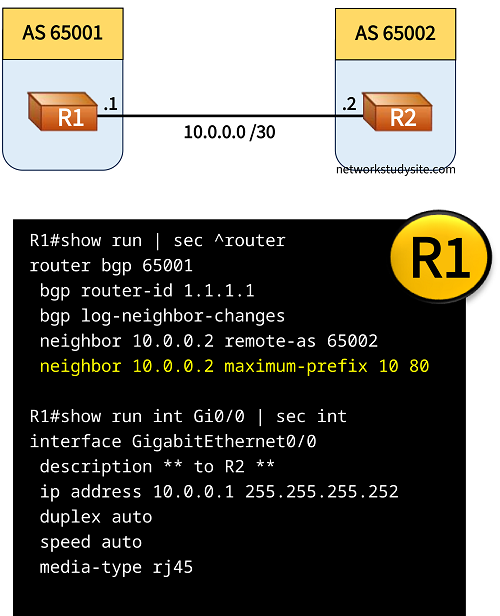
Configuration:
R1
R1#show run | sec ^router
router bgp 65001
 bgp router-id 1.1.1.1
 bgp log-neighbor-changes
 neighbor 10.0.0.2 remote-as 65002
 neighbor 10.0.0.2 maximum-prefix 10 80

R1#show run int Gi0/0 | sec int
interface GigabitEthernet0/0
 description ** to R2 **
 ip address 10.0.0.1 255.255.255.252
 duplex auto
 speed auto
 media-type rj45
R1#show ip bgp sum |  beg Ne
Neighbor        V           AS MsgRcvd MsgSent   TblVer  InQ OutQ Up/Down  State/PfxRcd
10.0.0.2        4        65002      39      34       27    0    0 00:27:25       10       « This is the maximum prefix limit


R1#show ip bgp sum |  beg Ne
Neighbor        V           AS MsgRcvd MsgSent   TblVer  InQ OutQ Up/Down  State/PfxRcd
10.0.0.2        4        65002       0       0        1    0    0 00:00:02 Idle (PfxCt)    « The prefix-limit is exceeded, BGP down


R1#show log | beg Log Buffer
Log Buffer (8192 bytes):

%BGP-4-MAXPFX: Number of prefixes received from 10.0.0.2 (afi 0) reaches 9, max 10         « Warning generated when 80% exceeded
%BGP-3-MAXPFXEXCEED: Number of prefixes received from 10.0.0.2 (afi 0): 11 exceeds limit 10
%BGP-3-NOTIFICATION: sent to neighbor 10.0.0.2 6/1 (Maximum Number of Prefixes Reached) 7 bytes 00010100 00000A
%BGP-5-NBR_RESET: Neighbor 10.0.0.2 reset (Peer over prefix limit)
%BGP-5-ADJCHANGE: neighbor 10.0.0.2 Down Peer over prefix limit                            « BGP neighborship down when limit exceeded
%BGP_SESSION-5-ADJCHANGE: neighbor 10.0.0.2 IPv4 Unicast topology base removed from session  Peer over prefix limit
When the number of advertised BGP routes is decreased below 10 the BGP neighborship can be cleared in order to reestablish the session. To do so the command clear ip bgp 10.0.0.2 soft is issued on R1.
Configuring BGP session restart
In the following example R1 has a BGP maximum-prefix limit 10 configured with a restart timer of 1 minute. This means, when the BGP session is terminated due to the exceeded limit, R1 waits 1 minute before reinitiating the BGP session to see if the number of advertised prefixes has been descreased below the limit.
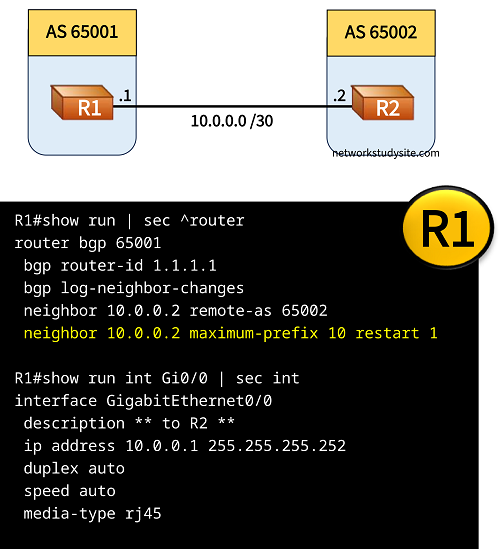
Configuration:
R1
R1#show run | sec ^router
router bgp 65001
 bgp router-id 1.1.1.1
 bgp log-neighbor-changes
 neighbor 10.0.0.2 remote-as 65002
 neighbor 10.0.0.2 maximum-prefix 10 restart 1

R1#show run int Gi0/0 | sec int
interface GigabitEthernet0/0
 description ** to R2 **
 ip address 10.0.0.1 255.255.255.252
 duplex auto
 speed auto
 media-type rj45
R1#show log | beg Log Buffer
Log Buffer (8192 bytes):

%BGP-4-MAXPFX: Number of prefixes received from 10.0.0.2 (afi 0) reaches 8, max 10
%BGP-4-MAXPFX: Number of prefixes received from 10.0.0.2 (afi 0) reaches 9, max 10
%BGP-3-MAXPFXEXCEED: Number of prefixes received from 10.0.0.2 (afi 0): 11 exceeds limit 10
%BGP-3-NOTIFICATION: sent to neighbor 10.0.0.2 6/1 (Maximum Number of Prefixes Reached) 7 bytes 00010100 00000A
%BGP-5-NBR_RESET: Neighbor 10.0.0.2 reset (Peer over prefix limit)
%BGP-5-ADJCHANGE: neighbor 10.0.0.2 Down Peer over prefix limit
%BGP_SESSION-5-ADJCHANGE: neighbor 10.0.0.2 IPv4 Unicast topology base removed from session  Peer over prefix limit
%BGP-5-NBR_RESET: Neighbor 10.0.0.2 passive reset (BGP Notification sent)
%BGP-5-ADJCHANGE: neighbor 10.0.0.2 passive Down AFI/SAFI not supported
%BGP-5-ADJCHANGE: neighbor 10.0.0.2 Up
%BGP-4-MAXPFX: Number of prefixes received from 10.0.0.2 (afi 0) reaches 8, max 10
%BGP-3-MAXPFXEXCEED: Number of prefixes received from 10.0.0.2 (afi 0): 11 exceeds limit 10
%BGP-3-NOTIFICATION: sent to neighbor 10.0.0.2 6/1 (Maximum Number of Prefixes Reached) 7 bytes 00010100 00000A
%BGP-5-NBR_RESET: Neighbor 10.0.0.2 reset (Peer over prefix limit)
%BGP-5-ADJCHANGE: neighbor 10.0.0.2 Down Peer over prefix limit
%BGP_SESSION-5-ADJCHANGE: neighbor 10.0.0.2 IPv4 Unicast topology base removed from session  Peer over prefix limit
%BGP-3-NOTIFICATION: sent to neighbor 10.0.0.2 passive 2/8 (no supported AFI/SAFI) 3 bytes 000101 (timer expired)
%BGP-5-NBR_RESET: Neighbor 10.0.0.2 passive reset (BGP Notification sent)
%BGP-5-ADJCHANGE: neighbor 10.0.0.2 passive Down AFI/SAFI not supported
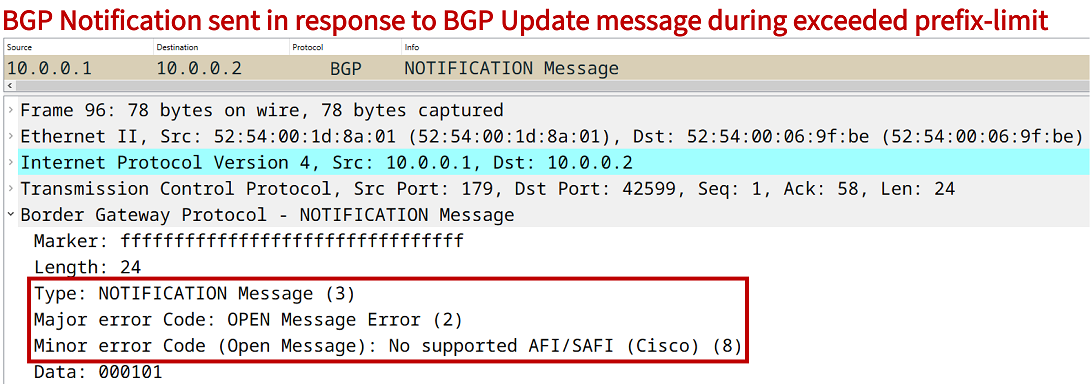
The following packet capture shows a BGP Notification message sent by R1 after the BGP session is terminated due to the maximum-prefix limit feature. The displayed error code 2/8 is sent by R1 every time R2 tries to establish a BGP neighborship while the prefix-limit is exceeded.