DMVPN Configuration with EIGRP - Dual Hub Example Network
Table of Contents
- What is DMVPN dual hub? ‹
- How to configure DMVPN with EIGRP? ‹
- DMVPN Phase 2 with EIGRP - Single Cloud ‹
- DMVPN Phase 3 with EIGRP - Single Cloud ‹
- DMVPN Phase 3 with EIGRP - Dual Cloud ‹
- Download section ‹
What is DMVPN dual hub?
A DMVPN dual hub network ensures redundancy of the hub routers. A dual hub design increases the complexity of the configuration with respect to routing and failover. A DMVPN dual hub network can be deployed with a single cloud or dual cloud design. A single cloud design involves one DMVPN subnet, and one DMVPN tunnel interface on the spoke router. In a dual cloud design a spoke router has two tunnel interfaces, therefore it has two seperate subnets for the DMVPN overlay network.
How to configure DMVPN with EIGRP?
EIGRP is an advanced distance-vector routing protocol that can be configured together with DMVPN. The following list mentions important considerations when implementing EIGRP with DMVPN.
| Topic | Description |
|---|---|
| Multicast | EIGRP uses multicast during protocol convergence. Therefore, DMVPN hub and spoke router tunnel configurations must include NHRP commands for multicast traffic. Hub router command: ip nhrp map multicast dynamic |
| Split horizon | EIGRP uses the split horizon mechanism to avoid routing loops. In practice, a prefix learned through an interface will not be advertised out that same interface. This mechanism may need to be disabled on the hub router tunnel interface for particular DMVPN designs. However, if the hub router only sends an EIGRP default route in DMVPN phase 1 or phase 3, then split horizon can be enabled on the hub router. Example hub router tunnel interface command: no ip split-horizon eigrp 10 |
| Next-hop-self | When a route is received by EIGRP, the next-hop IP address is set to the advertising router. In a DMVPN phase 2 deployment, if the hub router is set as the next-hop IP address, it disables spoke-to-spoke direct communication. Therefore, when implementing DMVPN phase 2, the hub router tunnel interface needs to disable the EIGRP next-hop-self mechanism. Meanwhile, when configuring DMVPN phase 1 and phase 3, this mechanism can be enabled (it is enabled by default). Hub router tunnel interface command to disable feature: no ip next-hop-self |
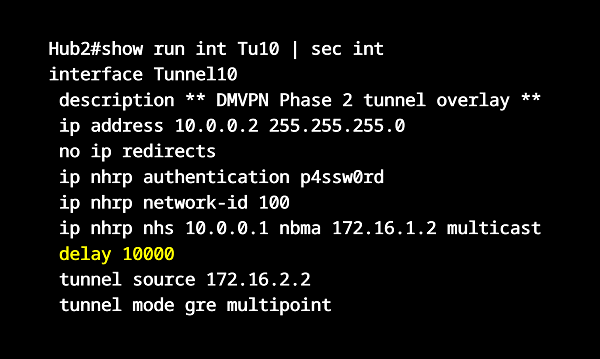
| Hub selection, traffic engineering | The EIGRP delay metric can be adjusted on the hub router tunnel interface to influence primary and secondary hub router selection. Example hub router tunnel interface command: delay 10000. Alternatively, an EIGRP Offset-List can be configured. |
| Spoke stub router | EIGRP control plane traffic can be reduced by configuring the spokes as EIGRP stub routers in a DMVPN network. This means, if a prefix becomes unreachable at a particular spoke location, then EIGRP Query packets are not forwarded to all the other spoke routers. As a result, control plane traffic is reduced, and the EIGRP routing process consumes less system resources. |
| Route summarization | If routes can be summarized on the spoke routers so that the hub routers only receive branch location summary routes, it reduces the burden of route processing on the hub routers, and can reduce the EIGRP Query domain. |
DMVPN Phase 2 with EIGRP - Single Cloud
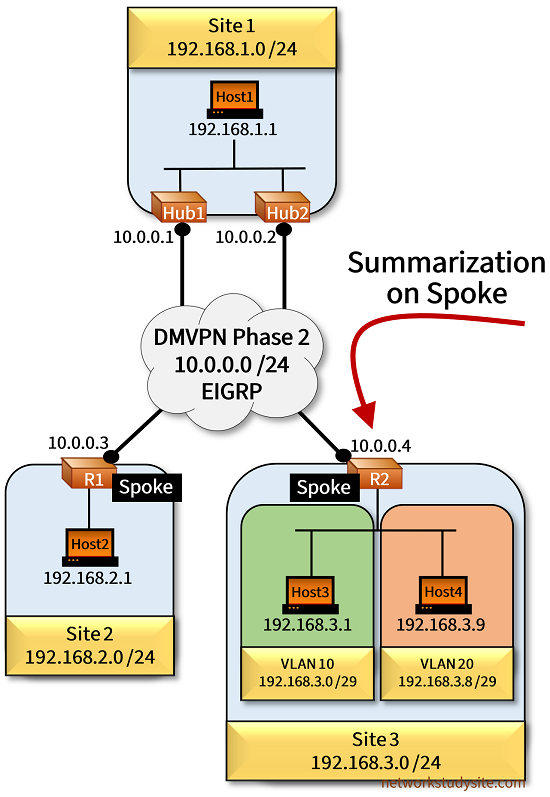
In the following example topology a single DMVPN cloud is configured (subnet 10.0.0.0/24) with two Hub routers using EIGRP as the dynamic routing protocol. DMVPN phase 2 is deployed, this means there is direct spoke-to-spoke communication, and the spoke routers receive Site-specific prefixes from each other.
Hub1 is the primary DMVPN hub router, and Hub2 is configured as the secondary hub by adjusting the delay on the Tunnel interface. Moreover, Site 1 also advertises a prefix into the DMVPN cloud, and the delay metric is adjusted on the Hub2 LAN interface to make Hub1 the preferred router to reach Host1.
For traffic exiting (egress) Site 1 an HSRP Group is configured between the LAN interface of Hub1 and Hub2. Thus, Host1 uses an HSRP virtual IP address as the default gateway. When the outside WAN link of Hub1 fails, HSRP (with IP SLA and object tracking) ensures Host1 uses Hub2 in order to send traffic out of Site 1.
Also, notice there are two VLANs in Site 3 that are summarized with the address 192.168.3.0/24 by the Spoke router R2. To provide connectivity for each VLAN, R2 uses two Bridge Domain Interfaces (BDI). The BDI interfaces have the default gateway addresses for hosts in Site 3.
Configuration:
Hub1
Hub1#show run int Gi0/0 | sec int
interface GigabitEthernet0/0
 description ** to Internet Provider **
 ip address 172.16.1.2 255.255.255.252
 duplex auto
 speed auto
 media-type rj45

Hub1#show run int Gi0/1 | sec int
interface GigabitEthernet0/1
 description ** to Host1 (Site 1 LAN) **
 ip address 192.168.1.2 255.255.255.0
 standby 1 ip 192.168.1.254
 standby 1 preempt
 standby 1 name EXAMPLE-HSRP
 standby 1 track 1 decrement 20
 duplex auto
 speed auto
 media-type rj45

Hub1#show run int Tu10 | sec int
interface Tunnel10
 description ** DMVPN Phase 2 tunnel overlay **
 ip address 10.0.0.1 255.255.255.0
 no ip redirects
 ip nhrp authentication p4ssw0rd
 ip nhrp network-id 100
 tunnel source 172.16.1.2
 tunnel mode gre multipoint

Hub1#show run all | inc ^interface Tunnel10|ip nhrp map
interface Tunnel10
 ip nhrp map multicast dynamic

Hub1#show run | sec ^router
router eigrp EXAMPLE-EIGRP
 !
 address-family ipv4 unicast autonomous-system 10
  !
  af-interface Tunnel10
   no next-hop-self
   no split-horizon
  exit-af-interface
  !
  topology base
  exit-af-topology
  network 10.0.0.0 0.0.0.255
  network 192.168.1.0
  eigrp router-id 1.1.1.1
 exit-address-family

Hub1#show run | sec ^ip route
ip route 0.0.0.0 0.0.0.0 GigabitEthernet0/0 172.16.1.1

Hub1#show run | sec ^ip sla
ip sla 10
 icmp-echo 172.16.1.1
 threshold 1000
 timeout 1000
 frequency 1
ip sla schedule 10 life forever start-time now

Hub1#show run | sec ^track
track 1 ip sla 10
Hub2
Hub2#show run int Gi0/0 | sec int
interface GigabitEthernet0/0
 description ** to Internet Provider **
 ip address 172.16.2.2 255.255.255.252
 duplex auto
 speed auto
 media-type rj45

Hub2#show run int Gi0/1 | sec int
interface GigabitEthernet0/1
 description ** to Host1 (Site 1 LAN) **
 ip address 192.168.1.3 255.255.255.0
 standby 1 ip 192.168.1.254
 standby 1 priority 90
 standby 1 preempt
 standby 1 name EXAMPLE-HSRP
 delay 10000
 duplex auto
 speed auto
 media-type rj45

Hub2#show run int Tu10 | sec int
interface Tunnel10
 description ** DMVPN Phase 2 tunnel overlay **
 ip address 10.0.0.2 255.255.255.0
 no ip redirects
 ip nhrp authentication p4ssw0rd
 ip nhrp network-id 100
 ip nhrp nhs 10.0.0.1 nbma 172.16.1.2 multicast
 delay 10000
 tunnel source 172.16.2.2
 tunnel mode gre multipoint

Hub2#show run all | inc ^interface Tunnel10|ip nhrp map
interface Tunnel10
 ip nhrp map multicast dynamic

Hub2#show run | sec ^router
router eigrp EXAMPLE-EIGRP
 !
 address-family ipv4 unicast autonomous-system 10
  !
  af-interface Tunnel10
   no next-hop-self
   no split-horizon
  exit-af-interface
  !
  topology base
  exit-af-topology
  network 10.0.0.0 0.0.0.255
  network 192.168.1.0
  eigrp router-id 2.2.2.2
 exit-address-family

Hub2#show run | sec ^ip route
ip route 0.0.0.0 0.0.0.0 GigabitEthernet0/0 172.16.2.1
R1 (Spoke)
R1#show run int Gi0/0 | sec int
interface GigabitEthernet0/0
 description ** to Host2 (Site 2 LAN) **
 ip address 192.168.2.2 255.255.255.0
 duplex auto
 speed auto
 media-type rj45

R1#show run int Gi0/1 | sec int
interface GigabitEthernet0/1
 description ** to Internet Provider **
 ip address 172.16.3.2 255.255.255.252
 duplex auto
 speed auto
 media-type rj45

R1#show run int Tu10 | sec int
interface Tunnel10
 description ** DMVPN Phase 2 tunnel overlay **
 ip address 10.0.0.3 255.255.255.0
 no ip redirects
 ip nhrp authentication p4ssw0rd
 ip nhrp map 10.0.0.1 172.16.1.2
 ip nhrp map multicast 172.16.1.2
 ip nhrp map 10.0.0.2 172.16.2.2
 ip nhrp map multicast 172.16.2.2
 ip nhrp network-id 100
 ip nhrp nhs 10.0.0.1
 ip nhrp nhs 10.0.0.2
 tunnel source 172.16.3.2
 tunnel mode gre multipoint

R1#show run | sec ^router
router eigrp EXAMPLE-EIGRP
 !
 address-family ipv4 unicast autonomous-system 10
  !
  topology base
  exit-af-topology
  network 10.0.0.0 0.0.0.255
  network 192.168.2.0
  eigrp router-id 3.3.3.3
 exit-address-family

R1#show run | sec ^ip route
ip route 0.0.0.0 0.0.0.0 GigabitEthernet0/1 172.16.3.1
R2 (Spoke)
R2#show run int Gi1 | sec int
interface GigabitEthernet1
 description ** to Site 3 LAN (Host3 and Host4) **
 no ip address
 negotiation auto
 no mop enabled
 no mop sysid
 service instance 10 ethernet
  encapsulation dot1q 10
  bridge-domain 100
 !
 service instance 20 ethernet
  encapsulation dot1q 20
  bridge-domain 200
 !

R2#show run int Gi2 | sec int
interface GigabitEthernet2
 description ** to Internet Provider **
 ip address 172.16.4.2 255.255.255.252
 negotiation auto
 no mop enabled
 no mop sysid

R2#show run int Tu10 | sec int
interface Tunnel10
 description ** DMVPN Phase 2 tunnel overlay **
 ip address 10.0.0.4 255.255.255.0
 no ip redirects
 ip nhrp authentication p4ssw0rd
 ip nhrp map 10.0.0.1 172.16.1.2
 ip nhrp map multicast 172.16.1.2
 ip nhrp map 10.0.0.2 172.16.2.2
 ip nhrp map multicast 172.16.2.2
 ip nhrp network-id 100
 ip nhrp nhs 10.0.0.1
 ip nhrp nhs 10.0.0.2
 tunnel source 172.16.4.2
 tunnel mode gre multipoint

R2#show run int BDI100 | sec int
interface BDI100
 description ** Bridge Domain Interface for VLAN 10 **
 ip address 192.168.3.2 255.255.255.248
 encapsulation dot1Q 10
 no mop enabled
 no mop sysid

R2#show run int BDI200 | sec int
interface BDI200
 description ** Bridge Domain Interface for VLAN 20 **
 ip address 192.168.3.10 255.255.255.248
 encapsulation dot1Q 20
 no mop enabled
 no mop sysid

R2#show run | sec ^router
router eigrp EXAMPLE-EIGRP
 !
 address-family ipv4 unicast autonomous-system 10
  !
  af-interface Tunnel10
   summary-address 192.168.3.0 255.255.255.0
  exit-af-interface
  !
  topology base
  exit-af-topology
  network 10.0.0.0 0.0.0.255
  network 192.168.3.0
  eigrp router-id 4.4.4.4
 exit-address-family

R2#show run | sec ^ip route
ip route 0.0.0.0 0.0.0.0 GigabitEthernet2 172.16.4.1
Host1
Host1#show run int Gi0/0 | sec int
interface GigabitEthernet0/0
 description ** to Hub1 and Hub2 **
 ip address 192.168.1.1 255.255.255.0
 duplex auto
 speed auto
 media-type rj45

Host1#show run | sec ^ip route
ip route 0.0.0.0 0.0.0.0 GigabitEthernet0/0 192.168.1.254
Host3
Host3#show run int Gi0/0 | sec int
interface GigabitEthernet0/0
 description ** to Spoke R2 **
 ip address 192.168.3.1 255.255.255.248
 duplex auto
 speed auto
 media-type rj45

Host3#show run | sec ^ip route
ip route 0.0.0.0 0.0.0.0 GigabitEthernet0/0 192.168.3.2
R1#show ip route eigrp | beg Ga
Gateway of last resort is 172.16.3.1 to network 0.0.0.0

D     192.168.1.0/24 [90/76805120] via 10.0.0.1, 00:58:24, Tunnel10
D     192.168.3.0/24 [90/102405120] via 10.0.0.4, 00:58:24, Tunnel10


R1#show ip route 192.168.3.0
Routing entry for 192.168.3.0/24
  Known via "eigrp 10", distance 90, metric 102405120, type internal
  Redistributing via eigrp 10
  Last update from 10.0.0.4 on Tunnel10, 00:14:57 ago
  Routing Descriptor Blocks:
  * 10.0.0.4, from 10.0.0.1, 00:14:57 ago, via Tunnel10                    « Route learned through Hub1
      Route metric is 102405120, traffic share count is 1
      Total delay is 100010 microseconds, minimum bandwidth is 100 Kbit
      Reliability 255/255, minimum MTU 1476 bytes
      Loading 2/255, Hops 2


R1#show ip eigrp topology all
EIGRP-IPv4 VR(EXAMPLE-EIGRP) Topology Table for AS(10)/ID(3.3.3.3)
Codes: P - Passive, A - Active, U - Update, Q - Query, R - Reply,
       r - reply Status, s - sia Status

P 192.168.3.0/24, 1 successors, FD is 13107855360, serno 6
       10.0.0.4 via 10.0.0.1 (13107855360/9831055360), Tunnel10             « Hub1 is preferred
       10.0.0.4 via 10.0.0.2 (16384655360/13107855360), Tunnel10
P 192.168.2.0/24, 1 successors, FD is 1310720, serno 2
        via Connected, GigabitEthernet0/0
P 10.0.0.0/24, 1 successors, FD is 9830400000, serno 1
        via Connected, Tunnel10
        via 10.0.0.1 (13107200000/9830400000), Tunnel10
        via 10.0.0.2 (16384000000/13107200000), Tunnel10
P 192.168.1.0/24, 1 successors, FD is 9831055360, serno 5
        via 10.0.0.1 (9831055360/1310720), Tunnel10
        via 10.0.0.2 (16384000000/6554255360), Tunnel10


Hub1#show dmvpn | beg Int
Interface: Tunnel10, IPv4 NHRP Details
Type:Hub, NHRP Peers:3,

 # Ent  Peer NBMA Addr Peer Tunnel Add State  UpDn Tm Attrb
 ----- --------------- --------------- ----- -------- -----
     1 172.16.2.2             10.0.0.2    UP 01:12:45     D                 « Spokes and Hub2 dynamically register with Hub1
     1 172.16.3.2             10.0.0.3    UP 01:13:00     D
     1 172.16.4.2             10.0.0.4    UP 01:12:39     D


Hub2#show dmvpn | beg Int
Interface: Tunnel10, IPv4 NHRP Details
Type:Hub/Spoke, NHRP Peers:3,

 # Ent  Peer NBMA Addr Peer Tunnel Add State  UpDn Tm Attrb
 ----- --------------- --------------- ----- -------- -----
     1 172.16.1.2             10.0.0.1    UP 01:29:18     S                 « Hub2 has a static NHS mapping to Hub1
     1 172.16.3.2             10.0.0.3    UP 02:15:32     D
     1 172.16.4.2             10.0.0.4    UP 02:15:17     D


Host2#ping 192.168.3.1
Type escape sequence to abort.
Sending 5, 100-byte ICMP Echos to 192.168.3.1, timeout is 2 seconds:
!!!!!
Success rate is 100 percent (5/5), round-trip min/avg/max = 47/57/71 ms     « Host2 can reach Host3 across the DMVPN cloud


Host2#trace 192.168.3.1 probe 1
Type escape sequence to abort.
Tracing the route to 192.168.3.1
VRF info: (vrf in name/id, vrf out name/id)
  1 192.168.2.2 1 msec
  2 10.0.0.4 46 msec                                « Direct spoke-to-spoke route is used
  3 192.168.3.1 51 msec


R1#show ip nhrp
10.0.0.1/32 via 10.0.0.1
   Tunnel10 created 02:08:25, never expire
   Type: static, Flags: used
   NBMA address: 172.16.1.2
10.0.0.2/32 via 10.0.0.2
   Tunnel10 created 02:08:25, never expire
   Type: static, Flags: used
   NBMA address: 172.16.2.2
10.0.0.4/32 via 10.0.0.4
   Tunnel10 created 00:08:25, expire 00:01:35
   Type: dynamic, Flags: router nhop                « NHRP installs dynamic direct next-hop route towards Spoke R2 (Site 3)
   NBMA address: 172.16.4.2
As visible, the Spoke R1 sends NHRP messages to Hub1 which is the preferred router to reach any other Site. The essential part of the hub router redundancy design is to have a backup hub to service NHRP control plane messages originating from the spoke routers.
Thus, when Hub1 is no longer reachable Hub2 takes over and manages the NHRP message exchange with the spokes, and also provides the IP routing control plane between the spoke locations.
DMVPN Phase 3 with EIGRP - Single Cloud
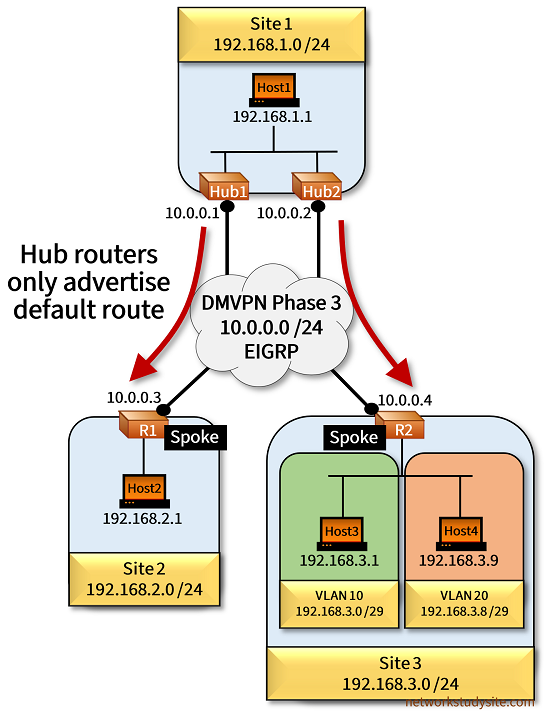
In the following example topology DMVPN Phase 3 is configured with dual hub routers in a single cloud design. The hub routers only advertise a single default route via EIGRP to the spokes, and Hub1 is the primary hub router. This means, the spoke routers cannot have a separate default route pointing to the underlay Internet Provider since two default routes cannot be simultaneously present in the same RIB.
So in consequence, the static (Internet Provider) default route is exchanged to a more specific route on the spokes. Note that if needed two default routes could coexist on a single spoke router with VRF configuration.
Also, with DMVPN Phase 3 the hub routers can have EIGRP next-hop-self and split-horizon enabled. And the command ip nhrp redirect is configured on the hub tunnel interface, while the ip nhrp shortcut is configured on the spoke tunnel interface.
Configuration:
Hub1
Hub1#show run int Gi0/0 | sec int
interface GigabitEthernet0/0
 description ** to Internet Provider **
 ip address 172.16.1.2 255.255.255.252
 duplex auto
 speed auto
 media-type rj45

Hub1#show run int Gi0/1 | sec int
interface GigabitEthernet0/1
 description ** to Host1 (Site 1 LAN) **
 ip address 192.168.1.2 255.255.255.0
 standby 1 ip 192.168.1.254
 standby 1 preempt
 standby 1 name EXAMPLE-HSRP
 standby 1 track 1 decrement 20
 duplex auto
 speed auto
 media-type rj45

Hub1#show run int Tu10 | sec int
interface Tunnel10
 description ** DMVPN Phase 3 tunnel overlay **
 ip address 10.0.0.1 255.255.255.0
 no ip redirects
 ip nhrp authentication p4ssw0rd
 ip nhrp network-id 100
 ip nhrp redirect
 tunnel source 172.16.1.2
 tunnel mode gre multipoint

Hub1#show run all | inc ^interface Tunnel10|ip nhrp map
interface Tunnel10
 ip nhrp map multicast dynamic

Hub1#show run | sec ^router
router eigrp EXAMPLE-EIGRP
 !
 address-family ipv4 unicast autonomous-system 10
  !
  af-interface Tunnel10
   summary-address 0.0.0.0 0.0.0.0
  exit-af-interface
  !
  topology base
  exit-af-topology
  network 10.0.0.0 0.0.0.255
  network 192.168.1.0
  eigrp router-id 1.1.1.1
 exit-address-family

Hub1#show run | sec ^ip route
ip route 0.0.0.0 0.0.0.0 GigabitEthernet0/0 172.16.1.1

Hub1#show run | sec ^ip sla
ip sla 10
 icmp-echo 172.16.1.1
 threshold 1000
 timeout 1000
 frequency 1
ip sla schedule 10 life forever start-time now

Hub1#show run | sec ^track
track 1 ip sla 10
Hub2
Hub2#show run int Gi0/0 | sec int
interface GigabitEthernet0/0
 description ** to Internet Provider **
 ip address 172.16.2.2 255.255.255.252
 duplex auto
 speed auto
 media-type rj45

Hub2#show run int Gi0/1 | sec int
interface GigabitEthernet0/1
 description ** to Host1 (Site 1 LAN) **
 ip address 192.168.1.3 255.255.255.0
 standby 1 ip 192.168.1.254
 standby 1 priority 90
 standby 1 preempt
 standby 1 name EXAMPLE-HSRP
 duplex auto
 speed auto
 media-type rj45

Hub2#show run int Tu10 | sec int
interface Tunnel10
 description ** DMVPN Phase 3 tunnel overlay **
 ip address 10.0.0.2 255.255.255.0
 no ip redirects
 ip nhrp authentication p4ssw0rd
 ip nhrp network-id 100
 ip nhrp nhs 10.0.0.1 nbma 172.16.1.2 multicast
 ip nhrp redirect
 delay 10000
 tunnel source 172.16.2.2
 tunnel mode gre multipoint

Hub2#show run all | inc ^interface Tunnel10|ip nhrp map
interface Tunnel10
 ip nhrp map multicast dynamic

Hub2#show run | sec ^router
router eigrp EXAMPLE-EIGRP
 !
 address-family ipv4 unicast autonomous-system 10
  !
  af-interface Tunnel10
   summary-address 0.0.0.0 0.0.0.0
  exit-af-interface
  !
  topology base
  exit-af-topology
  network 10.0.0.0 0.0.0.255
  network 192.168.1.0
  eigrp router-id 2.2.2.2
 exit-address-family

Hub2#show run | sec ^ip route
ip route 0.0.0.0 0.0.0.0 GigabitEthernet0/0 172.16.2.1
R1 (Spoke)
R1#show run int Gi0/0 | sec int
interface GigabitEthernet0/0
 description ** to Host2 (Site 2 LAN) **
 ip address 192.168.2.2 255.255.255.0
 duplex auto
 speed auto
 media-type rj45

R1#show run int Gi0/1 | sec int
interface GigabitEthernet0/1
 description ** to Internet Provider **
 ip address 172.16.3.2 255.255.255.252
 duplex auto
 speed auto
 media-type rj45

R1#show run int Tu10 | sec int
interface Tunnel10
 description ** DMVPN Phase 3 tunnel overlay **
 ip address 10.0.0.3 255.255.255.0
 no ip redirects
 ip nhrp authentication p4ssw0rd
 ip nhrp map 10.0.0.1 172.16.1.2
 ip nhrp map multicast 172.16.1.2
 ip nhrp map 10.0.0.2 172.16.2.2
 ip nhrp map multicast 172.16.2.2
 ip nhrp network-id 100
 ip nhrp nhs 10.0.0.1
 ip nhrp nhs 10.0.0.2
 tunnel source 172.16.3.2
 tunnel mode gre multipoint

R1#show run all | i interface Tunnel10|ip nhrp shortcut
interface Tunnel10
 ip nhrp shortcut

R1#show run | sec ^router
router eigrp EXAMPLE-EIGRP
 !
 address-family ipv4 unicast autonomous-system 10
  !
  topology base
  exit-af-topology
  network 10.0.0.0 0.0.0.255
  network 192.168.2.0
  eigrp router-id 3.3.3.3
 exit-address-family

R1#show run | sec ^ip route
ip route 172.16.0.0 255.255.0.0 GigabitEthernet0/1 172.16.3.1
R2 (Spoke)
R2#show run int Gi1 |  sec int
interface GigabitEthernet1
 description ** to Site 3 LAN (Host3 and Host4) **
 no ip address
 negotiation auto
 no mop enabled
 no mop sysid
 service instance 10 ethernet
  encapsulation dot1q 10
  bridge-domain 100
 !
 service instance 20 ethernet
  encapsulation dot1q 20
  bridge-domain 200
 !

R2#show run int Gi2 |  sec int
interface GigabitEthernet2
 description ** to Internet Provider **
 ip address 172.16.4.2 255.255.255.252
 negotiation auto
 no mop enabled
 no mop sysid

R2#show run int Tu10 |  sec int
interface Tunnel10
 description ** DMVPN Phase 3 tunnel overlay **
 ip address 10.0.0.4 255.255.255.0
 no ip redirects
 ip nhrp authentication p4ssw0rd
 ip nhrp map 10.0.0.1 172.16.1.2
 ip nhrp map multicast 172.16.1.2
 ip nhrp map 10.0.0.2 172.16.2.2
 ip nhrp map multicast 172.16.2.2
 ip nhrp network-id 100
 ip nhrp nhs 10.0.0.1
 ip nhrp nhs 10.0.0.2
 tunnel source 172.16.4.2
 tunnel mode gre multipoint

R2#show run all | i ^interface Tunnel10|ip nhrp shortcut
interface Tunnel10
 ip nhrp shortcut

R2#show run int BDI100 | sec int
interface BDI100
 description ** Bridge Domain Interface for VLAN 10 **
 ip address 192.168.3.2 255.255.255.248
 encapsulation dot1Q 10
 no mop enabled
 no mop sysid

R2#show run int BDI200 | sec int
interface BDI200
 description ** Bridge Domain Interface for VLAN 20 **
 ip address 192.168.3.10 255.255.255.248
 encapsulation dot1Q 20
 no mop enabled
 no mop sysid

R2#show run | sec ^router
router eigrp EXAMPLE-EIGRP
 !
 address-family ipv4 unicast autonomous-system 10
  !
  af-interface Tunnel10
   summary-address 192.168.3.0 255.255.255.0
  exit-af-interface
  !
  topology base
  exit-af-topology
  network 10.0.0.0 0.0.0.255
  network 192.168.3.0
  eigrp router-id 4.4.4.4
 exit-address-family

R2#show run | sec ^ip route
ip route 172.16.0.0 255.255.0.0 GigabitEthernet2 172.16.4.1
R1#show ip eigrp topology all
EIGRP-IPv4 VR(EXAMPLE-EIGRP) Topology Table for AS(10)/ID(3.3.3.3)
Codes: P - Passive, A - Active, U - Update, Q - Query, R - Reply,
       r - reply Status, s - sia Status

P 192.168.2.0/24, 1 successors, FD is 1310720, serno 2
        via Connected, GigabitEthernet0/0
P 10.0.0.0/24, 1 successors, FD is 9830400000, serno 1
        via Connected, Tunnel10
P 0.0.0.0/0, 1 successors, FD is 9831055360, serno 19
        via 10.0.0.1 (9831055360/1310720), Tunnel10, serno 18           « Default route from Hub1 is preferred
        via 10.0.0.2 (16384000000/6554255360), Tunnel10, serno 15


R1#show ip route | beg Ga
Gateway of last resort is 10.0.0.1 to network 0.0.0.0

D*    0.0.0.0/0 [90/76805120] via 10.0.0.1, 00:21:03, Tunnel10          « EIGRP default route installed on Spoke R1
      10.0.0.0/8 is variably subnetted, 3 subnets, 2 masks
C        10.0.0.0/24 is directly connected, Tunnel10
L        10.0.0.3/32 is directly connected, Tunnel10
H        10.0.0.4/32 is directly connected, 00:02:36, Tunnel10          « NHRP installs next-hop route to Spoke R2
      172.16.0.0/16 is variably subnetted, 3 subnets, 3 masks
S        172.16.0.0/16 [1/0] via 172.16.3.1, GigabitEthernet0/1
C        172.16.3.0/30 is directly connected, GigabitEthernet0/1
L        172.16.3.2/32 is directly connected, GigabitEthernet0/1
      192.168.2.0/24 is variably subnetted, 2 subnets, 2 masks
C        192.168.2.0/24 is directly connected, GigabitEthernet0/0
L        192.168.2.2/32 is directly connected, GigabitEthernet0/0
      192.168.3.0/29 is subnetted, 2 subnets
H        192.168.3.0 [250/255] via 10.0.0.4, 00:02:36, Tunnel10          « Site 3 prefix installed with NHRP
H        192.168.3.8 [250/255] via 10.0.0.4, 00:00:04, Tunnel10


R1#show ip nhrp
10.0.0.1/32 via 10.0.0.1
   Tunnel10 created 03:03:53, never expire
   Type: static, Flags: used
   NBMA address: 172.16.1.2
10.0.0.2/32 via 10.0.0.2
   Tunnel10 created 03:03:53, never expire
   Type: static, Flags: used
   NBMA address: 172.16.2.2
10.0.0.4/32 via 10.0.0.4
   Tunnel10 created 00:02:52, expire 00:09:39
   Type: dynamic, Flags: router nhop rib
   NBMA address: 172.16.4.2
192.168.2.0/24 via 10.0.0.3
   Tunnel10 created 00:02:52, expire 00:07:07
   Type: dynamic, Flags: router unique local
   NBMA address: 172.16.3.2
    (no-socket)
192.168.3.0/29 via 10.0.0.4
   Tunnel10 created 00:02:52, expire 00:07:07
   Type: dynamic, Flags: router rib
   NBMA address: 172.16.4.2
192.168.3.8/29 via 10.0.0.4
   Tunnel10 created 00:00:20, expire 00:09:39
   Type: dynamic, Flags: router rib
   NBMA address: 172.16.4.2
As visible in the above outputs, Spoke R1 receives only a single EIGRP default route, however due to DMVPN Phase 3 the NHRP mechanism provides additional prefix information that is installed in Spoke R1's routing table. A unique part of DMVPN Phase 3 is the Traffic Indication message sent from Hub1 (or from Hub2 in case failover) to the spokes triggering the direct spoke-to-spoke communication.
DMVPN Phase 3 with EIGRP - Dual Cloud
In the following example toplogy a DMVPN Phase 3 Dual Cloud design is configured with EIGRP as the dynamic routing protocol. Each cloud has a single hub router. This also means that each cloud has its own subnet, accordingly the cloud on the left uses 10.10.0.0/24, and on the right 10.20.0.0/24 is assigned.
Each hub router only has a single DMVPN tunnel interface. However, each spoke router has two DMVPN tunnel interfaces (one for each cloud). The tunnel key is assigned accordingly to each tunnel interface (on hub and on spoke) in order to differentiate between the two DMVPN clouds.
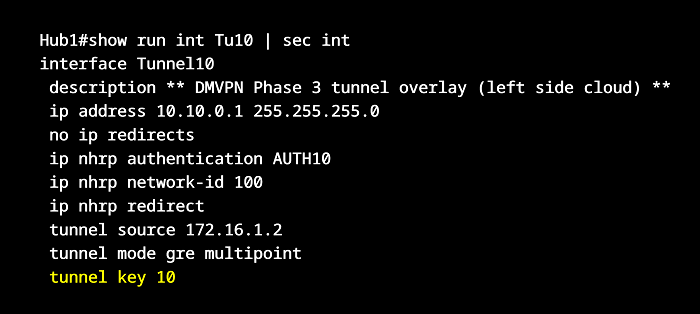
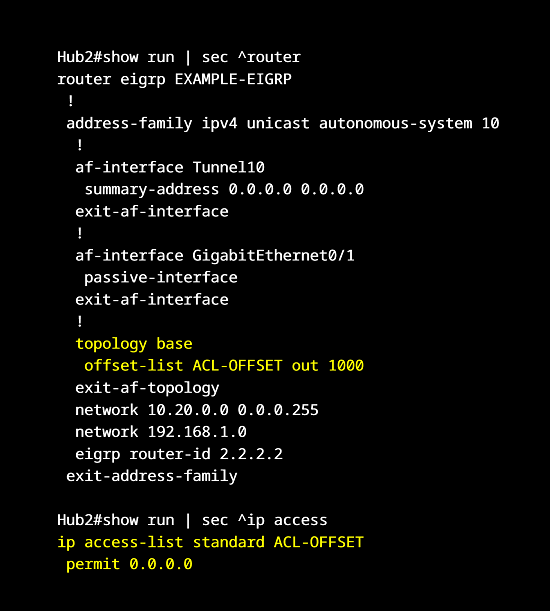
Instead of the delay metric, now an EIGRP Offset-List is configured on the backup Hub2 router in order make it less preferred than the primary Hub1 router.
Additionally, on the Spoke router R2 the LAN-facing interface has two Layer-3 subinterfaces in each VLAN connecting to Host3 and Host4. The two VLAN subnets are summarized with EIGRP, and the summary address is advertised into each DMVPN cloud separately.

Configuration:
Hub1
Hub1#show run int Gi0/0 | sec int
interface GigabitEthernet0/0
 description ** to Internet Provider **
 ip address 172.16.1.2 255.255.255.252
 duplex auto
 speed auto
 media-type rj45

Hub1#show run int Gi0/1 | sec int
interface GigabitEthernet0/1
 description ** to Host1 (Site 1 LAN) **
 ip address 192.168.1.2 255.255.255.0
 standby 1 ip 192.168.1.254
 standby 1 preempt
 standby 1 name EXAMPLE-HSRP
 standby 1 track 1 decrement 20
 duplex auto
 speed auto
 media-type rj45

Hub1#show run int Tu10 | sec int
interface Tunnel10
 description ** DMVPN Phase 3 tunnel overlay (left side cloud) **
 ip address 10.10.0.1 255.255.255.0
 no ip redirects
 ip nhrp authentication AUTH10
 ip nhrp network-id 100
 ip nhrp redirect
 tunnel source 172.16.1.2
 tunnel mode gre multipoint
 tunnel key 10

Hub1#show run all | inc ^interface Tunnel10|ip nhrp map
interface Tunnel10
 ip nhrp map multicast dynamic

Hub1#show run | sec ^router
router eigrp EXAMPLE-EIGRP
 !
 address-family ipv4 unicast autonomous-system 10
  !
  af-interface Tunnel10
   summary-address 0.0.0.0 0.0.0.0
  exit-af-interface
  !
  af-interface GigabitEthernet0/1
   passive-interface
  exit-af-interface
  !
  topology base
  exit-af-topology
  network 10.10.0.0 0.0.0.255
  network 192.168.1.0
  eigrp router-id 1.1.1.1
 exit-address-family

Hub1#show run | sec ^ip route
ip route 0.0.0.0 0.0.0.0 GigabitEthernet0/0 172.16.1.1

Hub1#show run | sec ^ip sla
ip sla 10
 icmp-echo 172.16.1.1
 threshold 1000
 timeout 1000
 frequency 1
ip sla schedule 10 life forever start-time now

Hub1#show run | sec ^track
track 1 ip sla 10
Hub2
Hub2#show run int Gi0/0 | sec int
interface GigabitEthernet0/0
 description ** to Internet Provider **
 ip address 172.16.2.2 255.255.255.252
 duplex auto
 speed auto
 media-type rj45

Hub2#show run int Gi0/1 | sec int
interface GigabitEthernet0/1
 description ** to Host1 (Site 1 LAN) **
 ip address 192.168.1.3 255.255.255.0
 standby 1 ip 192.168.1.254
 standby 1 priority 90
 standby 1 preempt
 standby 1 name EXAMPLE-HSRP
 duplex auto
 speed auto
 media-type rj45

Hub2#show run int Tu10 | sec int
interface Tunnel10
 description ** DMVPN Phase 3 tunnel overlay (right side cloud) **
 ip address 10.20.0.1 255.255.255.0
 no ip redirects
 ip nhrp authentication AUTH20
 ip nhrp network-id 200
 ip nhrp redirect
 tunnel source 172.16.2.2
 tunnel mode gre multipoint
 tunnel key 20

Hub2#show run all | inc ^interface Tunnel10|ip nhrp map
interface Tunnel10
 ip nhrp map multicast dynamic

Hub2#show run | sec ^router
router eigrp EXAMPLE-EIGRP
 !
 address-family ipv4 unicast autonomous-system 10
  !
  af-interface Tunnel10
   summary-address 0.0.0.0 0.0.0.0
  exit-af-interface
  !
  af-interface GigabitEthernet0/1
   passive-interface
  exit-af-interface
  !
  topology base
   offset-list ACL-OFFSET out 1000
  exit-af-topology
  network 10.20.0.0 0.0.0.255
  network 192.168.1.0
  eigrp router-id 2.2.2.2
 exit-address-family

Hub2#show run | sec ^ip access
ip access-list standard ACL-OFFSET
 permit 0.0.0.0

Hub2#show run | sec ^ip route
ip route 0.0.0.0 0.0.0.0 GigabitEthernet0/0 172.16.2.1
R1 (Spoke)
R1#show run int Gi0/0 | sec int
interface GigabitEthernet0/0
 description ** to Host2 (Site 2 LAN) **
 ip address 192.168.2.2 255.255.255.0
 duplex auto
 speed auto
 media-type rj45

R1#show run int Gi0/1 | sec int
interface GigabitEthernet0/1
 description ** to Internet Provider **
 ip address 172.16.3.2 255.255.255.252
 duplex auto
 speed auto
 media-type rj45

R1#show run int Tu10 | sec int
interface Tunnel10
 description ** DMVPN Phase 3 tunnel overlay (left side cloud) **
 ip address 10.10.0.2 255.255.255.0
 no ip redirects
 ip nhrp authentication AUTH10
 ip nhrp map 10.10.0.1 172.16.1.2
 ip nhrp map multicast 172.16.1.2
 ip nhrp network-id 100
 ip nhrp nhs 10.10.0.1
 tunnel source GigabitEthernet0/1
 tunnel mode gre multipoint
 tunnel key 10

R1#show run int Tu20 | sec int
interface Tunnel20
 description ** DMVPN Phase 3 tunnel overlay (right side cloud) **
 ip address 10.20.0.2 255.255.255.0
 no ip redirects
 ip nhrp authentication AUTH20
 ip nhrp map 10.20.0.1 172.16.2.2
 ip nhrp map multicast 172.16.2.2
 ip nhrp network-id 200
 ip nhrp nhs 10.20.0.1
 tunnel source GigabitEthernet0/1
 tunnel mode gre multipoint
 tunnel key 20

R1#show run all | inc ^interface Tunnel10|interface Tunnel20|ip nhrp shortcut
interface Tunnel10
 ip nhrp shortcut
interface Tunnel20
 ip nhrp shortcut

R1#show run | sec ^router
router eigrp EXAMPLE-EIGRP
 !
 address-family ipv4 unicast autonomous-system 10
  !
  topology base
  exit-af-topology
  network 10.10.0.0 0.0.0.255
  network 10.20.0.0 0.0.0.255
  network 192.168.2.0
  eigrp router-id 3.3.3.3
 exit-address-family

R1#show run | sec ^ip route
ip route 172.16.0.0 255.255.0.0 GigabitEthernet0/1 172.16.3.1
R2 (Spoke)
R2#show run int Gi0/0 | sec int
interface GigabitEthernet0/0
 description ** to Site 3 LAN (Host3 and Host4) **
 no ip address
 duplex auto
 speed auto
 media-type rj45

R2#show run int Gi0/0.10 | sec int
interface GigabitEthernet0/0.10
 description ** subinterface in VLAN 10 **
 encapsulation dot1Q 10
 ip address 192.168.3.2 255.255.255.248

R2#show run int Gi0/0.20 | sec int
interface GigabitEthernet0/0.20
 description ** subinterface in VLAN 20 **
 encapsulation dot1Q 20
 ip address 192.168.3.10 255.255.255.248

R2#show run int Gi0/1 | sec int
interface GigabitEthernet0/1
 description ** to Internet Provider **
 ip address 172.16.4.2 255.255.255.252
 duplex auto
 speed auto
 media-type rj45

R2#show run int Tu10 | sec int
interface Tunnel10
 description ** DMVPN Phase 3 tunnel overlay (left side cloud) **
 ip address 10.10.0.3 255.255.255.0
 no ip redirects
 ip nhrp authentication AUTH10
 ip nhrp map 10.10.0.1 172.16.1.2
 ip nhrp map multicast 172.16.1.2
 ip nhrp network-id 100
 ip nhrp nhs 10.10.0.1
 tunnel source GigabitEthernet0/1
 tunnel mode gre multipoint
 tunnel key 10

R2#show run int Tu20 | sec int
interface Tunnel20
 description ** DMVPN Phase 3 tunnel overlay (right side cloud) **
 ip address 10.20.0.3 255.255.255.0
 no ip redirects
 ip nhrp authentication AUTH20
 ip nhrp map 10.20.0.1 172.16.2.2
 ip nhrp map multicast 172.16.2.2
 ip nhrp network-id 200
 ip nhrp nhs 10.20.0.1
 tunnel source GigabitEthernet0/1
 tunnel mode gre multipoint
 tunnel key 20

R2#show run all | inc ^interface Tunnel10|interface Tunnel20|ip nhrp shortcut
interface Tunnel10
 ip nhrp shortcut
interface Tunnel20
 ip nhrp shortcut

R2#show run | sec ^router
router eigrp EXAMPLE-EIGRP
 !
 address-family ipv4 unicast autonomous-system 10
  !
  af-interface Tunnel10
   summary-address 192.168.3.0 255.255.255.0
  exit-af-interface
  !
  af-interface Tunnel20
   summary-address 192.168.3.0 255.255.255.0
  exit-af-interface
  !
  topology base
  exit-af-topology
  network 10.10.0.0 0.0.0.255
  network 10.20.0.0 0.0.0.255
  network 192.168.3.0
  eigrp router-id 4.4.4.4
 exit-address-family

R2#show run | sec ^ip route
ip route 172.16.0.0 255.255.0.0 GigabitEthernet0/1 172.16.4.1
Hub1#show ip route eigrp | beg Ga
Gateway of last resort is 172.16.1.1 to network 0.0.0.0

      10.0.0.0/8 is variably subnetted, 3 subnets, 2 masks
D        10.20.0.0/24 [90/102400000] via 10.10.0.3, 00:16:11, Tunnel10
                      [90/102400000] via 10.10.0.2, 00:16:11, Tunnel10
D     192.168.2.0/24 [90/76805120] via 10.10.0.2, 00:16:53, Tunnel10          « Site prefixes are learned from the spokes
D     192.168.3.0/24 [90/76805120] via 10.10.0.3, 00:16:11, Tunnel10


Hub2#show ip route eigrp | beg Ga
Gateway of last resort is 172.16.2.1 to network 0.0.0.0

      10.0.0.0/8 is variably subnetted, 3 subnets, 2 masks
D        10.10.0.0/24 [90/102400000] via 10.20.0.3, 00:16:31, Tunnel10
                      [90/102400000] via 10.20.0.2, 00:16:31, Tunnel10
D     192.168.2.0/24 [90/76805120] via 10.20.0.2, 00:17:12, Tunnel10
D     192.168.3.0/24 [90/76805120] via 10.20.0.3, 00:16:31, Tunnel10


R1#show ip route eigrp | beg Ga
Gateway of last resort is 10.10.0.1 to network 0.0.0.0

D*    0.0.0.0/0 [90/76805120] via 10.10.0.1, 00:16:41, Tunnel10               « Spoke R1 prefers default route from Hub1


R1#show ip eigrp topology
EIGRP-IPv4 VR(EXAMPLE-EIGRP) Topology Table for AS(10)/ID(3.3.3.3)
Codes: P - Passive, A - Active, U - Update, Q - Query, R - Reply,
       r - reply Status, s - sia Status

P 192.168.2.0/24, 1 successors, FD is 1310720
        via Connected, GigabitEthernet0/0
P 10.20.0.0/24, 1 successors, FD is 9830400000
        via Connected, Tunnel20
P 0.0.0.0/0, 1 successors, FD is 9831055360
        via 10.10.0.1 (9831055360/1310720), Tunnel10                           « Offset-List on Hub2 ensures default route towards Hub1 is preferred
        via 10.20.0.1 (9831056360/1311720), Tunnel20, serno 7
P 10.10.0.0/24, 1 successors, FD is 9830400000
        via Connected, Tunnel10


Host2#ping 192.168.3.1
Type escape sequence to abort.
Sending 5, 100-byte ICMP Echos to 192.168.3.1, timeout is 2 seconds:
!!!!!
Success rate is 100 percent (5/5), round-trip min/avg/max = 48/66/96 ms


Host2#trace 192.168.3.1 probe 1
Type escape sequence to abort.
Tracing the route to 192.168.3.1
VRF info: (vrf in name/id, vrf out name/id)
  1 192.168.2.2 1 msec
  2 10.10.0.3 46 msec                     « DMVPN cloud subnet connecting with Hub1 (left side) is preferred to reach Site 3
  3 192.168.3.1 53 msec
After a network outage that causes loss of connectivity with Hub1, the spoke routers start to use the DMVPN cloud with Hub2 (right side cloud) which is assigned to the subnet 10.20.0.0/24. The following outputs show a failure scenario impacting the primary Hub1 router.
R1#show ip route eigrp | beg Ga
Gateway of last resort is 10.20.0.1 to network 0.0.0.0

D*    0.0.0.0/0 [90/76805127] via 10.20.0.1, 00:06:30, Tunnel20         « Default route through Hub2 is installed


Host2#ping 192.168.3.1
Type escape sequence to abort.
Sending 5, 100-byte ICMP Echos to 192.168.3.1, timeout is 2 seconds:
!!!!!
Success rate is 100 percent (5/5), round-trip min/avg/max = 46/66/96 ms


Host2#trace 192.168.3.1 probe 1
Type escape sequence to abort.
Tracing the route to 192.168.3.1
VRF info: (vrf in name/id, vrf out name/id)
  1 192.168.2.2 1 msec
  2 10.20.0.3 47 msec              « DMVPN right side cloud subnet 10.20.0.0/24 is used to reach Spoke R2 (Site 3)
  3 192.168.3.1 47 msec


R1#show ip route nhrp | beg Ga
Gateway of last resort is 10.20.0.1 to network 0.0.0.0

      10.0.0.0/8 is variably subnetted, 6 subnets, 2 masks
H        10.10.0.3/32 is directly connected, 00:07:49, Tunnel10
H        10.20.0.3/32 is directly connected, 00:00:29, Tunnel20
      192.168.3.0/29 is subnetted, 2 subnets
H        192.168.3.0 [250/255] via 10.20.0.3, 00:00:29, Tunnel20           « NHRP installs Site 3 prefixes on Site 2 spoke router
H        192.168.3.8 [250/255] via 10.20.0.3, 00:00:05, Tunnel20