MPLS L3VPN Redundancy with Backup FlexVPN Configuration
Table of Contents
- Design options available for MPLS L3VPN redundancy ‹
- Configuring MPLS VPN with FlexVPN backup connection ‹
- How is routing configured between the sites? ‹
- Failover from primary MPLS VPN to backup FlexVPN ‹
- Verifying GETVPN/GDOI MPLS encryption ‹
- Download section ‹
Design options available for MPLS L3VPN redundancy
Running mission-critical applications in an enterprise headquarters and connecting large office buildings to a corporate WAN justify a redundant, high-availability infrastructure. With an MPLS Layer-3 VPN there are a variety of redundancy options, either with dual connections to the MPLS core or by mixing network technologies. For example, a customer location may have a separate internet access backup network as shown in the following image.

The image shows an example scenario of how MPLS L3VPN and FlexVPN could be interconnected to provide a secure and redundant network infrastructure. The MPLS solution uses GETVPN to encrypt traffic between CE routers. The GETVPN Key Server is managed by the MPLS provider. On customer locations with dual WAN edge routers, the MPLS VPN is the primary connection.
This sample topology is created purely for educational purposes to practice how different technologies could be interconnected. The illustrated design allows for different locations to communicate with each other across Site 1 which is a central office. Thus, Site 2 and Site 4 can only communicate through Site 1. It is importat that Site 3 is never used as a transit network, therefore traffic between Site 2 and Site 4 can never be routed through Site 3.
Configuring MPLS VPN with FlexVPN backup connection
The following image shows the details of a hypothetical example MPLS L3VPN network with FlexVPN over the internet as a backup service. Several important aspects are mentioned in the list below.
- The MPLS L3VPN is created using the EVPN unified control plane. EVPN IRB is configured to advertise VPN service labels between the PE routers and the BGP Route Reflector R6. The data plane label switching uses Segment Routing enabled with the IGP IS-IS.
- The traffic encryption service is inherently present with FlexVPN. Thus, traffic over the internet is encrypted between the Hub and Spoke routers. On the other hand, MPLS L3VPN is not natively encrypted, therefore GETVPN is added to the service. GETVPN encrypts traffic between each MPLS CE router using a tunnel-less architecture defined in RFC 3547.
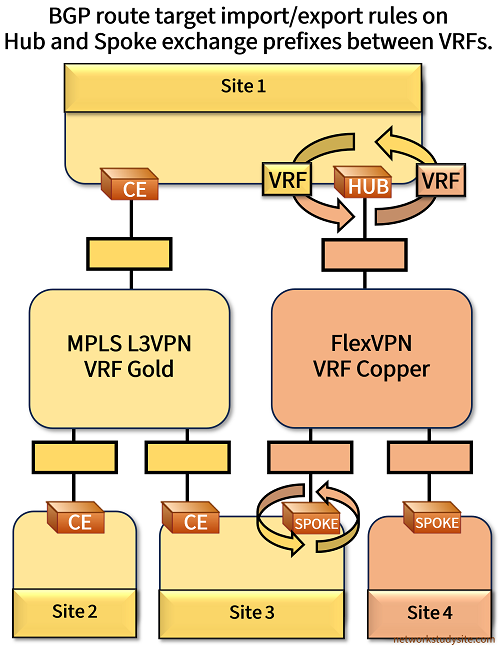
- The traffic separation is achieved with two VRFs. The sites connected to the MPLS L3VPN use VRF Gold. Meanwhile, the FlexVPN network uses VRF Copper. VRF routes are exchanged at the FlexVPN Hub and the Spoke router R13 (Site 3).

Configuration:
R1 (CE)
R1#show run | sec ^vrf
vrf definition Gold
 rd 1:1
 !
 address-family ipv4
 exit-address-family

R1#show run int Gi0/0 | sec int
interface GigabitEthernet0/0
 description ** to PE R2 - MPLS VPN **
 no ip address
 duplex auto
 speed auto
 media-type rj45

R1#show run int Gi0/0.10 | sec int
interface GigabitEthernet0/0.10
 description ** to PE R2 in VRF Gold - MPLS VPN **
 encapsulation dot1Q 1 native
 vrf forwarding Gold
 ip address 10.0.1.2 255.255.255.252
 bfd interval 100 min_rx 100 multiplier 3
 crypto map CRYPTO-GDOI-MAP

R1#show run int Gi0/1 | sec int
interface GigabitEthernet0/1
 description ** to SW1 - Site 1 LAN **
 no ip address
 duplex auto
 speed auto
 media-type rj45

R1#show run int Gi0/1.10 | sec int
interface GigabitEthernet0/1.10
 description ** to SW1 in VRF Gold - Site 1 LAN **
 encapsulation dot1Q 10
 vrf forwarding Gold
 ip address 192.168.1.9 255.255.255.248

R1#show run | sec ^router
router bgp 65001
 bgp router-id 1.1.1.1
 bgp log-neighbor-changes
 !
 address-family ipv4 vrf Gold
  neighbor 10.0.1.1 remote-as 65100
  neighbor 10.0.1.1 fall-over bfd
  neighbor 10.0.1.1 activate
  neighbor 10.0.1.1 route-map RM-FILTER-MPLS-VPN out
  neighbor 192.168.1.11 remote-as 65011
  neighbor 192.168.1.11 activate
  neighbor 192.168.1.11 route-map RM-FILTER-SITE out
 exit-address-family

R1#show run | sec ^route-map
route-map RM-FILTER-SITE permit 10
 match ip address prefix-list PL-FILTER-SITE
route-map RM-FILTER-MPLS-VPN permit 10
 match ip address prefix-list PL-FILTER-MPLS-VPN

R1#show run | sec ^ip prefix
ip prefix-list PL-FILTER-MPLS-VPN seq 5 permit 192.168.0.0/16 le 32
ip prefix-list PL-FILTER-MPLS-VPN seq 10 deny 0.0.0.0/0 le 32
ip prefix-list PL-FILTER-SITE seq 5 deny 10.0.0.0/8 le 32
ip prefix-list PL-FILTER-SITE seq 10 permit 0.0.0.0/0 le 32

R1#show run | sec ^crypto
crypto keyring CRYPTO-KEYRING vrf Gold
  pre-shared-key address 10.6.0.1 key p4ssw0rd.123
crypto isakmp policy 10
 encr aes
 authentication pre-share
 group 2
crypto isakmp profile CRYPTO-PROFILE
   keyring CRYPTO-KEYRING
   match identity address 10.6.0.1 255.255.255.252 Gold
crypto gdoi group EXAMPLE-GROUP
 identity number 100
 server address ipv4 10.6.0.1
crypto map CRYPTO-GDOI-MAP 10 gdoi
 set group EXAMPLE-GROUP
R8 (CE)
R8#show run | sec ^vrf
vrf definition Gold
 rd 1:1
 !
 address-family ipv4
 exit-address-family

R8#show run int Gi0/0 | sec int
interface GigabitEthernet0/0
 description ** to Host2 - Site 2 LAN **
 no ip address
 duplex auto
 speed auto
 media-type rj45

R8#show run int Gi0/0.10 | sec int
interface GigabitEthernet0/0.10
 description ** to Host2 in VRF Gold (VLAN 10) - Site 2 LAN **
 encapsulation dot1Q 10
 vrf forwarding Gold
 ip address 192.168.2.2 255.255.255.0

R8#show run int Gi0/1 | sec int
interface GigabitEthernet0/1
 description ** to PE R5 - MPLS VPN **
 no ip address
 duplex auto
 speed auto
 media-type rj45

R8#show run int Gi0/1.10 | sec int
interface GigabitEthernet0/1.10
 description ** to PE R5 in VRF Gold - MPLS VPN **
 encapsulation dot1Q 10
 vrf forwarding Gold
 ip address 10.0.2.2 255.255.255.252
 bfd interval 100 min_rx 100 multiplier 3
 crypto map CRYPTO-GDOI-MAP

R8#show run | sec ^router
router bgp 65002
 bgp router-id 8.8.8.8
 bgp log-neighbor-changes
 !
 address-family ipv4 vrf Gold
  network 192.168.2.0
  neighbor 10.0.2.1 remote-as 65100
  neighbor 10.0.2.1 fall-over bfd
  neighbor 10.0.2.1 activate
 exit-address-family

R8#show run | sec ^crypto
crypto keyring CRYPTO-KEYRING vrf Gold
  pre-shared-key address 10.6.0.1 key p4ssw0rd.123
crypto isakmp policy 10
 encr aes
 authentication pre-share
 group 2
crypto isakmp profile CRYPTO-PROFILE
   keyring CRYPTO-KEYRING
   match identity address 10.6.0.1 255.255.255.252 Gold
crypto gdoi group EXAMPLE-GROUP
 identity number 100
 server address ipv4 10.6.0.1
crypto map CRYPTO-GDOI-MAP 10 gdoi
 set group EXAMPLE-GROUP
R9 (CE)
R9#show run | sec ^vrf
vrf definition Gold
 rd 1:1
 !
 address-family ipv4
 exit-address-family

R9#show run int Gi0/0 | sec int
interface GigabitEthernet0/0
 description ** to SW2 - Site 3 LAN **
 no ip address
 duplex auto
 speed auto
 media-type rj45

R9#show run int Gi0/0.10 | sec int
interface GigabitEthernet0/0.10
 description ** to SW2 in VRF Gold - Site 3 LAN **
 encapsulation dot1Q 10
 vrf forwarding Gold
 ip address 192.168.3.9 255.255.255.248

R9#show run int Gi0/1 | sec int
interface GigabitEthernet0/1
 description ** to PE R5 - MPLS VPN **
 no ip address
 duplex auto
 speed auto
 media-type rj45

R9#show run int Gi0/1.10 | sec int
interface GigabitEthernet0/1.10
 description ** to PE R5 in VRF Gold - MPLS VPN **
 encapsulation dot1Q 20
 vrf forwarding Gold
 ip address 10.0.3.2 255.255.255.252
 bfd interval 100 min_rx 100 multiplier 3
 crypto map CRYPTO-GDOI-MAP

R9#show run | sec ^router
router bgp 65003
 bgp router-id 9.9.9.9
 bgp log-neighbor-changes
 !
 address-family ipv4 vrf Gold
  neighbor 10.0.3.1 remote-as 65100
  neighbor 10.0.3.1 fall-over bfd
  neighbor 10.0.3.1 activate
  neighbor 10.0.3.1 route-map RM-FILTER-MPLS-VPN out
  neighbor 192.168.3.11 remote-as 65033
  neighbor 192.168.3.11 activate
  neighbor 192.168.3.11 route-map RM-FILTER-SITE out
 exit-address-family

R9#show run | sec ^route-map
route-map RM-FILTER-SITE permit 10
 match ip address prefix-list PL-FILTER-SITE
route-map RM-FILTER-MPLS-VPN permit 10
 match ip address prefix-list PL-FILTER-MPLS-VPN

R9#show run | sec ^ip prefix
ip prefix-list PL-FILTER-MPLS-VPN seq 5 permit 192.168.0.0/16 le 32
ip prefix-list PL-FILTER-MPLS-VPN seq 10 deny 0.0.0.0/0 le 32
ip prefix-list PL-FILTER-SITE seq 5 permit 192.168.1.0/24 le 32
ip prefix-list PL-FILTER-SITE seq 10 permit 192.168.2.0/24 le 32
ip prefix-list PL-FILTER-SITE seq 15 deny 0.0.0.0/0 le 32

R9#show run | sec ^crypto
crypto keyring CRYPTO-KEYRING vrf Gold
  pre-shared-key address 10.6.0.1 key p4ssw0rd.123
crypto isakmp policy 10
 encr aes
 authentication pre-share
 group 2
crypto isakmp profile CRYPTO-PROFILE
   keyring CRYPTO-KEYRING
   match identity address 10.6.0.1 255.255.255.252 Gold
crypto gdoi group EXAMPLE-GROUP
 identity number 100
 server address ipv4 10.6.0.1
crypto map CRYPTO-GDOI-MAP 10 gdoi
 set group EXAMPLE-GROUP
R2 (PE)
R2#show run | sec ^mpls
mpls label range 200 299

R2#show run | sec ^vrf
vrf definition Gold
 rd 65100:1
 !
 address-family ipv4
  route-target export 65100:1 stitching
  route-target import 65100:3 stitching
  route-target import 65100:2 stitching
 exit-address-family

R2#show run | sec ^segment
segment-routing mpls
 !
 connected-prefix-sid-map
  address-family ipv4
   2.2.2.2/32 index 2 range 1
  exit-address-family
 !

R2#show run int Lo10 | sec int
interface Loopback10
 ip address 2.2.2.2 255.255.255.255

R2#show run int Gi1 | sec int
interface GigabitEthernet1
 description ** to R3 - MPLS Core **
 ip address 10.1.0.1 255.255.255.252
 ip router isis
 negotiation auto
 no mop enabled
 no mop sysid
 isis circuit-type level-2-only
 isis network point-to-point

R2#show run int Gi2 | sec int
interface GigabitEthernet2
 description ** to CE R1 (Site 1) **
 no ip address
 negotiation auto
 no mop enabled
 no mop sysid
 service instance 10 ethernet
  encapsulation untagged
 !

R2#show run int BDI1 | sec int
interface BDI1
 description ** to CE R1 in VRF Gold - Site 1 **
 vrf forwarding Gold
 ip address 10.0.1.1 255.255.255.252
 bfd interval 100 min_rx 100 multiplier 3
 no mop enabled
 no mop sysid

R2#show run | sec ^l2vpn
l2vpn evpn
 replication-type ingress
 mpls label mode per-ce
 router-id Loopback10
l2vpn evpn instance 100 vlan-based

R2#show run | sec ^bridge-domain
bridge-domain 1
 member GigabitEthernet2 service-instance 10
 member evpn-instance 100

R2#show run | sec ^router
router isis
 net 49.0010.0000.0000.0002.00
 is-type level-2-only
 advertise passive-only
 metric-style wide
 log-adjacency-changes
 segment-routing mpls
 passive-interface Loopback10
router bgp 65100
 bgp router-id 2.2.2.2
 bgp log-neighbor-changes
 neighbor 6.6.6.6 remote-as 65100
 neighbor 6.6.6.6 update-source Loopback10
 !
 address-family l2vpn evpn
  neighbor 6.6.6.6 activate
  neighbor 6.6.6.6 send-community both
 exit-address-family
 !
 address-family ipv4 vrf Gold
  advertise l2vpn evpn
  network 10.0.1.0 mask 255.255.255.252
  neighbor 10.0.1.2 remote-as 65001
  neighbor 10.0.1.2 fall-over bfd
  neighbor 10.0.1.2 activate
 exit-address-family
R5 (PE)
R5#show run | sec ^mpls
mpls label range 500 599

R5#show run | sec ^vrf
vrf definition Gold
 rd 65100:2
 !
 address-family ipv4
  route-target export 65100:2 stitching
  route-target import 65100:3 stitching
  route-target import 65100:1 stitching
 exit-address-family

R5#show run | sec ^segment
segment-routing mpls
 !
 connected-prefix-sid-map
  address-family ipv4
   5.5.5.5/32 index 5 range 1
  exit-address-family
 !

R5#show run int Lo10 | sec int
interface Loopback10
 ip address 5.5.5.5 255.255.255.255

R5#show run int Gi1 | sec int
interface GigabitEthernet1
 description ** to CE R8 (Site 2) and to CE R9 (Site 3) **
 no ip address
 negotiation auto
 no mop enabled
 no mop sysid
 service instance 10 ethernet
  encapsulation dot1q 10
  rewrite ingress tag pop 1 symmetric
 !
 service instance 20 ethernet
  encapsulation dot1q 20
  rewrite ingress tag pop 1 symmetric
 !

R5#show run int Gi2 | sec int
interface GigabitEthernet2
 description ** to R4 - MPLS Core **
 ip address 10.3.0.2 255.255.255.252
 ip router isis
 negotiation auto
 no mop enabled
 no mop sysid
 isis circuit-type level-2-only
 isis network point-to-point

R5#show run int BDI1 | sec int
interface BDI1
 description ** to CE R8 in VRF Gold - Site 2 **
 vrf forwarding Gold
 ip address 10.0.2.1 255.255.255.252
 bfd interval 100 min_rx 100 multiplier 3
 no mop enabled
 no mop sysid

R5#show run int BDI2 | sec int
interface BDI2
 description ** to CE R9 in VRF Gold - Site 3 **
 vrf forwarding Gold
 ip address 10.0.3.1 255.255.255.252
 bfd interval 100 min_rx 100 multiplier 3
 no mop enabled
 no mop sysid

R5#show run | sec ^l2vpn
l2vpn evpn
 replication-type ingress
 mpls label mode per-ce
 router-id Loopback10
l2vpn evpn instance 100 vlan-based
l2vpn evpn instance 200 vlan-based

R5#show run | sec ^bridge-domain
bridge-domain 1
 member GigabitEthernet1 service-instance 10
 member evpn-instance 100
bridge-domain 2
 member GigabitEthernet1 service-instance 20
 member evpn-instance 200

R5#show run | sec ^router
router isis
 net 49.0010.0000.0000.0005.00
 is-type level-2-only
 advertise passive-only
 metric-style wide
 log-adjacency-changes
 segment-routing mpls
 passive-interface Loopback10
router bgp 65100
 bgp router-id 5.5.5.5
 bgp log-neighbor-changes
 neighbor 6.6.6.6 remote-as 65100
 neighbor 6.6.6.6 update-source Loopback10
 !
 address-family l2vpn evpn
  neighbor 6.6.6.6 activate
  neighbor 6.6.6.6 send-community both
 exit-address-family
 !
 address-family ipv4 vrf Gold
  advertise l2vpn evpn
  network 10.0.2.0 mask 255.255.255.252
  network 10.0.3.0 mask 255.255.255.252
  neighbor 10.0.2.2 remote-as 65002
  neighbor 10.0.2.2 fall-over bfd
  neighbor 10.0.2.2 activate
  neighbor 10.0.3.2 remote-as 65003
  neighbor 10.0.3.2 fall-over bfd
  neighbor 10.0.3.2 activate
 exit-address-family
R7 (PE)
R7#show run | sec ^mpls
mpls label range 700 799

R7#show run | sec ^vrf
vrf definition Datacenter
 rd 65100:3
 !
 address-family ipv4
  route-target export 65100:3 stitching
  route-target import 65100:2 stitching
  route-target import 65100:1 stitching
 exit-address-family

R7#show run | sec ^segment
segment-routing mpls
 !
 connected-prefix-sid-map
  address-family ipv4
   7.7.7.7/32 index 7 range 1
  exit-address-family
 !

R7#show run int Lo10 | sec int
interface Loopback10
 ip address 7.7.7.7 255.255.255.255

R7#show run int Gi1 | sec int
interface GigabitEthernet1
 description ** to Key Server (GETVPN / GDOI) **
 no ip address
 negotiation auto
 no mop enabled
 no mop sysid
 service instance 5 ethernet
  encapsulation dot1q 10
  rewrite ingress tag pop 1 symmetric
 !

R7#show run int Gi2 | sec int
interface GigabitEthernet2
 description ** to R3 - MPLS Core **
 ip address 10.5.0.1 255.255.255.252
 ip router isis
 negotiation auto
 no mop enabled
 no mop sysid
 isis circuit-type level-2-only
 isis network point-to-point

R7#show run int BDI10 | sec int
interface BDI10
 description ** to Key Server in VRF Datacenter **
 vrf forwarding Datacenter
 ip address 10.6.0.2 255.255.255.0
 no mop enabled
 no mop sysid

R7#show run | sec ^l2vpn
l2vpn evpn
 replication-type ingress
 mpls label mode per-ce
 router-id Loopback10
l2vpn evpn instance 100 vlan-based

R7#show run | sec ^bridge-domain
bridge-domain 10
 member GigabitEthernet1 service-instance 5
 member evpn-instance 100

R7#show run | sec ^router
router isis
 net 49.0010.0000.0000.0007.00
 is-type level-2-only
 advertise passive-only
 metric-style wide
 log-adjacency-changes
 segment-routing mpls
 passive-interface Loopback10
router bgp 65100
 bgp router-id 7.7.7.7
 bgp log-neighbor-changes
 neighbor 6.6.6.6 remote-as 65100
 neighbor 6.6.6.6 update-source Loopback10
 !
 address-family l2vpn evpn
  neighbor 6.6.6.6 activate
  neighbor 6.6.6.6 send-community both
 exit-address-family
 !
 address-family ipv4 vrf Datacenter
  advertise l2vpn evpn
  network 10.6.0.0 mask 255.255.255.0
 exit-address-family
R6 (BGP RR)
R6#show run int Lo10 | sec int
interface Loopback10
 ip address 6.6.6.6 255.255.255.255

R6#show run int Gi0/0 | sec int
interface GigabitEthernet0/0
 description ** to R4 **
 ip address 10.4.0.1 255.255.255.252
 ip router isis
 duplex auto
 speed auto
 media-type rj45
 isis circuit-type level-2-only
 isis network point-to-point

R6#show run | sec ^router
router isis
 net 49.0010.0000.0000.0006.00
 is-type level-2-only
 advertise passive-only
 metric-style wide
 log-adjacency-changes
 passive-interface Loopback10
router bgp 65100
 bgp router-id 6.6.6.6
 bgp log-neighbor-changes
 neighbor 2.2.2.2 remote-as 65100
 neighbor 2.2.2.2 update-source Loopback10
 neighbor 5.5.5.5 remote-as 65100
 neighbor 5.5.5.5 update-source Loopback10
 neighbor 7.7.7.7 remote-as 65100
 neighbor 7.7.7.7 update-source Loopback10
 !
 address-family l2vpn evpn
  neighbor 2.2.2.2 activate
  neighbor 2.2.2.2 send-community both
  neighbor 2.2.2.2 route-reflector-client
  neighbor 5.5.5.5 activate
  neighbor 5.5.5.5 send-community both
  neighbor 5.5.5.5 route-reflector-client
  neighbor 7.7.7.7 activate
  neighbor 7.7.7.7 send-community both
  neighbor 7.7.7.7 route-reflector-client
 exit-address-family
Key Server
Key-Server#show run int Gi0/0 | sec int
interface GigabitEthernet0/0
 description ** to PE R7 **
 no ip address
 duplex auto
 speed auto
 media-type rj45

Key-Server#show run int Gi0/0.10 | sec int
interface GigabitEthernet0/0.10
 description ** to PE R7 in VLAN 10 **
 encapsulation dot1Q 10
 ip address 10.6.0.1 255.255.255.0


###################### C O M M E N T ##########################
First, RSA key-pair is generated using the command highlighted below.

Key-Server(config)#crypto key generate rsa modulus 2048 label EXAMPLE-RSA-KEY
The name for the keys will be: EXAMPLE-RSA-KEY

% The key modulus size is 2048 bits
% Generating 2048 bit RSA keys, keys will be non-exportable...
[OK] (elapsed time was 1 seconds)

Key-Server(config)#
###################### C O M M E N T ##########################


Key-Server#show run | sec ^crypto
crypto keyring CRYPTO-KEYRING
  pre-shared-key address 10.0.1.2 255.255.255.252 key p4ssw0rd.123
  pre-shared-key address 10.0.2.2 255.255.255.252 key p4ssw0rd.123
  pre-shared-key address 10.0.3.2 255.255.255.252 key p4ssw0rd.123
crypto isakmp policy 10
 encr aes
 authentication pre-share
 group 2
crypto ipsec transform-set CRYPTO-TRANSFORM esp-aes
 mode tunnel
crypto ipsec profile CRYPTO-PROFILE
 set transform-set CRYPTO-TRANSFORM
crypto gdoi group EXAMPLE-GROUP
 identity number 100
 server local
  rekey algorithm aes 128
  rekey authentication mypubkey rsa EXAMPLE-RSA-KEY
  rekey transport unicast
  sa ipsec 10
   profile CRYPTO-PROFILE
   match address ipv4 GDOI-ACL
   replay time window-size 5
   no tag
  address ipv4 10.6.0.1

Key-Server#show run | sec ^ip access
ip access-list extended GDOI-ACL
 deny   udp any eq 848 any
 deny   udp any any eq 848
 deny   tcp any any eq 22
 deny   tcp any eq 22 any
 deny   tcp any eq bgp any
 deny   tcp any any eq bgp
 deny   udp any any eq 3784
 deny   udp any any eq 3785
 permit ip any any

Key-Server#show run | sec ^ip route
ip route 0.0.0.0 0.0.0.0 10.6.0.2
R4
R4#show run | sec ^segment
segment-routing mpls
 !
 connected-prefix-sid-map
  address-family ipv4
   4.4.4.4/32 index 4 range 1
  exit-address-family
 !

R4#show run int Lo10 | sec int
interface Loopback10
 ip address 4.4.4.4 255.255.255.255

R4#show run int Gi1 | sec int
interface GigabitEthernet1
 description ** to PE R5 **
 ip address 10.3.0.1 255.255.255.252
 ip router isis
 negotiation auto
 no mop enabled
 no mop sysid
 isis circuit-type level-2-only
 isis network point-to-point

R4#show run int Gi2 | sec int
interface GigabitEthernet2
 description ** to R3 **
 ip address 10.2.0.2 255.255.255.252
 ip router isis
 negotiation auto
 no mop enabled
 no mop sysid
 isis circuit-type level-2-only
 isis network point-to-point

R4#show run int Gi3 | sec int
interface GigabitEthernet3
 description ** to BGP RR R6 **
 ip address 10.4.0.2 255.255.255.252
 ip router isis
 negotiation auto
 no mop enabled
 no mop sysid
 isis circuit-type level-2-only
 isis network point-to-point

R4#show run | sec ^router
router isis
 net 49.0010.0000.0000.0004.00
 is-type level-2-only
 advertise passive-only
 metric-style wide
 log-adjacency-changes
 segment-routing mpls
 passive-interface Loopback10
R10 (Hub)
R10#show run | sec ^vrf
vrf definition Copper
 rd 1:1
 !
 address-family ipv4
  import map RM-IMPORT-FLEXVPN
  route-target export 65010:1
  route-target import 65010:2
 exit-address-family
vrf definition Gold
 rd 2:2
 !
 address-family ipv4
  route-target export 65010:2
  route-target import 65010:1
 exit-address-family

R10#show run | sec ^route-map
route-map RM-FLEXVPN-DEFAULT permit 10
 match ip address prefix-list PL-FLEXVPN-DEFAULT
route-map RM-IMPORT-FLEXVPN permit 10
 match ip address prefix-list PL-IMPORT-FLEXVPN

R10#show run | sec ^ip prefix
ip prefix-list PL-FLEXVPN-DEFAULT seq 5 permit 0.0.0.0/0
ip prefix-list PL-FLEXVPN-DEFAULT seq 10 deny 0.0.0.0/0 le 32
ip prefix-list PL-IMPORT-FLEXVPN seq 5 permit 192.168.0.0/16 le 32
ip prefix-list PL-IMPORT-FLEXVPN seq 10 deny 0.0.0.0/0 le 32

R10#show run int Lo10 | sec int
interface Loopback10
 vrf forwarding Copper
 ip address 10.10.10.10 255.255.255.255

R10#show run int Gi0/0 | sec int
interface GigabitEthernet0/0
 description ** to R11 - internet ISP **
 ip address 10.0.4.2 255.255.255.252
 duplex auto
 speed auto
 media-type rj45

R10#show run int Gi0/1 | sec int
interface GigabitEthernet0/1
 description ** to SW1 - Site 1 LAN **
 no ip address
 duplex auto
 speed auto
 media-type rj45

R10#show run int Gi0/1.10 | sec int
interface GigabitEthernet0/1.10
 description ** to SW1 in VRF Gold - Site 1 LAN **
 encapsulation dot1Q 10
 vrf forwarding Gold
 ip address 192.168.1.10 255.255.255.248

R10#show run int Virtual-Template 10 | sec int
interface Virtual-Template10 type tunnel
 description ** Dynamic VTI for FlexVPN Spokes R13 and R14 **
 vrf forwarding Copper
 ip unnumbered Loopback10
 tunnel source GigabitEthernet0/0
 tunnel protection ipsec profile default

R10#show run | sec ^aaa n|^aaa a
aaa new-model
aaa authorization network AUTH-FLEXVPN local

R10#show run | sec ^crypto
crypto ikev2 authorization policy CRYPTO-AUTH
 route set interface
crypto ikev2 profile default
 match identity remote address 10.0.0.0 255.255.0.0
 authentication remote pre-share key p4ssw0rd.123
 authentication local pre-share key p4ssw0rd.123
 aaa authorization group psk list AUTH-FLEXVPN CRYPTO-AUTH
 virtual-template 10

R10#show run | sec ^router
router bgp 65010
 bgp router-id 10.10.10.10
 bgp log-neighbor-changes
 !
 address-family ipv4 vrf Copper
  neighbor 13.13.13.13 remote-as 65010
  neighbor 13.13.13.13 update-source Loopback10
  neighbor 13.13.13.13 activate
  neighbor 13.13.13.13 default-originate
  neighbor 13.13.13.13 route-map RM-FLEXVPN-DEFAULT out
  neighbor 14.14.14.14 remote-as 65010
  neighbor 14.14.14.14 update-source Loopback10
  neighbor 14.14.14.14 activate
  neighbor 14.14.14.14 default-originate
  neighbor 14.14.14.14 route-map RM-FLEXVPN-DEFAULT out
 exit-address-family
 !
 address-family ipv4 vrf Gold
  aggregate-address 192.168.0.0 255.255.0.0 summary-only
  neighbor 192.168.1.11 remote-as 65011
  neighbor 192.168.1.11 activate
 exit-address-family

R10#show run | sec ^ip route
ip route 0.0.0.0 0.0.0.0 GigabitEthernet0/0 10.0.4.1
R13 (Spoke)
R13#show run | sec ^vrf
vrf definition Copper
 rd 1:1
 !
 address-family ipv4
  import map RM-IMPORT-FLEXVPN
  route-target export 65010:1
  route-target import 65010:2
 exit-address-family
vrf definition Gold
 rd 2:2
 !
 address-family ipv4
  route-target export 65010:2
  route-target import 65010:1
 exit-address-family

R13#show run | sec ^route-map
route-map RM-IMPORT-FLEXVPN permit 10
 match ip address prefix-list PL-IMPORT-FLEXVPN

R13#show run | sec ^ip prefix
ip prefix-list PL-IMPORT-FLEXVPN seq 5 permit 192.168.3.0/24 le 32
ip prefix-list PL-IMPORT-FLEXVPN seq 10 deny 0.0.0.0/0 le 32

R13#show run int Gi0/0 | sec int
interface GigabitEthernet0/0
 description ** to SW2 - Site 3 LAN **
 no ip address
 duplex auto
 speed auto
 media-type rj45

R13#show run int Gi0/0.10 | sec int
interface GigabitEthernet0/0.10
 description description ** to SW2 in VRF Gold - Site 3 LAN **
 encapsulation dot1Q 10
 vrf forwarding Gold
 ip address 192.168.3.10 255.255.255.248

R13#show run int Gi0/1 | sec int
interface GigabitEthernet0/1
 description ** to R12 - internet ISP **
 ip address 10.0.5.2 255.255.255.252
 duplex auto
 speed auto
 media-type rj45

R13#show run int Tu10 | sec int
interface Tunnel10
 description ** FlexVPN Static VTI to Hub R10 **
 vrf forwarding Copper
 ip address 13.13.13.13 255.255.255.255
 tunnel source 10.0.5.2
 tunnel destination 10.0.4.2
 tunnel protection ipsec profile default

R13#show run | sec ^aaa n|^aaa a
aaa new-model
aaa authorization network AUTH-FLEXVPN local

R13#show run | sec ^crypto
crypto ikev2 authorization policy CRYPTO-AUTH
 route set interface
crypto ikev2 profile default
 match identity remote address 10.0.0.0 255.255.0.0
 authentication remote pre-share key p4ssw0rd.123
 authentication local pre-share key p4ssw0rd.123
 aaa authorization group psk list AUTH-FLEXVPN CRYPTO-AUTH

R13#show run | sec ^router
router bgp 65010
 bgp router-id 13.13.13.13
 bgp log-neighbor-changes
 !
 address-family ipv4 vrf Copper
  neighbor 10.10.10.10 remote-as 65010
  neighbor 10.10.10.10 activate
  neighbor 10.10.10.10 next-hop-self
 exit-address-family
 !
 address-family ipv4 vrf Gold
  neighbor 192.168.3.11 remote-as 65033
  neighbor 192.168.3.11 activate
 exit-address-family

R13#show run | sec ^ip route
ip route 0.0.0.0 0.0.0.0 GigabitEthernet0/1 10.0.5.1
R14 (Spoke)
R14#show run | sec ^vrf
vrf definition Copper
 rd 1:1
 !
 address-family ipv4
 exit-address-family

R14#show run int Gi0/0 | sec int
interface GigabitEthernet0/0
 description ** to Host4 - Site 4 LAN **
 no ip address
 duplex auto
 speed auto
 media-type rj45

R14#show run int Gi0/0.10 | sec int
interface GigabitEthernet0/0.10
 description ** to Host4 in VRF Copper (VLAN 1) - Site 4 LAN **
 encapsulation dot1Q 1 native
 vrf forwarding Copper
 ip address 192.168.4.2 255.255.255.0

R14#show run int Gi0/1 | sec int
interface GigabitEthernet0/1
 description ** to R12 - internet ISP **
 ip address 10.0.6.2 255.255.255.252
 duplex auto
 speed auto
 media-type rj45

R14#show run int Tu10 | sec int
interface Tunnel10
 description ** FlexVPN Static VTI to Hub R10 **
 vrf forwarding Copper
 ip address 14.14.14.14 255.255.255.255
 tunnel source 10.0.6.2
 tunnel destination 10.0.4.2
 tunnel protection ipsec profile default

R14#show run | sec ^aaa n|^aaa a
aaa new-model
aaa authorization network AUTH-FLEXVPN local

R14#show run | sec ^crypto
crypto ikev2 authorization policy CRYPTO-AUTH
 route set interface
crypto ikev2 profile default
 match identity remote address 10.0.0.0 255.255.0.0
 authentication remote pre-share key p4ssw0rd.123
 authentication local pre-share key p4ssw0rd.123
 aaa authorization group psk list AUTH-FLEXVPN CRYPTO-AUTH

R14#show run | sec ^router
router bgp 65010
 bgp router-id 14.14.14.14
 bgp log-neighbor-changes
 !
 address-family ipv4 vrf Copper
  network 192.168.4.0
  neighbor 10.10.10.10 remote-as 65010
  neighbor 10.10.10.10 activate
 exit-address-family

R14#show run | sec ^ip route
ip route 0.0.0.0 0.0.0.0 GigabitEthernet0/1 10.0.6.1
SW1
SW1#show run int Gi0/0 | sec int
interface GigabitEthernet0/0
 description ** to CE R1 - MPLS VPN **
 switchport trunk allowed vlan 10
 switchport trunk encapsulation dot1q
 switchport mode trunk
 negotiation auto

SW1#show run int Gi0/1 | sec int
interface GigabitEthernet0/1
 description ** to Hub R10 - FlexVPN internet **
 switchport trunk allowed vlan 10
 switchport trunk encapsulation dot1q
 switchport mode trunk
 negotiation auto

SW1#show run int vlan 10 | sec int
interface Vlan10
 description ** SVI for VLAN 10 connecting to CE R1 and Hub R10 **
 vrf forwarding Gold
 ip address 192.168.1.11 255.255.255.248

SW1#show run int Gi0/2 | sec int
interface GigabitEthernet0/2
 description ** to Host1 **
 switchport access vlan 20
 switchport mode access
 negotiation auto

SW1#show run int vlan 20 | sec int
interface Vlan20
 description ** SVI for VLAN 20 connecting to Host1 **
 vrf forwarding Gold
 ip address 192.168.1.2 255.255.255.252

SW1#show run | sec ^vrf
vrf definition Gold
 rd 1:1
 !
 address-family ipv4
 exit-address-family

SW1#show run | sec ^router
router bgp 65011
 bgp router-id 192.168.1.11
 bgp log-neighbor-changes
 !
 address-family ipv4 vrf Gold
  network 192.168.1.0 mask 255.255.255.252
  network 192.168.1.8 mask 255.255.255.248
  neighbor 192.168.1.9 remote-as 65001
  neighbor 192.168.1.9 update-source Vlan10
  neighbor 192.168.1.9 activate
  neighbor 192.168.1.10 remote-as 65010
  neighbor 192.168.1.10 update-source Vlan10
  neighbor 192.168.1.10 activate
 exit-address-family
SW2
SW2#show run int Gi0/0 | sec int
interface GigabitEthernet0/0
 description ** to Host3 **
 switchport access vlan 20
 switchport mode access
 negotiation auto

SW2#show run int vlan 20 | sec int
interface Vlan20
 description ** SVI for VLAN 20 connecting to Host3 **
 vrf forwarding Gold
 ip address 192.168.3.2 255.255.255.252

SW2#show run int Gi0/1 | sec int
interface GigabitEthernet0/1
 description ** to CE R9 - MPLS VPN **
 switchport trunk allowed vlan 10
 switchport trunk encapsulation dot1q
 switchport mode trunk
 negotiation auto

SW2#show run int Gi0/2 | sec int
interface GigabitEthernet0/2
 description ** to Spoke R13 - FlexVPN internet **
 switchport trunk allowed vlan 10
 switchport trunk encapsulation dot1q
 switchport mode trunk
 negotiation auto

SW2#show run int vlan 10 | sec int
interface Vlan10
 description ** SVI for VLAN 10 connecting to CE R9 and Spoke R13 **
 vrf forwarding Gold
 ip address 192.168.3.11 255.255.255.248

SW2#show run | sec ^router
router bgp 65033
 bgp router-id 192.168.3.11
 bgp log-neighbor-changes
 !
 address-family ipv4 vrf Gold
  network 192.168.3.0 mask 255.255.255.252
  network 192.168.3.8 mask 255.255.255.248
  neighbor 192.168.3.9 remote-as 65003
  neighbor 192.168.3.9 update-source Vlan10
  neighbor 192.168.3.9 activate
  neighbor 192.168.3.10 remote-as 65010
  neighbor 192.168.3.10 update-source Vlan10
  neighbor 192.168.3.10 activate
 exit-address-family

SW2#show run | sec ^vrf
vrf definition Gold
 rd 1:1
 !
 address-family ipv4
 exit-address-family
Host1
Host2#show run int Gi0/0 | sec int
interface GigabitEthernet0/0
 description ** to CE R8 **
 no ip address
 duplex auto
 speed auto
 media-type rj45

Host2#show run int Gi0/0.10 | sec int
interface GigabitEthernet0/0.10
 description ** to CE R8 in VLAN 10 **
 encapsulation dot1Q 10
 ip address 192.168.2.1 255.255.255.0

Host2#show run | sec ^ip route
ip route 0.0.0.0 0.0.0.0 192.168.2.2
Host1#trace 192.168.2.1 probe 1
Type escape sequence to abort.
Tracing the route to 192.168.2.1
VRF info: (vrf in name/id, vrf out name/id)
  1 192.168.1.2 1 msec
  2 192.168.1.9 2 msec
  3 10.0.2.2 51 msec                « Host1 reaches Host2 through MPLS VPN, no label stack in trace due to GETVPN tunnel-less encryption
  4 192.168.2.1 54 msec


Host1#trace 192.168.3.1 probe 1
Type escape sequence to abort.
Tracing the route to 192.168.3.1
VRF info: (vrf in name/id, vrf out name/id)
  1 192.168.1.2 1 msec
  2 192.168.1.9 3 msec
  3 10.0.3.2 53 msec                « Host1 reaches Host3 through MPLS GETVPN
  4 192.168.3.11 53 msec
  5 192.168.3.1 53 msec


Host1#trace 192.168.4.1 probe 1
Type escape sequence to abort.
Tracing the route to 192.168.4.1
VRF info: (vrf in name/id, vrf out name/id)
  1 192.168.1.2 2 msec
  2 192.168.1.10 3 msec
  3 14.14.14.14 50 msec            « Host1 reaches Host4 through FlexVPN encrypted tunnel
  4 192.168.4.1 50 msec


SW1#show ip route vrf Gold | beg Ga
Gateway of last resort is not set

B     192.168.0.0/16 [20/0] via 192.168.1.10, 00:22:14              « FlexVPN Hub router summarizes Spoke site addresses
      192.168.1.0/24 is variably subnetted, 4 subnets, 3 masks
C        192.168.1.0/30 is directly connected, Vlan20
L        192.168.1.2/32 is directly connected, Vlan20
C        192.168.1.8/29 is directly connected, Vlan10
L        192.168.1.11/32 is directly connected, Vlan10
B     192.168.2.0/24 [20/0] via 192.168.1.9, 00:03:27
      192.168.3.0/24 is variably subnetted, 2 subnets, 2 masks
B        192.168.3.0/30 [20/0] via 192.168.1.9, 00:03:27
B        192.168.3.8/29 [20/0] via 192.168.1.9, 00:03:27
It is visible in the above outputs that from Site 1 the MPLS VPN is the preferred path. Meanwhile, SW1 uses a /16 BGP summary route towards the FlexVPN Hub router to reach Spoke locations. Notice that the traceroutes do not display multiple hops because of the encryption service added by GETVPN and FlexVPN. For clarity, the following traceroute displays the MPLS VPN path while disabling GETVPN encryption.
Host1#trace 192.168.3.1 probe 1                               « Host1 (Site 1) traces to Host3 (Site 3)
Type escape sequence to abort.
Tracing the route to 192.168.3.1
VRF info: (vrf in name/id, vrf out name/id)
  1 192.168.1.2 3 msec
  2 192.168.1.9 3 msec
  3 10.0.1.1 38 msec
  4 10.1.0.2 [MPLS: Labels 16005/507 Exp 0] 69 msec           « MPLS label stack is used
  5 10.2.0.2 [MPLS: Labels 16005/507 Exp 0] 76 msec
  6 10.0.3.1 [MPLS: Label 507 Exp 0] 43 msec                  « VPN service label assigned by PE R5
  7 10.0.3.2 48 msec
  8 192.168.3.11 49 msec
  9 192.168.3.1 50 msec
In this example network sites that have a single MPLS VPN connection can communicate with sites that only have internet access (FlexVPN). Thus, Host2 and Host4 can communicate through the central office location Site 1. The following traceroute shows traffic in both directions.
Host2#trace 192.168.4.1 probe 1
Type escape sequence to abort.
Tracing the route to 192.168.4.1
VRF info: (vrf in name/id, vrf out name/id)
  1 192.168.2.2 2 msec
  2 10.0.1.2 50 msec                                 « Routing through Site 1 CE R1
  3 192.168.1.10 50 msec
  4 14.14.14.14 98 msec
  5 192.168.4.1 100 msec


Host4:~$ traceroute 192.168.2.1 -q 1 -n
traceroute to 192.168.2.1 (192.168.2.1), 30 hops max, 46 byte packets
 1  192.168.4.2  1.246 ms
 2  10.10.10.10  47.640 ms                          « Routing through Site 1 Hub R10
 3  192.168.1.9  51.263 ms
 4  10.0.2.2  100.192 ms
 5  192.168.2.1  100.834 ms


R8#show ip bgp vpnv4 vrf Gold | beg Ne
     Network          Next Hop            Metric LocPrf Weight Path
Route Distinguisher: 1:1 (default for vrf Gold)
 *>   10.0.1.0/30      10.0.2.1                               0 65100 i
 r>   10.0.2.0/30      10.0.2.1                 0             0 65100 i
 *>   10.0.3.0/30      10.0.2.1                 0             0 65100 i
 *>   10.6.0.0/24      10.0.2.1                               0 65100 i
 *>   192.168.0.0/16   10.0.2.1                               0 65100 65001 65011 65010 i      « FlexVPN Spoke represented by summary route
 *>   192.168.1.0/30   10.0.2.1                               0 65100 65001 65011 i
 *>   192.168.1.8/29   10.0.2.1                               0 65100 65001 65011 i
 *>   192.168.2.0      0.0.0.0                  0         32768 i
 *>   192.168.3.0/30   10.0.2.1                               0 65100 65003 65033 i
 *>   192.168.3.8/29   10.0.2.1                               0 65100 65003 65033 i
How is routing configured between the sites?
Site 1 is a hub location providing transit services to the other sites. This means, Site 1 has knowledge of all the connected MPLS VPN and FlexVPN locations. Site 2 (MPLS VPN only) and Site 4 (FlexVPN internet only) can communicate through the hub location Site 1.
The FlexVPN Hub router advertises only an iBGP default route to the Spoke routers. The Spoke routers transmit traffic through the Hub router to reach each other, thus traffic is backhauled to the central location Site 1. There is no direct spoke-to-spoke communication.
Site 2, Site 3 and Site 4 are stub locations. Site 3 does not provide transit services to any other site. In other words, if the CE router on Site 1 fails it means that Site 2 and Site 4 cannot communicate. Traffic cannot be routed through Site 3.
The two networks are separated with VRFs. Sites with access to the MPLS L3VPN are assigned to VRF Gold. The FlexVPN network uses VRF Copper. The Hub and Spoke routers use VRF import/export rules to exchange prefixes. Export and import maps are used to specifically control which prefixes should be distributed between the VRFs.
A benefit of using VRFs is that FlexVPN locations can receive two default routes. The underlay network internet service provider can assign a default route in the global routing table. And additionally, a second default route can be received through iBGP in the secure FlexVPN overlay network.
R14#show ip route | beg Ga
Gateway of last resort is 10.0.6.1 to network 0.0.0.0

S*    0.0.0.0/0 [1/0] via 10.0.6.1, GigabitEthernet0/1                « Default route in underlay internet transport global routing table
      10.0.0.0/8 is variably subnetted, 2 subnets, 2 masks
C        10.0.6.0/30 is directly connected, GigabitEthernet0/1
L        10.0.6.2/32 is directly connected, GigabitEthernet0/1


R14#show ip route vrf Copper | beg Ga
Gateway of last resort is 10.10.10.10 to network 0.0.0.0

B*    0.0.0.0/0 [200/0] via 10.10.10.10, 00:28:39                     « Default route received from FlexVPN Hub router
      10.0.0.0/32 is subnetted, 1 subnets
S        10.10.10.10 is directly connected, Tunnel10
      14.0.0.0/32 is subnetted, 1 subnets
C        14.14.14.14 is directly connected, Tunnel10
      192.168.4.0/24 is variably subnetted, 2 subnets, 2 masks
C        192.168.4.0/24 is directly connected, GigabitEthernet0/0.10
L        192.168.4.2/32 is directly connected, GigabitEthernet0/0.10
As shown in the above outputs from FlexVPN Spoke router R14, there are two default routes in use. One is in the global routing table, and the other is received in VRF Copper.
Also, an important aspect are the points of exchange between the two VRFs. Sites with dual WAN edge routers (Site 1 and Site 3) that have an internet backup use the above mentioned VRF import/export rules to receive a default route, and to import Site-specific routes into the FlexVPN secure overlay. This is shown in the following output.
R10#show ip route vrf Gold | beg Ga
Gateway of last resort is not set

B     192.168.0.0/16 [200/0], 00:30:15, Null0
      192.168.1.0/24 is variably subnetted, 3 subnets, 3 masks
B        192.168.1.0/30 [20/0] via 192.168.1.11, 00:30:15
C        192.168.1.8/29 is directly connected, GigabitEthernet0/1.10
L        192.168.1.10/32 is directly connected, GigabitEthernet0/1.10
B     192.168.2.0/24 [20/0] via 192.168.1.9, 00:11:16
      192.168.3.0/24 is variably subnetted, 2 subnets, 2 masks
B        192.168.3.0/30 [200/0] via 13.13.13.13 (Copper), 00:30:15           « Routes imported from VRF Copper into VRF Gold
B        192.168.3.8/29 [200/0] via 13.13.13.13 (Copper), 00:30:15
B     192.168.4.0/24 [200/0] via 14.14.14.14 (Copper), 00:30:07


R10#show ip route vrf Copper | beg Ga
Gateway of last resort is not set

      10.0.0.0/32 is subnetted, 1 subnets
C        10.10.10.10 is directly connected, Loopback10
      13.0.0.0/32 is subnetted, 1 subnets
S        13.13.13.13 is directly connected, Virtual-Access2
      14.0.0.0/32 is subnetted, 1 subnets
S        14.14.14.14 is directly connected, Virtual-Access1
B     192.168.0.0/16 [200/0], 00:31:26, Null0
      192.168.1.0/24 is variably subnetted, 2 subnets, 2 masks
B        192.168.1.0/30 [20/0] via 192.168.1.11 (Gold), 00:31:26             « Routes imported from VRF Gold into VRF Copper
B        192.168.1.8/29 [20/0] via 192.168.1.11 (Gold), 00:31:26
B     192.168.2.0/24 [20/0] via 192.168.1.9 (Gold), 00:12:39
      192.168.3.0/24 is variably subnetted, 2 subnets, 2 masks
B        192.168.3.0/30 [200/0] via 13.13.13.13, 00:31:26
B        192.168.3.8/29 [200/0] via 13.13.13.13, 00:31:26
B     192.168.4.0/24 [200/0] via 14.14.14.14, 00:31:26
Routing policies can be applied at the points of exchange between the VRFs in order to influence convergence between the two networks. Additionally, the Layer-3 switches (SW1, SW2) are connected with eBGP to the MPLS CE and FlexVPN routers. Thus, policies can also be applied on SW1/SW2 or on the CE routers.
For example, on the CE router R9 the FlexVPN WAN network's summary route 192.168.0.0/16 (originated by the Hub R10) is not advertised to SW2. This enables devices in Site 3 to use the FlexVPN default route for traffic destined to Spoke locations such as Site 4.
SW2#show ip bgp vpnv4 vrf Gold | beg Ne
     Network          Next Hop            Metric LocPrf Weight Path
Route Distinguisher: 1:1 (default for vrf Gold)
 *>   0.0.0.0          192.168.3.10                           0 65010 i          « Traffic to non-MPLS sites uses the FlexVPN default route
 *>   192.168.1.0/30   192.168.3.9                            0 65003 65100 65001 65011 i
 *>   192.168.1.8/29   192.168.3.9                            0 65003 65100 65001 65011 i
 *>   192.168.2.0      192.168.3.9                            0 65003 65100 65002 i
 *>   192.168.3.0/30   0.0.0.0                  0         32768 i
 *>   192.168.3.8/29   0.0.0.0                  0         32768 i
Failover from primary MPLS VPN to backup FlexVPN
The following scenario shows what happens during failure of the primary path through CE router R9 on Site 3. To improve failure detection BFD is configured between the CE and the PE routers. The displayed outputs show the path taken before failover to the backup internet connection.
Host3:~$ traceroute 192.168.1.1 -q 1 -n
traceroute to 192.168.1.1 (192.168.1.1), 30 hops max, 46 byte packets
 1  192.168.3.2  1.353 ms
 2  192.168.3.9  2.680 ms                           « Primary path through CE R9 is used before failure
 3  10.0.1.2  53.119 ms
 4  192.168.1.11  54.428 ms
 5  192.168.1.1  52.081 ms


Host3:~$ traceroute 192.168.2.1 -q 1 -n
traceroute to 192.168.2.1 (192.168.2.1), 30 hops max, 46 byte packets
 1  192.168.3.2  1.289 ms
 2  192.168.3.9  2.620 ms
 3  10.0.2.2  46.437 ms
 4  192.168.2.1  48.048 ms
The following outputs show the failure happening, and the switchover to the backup path. Notice how the latency (RTT) increases for traffic on the backup path which uses the internet. Also, Site 3 is still able to reach MPLS VPN locations but only through its backup connection.
Host3:~$ ping 192.168.1.1
PING 192.168.1.1 (192.168.1.1): 56 data bytes
64 bytes from 192.168.1.1: seq=0 ttl=42 time=77.125 ms
64 bytes from 192.168.1.1: seq=1 ttl=42 time=83.733 ms
64 bytes from 192.168.1.1: seq=2 ttl=42 time=78.310 ms
64 bytes from 192.168.1.1: seq=3 ttl=42 time=76.570 ms
64 bytes from 192.168.1.1: seq=4 ttl=42 time=104.076 ms        « Increase in RTT on backup path
64 bytes from 192.168.1.1: seq=5 ttl=42 time=106.246 ms
64 bytes from 192.168.1.1: seq=6 ttl=42 time=106.993 ms
64 bytes from 192.168.1.1: seq=7 ttl=42 time=103.309 ms
64 bytes from 192.168.1.1: seq=8 ttl=42 time=108.459 ms
^C
--- 192.168.1.1 ping statistics ---
9 packets transmitted, 9 packets received, 0% packet loss
round-trip min/avg/max = 76.570/93.869/108.459 ms


Host3:~$ traceroute 192.168.1.1 -q 1 -n
traceroute to 192.168.1.1 (192.168.1.1), 30 hops max, 46 byte packets
 1  192.168.3.2  1.608 ms
 2  192.168.3.10  3.412 ms
 3  10.10.10.10  101.693 ms                                    « Backup path is through FlexVPN Hub
 4  192.168.1.11  102.400 ms
 5  192.168.1.1  104.355 ms


Host3:~$ traceroute 192.168.2.1 -q 1 -n
traceroute to 192.168.2.1 (192.168.2.1), 30 hops max, 46 byte packets
 1  192.168.3.2  2.109 ms
 2  192.168.3.10  4.960 ms
 3  10.10.10.10  102.150 ms
 4  192.168.1.9  102.236 ms
 5  10.0.2.2  151.288 ms                                       « Site 3 still able to reach MPLS VPN CE for Site 2
 6  192.168.2.1  154.713 ms
Verifying GETVPN/GDOI MPLS encryption
The following commands can be used to verify the GETVPN service on the CE routers. Note that GETVPN encrypts traffic between the PE-facing subinterface of the CE routers. The Key Server transfers the Security Policy ACL to the CE routers in advance to identify traffic that should be encrypted. And throughout the GETVPN service operation each CE only has a single Security Association (SA) with the Key Server, this is called a group SA.
R1#show crypto gdoi gm
Group Member Information For Group EXAMPLE-GROUP:
    IPSec SA Direction       : Both
    ACL Received From KS     : gdoi_group_EXAMPLE-GROUP_temp_acl

    Group member             : 10.0.1.2        vrf: Gold           « GETVPN configured in VRF Gold on CE router
       Local addr/port       : 10.0.1.2/848
       Remote addr/port      : 10.6.0.1/848
       fvrf/ivrf             : Gold/Gold
       Version               : 1.0.17
       Registration status   : Registered                          « CE router is registered with GETVPN Key Server
       Registered with       : 10.6.0.1                            « IP address of the Key Server
       Re-registers in       : 1541 sec
       Succeeded registration: 1
       Attempted registration: 1
       Last rekey from       : 10.6.0.1
       Last rekey seq num    : 9
       Unicast rekey received: 2
       Rekey ACKs sent       : 2
       Rekey Rcvd(hh:mm:ss)  : 00:30:33
       DP Error Monitoring   : OFF
       IPSEC init reg executed    : 0
       IPSEC init reg postponed   : 0
       Active TEK Number     : 1
       SA Track (OID/status) : disabled


R1#show crypto session brief
Status: A- Active, U - Up, D - Down, I - Idle, S - Standby, N - Negotiating
        K - No IKE
ivrf = Gold
Peer            I/F          Username        Group/Phase1_id          Uptime   Status
0.0.0.0         Gi0/0.10                     10.6.0.1                          UA          « There is only single IPSec session with Key Server


R1#show crypto session
Crypto session current status

Interface: GigabitEthernet0/0.10
Profile: CRYPTO-PROFILE
Session status: UP-ACTIVE                            « IPSec Security Association is established and Security Policy ACL displayed
Peer: 0.0.0.0 port 848
  Session ID: 0
  IKEv1 SA: local 10.0.1.2/848 remote 10.6.0.1/848 Active
  IPSEC FLOW: permit ip 0.0.0.0/0.0.0.0 0.0.0.0/0.0.0.0
        Active SAs: 2, origin: crypto map
  IPSEC FLOW: deny 17 0.0.0.0/0.0.0.0 0.0.0.0/0.0.0.0 port 3785
        Active SAs: 0, origin: crypto map
  IPSEC FLOW: deny 17 0.0.0.0/0.0.0.0 0.0.0.0/0.0.0.0 port 3784
        Active SAs: 0, origin: crypto map
  IPSEC FLOW: deny 6 0.0.0.0/0.0.0.0 0.0.0.0/0.0.0.0 port 179
        Active SAs: 0, origin: crypto map
  IPSEC FLOW: deny 6 0.0.0.0/0.0.0.0 port 179 0.0.0.0/0.0.0.0
        Active SAs: 0, origin: crypto map
  IPSEC FLOW: deny 6 0.0.0.0/0.0.0.0 port 22 0.0.0.0/0.0.0.0
        Active SAs: 0, origin: crypto map
  IPSEC FLOW: deny 6 0.0.0.0/0.0.0.0 0.0.0.0/0.0.0.0 port 22
        Active SAs: 0, origin: crypto map
  IPSEC FLOW: deny 17 0.0.0.0/0.0.0.0 0.0.0.0/0.0.0.0 port 848
        Active SAs: 0, origin: crypto map
  IPSEC FLOW: deny 17 0.0.0.0/0.0.0.0 port 848 0.0.0.0/0.0.0.0
        Active SAs: 0, origin: crypto map


R1#show crypto gdoi gm acl
Group Name: EXAMPLE-GROUP
 ACL Downloaded From KS 10.6.0.1:                    « Security Policy ACL is downloaded from the Key Server to the CE router
   access-list   deny udp any port = 848 any
   access-list   deny udp any any port = 848
   access-list   deny tcp any any port = 22
   access-list   deny tcp any port = 22 any
   access-list   deny tcp any port = 179 any
   access-list   deny tcp any any port = 179
   access-list   deny udp any any port = 3784
   access-list   deny udp any any port = 3785
   access-list   permit ip any any
 ACL Configured Locally:
 ACL of default bypass policy for group-key management traffic:
   GigabitEthernet0/0.10: deny udp host 10.0.1.2 eq 848 any eq 848 vrf Gold
The following command can be issued on the Key Server to verify which GDOI Group Members (GMs) are registered. In GETVPN the GMs are the CE routers that register with the Key Server.
Key-Server#show crypto gdoi ks members summary

Group Member Information :

Group Name: EXAMPLE-GROUP, ID: 100, Group Members: 3
Key Server ID: 10.6.0.1, GMDB state: LOCAL, Group Members: 3
  Member ID     Version      Rekey sent     Rekey Ack missed
  10.0.1.2      1.0.17         9               0                     « IP address of CE router's PE-facing interface
  10.0.2.2      1.0.17         9               0
  10.0.3.2      1.0.17         9               0