A Guide to Configure DHCP Snooping Security Feature
Table of Contents
- What is DHCP Snooping? ‹
- How to configure DHCP Snooping? ‹
- No information option and why disable DHCP option 82? ‹
- Receiving DHCPRELEASE on untrusted port ‹
- DHCP Snooping rate limit configuration ‹
- Configuring a DHCP Snooping database agent with TFTP server ‹
- Download section ‹
What is DHCP Snooping?
DHCP Snooping is configured on a switch to protect against unauthorized DHCP servers in a network, or malicious hosts trying to manipulate a trusted DHCP server. DHCP Snooping creates a boundary between untrusted ports and trusted ports. Devices that are under the control of a local system administrator are connected on trusted ports. All other devices are untrusted, such as end-user hosts.
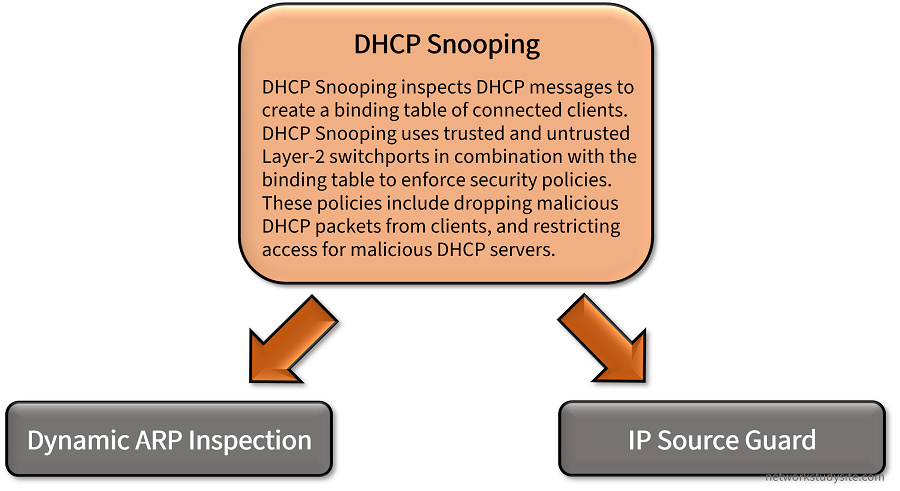
A switch configured with DHCP Snooping captures DHCP messages, and maintains a binding table which identifies and tracks all untrusted hosts. The binding table can be used to recognize malicious actions from untrusted network devices. Also, it can be accessed by other security features such as DIA and IP Source Guard. The following output shows the DHCP Snooping binding table.
SW1#show ip dhcp snooping binding
MacAddress          IpAddress        Lease(sec)  Type           VLAN  Interface
------------------  ---------------  ----------  -------------  ----  --------------------
00:00:00:00:00:01   192.168.1.2      85178       dhcp-snooping   10    GigabitEthernet0/1
00:00:00:00:00:03   192.168.1.4      86369       dhcp-snooping   10    GigabitEthernet0/3
00:00:00:00:00:02   192.168.1.3      85762       dhcp-snooping   10    GigabitEthernet0/2
Total number of bindings: 3
DHCP Snooping uses a set of rules to filter malicious network hosts and initiate a variety of threat response mechanisms. With the help of the snooping binding database the following example protections are implemented by DHCP Snooping to protect a network.
- If a DHCP server reply message (e.g DHCPOFFER) is received on an untrusted port, it is dropped. An authorized DHCP server should not be connected on an untrusted port.
- If a DHCPRELEASE message is received for an IP or MAC address which is learnt on another interface, it is dropped. The bindings in the DHCP Snooping database help track the connected hosts to avoid one host impersonating another.
- The rate of DHCP messages can be limited, so a client cannot flood the network with DHCP requests.
How to configure DHCP Snooping?
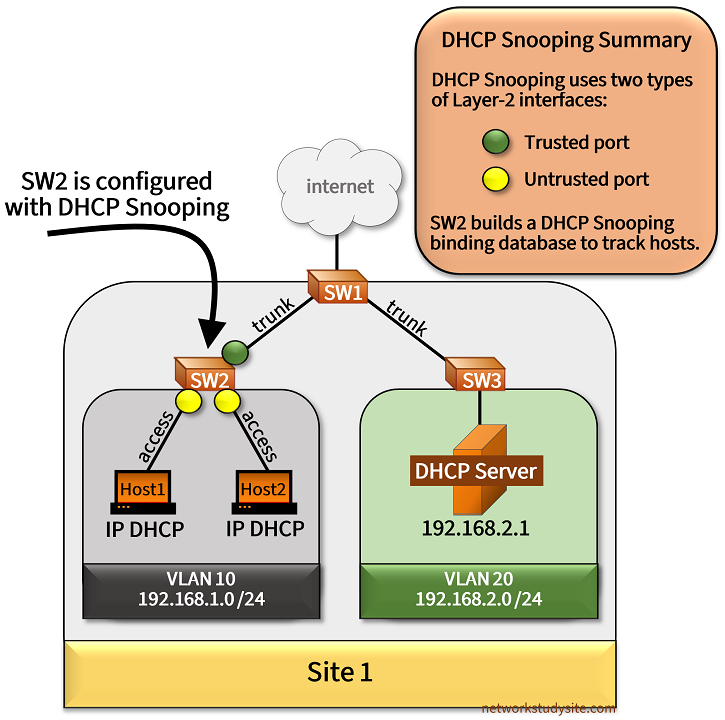
In the following example topology DHCP Snooping is configured on SW2. This means, that DHCP packets exchanged between the hosts in VLAN 10 and the DHCP Server in VLAN 20 are inspected by SW2 in order to create a DHCP Snooping binding database. By default, the database is stored locally on SW2 and is used to enforce security features. The configuration displayed underneath is applied on SW2.
SW2>
SW2>enable
SW2#configure terminal
Enter configuration commands, one per line.  End with CNTL/Z.
SW2(config)#ip dhcp snooping vlan 10
SW2(config)#no ip dhcp snooping information option
SW2(config)#ip dhcp snooping
SW2(config)#
SW2(config)#interface Gi0/0
SW2(config-if)#ip dhcp snooping trust
SW2(config-if)#
SW2(config-if)#exit
SW2(config)#exit
SW2#
Note, that SW1 in this example scenario uses Switch Virtual Interfaces (SVI) for inter-VLAN connectivity, and to forward DHCP messages originated by the hosts the command ip helper-address 192.168.2.1 is added on SVI VLAN 10. This enables the broadcast DHCP Discover messages to be converted into unicast messages and forwarded by SW1 to the DHCP Server in VLAN 20.
Configuration:
SW1
SW1#show run int Gi0/0 | sec int
interface GigabitEthernet0/0
 description ** to SW2 **
 switchport trunk allowed vlan 10
 switchport trunk encapsulation dot1q
 switchport mode trunk
 negotiation auto

SW1#show run int Gi0/1 | sec int
interface GigabitEthernet0/1
 description ** to SW3 **
 switchport trunk allowed vlan 20
 switchport trunk encapsulation dot1q
 switchport mode trunk
 negotiation auto

SW1#show run int vlan 10 | sec int
interface Vlan10
 description ** SVI for hosts in VLAN 10 **
 ip address 192.168.1.1 255.255.255.0
 ip helper-address 192.168.2.1

SW1#show run int vlan 20 | sec int
interface Vlan20
 description ** SVI for DHCP Server in VLAN 20 **
 ip address 192.168.2.2 255.255.255.0
SW2 (DHCP Snooping)
SW2#show run | sec ^ip dhcp|^no ip dhcp
ip dhcp snooping vlan 10
no ip dhcp snooping information option
ip dhcp snooping

SW2#show run int Gi0/0 | sec int
interface GigabitEthernet0/0
 description ** to SW1 **
 switchport trunk allowed vlan 10
 switchport trunk encapsulation dot1q
 switchport mode trunk
 negotiation auto
 ip dhcp snooping trust

SW2#show run int Gi0/1 | sec int
interface GigabitEthernet0/1
 description ** to Host1 **
 switchport access vlan 10
 switchport mode access
 negotiation auto

SW2#show run int Gi0/2 | sec int
interface GigabitEthernet0/2
 description ** to Host2 **
 switchport access vlan 10
 switchport mode access
 negotiation auto
SW3
SW3#show run int Gi0/0 | sec int
interface GigabitEthernet0/0
 description ** to SW1 **
 switchport trunk allowed vlan 20
 switchport trunk encapsulation dot1q
 switchport mode trunk
 negotiation auto

SW3#show run int Gi0/1 | sec int
interface GigabitEthernet0/1
 description ** to DHCP Server **
 switchport access vlan 20
 switchport mode access
 negotiation auto
DHCP Server
DHCP-Server#show run int Gi0/0 | sec int
interface GigabitEthernet0/0
 description ** to SW3 **
 ip address 192.168.2.1 255.255.255.0
 duplex auto
 speed auto
 media-type rj45

DHCP-Server#show run | sec ^ip dhcp
ip dhcp excluded-address 192.168.1.1
ip dhcp pool EXAMPLE-DHCP
 network 192.168.1.0 255.255.255.0
 default-router 192.168.1.1

DHCP-Server#show run | sec ^ip route
ip route 0.0.0.0 0.0.0.0 GigabitEthernet0/0 192.168.2.2
Host1
Host1#show run int Gi0/0 | sec int
interface GigabitEthernet0/0
 description ** to SW2 **
 mac-address 0000.0000.0001
 ip address dhcp
 duplex auto
 speed auto
 media-type rj45
SW2#show ip dhcp snooping binding
MacAddress          IpAddress        Lease(sec)  Type           VLAN  Interface
------------------  ---------------  ----------  -------------  ----  --------------------
00:00:00:00:00:01   192.168.1.4      83160       dhcp-snooping   10    GigabitEthernet0/1     « MAC address to IP address binding in VLAN 10
00:00:00:00:00:02   192.168.1.5      83168       dhcp-snooping   10    GigabitEthernet0/2
Total number of bindings: 2


SW2#show ip dhcp snooping statistics
 Packets Forwarded                                     = 164                       « So far all DHCP packets are forwarded
 Packets Dropped                                       = 0
 Packets Dropped From untrusted ports                  = 0


DHCP-Server#show ip dhcp binding
Bindings from all pools not associated with VRF:
IP address          Client-ID/              Lease expiration        Type
                    Hardware address/
                    User name
192.168.1.4         0063.6973.636f.2d30.    Jun 21 2024 03:14 PM    Automatic      « Addresses leased by DHCP Server
                    3030.302e.3030.3030.
                    2e30.3030.312d.4769.
                    302f.30
192.168.1.5         0063.6973.636f.2d30.    Jun 21 2024 03:15 PM    Automatic
                    3030.302e.3030.3030.
                    2e30.3030.322d.4769.
                    302f.30
The DHCP Snooping feature also works with EtherChannel. As displayed in the following example, a Layer-2 Port-channel interface is configured as a DHCP Snooping trusted port.
SW2#show run int Po1 | sec int
interface Port-channel1
 switchport trunk encapsulation dot1q
 switchport mode trunk
 ip dhcp snooping trust
No information option and why disable DHCP option 82?
As visible in the above DHCP Snooping configurations the command no ip dhcp snooping information option is included. Unless the command is added the switch configured with DHCP Snooping (SW2) will insert the Agent Information Option 82 in each DHCP Discover message. An example is shown in the following packet capture.
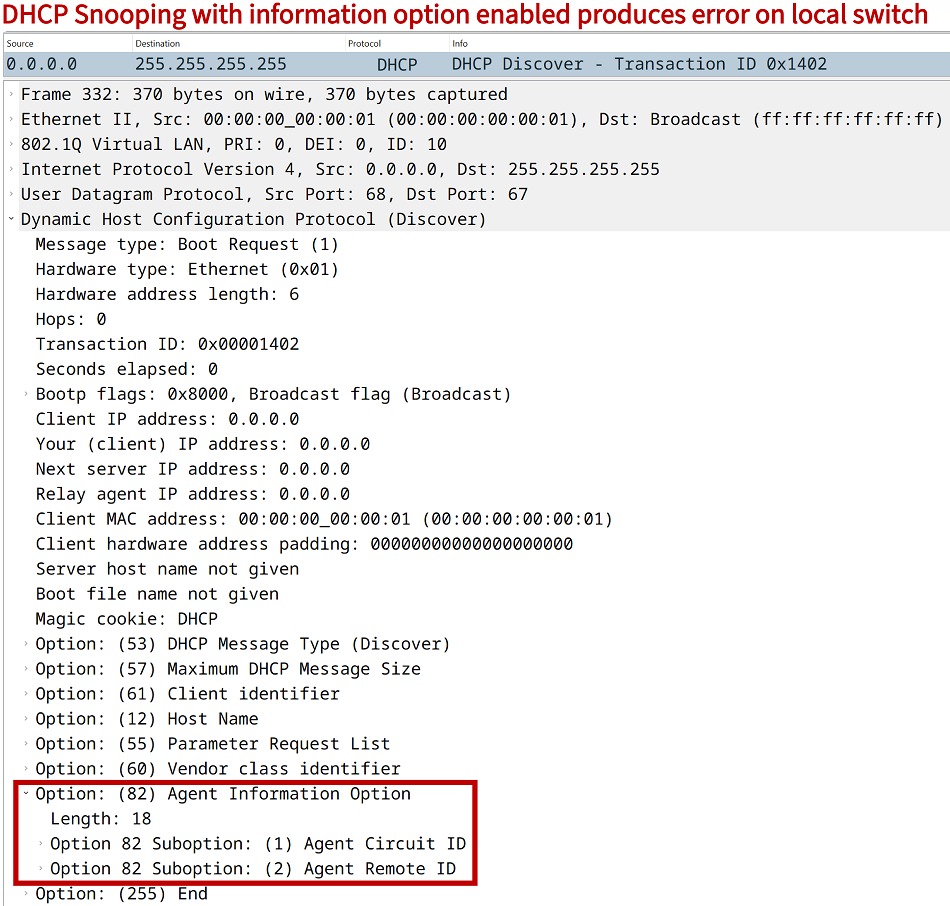
Such a DHCP packet may cause the DHCP Server to generate the following debug output message. As a result, the DHCP Server does not reply to the hosts who generated the Discover message and no IP addresses are handed out.
DHCPD: New packet workspace 0x1121FF18 (ID=0x8E000003)
DHCPD: Reload workspace interface Vlan10 tableid 0.
DHCPD: tableid for 192.168.1.1 on Vlan10 is 0
DHCPD: client's VPN is .
DHCPD: inconsistent relay information.
DHCPD: relay information option exists, but giaddr is zero.

[output omitted for brevity]
In the meantime, the switch configured with DHCP Snooping logs the following debug message.
DHCP_SNOOPING: add relay information option.
DHCP_SNOOPING_SW: encoding opt82 cid in vlan-mod-port format
DHCP_SNOOPING_SW: Encoding opt82 RID in MAC address format
DHCP_SNOOPING: binary dump of relay info option, length: 20 data:
0x52 0x12 0x1 0x6 0x0 0x4 0x0 0xA 0x0 0x1 0x2 0x8 0x0 0x6 0x52 0x54 0x0 0x15 0x3E 0x59
DHCP_SNOOPING_SW: bridge packet get invalid mat entry: FFFF.FFFF.FFFF, packet is flooded to ingress VLAN: (10)
DHCP_SNOOPING_SW: bridge packet send packet to port: GigabitEthernet0/0, vlan 10.

[output omitted for brevity]
The following command verifies whether the DHCP information option 82 is inserted into the DHCP Discover messages by DHCP Snooping.
SW2#show ip dhcp snooping
Switch DHCP snooping is enabled
Switch DHCP gleaning is disabled
DHCP snooping is configured on following VLANs:
10
DHCP snooping is operational on following VLANs:
10
DHCP snooping is configured on the following L3 Interfaces:

Insertion of option 82 is disabled
   circuit-id default format: vlan-mod-port
   remote-id: 5254.0015.3e59 (MAC)
Option 82 on untrusted port is not allowed
Verification of hwaddr field is enabled
Verification of giaddr field is enabled
DHCP snooping trust/rate is configured on the following Interfaces:

Interface                  Trusted    Allow option    Rate limit (pps)
-----------------------    -------    ------------    ----------------
GigabitEthernet0/0         yes        yes             unlimited
  Custom circuit-ids:
Receiving DHCPRELEASE on untrusted port
DHCP Snooping protects against denial of service attacks initiated by malicious clients connected on untrusted switchports. In this scenario, the Host1 MAC address 0000.0000.0001 is connected on port Gi0/1 and added in the DHCP Snooping binding table.

However, a malicious client connected on the untrusted port Gi0/3 changes its own MAC address to 0000.0000.0001 (to pose as Host1) and sends the following DHCPRELEASE message. Essentially, the malicious client wants to disrupt network access for Host1.
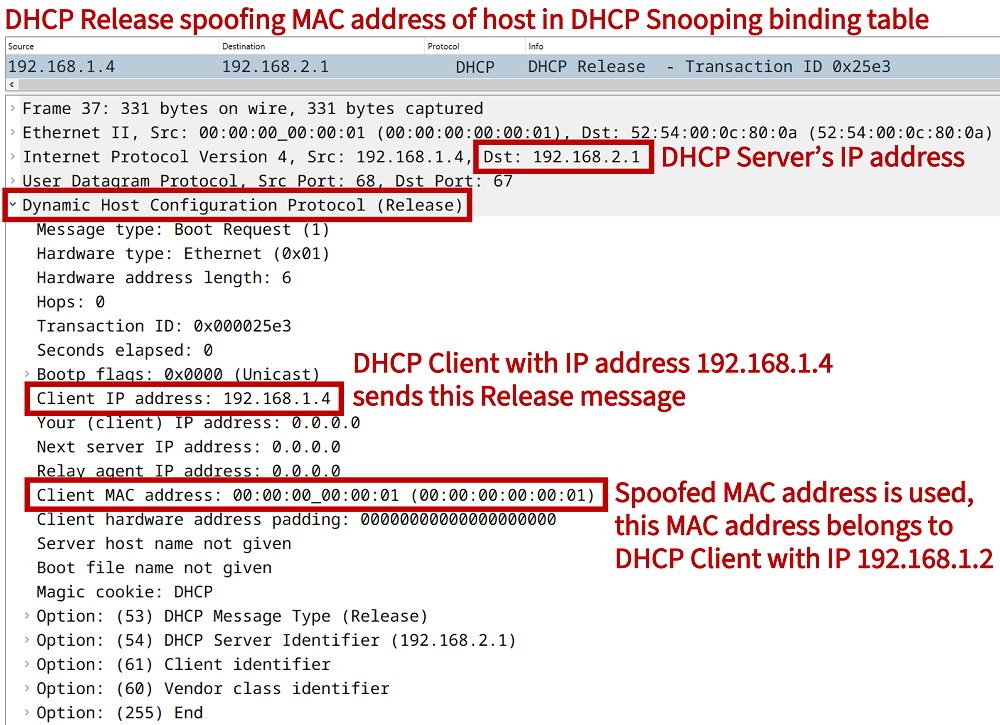
However, since the DHCP Snooping feature already learns Host1's MAC address on Gi0/1, it drops the malicious DHCPRELEASE message received on Gi0/3 and logs the following message.
SW2#show log | beg Log Buffer
Log Buffer (8192 bytes):

DHCP_SNOOPING: received new DHCP packet from input interface (GigabitEthernet0/3)
DHCP_SNOOPING: process new DHCP packet, message type: DHCPRELEASE, input interface: Gi0/3, MAC da: 5254.000c.800a, MAC sa: 0000.0000.0001, IP da: 192.168.2.1, IP sa: 192.168.1.4, DHCP ciaddr: 192.168.1.4, DHCP yiaddr: 0.0.0.0, DHCP siaddr: 0.0.0.0, DHCP giaddr: 0.0.0.0, DHCP chaddr: 0000.0000.0001
DHCP_SNOOPING: message type : DHCPRELEASE DHCP ciaddr: 192.168.1.4, DHCP yiaddr: 0.0.0.0, DHCP siaddr: 0.0.0.0, DHCP giaddr: 0.0.0.0, DHCP chaddr: 0000.0000.0001
%DHCP_SNOOPING-5-DHCP_SNOOPING_FAKE_INTERFACE: DHCP_SNOOPING drop message with mismatched source interface, the binding is not updated, message type: DHCPRELEASE, MAC sa: 0000.0000.0001


SW2#show ip dhcp snooping statistics
 Packets Forwarded                                     = 60
 Packets Dropped                                       = 2
 Packets Dropped From untrusted ports                  = 0
DHCP Snooping rate limit configuration
The rate at which DHCP messages are accepted on a switchport can be limited. In other words, if the number of transmitted DHCP messages exceeds the configured DHCP Snooping rate limit (packets per second) on an interface, it will transition into the errdisable state.The interface level example command ip dhcp snooping limit rate 1 is configured on SW2 port Gi0/1. This essentially blocks DHCP communication on that port, and logs the following outputs.
DHCP_SNOOPING: received new DHCP packet from input interface (GigabitEthernet0/1)
DHCP_SNOOPING: exceeded rate limit 1pps on Gi0/1
%DHCP_SNOOPING-4-DHCP_SNOOPING_ERRDISABLE_WARNING: DHCP Snooping received 1 DHCP packets on interface Gi0/1
%DHCP_SNOOPING-4-DHCP_SNOOPING_RATE_LIMIT_EXCEEDED: The interface Gi0/1 is receiving more than the threshold set
DHCP_SNOOPING_SW: perform error disable for interface (Gi0/1)
%PM-4-ERR_DISABLE: dhcp-rate-limit error detected on Gi0/1, putting Gi0/1 in err-disable state
%LINEPROTO-5-UPDOWN: Line protocol on Interface GigabitEthernet0/1, changed state to down
%LINK-3-UPDOWN: Interface GigabitEthernet0/1, changed state to down


SW2#show interfaces Gi0/1 status

Port      Name               Status       Vlan       Duplex  Speed Type
Gi0/1     ** to Host1 **     err-disabled 10           auto   auto RJ45


SW2#show interfaces status err-disabled

Port      Name               Status       Reason               Err-disabled Vlans
Gi0/1     ** to Host1 **     err-disabled dhcp-rate-limit
Configuring a DHCP Snooping database agent with TFTP server
In this example scenario, SW2 has a DHCP Snooping database agent configured with TFTP. The database agent on SW2 uses TFTP to upload its DHCP Snooping binding table to a TFTP Server. This file on the server is being actively written and updated by SW2 with new bindings.
The benefit of a remotely stored DHCP Snooping binding table is that the information remains intact and accessible after a switch looses power or is no longer connected to the network. Also, once a new switch is configured with DHCP Snooping, it can download the content of the DHCP Snooping table from the TFTP Server. The following configuration is applied on SW2.
SW2#show run | sec ^ip dhcp|^no ip dhcp
ip dhcp snooping vlan 10
no ip dhcp snooping information option
ip dhcp snooping database tftp://192.168.0.112/DatabaseAgent.txt
ip dhcp snooping database write-delay 15
ip dhcp snooping database timeout 15
ip dhcp snooping
To enable sending the data via TFTP, SW2 needs a Layer-3 source interface. For this reason, the SVI VLAN 100 is created on SW2.
SW2#show run int vlan 100 | sec int
interface Vlan100
 description ** Mgmt VLAN **
 ip address 192.168.0.110 255.255.255.0
When the connection between the local switch and the remote TFTP server is established the following output shows details about the file transfer process.
SW2#show ip dhcp snooping database
Agent URL : tftp://192.168.0.112/DatabaseAgent.txt                « Location of the remotely stored database file
Write delay Timer : 15 seconds
Abort Timer : 15 seconds

Agent Running : No
Delay Timer Expiry : Not Running
Abort Timer Expiry : Not Running

Last Succeded Time : 12:15:17 UTC Mon Aug 21 2023
Last Failed Time : 10:53:14 UTC Mon Aug 21 2023
Last Failed Reason : Unable to access URL.

Total Attempts       :       73   Startup Failures :        0
Successful Transfers :        5   Failed Transfers :       68     « Successful transfers to the remote location
Successful Reads     :        0   Failed Reads     :        1
Successful Writes    :        5   Failed Writes    :       67
Media Failures       :        0
The TFTP Server is a Linux Ubuntu virtual machine (VM) with tftpd-hpa installed. An important aspect of the tftpd-hpa installation is locating the TFTP directory, and modifying the configuration file to enable uploads. This is shown below:
tftpserver@user:/etc/default$ cat tftpd-hpa
TFTP_USERNAME="tftp"
TFTP_DIRECTORY="/srv/tftp"                 « This is the default directory
TFTP_ADDRESS=":69"
TFTP_OPTIONS="--secure --create"           « By adding "--create" the file can now be written remotely by SW2
Also, it is important to enable read and write permissions for the specific database agent file, as seen in the following output:
tftpserver@user:/srv/tftp$ ls -l
total 4
-rwxrwxrwx 1 tftp root 375 Aug 21 12:16 DatabaseAgent.txt
As soon as SW2 starts transfering the DHCP Snooping database to the TFTP Server, the updates appear in the remotely stored database file.
tftpserver@user:/srv/tftp$ sudo cat DatabaseAgent.txt
[sudo] password for tftpserver:
64e35555
TYPE DHCP-SNOOPING
VERSION 1
BEGIN
192.168.10.2 10 1000.0000.0000 64E4A6CF Gi0/2                            83ccfe8c
192.168.10.3 10 2000.0000.0000 64E49EBB Gi0/3                            d2b1bdc6
192.168.10.5 10 5254.0010.f30e 64E49F7A Gi1/1                            a5f8e04d
192.168.20.4 20 a000.0000.0000 64E49F02 Gi1/0                            6f5951b5
The content of the remotely stored file is identical to the DHCP Snooping database stored locally on SW2.
SW2#show ip dhcp snooping binding
MacAddress          IpAddress        Lease(sec)  Type           VLAN  Interface
------------------  ---------------  ----------  -------------  ----  --------------------
10:00:00:00:00:00   192.168.10.2     84507       dhcp-snooping   10    GigabitEthernet0/2
20:00:00:00:00:00   192.168.10.3     82439       dhcp-snooping   10    GigabitEthernet0/3
52:54:00:10:F3:0E   192.168.10.5     82630       dhcp-snooping   10    GigabitEthernet1/1
A0:00:00:00:00:00   192.168.20.4     82510       dhcp-snooping   20    GigabitEthernet1/0
Total number of bindings: 4