DMVPN NHRP Redirect and Dynamic Spoke-to-Spoke Tunnels
Table of Contents
- What does IP NHRP Redirect do? ‹
- DMVPN Phase 3 configuration and Resolution Reply packet ‹
- Download section ‹
What does IP NHRP Redirect do?
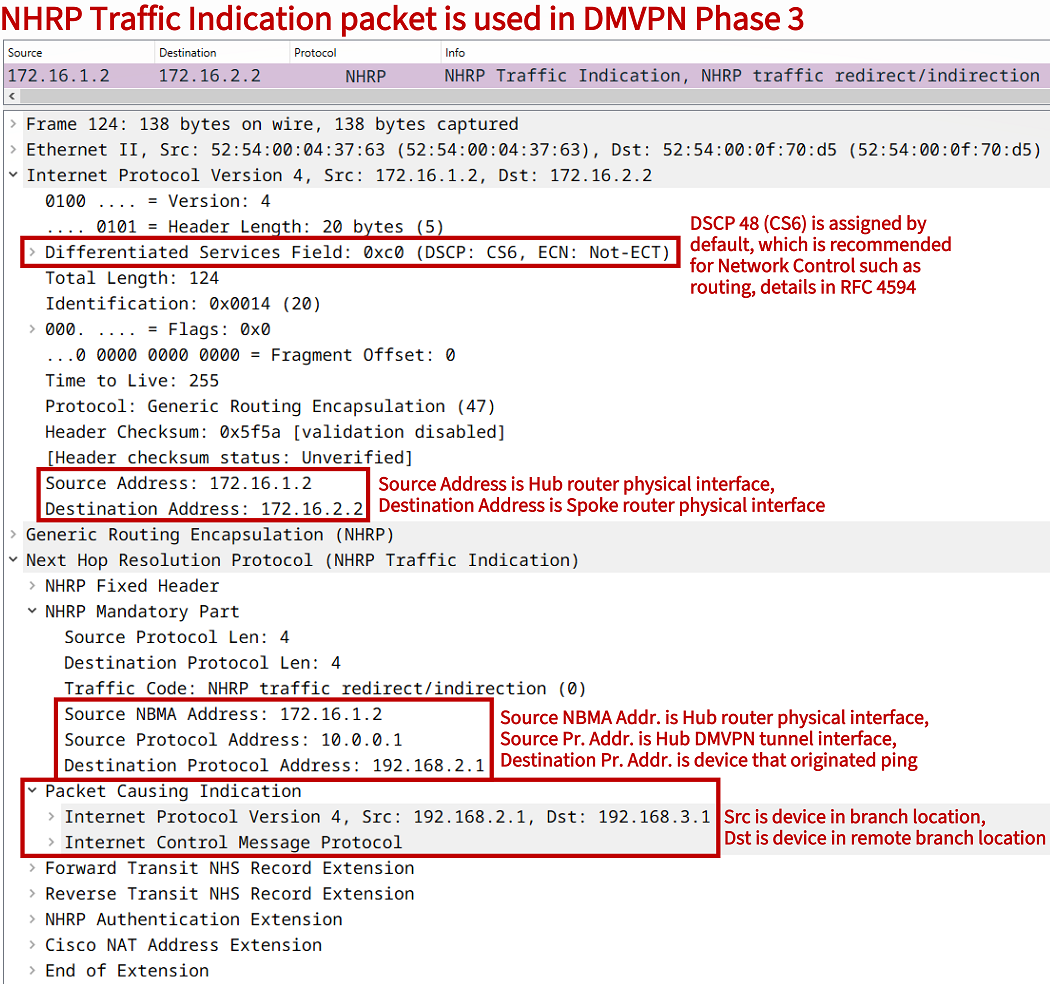
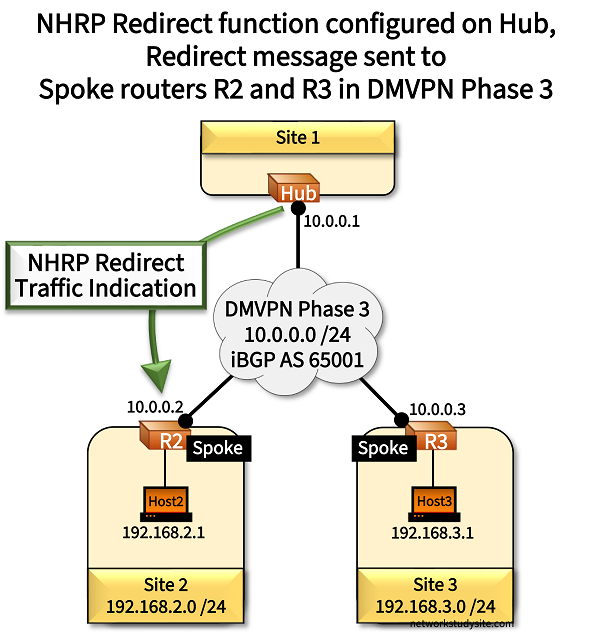
In DMVPN Phase 2 and Phase 3 there is direct spoke-to-spoke communication through a dynamically built GRE tunnel. This is achieved with the NHRP packet exchange between the DMVPN Hub and Spoke routers. In DMVPN Phase 3 specifically, the NHRP Redirect feature is used in order to build such a dynamic tunnel. The NHRP Redirect feature sends a Traffic Indication packet displayed in the following capture.
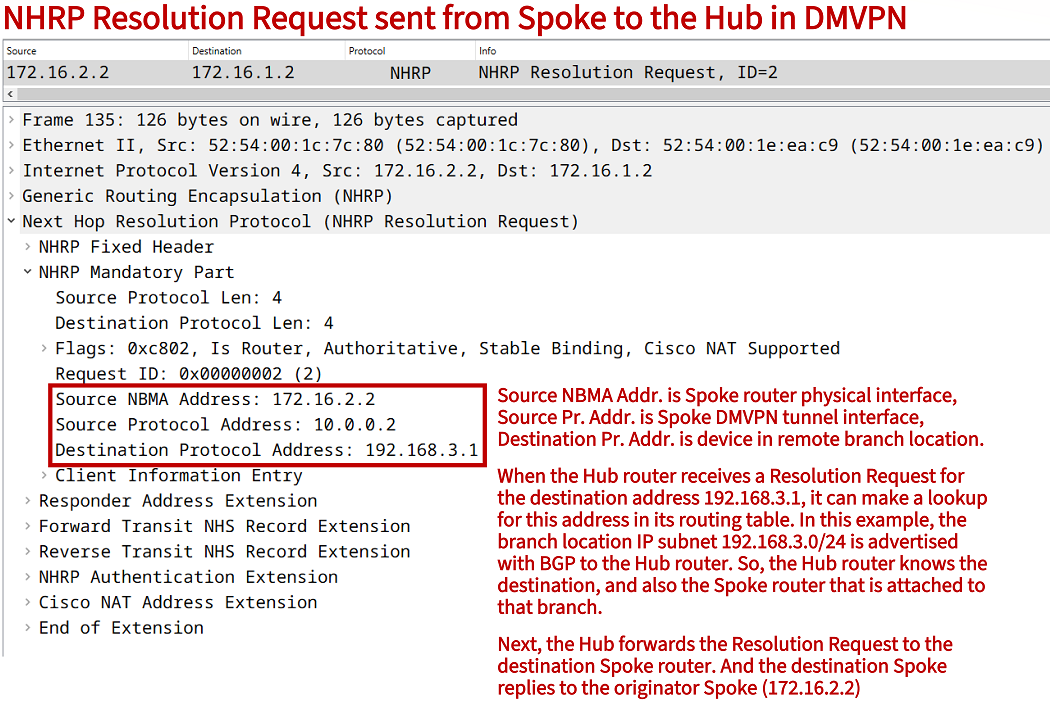
A unique aspect of this feature is the NHRP Traffic Indication message which is sent by the Hub router. The Traffic Indication message triggers the Spoke router to send an NHRP Resolution Request to the Hub. A Resolution Request packet is shown below, and it will trigger the remote Spoke router to send a Resolution Reply directly to the originating Spoke. The NHRP Resolution Reply is not sent to the Hub router.
DMVPN Phase 3 configuration and Resolution Reply packet
For DMVPN Phase 3, the command ip nhrp redirect is issued on the Hub router tunnel interface, and ip nhrp shortcut on the Spoke router tunnel interface. These commands are an integral part of DMVPN Phase 3 and enable the NHRP Redirect feature and dynamic spoke-to-spoke tunnels.
Configuration:
Hub
Hub#show run int Gi0/0 | sec int
interface GigabitEthernet0/0
 description ** to Internet Provider **
 ip address 172.16.1.2 255.255.255.252
 duplex auto
 speed auto
 media-type rj45

Hub#show run int Tu10 | sec int
interface Tunnel10
 description ** DMVPN Phase 3 - Cloud **
 ip address 10.0.0.1 255.255.255.0
 no ip redirects
 ip nhrp authentication P4SSW0RD
 ip nhrp network-id 10
 ip nhrp redirect
 tunnel source GigabitEthernet0/0
 tunnel mode gre multipoint

Hub#show run | sec ^ip route
ip route 172.16.0.0 255.255.0.0 GigabitEthernet0/0 172.16.1.1

Hub#show run | sec ^router
router bgp 65001
 bgp router-id 1.1.1.1
 bgp log-neighbor-changes
 neighbor 10.0.0.2 remote-as 65001
 neighbor 10.0.0.2 default-originate
 neighbor 10.0.0.3 remote-as 65001
 neighbor 10.0.0.3 default-originate
R2 (Spoke)
R2#show run int Gi0/0 | sec int
interface GigabitEthernet0/0
 description ** to Host2 (Site 2 LAN) **
 ip address 192.168.2.2 255.255.255.0
 duplex auto
 speed auto
 media-type rj45

R2#show run int Gi0/1 | sec int
interface GigabitEthernet0/1
 description ** to Internet Provider **
 ip address 172.16.2.2 255.255.255.252
 duplex auto
 speed auto
 media-type rj45

R2#show run int Tu10 | sec int
interface Tunnel10
 description ** DMVPN Phase 3 - Cloud **
 ip address 10.0.0.2 255.255.255.0
 no ip redirects
 ip nhrp authentication P4SSW0RD
 ip nhrp map 10.0.0.1 172.16.1.2
 ip nhrp network-id 10
 ip nhrp nhs 10.0.0.1
 tunnel source GigabitEthernet0/1
 tunnel mode gre multipoint

R2#show run all | include Tunnel10|ip nhrp shortcut
interface Tunnel10
 ip nhrp shortcut

R2#show run | sec ^ip route
ip route 172.16.0.0 255.255.0.0 GigabitEthernet0/1 172.16.2.1

R2#show run | sec ^router
router bgp 65001
 bgp router-id 2.2.2.2
 bgp log-neighbor-changes
 network 192.168.2.0
 neighbor 10.0.0.1 remote-as 65001
R3 (Spoke)
R3#show run int Gi0/0 | sec int
interface GigabitEthernet0/0
 description ** to Host3 (Site 3 LAN) **
 ip address 192.168.3.2 255.255.255.0
 duplex auto
 speed auto
 media-type rj45

R3#show run int Gi0/1 | sec int
interface GigabitEthernet0/1
 description ** to Internet Provider **
 ip address 172.16.3.2 255.255.255.252
 duplex auto
 speed auto
 media-type rj45

R3#show run int Tu10 | sec int
interface Tunnel10
 description ** DMVPN Phase 3 - Cloud **
 ip address 10.0.0.3 255.255.255.0
 no ip redirects
 ip nhrp authentication P4SSW0RD
 ip nhrp map 10.0.0.1 172.16.1.2
 ip nhrp network-id 10
 ip nhrp nhs 10.0.0.1
 tunnel source GigabitEthernet0/1
 tunnel mode gre multipoint

R3#show run all | include Tunnel10|ip nhrp shortcut
interface Tunnel10
 ip nhrp shortcut

R3#show run | sec ^ip route
ip route 172.16.0.0 255.255.0.0 GigabitEthernet0/1 172.16.3.1

R3#show run | sec ^router
router bgp 65001
 bgp router-id 3.3.3.3
 bgp log-neighbor-changes
 network 192.168.3.0
 neighbor 10.0.0.1 remote-as 65001
Host2
Host2#show run int Gi0/0 | sec int
interface GigabitEthernet0/0
 description ** to R2 **
 ip address 192.168.2.1 255.255.255.0
 duplex auto
 speed auto
 media-type rj45

Host2#show run | sec ^ip route
ip route 0.0.0.0 0.0.0.0 GigabitEthernet0/0 192.168.2.2
Host2#ping 192.168.3.1
Type escape sequence to abort.
Sending 5, 100-byte ICMP Echos to 192.168.3.1, timeout is 2 seconds:
!!!!!
Success rate is 100 percent (5/5), round-trip min/avg/max = 5/5/6 ms


Host2#trace 192.168.3.1 probe 1
Type escape sequence to abort.
Tracing the route to 192.168.3.1
VRF info: (vrf in name/id, vrf out name/id)
  1 192.168.2.2 2 msec
  2 10.0.0.3 3 msec                      « There is direct spoke-to-spoke communication
  3 192.168.3.1 3 msec


Hub#show ip nhrp traffic
Tunnel10: Max-send limit:10000Pkts/10Sec, Usage:0%
   Sent: Total 84
         6 Resolution Request  0 Resolution Reply  0 Registration Request       « Hub forwards Resolution Request to remote Spoke router
         64 Registration Reply  4 Purge Request  4 Purge Reply
         0 Error Indication  6 Traffic Indication  0 Redirect Suppress          « Hub sends Traffic Indication to originating Spoke router
   Rcvd: Total 78
         6 Resolution Request  0 Resolution Reply  64 Registration Request      « Hub receives Resolution Request from originating Spoke router
         0 Registration Reply  4 Purge Request  4 Purge Reply
         0 Error Indication  0 Traffic Indication  0 Redirect Suppress


R2#show ip nhrp traffic
Tunnel10: Max-send limit:10000Pkts/10Sec, Usage:0%
   Sent: Total 42
         3 Resolution Request  3 Resolution Reply  32 Registration Request      « Spoke sends Resolution Request and Resolution Reply
         0 Registration Reply  2 Purge Request  2 Purge Reply
         0 Error Indication  0 Traffic Indication  0 Redirect Suppress
   Rcvd: Total 45
         3 Resolution Request  3 Resolution Reply  0 Registration Request
         32 Registration Reply  2 Purge Request  2 Purge Reply
         0 Error Indication  3 Traffic Indication  0 Redirect Suppress          « Spoke receives Traffic Indication from Hub


R2#show ip route | begin Ga
Gateway of last resort is 10.0.0.1 to network 0.0.0.0

B*    0.0.0.0/0 [200/0] via 10.0.0.1, 01:45:20                                  « With DMVPN Phase 3, single default route can be received from Hub
      10.0.0.0/8 is variably subnetted, 3 subnets, 2 masks
C        10.0.0.0/24 is directly connected, Tunnel10
L        10.0.0.2/32 is directly connected, Tunnel10
H        10.0.0.3/32 is directly connected, 00:01:13, Tunnel10                  « NHRP direct spoke-to-spoke tunnel address installed
      172.16.0.0/16 is variably subnetted, 3 subnets, 3 masks
S        172.16.0.0/16 [1/0] via 172.16.2.1, GigabitEthernet0/1
C        172.16.2.0/30 is directly connected, GigabitEthernet0/1
L        172.16.2.2/32 is directly connected, GigabitEthernet0/1
      192.168.2.0/24 is variably subnetted, 2 subnets, 2 masks
C        192.168.2.0/24 is directly connected, GigabitEthernet0/0
L        192.168.2.2/32 is directly connected, GigabitEthernet0/0
H     192.168.3.0/24 [250/255] via 10.0.0.3, 00:01:13, Tunnel10                 « Remote branch subnet reachable via direct spoke-to-spoke tunnel
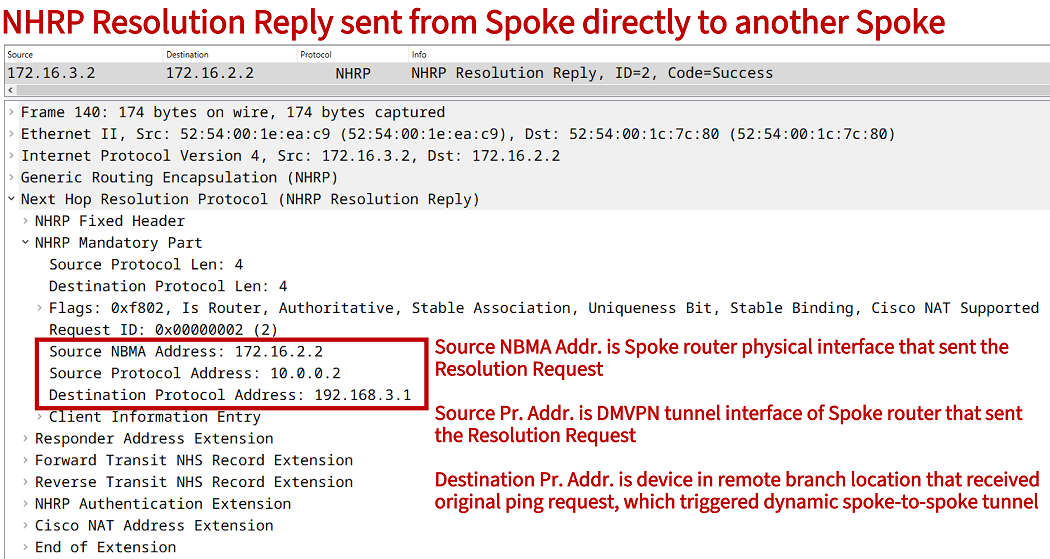
It is visible in the above outputs that the Hub router does not send Resolution Reply packets to the Spoke routers (also, the Hub does not receive any Resolution Reply). Whenever there is a dynamic spoke-to-spoke tunnel, the Spoke routers send Resolution Reply packets directly to each other. The following packet capture shows an NHRP Resolution Reply packet sent from Spoke R3 directly to Spoke R2.