Native VLAN Introduction and Configuration Example
Table of Contents
- What is a native VLAN? ‹
- Native VLAN example lab and configuration ‹
- Packet capture of tagged/untagged protocols ‹
- How to tag the native VLAN? ‹
- Download section ‹
What is a native VLAN?
An Ethernet frame can carry a VLAN tag, which includes the VLAN ID assigned to that frame. A VLAN tag is 4-bytes long and is also called an 802.1Q tag. With this tag, a switch can identify different VLANs for traffic arriving on a trunk link. A trunk link carries traffic for multiple VLANs.

A native VLAN can be arbitrarily chosen by the network administrator, and it is configured on a trunk interface. Traffic that is sent in the native VLAN does not have a VLAN tag assigned, it is untagged. And any traffic that arrives untagged is assigned by the switch to the native VLAN.

Four facts about the native VLAN:
- Only one native VLAN can be assigned to a trunk link.
- By default, a switch assigns VLAN 1 as the native VLAN.
- Some protocols always use the native VLAN, for example DTP.
- The native VLAN needs to match on both ends of a trunk link for optimal network operation.
If the native VLAN does not match on both ends of a link, the following message is logged on a switch. The message informs about the native VLAN 10 used on the local interface GigabitEthernet0/0, meanwhile the connected neighboring SW2 interface uses native VLAN 20.
SW1#show log | beg Log Buffer
Log Buffer (8192 bytes):

%SPANTREE-2-RECV_PVID_ERR: Received BPDU with inconsistent peer vlan id 20 on GigabitEthernet0/0 VLAN10.
%SPANTREE-2-BLOCK_PVID_PEER: Blocking GigabitEthernet0/0 on VLAN0020. Inconsistent peer vlan.
%SPANTREE-2-BLOCK_PVID_LOCAL: Blocking GigabitEthernet0/0 on VLAN0010. Inconsistent local vlan.
%CDP-4-NATIVE_VLAN_MISMATCH: Native VLAN mismatch discovered on GigabitEthernet0/0 (10), with SW2 GigabitEthernet0/0 (20).
Native VLAN example lab and configuration
By default, the native VLAN is asssigned to VLAN 1. VLAN 1 is also the "default VLAN". The default VLAN cannot be changed or deleted.
SW2(config)#no vlan 1
%Default VLAN 1 may not be deleted.
For improved network security in this sample topology, the native VLAN is changed to VLAN 20. The native VLAN is configured per trunk (also on Port-Channel interfaces) and on both ends of a link, in order to avoid native VLAN mismatch. As a result, in trunks configured with VLAN 20 as the native VLAN, traffic is not assigned a VLAN tag - the traffic remains untagged in the native VLAN.
On the access layer switches SW8 and SW9 the trunk ports allow only traffic in VLAN 10. However, the native VLAN 20 still needs to be configured in order to avoid native VLAN mismatch between SW8/SW9 and SW4/SW5.

Configuration:
SW1
SW1#show run int Po10 | sec int
interface Port-channel10
 description ** Layer-2 EtherChannel to SW2 **
 switchport trunk allowed vlan 10,20
 switchport trunk encapsulation dot1q
 switchport trunk native vlan 20
 switchport mode trunk

SW1#show run int Po20 | sec int
interface Port-channel20
 description ** Layer-2 EtherChannel to SW3 **
 switchport trunk allowed vlan 10,20
 switchport trunk encapsulation dot1q
 switchport trunk native vlan 20
 switchport mode trunk

SW1#show run int Gi0/0 | sec int
interface GigabitEthernet0/0
 description ** to SW2 **
 switchport trunk allowed vlan 10,20
 switchport trunk encapsulation dot1q
 switchport trunk native vlan 20
 switchport mode trunk
 negotiation auto
 channel-group 10 mode on

SW1#show run int Gi0/1 | sec int
interface GigabitEthernet0/1
 description ** to SW2 **
 switchport trunk allowed vlan 10,20
 switchport trunk encapsulation dot1q
 switchport trunk native vlan 20
 switchport mode trunk
 negotiation auto
 channel-group 10 mode on

SW1#show run int Gi0/2 | sec int
interface GigabitEthernet0/2
 description ** to SW3 **
 switchport trunk allowed vlan 10,20
 switchport trunk encapsulation dot1q
 switchport trunk native vlan 20
 switchport mode trunk
 negotiation auto
 channel-group 20 mode on

SW1#show run int Gi0/3 | sec int
interface GigabitEthernet0/3
 description ** to SW3 **
 switchport trunk allowed vlan 10,20
 switchport trunk encapsulation dot1q
 switchport trunk native vlan 20
 switchport mode trunk
 negotiation auto
 channel-group 20 mode on

SW1#show run int vlan10 | sec int
interface Vlan10
 description ** SVI for VLAN 10 **
 ip address 192.168.1.254 255.255.255.0

SW1#show run int vlan20 | sec int
interface Vlan20
 description ** SVI for VLAN 20 **
 ip address 192.168.2.254 255.255.255.0

SW1#show run | sec ^spanning
spanning-tree mode mst
spanning-tree extend system-id
spanning-tree pathcost method long
spanning-tree mst configuration
 name EXAMPLE-MST
 revision 1
 instance 1 vlan 10, 20
spanning-tree mst 0-1 priority 4096
SW2
SW2#show run int Po10 | sec int
interface Port-channel10
 description ** Layer-2 EtherChannel to SW1 **
 switchport trunk allowed vlan 10,20
 switchport trunk encapsulation dot1q
 switchport trunk native vlan 20
 switchport mode trunk

SW2#show run int Gi0/0 | sec int
interface GigabitEthernet0/0
 description ** to SW4 **
 switchport trunk allowed vlan 10,20
 switchport trunk encapsulation dot1q
 switchport trunk native vlan 20
 switchport mode trunk
 negotiation auto

SW2#show run int Gi0/1 | sec int
interface GigabitEthernet0/1
 description ** to SW5 **
 switchport trunk allowed vlan 10,20
 switchport trunk encapsulation dot1q
 switchport trunk native vlan 20
 switchport mode trunk
 negotiation auto

SW2#show run int Gi0/2 | sec int
interface GigabitEthernet0/2
 description ** to SW6 **
 switchport trunk allowed vlan 10,20
 switchport trunk encapsulation dot1q
 switchport trunk native vlan 20
 switchport mode trunk
 negotiation auto

SW2#show run int Gi0/3 | sec int
interface GigabitEthernet0/3
 description ** to SW7 **
 switchport trunk allowed vlan 10,20
 switchport trunk encapsulation dot1q
 switchport trunk native vlan 20
 switchport mode trunk
 negotiation auto

SW2#show run int Gi1/0 | sec int
interface GigabitEthernet1/0
 description ** to SW1 **
 switchport trunk allowed vlan 10,20
 switchport trunk encapsulation dot1q
 switchport trunk native vlan 20
 switchport mode trunk
 negotiation auto
 channel-group 10 mode on

SW2#show run int Gi1/1 | sec int
interface GigabitEthernet1/1
 description ** to SW1 **
 switchport trunk allowed vlan 10,20
 switchport trunk encapsulation dot1q
 switchport trunk native vlan 20
 switchport mode trunk
 negotiation auto
 channel-group 10 mode on

SW2#show run | sec ^spanning
spanning-tree mode mst
spanning-tree extend system-id
spanning-tree pathcost method long
spanning-tree mst configuration
 name EXAMPLE-MST
 revision 1
 instance 1 vlan 10, 20
spanning-tree mst 0-1 priority 8192
SW3
SW3#show run int Po20 | sec int
interface Port-channel20
 description ** Layer-2 EtherChannel to SW1 **
 switchport trunk allowed vlan 10,20
 switchport trunk encapsulation dot1q
 switchport trunk native vlan 20
 switchport mode trunk

SW3#show run int Gi0/0 | sec int
interface GigabitEthernet0/0
 description ** to SW4 **
 switchport trunk allowed vlan 10,20
 switchport trunk encapsulation dot1q
 switchport trunk native vlan 20
 switchport mode trunk
 negotiation auto

SW3#show run int Gi0/1 | sec int
interface GigabitEthernet0/1
 description ** to SW5 **
 switchport trunk allowed vlan 10,20
 switchport trunk encapsulation dot1q
 switchport trunk native vlan 20
 switchport mode trunk
 negotiation auto

SW3#show run int Gi0/2 | sec int
interface GigabitEthernet0/2
 description ** to SW6 **
 switchport trunk allowed vlan 10,20
 switchport trunk encapsulation dot1q
 switchport trunk native vlan 20
 switchport mode trunk
 negotiation auto

SW3#show run int Gi0/3 | sec int
interface GigabitEthernet0/3
 description ** to SW7 **
 switchport trunk allowed vlan 10,20
 switchport trunk encapsulation dot1q
 switchport trunk native vlan 20
 switchport mode trunk
 negotiation auto

SW3#show run int Gi1/0 | sec int
interface GigabitEthernet1/0
 description ** to SW1 **
 switchport trunk allowed vlan 10,20
 switchport trunk encapsulation dot1q
 switchport trunk native vlan 20
 switchport mode trunk
 negotiation auto
 channel-group 20 mode on

SW3#show run int Gi1/1 | sec int
interface GigabitEthernet1/1
 description ** to SW1 **
 switchport trunk allowed vlan 10,20
 switchport trunk encapsulation dot1q
 switchport trunk native vlan 20
 switchport mode trunk
 negotiation auto
 channel-group 20 mode on

SW3#show run | sec ^spanning
spanning-tree mode mst
spanning-tree extend system-id
spanning-tree pathcost method long
spanning-tree mst configuration
 name EXAMPLE-MST
 revision 1
 instance 1 vlan 10, 20
spanning-tree mst 0-1 priority 16384
SW4
SW4#show run int Gi0/0 | sec int
interface GigabitEthernet0/0
 description ** to SW8 **
 switchport trunk allowed vlan 10
 switchport trunk encapsulation dot1q
 switchport trunk native vlan 20
 switchport mode trunk
 negotiation auto

SW4#show run int Gi0/1 | sec int
interface GigabitEthernet0/1
 description ** to SW9 **
 switchport trunk allowed vlan 10
 switchport trunk encapsulation dot1q
 switchport trunk native vlan 20
 switchport mode trunk
 negotiation auto

SW4#show run int Gi0/2 | sec int
interface GigabitEthernet0/2
 description ** to SW2 **
 switchport trunk allowed vlan 10,20
 switchport trunk encapsulation dot1q
 switchport trunk native vlan 20
 switchport mode trunk
 negotiation auto

SW4#show run int Gi0/3 | sec int
interface GigabitEthernet0/3
 description ** to SW3 **
 switchport trunk allowed vlan 10,20
 switchport trunk encapsulation dot1q
 switchport trunk native vlan 20
 switchport mode trunk
 negotiation auto

SW4#show run | sec ^spanning
spanning-tree mode mst
spanning-tree extend system-id
spanning-tree pathcost method long
spanning-tree mst configuration
 name EXAMPLE-MST
 revision 1
 instance 1 vlan 10, 20
SW6
SW6#show run int Gi0/0 | sec int
interface GigabitEthernet0/0
 description ** to SW10 **
 switchport trunk allowed vlan 20
 switchport trunk encapsulation dot1q
 switchport trunk native vlan 20
 switchport mode trunk
 negotiation auto

SW6#show run int Gi0/1 | sec int
interface GigabitEthernet0/1
 description ** to SW2 **
 switchport trunk allowed vlan 10,20
 switchport trunk encapsulation dot1q
 switchport trunk native vlan 20
 switchport mode trunk
 negotiation auto

SW6#show run int Gi0/2 | sec int
interface GigabitEthernet0/2
 description ** to SW3 **
 switchport trunk allowed vlan 10,20
 switchport trunk encapsulation dot1q
 switchport trunk native vlan 20
 switchport mode trunk
 negotiation auto

SW6#show run | sec ^spanning
spanning-tree mode mst
spanning-tree extend system-id
spanning-tree pathcost method long
spanning-tree mst configuration
 name EXAMPLE-MST
 revision 1
 instance 1 vlan 10, 20
SW8
SW8#show run int Gi0/0 | sec int
interface GigabitEthernet0/0
 description ** to Host1 **
 switchport access vlan 10
 switchport mode access
 negotiation auto

SW8#show run int Gi0/1 | sec int
interface GigabitEthernet0/1
 description ** to Host2 **
 switchport access vlan 10
 switchport mode access
 negotiation auto

SW8#show run int Gi0/2 | sec int
interface GigabitEthernet0/2
 description ** to SW4 **
 switchport trunk allowed vlan 10
 switchport trunk encapsulation dot1q
 switchport trunk native vlan 20
 switchport mode trunk
 negotiation auto
 spanning-tree mst 0-1 cost 100

SW8#show run int Gi0/3 | sec int
interface GigabitEthernet0/3
 description ** to SW5 **
 switchport trunk allowed vlan 10
 switchport trunk encapsulation dot1q
 switchport trunk native vlan 20
 switchport mode trunk
 negotiation auto
 spanning-tree mst 0-1 cost 50

SW8#show run | sec ^spanning
spanning-tree mode mst
spanning-tree extend system-id
spanning-tree pathcost method long
spanning-tree mst configuration
 name EXAMPLE-MST
 revision 1
 instance 1 vlan 10, 20
Host1
Host1#show run int Gi0/0 | sec int
interface GigabitEthernet0/0
 description ** to SW8 **
 ip address 192.168.1.1 255.255.255.0
 duplex auto
 speed auto
 media-type rj45

Host1#show run | sec ^ip route
ip route 0.0.0.0 0.0.0.0 192.168.1.254
SW1#show int Po10 trunk

Port        Mode             Encapsulation  Status        Native vlan
Po10        on               802.1q         trunking      20

Port        Vlans allowed on trunk
Po10        10,20

Port        Vlans allowed and active in management domain
Po10        10,20

Port        Vlans in spanning tree forwarding state and not pruned
Po10        10,20


SW1#show int Po10 switchport
Name: Po10
Switchport: Enabled
Administrative Mode: trunk
Operational Mode: trunk
Administrative Trunking Encapsulation: dot1q
Operational Trunking Encapsulation: dot1q
Negotiation of Trunking: On
Access Mode VLAN: 1 (default)
Trunking Native Mode VLAN: 20 (VLAN20)
Administrative Native VLAN tagging: enabled
Voice VLAN: none
Administrative private-vlan host-association: none
Administrative private-vlan mapping: none
Administrative private-vlan trunk native VLAN: none
Administrative private-vlan trunk Native VLAN tagging: enabled
Administrative private-vlan trunk encapsulation: dot1q
Administrative private-vlan trunk normal VLANs: none
Administrative private-vlan trunk associations: none
Administrative private-vlan trunk mappings: none
Operational private-vlan: none
Trunking VLANs Enabled: 10,20
Pruning VLANs Enabled: 2-1001

Protected: false
Appliance trust: none


SW1#show ip int brief
Interface              IP-Address      OK? Method Status                Protocol
GigabitEthernet0/0     unassigned      YES unset  up                    up
GigabitEthernet0/1     unassigned      YES unset  up                    up
GigabitEthernet0/2     unassigned      YES unset  up                    up
GigabitEthernet0/3     unassigned      YES unset  up                    up
Port-channel10         unassigned      YES unset  up                    up
Port-channel20         unassigned      YES unset  up                    up
Vlan10                 192.168.1.254   YES NVRAM  up                    up
Vlan20                 192.168.2.254   YES NVRAM  up                    up


SW1#show spanning-tree

MST0
  Spanning tree enabled protocol mstp
  Root ID    Priority    4096
             Address     5254.001f.c7ba
             This bridge is the root
             Hello Time   2 sec  Max Age 20 sec  Forward Delay 15 sec

  Bridge ID  Priority    4096   (priority 4096 sys-id-ext 0)
             Address     5254.001f.c7ba
             Hello Time   2 sec  Max Age 20 sec  Forward Delay 15 sec

Interface           Role Sts Cost      Prio.Nbr Type
------------------- ---- --- --------- -------- --------------------------------
Po10                Desg FWD 10000     128.65   P2p
Po20                Desg FWD 10000     128.66   P2p


MST1
  Spanning tree enabled protocol mstp
  Root ID    Priority    4097
             Address     5254.001f.c7ba
             This bridge is the root
             Hello Time   2 sec  Max Age 20 sec  Forward Delay 15 sec

  Bridge ID  Priority    4097   (priority 4096 sys-id-ext 1)
             Address     5254.001f.c7ba
             Hello Time   2 sec  Max Age 20 sec  Forward Delay 15 sec

Interface           Role Sts Cost      Prio.Nbr Type
------------------- ---- --- --------- -------- --------------------------------
Po10                Desg FWD 10000     128.65   P2p
Po20                Desg FWD 10000     128.66   P2p
Packet capture of tagged/untagged protocols
When the native VLAN is changed, some protocols will follow this change and converge in the native VLAN. An example of this is the Spanning-Tree Protocol. Per-VLAN STP builds a tree topology for each VLAN, including the native VLAN 20. This is shown in the following packet capture, where PVST+ converges in VLAN 10 and also VLAN 20, but there is no VLAN tag added for BPDUs in VLAN 20, making frames 4 bytes shorter.

Another protocol, the Dynamic Trunking Protocol (DTP) always uses the native VLAN to exchange messages and negotiate a trunk link or access port. As a result, a DTP frame does not have a VLAN tag assigned.
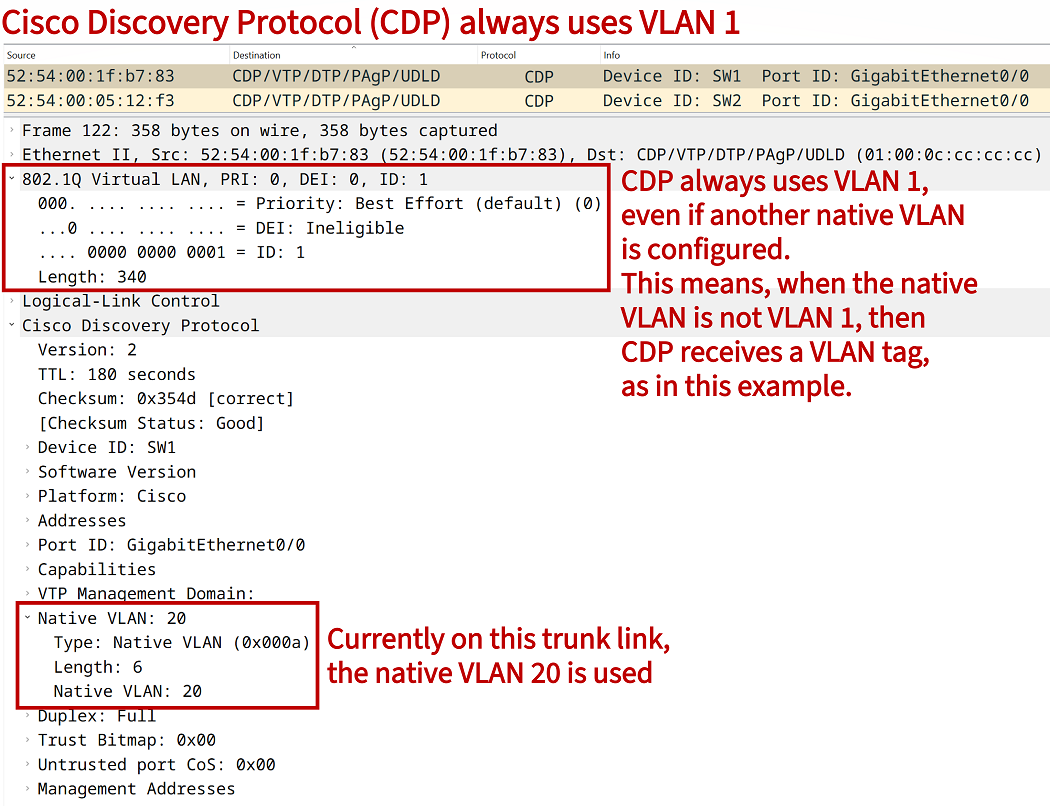
Meanwhile, some protocols do not necessarily use the native VLAN when exchanging protocol data units or frames. An example is provided in the following packet capture, the Cisco Discovery Protocol (CDP) continues to use the default VLAN 1 even if the network is configured with native VLAN 20. Note that by default VLAN 1 is the native VLAN.
How to tag the native VLAN?
By issuing the command vlan dot1q tag native in global configuration mode, a switch can be instructed to tag the native VLAN. Thus, even the native VLAN can be tagged. This practice is used to improve network security and avoid a VLAN hopping attack when double-tagged frames are forwarded in Q-in-Q.