How to Secure MPLS Network with MD5 LDP Authentication
Table of Contents
- What is LDP authentication? ‹
- How to configure LDP authentication? ‹
- Configure LDP authentication with IOS XR ‹
- Download section ‹
What is LDP authentication?
Label Distribution Protocol (LDP) creates neighborships to advertise MPLS labels between label switch routers (LSR). Thus, LDP is the control plane of MPLS. For improved security, LDP neighborships can be authenticated using the TCP MD5 option, a mechanism outlined in RFC 2385.
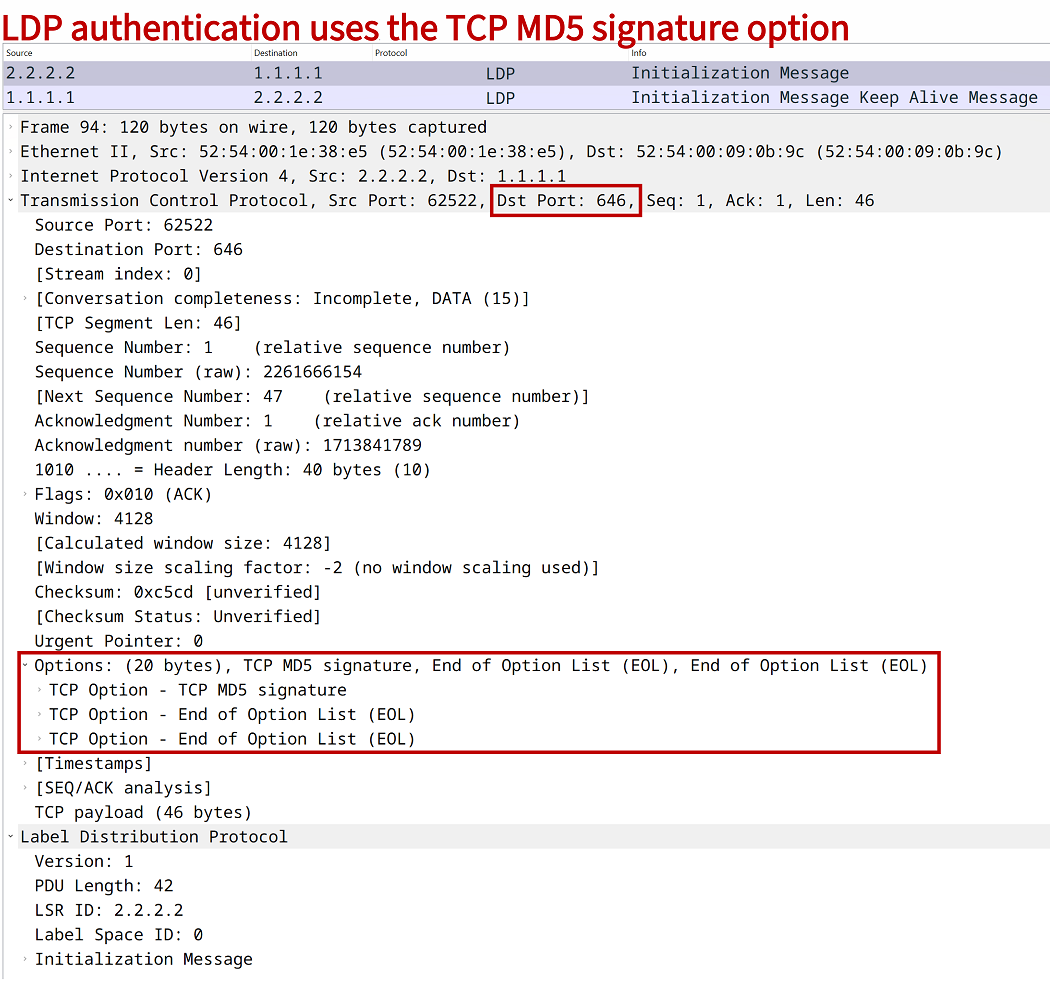
Note that although UDP is used for LDP Hello messages, TCP is used to form a neighborship and exchange LDP Label Mapping messages. This is how LDP can leverage the TCP MD5 option. The following packet capture shows an authenticated TCP segment used to establish an LDP neighborship.
How to configure LDP authentication?
The following table shows two methods to configure authentication of LDP neighbors. The first method on the left side configures LDP authentication for a single neighbor. If there are multiple authenticated LDP neighbors, this command will need to be repeated. However, each LDP neighbor can have a different password.
The second option shown on the right side assigns a key-chain with LDP global authentication. Thus, all LDP neighbors require authentication with the same key-chain.
| Per neighbor | Globally |
|---|---|
R1>enable
R1#configure terminal
Enter configuration commands, one per line.  End with CNTL/Z.
R1(config)#mpls ldp neighbor 2.2.2.2 password p4ssw0rd.123
R1(config)#end
R1#
|
R1>enable R1#configure terminal Enter configuration commands, one per line. End with CNTL/Z. R1(config)#key chain EXAMPLE-KEY R1(config-keychain)#key 10 R1(config-keychain-key)#key-string p4ssw0rd.123 R1(config-keychain-key)#exit R1(config-keychain)#exit R1(config)#mpls ldp password required R1(config)#mpls ldp password fallback key-chain EXAMPLE-KEY R1(config)#end R1# |
With neighbor command
In the following example the IGP OSPF advertises prefixes in area 0 between the routers. Label Distribution Protocol (LDP) assigns labels to every prefix in the routing tables. To enable LDP on a router the command mpls ip is issued in global configuration mode. Each LDP neighbor is separately configured with authentication. The Loopback address on each router is used as the LDP transport address.
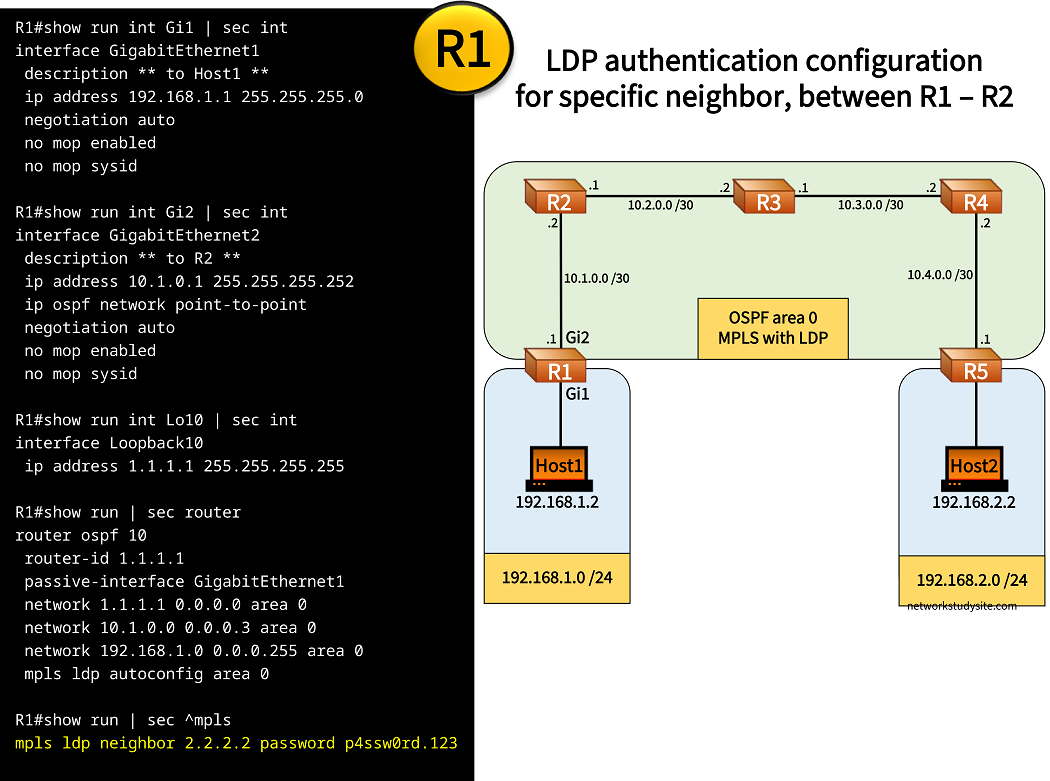
Configuration:
R1
R1#show run int Gi1 | sec int
interface GigabitEthernet1
 description ** to Host1 **
 ip address 192.168.1.1 255.255.255.0
 negotiation auto
 no mop enabled
 no mop sysid

R1#show run int Gi2 | sec int
interface GigabitEthernet2
 description ** to R2 **
 ip address 10.1.0.1 255.255.255.252
 ip ospf network point-to-point
 negotiation auto
 no mop enabled
 no mop sysid

R1#show run int Lo10 | sec int
interface Loopback10
 ip address 1.1.1.1 255.255.255.255

R1#show run | sec router
router ospf 10
 router-id 1.1.1.1
 passive-interface GigabitEthernet1
 network 1.1.1.1 0.0.0.0 area 0
 network 10.1.0.0 0.0.0.3 area 0
 network 192.168.1.0 0.0.0.255 area 0
 mpls ldp autoconfig area 0

R1#show run | sec ^mpls
mpls ldp neighbor 2.2.2.2 password p4ssw0rd.123
R2
R2#show run int Gi1 | sec int
interface GigabitEthernet1
 description ** to R1 **
 ip address 10.1.0.2 255.255.255.252
 ip ospf network point-to-point
 negotiation auto
 no mop enabled
 no mop sysid

R2#show run int Gi2 | sec int
interface GigabitEthernet2
 description ** to R3 **
 ip address 10.2.0.1 255.255.255.252
 ip ospf network point-to-point
 negotiation auto
 no mop enabled
 no mop sysid

R2#show run int Lo10 | sec int
interface Loopback10
 ip address 2.2.2.2 255.255.255.255

R2#show run | sec router
router ospf 10
 router-id 2.2.2.2
 network 2.2.2.2 0.0.0.0 area 0
 network 10.1.0.0 0.0.0.3 area 0
 network 10.2.0.0 0.0.0.3 area 0
 mpls ldp autoconfig area 0

R2#show run | sec ^mpls
mpls ldp neighbor 1.1.1.1 password p4ssw0rd.123
mpls ldp neighbor 3.3.3.3 password p4ssw0rd.123
R5
R5#show run int Gi1 | sec int
interface GigabitEthernet1
 description ** to Host2 **
 ip address 192.168.2.1 255.255.255.0
 negotiation auto
 no mop enabled
 no mop sysid

R5#show run int Gi2 | sec int
interface GigabitEthernet2
 description ** to R4 **
 ip address 10.4.0.1 255.255.255.252
 ip ospf network point-to-point
 negotiation auto
 no mop enabled
 no mop sysid

R5#show run int Lo10 | sec int
interface Loopback10
 ip address 5.5.5.5 255.255.255.255

R5#show run | sec router
router ospf 10
 router-id 5.5.5.5
 passive-interface GigabitEthernet1
 network 5.5.5.5 0.0.0.0 area 0
 network 10.4.0.0 0.0.0.3 area 0
 network 192.168.2.0 0.0.0.255 area 0
 mpls ldp autoconfig area 0

R5#show run | sec ^mpls
mpls ldp neighbor 4.4.4.4 password p4ssw0rd.123
Host1
Host1#show run int Gi0/0 | sec int
interface GigabitEthernet0/0
 description ** to R1 **
 ip address 192.168.1.2 255.255.255.0
 duplex auto
 speed auto
 media-type rj45

Host1#show run | sec ip route
ip route 0.0.0.0 0.0.0.0 GigabitEthernet0/0 192.168.1.1
R1#show mpls ldp neighbor 2.2.2.2 detail
    Peer LDP Ident: 2.2.2.2:0; Local LDP Ident 1.1.1.1:0
        TCP connection: 2.2.2.2.38651 - 1.1.1.1.646; MD5 on          « MD5 authentication in use for this neighbor
        Password: not required, neighbor, in use
        State: Oper; Msgs sent/rcvd: 93/91; Downstream; Last TIB rev sent 22
        Up time: 01:09:53; UID: 2; Peer Id 0
        LDP discovery sources:
          GigabitEthernet2; Src IP addr: 10.1.0.2
            holdtime: 15000 ms, hello interval: 5000 ms
        Addresses bound to peer LDP Ident:
          10.1.0.2        10.2.0.1        2.2.2.2
        Peer holdtime: 180000 ms; KA interval: 60000 ms; Peer state: estab
        NSR: Not Ready
        Capabilities Sent:
          [ICCP (type 0x0405) MajVer 1 MinVer 0]
          [Dynamic Announcement (0x0506)]
          [mLDP Point-to-Multipoint (0x0508)]
          [mLDP Multipoint-to-Multipoint (0x0509)]
          [Typed Wildcard (0x050B)]
        Capabilities Received:
          [ICCP (type 0x0405) MajVer 1 MinVer 0]
          [Dynamic Announcement (0x0506)]
          [mLDP Point-to-Multipoint (0x0508)]
          [mLDP Multipoint-to-Multipoint (0x0509)]
          [Typed Wildcard (0x050B)]


R1#show mpls ldp bindings 192.168.2.0 24
  lib entry: 192.168.2.0/24, rev 22
        local binding:  label: 23                 « Label assigned to Host2 prefix
        remote binding: lsr: 2.2.2.2:0, label: 23


Host1#trace 192.168.2.2 probe 1
Type escape sequence to abort.
Tracing the route to 192.168.2.2
VRF info: (vrf in name/id, vrf out name/id)
  1 192.168.1.1 1 msec
  2 10.1.0.2 [MPLS: Label 23 Exp 0] 4 msec        « MPLS label switching used
  3 10.2.0.2 [MPLS: Label 23 Exp 0] 5 msec
  4 10.3.0.2 [MPLS: Label 23 Exp 0] 4 msec
  5 10.4.0.1 4 msec
  6 192.168.2.2 5 msec
Authenticate globally
In this example scenario, LDP is configured to authenticate all neighbors with the same key-chain. This means that LDP authentication is configured globally for every neighborship, and that the same pre-shared key is used. With a key-chain multiple keys can also be defined.
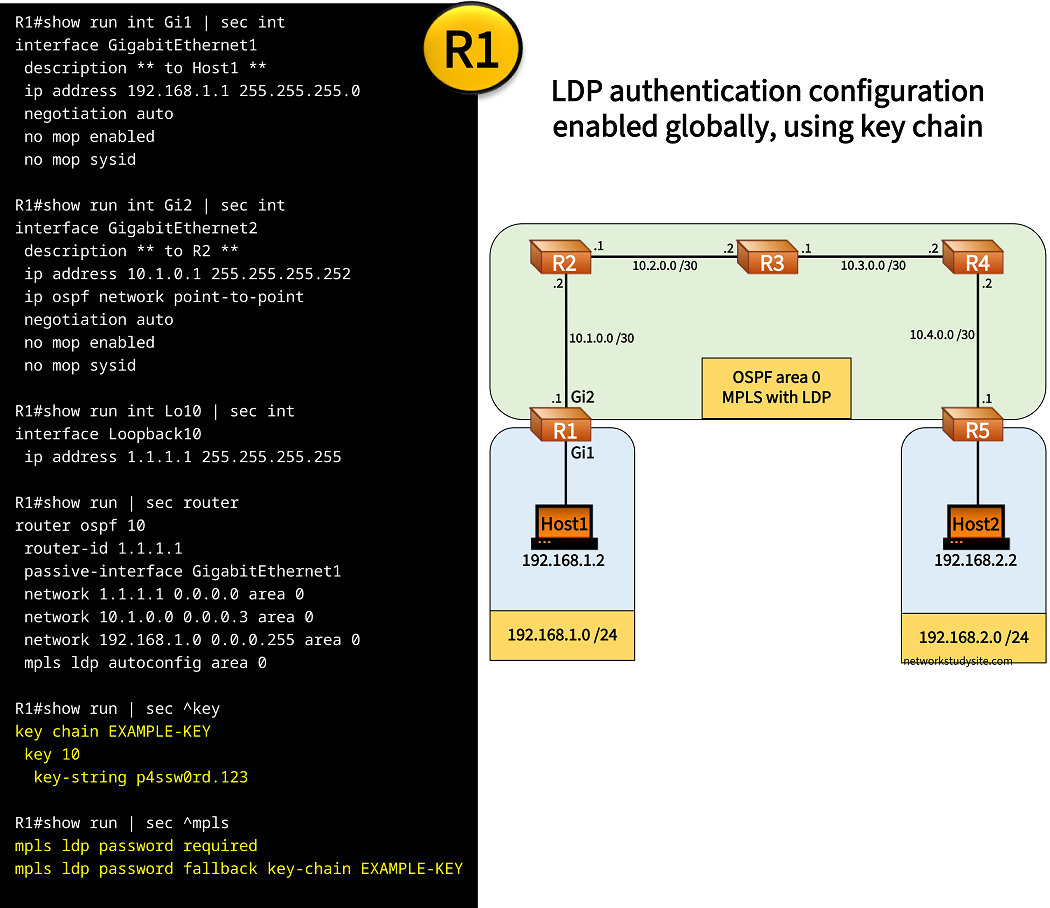
Configuration:
R1
R1#show run int Gi1 | sec int
interface GigabitEthernet1
 description ** to Host1 **
 ip address 192.168.1.1 255.255.255.0
 negotiation auto
 no mop enabled
 no mop sysid

R1#show run int Gi2 | sec int
interface GigabitEthernet2
 description ** to R2 **
 ip address 10.1.0.1 255.255.255.252
 ip ospf network point-to-point
 negotiation auto
 no mop enabled
 no mop sysid

R1#show run int Lo10 | sec int
interface Loopback10
 ip address 1.1.1.1 255.255.255.255

R1#show run | sec router
router ospf 10
 router-id 1.1.1.1
 passive-interface GigabitEthernet1
 network 1.1.1.1 0.0.0.0 area 0
 network 10.1.0.0 0.0.0.3 area 0
 network 192.168.1.0 0.0.0.255 area 0
 mpls ldp autoconfig area 0

R1#show run | sec ^key
key chain EXAMPLE-KEY
 key 10
  key-string p4ssw0rd.123

R1#show run | sec ^mpls
mpls ldp password required
mpls ldp password fallback key-chain EXAMPLE-KEY
R2
R2#show run int Gi1 | sec int
interface GigabitEthernet1
 description ** to R1 **
 ip address 10.1.0.2 255.255.255.252
 ip ospf network point-to-point
 negotiation auto
 no mop enabled
 no mop sysid

R2#show run int Gi2 | sec int
interface GigabitEthernet2
 description ** to R3 **
 ip address 10.2.0.1 255.255.255.252
 ip ospf network point-to-point
 negotiation auto
 no mop enabled
 no mop sysid

R2#show run int Lo10 | sec int
interface Loopback10
 ip address 2.2.2.2 255.255.255.255

R2#show run | sec router
router ospf 10
 router-id 2.2.2.2
 network 2.2.2.2 0.0.0.0 area 0
 network 10.1.0.0 0.0.0.3 area 0
 network 10.2.0.0 0.0.0.3 area 0
 mpls ldp autoconfig area 0

R2#show run | sec ^key
key chain EXAMPLE-KEY
 key 10
  key-string p4ssw0rd.123

R2#show run | sec ^mpls
mpls ldp password required
mpls ldp password fallback key-chain EXAMPLE-KEY
R5
R5#show run int Gi1 | sec int
interface GigabitEthernet1
 description ** to Host2 **
 ip address 192.168.2.1 255.255.255.0
 negotiation auto
 no mop enabled
 no mop sysid

R5#show run int Gi2 | sec int
interface GigabitEthernet2
 description ** to R4 **
 ip address 10.4.0.1 255.255.255.252
 ip ospf network point-to-point
 negotiation auto
 no mop enabled
 no mop sysid

R5#show run int Lo10 | sec int
interface Loopback10
 ip address 5.5.5.5 255.255.255.255

R5#show run | sec router
router ospf 10
 router-id 5.5.5.5
 passive-interface GigabitEthernet1
 network 5.5.5.5 0.0.0.0 area 0
 network 10.4.0.0 0.0.0.3 area 0
 network 192.168.2.0 0.0.0.255 area 0
 mpls ldp autoconfig area 0

R5#show run | sec ^key
key chain EXAMPLE-KEY
 key 10
  key-string p4ssw0rd.123

R5#show run | sec ^mpls
mpls ldp password required
mpls ldp password fallback key-chain EXAMPLE-KEY
R1#show mpls ldp neighbor detail
    Peer LDP Ident: 2.2.2.2:0; Local LDP Ident 1.1.1.1:0
        TCP connection: 2.2.2.2.28785 - 1.1.1.1.646; MD5 on
        Password: required, fallback, in use                  « A password is required
        State: Oper; Msgs sent/rcvd: 32/32; Downstream; Last TIB rev sent 22
        Up time: 00:15:58; UID: 3; Peer Id 0
        LDP discovery sources:
          GigabitEthernet2; Src IP addr: 10.1.0.2
            holdtime: 15000 ms, hello interval: 5000 ms
        Addresses bound to peer LDP Ident:
          10.1.0.2        10.2.0.1        2.2.2.2
        Peer holdtime: 180000 ms; KA interval: 60000 ms; Peer state: estab
        NSR: Not Ready
        Capabilities Sent:
          [ICCP (type 0x0405) MajVer 1 MinVer 0]
          [Dynamic Announcement (0x0506)]
          [mLDP Point-to-Multipoint (0x0508)]
          [mLDP Multipoint-to-Multipoint (0x0509)]
          [Typed Wildcard (0x050B)]
        Capabilities Received:
          [ICCP (type 0x0405) MajVer 1 MinVer 0]
          [Dynamic Announcement (0x0506)]
          [mLDP Point-to-Multipoint (0x0508)]
          [mLDP Multipoint-to-Multipoint (0x0509)]
          [Typed Wildcard (0x050B)]


Host1#trace 192.168.2.2 probe 1
Type escape sequence to abort.
Tracing the route to 192.168.2.2
VRF info: (vrf in name/id, vrf out name/id)
  1 192.168.1.1 1 msec
  2 10.1.0.2 [MPLS: Label 23 Exp 0] 4 msec
  3 10.2.0.2 [MPLS: Label 23 Exp 0] 4 msec
  4 10.3.0.2 [MPLS: Label 23 Exp 0] 3 msec
  5 10.4.0.1 3 msec
  6 192.168.2.2 5 msec
Configure LDP authentication with IOS XR
The following table shows how to configure LDP authentication with IOS XR. The two options of LDP authentication configuration are available as with IOS XR shown in the previous sections.
| Per neighbor | Globally |
|---|---|
RP/0/0/CPU0:R1#
RP/0/0/CPU0:R1#configure
Fri Jan 26 12:15:45.052 UTC
RP/0/0/CPU0:R1(config)#mpls ldp
RP/0/0/CPU0:R1(config-ldp)#neighbor
RP/0/0/CPU0:R1(config-ldp-nbr)#2.2.2.2:0 password clear p4ssw0rd.123
RP/0/0/CPU0:R1(config-ldp-nbr)#commit
Fri Jan 26 12:16:00.690 UTC
RP/0/0/CPU0:R1(config-ldp-nbr)#end
RP/0/0/CPU0:R1#
|
RP/0/0/CPU0:R1#
RP/0/0/CPU0:R1#configure
Fri Jan 26 12:10:02.608 UTC
RP/0/0/CPU0:R1(config)#mpls ldp
RP/0/0/CPU0:R1(config-ldp)#neighbor
RP/0/0/CPU0:R1(config-ldp-nbr)#password clear p4ssw0rd.123
RP/0/0/CPU0:R1(config-ldp-nbr)#commit
Fri Jan 26 12:10:49.754 UTC
RP/0/0/CPU0:R1(config-ldp-nbr)#end
RP/0/0/CPU0:R1#
|