DMVPN with OSPF Configuration using P2MP and Broadcast
- Phase 1 with OSPF configuration, network type point-to-multipoint ‹
- Phase 2 with OSPF configuration, network type broadcast ‹
- Phase 3 with OSPF configuration, network type broadcast ‹
- Download section ‹
Phase 1 with OSPF configuration, network type point-to-multipoint
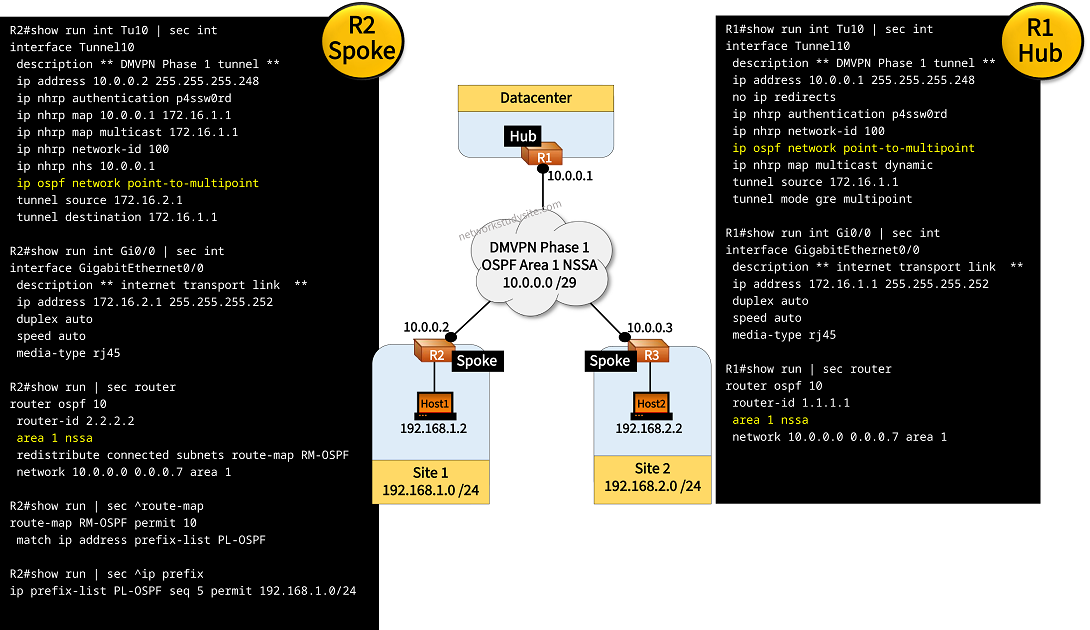
In this example topology, DMVPN Phase 1 is configured with OSPF as the routing protocol. The DMVPN Tunnels are configured with the OSPF network type point-to-multipoint. As a result, there is no Designated Router (DR) or Backup DR election taking place.
Also, the DMVPN overlay subnet is configured as a Not-So-Stubby-Area (NSSA) and the Site subnets are redistributed into the DMVPN network on the Spoke routers. With DMVPN Phase 1 all traffic from the Spokes is routed through the Hub, there is no direct spoke-to-spoke communication.
Configuration:
R1 (Hub)
R1#show run int Tu10 | sec int
interface Tunnel10
 description ** DMVPN Phase 1 tunnel **
 ip address 10.0.0.1 255.255.255.248
 no ip redirects
 ip nhrp authentication p4ssw0rd
 ip nhrp network-id 100
 ip ospf network point-to-multipoint
 ip nhrp map multicast dynamic
 tunnel source 172.16.1.1
 tunnel mode gre multipoint

R1#show run int Gi0/0 | sec int
interface GigabitEthernet0/0
 description ** internet transport link  **
 ip address 172.16.1.1 255.255.255.252
 duplex auto
 speed auto
 media-type rj45

R1#show run | sec router
router ospf 10
 router-id 1.1.1.1
 area 1 nssa
 network 10.0.0.0 0.0.0.7 area 1

R1#show run | sec ip route
ip route 0.0.0.0 0.0.0.0 GigabitEthernet0/0 172.16.1.2
R2 (Spoke)
R2#show run int Tu10 | sec int
interface Tunnel10
 description ** DMVPN Phase 1 tunnel **
 ip address 10.0.0.2 255.255.255.248
 ip nhrp authentication p4ssw0rd
 ip nhrp map 10.0.0.1 172.16.1.1
 ip nhrp map multicast 172.16.1.1
 ip nhrp network-id 100
 ip nhrp nhs 10.0.0.1
 ip ospf network point-to-multipoint
 tunnel source 172.16.2.1
 tunnel destination 172.16.1.1

R2#show run int Gi0/0 | sec int
interface GigabitEthernet0/0
 description ** internet transport link  **
 ip address 172.16.2.1 255.255.255.252
 duplex auto
 speed auto
 media-type rj45

R2#show run int Gi0/1 | sec int
interface GigabitEthernet0/1
 description ** to Host1 in Site1 **
 ip address 192.168.1.1 255.255.255.0
 duplex auto
 speed auto
 media-type rj45

R2#show run | sec router
router ospf 10
 router-id 2.2.2.2
 area 1 nssa
 redistribute connected subnets route-map RM-OSPF
 network 10.0.0.0 0.0.0.7 area 1

R2#show run | sec ^route-map
route-map RM-OSPF permit 10
 match ip address prefix-list PL-OSPF

R2#show run | sec ^ip prefix
ip prefix-list PL-OSPF seq 5 permit 192.168.1.0/24

R2#show run | sec ip route
ip route 172.16.1.1 255.255.255.255 GigabitEthernet0/0 172.16.2.2
R3 (Spoke)
R3#show run int Tu10 | sec int
interface Tunnel10
 description ** DMVPN Phase 1 tunnel **
 ip address 10.0.0.3 255.255.255.248
 ip nhrp authentication p4ssw0rd
 ip nhrp map 10.0.0.1 172.16.1.1
 ip nhrp map multicast 172.16.1.1
 ip nhrp network-id 100
 ip nhrp nhs 10.0.0.1
 ip ospf network point-to-multipoint
 tunnel source 172.16.3.1
 tunnel destination 172.16.1.1

R3#show run int Gi0/0 | sec int
interface GigabitEthernet0/0
 description ** internet transport link  **
 ip address 172.16.3.1 255.255.255.252
 duplex auto
 speed auto
 media-type rj45

R3#show run int Gi0/1 | sec int
interface GigabitEthernet0/1
 description ** to Host2 in Site2 **
 ip address 192.168.2.1 255.255.255.0
 duplex auto
 speed auto
 media-type rj45

R3#show run | sec router
router ospf 10
 router-id 3.3.3.3
 area 1 nssa
 redistribute connected subnets route-map RM-OSPF
 network 10.0.0.0 0.0.0.7 area 1

R3#show run | sec ^route-map
route-map RM-OSPF permit 10
 match ip address prefix-list PL-OSPF

R3#show run | sec ^ip prefix
ip prefix-list PL-OSPF seq 5 permit 192.168.2.0/24

R3#show run | sec ip route
ip route 172.16.1.1 255.255.255.255 GigabitEthernet0/0 172.16.3.2
R1#show dmvpn
Legend: Attrb --> S - Static, D - Dynamic, I - Incomplete
        N - NATed, L - Local, X - No Socket
        T1 - Route Installed, T2 - Nexthop-override
        C - CTS Capable, I2 - Temporary
        # Ent --> Number of NHRP entries with same NBMA peer
        NHS Status: E --> Expecting Replies, R --> Responding, W --> Waiting
        UpDn Time --> Up or Down Time for a Tunnel
==========================================================================

Interface: Tunnel10, IPv4 NHRP Details
Type:Hub, NHRP Peers:2,

 # Ent  Peer NBMA Addr Peer Tunnel Add State  UpDn Tm Attrb
 ----- --------------- --------------- ----- -------- -----
     1 172.16.2.1             10.0.0.2    UP 03:09:16     D        « Spoke routers registered with the Hub

     1 172.16.3.1             10.0.0.3    UP 03:09:38     D


R1#show ip ospf neighbor

Neighbor ID     Pri   State           Dead Time   Address         Interface
3.3.3.3           0   FULL/  -        00:01:50    10.0.0.3        Tunnel10     « OSPF neighborships are established

2.2.2.2           0   FULL/  -        00:01:45    10.0.0.2        Tunnel10


R1#show ip route ospf | beg Ga
Gateway of last resort is 172.16.1.2 to network 0.0.0.0

      10.0.0.0/8 is variably subnetted, 4 subnets, 2 masks
O        10.0.0.2/32 [110/1000] via 10.0.0.2, 00:22:14, Tunnel10
O        10.0.0.3/32 [110/1000] via 10.0.0.3, 00:20:23, Tunnel10
O N2  192.168.1.0/24 [110/20] via 10.0.0.2, 00:16:11, Tunnel10         « NSSA external Type-7 prefixes learned from the Spokes

O N2  192.168.2.0/24 [110/20] via 10.0.0.3, 00:15:05, Tunnel10


Host1#ping 192.168.2.2
Type escape sequence to abort.
Sending 5, 100-byte ICMP Echos to 192.168.2.2, timeout is 2 seconds:
!!!!!
Success rate is 100 percent (5/5), round-trip min/avg/max = 89/90/92 ms


Host1#trace 192.168.2.2 probe 1
Type escape sequence to abort.
Tracing the route to 192.168.2.2
VRF info: (vrf in name/id, vrf out name/id)
  1 192.168.1.1 1 msec
  2 10.0.0.1 50 msec               « Traffic from the Spokes travels through the Hub in DMVPN Phase 1

  3 10.0.0.3 91 msec
  4 192.168.2.2 92 msec
Phase 2 with OSPF configuration, network type broadcast
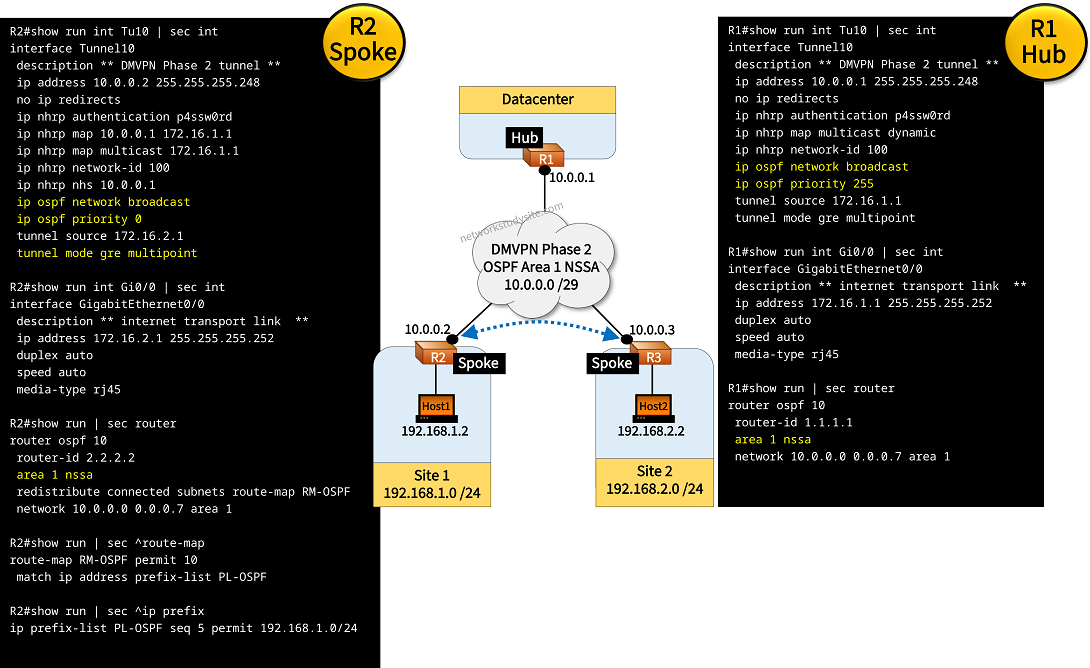
In this example topology, DMPVPN Phase 2 is configured with OSPF as the routing protocol. The DMVPN Tunnels are configured with the OSPF network type broadcast. As a result, a DR/BDR election takes place. However, it is important that the Hub router become the DR, and under no circumstances should a Spoke router become a DR.
Therefore, the ip ospf priority 255 command is configured on the Hub router tunnel interface, which makes it become the OSPF DR.
Meanwhile, the ip ospf priority 0 command is configured on the Spoke routers, which instructs them not to participte in the DR/BDR election process.
Also, the DMVPN overlay subnet is configured as a Not-So-Stubby-Area (NSSA) and the Site subnets are redistributed into the DMVPN network on the Spoke routers. With DMVPN Phase 2 there is direct spoke-to-spoke communication established with Multipoint GRE. For this to work, the command tunnel mode gre multipoint is configured on the Spoke router Tunnel interfaces.
Configuration:
R1 (Hub)
R1#show run int Tu10 | sec int
interface Tunnel10
 description ** DMVPN Phase 2 tunnel **
 ip address 10.0.0.1 255.255.255.248
 no ip redirects
 ip nhrp authentication p4ssw0rd
 ip nhrp network-id 100
 ip nhrp map multicast dynamic
 ip ospf network broadcast
 ip ospf priority 255
 tunnel source 172.16.1.1
 tunnel mode gre multipoint

R1#show run int Gi0/0 | sec int
interface GigabitEthernet0/0
 description ** internet transport link  **
 ip address 172.16.1.1 255.255.255.252
 duplex auto
 speed auto
 media-type rj45

R1#show run | sec router
router ospf 10
 router-id 1.1.1.1
 area 1 nssa
 network 10.0.0.0 0.0.0.7 area 1

R1#show run | sec ip route
ip route 0.0.0.0 0.0.0.0 GigabitEthernet0/0 172.16.1.2
R2 (Spoke)
R2#show run int Tu10 | sec int
interface Tunnel10
 description ** DMVPN Phase 2 tunnel **
 ip address 10.0.0.2 255.255.255.248
 no ip redirects
 ip nhrp authentication p4ssw0rd
 ip nhrp map 10.0.0.1 172.16.1.1
 ip nhrp map multicast 172.16.1.1
 ip nhrp network-id 100
 ip nhrp nhs 10.0.0.1
 ip ospf network broadcast
 ip ospf priority 0
 tunnel source 172.16.2.1
 tunnel mode gre multipoint

R2s#show run int Gi0/0 | sec int
interface GigabitEthernet0/0
 description ** internet transport link  **
 ip address 172.16.2.1 255.255.255.252
 duplex auto
 speed auto
 media-type rj45

R2#show run int Gi0/1 | sec int
interface GigabitEthernet0/1
 description ** to Host1 in Site1 **
 ip address 192.168.1.1 255.255.255.0
 duplex auto
 speed auto
 media-type rj45

R2#show run | sec router
router ospf 10
 router-id 2.2.2.2
 area 1 nssa
 redistribute connected subnets route-map RM-OSPF
 network 10.0.0.0 0.0.0.7 area 1

R2#show run | sec ^route-map
route-map RM-OSPF permit 10
 match ip address prefix-list PL-OSPF

R2#show run | sec ^ip prefix
ip prefix-list PL-OSPF seq 5 permit 192.168.1.0/24

R2#show run | sec ip route
ip route 0.0.0.0 0.0.0.0 GigabitEthernet0/0 172.16.2.2
R3 (Spoke)
R3#show run int Tu10 | sec int
interface Tunnel10
 description ** DMVPN Phase 2 tunnel **
 ip address 10.0.0.3 255.255.255.248
 no ip redirects
 ip nhrp authentication p4ssw0rd
 ip nhrp map 10.0.0.1 172.16.1.1
 ip nhrp map multicast 172.16.1.1
 ip nhrp network-id 100
 ip nhrp nhs 10.0.0.1
 ip ospf network broadcast
 ip ospf priority 0
 tunnel source 172.16.3.1
 tunnel mode gre multipoint

R3#show run int Gi0/0 | sec int
interface GigabitEthernet0/0
 description ** internet transport link  **
 ip address 172.16.3.1 255.255.255.252
 duplex auto
 speed auto
 media-type rj45

R3#show run int Gi0/1 | sec int
interface GigabitEthernet0/1
 description ** to Host2 in Site2 **
 ip address 192.168.2.1 255.255.255.0
 duplex auto
 speed auto
 media-type rj45

R3#show run | sec router
router ospf 10
 router-id 3.3.3.3
 area 1 nssa
 redistribute connected subnets route-map RM-OSPF
 network 10.0.0.0 0.0.0.7 area 1

R3#show run | sec ^route-map
route-map RM-OSPF permit 10
 match ip address prefix-list PL-OSPF

R3#show run | sec ^ip prefix
ip prefix-list PL-OSPF seq 5 permit 192.168.2.0/24

R3#show run | sec ip route
ip route 0.0.0.0 0.0.0.0 GigabitEthernet0/0 172.16.3.2
R1#show ip ospf neighbor

Neighbor ID     Pri   State           Dead Time   Address         Interface
2.2.2.2           0   FULL/DROTHER    00:00:30    10.0.0.2        Tunnel10       « R1 is the Designated Router, Spokes are DROTHER
3.3.3.3           0   FULL/DROTHER    00:00:36    10.0.0.3        Tunnel10


R1#show ip route ospf | beg Ga
Gateway of last resort is 172.16.1.2 to network 0.0.0.0

O N2  192.168.1.0/24 [110/20] via 10.0.0.2, 00:11:54, Tunnel10       « NSSA Type-7 external routes received from Spokes
O N2  192.168.2.0/24 [110/20] via 10.0.0.3, 00:11:23, Tunnel10


R2#show ip ospf interface Tu10
Tunnel10 is up, line protocol is up
  Internet Address 10.0.0.2/29, Area 1, Attached via Network Statement
  Process ID 10, Router ID 2.2.2.2, Network Type BROADCAST, Cost: 1000         « Network type is broadcast
  Topology-MTID    Cost    Disabled    Shutdown      Topology Name
        0           1000      no          no            Base
  Transmit Delay is 1 sec, State DROTHER, Priority 0                           « On the Spoke, priority set to 0
  Designated Router (ID) 1.1.1.1, Interface address 10.0.0.1                   « The Hub router is the DR
  No backup designated router on this network                                  « No BDR on this network
  Timer intervals configured, Hello 10, Dead 40, Wait 40, Retransmit 5
    oob-resync timeout 40
    Hello due in 00:00:05
  Supports Link-local Signaling (LLS)
  Cisco NSF helper support enabled
  IETF NSF helper support enabled
  Index 1/1/1, flood queue length 0
  Next 0x0(0)/0x0(0)/0x0(0)
  Last flood scan length is 1, maximum is 2
  Last flood scan time is 0 msec, maximum is 0 msec
  Neighbor Count is 1, Adjacent neighbor count is 1
    Adjacent with neighbor 1.1.1.1  (Designated Router)
  Suppress hello for 0 neighbor(s)


Host1#ping 192.168.2.2
Type escape sequence to abort.
Sending 5, 100-byte ICMP Echos to 192.168.2.2, timeout is 2 seconds:
!!!!!
Success rate is 100 percent (5/5), round-trip min/avg/max = 45/55/93 ms


Host1#trace 192.168.2.2 probe 1
Type escape sequence to abort.
Tracing the route to 192.168.2.2
VRF info: (vrf in name/id, vrf out name/id)
  1 192.168.1.1 2 msec
  2 10.0.0.3 45 msec                  « Tunnel IP address of Spoke R3, direct spoke-to-spoke communication
  3 192.168.2.2 48 msec
Phase 3 with OSPF configuration, network type broadcast
In the following example, DMPVPN Phase 3 is configured with OSPF as the routing protocol. Compared to the configuration applied for DMVPN Phase 2, now with Phase 3 the Spoke router tunnel interfaces have the ip nhrp shortcut command added.
Meanwhile, on the Hub router the DMVPN tunnel interface has the command ip nhrp redirect added. These commands enable the IP NHRP Traffic Indication message sent from the Hub router to be accepted by the Spoke router. With DMVPN Phase 3 NHRP can install routes into the routing table of Spoke routers, thereby enabling direct spoke-to-spoke communication.

Configuration:
R1 (Hub)
R1#show run int Tu10 | sec int
interface Tunnel10
 description ** DMVPN Phase 1 tunnel **
 ip address 10.0.0.1 255.255.255.248
 no ip redirects
 ip nhrp authentication p4ssw0rd
 ip nhrp map multicast dynamic
 ip nhrp network-id 100
 ip nhrp redirect
 ip ospf network broadcast
 ip ospf priority 255
 tunnel source 172.16.1.1
 tunnel mode gre multipoint

R1#show run int Gi0/0 | sec int
interface GigabitEthernet0/0
 description ** internet transport link  **
 ip address 172.16.1.1 255.255.255.252
 duplex auto
 speed auto
 media-type rj45

R1#show run | sec router
router ospf 10
 router-id 1.1.1.1
 area 1 nssa
 network 10.0.0.0 0.0.0.7 area 1

R1#show run | sec ip route
ip route 0.0.0.0 0.0.0.0 GigabitEthernet0/0 172.16.1.2
R2 (Spoke)
R2#show run int Tu10 | sec int
interface Tunnel10
 description ** DMVPN Phase 2 tunnel **
 ip address 10.0.0.2 255.255.255.248
 no ip redirects
 ip nhrp authentication p4ssw0rd
 ip nhrp map 10.0.0.1 172.16.1.1
 ip nhrp map multicast 172.16.1.1
 ip nhrp network-id 100
 ip nhrp nhs 10.0.0.1
 ip ospf network broadcast
 ip ospf priority 0
 ip nhrp shortcut
 tunnel source 172.16.2.1
 tunnel mode gre multipoint


R2#show run int Gi0/0 | sec int
interface GigabitEthernet0/0
 description ** internet transport link  **
 ip address 172.16.2.1 255.255.255.252
 duplex auto
 speed auto
 media-type rj45

R2#show run int Gi0/1 | sec int
interface GigabitEthernet0/1
 description ** to Host1 in Site1 **
 ip address 192.168.1.1 255.255.255.0
 duplex auto
 speed auto
 media-type rj45

R2#show run | sec router
router ospf 10
 router-id 2.2.2.2
 area 1 nssa
 redistribute connected subnets route-map RM-OSPF
 network 10.0.0.0 0.0.0.7 area 1

R2#show run | sec ^route-map
route-map RM-OSPF permit 10
 match ip address prefix-list PL-OSPF

R2#show run | sec ^ip prefix
ip prefix-list PL-OSPF seq 5 permit 192.168.1.0/24

R2#show run | sec ip route
ip route 0.0.0.0 0.0.0.0 GigabitEthernet0/0 172.16.2.2
R3 (Spoke)
R3#show run int Tu10 | sec int
interface Tunnel10
 description ** DMVPN Phase 1 tunnel **
 ip address 10.0.0.3 255.255.255.248
 no ip redirects
 ip nhrp authentication p4ssw0rd
 ip nhrp map 10.0.0.1 172.16.1.1
 ip nhrp map multicast 172.16.1.1
 ip nhrp network-id 100
 ip nhrp nhs 10.0.0.1
 ip ospf network broadcast
 ip ospf priority 0
 ip nhrp shortcut
 tunnel source 172.16.3.1
 tunnel mode gre multipoint

R3#show run int Gi0/0 | sec int
interface GigabitEthernet0/0
 description ** internet transport link  **
 ip address 172.16.3.1 255.255.255.252
 duplex auto
 speed auto
 media-type rj45

R3#show run int Gi0/1 | sec int
interface GigabitEthernet0/1
 description ** to Host2 in Site2 **
 ip address 192.168.2.1 255.255.255.0
 duplex auto
 speed auto
 media-type rj45

R3#show run | sec router
router ospf 10
 router-id 3.3.3.3
 area 1 nssa
 redistribute connected subnets route-map RM-OSPF
 network 10.0.0.0 0.0.0.7 area 1

R3#show run | sec ^route-map
route-map RM-OSPF permit 10
 match ip address prefix-list PL-OSPF

R3#show run | sec ^ip prefix
ip prefix-list PL-OSPF seq 5 permit 192.168.2.0/24

R3#show run | sec ip route
ip route 0.0.0.0 0.0.0.0 GigabitEthernet0/0 172.16.3.2
Host2#ping 192.168.1.2
Type escape sequence to abort.
Sending 5, 100-byte ICMP Echos to 192.168.1.2, timeout is 2 seconds:
!!!!!
Success rate is 100 percent (5/5), round-trip min/avg/max = 46/47/48 ms


Host2#trace 192.168.1.2 probe 1
Type escape sequence to abort.
Tracing the route to 192.168.1.2
VRF info: (vrf in name/id, vrf out name/id)
  1 192.168.2.1 1 msec
  2 10.0.0.2 46 msec              « Spoke R2 tunnel interface, direct spoke-to-spoke communication
  3 192.168.1.2 46 msec


R3#show ip route | beg Ga
Gateway of last resort is 172.16.3.2 to network 0.0.0.0

S*    0.0.0.0/0 [1/0] via 172.16.3.2, GigabitEthernet0/0
      10.0.0.0/8 is variably subnetted, 3 subnets, 2 masks
C        10.0.0.0/29 is directly connected, Tunnel10
H        10.0.0.2/32 is directly connected, 00:01:06, Tunnel10           « NHRP install this route
L        10.0.0.3/32 is directly connected, Tunnel10
      172.16.0.0/16 is variably subnetted, 2 subnets, 2 masks
C        172.16.3.0/30 is directly connected, GigabitEthernet0/0
L        172.16.3.1/32 is directly connected, GigabitEthernet0/0
O N2  192.168.1.0/24 [110/20] via 10.0.0.2, 00:25:14, Tunnel10
      192.168.2.0/24 is variably subnetted, 2 subnets, 2 masks
C        192.168.2.0/24 is directly connected, GigabitEthernet0/1
L        192.168.2.1/32 is directly connected, GigabitEthernet0/1


R3#show ip nhrp traffic
Tunnel10: Max-send limit:10000Pkts/10Sec, Usage:0%
   Sent: Total 112
         11 Resolution Request  9 Resolution Reply  84 Registration Request
         0 Registration Reply  5 Purge Request  3 Purge Reply
         0 Error Indication  0 Traffic Indication  0 Redirect Suppress
   Rcvd: Total 102
         9 Resolution Request  5 Resolution Reply  0 Registration Request
         78 Registration Reply  3 Purge Request  5 Purge Reply
         0 Error Indication  2 Traffic Indication  0 Redirect Suppress           « NHRP Redirect message received on Spoke router