A Step-by-Step Guide Explaining How Proxy ARP Works
Table of Contents
- What is Proxy ARP? ‹
- Proxy ARP example scenario with packet captures ‹
- What are the advantages and disadvantages of Proxy ARP? ‹
- Download section ‹
What is Proxy ARP?
Proxy ARP is performed by a networking device that inserts its own MAC address in the ARP response on behalf of a host in the network. If a router receives a broadcast ARP request and can locate the destination IP address on one of its connected interfaces then it could choose (because of proxy ARP) to forward that ARP request.
Later, when the router receives an ARP response it can then insert its own MAC address before forwarding the response to the original sender. The important part is that instead of the requested host's MAC address, the router inserts its own MAC address in the ARP response. As a result, the subnet mask of a host device is less important for network segmentation, because the gateway router resolves all the ARP requests. The corresponding section from the RFC 1027 is quoted below.
Therefore a method for hiding the existence of subnets from hosts was highly desirable. Since all the local area networks supported ARP, an ARP-based method (commonly known as "Proxy ARP" or the "ARP hack") was chosen.
RFC 1027, Using ARP to Implement Transparent Subnet Gateways
Proxy ARP example scenario with packet captures
In the follow example scenario R1 has proxy ARP enabled on interface Gi0/0. Note that in many cases proxy ARP is already enabled by default.
R1#configure terminal
Enter configuration commands, one per line.  End with CNTL/Z.
R1(config)#interface Gi0/0
R1(config-if)#ip proxy-arp

R1#show run all | section interface GigabitEthernet0/0
interface GigabitEthernet0/0
 description ** to Host1 and Host2 **
 mac-address 0000.0000.aaa1
 ip address 192.168.1.1 255.255.255.0
 ip redirects
 ip unreachables
 ip proxy-arp
 ip mtu 1500
[output omitted]
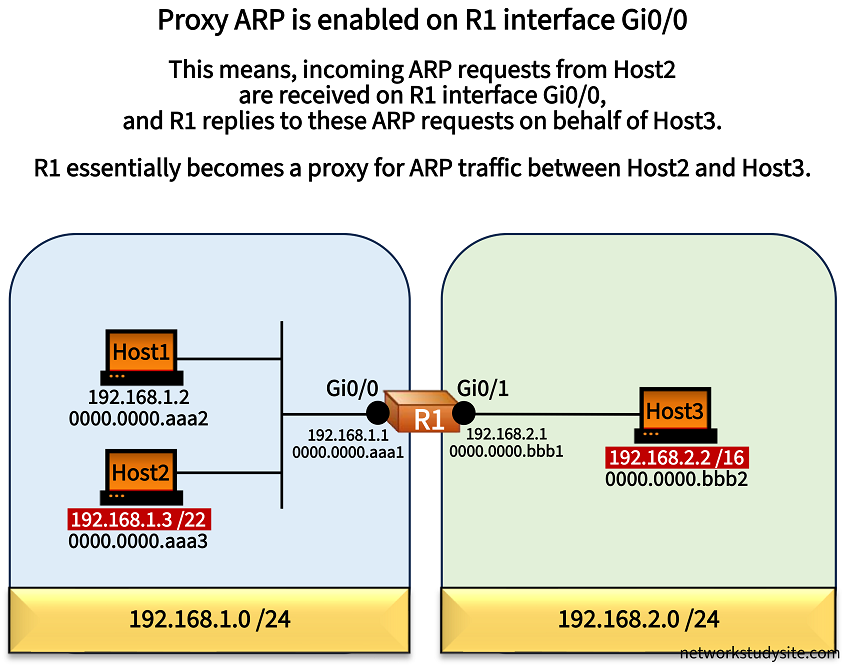
Configuration:
Host1
Host1#show run int Gi0/0 | sec int
interface GigabitEthernet0/0
 description ** to R1 **
 mac-address 0000.0000.aaa2
 ip address 192.168.1.2 255.255.255.0
 duplex auto
 speed auto
 media-type rj45
Host2
Host2#show run int Gi0/0 | sec int
interface GigabitEthernet0/0
 description ** to R1 **
 mac-address 0000.0000.aaa3
 ip address 192.168.1.3 255.255.252.0
 duplex auto
 speed auto
 media-type rj45
Host3
Host3#show run int Gi0/0 | sec int
interface GigabitEthernet0/0
 description ** to R1 **
 mac-address 0000.0000.bbb2
 ip address 192.168.2.2 255.255.0.0
 duplex auto
 speed auto
 media-type rj45

Host3#show run | sec ip route
ip route 0.0.0.0 0.0.0.0 192.168.2.1
R1
R1#show run int Gi0/0 | sec int
interface GigabitEthernet0/0
 description ** to Host1 and Host2 **
 mac-address 0000.0000.aaa1
 ip address 192.168.1.1 255.255.255.0
 duplex auto
 speed auto
 media-type rj45

R1#show run int Gi0/1 | sec int
interface GigabitEthernet0/1
 description ** to Host3 **
 mac-address 0000.0000.bbb1
 ip address 192.168.2.1 255.255.255.0
 duplex auto
 speed auto
 media-type rj45
Host1#ping 192.168.2.2
Type escape sequence to abort.
Sending 5, 100-byte ICMP Echos to 192.168.2.2, timeout is 2 seconds:
.....
Success rate is 0 percent (0/5)


Host2#ping 192.168.2.2
Type escape sequence to abort.
Sending 5, 100-byte ICMP Echos to 192.168.2.2, timeout is 2 seconds:
.!!!!
Success rate is 80 percent (4/5), round-trip min/avg/max = 1/1/2 ms
Host1 and Host2 do not have default routes configured. Host2 has the subnet mask /22 configured. Due to proxy ARP enabled on R1, Host2 can ping Host3. The reason for this behavior is that Host2 and Host3 are technically in the same IP subnet and R1 translates the ARP requests.
Step 1) When Host2 sends a ping to 192.168.2.2 it does not try to use a default route, but instead Host2 initiates a broadcast ARP request. Host2 broadcasts an ARP request to ask whether anyone can reply with the MAC address belonging to Host3 (192.168.2.2). This is shown in the following packet capture.

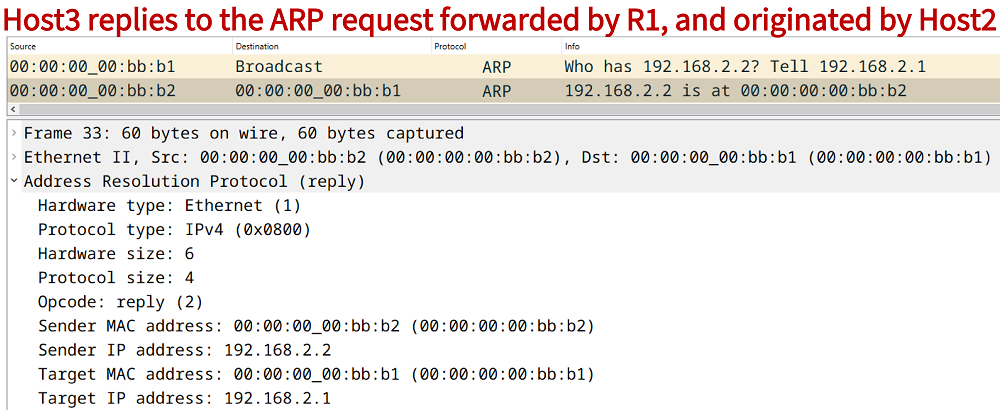
Step 2) This ARP broadcast packet is received by R1, and because R1 has proxy ARP enabled it can reply to the ARP request sent from Host2. Specifically what happens is that R1 forwards the ARP request, and broadcasts it out on R1 Gi0/1. Thus, Host3 receives the ARP request, and replies with its MAC address to R1. This is shown in the following packet capture.
Step 3) When R1 receives this information from Host3, R1 replies to Host2 by inserting its own interface Gi0/0 MAC address in the ARP reply. As a result, Host2 actually has the IP address of Host3 (192.168.2.2) connected to the MAC address of R1 (0000.0000.aaa1) in its ARP table. The following packet capture shows the ARP reply sent from R1 to Host2. This process can only work due to proxy ARP enabled on R1 Gi0/0.

In the ARP table of Host2, the following information is visible. Note that the IP address 192.168.2.2 of Host2, is bound to the MAC address 0000.0000.aaa1 of R1.
Host2#show arp
Protocol  Address          Age (min)  Hardware Addr   Type   Interface
Internet  192.168.1.3             -   0000.0000.aaa3  ARPA   GigabitEthernet0/0
Internet  192.168.2.2            22   0000.0000.aaa1  ARPA   GigabitEthernet0/0
What are the advantages and disadvantages of Proxy ARP?
One advantage of Proxy ARP is providing network connectivity to hosts without a default route and without strickt isolation of host subnets. If we assume that Host2 cannot be configured with a default route pointing to R1, than in this case proxy ARP can provide a solution and enable network access for Host2.
A disadvantage of proxy ARP is the increased amount of broadcast traffic due to the ARP protocol. The broadcast packets need to be processed by each host on the local subnet. And on R1 these ARP messages are processed by the CPU which may impact R1's performance. This is shown in the following outputs.
R1#show ip traffic | section ARP
ARP statistics:
  Rcvd: 21 requests, 12 replies, 0 reverse, 0 other
  Sent: 6 requests, 31 replies (12 proxy), 28 reverse
  Drop due to input queue full: 0


R1#show ip cef switching statistics

       Reason                          Drop       Punt  Punt2Host
RP LES Packet destined for us             0        228          0
RP LES Neighbor resolution req            0          6          0
RP LES Total                              0        234          0

All    Total                              0        234          0
Another disadvantage is that proxy ARP leads to more entries in the host devices' ARP tables. For example, if there are 5 hosts in the subnet 192.168.2.0 /16 communicating with Host2 through proxy ARP, this means 5 ARP table entries on Host2 and each with the MAC address of the proxy ARP router R1 interface Gi0/0. Such an example scenario is shown below.
Host2#show arp
Protocol  Address          Age (min)  Hardware Addr   Type   Interface
Internet  192.168.1.3             -   0000.0000.aaa3  ARPA   GigabitEthernet0/0
Internet  192.168.2.2           212   0000.0000.aaa1  ARPA   GigabitEthernet0/0
Internet  192.168.2.3             0   0000.0000.aaa1  ARPA   GigabitEthernet0/0
Internet  192.168.2.4             0   0000.0000.aaa1  ARPA   GigabitEthernet0/0
Internet  192.168.2.5             0   0000.0000.aaa1  ARPA   GigabitEthernet0/0
Internet  192.168.2.6             0   0000.0000.aaa1  ARPA   GigabitEthernet0/0