Spanning Tree Bridge ID, Priority and Root Bridge Election
- What is STP Bridge Priority? ‹
- Suboptimal STP convergence and root bridge election ‹
- Bridge priority configuration and assigning the root bridge ‹
- Secondary root bridge election per VLAN and distributing traffic ‹
- Download section ‹
What is STP Bridge Priority?
The Spanning Tree Protocol (STP) bridge priority value is used to determine the root bridge in a Layer-2 topology. The switch with the lowest priority value wins the root bridge election process. If two switches have identical bridge priority values, then the switch with the lowest MAC address becomes the root bridge. The default STP bridge priority value is 32768, and any configured priority values must be in increments of 4096, this is shown in the following output.
SW1>
SW1>enable
SW1#configure terminal
Enter configuration commands, one per line.  End with CNTL/Z.
SW1(config)#spanning-tree vlan 10 priority ?
  <0-61440>  bridge priority in increments of 4096
When Per-VLAN STP is used, the 12-bit Extended System-ID ensures that the VLAN number can be represented together with the bridge priority value as a single integer. In other words, the 12-bit VLAN number and the 4-bit priority are combined to essentially create a 16-bit (extended) bridge priority value. This is shown in the following image.

The extended bridge priority value (16-bit) and MAC address (48-bit) together make up the Bridge ID. Thus, a switch can use a single MAC address across different VLANs, and have the Extended System-ID (based on the VLAN) create a unique Bridge ID per each VLAN. This reduces the need for a large number of allocated MAC addresses, because now the Extended System-ID makes each Bridge ID unique.
To show this in the following output, the VLAN number is 10 and it is added to the default bridge priority of 32768. This results in the bridge priority value 32778 which is valid in VLAN 10.
SW1#show spanning-tree vlan 10

VLAN0010
  Spanning tree enabled protocol ieee
  Root ID    Priority    32778
             Address     5254.0002.6bdf
             Cost        4
             Port        2 (GigabitEthernet0/1)
             Hello Time   2 sec  Max Age 20 sec  Forward Delay 15 sec

  Bridge ID  Priority    32778  (priority 32768 sys-id-ext 10)
             Address     5254.000e.88b4
             Hello Time   2 sec  Max Age 20 sec  Forward Delay 15 sec
             Aging Time  300 sec

Interface           Role Sts Cost      Prio.Nbr Type
------------------- ---- --- --------- -------- --------------------------------
Gi0/0               Altn BLK 4         128.1    P2p
Gi0/1               Root FWD 4         128.2    P2p
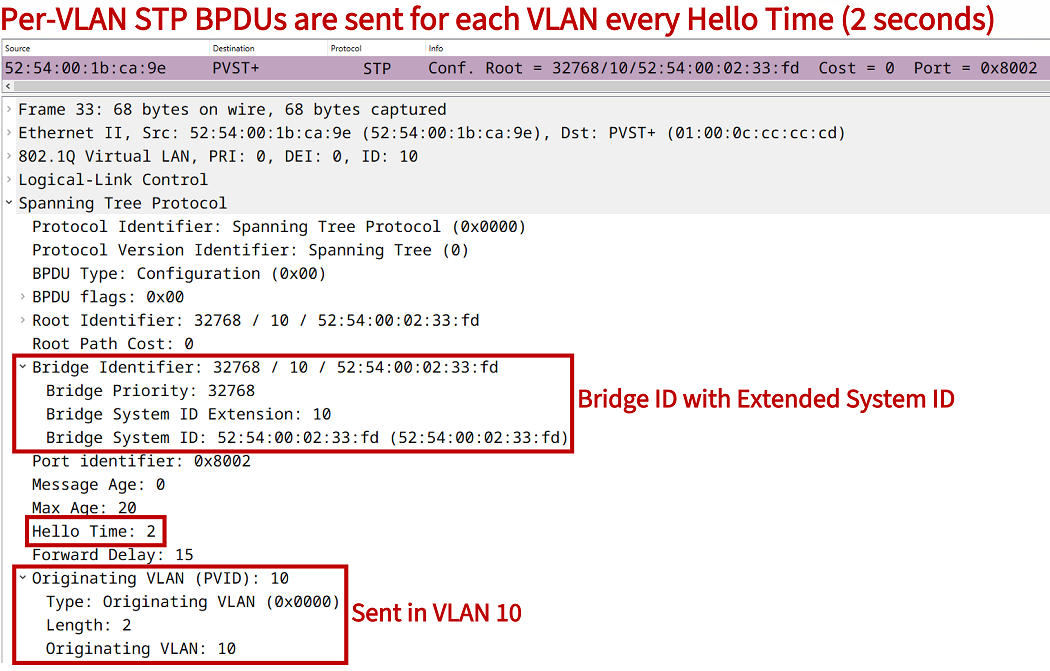
The following packet capture shows a BPDU advertising the root bridge priority value of 32778 for VLAN 10. Notice under the Bridge Identifier field the three components that make up the STP Bridge ID:
- Bridge Priority, 4-bit priority value
- Bridge System ID Extension, 12-bit VLAN ID
- Bridge System ID, 48-bit switch MAC address
With Per-VLAN STP the bridge priority can be individually configured for each VLAN. This also means, different STP topologies can be created for each VLAN. The following configuration applies the STP bridge priority value 4096 to VLAN 10 only.
SW1>
SW1>enable
SW1#configure terminal
Enter configuration commands, one per line.  End with CNTL/Z.
SW1(config)#spanning-tree vlan 10 priority 4096
SW1(config)#
SW1(config)#exit
SW1#
Combined with the VLAN number 10, this results in the new bridge priority value of 4106 shown in the following outputs.
SW1#show spanning-tree vlan 10 bridge priority
VLAN0010         4106


SW1#show spanning-tree bridge

                                                   Hello  Max  Fwd
Vlan                         Bridge ID              Time  Age  Dly  Protocol
---------------- --------------------------------- -----  ---  ---  --------
VLAN0001         32769 (32768,   1) 5254.000e.88b4    2    20   15  ieee
VLAN0010          4106 ( 4096,  10) 5254.000e.88b4    2    20   15  ieee
VLAN0020         32788 (32768,  20) 5254.000e.88b4    2    20   15  ieee
VLAN0030         32798 (32768,  30) 5254.000e.88b4    2    20   15  ieee


SW1#show spanning-tree bridge id
VLAN0001         8001.5254.000e.88b4
VLAN0010         100A.5254.000e.88b4
VLAN0020         8014.5254.000e.88b4
VLAN0030         801E.5254.000e.88b4
Suboptimal STP convergence and root bridge election
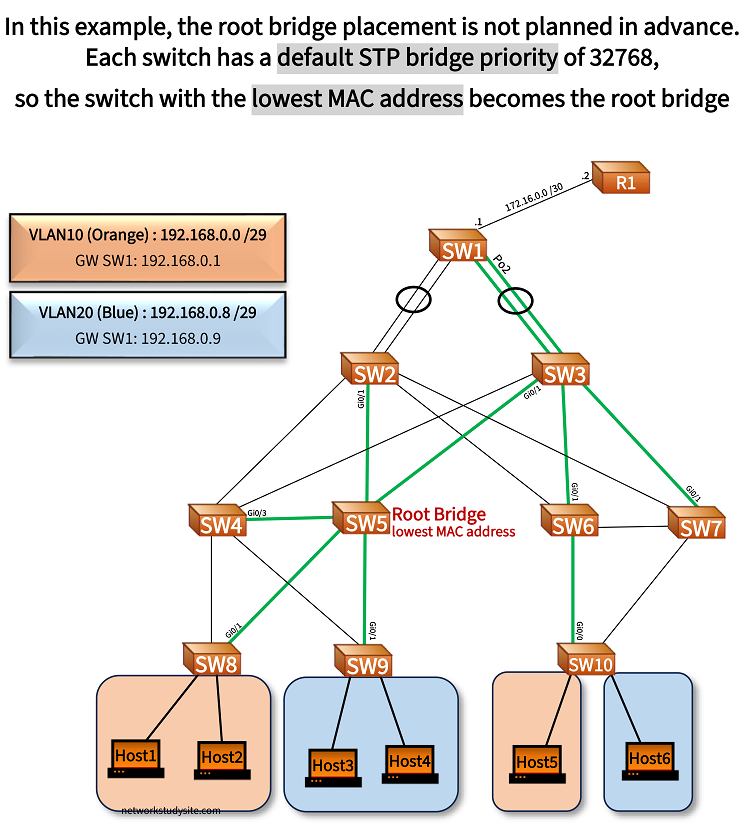
Switches in this example topology are running Rapid Per-VLAN Spanning-Tree Protocol (RPVSTP), or in other words RSTP per every active VLAN. SW1 is a layer-3 switch with routed VLAN interfaces (SVI) as the gateway (GW) for the hosts. By default, SW5 is elected as the root bridge for all VLANs because it has the lowest MAC address.
As a result of this convergence, the link between SW1 - SW2 is blocked. Thus, traffic from any host destined to R1 passes only through link SW1 - SW3. This can lead to congestion. Additionally, the secondary root bridge is not configured. So if SW5 goes offline the remaining switches elect the root bridge based on the lowest MAC address.
This means, the newly converged topology is unpredictable and could be even less optimal. For example, if an access switch (SW8, SW9, SW10) becomes the root bridge, it may not have enough processing power to send BPDUs for each VLAN in a large STP topology.
SW6#show spanning-tree summary | i is in
Switch is in rapid-pvst mode          « Per VLAN RSTP confirmed


SW6#show spanning-tree bridge protocol
VLAN0001         rstp
VLAN0010         rstp
VLAN0020         rstp


SW6#show spanning-tree root port
VLAN0001         GigabitEthernet0/1   « Finding the root bridge by following the root port
VLAN0010         GigabitEthernet0/1
VLAN0020         GigabitEthernet0/1


SW5#show spanning-tree root port
VLAN0001         This bridge is root   « SW5 confirmed root bridge
VLAN0010         This bridge is root
VLAN0020         This bridge is root


SW6#show spanning-tree bridge priority
VLAN0001         32769                « Bridge priorities are the same within each VLAN
VLAN0010         32778
VLAN0020         32788


SW5#show spanning-tree bridge priority
VLAN0001         32769                « Due to same bridge priorities, lowest mac-address is tie-breaker
VLAN0010         32778
VLAN0020         32788


SW6#show spanning-tree root id
VLAN0001         8001.5254.0001.aecc  « Finding the root bridge based on the bridge id
VLAN0010         800A.5254.0001.aecc
VLAN0020         8014.5254.0001.aecc


SW5#show spanning-tree bridge id
VLAN0001         8001.5254.0001.aecc  « SW5 is confirmed as the root bridge
VLAN0010         800A.5254.0001.aecc
VLAN0020         8014.5254.0001.aecc
Bridge priority configuration and assigning the root bridge
To assign SW1 as the root bridge, the bridge priority is adjusted. This would leave SW2 and SW3 electing the secondary root bridge based on a lower MAC address, due to their same bridge priority value and same cost to the primary root bridge SW1.
To avoid election based on the MAC address, SW2 is manually configured as the secondary root bridge. Now the STP topology mirrors the main traffic patterns (from hosts towards gateway SW1), and the link between SW1 - SW2 is no longer blocked.

Configuration:
SW1
SW1>
SW1>enable
SW1#configure terminal
Enter configuration commands, one per line.  End with CNTL/Z.
SW1(config)#
SW1(config)#spanning-tree vlan 1,10,20 root primary
SW1(config)#
SW1(config)#exit

SW1#show run | sec spanning-tree
spanning-tree mode rapid-pvst
spanning-tree extend system-id
spanning-tree vlan 1,10,20 priority 24576
SW2
SW2>
SW2>enable
SW2#configure terminal
Enter configuration commands, one per line.  End with CNTL/Z.
SW2(config)#
SW2(config)#spanning-tree vlan 1,10,20 root secondary
SW2(config)#
SW2(config)#exit

SW2#show run | sec spanning-tree
spanning-tree mode rapid-pvst
spanning-tree extend system-id
spanning-tree vlan 1,10,20 priority 28672
As shown in the following output, Spanning Tree handles an EtherChannel bundle as a single logical interface.
SW2#show spanning-tree root port
VLAN0001         Port-channel1             « STP treats a Port-channel as a single interface
VLAN0010         Port-channel1
VLAN0020         Port-channel1


SW6#show spanning-tree root port
VLAN0001         GigabitEthernet0/0
VLAN0010         GigabitEthernet0/0
VLAN0020         GigabitEthernet0/0


SW6#show spanning-tree root id
VLAN0001         6001.5254.000d.955a
VLAN0010         600A.5254.000d.955a
VLAN0020         6014.5254.000d.955a      « 6014 hexadecimal = 24596 decimal, extended system-id of SW1 VLAN20
Secondary root bridge election per VLAN and distributing traffic
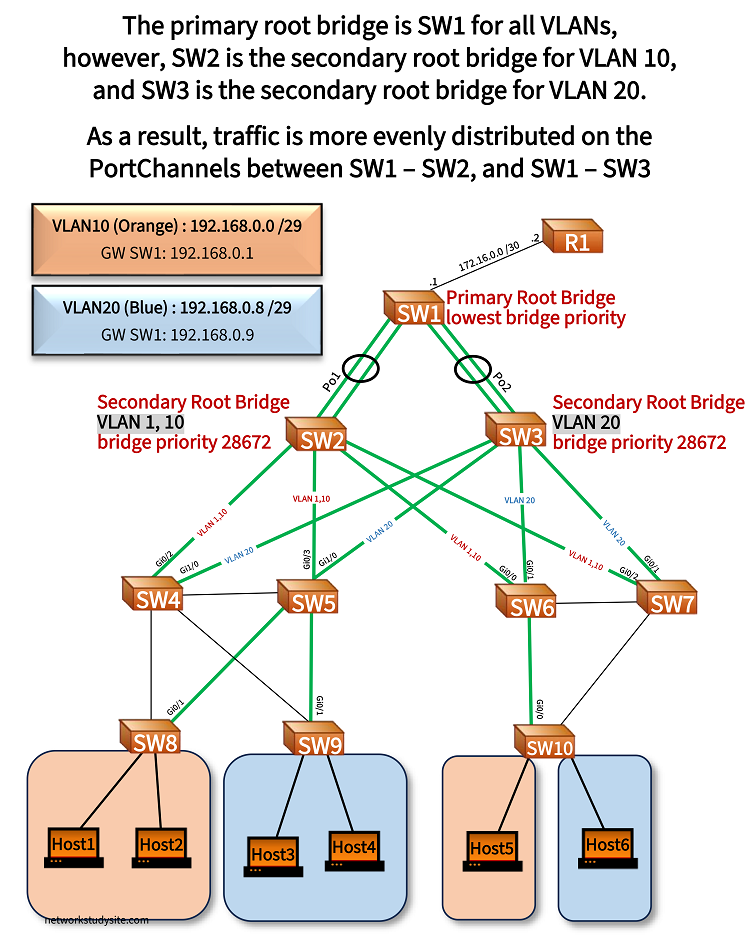
In this example, PVST's "per-VLAN" characteristic is leveraged, and a different secondary root bridge is configured for VLAN 10 and VLAN 20. Now traffic is distributed more evenly between the switches, and the number of unused (STP blocked) links are reduced.
- for VLAN 1 and 10, secondary root bridge is SW2
- for VLAN 20, secondary root bridge is SW3
Configuration:
SW1
SW1>
SW1>enable
SW1#configure terminal
Enter configuration commands, one per line.  End with CNTL/Z.
SW1(config)#
SW1(config)#spanning-tree vlan 1,10,20 root primary
SW1(config)#
SW1(config)#exit

SW1#show run | sec spanning-tree
spanning-tree mode rapid-pvst
spanning-tree extend system-id
spanning-tree vlan 1,10,20 priority 24576
SW2
SW2>
SW2>enable
SW2#configure terminal
Enter configuration commands, one per line.  End with CNTL/Z.
SW2(config)#
SW2(config)#spanning-tree vlan 1,10 root secondary
SW2(config)#
SW2(config)#exit

SW2#show run | sec spanning-tree
spanning-tree mode rapid-pvst
spanning-tree extend system-id
spanning-tree vlan 1,10 priority 28672
SW3
SW3>
SW3>enable
SW3#configure terminal
Enter configuration commands, one per line.  End with CNTL/Z.
SW3(config)#
SW3(config)#spanning-tree vlan 20 root secondary
SW3(config)#
SW3(config)#exit

SW3#show run | sec spanning-tree
spanning-tree mode rapid-pvst
spanning-tree extend system-id
spanning-tree vlan 20 priority 28672
SW2#show spanning-tree  bridge id
VLAN0001         7001.5254.0016.a282
VLAN0010         700A.5254.0016.a282
VLAN0020         8014.5254.0016.a282         « Less desirable bridge id for VLAN 20


SW3#show spanning-tree  bridge id
VLAN0001         8001.5254.0006.ee99
VLAN0010         800A.5254.0006.ee99
VLAN0020         7014.5254.0006.ee99         « More desirable bridge id for VLAN 20


SW4#show spanning-tree root port
VLAN0001         GigabitEthernet0/2
VLAN0010         GigabitEthernet0/2
VLAN0020         GigabitEthernet1/0          « Different egress interface for VLAN 20


SW5#show spanning-tree root port
VLAN0001         GigabitEthernet0/3
VLAN0010         GigabitEthernet0/3
VLAN0020         GigabitEthernet1/0