This Tutorial Helps You Understand EIGRP Summary Leak Map
Table of Contents
- What is an EIGRP summary leak-map? ‹
- How to configure an EIGRP summary leak-map? ‹
- Summary leak-map with EIGRP named mode configuration ‹
- Download section ‹
What is an EIGRP summary leak-map?
An EIGRP summary route can be advertised together with one or more of its specific component routes. To achieve this, a leak-map can be used. A leak-map identifies a set of prefixes that are advertised separately and in addition to their summary route. Thus, an EIGRP neighbor receives a summary route, and also one or more of its specific component routes.
How to configure an EIGRP summary leak-map?
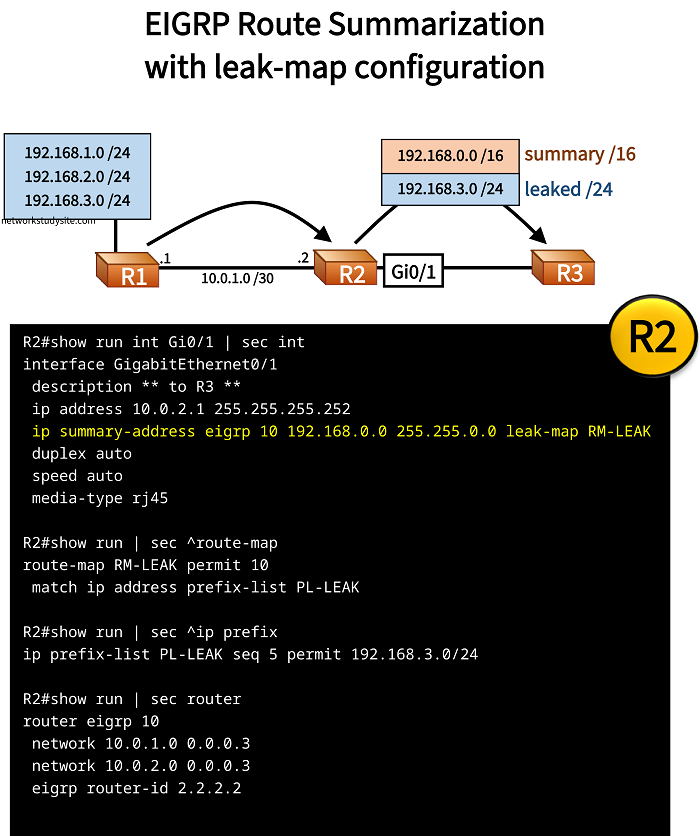
In the following example topology, EIGRP classic mode is configured with a summary leak-map. This means, that R2 summarizes three prefixes received from R1, and sends the summary prefix 192.168.0.0/16 to R3. However, R2 has a leak-map configured, and also sends the more specific prefix 192.168.3.0/24 to R3, in additin to the summary prefix.
This means, R3 receives the summary prefix 192.168.0.0/16, and also the component prefix 192.168.3.0/24 from R2. To achieve this outcome, a prefix-list is configured which specifies the route to be leaked. The prefix-list is added to route-map, and the route-map is applied to the EIGRP summary route configuration. The image below shows the configuration details.
Configuration:
R1
R1#show run int Gi0/0 | sec int
interface GigabitEthernet0/0
 description ** to R2 **
 ip address 10.0.1.1 255.255.255.252
 duplex auto
 speed auto
 media-type rj45

R1#show run int Lo10 | sec int
interface Loopback10
 ip address 192.168.1.1 255.255.255.0

R1#show run int Lo20 | sec int
interface Loopback20
 ip address 192.168.2.1 255.255.255.0

R1#show run int Lo30 | sec int
interface Loopback30
 ip address 192.168.3.1 255.255.255.0

R1#show run | sec router
router eigrp 10
 network 10.0.1.0 0.0.0.3
 network 192.168.1.0
 network 192.168.2.0
 network 192.168.3.0
 eigrp router-id 1.1.1.1
R2
R2#show run int Gi0/0 | sec int
interface GigabitEthernet0/0
 description ** to R1 **
 ip address 10.0.1.2 255.255.255.252
 duplex auto
 speed auto
 media-type rj45

R2#show run int Gi0/1 | sec int
interface GigabitEthernet0/1
 description ** to R3 **
 ip address 10.0.2.1 255.255.255.252
 ip summary-address eigrp 10 192.168.0.0 255.255.0.0 leak-map RM-LEAK
 duplex auto
 speed auto
 media-type rj45

R2#show run | sec ^route-map
route-map RM-LEAK permit 10
 match ip address prefix-list PL-LEAK

R2#show run | sec ^ip prefix
ip prefix-list PL-LEAK seq 5 permit 192.168.3.0/24

R2#show run | sec router
router eigrp 10
 network 10.0.1.0 0.0.0.3
 network 10.0.2.0 0.0.0.3
 eigrp router-id 2.2.2.2
R3
R3#show run int Gi0/0 | sec int
interface GigabitEthernet0/0
 description ** to R2 **
 ip address 10.0.2.2 255.255.255.252
 duplex auto
 speed auto
 media-type rj45

R3#show run | sec router
router eigrp 10
 network 10.0.2.0 0.0.0.3
 eigrp router-id 3.3.3.3
R3#show ip route eigrp | beg Ga
Gateway of last resort is not set

      10.0.0.0/8 is variably subnetted, 3 subnets, 2 masks
D        10.0.1.0/30 [90/3072] via 10.0.2.1, 00:25:09, GigabitEthernet0/0
D     192.168.0.0/16 [90/131072] via 10.0.2.1, 00:23:26, GigabitEthernet0/0       « R3 receives summary route
D     192.168.3.0/24 [90/131072] via 10.0.2.1, 00:24:32, GigabitEthernet0/0       « R3 receives leaked route


R3#show ip eigrp topology
EIGRP-IPv4 Topology Table for AS(10)/ID(3.3.3.3)
Codes: P - Passive, A - Active, U - Update, Q - Query, R - Reply,
       r - reply Status, s - sia Status

P 192.168.3.0/24, 1 successors, FD is 131072
        via 10.0.2.1 (131072/130816), GigabitEthernet0/0
P 10.0.1.0/30, 1 successors, FD is 3072
        via 10.0.2.1 (3072/2816), GigabitEthernet0/0
P 192.168.0.0/16, 1 successors, FD is 131072
        via 10.0.2.1 (131072/130816), GigabitEthernet0/0
P 10.0.2.0/30, 1 successors, FD is 2816
        via Connected, GigabitEthernet0/0


R2#show ip route eigrp | beg Ga
Gateway of last resort is not set

D     192.168.0.0/16 is a summary, 00:23:53, Null0            « R2 originates the summary route
D     192.168.1.0/24 [90/130816] via 10.0.1.1, 00:24:59, GigabitEthernet0/0
D     192.168.2.0/24 [90/130816] via 10.0.1.1, 00:24:59, GigabitEthernet0/0
D     192.168.3.0/24 [90/130816] via 10.0.1.1, 00:24:59, GigabitEthernet0/0
Summary leak-map with EIGRP named mode configuration
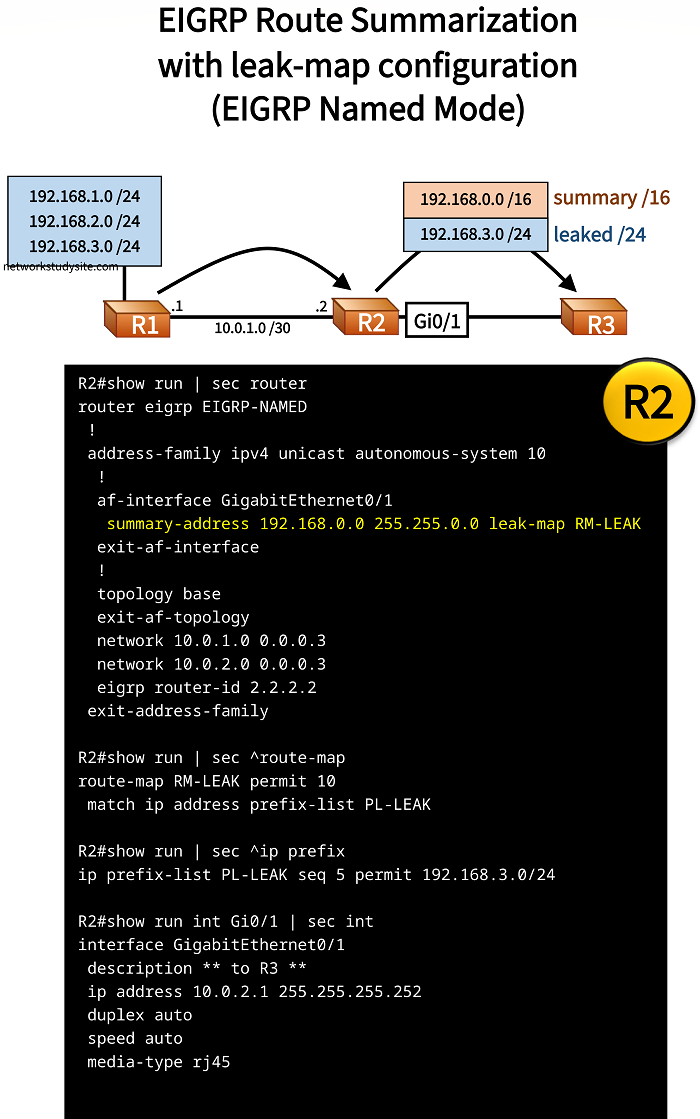
In the following example, a summary route with a leak-map is configured using EIGRP named mode. In EIGRP named mode the configuration is done under the routing process. This means, the summary address is configured under the address-family ipv4 process. This simplifies the configuration tasks, as the necessary EIGRP configuration is found in a single place.
Configuration:
R1
R1#show run int Gi0/0 | sec int
interface GigabitEthernet0/0
 description ** to R2 **
 ip address 10.0.1.1 255.255.255.252
 duplex auto
 speed auto
 media-type rj45

R1#show run int Lo10 | sec int
interface Loopback10
 ip address 192.168.1.1 255.255.255.0

R1#show run int Lo20 | sec int
interface Loopback20
 ip address 192.168.2.1 255.255.255.0

R1#show run int Lo30 | sec int
interface Loopback30
 ip address 192.168.3.1 255.255.255.0

R1#show run | sec router
router eigrp EIGRP-NAMED
 !
 address-family ipv4 unicast autonomous-system 10
  !
  topology base
  exit-af-topology
  network 10.0.1.0 0.0.0.3
  network 192.168.1.0
  network 192.168.2.0
  network 192.168.3.0
  eigrp router-id 1.1.1.1
 exit-address-family
R2
R2#show run int Gi0/1 | sec int
interface GigabitEthernet0/1
 description ** to R3 **
 ip address 10.0.2.1 255.255.255.252
 duplex auto
 speed auto
 media-type rj45

R2#show run int Gi0/0 | sec int
interface GigabitEthernet0/0
 description ** to R1 **
 ip address 10.0.1.2 255.255.255.252
 duplex auto
 speed auto
 media-type rj45

R2#show run | sec router
router eigrp EIGRP-NAMED
 !
 address-family ipv4 unicast autonomous-system 10
  !
  af-interface GigabitEthernet0/1
   summary-address 192.168.0.0 255.255.0.0 leak-map RM-LEAK
  exit-af-interface
  !
  topology base
  exit-af-topology
  network 10.0.1.0 0.0.0.3
  network 10.0.2.0 0.0.0.3
  eigrp router-id 2.2.2.2
 exit-address-family

R2#show run | sec ^route-map
route-map RM-LEAK permit 10
 match ip address prefix-list PL-LEAK

R2#show run | sec ^ip prefix
ip prefix-list PL-LEAK seq 5 permit 192.168.3.0/24
R3
R3#show run int Gi0/0 | sec int
interface GigabitEthernet0/0
 description ** to R2 **
 ip address 10.0.2.2 255.255.255.252
 duplex auto
 speed auto
 media-type rj45

R3#show run | sec router
router eigrp EIGRP-NAMED
 !
 address-family ipv4 unicast autonomous-system 10
  !
  topology base
  exit-af-topology
  network 10.0.2.0 0.0.0.3
  eigrp router-id 3.3.3.3
 exit-address-family
R3#show ip route eigrp | beg Ga
Gateway of last resort is not set

      10.0.0.0/8 is variably subnetted, 3 subnets, 2 masks
D        10.0.1.0/30 [90/15360] via 10.0.2.1, 00:14:03, GigabitEthernet0/0
D     192.168.0.0/16 [90/16000] via 10.0.2.1, 00:13:34, GigabitEthernet0/0
D     192.168.3.0/24 [90/16000] via 10.0.2.1, 00:14:03, GigabitEthernet0/0


R3#show ip eigrp topology
EIGRP-IPv4 VR(EIGRP-NAMED) Topology Table for AS(10)/ID(3.3.3.3)
Codes: P - Passive, A - Active, U - Update, Q - Query, R - Reply,
       r - reply Status, s - sia Status

P 192.168.3.0/24, 1 successors, FD is 2048000
        via 10.0.2.1 (2048000/1392640), GigabitEthernet0/0
P 10.0.1.0/30, 1 successors, FD is 1966080
        via 10.0.2.1 (1966080/1310720), GigabitEthernet0/0
P 192.168.0.0/16, 1 successors, FD is 2048000
        via 10.0.2.1 (2048000/1392640), GigabitEthernet0/0
P 10.0.2.0/30, 1 successors, FD is 1310720
        via Connected, GigabitEthernet0/0
As visible in the output above, the summary route 192.168.0.0/16 as well as the leaked prefix 192.168.3.0/24 are received on R3.