Understanding IGMP Multicast Query and Membership Report
Table of Contents
Jump to section:
- What is IGMP in multicast? ‹
- How to configure IGMP? ‹
- What is IGMP Querier? ‹
- What is IGMP Snooping? ‹
- Does IPv6 use IGMP? ‹
- Download section ‹
What is IGMP in multicast?
IGMP stands for Internet Group Management Protocol and it is used by hosts on a local area network segment to request a multicast stream from connected routers. Both hosts and routers send IGMP messages on a shared network segment. The IGMP message exchange ensures that if a host subscribes to a particular multicast group address, it can communicate this to the nearest multicast-enabled router. As a result, the router can take actions (for example send PIM Join or PIM Graft) to find and connect to the multicast source for the requested stream.
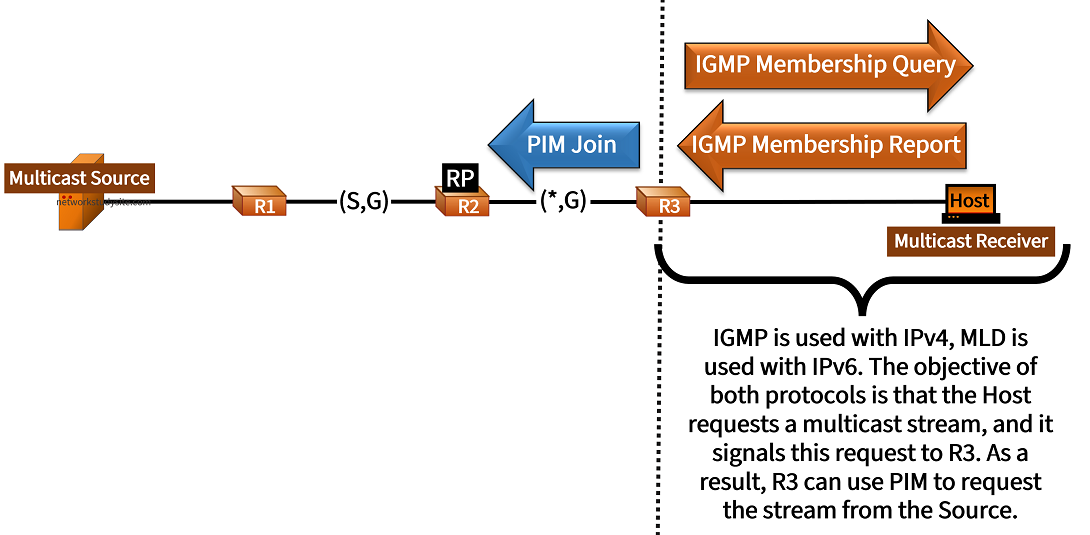
IGMP has three different versions. The following list highlights important aspects of each IGMP version, and the multicast signalling features that are enabled.
- IGMPv1 supports the Membership Query and Membership Report message types, however it does not support the IGMP Leave message. Thus, a host cannot signal to a router that it no longer requests a multicast stream. Instead, the router periodically sends a Membership Query to find out.
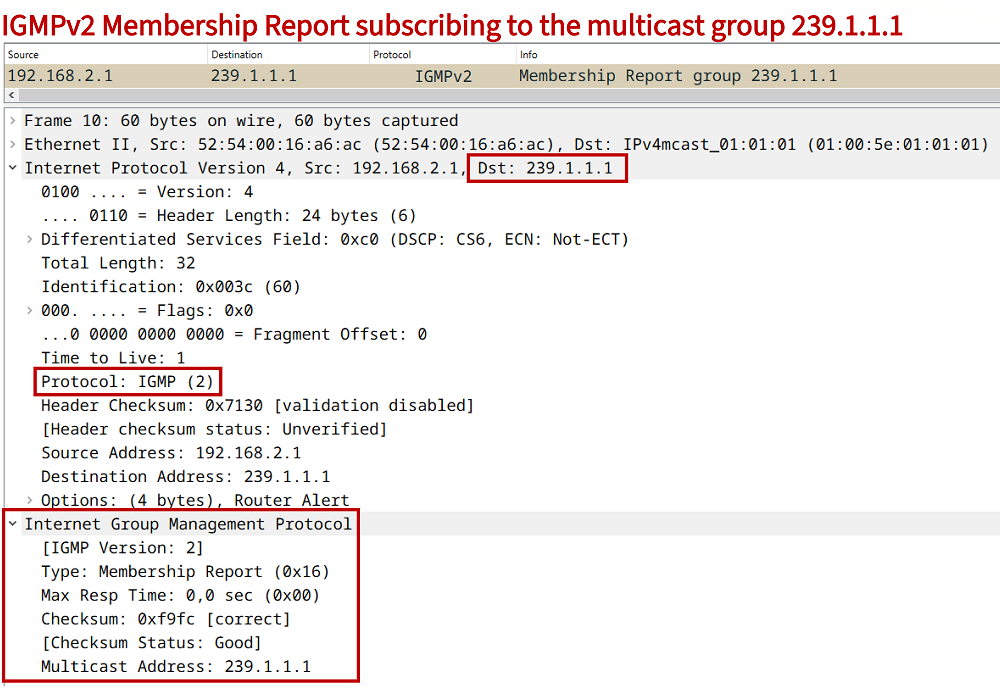
- IGMPv2 is the most commonly deployed version and supports the Leave message type. Also, while IGMPv1-enabled routers only support the General Membership Query, IGMPv2 adds support for Group-Specific Query messages. This way an IGMPv2-enabled router can avoid querying every single node in the local subnet. Meanwhile, the Membership Report mechanism is identical in IGMPv1 and v2.
- IGMPv3 adds support for Source-Specific Membership Reports which enable PIM Source-Specific Multicast. Note that IGMPv3 is backwards compatible, and also supports sending Group-Specific Membership Reports. Further, IGMPv3 no longer uses the Leave message, but instead sends a Membership Report with the Record Type "Block Old Sources".
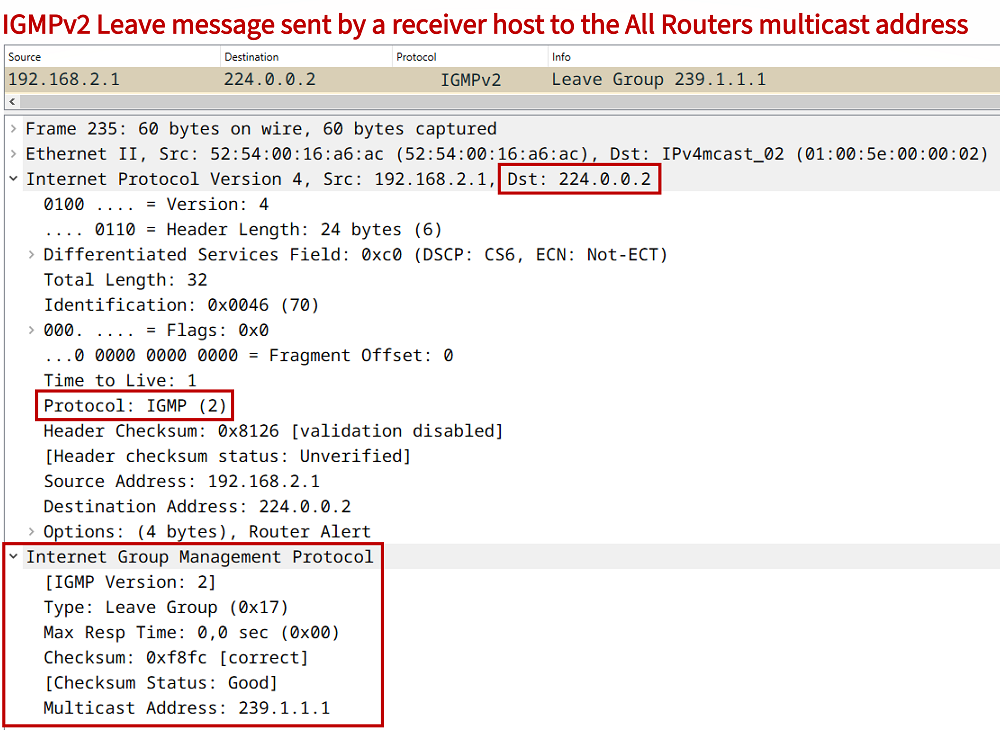
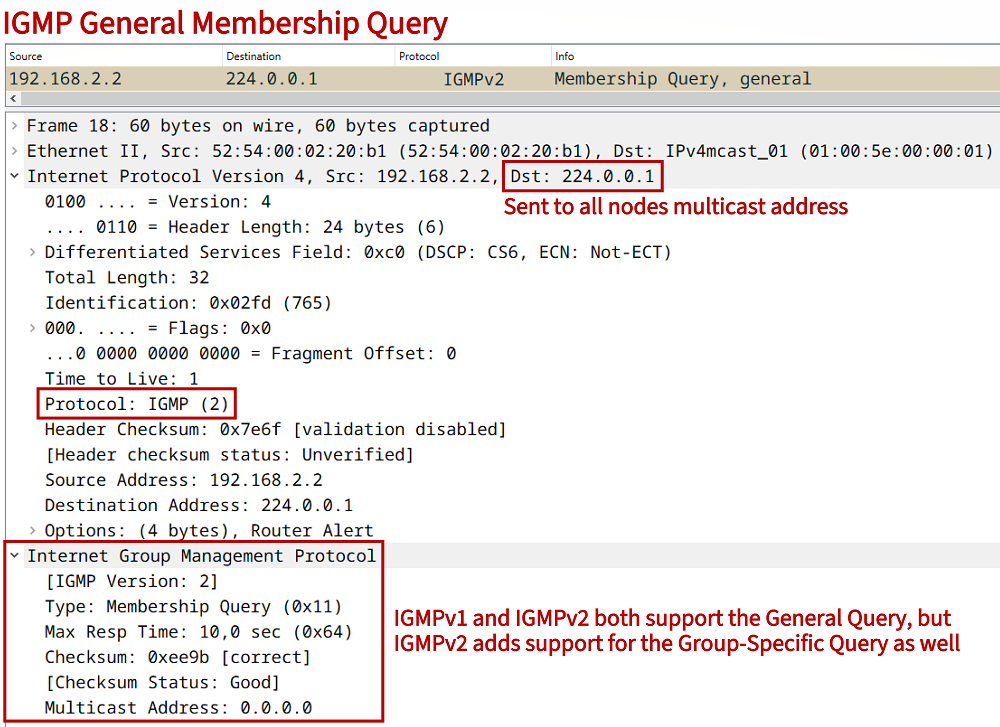
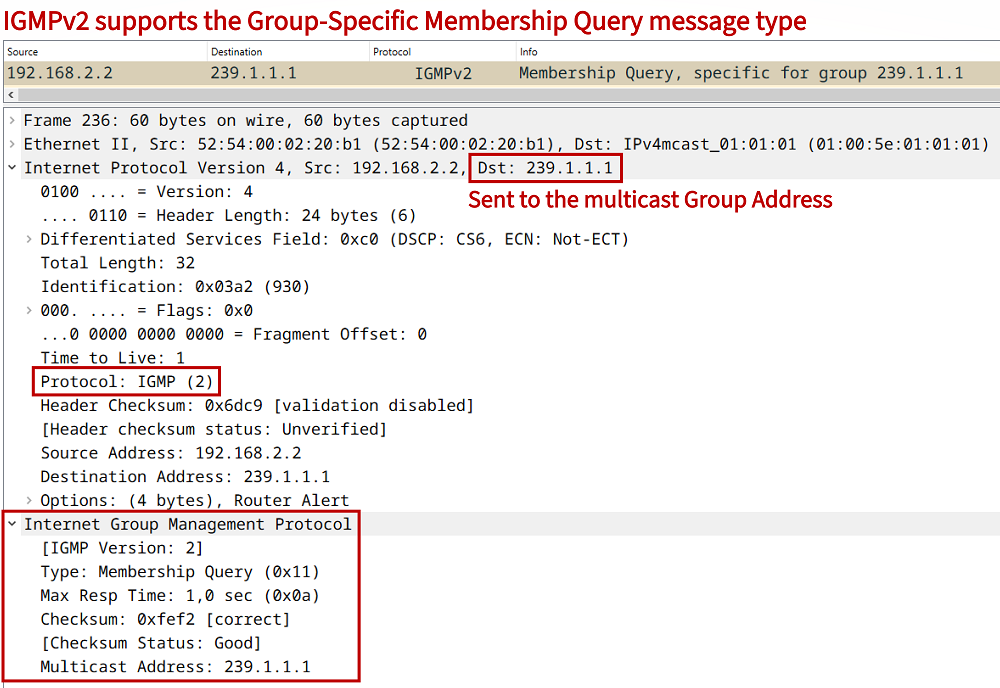
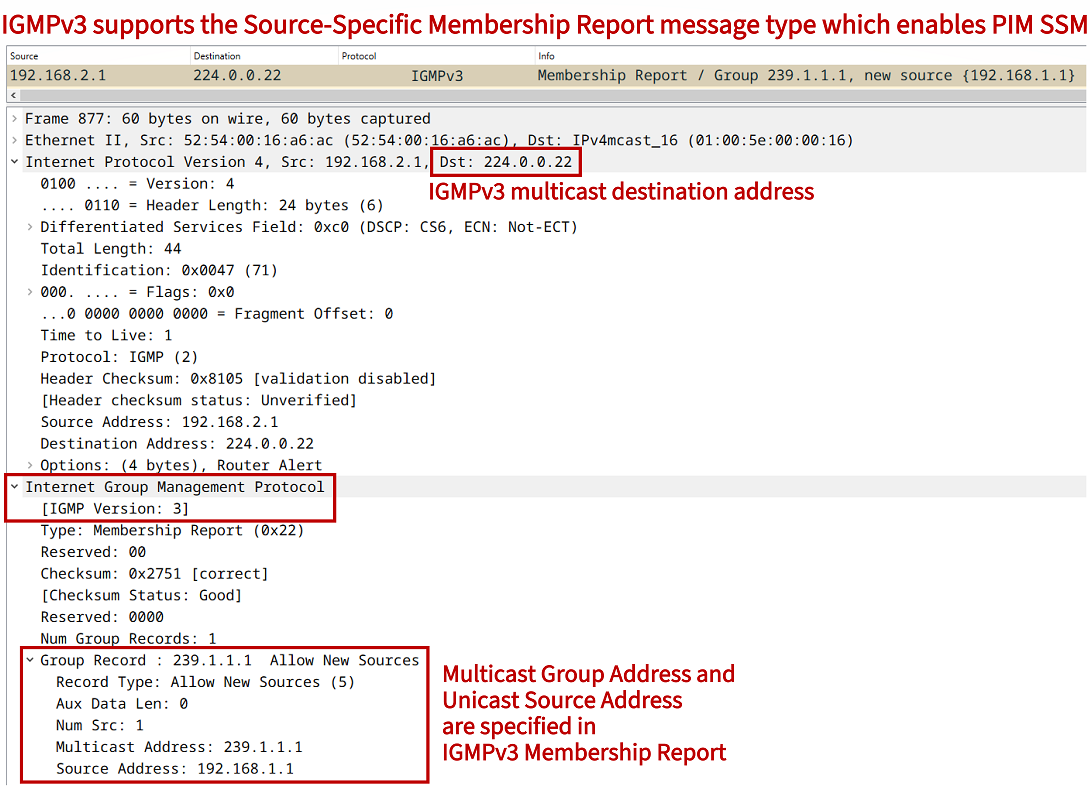
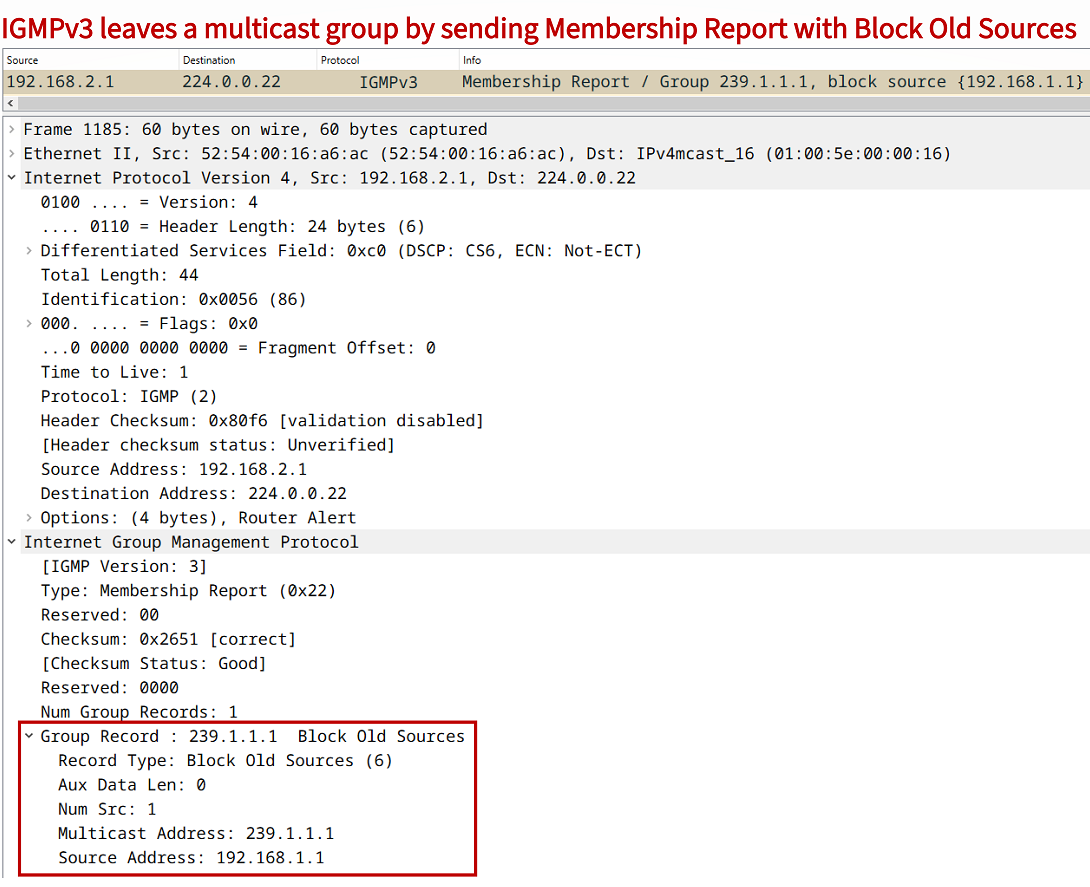
A main purpose of IGMP is to request a particular multicast stream. With some variation (depending on the IGMP version), this is achieved by sending a Membership Report message shown in the following packet capture.
How to configure IGMP?
On a Cisco router, in order to join a multicast group address with IGMPv2 the following interface-level command needs to be issued. After entering this command, an IGMP Membership Report will be sent.
Receiver>
Receiver>enable
Receiver#configure terminal
Enter configuration commands, one per line.  End with CNTL/Z.
Receiver(config)#
Receiver(config)#interface GigabitEthernet0/0
Receiver(config-if)#ip igmp join-group 239.1.1.1
Receiver(config-if)#
Receiver(config-if)#exit
Receiver(config)#exit
Receiver#
An IGMPv2 Membership Report is also sent if an NTP multicast mode client is configured. Network Time Protocol (NTP) packets can use a multicast destination address to deliver time information to multiple clients simultaneously, and in different subnets (through multicast routing). With multicast mode, NTP clients need to join the NTP multicast group address. This is shown in the following example configuration.
NTP-Client>
NTP-Client>enable
NTP-Client#configure terminal
Enter configuration commands, one per line.  End with CNTL/Z.
NTP-Client(config)#
NTP-Client(config)#interface GigabitEthernet0/0
NTP-Client(config-if)#ntp multicast client 239.1.1.1
NTP-Client(config-if)#
NTP-Client(config-if)#exit
NTP-Client(config)#exit
NTP-Client#
In order to use IGMPv3 and join a source-specific multicast group address the following commands need to be issued on the host (receiver). Additionally, the connected router interface also needs to be enabled with the ip igmp version 3 interface-level command.
Receiver>
Receiver>enable
Receiver#configure terminal
Enter configuration commands, one per line.  End with CNTL/Z.
Receiver(config)#
Receiver(config)#interface GigabitEthernet0/0
Receiver(config-if)#ip igmp version 3
Receiver(config-if)#ip igmp join-group 239.1.1.1 source 192.168.1.1
Receiver(config-if)#
Receiver(config-if)#exit
Receiver(config)#exit
Receiver#
What is IGMP Querier?
An IGMP Querier is a role assigned to a multicast router that sends IGMP General Query messages on a local subnetwork to find attached hosts that request a multicast stream. In other words, the Querier proactively asks end devices (hosts) whether they are subscribed to a multicast group address. In turn, a host can signal its readiness to receive a multicast stream by sending an IGMP Membership Report in response to a Query message.
Depending on the IGMP version used the process may be different. For example, if there are two or more multicast routers joined to a shared LAN segment, IGMPv2 will elect a single Querier based on the lowest source IP address of the IGMP Query message.
What is IGMP Snooping?
IGMP Snooping is a network resource optimization feature available on switches in order to handle multicast transmissions. With IGMP Snooping a switch reads the content of IGMP messages that are exchanged between multicast receivers (hosts) and a multicast router. These captured messages provide information such as the incoming interface, the group address and the VLAN.
Now, a switch can build a table to only forward multicast traffic on ports that have interested receivers. Without IGMP Snooping when a switch receives a frame with a multicast MAC address in the destination field, the switch floods the frame on the LAN segment to all hosts. On many switches IGMP Snooping is enabled by default, so no extra configuration commands need to be added.
SW1#show ip igmp snooping groups
Vlan      Group                    Version     Port List
---------------------------------------------------------
1         224.0.1.40               v2          Gi0/1
1         239.1.1.1                v2          Gi0/0
1         239.2.2.2                v2          Gi0/0
1         239.3.3.3                v2          Gi0/0


SW1#show ip igmp snooping mrouter
Vlan    ports
----    -----
   1    Gi0/1(dynamic)


SW1#show ip igmp snooping querier
Vlan      IP Address               IGMP Version   Port
-------------------------------------------------------------
1         192.168.2.2              v2            Gi0/1
In the above three outputs from SW1 the IGMP Snooping database is visible. Notably, on Gi0/1 there is a device listening to 224.0.1.40 (Auto-RP multicast address), which is probably a router. This is confirmed in the next output using the command show ip igmp snooping mrouter. The third output shows the IGMP Querier for the LAN segment, and its IP address. Meanwhile, a single multicast receiver is located on interface Gi0/0 and listening on three multicast group addresses.
Does IPv6 use IGMP?
IPv6 does not use IGMP, but instead the Multicast Listener Discovery (MLD) feature is implemented which uses the ICMPv6 protocol. MLD uses Query and Report messages so that hosts can request an IPV6 multicast stream.