OSPF Route Filtering - Configuration Example
Table of Contents
Jump to section:
- • What is route filtering in OSPF?
- • What is the difference between filter-list and distribute-list in OSPF?
- • How to configure OSPF route filtering?
- • Configure filter list - inbound
- • Configure filter list - outbound
- • Configure distribute list - inbound
- • Configure distribute list - outbound
- • Configure filtering with "area range" command
- • Bonus topic P2P network type
- • Download section
- What is route filtering in OSPF? ‹
- What is the difference between filter-list and distribute-list in OSPF? ‹
- How to configure OSPF route filtering? ‹
- Configure filter list - inbound ‹
- Configure filter list - outbound ‹
- Configure distribute list - inbound ‹
- Configure distribute list - outbound ‹
- Configure filtering with "area range" command ‹
- Bonus topic P2P network type ‹
- Download section ‹
What is route filtering in OSPF?
Route filtering in OSPF is configured on an Area Border Router (ABR) or an Autonomous System Boundary Router (ASBR). Routes can be filtered between areas, or at the point they enter the OSPF domain through redistribution. Once a route is permitted to enter a particular OSPF area, it is not possible to filter it with OSPF within that area.
OSPF can also be instructed to filter a route from the routing table (RIB) of a local router, but without actually removing the route from the OSPF Link State Database (LSDB). This is accomplished with an inbound distribute-list, demonstrated later in this blog post.
What is the difference between filter-list and distribute-list in OSPF?
An OSPF filter-list is used to permit or deny the advertisement of Type-3 summary LSAs between areas. On the other hand, an outbound distribute-list is used to permit or deny OSPF Type-5 external LSAs from entering the OSPF domain through redistribution.
For example, the following configuration permits only the prefix 172.16.10.0/29 to be redistributed from BGP into OSPF area 0.
Router#show run | sec router
router ospf 10
 router-id 1.1.1.1
 redistribute bgp 65001 subnets
 network 10.0.0.0 0.0.0.3 area 0
 distribute-list prefix PL-OSPF-DISTRIB out bgp 65001
router bgp 65001
 bgp router-id 1.1.1.1
 bgp log-neighbor-changes
 neighbor 172.16.0.1 remote-as 65002

Router#show run | sec ip prefix
ip prefix-list PL-OSPF-DISTRIB seq 5 permit 172.16.10.0/29
ip prefix-list PL-OSPF-DISTRIB seq 10 deny 0.0.0.0/0 le 32
How to configure OSPF route filtering?
OSPF route filtering commonly uses a prefix-list to specify particular routes. This prefix-list is then applied to either a filter-list or a distribute-list. OSPF route filtering can also use a route-map to match a variety of attributes, such as a route tag, in order to filter prefixes. The following sections provide details and configuration examples for five ways to configure route filtering with OSPF.
Configure filter list - inbound
In this example, an inbound filter-list is configured on the Area Border Router (ABR) R2. The filter-list on R2 uses the prefix-list PL-OSPF-FILTER which contains a single permit statement. As a result, the single OSPF prefix 10.0.0.8/29 is advertised into area 1 from area 0. This is possible due to the implicit deny statement at the end of a prefix-list.
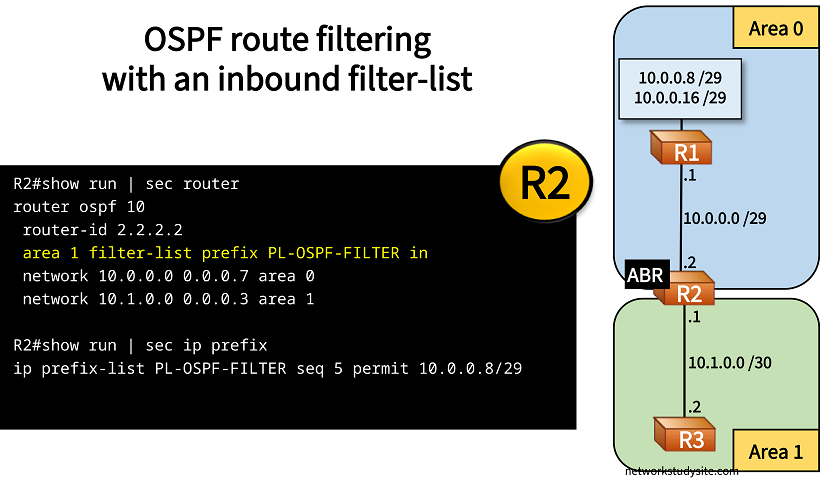
Configuration:
R1
R1#show run int Lo10 | sec int
interface Loopback10
 ip address 10.0.0.9 255.255.255.248
 ip ospf network point-to-point

R1#show run int Lo20 | sec int
interface Loopback20
 ip address 10.0.0.17 255.255.255.248
 ip ospf network point-to-point

R1#show run int Gi0/0 | sec int
interface GigabitEthernet0/0
 description ** to R2 **
 ip address 10.0.0.1 255.255.255.248
 ip ospf network point-to-point
 duplex auto
 speed auto
 media-type rj45

R1#show run | sec router
router ospf 10
 router-id 1.1.1.1
 network 10.0.0.0 0.0.0.31 area 0
R2
R2#show run int Gi0/0 | sec int
interface GigabitEthernet0/0
 description ** to R1 **
 ip address 10.0.0.2 255.255.255.248
 ip ospf network point-to-point
 duplex auto
 speed auto
 media-type rj45

R2#show run int Gi0/1 | sec int
interface GigabitEthernet0/1
 description ** to R3 **
 ip address 10.1.0.1 255.255.255.252
 ip ospf network point-to-point
 duplex auto
 speed auto
 media-type rj45

R2#show run | sec router
router ospf 10
 router-id 2.2.2.2
 area 1 filter-list prefix PL-OSPF-FILTER in
 network 10.0.0.0 0.0.0.7 area 0
 network 10.1.0.0 0.0.0.3 area 1

R2#show run | sec ip prefix
ip prefix-list PL-OSPF-FILTER seq 5 permit 10.0.0.8/29
R3
R3#show run int Gi0/0 | sec int
interface GigabitEthernet0/0
 description ** to R2 **
 ip address 10.1.0.2 255.255.255.252
 ip ospf network point-to-point
 duplex auto
 speed auto
 media-type rj45

R3#show run | sec router
router ospf 10
 router-id 3.3.3.3
 network 10.1.0.0 0.0.0.3 area 1
R3#show ip route ospf | beg Ga
Gateway of last resort is not set

      10.0.0.0/8 is variably subnetted, 4 subnets, 3 masks
O IA     10.0.0.8/29 [110/3] via 10.1.0.1, 00:22:19, GigabitEthernet0/0


R3#show ip ospf nei

Neighbor ID     Pri   State           Dead Time   Address         Interface
2.2.2.2           0   FULL/  -        00:00:39    10.1.0.1        GigabitEthernet0/0
The above example can also be configured in another way, while still using an inbound filter-list. As shown below, now the prefix-list uses both permit and deny statements to only allow prefix 10.0.0.8/29 into OSPF area 1.
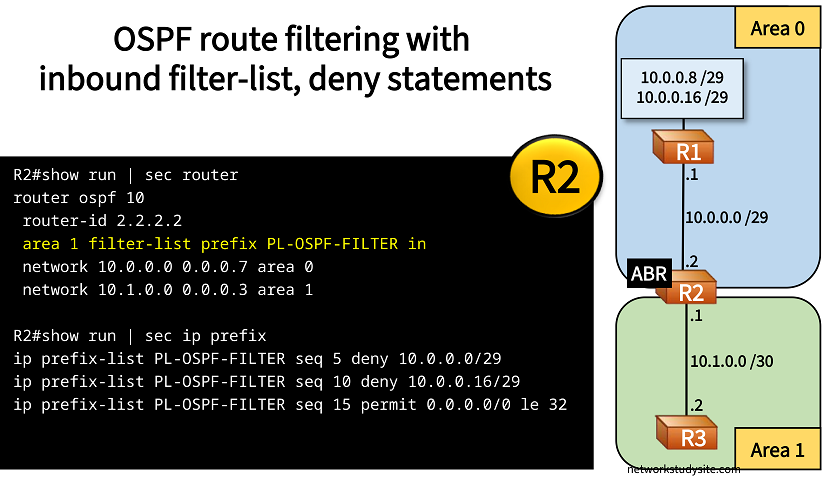
Configuration:
R2
R2#show run int Gi0/0 | sec int
interface GigabitEthernet0/0
 description ** to R1 **
 ip address 10.0.0.2 255.255.255.248
 ip ospf network point-to-point
 duplex auto
 speed auto
 media-type rj45

R2#show run int Gi0/1 | sec int
interface GigabitEthernet0/1
 description ** to R3 **
 ip address 10.1.0.1 255.255.255.252
 ip ospf network point-to-point
 duplex auto
 speed auto
 media-type rj45

R2#show run | sec router
router ospf 10
 router-id 2.2.2.2
 area 1 filter-list prefix PL-OSPF-FILTER in
 network 10.0.0.0 0.0.0.7 area 0
 network 10.1.0.0 0.0.0.3 area 1

R2#show run | sec ip prefix
ip prefix-list PL-OSPF-FILTER seq 5 deny 10.0.0.0/29
ip prefix-list PL-OSPF-FILTER seq 10 deny 10.0.0.16/29
ip prefix-list PL-OSPF-FILTER seq 15 permit 0.0.0.0/0 le 32
R3#show ip route ospf | beg Ga
Gateway of last resort is not set

      10.0.0.0/8 is variably subnetted, 4 subnets, 3 masks
O IA     10.0.0.8/29 [110/3] via 10.1.0.1, 00:05:12, GigabitEthernet0/0
The inbound filter-list in both of the examples shown above affects how OSPF Type-3 summary LSAs are advertised between two areas.
Configure filter list - outbound
In the following example, an outbound filter-list is configured on the ABR R2. The filter-list on R2 uses the prefix-list PL-OSPF-FILTER. As a result, the single OSPF prefix 10.0.0.8/29 is advertised into area 1 from area 0.
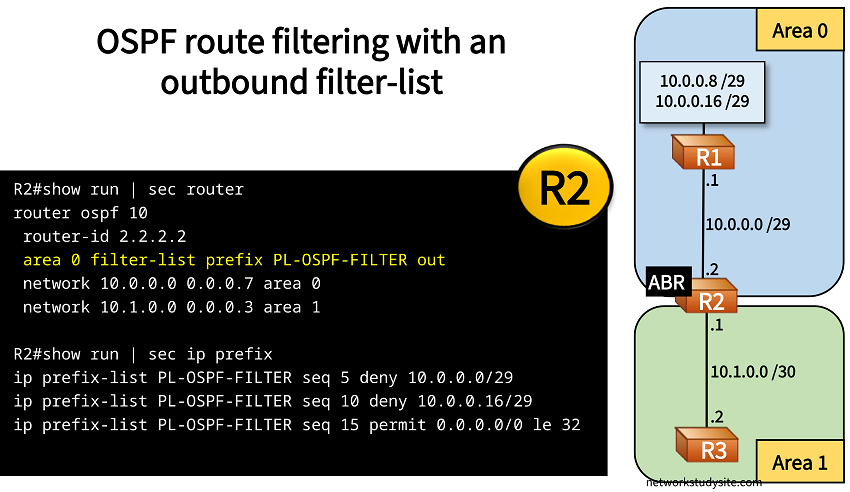
Configuration:
R1
R1#show run int Lo10 | sec int
interface Loopback10
 ip address 10.0.0.9 255.255.255.248
 ip ospf network point-to-point

R1#show run int Lo20 | sec int
interface Loopback20
 ip address 10.0.0.17 255.255.255.248
 ip ospf network point-to-point

R1#show run int Gi0/0 | sec int
interface GigabitEthernet0/0
 description ** to R2 **
 ip address 10.0.0.1 255.255.255.248
 ip ospf network point-to-point
 duplex auto
 speed auto
 media-type rj45

R1#show run | sec router
router ospf 10
 router-id 1.1.1.1
 network 10.0.0.0 0.0.0.31 area 0
R2
R2#show run int Gi0/0 | sec int
interface GigabitEthernet0/0
 description ** to R1 **
 ip address 10.0.0.2 255.255.255.248
 ip ospf network point-to-point
 duplex auto
 speed auto
 media-type rj45

R2#show run int Gi0/1 | sec int
interface GigabitEthernet0/1
 description ** to R3 **
 ip address 10.1.0.1 255.255.255.252
 ip ospf network point-to-point
 duplex auto
 speed auto
 media-type rj45

R2#show run | sec router
router ospf 10
 router-id 2.2.2.2
 area 0 filter-list prefix PL-OSPF-FILTER out
 network 10.0.0.0 0.0.0.7 area 0
 network 10.1.0.0 0.0.0.3 area 1

R2#show run | sec ip prefix
ip prefix-list PL-OSPF-FILTER seq 5 deny 10.0.0.0/29
ip prefix-list PL-OSPF-FILTER seq 10 deny 10.0.0.16/29
ip prefix-list PL-OSPF-FILTER seq 15 permit 0.0.0.0/0 le 32
R3
R3#show run int Gi0/0 | sec int
interface GigabitEthernet0/0
 description ** to R2 **
 ip address 10.1.0.2 255.255.255.252
 ip ospf network point-to-point
 duplex auto
 speed auto
 media-type rj45

R3#show run | sec router
router ospf 10
 router-id 3.3.3.3
 network 10.1.0.0 0.0.0.3 area 1
R3#show ip route ospf | beg Ga
Gateway of last resort is not set

      10.0.0.0/8 is variably subnetted, 3 subnets, 3 masks
O IA     10.0.0.8/29 [110/3] via 10.1.0.1, 00:01:13, GigabitEthernet0/0
Configure distribute list - inbound
In the following example an inbound distribute-list is configured on R2. The distribute-list references the prefix-list PL-OSPF-DISTRIB. As a result, the prefix 10.1.0.16/29 is not installed in the routing table (RIB) of R2. However, it is still installed in the OSPF Link State Database (LSDB) on R2, and also advertised to R1.
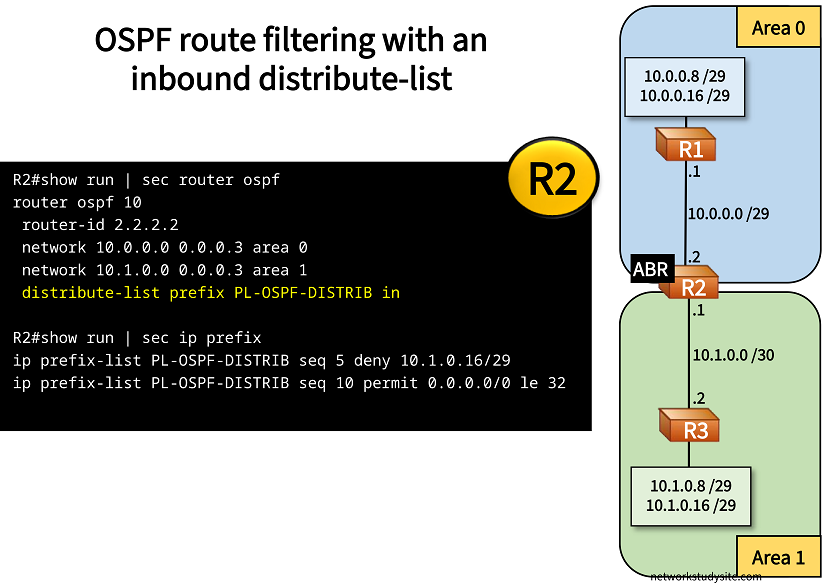
Configuration:
R1
R1#show run int Lo10 | sec int
interface Loopback10
 ip address 10.0.0.9 255.255.255.248
 ip ospf network point-to-point

R1#show run int Lo20 | sec int
interface Loopback20
 ip address 10.0.0.17 255.255.255.248
 ip ospf network point-to-point

R1#show run int Gi0/0 | sec int
interface GigabitEthernet0/0
 description ** to R2 **
 ip address 10.0.0.1 255.255.255.252
 ip ospf network point-to-point
 duplex auto
 speed auto
 media-type rj45

R1#show run | sec router
router ospf 10
 router-id 1.1.1.1
 network 10.0.0.0 0.0.0.3 area 0
 network 10.0.0.8 0.0.0.7 area 0
 network 10.0.0.16 0.0.0.7 area 0
R2
R2#show run int Gi0/0 | sec int
interface GigabitEthernet0/0
 description ** to R1 **
 ip address 10.0.0.2 255.255.255.252
 ip ospf network point-to-point
 duplex auto
 speed auto
 media-type rj45

R2#show run int Gi0/1 | sec int
interface GigabitEthernet0/1
 description ** to R3 **
 ip address 10.1.0.1 255.255.255.252
 ip ospf network point-to-point
 duplex auto
 speed auto
 media-type rj45

R2#show run | sec router
router ospf 10
 router-id 2.2.2.2
 network 10.0.0.0 0.0.0.3 area 0
 network 10.1.0.0 0.0.0.3 area 1
 distribute-list prefix PL-OSPF-DISTRIB in

R2#show run | sec ip prefix
ip prefix-list PL-OSPF-DISTRIB seq 5 deny 10.1.0.16/29
ip prefix-list PL-OSPF-DISTRIB seq 10 permit 0.0.0.0/0 le 32
R3
R3#show run int Lo10 | sec int
interface Loopback10
 ip address 10.1.0.9 255.255.255.248
 ip ospf network point-to-point

R3#show run int Lo20 | sec int
interface Loopback20
 ip address 10.1.0.17 255.255.255.248
 ip ospf network point-to-point

R3#show run int Gi0/0 | sec int
interface GigabitEthernet0/0
 description ** to R2 **
 ip address 10.1.0.2 255.255.255.252
 ip ospf network point-to-point
 duplex auto
 speed auto
 media-type rj45

R3#show run | sec router
router ospf 10
 router-id 3.3.3.3
 network 10.1.0.0 0.0.0.3 area 1
 network 10.1.0.8 0.0.0.7 area 1
 network 10.1.0.16 0.0.0.7 area 1
R2#show ip route ospf | beg Ga
Gateway of last resort is not set

      10.0.0.0/8 is variably subnetted, 7 subnets, 3 masks
O        10.0.0.8/29 [110/2] via 10.0.0.1, 00:00:03, GigabitEthernet0/0
O        10.0.0.16/29 [110/2] via 10.0.0.1, 00:00:03, GigabitEthernet0/0
O        10.1.0.8/29 [110/2] via 10.1.0.2, 00:00:03, GigabitEthernet0/1


R2#show ip ospf database

            OSPF Router with ID (2.2.2.2) (Process ID 10)

                Router Link States (Area 0)

Link ID         ADV Router      Age         Seq#       Checksum Link count
1.1.1.1         1.1.1.1         623         0x80000004 0x00D4E8 4
2.2.2.2         2.2.2.2         617         0x80000002 0x00EF0A 2

                Summary Net Link States (Area 0)

Link ID         ADV Router      Age         Seq#       Checksum
10.1.0.3        2.2.2.2         622         0x80000001 0x009890
10.1.0.8        2.2.2.2         305         0x80000001 0x0058CE
10.1.0.16       2.2.2.2         305         0x80000001 0x000817                       « Prefix is installed in LSDB

                Router Link States (Area 1)

Link ID         ADV Router      Age         Seq#       Checksum Link count
2.2.2.2         2.2.2.2         314         0x8000000F 0x002CB7 2
3.3.3.3         3.3.3.3         315         0x8000000E 0x00BAE3 4

                Summary Net Link States (Area 1)

Link ID         ADV Router      Age         Seq#       Checksum
10.0.0.0        2.2.2.2         622         0x80000001 0x00C26A
10.0.0.8        2.2.2.2         617         0x80000001 0x0064C3
10.0.0.16       2.2.2.2         617         0x80000001 0x00140C


R1#show ip route ospf | beg Ga
Gateway of last resort is not set

      10.0.0.0/8 is variably subnetted, 9 subnets, 3 masks
O IA     10.1.0.0/30 [110/2] via 10.0.0.2, 00:11:32, GigabitEthernet0/0
O IA     10.1.0.8/29 [110/3] via 10.0.0.2, 00:06:29, GigabitEthernet0/0
O IA     10.1.0.16/29 [110/3] via 10.0.0.2, 00:06:29, GigabitEthernet0/0              « Prefix received on R1
Configure distribute list - outbound
In this example, an outbound distribute-list is configured on the Autonomous System Boundary Router (ASBR) R2. R2 is configured with BGP AS 65002, and R1 with BGP AS 65001. R2 receives eBGP routes from R1 and redistributes these routes into OSPF area 1.
The outbound distribute-list references prefix-list PL-OSPF-DISTRIB and filters routes before they are redistributed into OSPF. As a result, only the prefix 10.0.0.8/29 is redistributed into OSPF area 1.
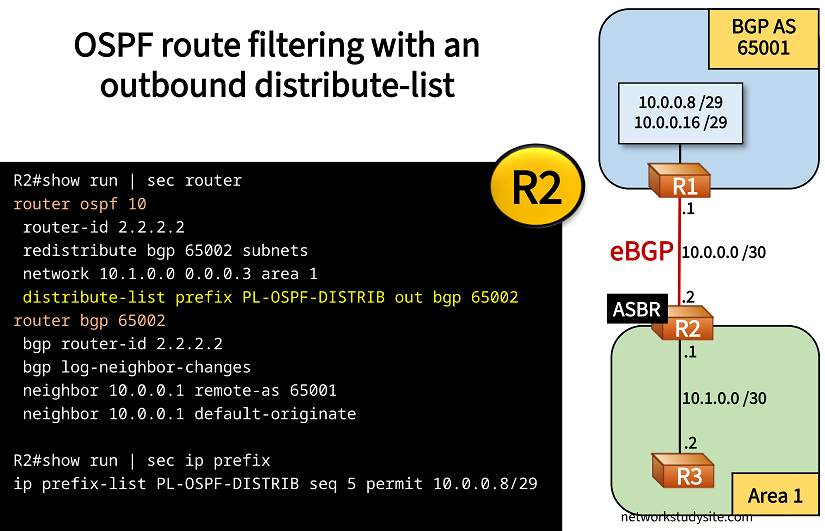
Configuration:
R1
R1#show run int Lo10 | sec int
interface Loopback10
 ip address 10.0.0.9 255.255.255.248

R1#show run int Lo20 | sec int
interface Loopback20
 ip address 10.0.0.17 255.255.255.248

R1#show run int Gi0/0 | sec int
interface GigabitEthernet0/0
 description ** to R2 **
 ip address 10.0.0.1 255.255.255.252
 duplex auto
 speed auto
 media-type rj45

R1#show run | sec router
router bgp 65001
 bgp router-id 1.1.1.1
 bgp log-neighbor-changes
 network 10.0.0.8 mask 255.255.255.248
 network 10.0.0.16 mask 255.255.255.248
 neighbor 10.0.0.2 remote-as 65002
R2
R2#show run int Gi0/0 | sec int
interface GigabitEthernet0/0
 description ** to R1 **
 ip address 10.0.0.2 255.255.255.252
 duplex auto
 speed auto
 media-type rj45

R2#show run int Gi0/1 | sec int
interface GigabitEthernet0/1
 description ** to R3 **
 ip address 10.1.0.1 255.255.255.252
 ip ospf network point-to-point
 duplex auto
 speed auto
 media-type rj45

R2#show run | sec router
router ospf 10
 router-id 2.2.2.2
 redistribute bgp 65002 subnets
 network 10.1.0.0 0.0.0.3 area 1
 distribute-list prefix PL-OSPF-DISTRIB out bgp 65002
router bgp 65002
 bgp router-id 2.2.2.2
 bgp log-neighbor-changes
 neighbor 10.0.0.1 remote-as 65001
 neighbor 10.0.0.1 default-originate

R2#show run | sec ip prefix
ip prefix-list PL-OSPF-DISTRIB seq 5 permit 10.0.0.8/29
R3
R3#show run int Gi0/0 | sec int
interface GigabitEthernet0/0
 description ** to R2 **
 ip address 10.1.0.2 255.255.255.252
 ip ospf network point-to-point
 duplex auto
 speed auto
 media-type rj45

R3#show run | sec router
router ospf 10
 router-id 3.3.3.3
 network 10.1.0.0 0.0.0.3 area 1
R3#show ip route ospf | beg Ga
Gateway of last resort is not set

      10.0.0.0/8 is variably subnetted, 3 subnets, 3 masks
O E2     10.0.0.8/29 [110/1] via 10.1.0.1, 00:00:30, GigabitEthernet0/0      « OSPF external route received from ASBR R2


R2#show ip route | beg Ga
Gateway of last resort is not set

      10.0.0.0/8 is variably subnetted, 7 subnets, 3 masks
C        10.0.0.0/30 is directly connected, GigabitEthernet0/0
L        10.0.0.2/32 is directly connected, GigabitEthernet0/0
B        10.0.0.8/29 [20/0] via 10.0.0.1, 00:20:59
B        10.0.0.16/29 [20/0] via 10.0.0.1, 00:20:59
C        10.1.0.0/30 is directly connected, GigabitEthernet0/1
L        10.1.0.1/32 is directly connected, GigabitEthernet0/1
Configure filtering with "area range" command
In this example, the command area 0 range 10.0.0.0 255.255.255.252 not-advertise is issued on R2. This has the effect that the prefix 10.0.0.0/30 is not advertised into OSPF area 1.
The OSPF area range command can be used for route summarization, however it is also useful for route filtering.
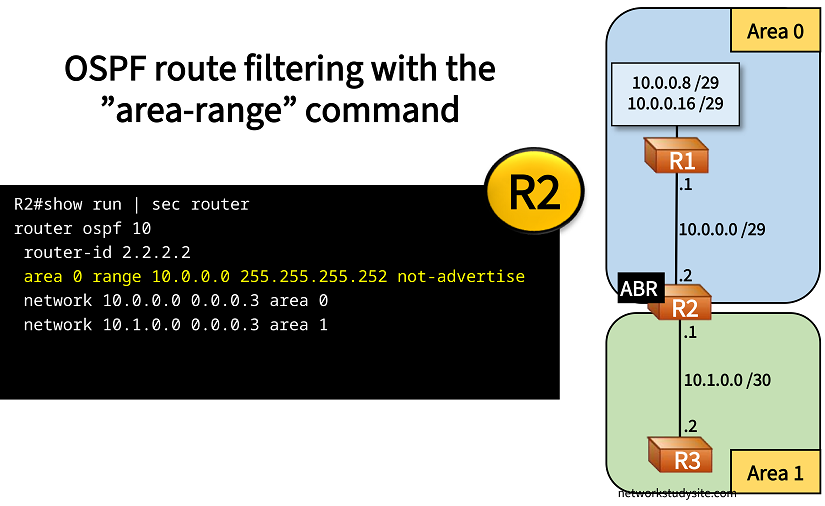
Configuration:
R1
R1#show run int Lo10 | sec int
interface Loopback10
 ip address 10.0.0.9 255.255.255.248
 ip ospf network point-to-point

R1#show run int Lo20 | sec int
interface Loopback20
 ip address 10.0.0.17 255.255.255.248
 ip ospf network point-to-point

R1#show run int Gi0/0 | sec int
interface GigabitEthernet0/0
 description ** to R2 **
 ip address 10.0.0.1 255.255.255.252
 ip ospf network point-to-point
 duplex auto
 speed auto
 media-type rj45

R1#show run | sec router
router ospf 10
 router-id 1.1.1.1
 network 10.0.0.0 0.0.0.3 area 0
 network 10.0.0.8 0.0.0.7 area 0
 network 10.0.0.16 0.0.0.7 area 0
R2
R2#show run int Gi0/0 | sec int
interface GigabitEthernet0/0
 description ** to R1 **
 ip address 10.0.0.2 255.255.255.252
 ip ospf network point-to-point
 duplex auto
 speed auto
 media-type rj45

R2#show run int Gi0/1 | sec int
interface GigabitEthernet0/1
 description ** to R3 **
 ip address 10.1.0.1 255.255.255.252
 ip ospf network point-to-point
 duplex auto
 speed auto
 media-type rj45

R2#show run | sec router
router ospf 10
 router-id 2.2.2.2
 area 0 range 10.0.0.0 255.255.255.252 not-advertise
 network 10.0.0.0 0.0.0.3 area 0
 network 10.1.0.0 0.0.0.3 area 1
R3
R3#show run int Gi0/0 | sec int
interface GigabitEthernet0/0
 description ** to R2 **
 ip address 10.1.0.2 255.255.255.252
 ip ospf network point-to-point
 duplex auto
 speed auto
 media-type rj45

R3#show run | sec router
router ospf 10
 router-id 3.3.3.3
 network 10.1.0.0 0.0.0.3 area 1
 network 10.1.0.8 0.0.0.7 area 1
 network 10.1.0.16 0.0.0.7 area 1
R3#show ip route ospf | beg Ga
Gateway of last resort is not set

      10.0.0.0/8 is variably subnetted, 4 subnets, 3 masks
O IA     10.0.0.8/29 [110/3] via 10.1.0.1, 00:12:17, GigabitEthernet0/0
O IA     10.0.0.16/29 [110/3] via 10.1.0.1, 00:28:50, GigabitEthernet0/0
Bonus topic P2P network type
Throughout this blog post the interface level command ip ospf network point-to-point is used extensively. There are two purposes of this command:
- when issued on a Loopback interface, OSPF starts to advertise the specifically configured network mask, instead of a default /32 prefix
- when issued on a physical interface or subinterface, OSPF does not start the DR/BDR election process
In IOS-XR the following configuration achieves a similar result:
router ospf 10
 router-id 1.1.1.1
 address-family ipv4 unicast
 area 0
  interface Loopback10
   loopback stub-network enable
  !
  interface Loopback20
   loopback stub-network enable
  !
  interface Loopback30
   loopback stub-network enable
  !
  interface GigabitEthernet0/0/0/0
  !
 !
!