IS-IS Cost Explained using Wide and Narrow Metric
- What is the IS-IS metric? ‹
- IS-IS narrow metric configuration ‹
- IS-IS wide metric configuration ‹
- IS-IS metric at redistribution ‹
- IS-IS maximum metric configuration and how to exclude a path ‹
- IS-IS metric transition ‹
- Download section ‹
What is the IS-IS metric?
The IS-IS routing protocol uses the default metric value of 10 on each interface, making it similar to a hop count between a source and destination address. The cost of a path is calculated by adding the metric of outgoing interfaces leading up to a destination. For path control the IS-IS metric can be changed using either narrow or wide metric style values. Wide metrics allow for a much larger range of values.
IS-IS advertises the metric of prefixes in LSPs using a specific TLV to encode the information. When two paths are available to the same destination, the path with the lower metric value is preferred. The following output shows a metric of 60 assigned to the prefix 192.168.1.0 /24.
R1#show ip route 192.168.1.0
Routing entry for 192.168.1.0/24
  Known via "isis", distance 115, metric 60, type level-1
  Redistributing via isis
  Last update from 10.2.0.1 on GigabitEthernet0/0, 00:03:12 ago
  Routing Descriptor Blocks:
  * 10.0.0.2, from 2.2.2.2, 00:03:12 ago, via GigabitEthernet0/0
      Route metric is 60, traffic share count is 1
IS-IS narrow metric configuration
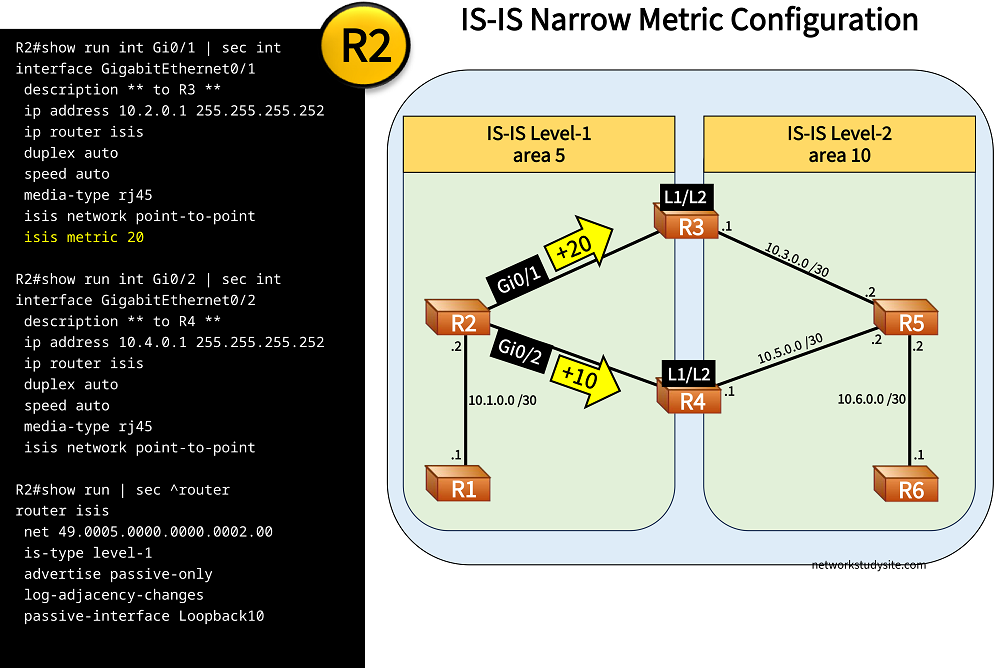
In this example scenario a redundant pair of L1/L2 routers connect two IS-IS areas. In order to make R4 the primary L1/L2 router, R2 and R5 have a less preferred metric configured for the path through R3. As a result, all traffic between the Level-1 and Level-2 IS-IS area goes through R4. If R4 were to fail, IS-IS would automatically choose R3 as a secondary path.
Remember that the IS-IS metric is configured per outgoing interface, and defaults to 10. Accordingly, R2 Gi0/2 already has the metric 10 assigned and Gi0/1 is configured with 20. What this means is that all prefixes learned by IS-IS on R2 Gi0/1 have a metric of +20 added to them. On the other hand, on R2 Gi0/2 all prefixes learned by IS-IS have a metric of +10 added.
Configuration:
R1
R1#show run int Gi0/0 | sec int
interface GigabitEthernet0/0
 description ** to R2 **
 ip address 10.1.0.1 255.255.255.252
 ip router isis
 duplex auto
 speed auto
 media-type rj45
 isis network point-to-point

R1#show run int Lo10 | sec int
interface Loopback10
 ip address 1.1.1.1 255.255.255.255

R1#show run | sec ^router
router isis
 net 49.0005.0000.0000.0001.00
 is-type level-1
 advertise passive-only
 log-adjacency-changes
 passive-interface Loopback10
R2
R2#show run int Gi0/0 | sec int
interface GigabitEthernet0/0
 description ** to R1 **
 ip address 10.1.0.2 255.255.255.252
 ip router isis
 duplex auto
 speed auto
 media-type rj45
 isis network point-to-point

R2#show run int Gi0/1 | sec int
interface GigabitEthernet0/1
 description ** to R3 **
 ip address 10.2.0.1 255.255.255.252
 ip router isis
 duplex auto
 speed auto
 media-type rj45
 isis network point-to-point
 isis metric 20

R2#show run int Gi0/2 | sec int
interface GigabitEthernet0/2
 description ** to R4 **
 ip address 10.4.0.1 255.255.255.252
 ip router isis
 duplex auto
 speed auto
 media-type rj45
 isis network point-to-point

R2#show run int Lo10 | sec int
interface Loopback10
 ip address 2.2.2.2 255.255.255.255

R2#show run | sec ^router
router isis
 net 49.0005.0000.0000.0002.00
 is-type level-1
 advertise passive-only
 log-adjacency-changes
 passive-interface Loopback10
R3
R3#show run int Gi0/0 | sec int
interface GigabitEthernet0/0
 description ** to R2 **
 ip address 10.2.0.2 255.255.255.252
 ip router isis
 duplex auto
 speed auto
 media-type rj45
 isis network point-to-point

R3#show run int Gi0/1 | sec int
interface GigabitEthernet0/1
 description ** to R5 **
 ip address 10.3.0.1 255.255.255.252
 ip router isis
 duplex auto
 speed auto
 media-type rj45
 isis network point-to-point

R3#show run int Lo10 | sec int
interface Loopback10
 ip address 3.3.3.3 255.255.255.255

R3#show run | sec ^router
router isis
 net 49.0005.0000.0000.0003.00
 advertise passive-only
 log-adjacency-changes
 passive-interface Loopback10
R4
R4#show run int Gi0/0 | sec int
interface GigabitEthernet0/0
 description ** to R2 **
 ip address 10.4.0.2 255.255.255.252
 ip router isis
 duplex auto
 speed auto
 media-type rj45
 isis network point-to-point

R4#show run int Gi0/1 | sec int
interface GigabitEthernet0/1
 description ** to R5 **
 ip address 10.5.0.1 255.255.255.252
 ip router isis
 duplex auto
 speed auto
 media-type rj45
 isis network point-to-point

R4#show run int Lo10 | sec int
interface Loopback10
 ip address 4.4.4.4 255.255.255.255

R4#show run | sec ^router
router isis
 net 49.0005.0000.0000.0004.00
 advertise passive-only
 log-adjacency-changes
 passive-interface Loopback10
R5
R5#show run int Gi0/0 | sec int
interface GigabitEthernet0/0
 description ** to R3 **
 ip address 10.3.0.2 255.255.255.252
 ip router isis
 duplex auto
 speed auto
 media-type rj45
 isis network point-to-point
 isis metric 20

R5#show run int Gi0/1 | sec int
interface GigabitEthernet0/1
 description ** to R4 **
 ip address 10.5.0.2 255.255.255.252
 ip router isis
 duplex auto
 speed auto
 media-type rj45
 isis network point-to-point

R5#show run int Gi0/2 | sec int
interface GigabitEthernet0/2
 description ** to R6 **
 ip address 10.6.0.2 255.255.255.252
 ip router isis
 duplex auto
 speed auto
 media-type rj45
 isis network point-to-point

R5#show run int Lo10 | sec int
interface Loopback10
 ip address 5.5.5.5 255.255.255.255

R5#show run | sec ^router
router isis
 net 49.0010.0000.0000.0005.00
 is-type level-2-only
 advertise passive-only
 log-adjacency-changes
 passive-interface Loopback10
R2#show clns interface Gi0/1 GigabitEthernet0/1 is up, line protocol is up Checksums enabled, MTU 1497, Encapsulation SAP ERPDUs enabled, min. interval 10 msec. CLNS fast switching disabled CLNS SSE switching disabled DEC compatibility mode OFF for this interface Next ESH/ISH in 23 seconds Routing Protocol: IS-IS Circuit Type: level-1-2 Interface number 0x1, local circuit ID 0x101 Neighbor System-ID: R3 Level-1 Metric: 20, Priority: 64, Circuit ID: R3.00 « Metric of 20 is manually configured Level-1 IPv6 Metric: 10 Number of active level-1 adjacencies: 1 Next IS-IS Hello in 4 seconds if state UP R2#show clns protocol IS-IS Router:System Id: 0000.0000.0002.00 IS-Type: level-1 Manual area address(es): 49.0005 Routing for area address(es): 49.0005 Interfaces supported by IS-IS: GigabitEthernet0/2 - IP GigabitEthernet0/1 - IP GigabitEthernet0/0 - IP Passive interface: Loopback10 Redistribute: static (on by default) Distance for L2 CLNS routes: 110 RRR level: none Generate narrow metrics: level-1-2 « Narrow metric style is used Accept narrow metrics: level-1-2 Generate wide metrics: none Accept wide metrics: none R2#show ip route isis | beg Ga Gateway of last resort is 10.4.0.2 to network 0.0.0.0 i*L1 0.0.0.0/0 [115/10] via 10.4.0.2, 00:33:18, GigabitEthernet0/2 « The default IS-IS metric is 10 1.0.0.0/32 is subnetted, 1 subnets i L1 1.1.1.1 [115/10] via 10.1.0.1, 05:52:42, GigabitEthernet0/0 3.0.0.0/32 is subnetted, 1 subnets i L1 3.3.3.3 [115/20] via 10.2.0.2, 05:19:12, GigabitEthernet0/1 4.0.0.0/32 is subnetted, 1 subnets i L1 4.4.4.4 [115/10] via 10.4.0.2, 05:52:42, GigabitEthernet0/2
Note that R2 only receives two default routes from the L1/L2 routers. So the metric values configured on R2 apply to the default routes originated by the L1/L2 routers R3 and R4. The metric values used in this example scenario are called narrow metrics. These are encoded in IS-IS LSPs using a 6-bit TLV. The upper limit of a narrow metric is 63, since it is encoded in 6-bits.
The following message is received if a narrow metric larger than 63 is configured.
R2>enable
R2#configure terminal
Enter configuration commands, one per line.  End with CNTL/Z.
R2(config)#interface Gi0/1
R2(config-if)#isis metric 64
Warning: for metrics greater than 63, 'metric-style wide'  should be configured on level-1-2, or it will be capped at 63.
IS-IS wide metric configuration
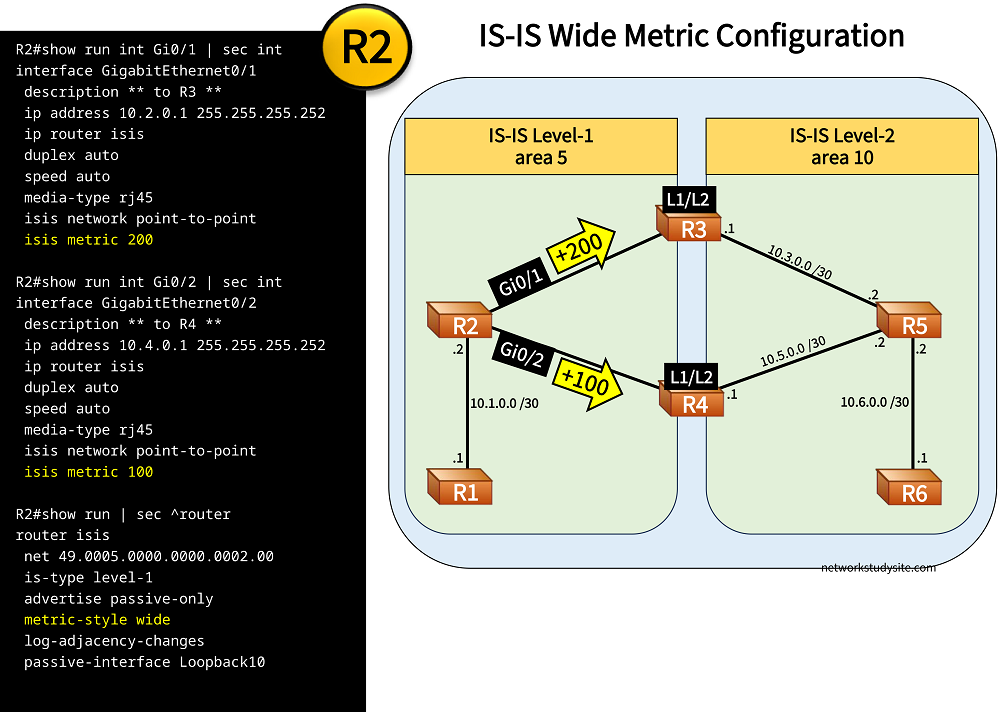
In the following example scenario, the IS-IS wide metric is configured to make R4 the preferred L1/L2 router connecting the IS-IS Level-1 and Level-2 areas. The wide metric is encoded in a 24-bit field and allows for many more values compared to the narrow metric. Note that the interfaces still default to a metric of 10.
Configuration:
R1
R1#show run int Gi0/0 | sec int
interface GigabitEthernet0/0
 description ** to R2 **
 ip address 10.1.0.1 255.255.255.252
 ip router isis
 duplex auto
 speed auto
 media-type rj45
 isis network point-to-point

R1#show run int Lo10 | sec int
interface Loopback10
 ip address 1.1.1.1 255.255.255.255

R1#show run | sec ^router
router isis
 net 49.0005.0000.0000.0001.00
 is-type level-1
 advertise passive-only
 metric-style wide
 log-adjacency-changes
 passive-interface Loopback10
R2
R2#show run int Gi0/0 | sec int
interface GigabitEthernet0/0
 description ** to R1 **
 ip address 10.1.0.2 255.255.255.252
 ip router isis
 duplex auto
 speed auto
 media-type rj45
 isis network point-to-point

R2#show run int Gi0/1 | sec int
interface GigabitEthernet0/1
 description ** to R3 **
 ip address 10.2.0.1 255.255.255.252
 ip router isis
 duplex auto
 speed auto
 media-type rj45
 isis network point-to-point
 isis metric 200

R2#show run int Gi0/2 | sec int
interface GigabitEthernet0/2
 description ** to R4 **
 ip address 10.4.0.1 255.255.255.252
 ip router isis
 duplex auto
 speed auto
 media-type rj45
 isis network point-to-point
 isis metric 100

R2#show run int Lo10 | sec int
interface Loopback10
 ip address 2.2.2.2 255.255.255.255

R2#show run | sec ^router
router isis
 net 49.0005.0000.0000.0002.00
 is-type level-1
 advertise passive-only
 metric-style wide
 log-adjacency-changes
 passive-interface Loopback10
R3
R3#show run int Gi0/0 | sec int
interface GigabitEthernet0/0
 description ** to R2 **
 ip address 10.2.0.2 255.255.255.252
 ip router isis
 duplex auto
 speed auto
 media-type rj45
 isis network point-to-point

R3#show run int Gi0/1 | sec int
interface GigabitEthernet0/1
 description ** to R5 **
 ip address 10.3.0.1 255.255.255.252
 ip router isis
 duplex auto
 speed auto
 media-type rj45
 isis network point-to-point

R3#show run int Lo10 | sec int
interface Loopback10
 ip address 3.3.3.3 255.255.255.255

R3#show run | sec ^router
router isis
 net 49.0005.0000.0000.0003.00
 advertise passive-only
 metric-style wide
 log-adjacency-changes
 passive-interface Loopback10
R4
R4#show run int Gi0/0 | sec int
interface GigabitEthernet0/0
 description ** to R2 **
 ip address 10.4.0.2 255.255.255.252
 ip router isis
 duplex auto
 speed auto
 media-type rj45
 isis network point-to-point

R4#show run int Gi0/1 | sec int
interface GigabitEthernet0/1
 description ** to R5 **
 ip address 10.5.0.1 255.255.255.252
 ip router isis
 duplex auto
 speed auto
 media-type rj45
 isis network point-to-point

R4#show run int Lo10 | sec int
interface Loopback10
 ip address 4.4.4.4 255.255.255.255

R4#show run | sec ^router
router isis
 net 49.0005.0000.0000.0004.00
 advertise passive-only
 metric-style wide
 log-adjacency-changes
 passive-interface Loopback10
R5
R5#show run int Gi0/0 | sec int
interface GigabitEthernet0/0
 description ** to R3 **
 ip address 10.3.0.2 255.255.255.252
 ip router isis
 duplex auto
 speed auto
 media-type rj45
 isis network point-to-point
 isis metric 200

R5#show run int Gi0/1 | sec int
interface GigabitEthernet0/1
 description ** to R4 **
 ip address 10.5.0.2 255.255.255.252
 ip router isis
 duplex auto
 speed auto
 media-type rj45
 isis network point-to-point
 isis metric 100

R5#show run int Gi0/2 | sec int
interface GigabitEthernet0/2
 description ** to R6 **
 ip address 10.6.0.2 255.255.255.252
 ip router isis
 duplex auto
 speed auto
 media-type rj45
 isis network point-to-point

R5#show run int Lo10 | sec int
interface Loopback10
 ip address 5.5.5.5 255.255.255.255

R5#show run | sec ^router
router isis
 net 49.0010.0000.0000.0005.00
 is-type level-2-only
 advertise passive-only
 metric-style wide
 log-adjacency-changes
 passive-interface Loopback10
R2#show clns protocol IS-IS Router:System Id: 0000.0000.0002.00 IS-Type: level-1 Manual area address(es): 49.0005 Routing for area address(es): 49.0005 Interfaces supported by IS-IS: GigabitEthernet0/2 - IP GigabitEthernet0/1 - IP GigabitEthernet0/0 - IP Passive interface: Loopback10 Redistribute: static (on by default) Distance for L2 CLNS routes: 110 RRR level: none Generate narrow metrics: none Accept narrow metrics: none Generate wide metrics: level-1-2 Accept wide metrics: level-1-2 R2#show isis rib IPv4 local RIB for IS-IS process IPV4 unicast topology base (TID 0, TOPOID 0x0) ================= 1.1.1.1/32 prefix attr X:0 R:0 N:1 [115/L1/10] via 10.1.0.1(GigabitEthernet0/0), from 1.1.1.1, tag 0, LSP[4/4/17] prefix attr: X:0 R:0 N:1 (installed) 3.3.3.3/32 prefix attr X:0 R:0 N:1 [115/L1/200] via 10.2.0.2(GigabitEthernet0/1), from 3.3.3.3, tag 0, LSP[2/2/17] prefix attr: X:0 R:0 N:1 (installed) 4.4.4.4/32 prefix attr X:0 R:0 N:1 [115/L1/100] via 10.4.0.2(GigabitEthernet0/2), from 4.4.4.4, tag 0, LSP[3/3/17] prefix attr: X:0 R:0 N:1 (installed) 0.0.0.0/0 [115/L1/100] via 10.4.0.2(GigabitEthernet0/2), from 4.4.4.4, tag 0, LSP[0/0/18] (installed)
The wide metric is necessary for MPLS Traffic Engineering tunnels (MPLS TE). The following output shows the message received when attempting to configure MPLS TE with the narrow metric.
R1>enable
R1#configure terminal
Enter configuration commands, one per line.  End with CNTL/Z.
R1(config)#router isis
R1(config-router)#mpls traffic-eng level-1
%Must enable wide metrics on level-1 first
IS-IS metric at redistribution
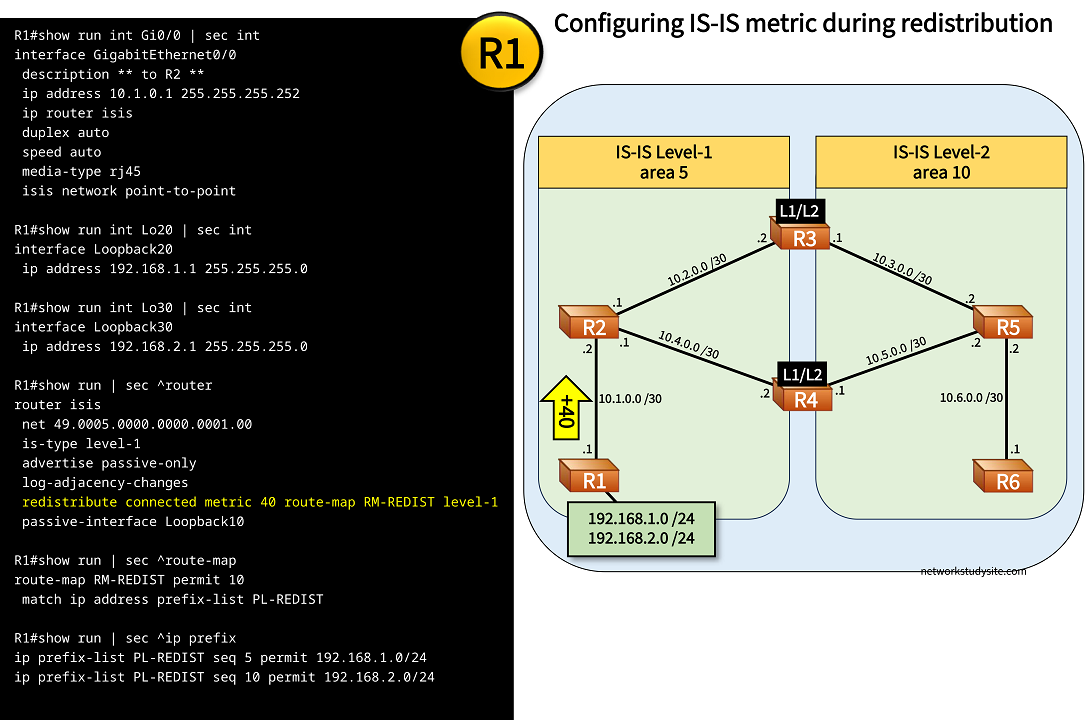
In the following example, R1 redistributes prefixes into the IS-IS Level-1 area 5. During redistribution, R1 assigns a metric of 40 to the redistributed prefixes. This means that R2 receives an LSP including the prefixes with a metric of 40 already assigned by R1. R2 then adds its own interface cost of 10 and proceeds to install the prefixes in its RIB with a metric of 50.
Configuration:
R1
R1#show run int Gi0/0 | sec int
interface GigabitEthernet0/0
 description ** to R2 **
 ip address 10.1.0.1 255.255.255.252
 ip router isis
 duplex auto
 speed auto
 media-type rj45
 isis network point-to-point

R1#show run int Lo10 | sec int
interface Loopback10
 ip address 1.1.1.1 255.255.255.255

R1#show run int Lo20 | sec int
interface Loopback20
 ip address 192.168.1.1 255.255.255.0

R1#show run int Lo30 | sec int
interface Loopback30
 ip address 192.168.2.1 255.255.255.0

R1#show run | sec ^router
router isis
 net 49.0005.0000.0000.0001.00
 is-type level-1
 advertise passive-only
 log-adjacency-changes
 redistribute connected metric 40 route-map RM-REDIST level-1
 passive-interface Loopback10

R1#show run | sec ^route-map
route-map RM-REDIST permit 10
 match ip address prefix-list PL-REDIST

R1#show run | sec ^ip prefix
ip prefix-list PL-REDIST seq 5 permit 192.168.1.0/24
ip prefix-list PL-REDIST seq 10 permit 192.168.2.0/24
R2#show ip route 192.168.1.0
Routing entry for 192.168.1.0/24
  Known via "isis", distance 115, metric 50, type level-1
  Redistributing via isis
  Last update from 10.1.0.1 on GigabitEthernet0/0, 00:12:23 ago
  Routing Descriptor Blocks:
  * 10.1.0.1, from 1.1.1.1, 00:12:23 ago, via GigabitEthernet0/0
      Route metric is 50, traffic share count is 1


R2#show isis rib 192.168.1.0


IPv4 local RIB for IS-IS process

IPV4 unicast topology base (TID 0, TOPOID 0x0) =================
Routes under majornet 192.168.1.0/24:

192.168.1.0/24
  [115/L1/50] via 10.1.0.1(GigabitEthernet0/0), from 1.1.1.1, tag 0, LSP[4/4/3]
              (installed)
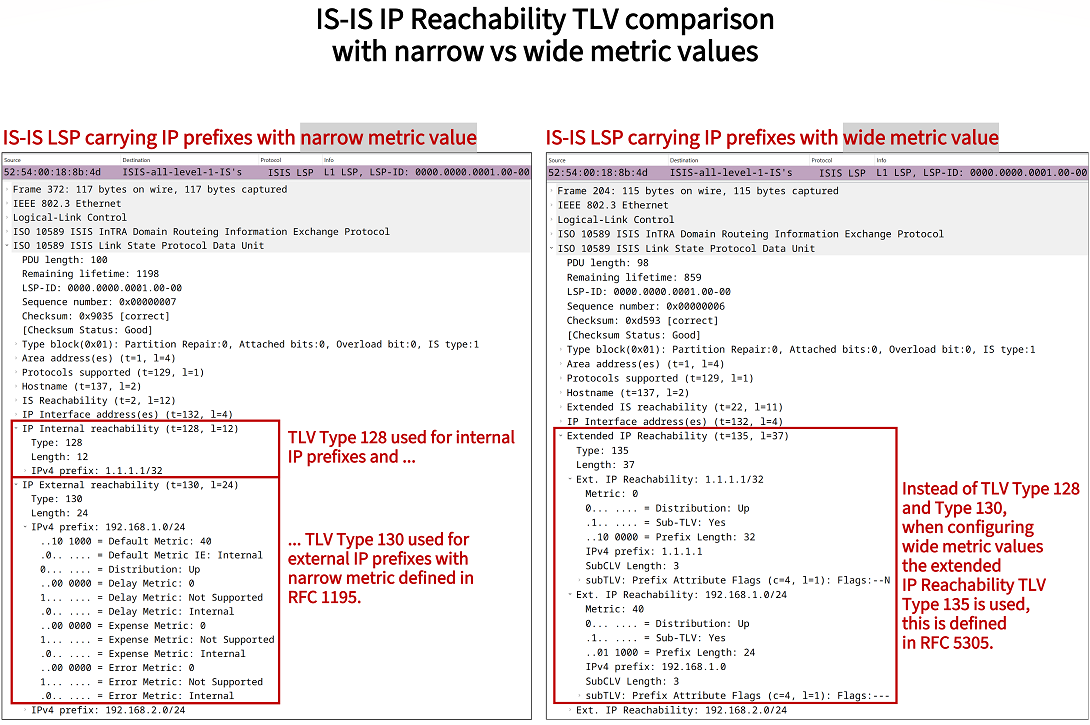
The following packet capture shows the LSP generated by R1 and including the redistributed prefixes with their metric value 40. This is the LSP received by R2. Notice there are also other metric values present in the capture, such as Delay Metric, Expense Metric and Error Metric. These are not supported in this implementation, and generally only the Default Metric is supported.
IS-IS maximum metric configuration and how to exclude a path
It is possible to exclude a path from SPF calculations by configuring the IS-IS maximum metric. The same rules apply as with the narrow or wide metrics, namely that the maximum metric should be configured on the outgoing interface leading up to the link that we want to exclude from the IS-IS topology. The following configuration is applied.
R2>enable
R2#configure terminal
Enter configuration commands, one per line.  End with CNTL/Z.
R2(config)#interface Gi0/1
R2(config-if)#isis metric maximum
R2(config-if)#exit
R2(config)#end
R2#
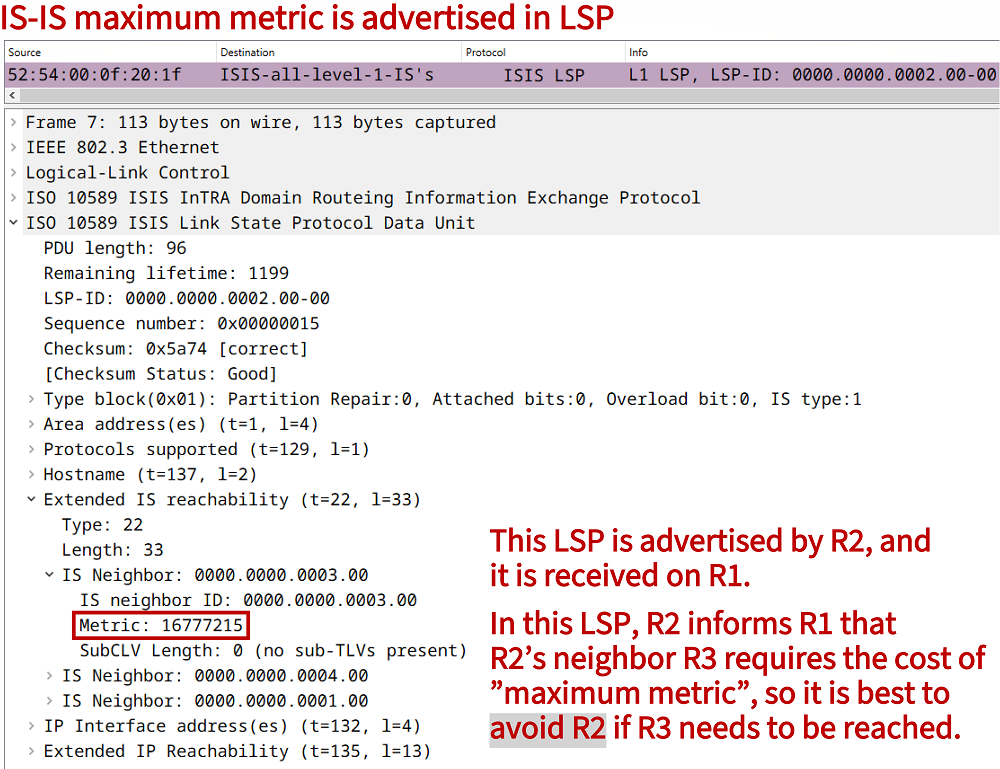
When configuring the maximum metric, the following LSP is advertised to update the IS-IS neighbors of R2. As a result, routers (including R2) remove the prefix from the IS-IS RIB. This has a similar effect to the IS-IS overload bit because it ensures that a particular path and device are not used for transit traffic.
IS-IS metric transition
When transitioning between the narrow and wide IS-IS metrics, routers can be configured to accept both type of metrics. To achieve this result, the following configuration is applied. It is important that this configuration is applied on both of the neighboring routers.
R2>enable
R2#configure terminal
Enter configuration commands, one per line.  End with CNTL/Z.
R2(config)#router isis
R2(config-router)#metric-style transition
R2(config-router)#exit
R2(config)#end
R2#
R2#
R2#show clns protocol

IS-IS Router: <Null Tag>
  System Id: 0000.0000.0002.00  IS-Type: level-1
  Manual area address(es):
        49.0005
  Routing for area address(es):
        49.0005
  Interfaces supported by IS-IS:
        GigabitEthernet0/2 - IP
        GigabitEthernet0/1 - IP
        GigabitEthernet0/0 - IP
  Passive interface:
        Loopback10
  Redistribute:
    static (on by default)
  Distance for L2 CLNS routes: 110
  RRR level: none
  Generate narrow metrics: level-1-2
  Accept narrow metrics:   level-1-2
  Generate wide metrics:   level-1-2
  Accept wide metrics:     level-1-2