Learn EIGRP Route Summarization and EIGRP Summary Metric
Table of Contents
Jump to section:
- • How to configure route summarization in EIGRP? ‹
- • What is the AD of an EIGRP summary route? ‹
- • Can I change the AD of an EIGRP summary route? ‹
- • How is the EIGRP summary metric calculated? ‹
- • How to configure the EIGRP summary metric? ‹
- • Changing summary route metric and distance ‹
- • Download section
- How to configure route summarization in EIGRP? ‹
- What is the AD of an EIGRP summary route? ‹
- Can I change the AD of an EIGRP summary route? ‹
- How is the EIGRP summary metric calculated? ‹
- How to configure the EIGRP summary metric? ‹
- Changing summary route metric and distance ‹
- Download section ‹
How to configure route summarization in EIGRP?
EIGRP route summarization can be implemented with the traditional EIGRP Classic Mode of configuration or using the Named Mode (newer method) of configuration. For comparison, both methods are shown in the following table. Notice, in EIGRP Named Mode all the configuration items are applied under the routing process.
| EIGRP Classic Mode | EIGRP Named Mode |
|---|---|
R2>
R2>enable
R2#configure terminal
Enter configuration commands, one per line.  End with CNTL/Z.
R2(config)#router eigrp 10
R2(config-router)#eigrp router-id 2.2.2.2
R2(config-router)#network 10.0.0.0 0.0.0.3
R2(config-router)#network 192.168.1.1 0.0.0.0
R2(config-router)#network 192.168.2.1 0.0.0.0
R2(config-router)#
R2(config-router)#exit
R2(config)#
R2(config)#interface Gi0/0
R2(config-if)#description ** to R1 **
R2(config-if)#ip address 10.0.0.2 255.255.255.252
R2(config-if)#ip summary-address eigrp 10 192.168.0.0 255.255.252.0
R2(config-if)#
R2(config-if)#end
R2#
|
R2> R2>enable R2#configure terminal Enter configuration commands, one per line. End with CNTL/Z. R2(config)#router eigrp EXAMPLE-EIGRP R2(config-router)#address-family ipv4 unicast autonomous-system 10 R2(config-router-af)#eigrp router-id 2.2.2.2 R2(config-router-af)#network 10.0.0.0 0.0.0.3 R2(config-router-af)#network 192.168.1.1 0.0.0.0 R2(config-router-af)#network 192.168.2.1 0.0.0.0 R2(config-router-af)#af-interface GigabitEthernet0/0 R2(config-router-af-interface)#summary-address 192.168.0.0 255.255.252.0 R2(config-router-af-interface)# R2(config-router-af-interface)#end R2# |
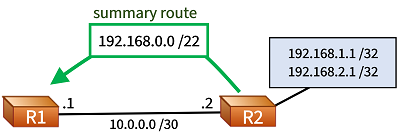
Both of the above configurations achieve the same result. Namely, two prefixes configured on the router R2 (192.168.1.1/32 and 192.168.2.1/32) are summarized, and the summary route 192.168.0.0/22 is advertised to R1. On R1, the received summary route automatically replaces the previously installed component — more specific — routes.
The following outputs from R1 show that the received summary prefix is an EIGRP internal route and has an Administrative Distance (AD) of 90.
R1#show ip route eigrp | beg Ga
Gateway of last resort is not set

D     192.168.0.0/22 [90/2848] via 10.0.0.2, 00:11:40, GigabitEthernet0/0


R1#show ip route 192.168.0.0
Routing entry for 192.168.0.0/22, supernet
  Known via "eigrp 10", distance 90, metric 2848, type internal         « Summary route has AD 90, EIGRP internal route
  Redistributing via eigrp 10
  Last update from 10.0.0.2 on GigabitEthernet0/0, 00:11:45 ago
  Routing Descriptor Blocks:
  * 10.0.0.2, from 10.0.0.2, 00:11:45 ago, via GigabitEthernet0/0
      Route metric is 2848, traffic share count is 1
      Total delay is 12 microseconds, minimum bandwidth is 1000000 Kbit
      Reliability 255/255, minimum MTU 1500 bytes
      Loading 1/255, Hops 1


R1#show ip eigrp topology 192.168.0.0/22
EIGRP-IPv4 Topology Entry for AS(10)/ID(1.1.1.1) for 192.168.0.0/22
  State is Passive, Query origin flag is 1, 1 Successor(s), FD is 2848
  Descriptor Blocks:
  10.0.0.2 (GigabitEthernet0/0), from 10.0.0.2, Send flag is 0x0
      Composite metric is (2848/288), route is Internal
      Vector metric:
        Minimum bandwidth is 1000000 Kbit
        Total delay is 11 microseconds
        Reliability is 255/255
        Load is 1/255
        Minimum MTU is 1500
        Hop count is 1
        Originating router is 2.2.2.2                                   « R2 advertises this summary route
An important aspect of EIGRP route summarization is that the neighborship is reset when receiving the Update message with the summary prefix. This can be seen in the router logs. The following system messages are logged each time an EIGRP summary route is received.
R1#show log | beg Log Buffer
Log Buffer (8192 bytes):

%DUAL-5-NBRCHANGE: EIGRP-IPv4 10: Neighbor 10.0.0.2 (GigabitEthernet0/0) is resync: peer graceful-restart
%DUAL-5-NBRCHANGE: EIGRP-IPv4 10: Neighbor 10.0.0.2 (GigabitEthernet0/0) is resync: peer graceful-restart
%DUAL-5-NBRCHANGE: EIGRP-IPv4 10: Neighbor 10.0.0.2 (GigabitEthernet0/0) is resync: peer graceful-restart
The following packet capture shows that the Restart flag is being set in the Update message advertising the summary route. As a result, the EIGRP neighborship undergoes a restart. Further details are explained in the RFC 7868, Section 6.5 (EIGRP Packet Header).

What is the AD of an EIGRP summary route?
The Administrative Distance (AD) of an EIGRP summary route is 5. The EIGRP summary route points to the Null0 interface. This is visible in the following output taken from the router R2 that originates the summary route.
R2#show ip route 192.168.0.0
Routing entry for 192.168.0.0/22, supernet
  Known via "eigrp 10", distance 5, metric 128256, type internal
  Redistributing via eigrp 10
  Routing Descriptor Blocks:
  * directly connected, via Null0
      Route metric is 128256, traffic share count is 1
      Total delay is 5000 microseconds, minimum bandwidth is 8000000 Kbit
      Reliability 255/255, minimum MTU 1514 bytes
      Loading 1/255, Hops 0


R2#show ip route eigrp | beg Ga
Gateway of last resort is not set

D     192.168.0.0/22 is a summary, 00:10:44, Null0
The summary route received on R1 has an AD of 90, it is an EIGRP internal route.
R1#show ip route 192.168.0.0
Routing entry for 192.168.0.0/22, supernet
  Known via "eigrp 10", distance 90, metric 130816, type internal
  Redistributing via eigrp 10
  Last update from 10.0.0.2 on GigabitEthernet0/0, 00:19:37 ago
  Routing Descriptor Blocks:
  * 10.0.0.2, from 10.0.0.2, 00:19:37 ago, via GigabitEthernet0/0
      Route metric is 130816, traffic share count is 1
      Total delay is 5010 microseconds, minimum bandwidth is 1000000 Kbit
      Reliability 255/255, minimum MTU 1500 bytes
      Loading 1/255, Hops 1
Can I change the AD of an EIGRP summary route?
Yes, the administrative distance (AD) of an EIGRP summary route can be changed.
The command summary-metric 192.168.0.0 255.255.252.0 distance 6 changes the AD of the summary route to 6. The default AD is 5.
R2#show run | sec router eigrp
router eigrp 10
 summary-metric 192.168.0.0/22 distance 6
 network 10.0.0.0 0.0.0.3
 network 192.168.1.1 0.0.0.0
 network 192.168.2.1 0.0.0.0
 eigrp router-id 2.2.2.2


R2#show ip route 192.168.0.0
Routing entry for 192.168.0.0/22, supernet
  Known via "eigrp 10", distance 6, metric 128256, type internal
  Redistributing via eigrp 10
  Routing Descriptor Blocks:
  * directly connected, via Null0
      Route metric is 128256, traffic share count is 1
      Total delay is 5000 microseconds, minimum bandwidth is 8000000 Kbit
      Reliability 255/255, minimum MTU 1514 bytes
      Loading 1/255, Hops 0
How is the EIGRP summary metric calculated?
When summarizing routes in EIGRP, by default the summary route inherits the lowest metric among its component routes. This is an automatic process. Every time a component route changes metric, or is no longer advertised, the summarizing router recalculates the summary route metric. Summary metric recalculation is done by the CPU and can impact performance. Note that the same mechanism also applies for OSPF route summarization.

R7#show ip eigrp topology 192.168.0.0/21
EIGRP-IPv4 Topology Entry for AS(10)/ID(7.7.7.7) for 192.168.0.0/21
  State is Passive, Query origin flag is 1, 1 Successor(s), FD is 3328
  Descriptor Blocks:
  10.0.0.1 (GigabitEthernet0/0), from 10.0.0.1, Send flag is 0x0
      Composite metric is (3328/3072), route is Internal        « Reported Distance of summary route: 3072
      Vector metric:
        Minimum bandwidth is 1000000 Kbit
        Total delay is 30 microseconds
        Reliability is 255/255
        Load is 1/255
        Minimum MTU is 1500
        Hop count is 1
        Originating router is 6.6.6.6


R6#show ip eigrp topology | sec 192.168.0|192.168.5|192.168.2
P 192.168.2.32/27, 1 successors, FD is 538112
        via 192.168.15.6 (538112/537856), GigabitEthernet0/0
P 192.168.2.16/28, 1 successors, FD is 538112
        via 192.168.15.6 (538112/537856), GigabitEthernet0/0
P 192.168.2.0/29, 1 successors, FD is 409856
        via 192.168.15.6 (409856/409600), GigabitEthernet0/0
P 192.168.0.0/21, 1 successors, FD is 3072
        via Summary (3072/0), Null0                        « Summary route inherits lowest metric among component routes
P 192.168.5.16/28, 1 successors, FD is 131072
        via 192.168.15.2 (131072/130816), GigabitEthernet0/2
P 192.168.5.0/29, 1 successors, FD is 3072
        via 192.168.15.2 (3072/2816), GigabitEthernet0/2   « This is the component route with the lowest metric
P 192.168.2.8/29, 1 successors, FD is 410112
        via 192.168.15.6 (410112/409856), GigabitEthernet0/0
P 192.168.5.32/27, 1 successors, FD is 131072
        via 192.168.15.2 (131072/130816), GigabitEthernet0/2


R6#show ip eigrp topology | i 192.168.2
P 192.168.2.32/27, 1 successors, FD is 538112
P 192.168.2.16/28, 1 successors, FD is 538112
P 192.168.2.0/29, 1 successors, FD is 409856
P 192.168.2.8/29, 1 successors, FD is 410112


R6#show ip eigrp topology | i 192.168.5
P 192.168.5.16/28, 1 successors, FD is 131072
P 192.168.5.0/29, 1 successors, FD is 3072
P 192.168.5.32/27, 1 successors, FD is 131072
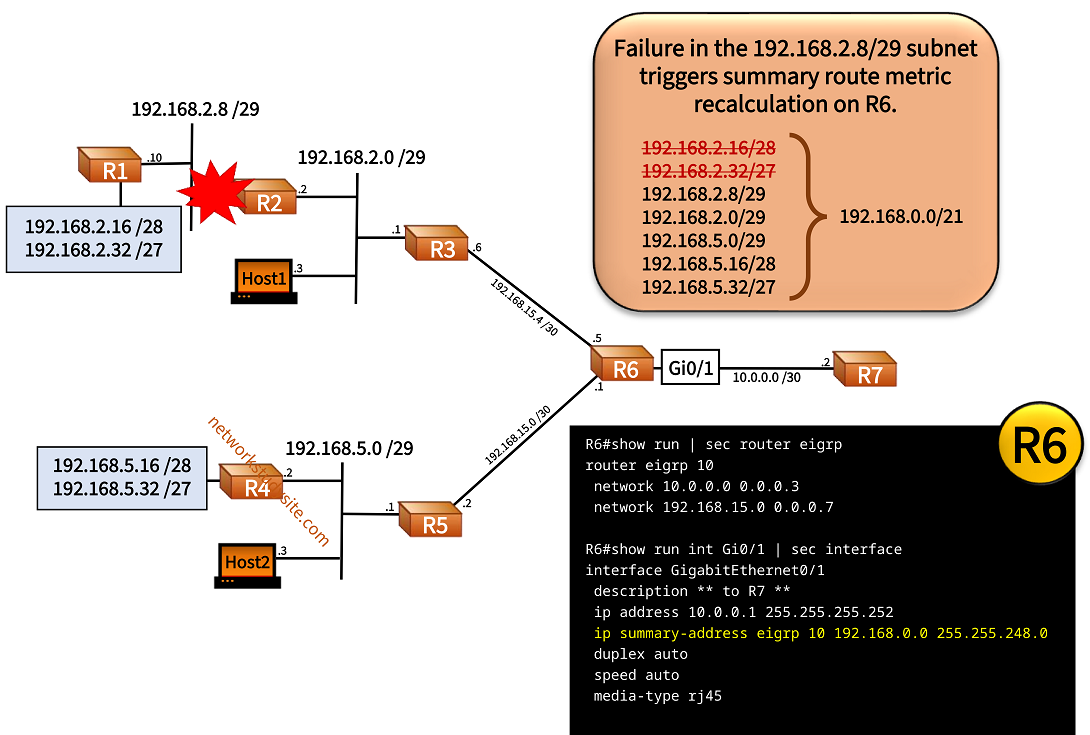
Currently, there are 7 component routes summarized with 192.168.0.0/21. However, a network failure on R2 causes two component routes to be no longer available on R6. This means that R6 removes two component routes and recalculates the metric of the summary route 192.168.0.0/21 based on the remaining five component routes.
R6#show log | beg Log Buffer
Log Buffer (8192 bytes):

EIGRP-IPv4(10): summary_depend: dest 192.168.2.32/27 vec 0, metric 538112, add 0 auto 0    « Prefix no longer advertised
EIGRP-IPv4(10): summary_depend: revise summary 192.168.0.0/21
EIGRP-IPv4(10): summary_revise: result 0
EIGRP-IPv4(10): summary_depend: dest 192.168.2.32/27 vec 0, metric 0, add 0 auto 0
EIGRP-IPv4(10): summary_depend: revise summary 192.168.0.0/21
EIGRP-IPv4(10): summary_revise: result 2
EIGRP-IPv4(10): summary_enqueue: 192.168.0.0/21 vec(0) summary changed
EIGRP-IPv4(10): summary_depend: dest 192.168.2.16/28 vec 0, metric 538112, add 0 auto 0    « Prefix no longer advertised
EIGRP-IPv4(10): summary_depend: revise summary 192.168.0.0/21
EIGRP-IPv4(10): summary_revise: result 0
EIGRP-IPv4(10): summary_depend: dest 192.168.2.16/28 vec 0, metric 0, add 0 auto 0
EIGRP-IPv4(10): summary_depend: revise summary 192.168.0.0/21
EIGRP-IPv4(10): summary_revise: result 2
EIGRP-IPv4(10): summary_process: 7 components with static metric(0)
EIGRP-IPv4(10): summary_metric_calc: 192.168.0.0/21 with 7 components and metric 3072
EIGRP-IPv4(10): summary_metric overlapping: 192.168.2.0/29 metric 409856
EIGRP-IPv4(10): summary_metric overlapping: 192.168.5.16/28 metric 131072
EIGRP-IPv4(10): summary_metric overlapping: 192.168.5.0/29 metric 3072
EIGRP-IPv4(10): summary_metric overlapping: 192.168.2.8/29 metric 410112
EIGRP-IPv4(10): summary_metric overlapping: 192.168.5.32/27 metric 131072
EIGRP-IPv4(10): summary_metric_calc: 192.168.0.0/21, from 192.168.5.0/29, metric 3072
EIGRP-IPv4(10): summary_process: 192.168.0.0/21 old(3072) new(3072) processed(yes)     « Recalculating summary metric
EIGRP-IPv4(10): summary_depend: dest 192.168.2.32/27 vec 0, metric 0, add 0 auto 0
EIGRP-IPv4(10): summary_depend: revise summary 192.168.0.0/21
EIGRP-IPv4(10): summary_revise: result 2
EIGRP-IPv4(10): summary_enqueue: 192.168.0.0/21 vec(0) summary changed                  « Adjusting summary components
EIGRP-IPv4(10): summary_decr: 192.168.0.0/21 count(6)                                   « Decrementing summary component count
EIGRP-IPv4(10): summary_depend: dest 192.168.2.16/28 vec 0, metric 0, add 0 auto 0
EIGRP-IPv4(10): summary_depend: revise summary 192.168.0.0/21
EIGRP-IPv4(10): summary_revise: result 2
EIGRP-IPv4(10): summary_decr: 192.168.0.0/21 count(5)
EIGRP-IPv4(10): summary_process: 5 components with static metric(0)                     « 5 component addresses remain, instead of 7
EIGRP-IPv4(10): summary_metric_calc: 192.168.0.0/21 with 5 components and metric 3072
EIGRP-IPv4(10): summary_metric overlapping: 192.168.2.0/29 metric 409856
EIGRP-IPv4(10): summary_metric overlapping: 192.168.5.16/28 metric 131072
EIGRP-IPv4(10): summary_metric overlapping: 192.168.5.0/29 metric 3072
EIGRP-IPv4(10): summary_metric overlapping: 192.168.2.8/29 metric 410112
EIGRP-IPv4(10): summary_metric overlapping: 192.168.5.32/27 metric 131072
EIGRP-IPv4(10): summary_metric_calc: 192.168.0.0/21, from 192.168.5.0/29, metric 3072
EIGRP-IPv4(10): summary_process: 192.168.0.0/21 old(3072) new(3072) processed(yes)      « Recalculation did not change metric
When the missing routes are again advertised, the same process happens: component route count increments to 7, and summary metric is recalculated. In this next example, R6 also recalculates the summary metric if any component route changes its metric. Accordingly, R3 interface Gi0/0 is configured for a different speed, as shown below. This triggers summary route metric recalculation on R6.
R3#configure terminal
Enter configuration commands, one per line.  End with CNTL/Z.
R3(config)#interface Gi0/0
R3(config-if)#do show run int Gi0/0 | i speed
 speed 100                 « Current speed
R3(config-if)#speed 1000   « New speed
R3(config-if)#


R6#show log | beg Log Buffer
Log Buffer (8192 bytes):

EIGRP-IPv4(10): summary_depend: dest 192.168.2.32/27 vec F0FBECC, metric 515072, add 1 auto 0
EIGRP-IPv4(10): summary_depend: revise summary 192.168.0.0/21
EIGRP-IPv4(10): summary_revise: result 2
EIGRP-IPv4(10): summary_enqueue: 192.168.0.0/21 vec(0) summary changed                  « Metric recalculation triggered
EIGRP-IPv4(10): summary_depend: dest 192.168.2.16/28 vec FDACB7C, metric 515072, add 1 auto 0
EIGRP-IPv4(10): summary_depend: revise summary 192.168.0.0/21
EIGRP-IPv4(10): summary_revise: result 2
EIGRP-IPv4(10): summary_depend: dest 192.168.2.8/29 vec D05E014, metric 387072, add 1 auto 0
EIGRP-IPv4(10): summary_depend: revise summary 192.168.0.0/21
EIGRP-IPv4(10): summary_revise: result 2
EIGRP-IPv4(10): summary_depend: dest 192.168.2.0/29 vec DDAF87C, metric 386816, add 1 auto 0
EIGRP-IPv4(10): summary_depend: revise summary 192.168.0.0/21
EIGRP-IPv4(10): summary_revise: result 2
EIGRP-IPv4(10): summary_process: 7 components with static metric(0)
EIGRP-IPv4(10): summary_metric_calc: 192.168.0.0/21 with 7 components and metric 3072
EIGRP-IPv4(10): summary_metric overlapping: 192.168.2.32/27 metric 515072
EIGRP-IPv4(10): summary_metric overlapping: 192.168.2.16/28 metric 515072
EIGRP-IPv4(10): summary_metric overlapping: 192.168.2.0/29 metric 386816
EIGRP-IPv4(10): summary_metric overlapping: 192.168.5.16/28 metric 131072
EIGRP-IPv4(10): summary_metric overlapping: 192.168.5.0/29 metric 3072
EIGRP-IPv4(10): summary_metric overlapping: 192.168.2.8/29 metric 387072
EIGRP-IPv4(10): summary_metric overlapping: 192.168.5.32/27 metric 131072
EIGRP-IPv4(10): summary_metric_calc: 192.168.0.0/21, from 192.168.5.0/29, metric 3072
EIGRP-IPv4(10):  summary_process: 192.168.0.0/21 old(3072) new(3072) processed(yes)     « Recalculation did not change summary metric
How to configure the EIGRP summary metric?
Recalculations of the summary route metric can be avoided by configuring a static summary metric value as shown in the following image. This means, when any of the component routes changes its metric or is no longer available, the summarizing router R6 does not recalculate the summary route metric. The configured static metric value remains in place and this conserves system resources.

Configuration:
R6
R6#show run | sec router eigrp
router eigrp 10
 summary-metric 192.168.0.0/21 1000000 10 255 0 1500
 network 10.0.0.0 0.0.0.3
 network 192.168.15.0 0.0.0.7

R6#show run int Gi0/1 | sec interface
interface GigabitEthernet0/1
 description ** to R7 **
 ip address 10.0.0.1 255.255.255.252
 ip summary-address eigrp 10 192.168.0.0 255.255.248.0
 duplex auto
 speed auto
 media-type rj45
R6#show log | beg Log Buffer
Log Buffer (8192 bytes):

EIGRP-IPv4(10): summary_depend: dest 192.168.2.32/27 vec F0FBECC, metric 538112, add 1 auto 0
EIGRP-IPv4(10): summary_depend: revise summary 192.168.0.0/21
EIGRP-IPv4(10): summary_revise: manually configured metric             « Changes in component routes do not trigger metric recalculation
EIGRP-IPv4(10): summary_depend: dest 192.168.2.16/28 vec FDACB7C, metric 538112, add 1 auto 0
EIGRP-IPv4(10): summary_depend: revise summary 192.168.0.0/21
EIGRP-IPv4(10): summary_revise: manually configured metric
EIGRP-IPv4(10): summary_depend: dest 192.168.2.8/29 vec D05E014, metric 410112, add 1 auto 0
EIGRP-IPv4(10): summary_depend: revise summary 192.168.0.0/21
EIGRP-IPv4(10): summary_revise: manually configured metric
EIGRP-IPv4(10): summary_depend: dest 192.168.2.0/29 vec DDAF87C, metric 409856, add 1 auto 0
EIGRP-IPv4(10): summary_depend: revise summary 192.168.0.0/21
EIGRP-IPv4(10): summary_revise: manually configured metric


R6#show ip eigrp topology | sec 192.168.0|192.168.2|192.168.5
P 192.168.2.32/27, 1 successors, FD is 538112
        via 192.168.15.6 (538112/537856), GigabitEthernet0/0
P 192.168.2.16/28, 1 successors, FD is 538112
        via 192.168.15.6 (538112/537856), GigabitEthernet0/0
P 192.168.2.0/29, 1 successors, FD is 409856
        via 192.168.15.6 (409856/409600), GigabitEthernet0/0
P 192.168.0.0/21, 1 successors, FD is 3072
        via Summary (5120/0), Null0                                     « Manually configured metric, not inherited from component routes
P 192.168.5.16/28, 1 successors, FD is 131072
        via 192.168.15.2 (131072/130816), GigabitEthernet0/2
P 192.168.5.0/29, 1 successors, FD is 3072
        via 192.168.15.2 (3072/2816), GigabitEthernet0/2
P 192.168.2.8/29, 1 successors, FD is 410112
        via 192.168.15.6 (410112/409856), GigabitEthernet0/0
P 192.168.5.32/27, 1 successors, FD is 131072
        via 192.168.15.2 (131072/130816), GigabitEthernet0/2
Changing summary route metric and distance
In the following example configuration, the summary route metric and also the AD of the summary route are adjusted. The AD of the summary route is configured to 150.
R6#show run | sec router eigrp 10
router eigrp 10
 summary-metric 192.168.0.0/21 1000000 10 255 0 1500 distance 150
 network 10.0.0.0 0.0.0.3
 network 192.168.15.0 0.0.0.7


R6#show run int Gi0/1 | sec interface
interface GigabitEthernet0/1
 description ** to R7 **
 ip address 10.0.0.1 255.255.255.252
 ip summary-address eigrp 10 192.168.0.0 255.255.248.0
 duplex auto
 speed auto
 media-type rj45


R6#show ip route 192.168.0.0 255.255.248.0
Routing entry for 192.168.0.0/21, supernet
  Known via "eigrp 10", distance 150, metric 5120, type internal  « Admin distance set to 150, and summary metric manually configured
  Redistributing via eigrp 10
  Routing Descriptor Blocks:
  * directly connected, via Null0
      Route metric is 5120, traffic share count is 1
      Total delay is 100 microseconds, minimum bandwidth is 1000000 Kbit
      Reliability 255/255, minimum MTU 1500 bytes
      Loading 0/255, Hops 0