IPv6 Network SLAAC and DHCPv6 Guide - Introduction to NDP
Table of Contents
Jump to section:
- • What is Stateless Address Autoconfiguration (SLAAC)?
- • What is the difference between SLAAC and Prefix Delegation?
- • How to configure IPv6 SLAAC?
- • How to provide DNS with SLAAC? (RDNSS)
- • How to provide DNS with Stateless DHCPv6?
- • What is IPv6 RA Router Preference?
- • Can you disable sending IPv6 RA messages?
- • Stateful DHCPv6 explained and configured
- • Stateful DHCPv6 rapid-commit
- • Download section
- What is Stateless Address Autoconfiguration (SLAAC)? ‹
- What is the difference between SLAAC and Prefix Delegation? ‹
- How to configure IPv6 SLAAC? ‹
- How to provide DNS with SLAAC? (RDNSS) ‹
- How to provide DNS with Stateless DHCPv6? ‹
- What is IPv6 RA Router Preference? ‹
- Can you disable sending IPv6 RA messages? ‹
- Stateful DHCPv6 explained and configured ‹
- Stateful DHCPv6 rapid-commit ‹
- Download section ‹
What is Stateless Address Autoconfiguration (SLAAC)?
Stateless Address Autoconfiguration (SLAAC) is a method to assign an IPv6 address to a device through an IPv6-enabled network but without the use of DHCP. Instead, SLAAC relies on the Neighbor Discovery Protocol (NDP) to exchange ICMPv6 messages including Router Advertisements (RA). An RA message contains IPv6 prefix information such as a /64 global prefix address. Upon receiving a global prefix through an RA, a host that supports SLAAC can assign itself an IPv6 address.
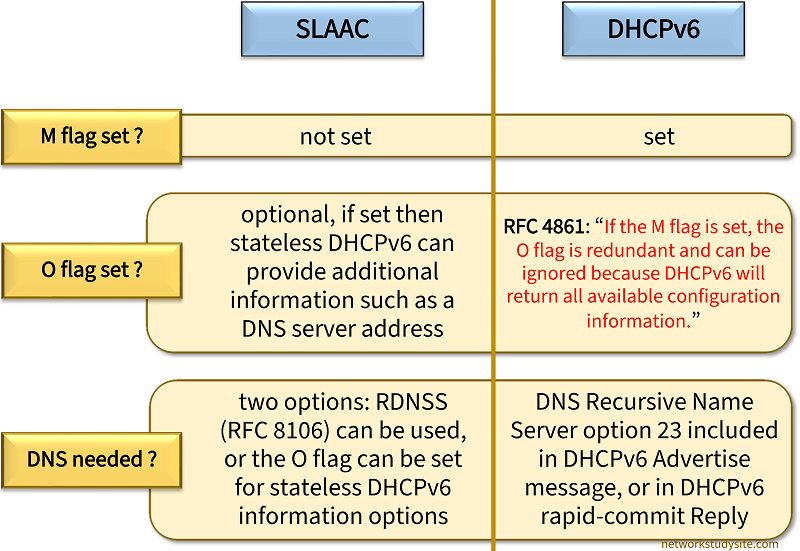
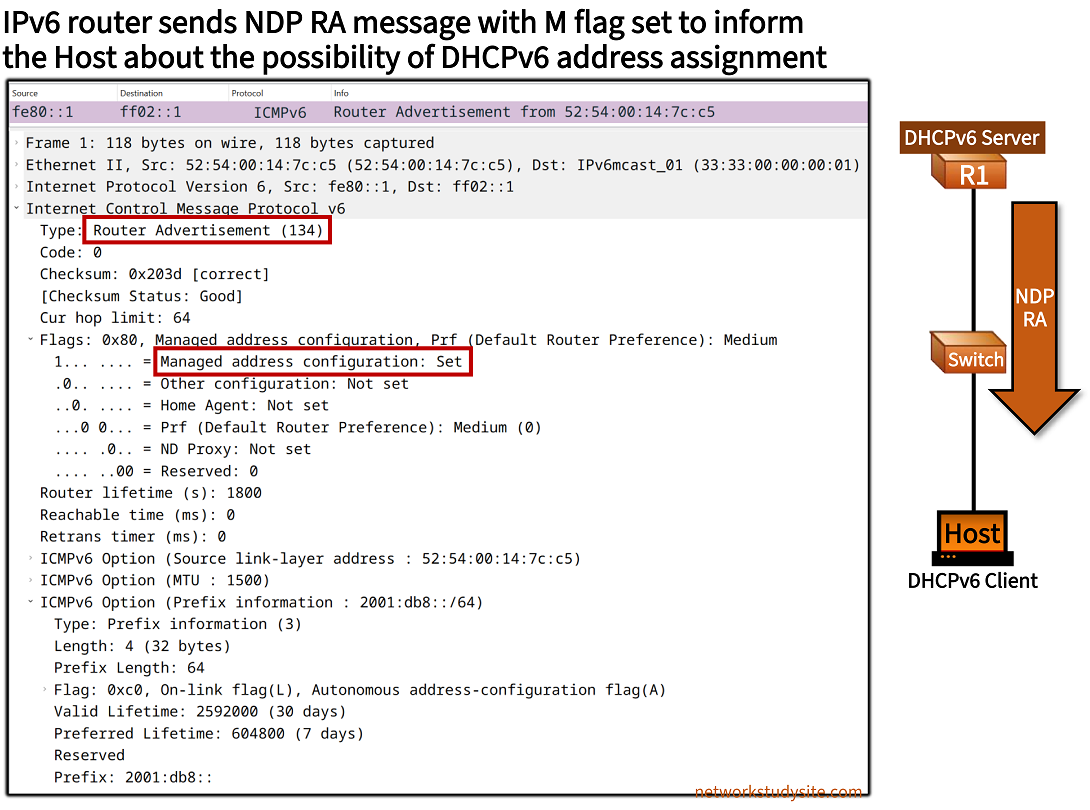
The above details are included in RA messages and need to be processed by SLAAC-capable hosts in order to participate in stateless autoconfiguration. The M flag (Managed Address Configuration Flag), the O flag (Other Stateful Configuration Flag), and the A flag (Autonomous Address-Configuration flag) are visible in the following packet capture. These flags provide important details to IPv6 hosts.

The entire SLAAC process consists of multiple steps based on the RFC 2462 and updated RFC 4862 specifications. These steps are summarized in the following table. All NDP messages are encapsulated with ICMPv6.
| Process step | Description |
|---|---|
| Assign link-local address | On devices that support IPv6, an interface assigns itself a link-local address (FE80::/10) when the device is booted or when the interface is enabled. The modified EUI-64 method is commonly used to autoconfigure a link-local address based on the MAC address of the interface. An IPv6 link-local address allows for communication on a local subnet. |
| Duplicate Address Detection (DAD) for the link-local address | Once the link-local address is assigned to an interface, the device verifies whether the address is unique in the local network. This is called Duplicate Address Detection (DAD), and the mechanism is performed with NDP (ICMPv6) Neighbor Solicitation (NS) messages. The NS message is sent from the IPv6 unspecified address (::) to the solicited node multicast address. If there is no reply to NS messages that means the newly assigned link-local address is unique in the connected subnet. |
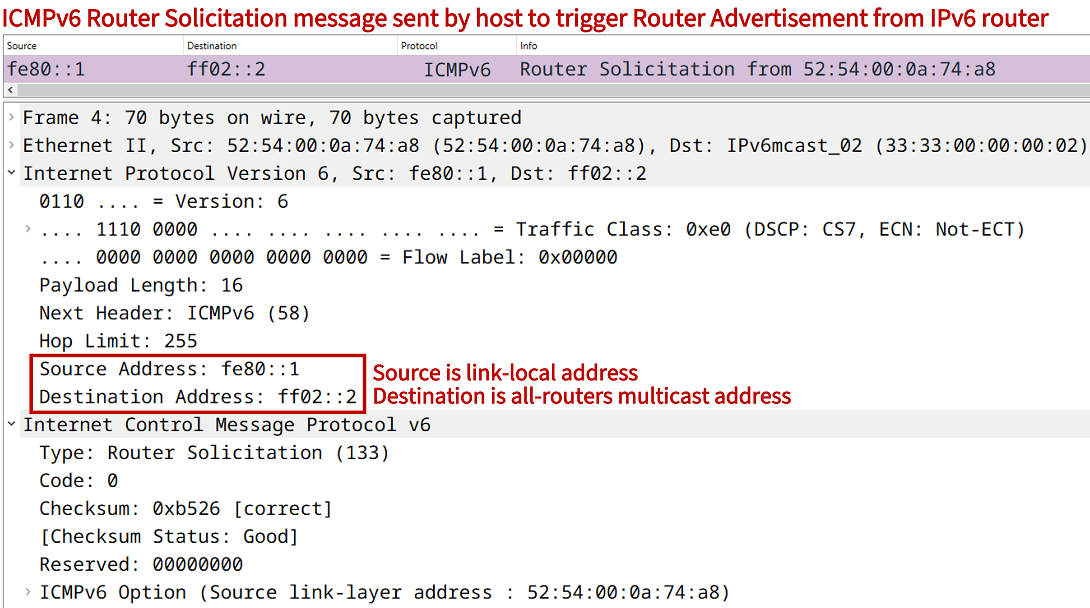
| Router Solicitation (RS) | If the DAD process confirms that the link-local address is unique, the device sends a Router Solicitation (RS) message to identify any IPv6-capable routers in the local network. The RS message is sent from a device's automatically created (or manually assigned) link-local address to the all-routers multicast address FF02::2. If an IPv6 capable router receives a RS message, it will immediately answer with a Router Advertisement (RA) message. |
| Router Advertisement (RA) | Router Advertisement (RA) messages are sent from an IPv6-capable router to the all-nodes multicast address FF02::1. RA messages are sent periodically but also in reply to RS messages. RA messages contain information about IPv6 address assignment, such as the prefix information used for SLAAC which enables hosts to generate themselves a unique IPv6 address. The M-flag (Managed Address Configuration Flag) is also included in the RA message. If the M-flag is not set, then the receiving IPv6 host uses SLAAC to assign itself a unique IPv6 address. If the M-flag is set, then the SLAAC process does not take place, and instead a DHCPv6 server is queried. |
| Duplicate Address Detection (DAD) for the global unicast address | After a device assigns itself an IPv6 address based on the RA message, it verifies whether the newly configured global IPv6 address is in fact unique in the local network. This is accomplished with the NS message. |


What is the difference between SLAAC and Prefix Delegation?
SLAAC does not rely on DHCPv6, however Prefix Delegation (PD) relies on a DHCPv6 Server. PD is commonly implemented by a Service Provider (ISP) and treats a subscriber location's gateway router as its client, whereas SLAAC is generally deployed to provide addressing for end user host machines and any type of IPv6 network device interface.
At the same time, SLAAC and PD can work together. Namely, the /64 address received by the end user host through SLAAC (through a Router Advertisement) can actually be a prefix delegated by PD. In other words, PD delegates an IPv6 prefix to the subscriber's gateway router, and the router advertises the prefix in an RA message to the hosts.
Note that SLAAC relies on a gateway router advertising a /64 IPv6 address encoded by the Prefix Information Option in an RA message, however the gateway router may have actually received a /48 or other prefix via PD.
How to configure IPv6 SLAAC?
In the following example topology, Host1 assigns itself an IPv6 link-local address with the EUI-64 process and a global IPv6 address with Stateless Address Autoconfiguration (SLAAC). As a result, Host1 is able to communicate with other IPv6-capable hosts without needing a DHCP server for address assignment.
SLAAC uses the Neighbor Discovery Protocol (NDP) to provide hosts with prefix information which can be used to generate a unique /128 IPv6 address. In this scenario, L3-SW1 is an IPv6-capable network gateway device with Switched Virtual Interfaces (SVI) in each VLAN. The hosts use multicast ICMPv6 Router Solicitation (RS) messages within each individual VLAN to query for an IPv6-capable router or L3 switch.

Configuration:
L3-SW1
L3-SW1#show run int vlan 10 | sec int
interface Vlan10
 description ** Switch Virtual Interface (SVI) for hosts in VLAN 10 **
 no ip address
 ipv6 address FE80::1 link-local
 ipv6 address 2001:DB8:1:1::1/64

L3-SW1#show run int Po3 | sec int
interface Port-channel3
 switchport trunk encapsulation dot1q
 switchport mode trunk

L3-SW1#show run int Gi0/2 | sec int
interface GigabitEthernet0/2
 description ** to R1 **
 no switchport
 no ip address
 negotiation auto
 ipv6 address FE80::1 link-local
 ipv6 address 2001:DB8:2:1::1/64

L3-SW1#show run | sec ipv6 route
ipv6 route 2001:DB8:1::/48 Null0

L3-SW1#show run | sec router
router bgp 65001
 bgp router-id 11.11.11.11
 bgp log-neighbor-changes
 neighbor 2001:DB8:2:1::2 remote-as 65002
 !
 address-family ipv6
  network 2001:DB8:1::/48
  neighbor 2001:DB8:2:1::2 activate
 exit-address-family
Host1
Host1#show run int Gi0/0 | sec int
interface GigabitEthernet0/0
 no ip address
 no ip route-cache
 duplex auto
 speed auto
 ipv6 address autoconfig default
 ipv6 enable
 ipv6 nd autoconfig prefix
L3-SW1 sends Router Advertisement (RA) messages periodically in each VLAN and also in reply to RS messages. In this scenario, the RA messages sent by L3-SW1 contain the global prefix 2001:DB8:64:1:1:: /64 for VLAN 10 and 2001:DB8:64:1:2:: /64 for VLAN 20. With this information, the hosts can assign themselves a unique /128 IPv6 address.
Host1#show ipv6 route | beg ::
ND  ::/0 [2/0]               « Default route received via Neighbor Discovery from L3-SW1
     via FE80::1, GigabitEthernet0/0
NDp 2001:DB8:1:1::/64 [2/0]
     via GigabitEthernet0/0, directly connected
L   2001:DB8:1:1:5054:FF:FE04:BAC0/128 [0/0]
     via GigabitEthernet0/0, receive
L   FF00::/8 [0/0]
     via Null0, receive


Host1#ping 2001:DB8:AA:1::1
Type escape sequence to abort.
Sending 5, 100-byte ICMP Echos to 2001:DB8:AA:1::1, timeout is 2 seconds:
!!!!!
Success rate is 100 percent (5/5), round-trip min/avg/max = 5/5/6 ms          « Host1 can reach address in Site 2


Host1#trace 2001:DB8:AA:1::1
Type escape sequence to abort.
Tracing the route to 2001:DB8:AA:1::1

  1 2001:DB8:1:1::1 5 msec 5 msec 4 msec       « IPv6 gateway address on L3-SW1 VLAN 10 SVI interface
  2 2001:DB8:2:1::2 6 msec 5 msec 6 msec
  3 2001:DB8:3:1::2 7 msec 7 msec 7 msec


L3-SW1#show bgp ipv6 unicast sum | beg Ne
Neighbor        V           AS MsgRcvd MsgSent   TblVer  InQ OutQ Up/Down  State/PfxRcd
2001:DB8:2:1::2 4        65002     182     183       20    0    0 02:41:39        3          « BGP neighborship between L3-SW1 and R1
How to provide DNS with SLAAC? (RDNSS)
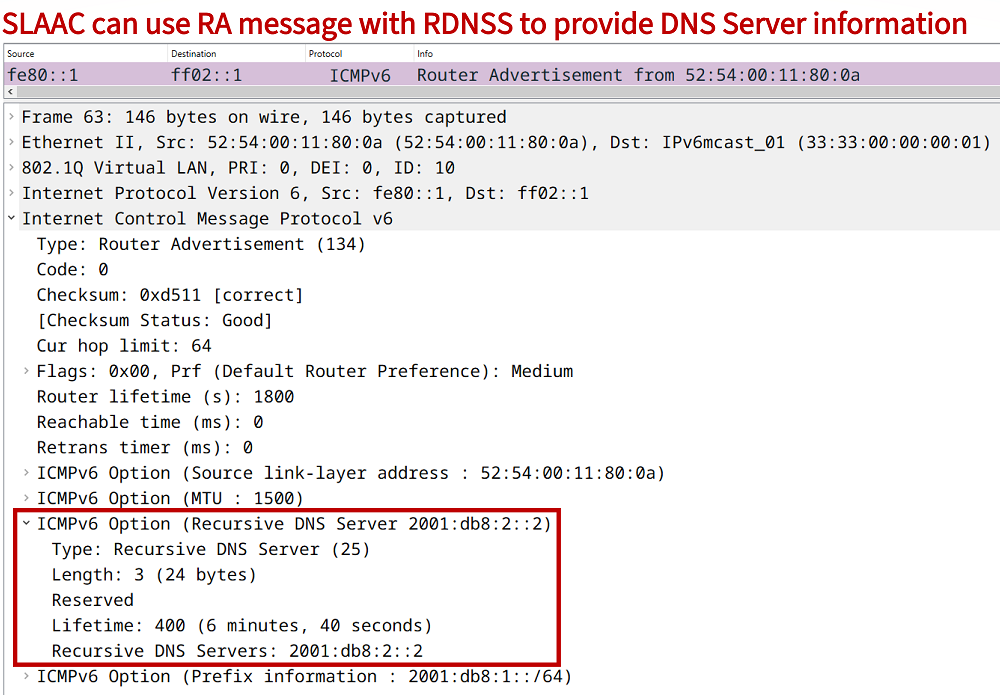
SLAAC can provide DNS Server information through the Recursive DNS Server (RDNSS) ICMPv6 Option. This means, an IPv6-capable gateway device (router or L3-switch) can send this information to clients who can then install the DNS Server address used for name resolution. The following example configuration can be added on a switch VLAN interface.
SW1#show run int vlan 10 | sec int
interface Vlan10
 description ** Switch Virtual Interface (SVI) for hosts in VLAN 10 **
 no ip address
 ipv6 address FE80::1 link-local
 ipv6 address 2001:DB8:1::1/64
 ipv6 nd ra dns server 2001:DB8:2::2
As a result of this configuration, newly generated Router Advertisement (RA) messages will contain the RDNSS ICMPv6 Option. The following packet capture displays such an RA message.
How to provide DNS with Stateless DHCPv6?
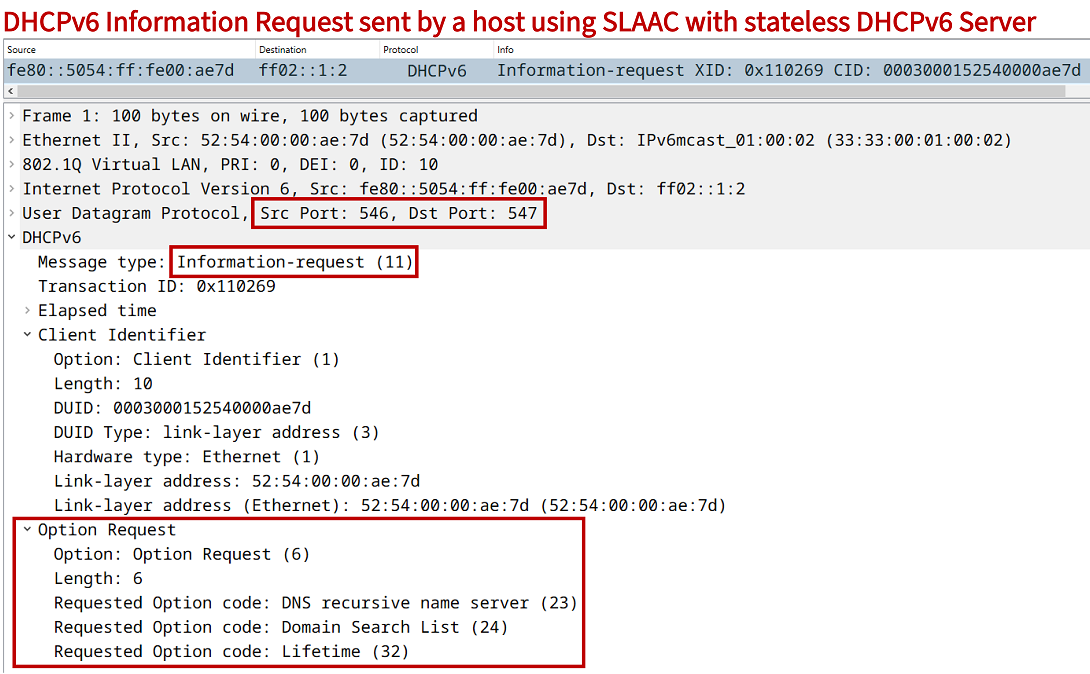
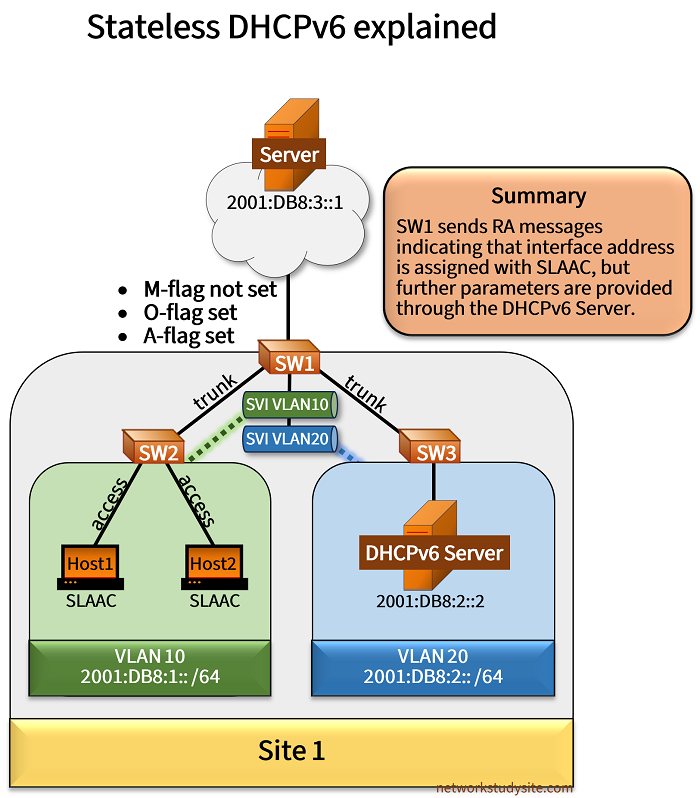
In the following example scenario, SLAAC with stateless DHCPv6 is used. This means, Host1 uses SLAAC to receive an IPv6 address from the gateway device SW1 (with RA message from interface VLAN 10). However, in the RA message SW1 signals to Host1 that additional configuration parameters can be found at the DHCPv6 Server. This is done by setting the Other Stateful Configuration Flag (O-flag).
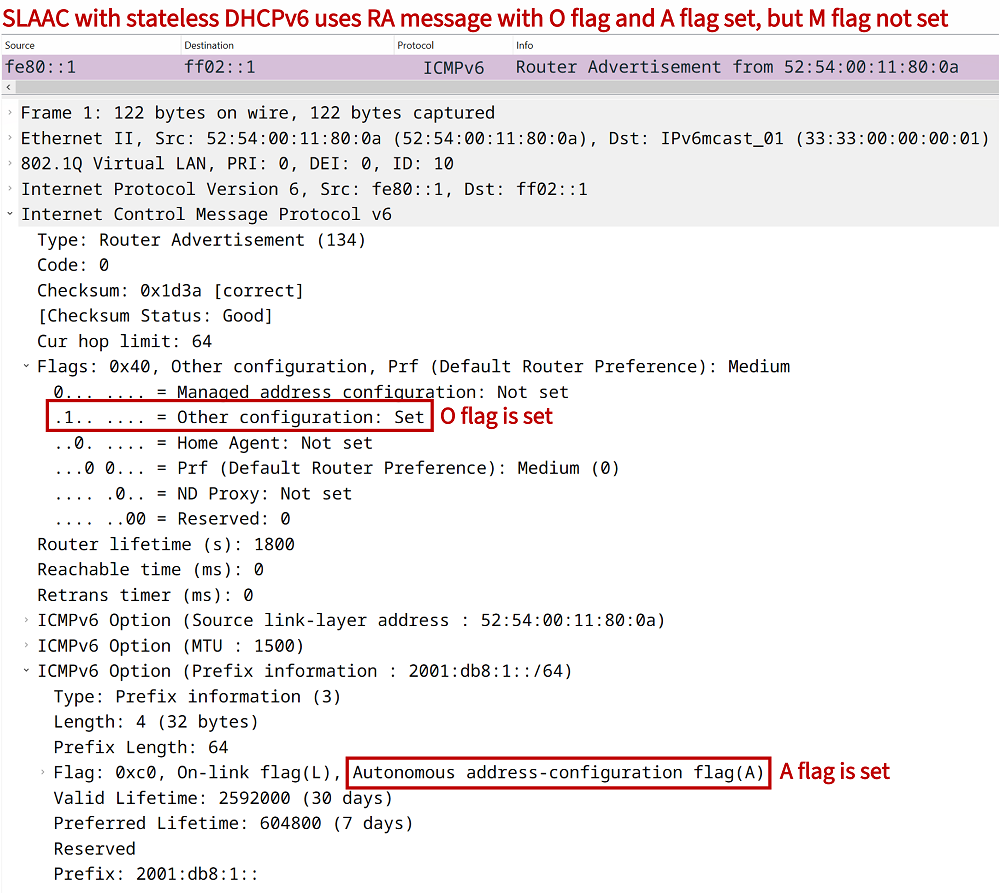
Therefore, Host1 queries for a DHCPv6 Server with an Information Request message. In this particular scenario, SW1 is a DHCPv6 relay agent, so the Information Request is forwarded to the DHCPv6 Server in VLAN 20. In order to configure SW1 as a DHCPv6 relay agent for VLAN 10, the command ipv6 dhcp relay destination 2001:DB8:2::2 is added under the SVI interface.
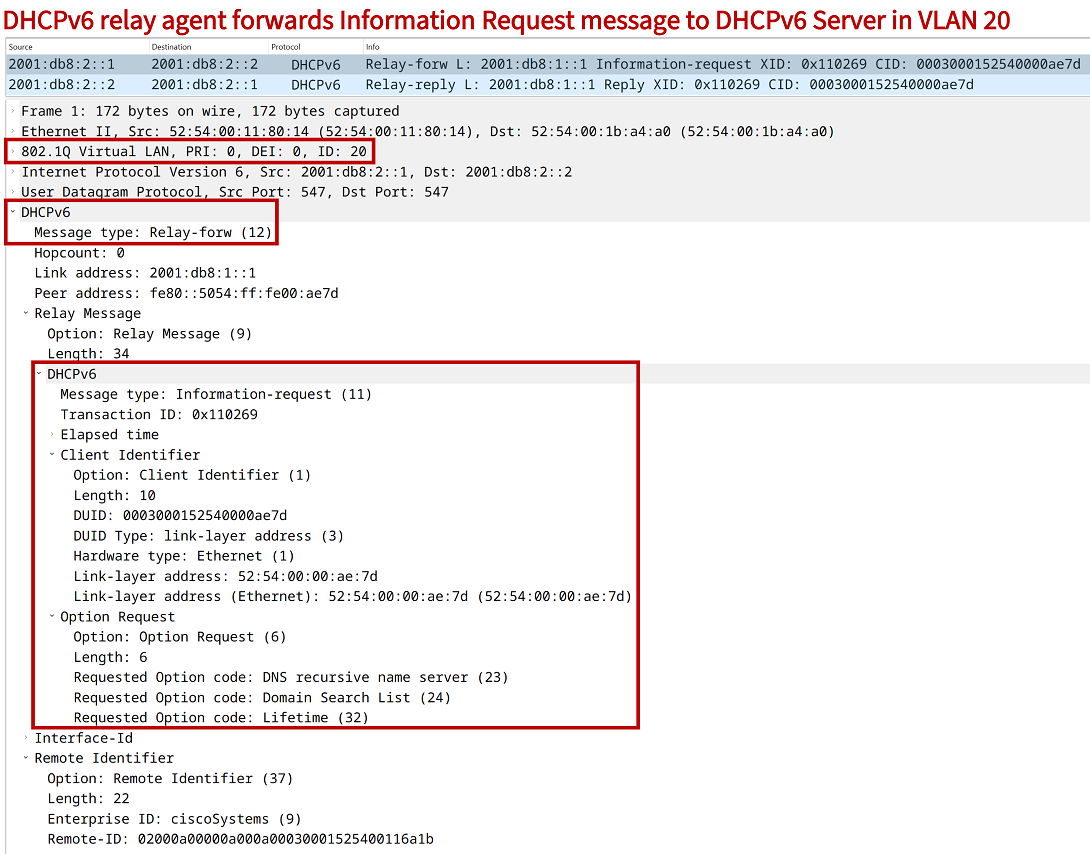
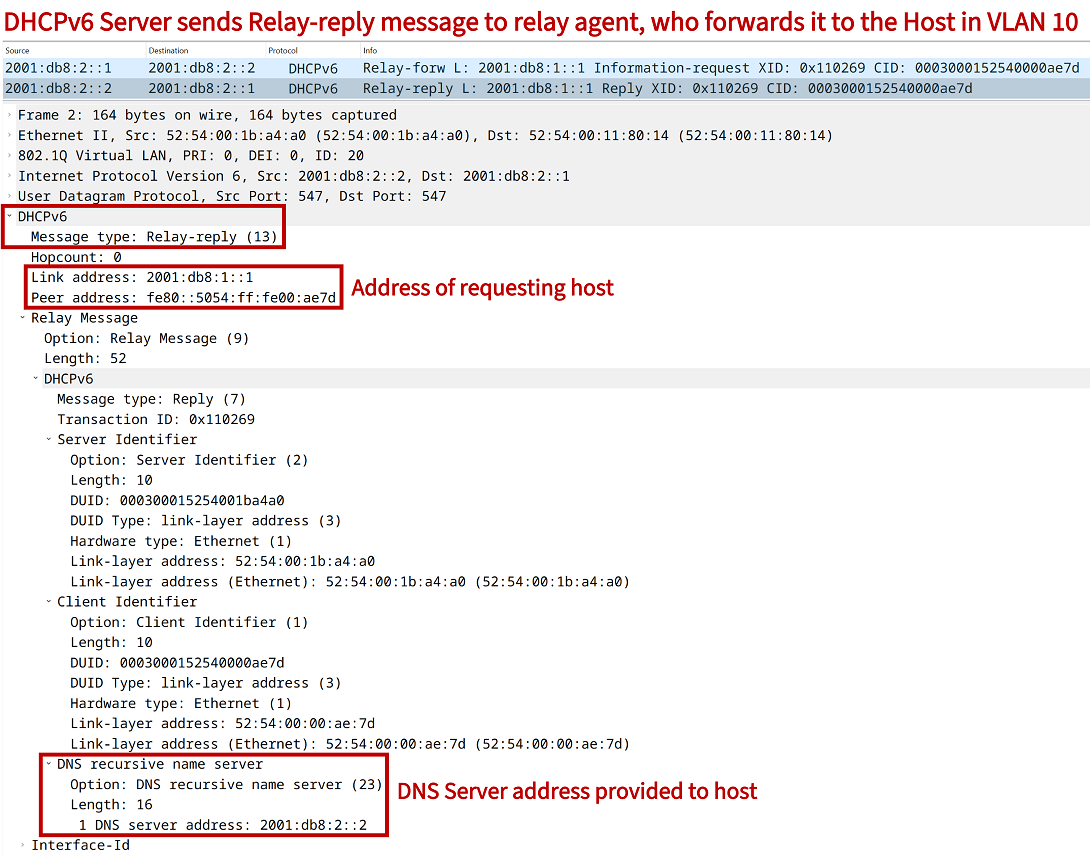
The DHCPv6 Server returns a Relay-reply message to SW1 who forwards it to the requesting Host1. The DHCPv6 Relay-reply contains the requested additional parameters, in this scenario the DNS Server address (which is configured on the same device as the DHCPv6 Server).
Configuration:
SW1
SW1#show run int vlan 10 | sec int
interface Vlan10
 description ** SVI for hosts in VLAN 10 **
 no ip address
 ipv6 address FE80::1 link-local
 ipv6 address 2001:DB8:1::1/64
 ipv6 nd other-config-flag
 ipv6 dhcp relay destination 2001:DB8:2::2

SW1#show run int vlan 20 | sec int
interface Vlan20
 description ** SVI for DNS Server in VLAN 20 **
 no ip address
 ipv6 address FE80::1 link-local
 ipv6 address 2001:DB8:2::1/64

SW1#show run int Gi0/0 | sec int
interface GigabitEthernet0/0
 description ** to SW2 **
 switchport trunk allowed vlan 10
 switchport trunk encapsulation dot1q
 switchport mode trunk
 negotiation auto

SW1#show run int Gi0/1 | sec int
interface GigabitEthernet0/1
 description ** to SW3 **
 switchport trunk allowed vlan 20
 switchport trunk encapsulation dot1q
 switchport mode trunk
 negotiation auto

SW1#show run int Gi0/2 | sec int
interface GigabitEthernet0/2
 description ** to Server **
 no switchport
 no ip address
 negotiation auto
 ipv6 address FE80::2 link-local
 ipv6 address 2001:DB8:3::2/64

SW1#show run | sec ^ipv6 uni
ipv6 unicast-routing
SW2
SW2#show run int Gi0/0 | sec int
interface GigabitEthernet0/0
 description ** to SW1 **
 switchport trunk allowed vlan 10
 switchport trunk encapsulation dot1q
 switchport mode trunk
 negotiation auto

SW2#show run int Gi0/1 | sec int
interface GigabitEthernet0/1
 description ** to Host1 **
 switchport access vlan 10
 switchport mode access
 negotiation auto

SW2#show run int Gi0/2 | sec int
interface GigabitEthernet0/2
 description ** to Host2 **
 switchport access vlan 10
 switchport mode access
 negotiation auto
SW3
SW3#show run int Gi0/0 | sec int
interface GigabitEthernet0/0
 description ** to DNS Server **
 switchport access vlan 20
 switchport mode access
 negotiation auto

SW3#show run int Gi0/1 | sec int
interface GigabitEthernet0/1
 description ** to SW1 **
 switchport trunk allowed vlan 20
 switchport trunk encapsulation dot1q
 switchport mode trunk
 negotiation auto
Host1
Host1#show run int Gi0/0 | sec int
interface GigabitEthernet0/0
 description ** to SW2 **
 no ip address
 duplex auto
 speed auto
 media-type rj45
 ipv6 address autoconfig default
 ipv6 enable
 ipv6 nd autoconfig prefix
DHCPv6 Server
DHCPv6-Server#show run | sec ^ipv6 dhcp
ipv6 dhcp pool IPv6-VLAN10
 address prefix 2001:DB8:1::/64 lifetime infinite infinite
 dns-server 2001:DB8:2::2

DHCPv6-Server#show run | sec ^ip host
ip host Server 2001:DB8:3::1

DHCPv6-Server#show run | sec ^ip dns
ip dns server

DHCPv6-Server#show run int Gi0/0 | sec int
interface GigabitEthernet0/0
 description ** to SW3 **
 no ip address
 duplex auto
 speed auto
 media-type rj45
 ipv6 address FE80::2 link-local
 ipv6 address 2001:DB8:2::2/64
 ipv6 dhcp server IPv6-VLAN10

DHCPv6-Server#show run | sec ^ipv6 route
ipv6 route ::/0 2001:DB8:2::1

DHCPv6-Server#show run | sec ^ipv6 uni
ipv6 unicast-routing
Server
Server#show run int Gi0/0 | sec int
interface GigabitEthernet0/0
 description ** to SW1 **
 no ip address
 duplex auto
 speed auto
 media-type rj45
 ipv6 address FE80::1 link-local
 ipv6 address 2001:DB8:3::1/64

Server#show run | sec ^ipv6 route
ipv6 route ::/0 2001:DB8:3::2
Host1#ping Server
Translating "Server"...domain server (2001:DB8:2::2) [OK]

Type escape sequence to abort.
Sending 5, 100-byte ICMP Echos to 2001:DB8:3::1, timeout is 2 seconds:
!!!!!
Success rate is 100 percent (5/5), round-trip min/avg/max = 3/3/4 ms


Host1#trace Server
Type escape sequence to abort.
Tracing the route to Server (2001:DB8:3::1)

  1 2001:DB8:1::1 3 msec 2 msec 3 msec
  2 Server (2001:DB8:3::1) 3 msec 4 msec 3 msec
As a result of this process, Host1 can now reach the Server outside of Site 1 by using its hostname. In practice, Host1 queries the DNS Server for the requested AAAA record, and the DNS Server returns the necessary IPv6 address.
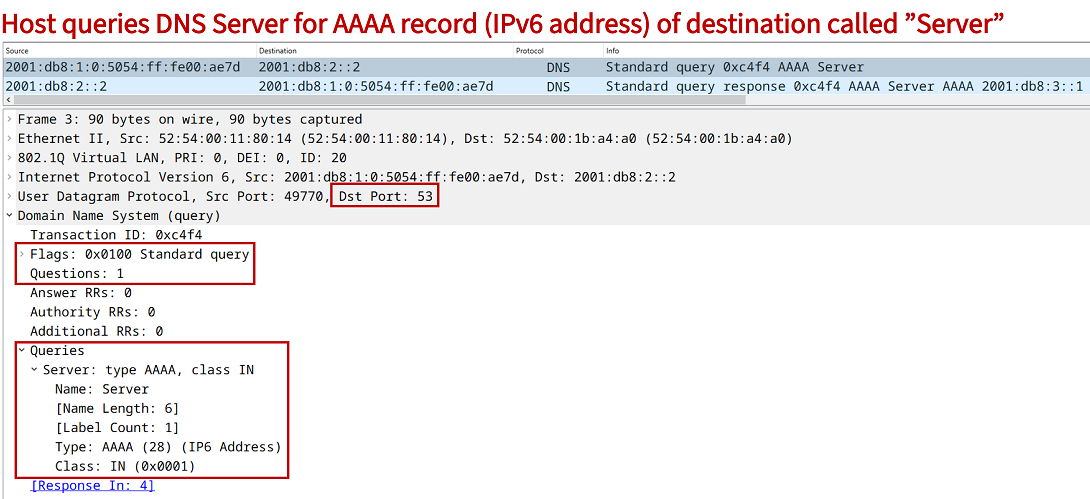
The important aspect of this process is that the DHCPv6 Server does not keep track of any IPv6 client addresses in a binding table, there is no lease time managed by the DHCPv6 Server. Consequently, this process is called stateless DHCPv6 with SLAAC for interface addressing.
What is IPv6 RA Router Preference?
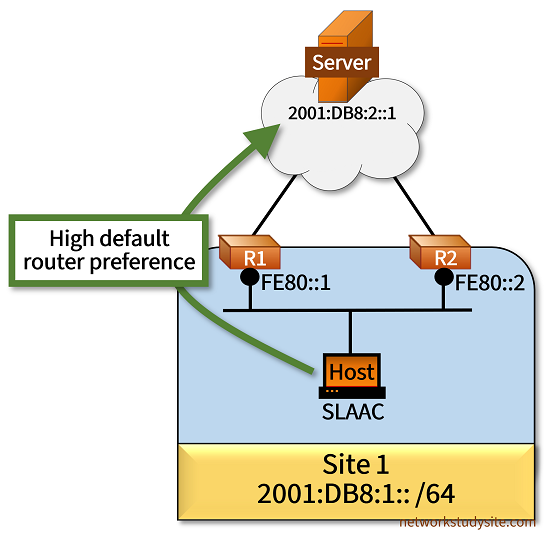
In the following scenario the Host uses SLAAC to receive an IPv6 address and also receives a default route from both of the gateway routers (R1 and R2). In other words, R1 and R2 send Router Advertisement (RA) messages on the Site 1 LAN segment. This means, the Host can decide which default route to prefer.
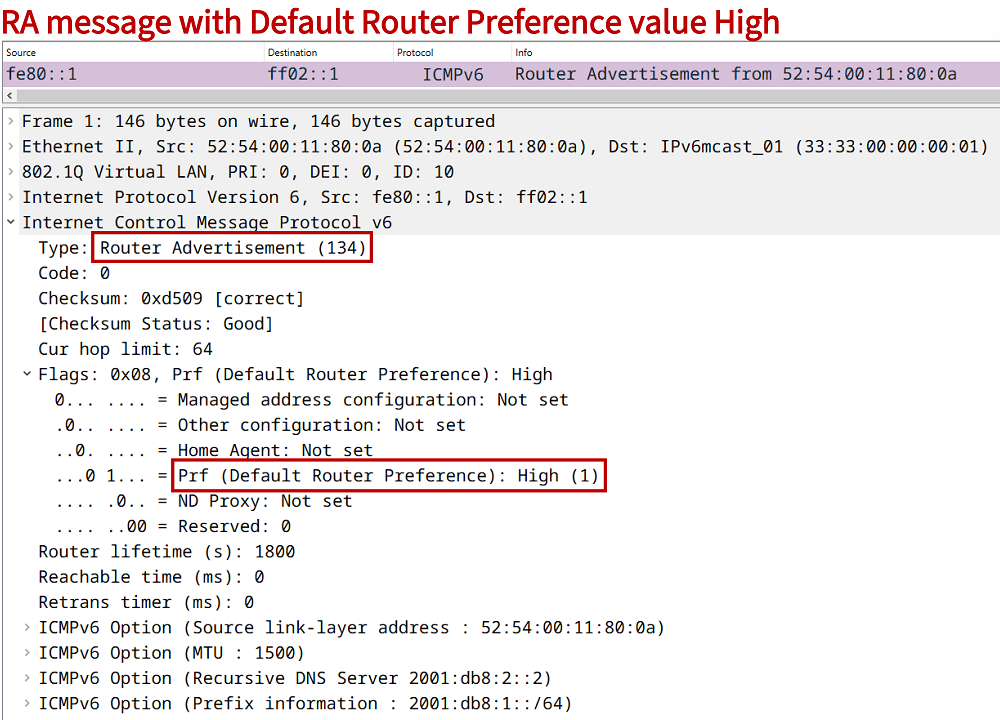
To influence the decision, the Default Router Preference can be adjusted using the value Low, Medium (this the default value), or High. Thus, R1 sends RA messages with the Default Router Preference value (Prf field) High. This makes the Host prefer R1 as the primary default gateway.
Configuration:
R1
R1#show run int Gi0/0 | sec int
interface GigabitEthernet0/0
 description ** to Host **
 no ip address
 duplex auto
 speed auto
 media-type rj45
 ipv6 address FE80::1 link-local
 ipv6 address 2001:DB8:1::1/64
 ipv6 nd router-preference High
 ospfv3 10 ipv6 area 0

R1#show run int Gi0/1 | sec int
interface GigabitEthernet0/1
 description ** to Server **
 no ip address
 duplex auto
 speed auto
 media-type rj45
 ipv6 address FE80::1 link-local
 ipv6 address 2001:DB8:10::1/64
 ospfv3 network point-to-point
 ospfv3 10 ipv6 area 0

R1#show run | sec ^router
router ospfv3 10
 router-id 1.1.1.1
 !
 address-family ipv6 unicast
  passive-interface GigabitEthernet0/0
 exit-address-family
R2
R2#show run int Gi0/0 | sec int
interface GigabitEthernet0/0
 description ** to Host **
 no ip address
 duplex auto
 speed auto
 ipv6 address FE80::2 link-local
 ipv6 address 2001:DB8:1::2/64
 ipv6 nd router-preference Low
 ospfv3 10 ipv6 area 0

R2#show run int Gi0/1 | sec int
interface GigabitEthernet0/1
 description ** to Server **
 no ip address
 duplex auto
 speed auto
 ipv6 address FE80::1 link-local
 ipv6 address 2001:DB8:20::1/64
 ospfv3 network point-to-point
 ospfv3 10 ipv6 area 0

R2#show run | sec ^router
router ospfv3 10
 router-id 2.2.2.2
 !
 address-family ipv6 unicast
  passive-interface GigabitEthernet0/0
 exit-address-family
Host
Host1#show run int Gi0/0 | sec int
interface GigabitEthernet0/0
 description ** to SW2 **
 no ip address
 duplex auto
 speed auto
 media-type rj45
 ipv6 address autoconfig default
 ipv6 enable
 ipv6 nd autoconfig prefix
Server
Server#show run int Gi0/0 | sec int
interface GigabitEthernet0/0
 description ** to R1 and R2 **
 no ip address
 duplex auto
 speed auto
 media-type rj45
 ipv6 address FE80::1 link-local
 ipv6 address 2001:DB8:2::1/64

Server#show run | sec ^ipv6 route
ipv6 route ::/0 GigabitEthernet0/0 2001:DB8:2::2
Host1#trace 2001:DB8:2::1
Type escape sequence to abort.
Tracing the route to 2001:DB8:2::1

  1 2001:DB8:1::1 2 msec 2 msec 2 msec
  2 2001:DB8:10::2 3 msec 2 msec 2 msec


Host1#show ipv6 route
IPv6 Routing Table - default - 6 entries
Codes: C - Connected, L - Local, S - Static, U - Per-user Static route
       B - BGP, HA - Home Agent, MR - Mobile Router, R - RIP
       H - NHRP, I1 - ISIS L1, I2 - ISIS L2, IA - ISIS interarea
       IS - ISIS summary, D - EIGRP, EX - EIGRP external, NM - NEMO
       ND - ND Default, NDp - ND Prefix, DCE - Destination, NDr - Redirect
       RL - RPL, O - OSPF Intra, OI - OSPF Inter, OE1 - OSPF ext 1
       OE2 - OSPF ext 2, ON1 - OSPF NSSA ext 1, ON2 - OSPF NSSA ext 2
       la - LISP alt, lr - LISP site-registrations, ld - LISP dyn-eid
       lA - LISP away, a - Application
ND  ::/0 [2/0]
     via FE80::1, GigabitEthernet0/0
NDp 2001:DB8:1::/64 [2/0]
     via GigabitEthernet0/0, directly connected
L   2001:DB8:1:0:5054:FF:FE1F:85D7/128 [0/0]
     via GigabitEthernet0/0, receive
NDp 2001:DB8:10::/64 [2/0]
     via GigabitEthernet0/0, directly connected
L   2001:DB8:10:0:5054:FF:FE1F:85D7/128 [0/0]
     via GigabitEthernet0/0, receive
L   FF00::/8 [0/0]
     via Null0, receive
The following capture shows an example Router Advertisement message sent in VLAN 10, with the Default Router Preference set to "High".
Can you disable sending IPv6 RA messages?
Yes, a Cisco router can be configured not to send any NDP Router Advertisement (RA) messages with the ipv6 nd ra suppress all interface level command. Once configured, the router does not advertise RA messages periodically and ignores any Router Solicitation (RS) messages received from SLAAC clients.
If however the command ipv6 nd ra suppress is configured, then a router still responds to RS messages with an RA message, and only the periodic RA messages are disabled. Note there are many scenarios where periodic RA messages are not needed, for example on inter-AS interconnections or on IPv6-enabled Service Provider core routers that have point-to-point high-speed links.
Stateful DHCPv6 explained and configured
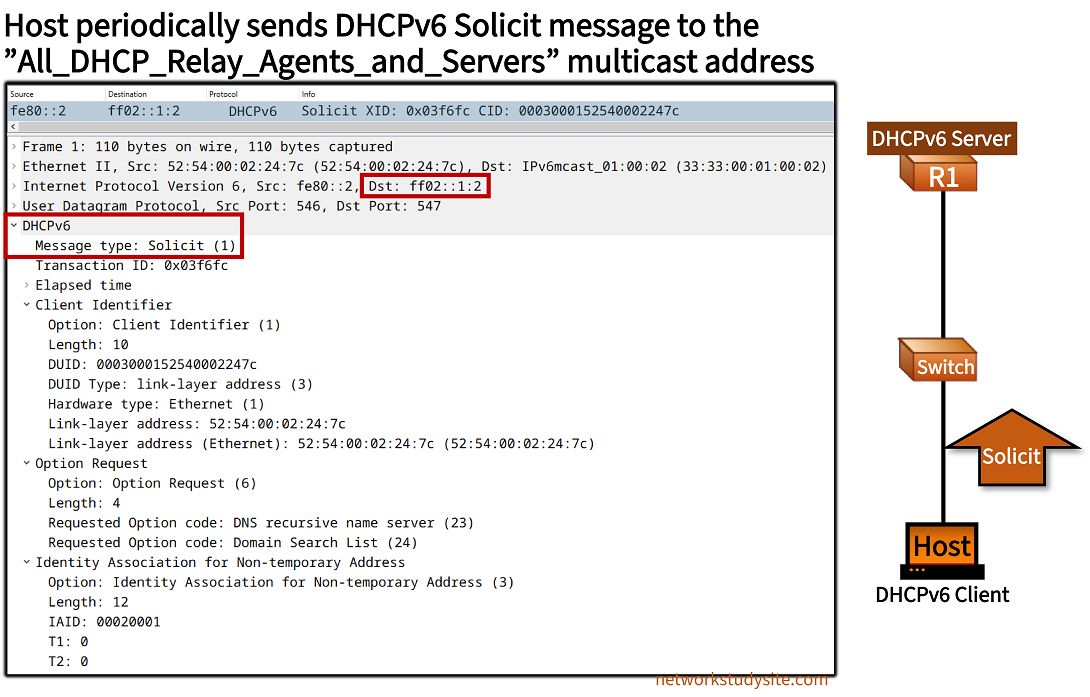
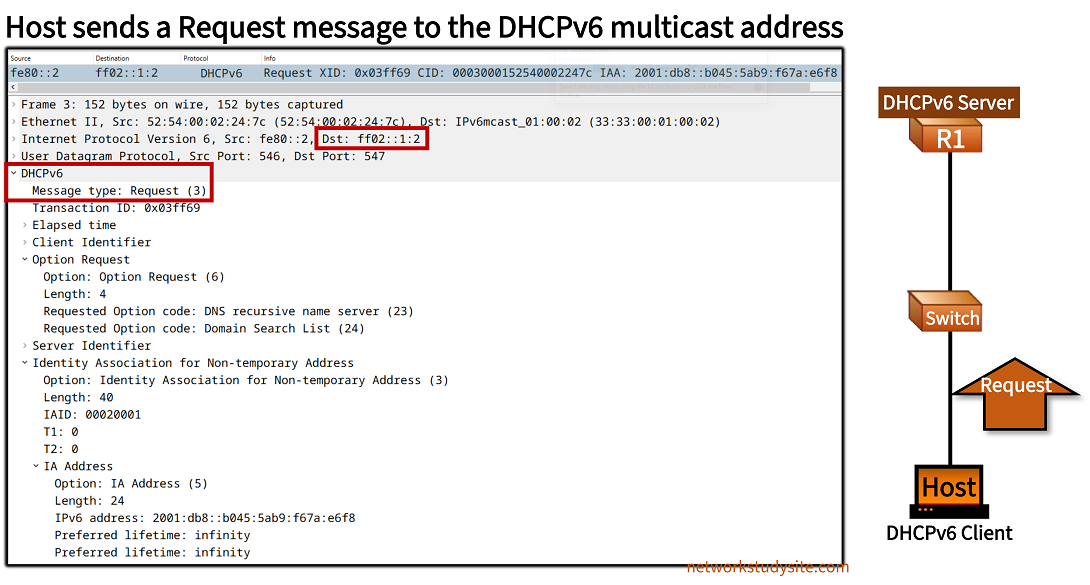
A stateful DHCPv6 server allocates IPv6 addresses from a configured pool, and tracks the leased IPv6 host addresses in a binding table. This makes DHCPv6 similar to DHCPv4. A notable difference is that DHCPv6 uses different message types, and operates over UDP port 546 (for clients) and 547 (for servers). During the message exchange, the client sends packets to the reserved DHCPv6 multicast address FF02::1:2.

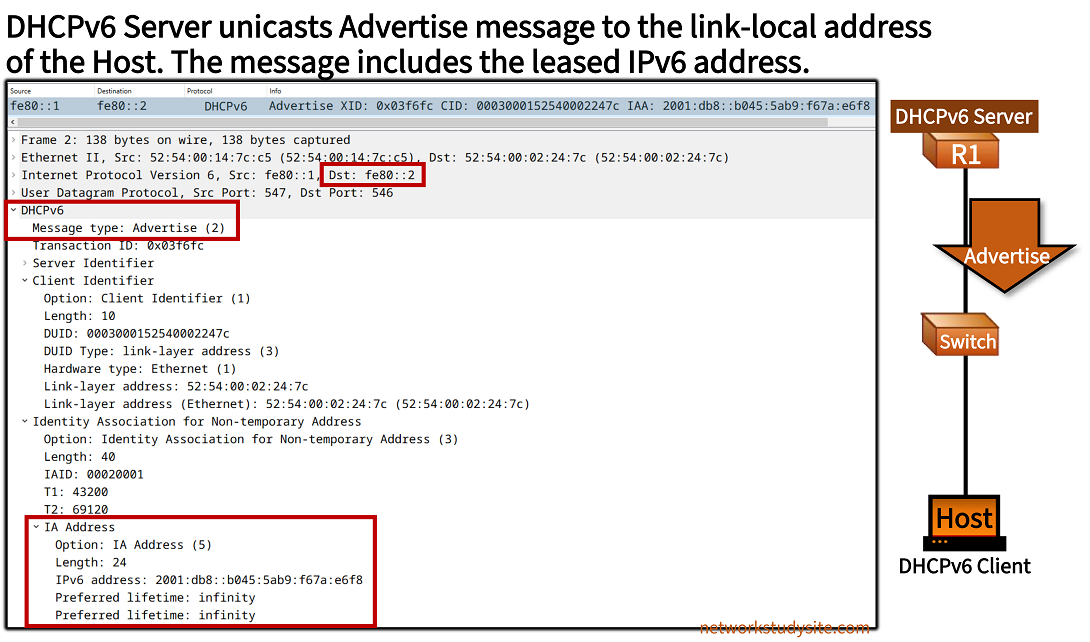
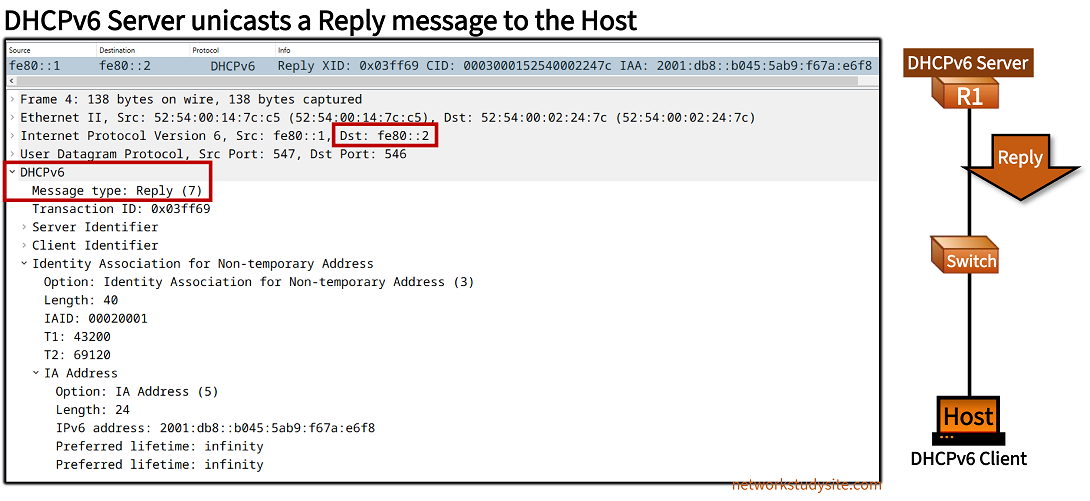
The entire DHCPv6 exchange between the Host and R1 consists of 4 messages: Solicit - Advertise - Request - Reply. At the end of the exchange a DHCPV6 client receives its IPv6 address (and any further configuration details) from a DHCPv6 server which tracks the leased IP address in its binding table. Therefore, this solution is called stateful DHCPv6.
Configuration:
R1 (DHCPv6 Server)
R1#show run | sec ^ipv6 uni
ipv6 unicast-routing

R1#show run | sec ^ipv6 dhcp
ipv6 dhcp pool EXAMPLE-DHCPv6
 address prefix 2001:DB8::/64 lifetime infinite infinite

R1#show run int Gi0/0 | sec int
interface GigabitEthernet0/0
 description ** to Host **
 no ip address
 duplex auto
 speed auto
 media-type rj45
 ipv6 address FE80::1 link-local
 ipv6 address 2001:DB8::1/64
 ipv6 nd managed-config-flag
 ipv6 dhcp server EXAMPLE-DHCPv6
Host
Host#show run int Gi0/0 | sec int
interface GigabitEthernet0/0
 description ** to Host **
 no ip address
 duplex auto
 speed auto
 media-type rj45
 ipv6 address dhcp
 ipv6 address FE80::2 link-local
 ipv6 enable
R1#show ipv6 dhcp binding
Client: FE80::2
  DUID: 000300015254000D2405
  Username : unassigned
  VRF : default
  IA NA: IA ID 0x00020001, T1 43200, T2 69120
    Address: 2001:DB8::5458:2AB4:C613:2D92          « DHCPv6 binding table shows the address leased to the Host
            preferred lifetime INFINITY, , valid lifetime INFINITY,


R1#show ipv6 interface Gi0/0
GigabitEthernet0/0 is up, line protocol is up
  IPv6 is enabled, link-local address is FE80::1
  No Virtual link-local address(es):
  Description: ** to Host **
  Global unicast address(es):
    2001:DB8::1, subnet is 2001:DB8::/64
  Joined group address(es):
    FF02::1
    FF02::2
    FF02::1:2
    FF02::1:FF00:1
    FF05::1:3
  MTU is 1500 bytes
  ICMP error messages limited to one every 100 milliseconds
  ICMP redirects are enabled
  ICMP unreachables are sent
  ND DAD is enabled, number of DAD attempts: 1
  ND reachable time is 30000 milliseconds (using 30000)
  ND advertised reachable time is 0 (unspecified)
  ND advertised retransmit interval is 0 (unspecified)
  ND router advertisements are sent every 200 seconds
  ND router advertisements live for 1800 seconds
  ND advertised default router preference is Medium
  Hosts use DHCP to obtain routable addresses.


Host#show ipv6 int brief
GigabitEthernet0/0     [up/up]
    FE80::2
    2001:DB8::5458:2AB4:C613:2D92
GigabitEthernet0/1     [administratively down/down]
    unassigned
GigabitEthernet0/2     [administratively down/down]
    unassigned
GigabitEthernet0/3     [administratively down/down]
    unassigned


Host#show ipv6 interface Gi0/0
GigabitEthernet0/0 is up, line protocol is up
  IPv6 is enabled, link-local address is FE80::2
  No Virtual link-local address(es):
  Description: ** to R1 **
  Global unicast address(es):
    2001:DB8::5458:2AB4:C613:2D92, subnet is 2001:DB8::5458:2AB4:C613:2D92/128
  Joined group address(es):
    FF02::1
    FF02::1:FF00:2
    FF02::1:FF13:2D92
  MTU is 1500 bytes
  ICMP error messages limited to one every 100 milliseconds
  ICMP redirects are enabled
  ICMP unreachables are sent
  ND DAD is enabled, number of DAD attempts: 1
  ND reachable time is 30000 milliseconds (using 30000)
  ND NS retransmit interval is 1000 milliseconds
  Default router is FE80::1 on GigabitEthernet0/0
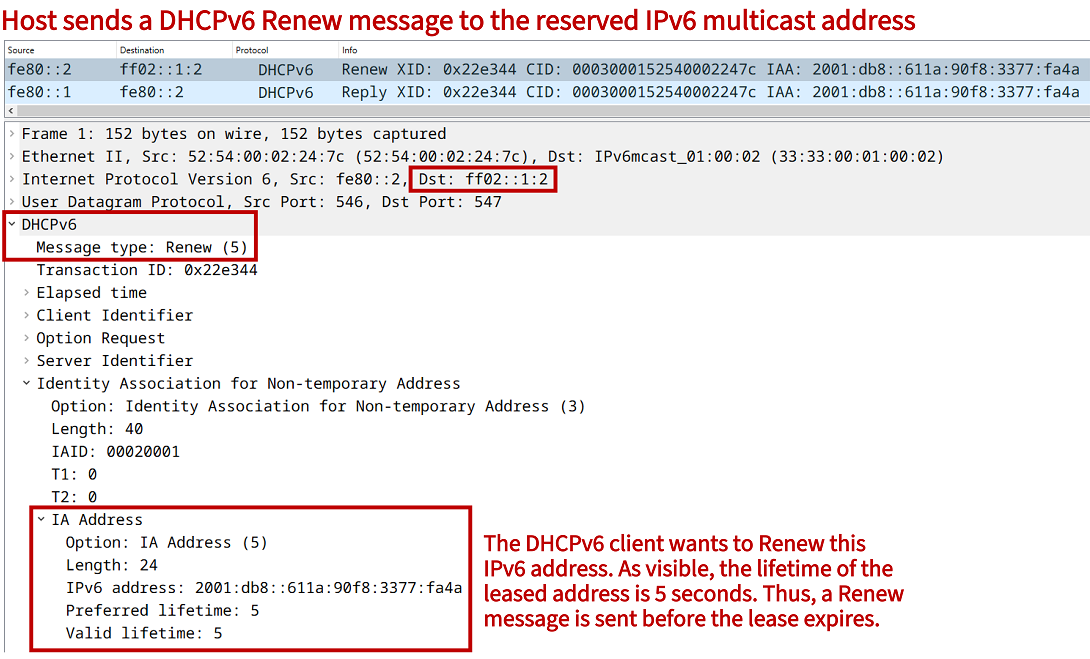
Before the leased IPv6 address lifetime expires, the Host sends a DHCPv6 Renew message (shown below). The Renew message is sent to the DHCPv6 multicast address, and the DHCPv6 Server sends a unicast Reply message to confirm the address renewal.
Stateful DHCPv6 rapid-commit
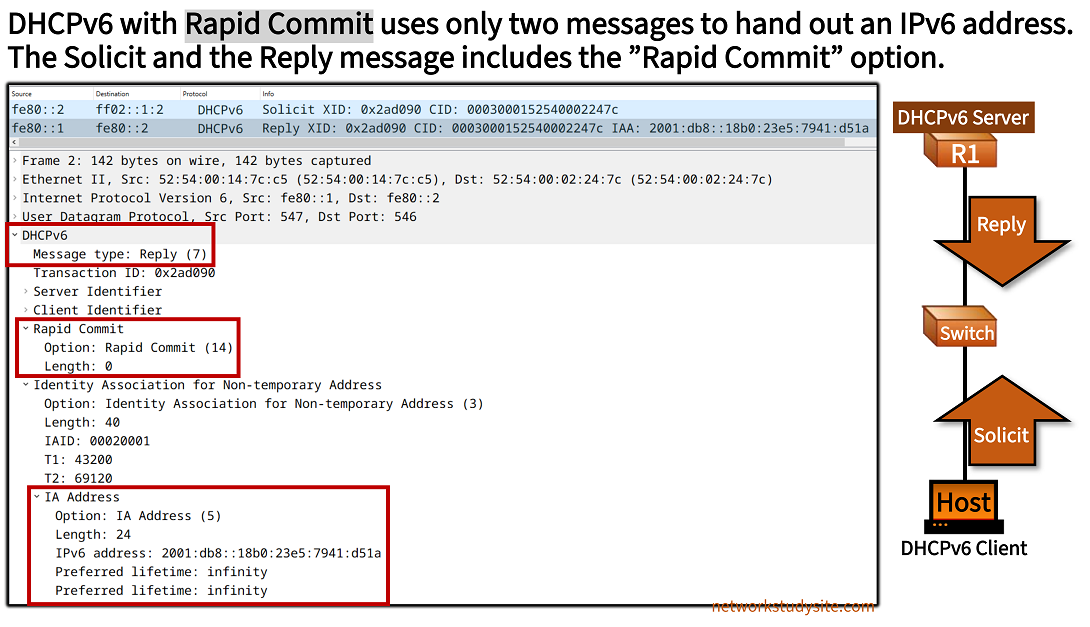
There is an option to reduce the number of DHCPv6 messages transmitted between the DHCPv6 client and the server. By configuring the rapid-commit keyword on the client and on the server, only two DHCPv6 messages are exchanged (instead of four) in order to receive an IPv6 address. These are the DHCP Solicit and Reply messages show in the following image.
Configuration:
R1 (DHCPv6 Server)
R1#show run | sec ^ipv6 uni
ipv6 unicast-routing

R1#show run | sec ^ipv6 dhcp
ipv6 dhcp pool EXAMPLE-DHCPv6
 address prefix 2001:DB8::/64 lifetime 86400 86400

R1#show run int Gi0/0 | sec int
interface GigabitEthernet0/0
 description ** to Host **
 no ip address
 duplex auto
 speed auto
 media-type rj45
 ipv6 address FE80::1 link-local
 ipv6 address 2001:DB8::1/64
 ipv6 nd managed-config-flag
 ipv6 dhcp server EXAMPLE-DHCPv6 rapid-commit
Host
Host#show run int Gi0/0 | sec int
interface GigabitEthernet0/0
 description ** to R1 **
 no ip address
 duplex auto
 speed auto
 ipv6 address dhcp rapid-commit
 ipv6 address FE80::2 link-local
 ipv6 enable
R1#show ipv6 dhcp binding
Client: FE80::2
  DUID: 000300015254000D2405
  Username : unassigned
  VRF : default
  IA NA: IA ID 0x00020001, T1 43200, T2 69120
    Address: 2001:DB8::8C0A:9452:8744:5A0D
            preferred lifetime 86400, valid lifetime 86400
            expires at Nov 11 2024 08:33 PM (85692 seconds)