OSPF Authentication Methods Explained and Configured
Table of Contents
Jump to section:
- • What is OSPF authentication?
- • OSPF cleartext simple password authentication
- • OSPF message digest interface-only configuration
- • OSPF message digest router process configuration
- • OSPF Virtual Link authentication
- • OSPF key chain SHA cryptographic hash authentication
- • OSPFv3 IPSec AH with traditional configuration
- • OSPFv3 IPSec AH with new-style configuration
- • OSPFv3 Authentication Trailer configuration
- • Download section
- What is OSPF authentication? ‹
- OSPF cleartext simple password authentication ‹
- OSPF message digest interface-only configuration ‹
- OSPF message digest router process configuration ‹
- OSPF Virtual Link authentication ‹
- OSPF key chain SHA cryptographic hash authentication ‹
- OSPFv3 IPSec AH with traditional configuration ‹
- OSPFv3 IPSec AH with new-style configuration ‹
- OSPFv3 Authentication Trailer configuration ‹
- Download section ‹
What is OSPF authentication?
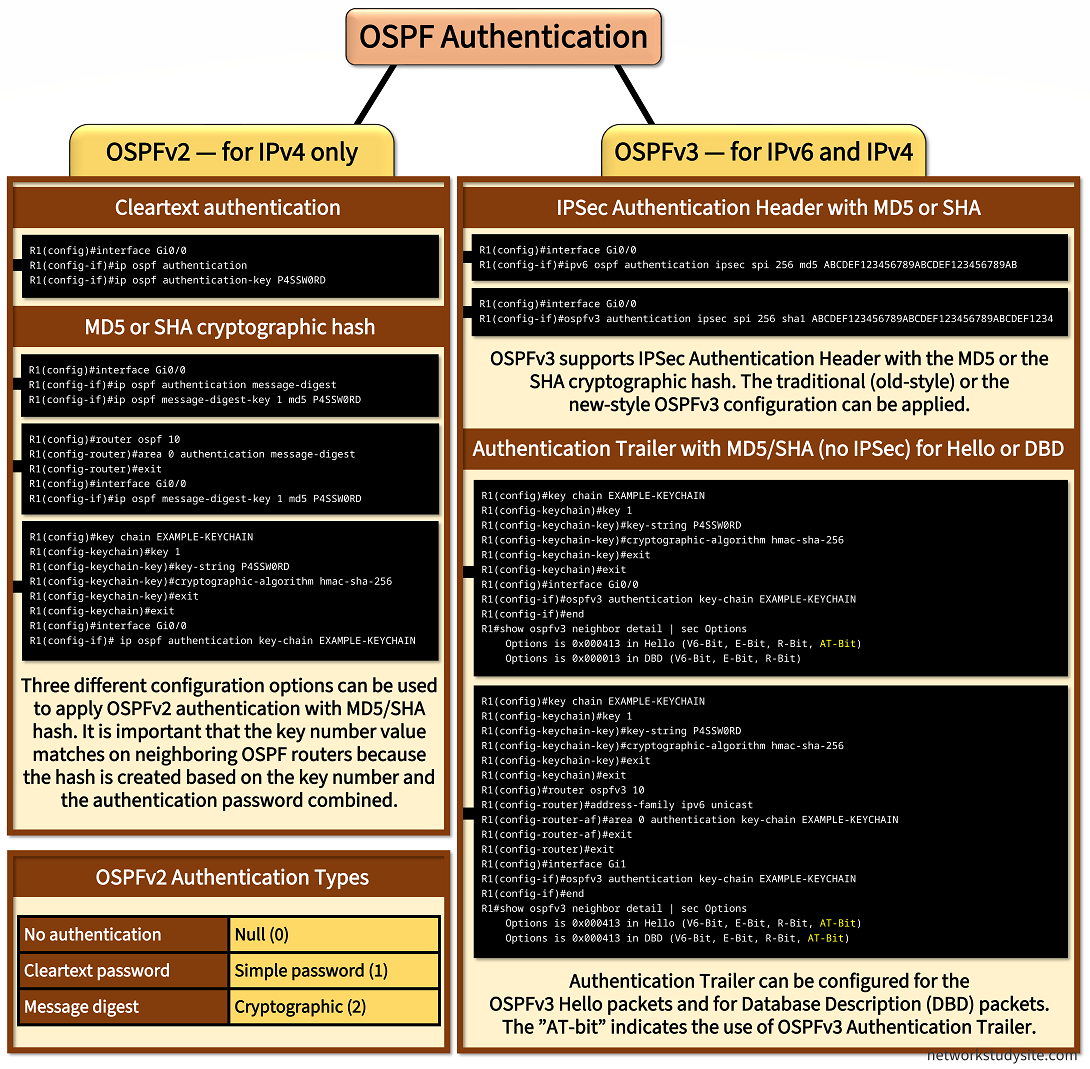
OSPF authentication secures neighborships and routing updates. The authentication feature is added with all OSPFv2 control plane packets. The OSPFv2 packet header contains details about the authentication type used, and the pre-shared key. The authentication type can be Null (for no authentication), cleartext, or Message Digest.
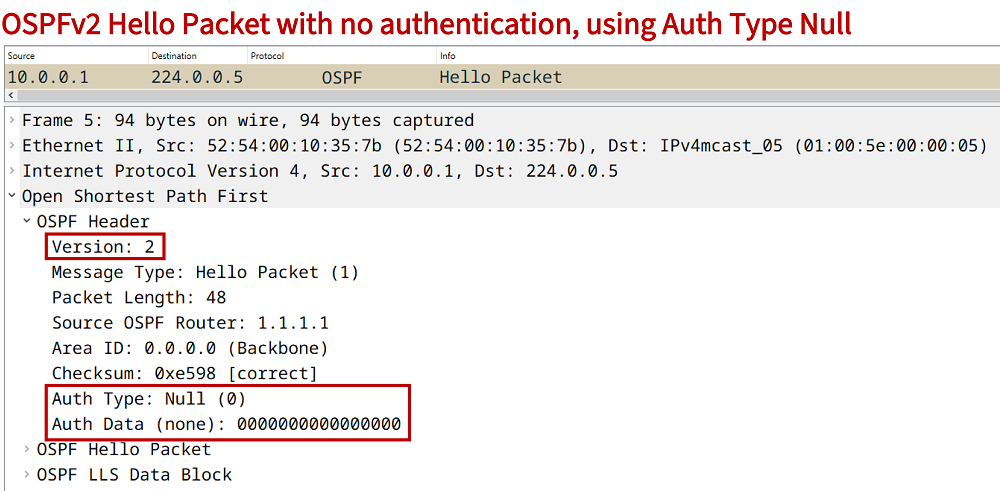
If there is no authentication configured between OSPFv2 neighbors, the authentication type is set to Null, this is shown in the following packet capture. The authentication fields are present with all OSPFv2 control plane packets, even if there is no authentication configured.
On the other hand, OSPFv3 relies on the IPSec Authentication Header and the Authentication Trailer for security. When configured, both methods insert additional fields into the OSPFv3 control plane messages. The following packet capture shows the IPSec Authentication Header which is encapsulated after the IPv6 header.

Since OSPFv3 Authentication Header uses IPSec for security the result of the applied configuration can be viewed with cryptographic show commands. These are visible in the following router outputs.
R1#show crypto sockets

Number of Crypto Socket connections 1

   Gi1 Peers: (local): ::
              (remote): ::
       Local Ident (addr/plen/port/prot): (FE80::/10/0/89)         « OSPF uses IP Protocol 89
       Remote Ident (addr/plen/port/prot): (::/0/0/89)
       IPSec Profile: "OSPFv3-256"
       Socket State: Open
       Client: "OSPFv3" (Client State: Active)
Crypto Sockets in Listen state:


R1#show crypto ipsec policy
Crypto IPsec client security policy data

Policy name:      OSPFv3-256
Policy refcount:  1
Inbound  AH SPI:  256 (0x100)
Outbound AH SPI:  256 (0x100)
Transform set:    ah-sha-hmac
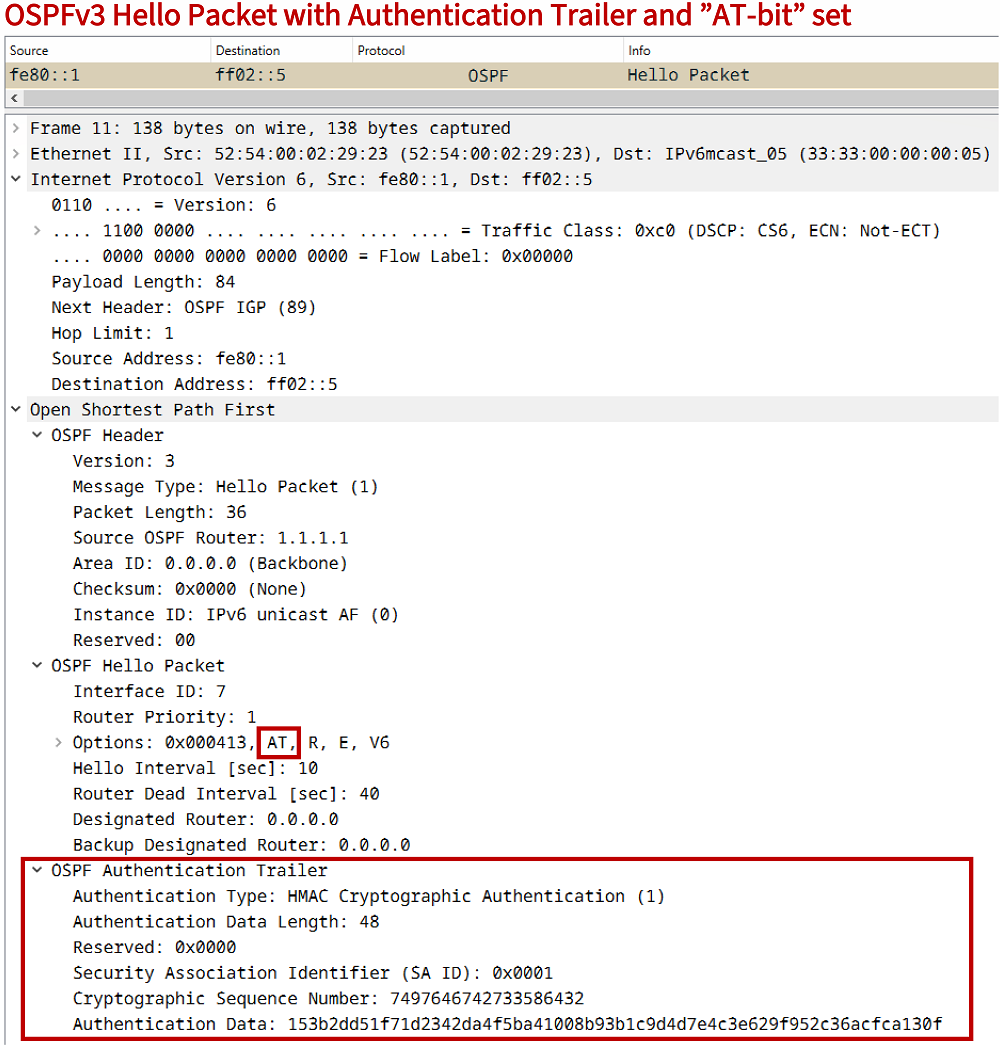
Meanwhile, an OSPFv3 Authentication Trailer is inserted after the OSPFv3 Hello Packet and does not use IPSec. The following packet capture shows an OSPFv3 Authentication Trailer using a cryptographic hash algorithm. Notice that within the Hello packet the "AT-bit" is set to indicate the use of the Authentication Trailer.
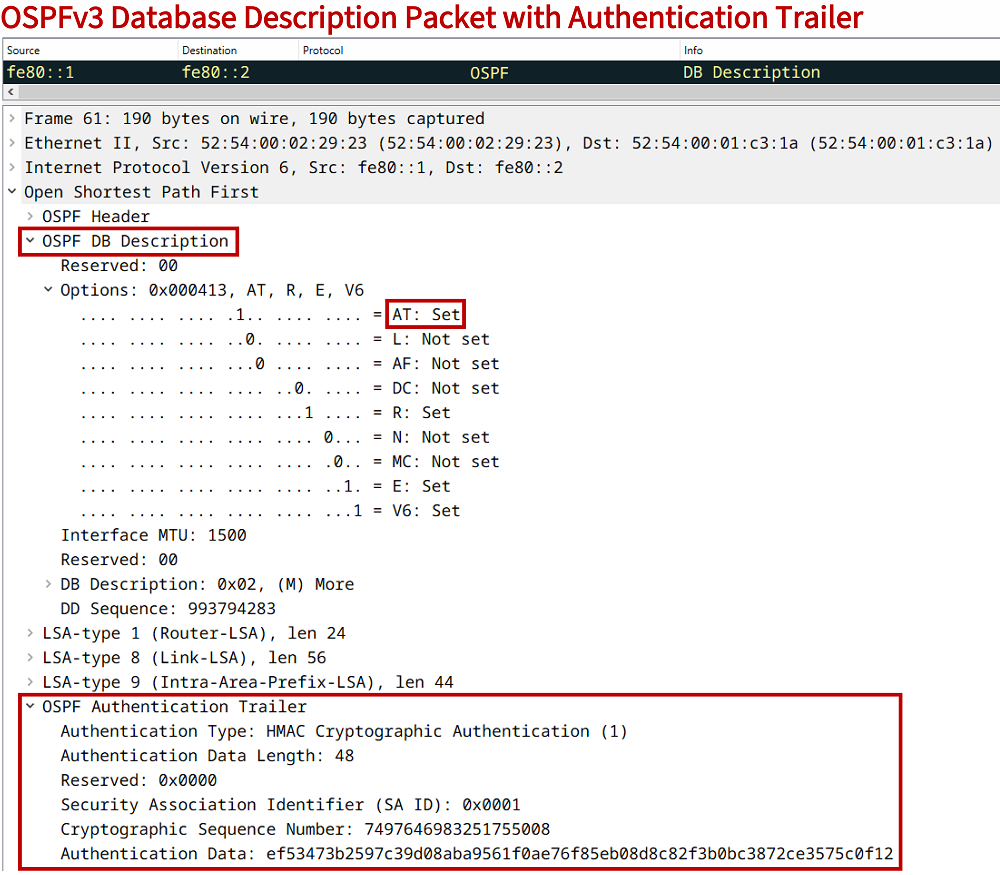
Furthermore, the OSPFv3 Authentication Trailer feature can be enabled for Database Description packets. So, unlike with OSPFv2 where the authentication field is added to all OSPF control plane packets (via the OSPF Header), the OSPFv3 Authentication Trailer can be added to Hello packets and Database Description (DBD) packets. The following capture shows a DBD packet with the Authentication Trailer.
An important aspect of configuring authentication with a key-chain is that a whitespace counts as a valid keystring character. This means, two seemingly identical passwords may not be valid for authentication if one of the keystrings contains an extra whitespace.
OSPF cleartext simple password authentication
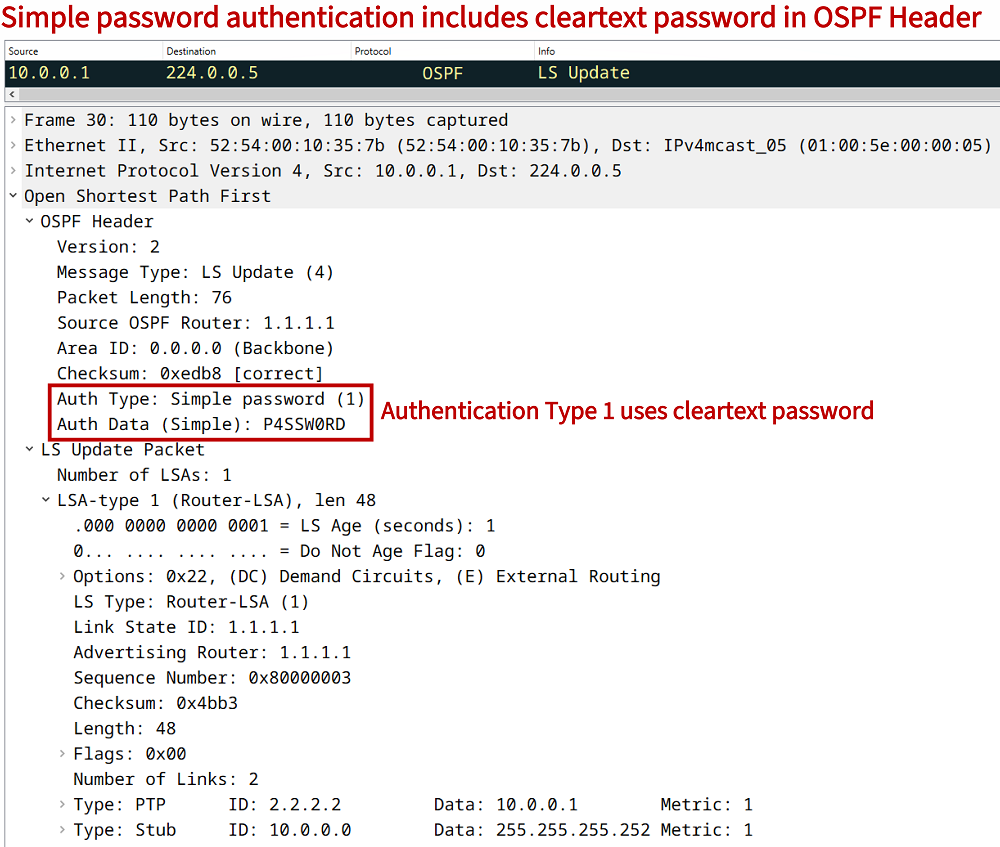
In the following example scenario a simple password authentication method is used between R1 and R2. This means, the OSPF control plane packet headers include the password in cleartext. This method is also called authentication type 1.
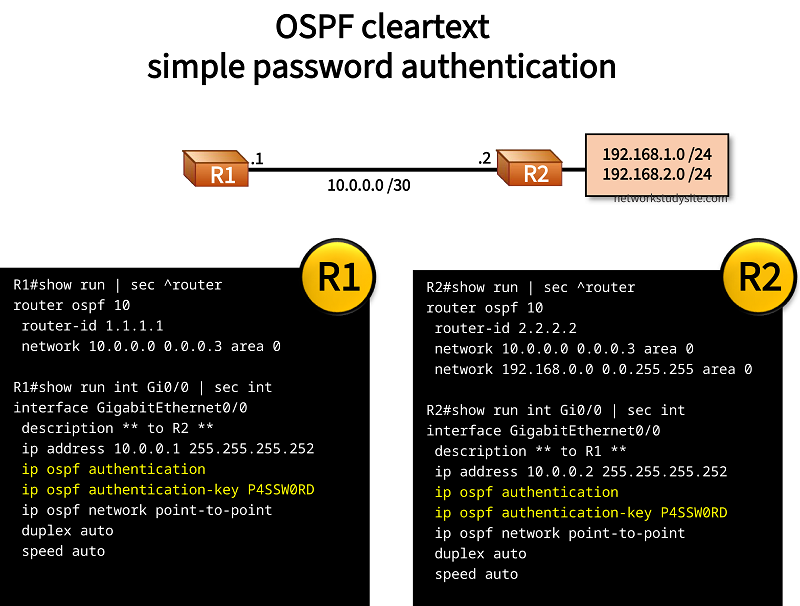
Configuration:
R1
R1#show run | sec ^router
router ospf 10
 router-id 1.1.1.1
 network 10.0.0.0 0.0.0.3 area 0

R1#show run int Gi0/0 | sec int
interface GigabitEthernet0/0
 description ** to R2 **
 ip address 10.0.0.1 255.255.255.252
 ip ospf authentication
 ip ospf authentication-key P4SSW0RD
 ip ospf network point-to-point
 duplex auto
 speed auto
R2
R2#show run | sec ^router
router ospf 10
 router-id 2.2.2.2
 network 10.0.0.0 0.0.0.3 area 0
 network 192.168.0.0 0.0.255.255 area 0

R2#show run int Gi0/0 | sec int
interface GigabitEthernet0/0
 description ** to R1 **
 ip address 10.0.0.2 255.255.255.252
 ip ospf authentication
 ip ospf authentication-key P4SSW0RD
 ip ospf network point-to-point
 duplex auto
 speed auto

R2#show run int Lo10 | sec int
interface Loopback10
 ip address 192.168.1.1 255.255.255.0
 ip ospf network point-to-point

R2#show run int Lo20 | sec int
interface Loopback20
 ip address 192.168.2.1 255.255.255.0
 ip ospf network point-to-point
R1#show ip ospf interface Gi0/0 | sec auth
  Simple password authentication enabled


R1#show log | beg Log Buffer
Log Buffer (8192 bytes):

OSPF-10 PAK  : Gi0/0:  IN: 10.0.0.2->224.0.0.5: ver:2 type:1 len:48 rid:2.2.2.2 area:0.0.0.0 chksum:E597 auth:1    « Auth type 1 is used
OSPF-10 PAK  : Gi0/0: OUT: 10.0.0.1->224.0.0.5: ver:2 type:1 len:48 rid:1.1.1.1 area:0.0.0.0 chksum:E597 auth:1
OSPF-10 PAK  : Gi0/0:  IN: 10.0.0.2->224.0.0.5: ver:2 type:4 len:88 rid:2.2.2.2 area:0.0.0.0 chksum:3A5C auth:1
[...]
The above debug logs are displayed after issuing the command debug ip ospf packet. It is visible that the type 1 authentication is used.
OSPF message digest interface-only configuration
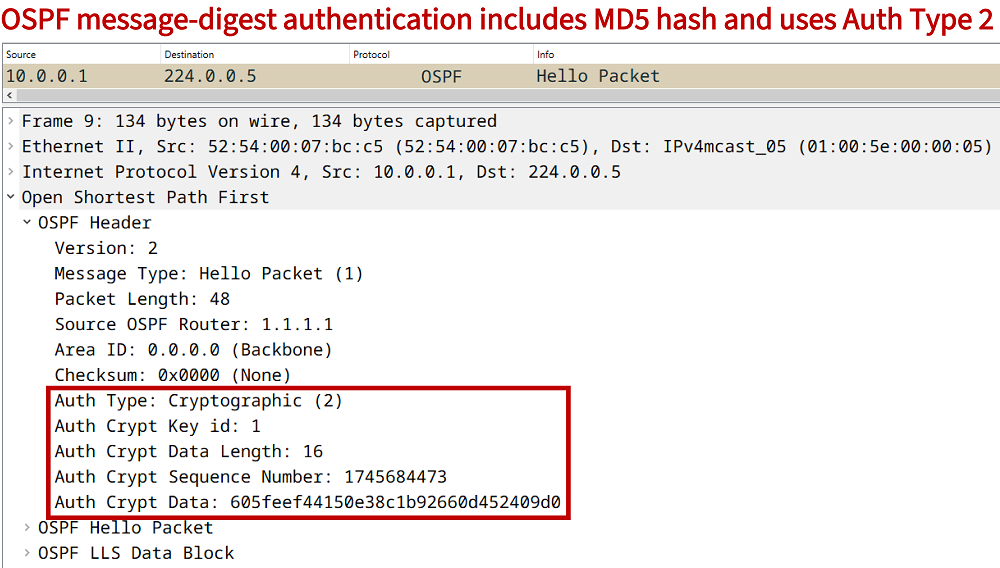
In the following example scenario, OSPF message-digest authentication is configured. An MD5 hash is created by combining the key value (1) and the password. The OSPF Header includes this generated hash value, and uses the authentication type 2.
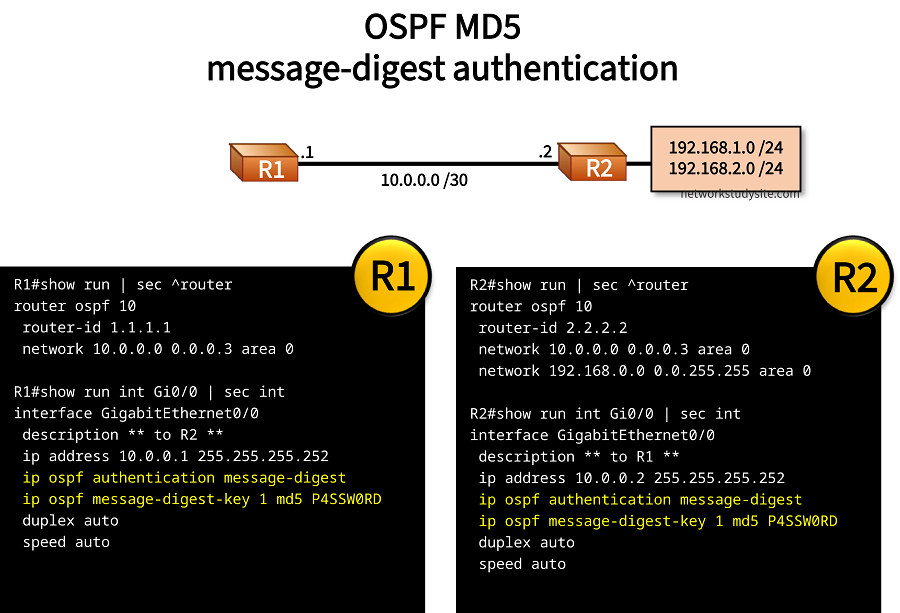
Configuration:
R1
R1#show run | sec ^router
router ospf 10
 router-id 1.1.1.1
 network 10.0.0.0 0.0.0.3 area 0

R1#show run int Gi0/0 | sec int
interface GigabitEthernet0/0
 description ** to R2 **
 ip address 10.0.0.1 255.255.255.252
 ip ospf authentication message-digest
 ip ospf message-digest-key 1 md5 P4SSW0RD
 duplex auto
 speed auto
R2
R2#show run | sec ^router
router ospf 10
 router-id 2.2.2.2
 network 10.0.0.0 0.0.0.3 area 0
 network 192.168.0.0 0.0.255.255 area 0

R2#show run int Gi0/0 | sec int
interface GigabitEthernet0/0
 description ** to R1 **
 ip address 10.0.0.2 255.255.255.252
 ip ospf authentication message-digest
 ip ospf message-digest-key 1 md5 P4SSW0RD
 duplex auto
 speed auto

R2#show run int Lo10 | sec int
interface Loopback10
 ip address 192.168.1.1 255.255.255.0
 ip ospf network point-to-point

R2#show run int Lo20 | sec int
interface Loopback20
 ip address 192.168.2.1 255.255.255.0
 ip ospf network point-to-point
R1#show ip ospf interface Gi0/0
GigabitEthernet0/0 is up, line protocol is up
  Internet Address 10.0.0.1/30, Area 0, Attached via Network Statement
  Process ID 10, Router ID 1.1.1.1, Network Type BROADCAST, Cost: 1
  Topology-MTID    Cost    Disabled    Shutdown      Topology Name
        0           1         no          no            Base
  Transmit Delay is 1 sec, State BDR, Priority 1
  Designated Router (ID) 2.2.2.2, Interface address 10.0.0.2
  Backup Designated router (ID) 1.1.1.1, Interface address 10.0.0.1
  Timer intervals configured, Hello 10, Dead 40, Wait 40, Retransmit 5
    oob-resync timeout 40
    Hello due in 00:00:08
  Supports Link-local Signaling (LLS)
  Cisco NSF helper support enabled
  IETF NSF helper support enabled
  Index 1/1/1, flood queue length 0
  Next 0x0(0)/0x0(0)/0x0(0)
  Last flood scan length is 1, maximum is 1
  Last flood scan time is 0 msec, maximum is 0 msec
  Neighbor Count is 1, Adjacent neighbor count is 1
    Adjacent with neighbor 2.2.2.2  (Designated Router)
  Suppress hello for 0 neighbor(s)
  Cryptographic authentication enabled
    Youngest key id is 1
OSPF message digest router process configuration
In the following example scenario, OSPF area 0 authentication is configured with a message-digest configured under the connected interfaces. Compared to the previous section, this form of authentication uses a different configuration, however the method is the same, and is categorized as Authentication Type 2.
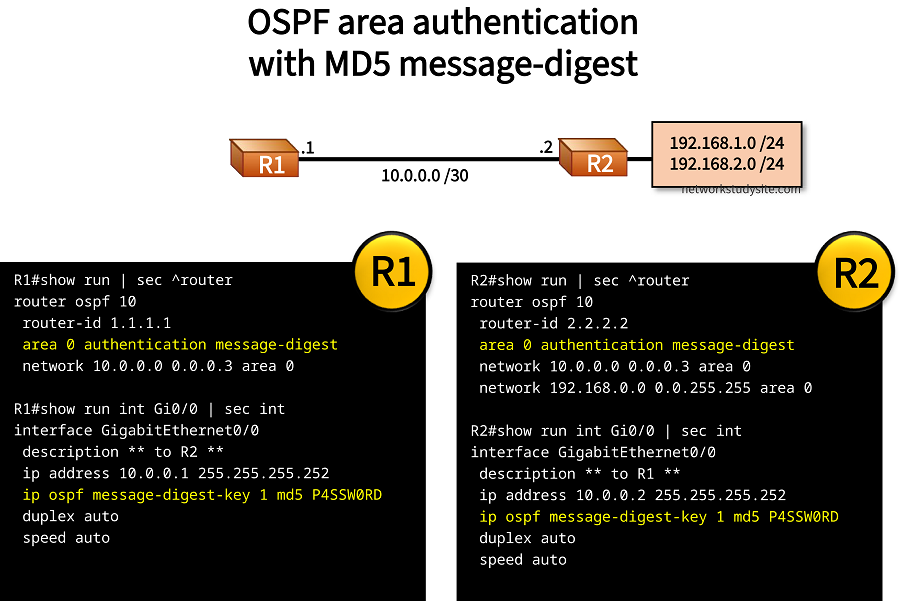
Configuration:
R1
R1#show run | sec ^router
router ospf 10
 router-id 1.1.1.1
 area 0 authentication message-digest
 network 10.0.0.0 0.0.0.3 area 0

R1#show run int Gi0/0 | sec int
interface GigabitEthernet0/0
 description ** to R2 **
 ip address 10.0.0.1 255.255.255.252
 ip ospf message-digest-key 1 md5 P4SSW0RD
 duplex auto
 speed auto
R2
R2#show run | sec ^router
router ospf 10
 router-id 2.2.2.2
 area 0 authentication message-digest
 network 10.0.0.0 0.0.0.3 area 0
 network 192.168.0.0 0.0.255.255 area 0

R2#show run int Gi0/0 | sec int
interface GigabitEthernet0/0
 description ** to R1 **
 ip address 10.0.0.2 255.255.255.252
 ip ospf message-digest-key 1 md5 P4SSW0RD
 duplex auto
 speed auto

R2#show run int Lo10 | sec int
interface Loopback10
 ip address 192.168.1.1 255.255.255.0
 ip ospf network point-to-point

R2#show run int Lo20 | sec int
interface Loopback20
 ip address 192.168.2.1 255.255.255.0
 ip ospf network point-to-point
R2#show ip ospf interface Gi0/0
GigabitEthernet0/0 is up, line protocol is up
  Internet Address 10.0.0.2/30, Area 0, Attached via Network Statement
  Process ID 10, Router ID 2.2.2.2, Network Type BROADCAST, Cost: 1
  Topology-MTID    Cost    Disabled    Shutdown      Topology Name
        0           1         no          no            Base
  Transmit Delay is 1 sec, State DR, Priority 1
  Designated Router (ID) 2.2.2.2, Interface address 10.0.0.2
  Backup Designated router (ID) 1.1.1.1, Interface address 10.0.0.1
  Timer intervals configured, Hello 10, Dead 40, Wait 40, Retransmit 5
    oob-resync timeout 40
    Hello due in 00:00:09
  Supports Link-local Signaling (LLS)
  Cisco NSF helper support enabled
  IETF NSF helper support enabled
  Index 1/1/1, flood queue length 0
  Next 0x0(0)/0x0(0)/0x0(0)
  Last flood scan length is 0, maximum is 2
  Last flood scan time is 0 msec, maximum is 0 msec
  Neighbor Count is 1, Adjacent neighbor count is 1
    Adjacent with neighbor 1.1.1.1  (Backup Designated Router)
  Suppress hello for 0 neighbor(s)
  Cryptographic authentication enabled
    Youngest key id is 1
OSPF Virtual Link authentication
In the following example scenario, the OSPF Virtual Link between R2 and R3 uses a key chain authentication method and generates a SHA-256 hash based on a combination of the configured key value (1) and the password. This means, Authentication Type 2 is used in OSPF Headers that are part of the control plane to create the Virtual Link and advertise routes.
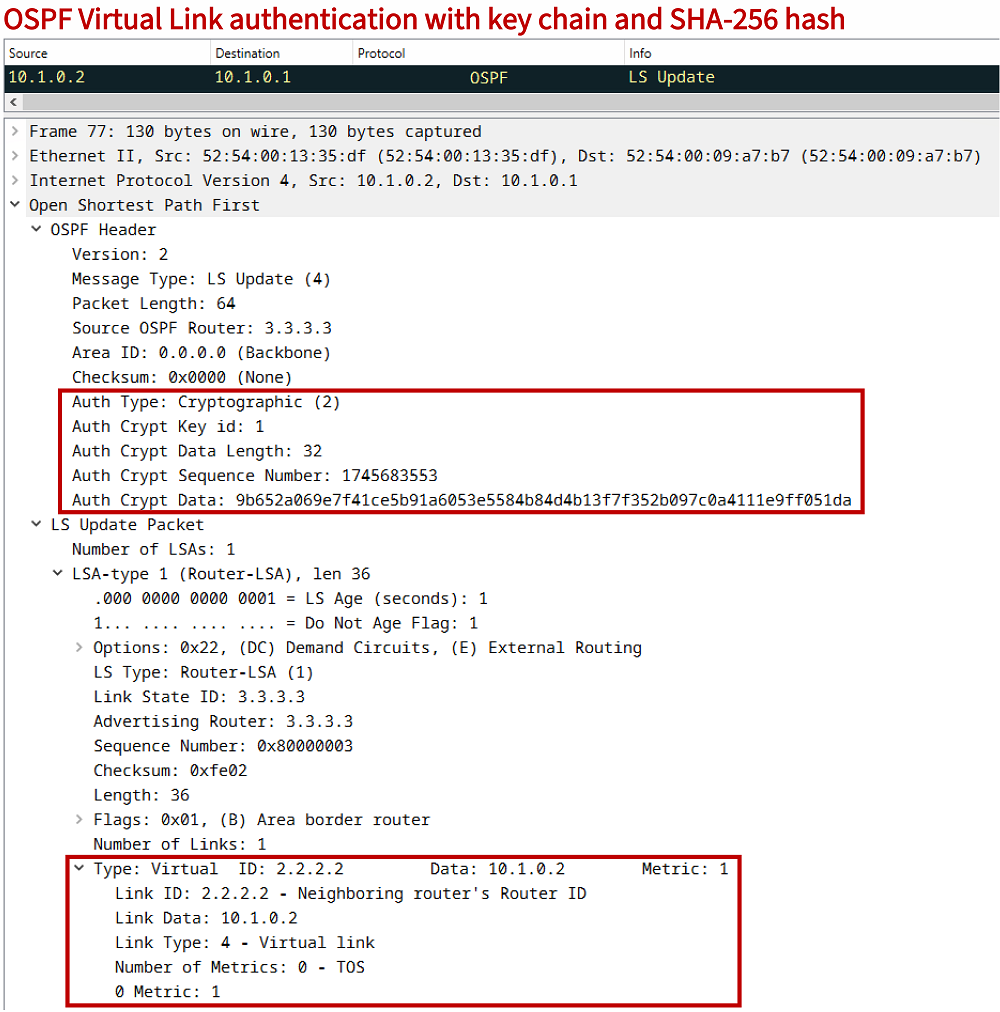
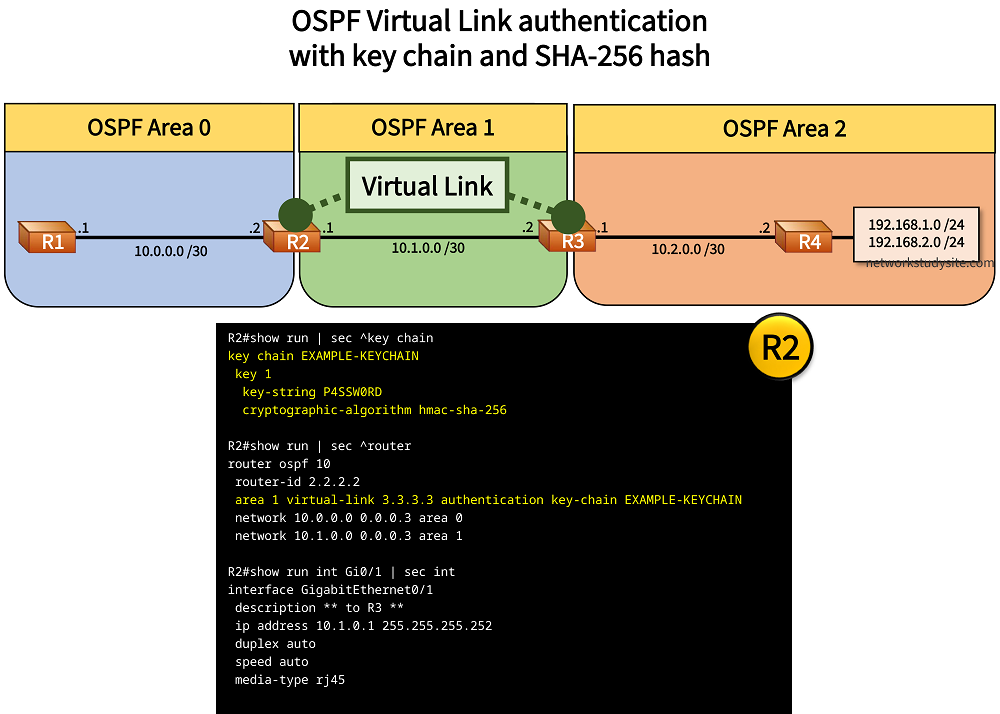
Configuration:
R1
R1#show run | sec ^router
router ospf 10
 router-id 1.1.1.1
 network 10.0.0.0 0.0.0.3 area 0

R1#show run int Gi0/0 | sec int
interface GigabitEthernet0/0
 description ** to R2 **
 ip address 10.0.0.1 255.255.255.252
 duplex auto
 speed auto
 media-type rj45
R2
R2#show run | sec ^key chain
key chain EXAMPLE-KEYCHAIN
 key 1
  key-string P4SSW0RD
  cryptographic-algorithm hmac-sha-256

R2#show run | sec ^router
router ospf 10
 router-id 2.2.2.2
 area 1 virtual-link 3.3.3.3 authentication key-chain EXAMPLE-KEYCHAIN
 network 10.0.0.0 0.0.0.3 area 0
 network 10.1.0.0 0.0.0.3 area 1

R2#show run int Gi0/0 | sec int
interface GigabitEthernet0/0
 description ** to R1 **
 ip address 10.0.0.2 255.255.255.252
 duplex auto
 speed auto
 media-type rj45

R2#show run int Gi0/1 | sec int
interface GigabitEthernet0/1
 description ** to R3 **
 ip address 10.1.0.1 255.255.255.252
 duplex auto
 speed auto
 media-type rj45
R3
R3#show run | sec ^key chain
key chain EXAMPLE-KEYCHAIN
 key 1
  key-string P4SSW0RD
  cryptographic-algorithm hmac-sha-256

R3#show run | sec ^router
router ospf 10
 router-id 3.3.3.3
 area 1 virtual-link 2.2.2.2 authentication key-chain EXAMPLE-KEYCHAIN
 network 10.1.0.0 0.0.0.3 area 1
 network 10.2.0.0 0.0.0.3 area 2

R3#show run int Gi0/0 | sec int
interface GigabitEthernet0/0
 description ** to R2 **
 ip address 10.1.0.2 255.255.255.252
 duplex auto
 speed auto
 media-type rj45

R3#show run int Gi0/1 | sec int
interface GigabitEthernet0/1
 description ** to R4 **
 ip address 10.2.0.1 255.255.255.252
 duplex auto
 speed auto
 media-type rj45
R4
R4#show run | sec ^router
router ospf 10
 router-id 4.4.4.4
 network 10.2.0.0 0.0.0.3 area 2
 network 192.168.0.0 0.0.255.255 area 2

R4#show run int Gi0/0 | sec int
interface GigabitEthernet0/0
 description ** to R3 **
 ip address 10.2.0.2 255.255.255.252
 duplex auto
 speed auto
 media-type rj45

R4#show run int Lo10 | sec int
interface Loopback10
 ip address 192.168.1.1 255.255.255.0
 ip ospf network point-to-point

R4#show run int Lo20 | sec int
interface Loopback20
 ip address 192.168.2.1 255.255.255.0
 ip ospf network point-to-point
R2#show ip ospf virtual-links
Virtual Link OSPF_VL0 to router 3.3.3.3 is up
  Run as demand circuit
  DoNotAge LSA allowed.
  Transit area 1, via interface GigabitEthernet0/1
 Topology-MTID    Cost    Disabled     Shutdown      Topology Name
        0           1         no          no            Base
  Transmit Delay is 1 sec, State POINT_TO_POINT,
  Timer intervals configured, Hello 10, Dead 40, Wait 40, Retransmit 5
    Hello due in 00:00:02
    Adjacency State FULL (Hello suppressed)
    Index 1/1/2, retransmission queue length 0, number of retransmission 11
    First 0x0(0)/0x0(0)/0x0(0) Next 0x0(0)/0x0(0)/0x0(0)
    Last retransmission scan length is 1, maximum is 1
    Last retransmission scan time is 0 msec, maximum is 0 msec
  Cryptographic authentication enabled
    Sending SA: Key 1, Algorithm HMAC-SHA-256 - key chain EXAMPLE-KEYCHAIN


R2#show ip ospf neighbor

Neighbor ID     Pri   State           Dead Time   Address         Interface
1.1.1.1           1   FULL/DR         00:00:32    10.0.0.1        GigabitEthernet0/0
3.3.3.3           0   FULL/  -           -        10.1.0.2        OSPF_VL0
3.3.3.3           1   FULL/DR         00:00:36    10.1.0.2        GigabitEthernet0/1


R1#show ip route ospf | beg Ga
Gateway of last resort is not set

      10.0.0.0/8 is variably subnetted, 4 subnets, 2 masks
O IA     10.1.0.0/30 [110/2] via 10.0.0.2, 00:39:19, GigabitEthernet0/0
O IA     10.2.0.0/30 [110/3] via 10.0.0.2, 00:27:16, GigabitEthernet0/0
O IA  192.168.1.0/24 [110/4] via 10.0.0.2, 00:27:16, GigabitEthernet0/0
O IA  192.168.2.0/24 [110/4] via 10.0.0.2, 00:27:16, GigabitEthernet0/0
OSPF key chain SHA cryptographic hash authentication
In the following example scenario, a key chain is configured together with the hashing algorithm SHA-256. The key chain authentication is applied to the connected interfaces running OSPF, and thus the two routers can secure their control plane communications.
It is important that the key number (in this example the number 1) matches on both routers because it is part of the created hash. The key chain authentication method is categorized as Auth Type 2.

Configuration:
R1
R1#show run | sec ^key chain
key chain EXAMPLE-KEYCHAIN
 key 1
  key-string P4SSW0RD
  cryptographic-algorithm hmac-sha-256

R1#show run | sec ^router
router ospf 10
 router-id 1.1.1.1
 network 10.0.0.0 0.0.0.3 area 0

R1#show run int Gi0/0 | sec int
interface GigabitEthernet0/0
 description ** to R2 **
 ip address 10.0.0.1 255.255.255.252
 ip ospf authentication key-chain EXAMPLE-KEYCHAIN
 duplex auto
 speed auto
 media-type rj45
R2
R2#show run | sec ^key chain
key chain EXAMPLE-KEYCHAIN
 key 1
  key-string P4SSW0RD
  cryptographic-algorithm hmac-sha-256

R2#show run | sec ^router
router ospf 10
 router-id 2.2.2.2
 network 10.0.0.0 0.0.0.3 area 0
 network 192.168.0.0 0.0.255.255 area 0

R2#show run int Gi0/0 | sec int
interface GigabitEthernet0/0
 description ** to R1 **
 ip address 10.0.0.2 255.255.255.252
 ip ospf authentication key-chain EXAMPLE-KEYCHAIN
 duplex auto
 speed auto
 media-type rj45

R2#show run int Lo10 | sec int
interface Loopback10
 ip address 192.168.1.1 255.255.255.0
 ip ospf network point-to-point

R2#show run int Lo20 | sec int
interface Loopback20
 ip address 192.168.2.1 255.255.255.0
 ip ospf network point-to-point
R1#show ip ospf int Gi0/0
GigabitEthernet0/0 is up, line protocol is up
  Internet Address 10.0.0.1/30, Area 0, Attached via Network Statement
  Process ID 10, Router ID 1.1.1.1, Network Type BROADCAST, Cost: 1
  Topology-MTID    Cost    Disabled    Shutdown      Topology Name
        0           1         no          no            Base
  Transmit Delay is 1 sec, State BDR, Priority 1
  Designated Router (ID) 2.2.2.2, Interface address 10.0.0.2
  Backup Designated router (ID) 1.1.1.1, Interface address 10.0.0.1
  Timer intervals configured, Hello 10, Dead 40, Wait 40, Retransmit 5
    oob-resync timeout 40
    Hello due in 00:00:09
  Supports Link-local Signaling (LLS)
  Cisco NSF helper support enabled
  IETF NSF helper support enabled
  Index 1/1/1, flood queue length 0
  Next 0x0(0)/0x0(0)/0x0(0)
  Last flood scan length is 1, maximum is 1
  Last flood scan time is 0 msec, maximum is 0 msec
  Neighbor Count is 1, Adjacent neighbor count is 1
    Adjacent with neighbor 2.2.2.2  (Designated Router)
  Suppress hello for 0 neighbor(s)
  Cryptographic authentication enabled
    Sending SA: Key 1, Algorithm HMAC-SHA-256 - key chain EXAMPLE-KEYCHAIN
OSPFv3 IPSec AH with traditional configuration
In the following example, OSPFv3 IPSec authentication with SHA is applied between R1 and R2 using the traditional (oly-style) configuration. The authentication details are configured under the interface. As a result, for OSPFv3 control plane packets an IPSec Authentication Header is added to the IPv6 header.
In the packet capture the IPv6 header contains the "Next Header" value 51 which specifies the IPSec Authentication Header. And in turn, the IPSec Authentication Header contains the "Next Header" value 89 which specifies the OSPF IGP.
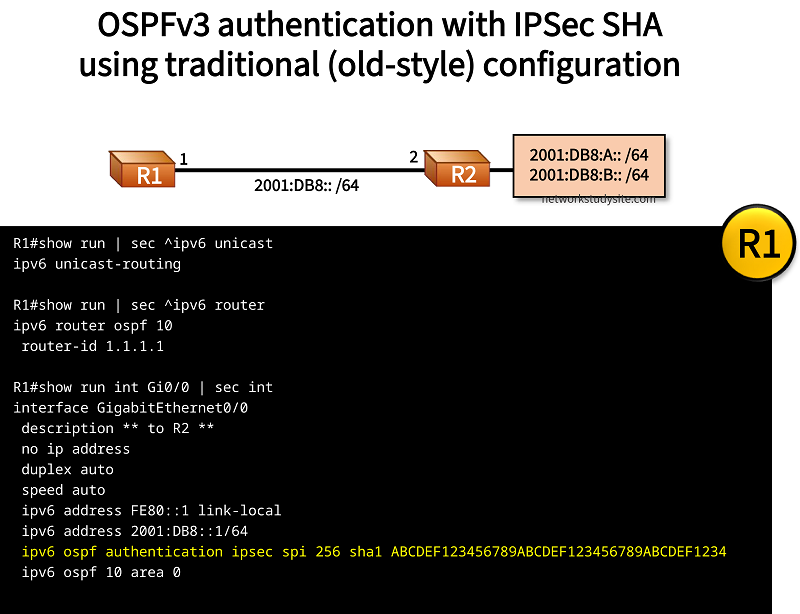
Configuration:
R1
R1#show run | sec ^ipv6 unicast
ipv6 unicast-routing

R1#show run | sec ^ipv6 router
ipv6 router ospf 10
 router-id 1.1.1.1

R1#show run int Gi0/0 | sec int
interface GigabitEthernet0/0
 description ** to R2 **
 no ip address
 duplex auto
 speed auto
 ipv6 address FE80::1 link-local
 ipv6 address 2001:DB8::1/64
 ipv6 ospf authentication ipsec spi 256 sha1 ABCDEF123456789ABCDEF123456789ABCDEF1234
 ipv6 ospf 10 area 0
R2
R2#show run | sec ^ipv6 unicast
ipv6 unicast-routing

R2#show run | sec ^ipv6 router
ipv6 router ospf 10
 router-id 2.2.2.2

R2#show run int Gi0/0 | sec int
interface GigabitEthernet0/0
 description ** to R1 **
 no ip address
 duplex auto
 speed auto
 ipv6 address FE80::2 link-local
 ipv6 address 2001:DB8::2/64
 ipv6 ospf authentication ipsec spi 256 sha1 ABCDEF123456789ABCDEF123456789ABCDEF1234
 ipv6 ospf 10 area 0

R2#show run int Lo10 | sec int
interface Loopback10
 no ip address
 ipv6 address 2001:DB8:A::1/64
 ipv6 ospf 10 area 0
 ipv6 ospf network point-to-point

R2#show run int Lo20 | sec int
interface Loopback20
 no ip address
 ipv6 address 2001:DB8:B::1/64
 ipv6 ospf 10 area 0
 ipv6 ospf network point-to-point
R1#show ospfv3 interface Gi0/0
GigabitEthernet0/0 is up, line protocol is up
  Link Local Address FE80::1, Interface ID 2
  Area 0, Process ID 10, Instance ID 0, Router ID 1.1.1.1
  Network Type BROADCAST, Cost: 1
  SHA-1 authentication SPI 256, secure socket UP (errors: 0)
  Transmit Delay is 1 sec, State BDR, Priority 1
  Designated Router (ID) 2.2.2.2, local address FE80::2
  Backup Designated router (ID) 1.1.1.1, local address FE80::1
  Timer intervals configured, Hello 10, Dead 40, Wait 40, Retransmit 5
    Hello due in 00:00:04
  Graceful restart helper support enabled
  Index 1/1/1, flood queue length 0
  Next 0x0(0)/0x0(0)/0x0(0)
  Last flood scan length is 1, maximum is 2
  Last flood scan time is 0 msec, maximum is 0 msec
  Neighbor Count is 1, Adjacent neighbor count is 1
    Adjacent with neighbor 2.2.2.2  (Designated Router)
  Suppress hello for 0 neighbor(s)


R1#show crypto socket

Number of Crypto Socket connections 1

 Gi0/0 Peers: (local): ::
              (remote): ::
       Local Ident (addr/plen/port/prot): (FE80::/10/0/89)
       Remote Ident (addr/plen/port/prot): (::/0/0/89)
       IPSec Profile: "OSPFv3-256"
       Socket State: Open
       Client: "OSPFv3" (Client State: Active)
Crypto Sockets in Listen state:
OSPFv3 IPSec AH with new-style configuration
In the following example, OSPFv3 with dual stack IPv6 and IPv4 address-family is implemented using the new-syle configuration method. IPSec authentication is configured between R1 and R2 to secure OSPFv3 control plane messages.

Configuration:
R1
R1#show run | sec ^ipv6 unicast
ipv6 unicast-routing

R1#show run | sec ^router
router ospfv3 10
 router-id 1.1.1.1
 !
 address-family ipv4 unicast
 exit-address-family
 !
 address-family ipv6 unicast
 exit-address-family

R1#show run int Gi0/0 | sec int
interface GigabitEthernet0/0
 description ** to R2 **
 ip address 10.0.0.1 255.255.255.252
 duplex auto
 speed auto
 ipv6 address FE80::1 link-local
 ipv6 address 2001:DB8::1/64
 ospfv3 authentication ipsec spi 256 sha1 ABCDEF123456789ABCDEF123456789ABCDEF1234
 ospfv3 10 ipv6 area 0
 ospfv3 10 ipv4 area 0
R2
R2#show run | sec ^ipv6 unicast
ipv6 unicast-routing

R2#show run | sec ^router
router ospfv3 10
 router-id 2.2.2.2
 !
 address-family ipv4 unicast
 exit-address-family
 !
 address-family ipv6 unicast
 exit-address-family

R2#show run int Gi0/0 | sec int
interface GigabitEthernet0/0
 description ** to R1 **
 ip address 10.0.0.2 255.255.255.252
 duplex auto
 speed auto
 ipv6 address FE80::2 link-local
 ipv6 address 2001:DB8::2/64
 ospfv3 authentication ipsec spi 256 sha1 ABCDEF123456789ABCDEF123456789ABCDEF1234
 ospfv3 10 ipv6 area 0
 ospfv3 10 ipv4 area 0

R2#show run int Lo10 | sec int
interface Loopback10
 ip address 192.168.1.1 255.255.255.0
 ipv6 address 2001:DB8:A::1/64
 ospfv3 10 ipv4 area 0
 ospfv3 10 ipv4 network point-to-point
 ospfv3 10 ipv6 area 0
 ospfv3 10 ipv6 network point-to-point

R2#show run int Lo20 | sec int
interface Loopback20
 ip address 192.168.2.1 255.255.255.0
 ipv6 address 2001:DB8:B::1/64
 ospfv3 10 ipv4 area 0
 ospfv3 10 ipv4 network point-to-point
 ospfv3 10 ipv6 area 0
 ospfv3 10 ipv6 network point-to-point
R1#show ospfv3 interface Gi0/0
GigabitEthernet0/0 is up, line protocol is up
  Link Local Address FE80::1, Interface ID 2
  Internet Address 10.0.0.1/30
  Area 0, Process ID 10, Instance ID 64, Router ID 1.1.1.1
  Network Type BROADCAST, Cost: 1
  SHA-1 authentication SPI 256, secure socket UP (errors: 0)
  Transmit Delay is 1 sec, State BDR, Priority 1
  Designated Router (ID) 2.2.2.2, local address FE80::2
  Backup Designated router (ID) 1.1.1.1, local address FE80::1
  Timer intervals configured, Hello 10, Dead 40, Wait 40, Retransmit 5
    Hello due in 00:00:05
  Graceful restart helper support enabled
  Index 1/1/1, flood queue length 0
  Next 0x0(0)/0x0(0)/0x0(0)
  Last flood scan length is 1, maximum is 2
  Last flood scan time is 0 msec, maximum is 0 msec
  Neighbor Count is 1, Adjacent neighbor count is 1
    Adjacent with neighbor 2.2.2.2  (Designated Router)
  Suppress hello for 0 neighbor(s)
GigabitEthernet0/0 is up, line protocol is up
  Link Local Address FE80::1, Interface ID 2
  Area 0, Process ID 10, Instance ID 0, Router ID 1.1.1.1
  Network Type BROADCAST, Cost: 1
  SHA-1 authentication SPI 256, secure socket UP (errors: 0)
  Transmit Delay is 1 sec, State BDR, Priority 1
  Designated Router (ID) 2.2.2.2, local address FE80::2
  Backup Designated router (ID) 1.1.1.1, local address FE80::1
  Timer intervals configured, Hello 10, Dead 40, Wait 40, Retransmit 5
    Hello due in 00:00:00
  Graceful restart helper support enabled
  Index 1/1/1, flood queue length 0
  Next 0x0(0)/0x0(0)/0x0(0)
  Last flood scan length is 1, maximum is 2
  Last flood scan time is 0 msec, maximum is 0 msec
  Neighbor Count is 1, Adjacent neighbor count is 1
    Adjacent with neighbor 2.2.2.2  (Designated Router)
  Suppress hello for 0 neighbor(s)
OSPFv3 Authentication Trailer configuration
In the following example topology, the OSPFv3 Authentication Trailer security feature is configured on IOS XE routers using the SHA algorithm. This process does not involve IPSec. It adds an extra Authentication Trailer field to OSPFv3 Hello and Database Description (DBD) packets.

Configuration:
R1
R1#show run | sec ^ipv6 unicast
ipv6 unicast-routing

R1#show run | sec ^key chain
key chain EXAMPLE-KEYCHAIN
 key 1
  key-string P4SSW0RD
   cryptographic-algorithm hmac-sha-256

R1#show run | sec ^router
router ospfv3 10
 router-id 1.1.1.1
 !
 address-family ipv6 unicast
  area 0 authentication key-chain EXAMPLE-KEYCHAIN
 exit-address-family

R1#show run int Gi1 | sec int
interface GigabitEthernet1
 description ** to R2 **
 no ip address
 negotiation auto
 ipv6 address FE80::1 link-local
 ipv6 address 2001:DB8::1/64
 ospfv3 authentication key-chain EXAMPLE-KEYCHAIN
 ospfv3 10 ipv6 area 0
 no mop enabled
 no mop sysid
R2
R2#show run | sec ^ipv6 unicast
ipv6 unicast-routing

R2#show run | sec ^key chain
key chain EXAMPLE-KEYCHAIN
 key 1
  key-string P4SSW0RD
   cryptographic-algorithm hmac-sha-256

R2#show run | sec ^router
router ospfv3 10
 router-id 2.2.2.2
 !
 address-family ipv6 unicast
  area 0 authentication key-chain EXAMPLE-KEYCHAIN
 exit-address-family

R2#show run int Gi1 | sec int
interface GigabitEthernet1
 description ** to R1 **
 no ip address
 negotiation auto
 ipv6 address FE80::2 link-local
 ipv6 address 2001:DB8::2/64
 ospfv3 authentication key-chain EXAMPLE-KEYCHAIN
 ospfv3 10 ipv6 area 0
 no mop enabled
 no mop sysid

R2#show run int Lo10 | sec int
interface Loopback10
 no ip address
 ipv6 address 2001:DB8:A::1/64
 ospfv3 network point-to-point
 ospfv3 10 ipv6 area 0

R2#show run int Lo20 | sec int
interface Loopback20
 no ip address
 ipv6 address 2001:DB8:B::1/64
 ospfv3 network point-to-point
 ospfv3 10 ipv6 area 0
R1#show ospfv3 neighbor detail

          OSPFv3 10 address-family ipv6 (router-id 1.1.1.1)

 Neighbor 2.2.2.2
    In the area 0 via interface GigabitEthernet1
    Neighbor: interface-id 7, link-local address FE80::2
    Neighbor priority is 1, State is FULL, 6 state changes
    DR is 2.2.2.2 BDR is 1.1.1.1
    Options is 0x000413 in Hello (V6-Bit, E-Bit, R-Bit, AT-Bit)
    Options is 0x000413 in DBD (V6-Bit, E-Bit, R-Bit, AT-Bit)
    Dead timer due in 00:00:35
    Neighbor is up for 04:44:32
    Index 1/1/1, retransmission queue length 0, number of retransmission 0
    First 0x0(0)/0x0(0)/0x0(0) Next 0x0(0)/0x0(0)/0x0(0)
    Last retransmission scan length is 0, maximum is 0
    Last retransmission scan time is 0 msec, maximum is 0 msec


R1#show ospfv3 | section Key-chains
 Active Key-chains:
  Key chain EXAMPLE-KEYCHAIN: Send key 1, Algorithm HMAC-SHA-256, Number of interfaces 1
    Area BACKBONE(0)