Control Plane Policing (CoPP) Described with Configuration
Table of Contents
Jump to section:
- • What is Control Plane Policing?
- • Dropping control plane traffic and denying SSH access
- • Dropping ICMP and denying ping to router
- • Restricting Telnet from IPv6 address
- • Assigning an IPv6 ACL to the VTY line
- • One class-map for all traffic types
- • One class-map for each traffic type
- • Download section
- What is Control Plane Policing? ‹
- Dropping control plane traffic and denying SSH access ‹
- Dropping ICMP and denying ping to router ‹
- Restricting Telnet from IPv6 address ‹
- Assigning an IPv6 ACL to the VTY line ‹
- One class-map for all traffic types ‹
- One class-map for each traffic type ‹
- Download section ‹
What is Control Plane Policing?
Control Plane Policing (CoPP) protects network equipment by rate-limiting or filtering particular packets destined to the local control plane. On network devices the control plane performs tasks such as sending and receiving routing protocol messages or enabling device management via SSH and Telnet. These types of traffic need access to the control plane.
However, not all type of incoming control plane traffic is desirable, and certain traffic may be malicious. Also, a high data rate of incoming traffic may lead to a congested control plane and disrupt network operations. As a solution, CoPP ensures network availability and security by applying filters to traffic destined to a local networking device. CoPP configuration is performed with the Modular Quality of Service (QoS) framework.
Dropping control plane traffic and denying SSH access
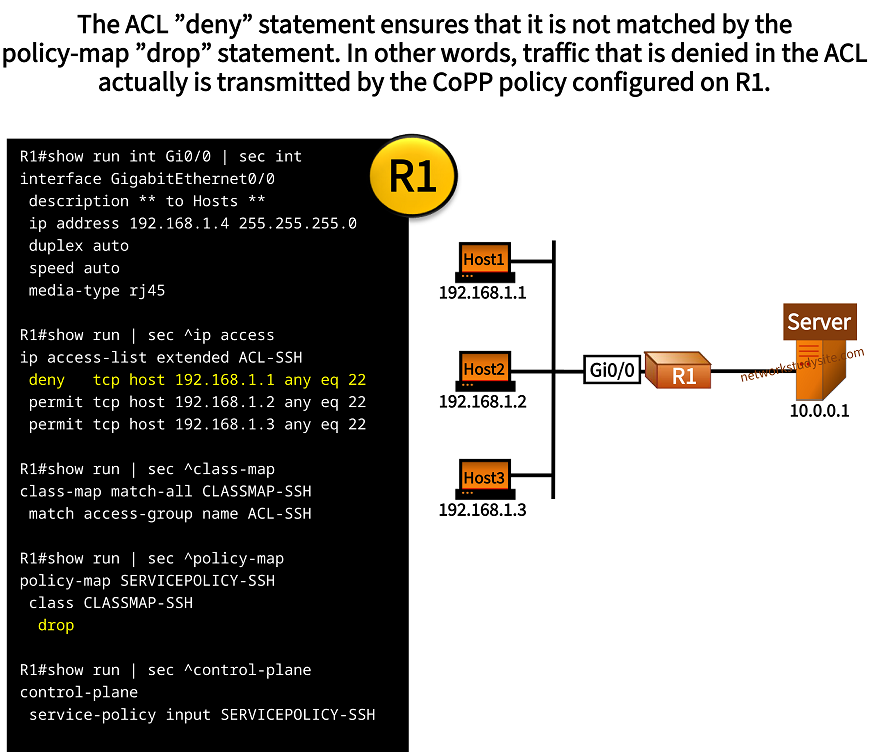
In the following example scenario, R1 has SSH configured to use a local login username and password. With CoPP, R1 restricts access to its control plane so that only Host1 can use SSH. Meanwhile, SSH traffic from Host2 and Host3 is denied by the CoPP policy.
Importantly, only Host2 and Host3 are restricted from accessing R1 throught SSH. Host1 can access R1 due to the deny statement configured in the ACL. However, the Server can also access R1 because of the implicit deny statement at the end of the ACL.
Configuration:
R1
R1#show run | sec ^ip access
ip access-list extended ACL-SSH
 deny   tcp host 192.168.1.1 any eq 22
 permit tcp host 192.168.1.2 any eq 22
 permit tcp host 192.168.1.3 any eq 22

R1#show run | sec ^class-map
class-map match-all CLASSMAP-SSH
 match access-group name ACL-SSH

R1#show run | sec ^policy-map
policy-map SERVICEPOLICY-SSH
 class CLASSMAP-SSH
  drop

R1#show run | sec ^control-plane
control-plane
 service-policy input SERVICEPOLICY-SSH

R1#show run int Gi0/0 | sec int
interface GigabitEthernet0/0
 description ** to Hosts **
 ip address 192.168.1.4 255.255.255.0
 duplex auto
 speed auto
 media-type rj45

R1#show run int Gi0/1 | sec int
interface GigabitEthernet0/1
 description ** to Server **
 ip address 10.0.0.2 255.255.255.252
 duplex auto
 speed auto
 media-type rj45
Host2#ssh -l EXAMPLEUSER 192.168.1.4
% Connection timed out; remote host not responding


Host3#ssh -l EXAMPLEUSER 192.168.1.4
% Connection timed out; remote host not responding


Host3#ping 192.168.1.4
Type escape sequence to abort.
Sending 5, 100-byte ICMP Echos to 192.168.1.4, timeout is 2 seconds:
!!!!!
Success rate is 100 percent (5/5), round-trip min/avg/max = 1/1/2 ms          « Other type of traffic is working


R1#show users
    Line       User       Host(s)              Idle       Location
*  0 con 0                idle                 00:00:00
 578 vty 0     EXAMPLEUSE idle                 00:00:26 10.0.0.1              « Server is logged in via SSH due to implicit deny in ACL
 579 vty 1     EXAMPLEUSE idle                 00:00:02 192.168.1.1           « Host1 is logged in via SSH due to explicit deny in ACL

  Interface    User               Mode         Idle     Peer Address


R1#show tcp brief
TCB       Local Address               Foreign Address             (state)
0F30FD00  192.168.1.4.22             192.168.1.1.64873           ESTAB        « SSH TCP session between Host1 and R1 established
11600998  10.0.0.2.22                10.0.0.1.18492              ESTAB


R1#show policy-map control-plane input
 Control Plane

  Service-policy input: SERVICEPOLICY-SSH

    Class-map: CLASSMAP-SSH (match-all)
      8 packets, 480 bytes                                       « Dropped SSH packets from Host2 and Host3
      5 minute offered rate 0000 bps, drop rate 0000 bps
      Match: access-group name ACL-SSH                           « CoPP service-policy matches extended ACL
      drop

    Class-map: class-default (match-any)
      229 packets, 47169 bytes
      5 minute offered rate 0000 bps, drop rate 0000 bps
      Match: any
Dropping ICMP and denying ping to router
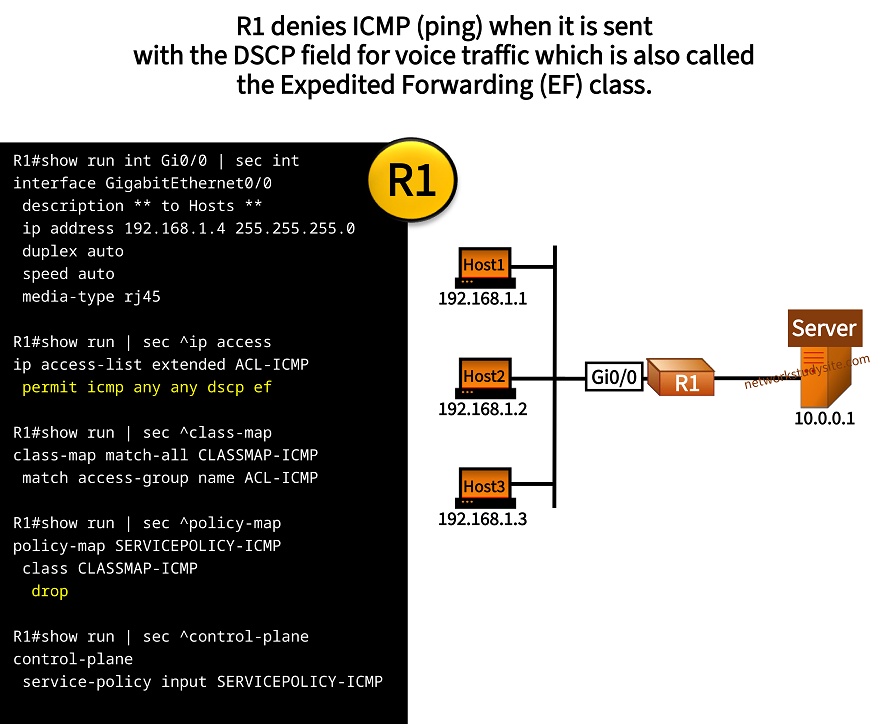
In the following example scenario, R1 denies ICMP traffic that has the DSCP field set for the voice class (Expedited Forwarding / EF class). In numeric values, the EF class has DSCP 46 which is equivalent to the TOS (Type of Service) value 184. If this value is not set, then R1 replies to ICMP ping requests.
Configuration:
R1
R1#show run | sec ^ip access
ip access-list extended ACL-ICMP
 permit icmp any any dscp ef

R1#show run | sec ^class-map
class-map match-all CLASSMAP-ICMP
 match access-group name ACL-ICMP

R1#show run | sec ^policy-map
policy-map SERVICEPOLICY-ICMP
 class CLASSMAP-ICMP
  drop

R1#show run | sec ^control-plane
control-plane
 service-policy input SERVICEPOLICY-ICMP

R1#show run int Gi0/0 | sec int
interface GigabitEthernet0/0
 description ** to Hosts **
 ip address 192.168.1.4 255.255.255.0
 duplex auto
 speed auto
 media-type rj45

R1#show run int Gi0/1 | sec int
interface GigabitEthernet0/1
 description ** to Server **
 ip address 10.0.0.2 255.255.255.252
 duplex auto
 speed auto
 media-type rj45
Host1#ping 192.168.1.4
Type escape sequence to abort.
Sending 5, 100-byte ICMP Echos to 192.168.1.4, timeout is 2 seconds:
!!!!!
Success rate is 100 percent (5/5), round-trip min/avg/max = 1/1/2 ms


Host1#ping 192.168.1.4 dscp af12
Type escape sequence to abort.
Sending 5, 100-byte ICMP Echos to 192.168.1.4, timeout is 2 seconds:
!!!!!
Success rate is 100 percent (5/5), round-trip min/avg/max = 1/1/2 ms        « Ping works in the Assured Forwarding (AF) class


Host1#ping 192.168.1.4 dscp ef
Type escape sequence to abort.
Sending 5, 100-byte ICMP Echos to 192.168.1.4, timeout is 2 seconds:
.....
Success rate is 0 percent (0/5)                                             « Ping does not work in the EF class


Host1#ping 192.168.1.4 tos 184
Type escape sequence to abort.
Sending 5, 100-byte ICMP Echos to 192.168.1.4, timeout is 2 seconds:
.....
Success rate is 0 percent (0/5)


R1#show policy-map control-plane input
 Control Plane

  Service-policy input: SERVICEPOLICY-ICMP

    Class-map: CLASSMAP-ICMP (match-all)
      16 packets, 1824 bytes                                                 « Ping packets with EF class dropped by CoPP
      5 minute offered rate 0000 bps, drop rate 0000 bps
      Match: access-group name ACL-ICMP
      drop

    Class-map: class-default (match-any)
      86 packets, 25428 bytes
      5 minute offered rate 0000 bps, drop rate 0000 bps
      Match: any
Restricting Telnet from IPv6 address
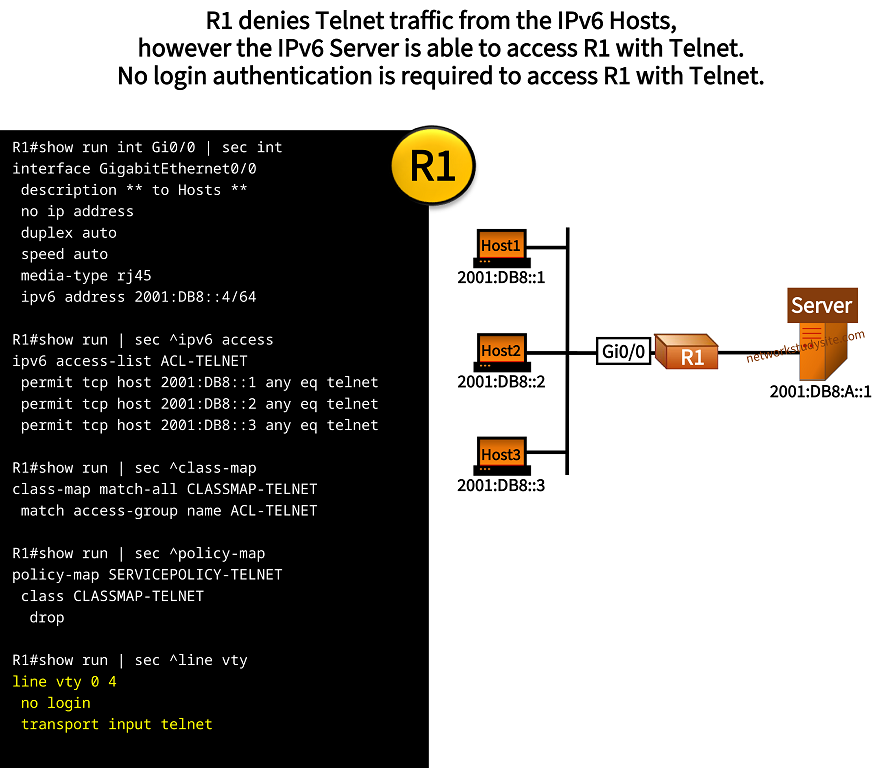
In the following example scenario, Host IPv6 addresses are denied access to the router R1 with Telnet. To accomplish this an IPv6 access-list is configured and attached to the CoPP policy-map. Meanwhile, the VTY lines on R1 are configured to completely bypass authentication for Telnet access by adding the no login keyword. This is used by the Server to remotely access R1.
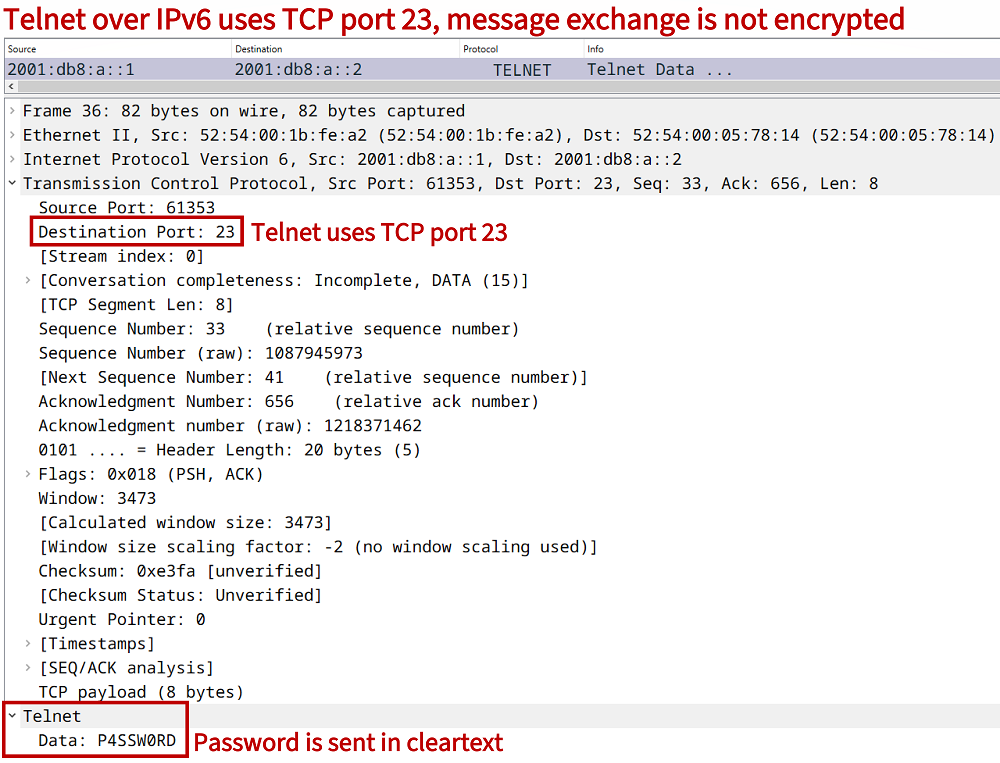
Note in this scenario if the Hosts need to access the Server then the command ipv6 unicast-routing needs to be configured on R1. This is necessary even if there is no dynamic routing protocol configured on R1.
Configuration:
R1
R1#show run | sec ^ipv6 access
ipv6 access-list ACL-TELNET
 permit tcp host 2001:DB8::1 any eq telnet
 permit tcp host 2001:DB8::2 any eq telnet
 permit tcp host 2001:DB8::3 any eq telnet

R1#show run | sec ^class-map
class-map match-all CLASSMAP-TELNET
 match access-group name ACL-TELNET

R1#show run | sec ^policy-map
policy-map SERVICEPOLICY-TELNET
 class CLASSMAP-TELNET
  drop

R1#show run | sec ^line vty
line vty 0 4
 no login
 transport input telnet

R1#show run int Gi0/0 | sec int
interface GigabitEthernet0/0
 description ** to Hosts **
 no ip address
 duplex auto
 speed auto
 media-type rj45
 ipv6 address 2001:DB8::4/64

R1#show run int Gi0/1 | sec int
interface GigabitEthernet0/1
 description ** to Server **
 no ip address
 duplex auto
 speed auto
 media-type rj45
 ipv6 address 2001:DB8:A::2/64

R1#show run | sec ^ipv6 unicast
ipv6 unicast-routing
Host1#telnet 2001:DB8::4
Trying 2001:DB8::4 ...
% Connection timed out; remote host not responding


Host2#telnet 2001:DB8::4
Trying 2001:DB8::4 ...
% Connection timed out; remote host not responding


R1#show users
    Line       User       Host(s)              Idle       Location
*  0 con 0                idle                 00:00:00
 578 vty 0                idle                 00:00:09 2001:DB8:A::1           « Server is remotely connected to R1

  Interface    User               Mode         Idle     Peer Address


R1#show tcp brief
TCB       Local Address               Foreign Address             (state)
11645920  2001:DB8:A::2.23           2001:DB8:A::1.33378         ESTAB          « Telnet is used on R1 through TCP port 23


R1#show policy-map control-plane input
 Control Plane

  Service-policy input: SERVICEPOLICY-TELNET

    Class-map: CLASSMAP-TELNET (match-all)
      16 packets, 1248 bytes                                                    « Telnet traffic from the hosts is dropped by the CoPP policy
      5 minute offered rate 0000 bps, drop rate 0000 bps
      Match: access-group name ACL-TELNET
      drop

    Class-map: class-default (match-any)
      255 packets, 59456 bytes
      5 minute offered rate 0000 bps, drop rate 0000 bps
      Match: any
Assigning an IPv6 ACL to the VTY line
The following scenario builds on the previous topology, however CoPP is not configured now. Instead, the IPv6 ACL is directly configured on the VTY lines and explicitly denies Telnet traffic from the Hosts. However, it is visible that even the Server is unable to access R1 with Telnet. This is because the IPv6 ACL has an implicit deny statement at the end, just like an IPv4 ACL.
R1>
R1>enable
Password:
R1#configure terminal
Enter configuration commands, one per line.  End with CNTL/Z.
R1(config)#
R1(config)#ipv6 access-list ACL-TELNET
R1(config-ipv6-acl)#deny tcp host 2001:DB8::1 any eq telnet
R1(config-ipv6-acl)#deny tcp host 2001:DB8::2 any eq telnet
R1(config-ipv6-acl)#deny tcp host 2001:DB8::3 any eq telnet
R1(config-ipv6-acl)#
R1(config-ipv6-acl)#exit
R1(config)#
R1(config)#line vty 0 4
R1(config-line)#no login
R1(config-line)#transport input telnet
R1(config-line)#ipv6 access-class ACL-TELNET in
R1(config-line)#
R1(config-line)#end
R1#


----------------------------------------------------------------------


Host1#telnet 2001:DB8::4
Trying 2001:DB8::4 ...
% Connection refused by remote host


Server#telnet 2001:DB8:A::2
Trying 2001:DB8:A::2 ...
% Connection refused by remote host
One class-map for all traffic types
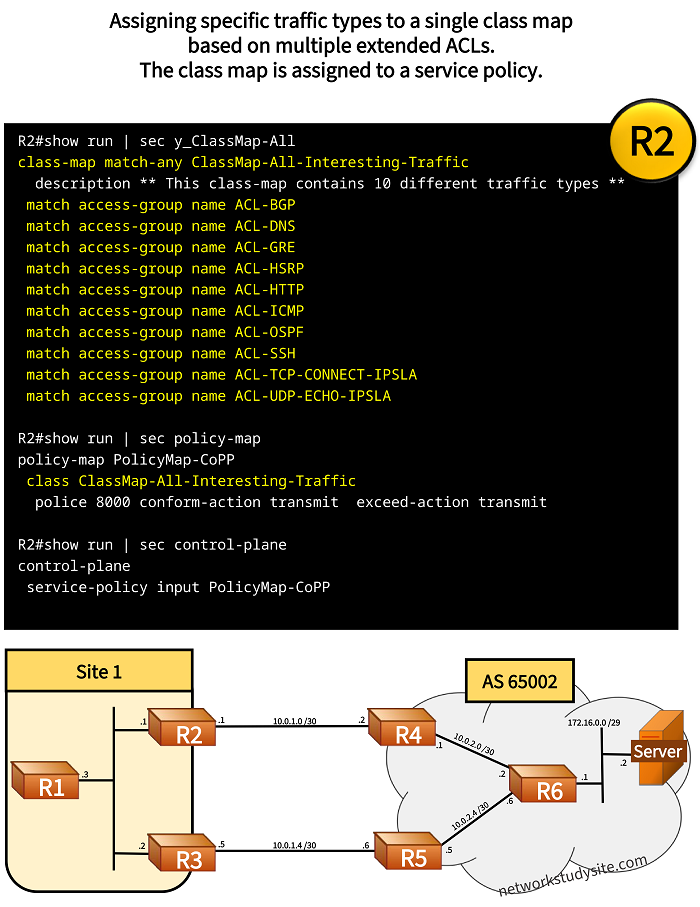
In the following example scenario, R2 monitors control plane traffic in order to establish baselines for traffic types and their data rate. This scenario uses transmit all policies to understand the multiple services running on R2, which generate and receive control plane traffic.
Although the appropriate ACLs are configured to capture multiple types of traffic, only one class-map is created and assigned under the policy-map named "PolicyMap-CoPP". As a result, an overview of the combined data rate is received, but this does not provide much insight into the specific types of traffic.
Configuration:
R2
R2#show run | sec y_ClassMap-All
class-map match-any ClassMap-All-Interesting-Traffic
  description ** This class-map contains 10 different traffic types **
 match access-group name ACL-BGP
 match access-group name ACL-DNS
 match access-group name ACL-GRE
 match access-group name ACL-HSRP
 match access-group name ACL-HTTP
 match access-group name ACL-ICMP
 match access-group name ACL-OSPF
 match access-group name ACL-SSH
 match access-group name ACL-TCP-CONNECT-IPSLA
 match access-group name ACL-UDP-ECHO-IPSLA


R2#show run | sec policy-map
policy-map PolicyMap-CoPP
 class ClassMap-All-Interesting-Traffic
  police 8000 conform-action transmit  exceed-action transmit

R2#show run | sec control-plane
control-plane
 service-policy input PolicyMap-CoPP
R2#show policy-map control-plane
 Control Plane

  Service-policy input: PolicyMap-CoPP

    Class-map: ClassMap-All-Interesting-Traffic (match-any)      « One class-map for all traffic types
      9119 packets, 596630 bytes
      5 minute offered rate 2000 bps, drop rate 0000 bps
      Match: access-group name ACL-BGP                           « Extended ACLs defining interesting traffic
      Match: access-group name ACL-DNS
      Match: access-group name ACL-GRE
      Match: access-group name ACL-HSRP
      Match: access-group name ACL-HTTP
      Match: access-group name ACL-ICMP
      Match: access-group name ACL-OSPF
      Match: access-group name ACL-SSH
      Match: access-group name ACL-TCP-CONNECT-IPSLA
      Match: access-group name ACL-UDP-ECHO-IPSLA
      police:
          cir 8000 bps, bc 1500 bytes                             « Committed information rate, and burst committed
        conformed 9160 packets, 596928 bytes; actions:            « Number of packets conformed to policing rule
          transmit                                                « Actions taken
        exceeded 198 packets, 15416 bytes; actions:
          transmit
        conformed 2000 bps, exceeded 0000 bps

    Class-map: class-default (match-any)                          « Traffic which does not match the defined class-map
      1804 packets, 84735 bytes
      5 minute offered rate 0000 bps, drop rate 0000 bps
      Match: any
This approach does not provide much detail as it only distinguishes between two class-maps: a broad range of interesting traffic and a default class. Each class-map has its own counters and if details about each traffic type is needed then multiple class-maps have to be configured.
One class-map for each traffic type
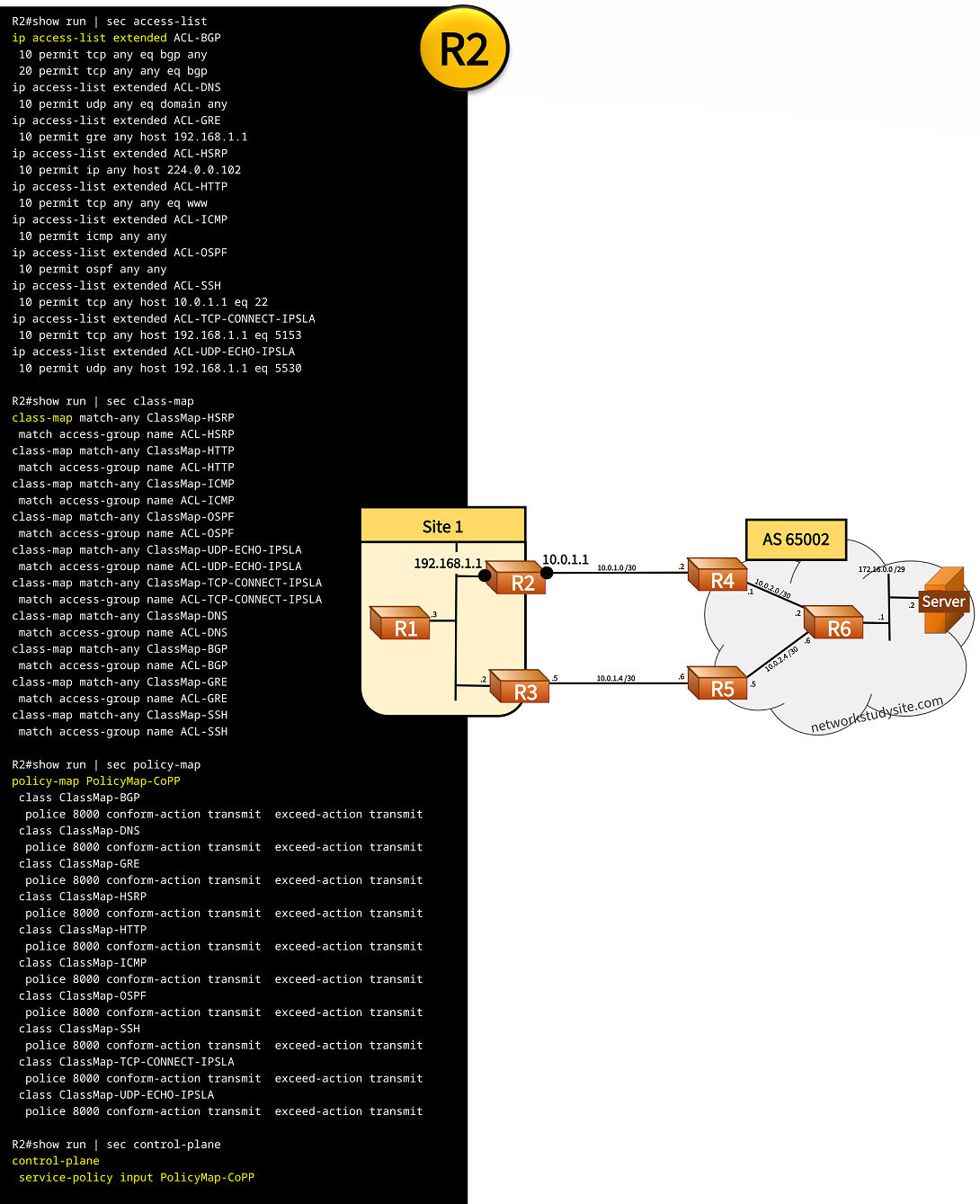
In this example, in order to understand details about each traffic type, multiple class-maps (containing each individual ACL) are assigned to the policy-map. Each class-map has its own counters and policing actions as shown in the following image and router outputs.
Configuration:
R2
R2#show run | sec access-list
ip access-list extended ACL-BGP
 10 permit tcp any eq bgp any
 20 permit tcp any any eq bgp
ip access-list extended ACL-DNS
 10 permit udp any eq domain any
ip access-list extended ACL-GRE
 10 permit gre any host 192.168.1.1
ip access-list extended ACL-HSRP
 10 permit ip any host 224.0.0.102
ip access-list extended ACL-HTTP
 10 permit tcp any any eq www
ip access-list extended ACL-ICMP
 10 permit icmp any any
ip access-list extended ACL-OSPF
 10 permit ospf any any
ip access-list extended ACL-SSH
 10 permit tcp any host 10.0.1.1 eq 22
ip access-list extended ACL-TCP-CONNECT-IPSLA
 10 permit tcp any host 192.168.1.1 eq 5153
ip access-list extended ACL-UDP-ECHO-IPSLA
 10 permit udp any host 192.168.1.1 eq 5530

R2#show run | sec class-map
class-map match-any ClassMap-HSRP
 match access-group name ACL-HSRP
class-map match-any ClassMap-HTTP
 match access-group name ACL-HTTP
class-map match-any ClassMap-ICMP
 match access-group name ACL-ICMP
class-map match-any ClassMap-OSPF
 match access-group name ACL-OSPF
class-map match-any ClassMap-UDP-ECHO-IPSLA
 match access-group name ACL-UDP-ECHO-IPSLA
class-map match-any ClassMap-TCP-CONNECT-IPSLA
 match access-group name ACL-TCP-CONNECT-IPSLA
class-map match-any ClassMap-DNS
 match access-group name ACL-DNS
class-map match-any ClassMap-BGP
 match access-group name ACL-BGP
class-map match-any ClassMap-GRE
 match access-group name ACL-GRE
class-map match-any ClassMap-SSH
 match access-group name ACL-SSH

R2#show run | sec policy-map
policy-map PolicyMap-CoPP
 class ClassMap-BGP
  police 8000 conform-action transmit  exceed-action transmit
 class ClassMap-DNS
  police 8000 conform-action transmit  exceed-action transmit
 class ClassMap-GRE
  police 8000 conform-action transmit  exceed-action transmit
 class ClassMap-HSRP
  police 8000 conform-action transmit  exceed-action transmit
 class ClassMap-HTTP
  police 8000 conform-action transmit  exceed-action transmit
 class ClassMap-ICMP
  police 8000 conform-action transmit  exceed-action transmit
 class ClassMap-OSPF
  police 8000 conform-action transmit  exceed-action transmit
 class ClassMap-SSH
  police 8000 conform-action transmit  exceed-action transmit
 class ClassMap-TCP-CONNECT-IPSLA
  police 8000 conform-action transmit  exceed-action transmit
 class ClassMap-UDP-ECHO-IPSLA
  police 8000 conform-action transmit  exceed-action transmit

R2#show run | sec control-plane
control-plane
 service-policy input PolicyMap-CoPP
The following output provides a detailed overview of the traffic types and the corresponding data rate. Now it is possible to gain valuable insight about the control plane activities on this particular network and specifically affecting the router R2.
R2#show policy-map control-plane input
 Control Plane

  Service-policy input: PolicyMap-CoPP

    Class-map: ClassMap-BGP (match-any)
      180 packets, 11471 bytes                                      « BGP requires active TCP connection on port 179
      5 minute offered rate 0000 bps, drop rate 0000 bps
      Match: access-group name ACL-BGP
      police:
          cir 8000 bps, bc 1500 bytes
        conformed 183 packets, 11671 bytes; actions:
          transmit
        exceeded 0 packets, 0 bytes; actions:
          transmit
        conformed 0000 bps, exceeded 0000 bps

    Class-map: ClassMap-DNS (match-any)
      15 packets, 1156 bytes                                        « DNS message exchange to resolve hostname
      5 minute offered rate 0000 bps, drop rate 0000 bps
      Match: access-group name ACL-DNS
      police:
          cir 8000 bps, bc 1500 bytes
        conformed 15 packets, 1156 bytes; actions:
          transmit
        exceeded 0 packets, 0 bytes; actions:
          transmit
        conformed 0000 bps, exceeded 0000 bps

    Class-map: ClassMap-GRE (match-any)
      470 packets, 17860 bytes                                      « GRE tunnel with keepalive
      5 minute offered rate 0000 bps, drop rate 0000 bps
      Match: access-group name ACL-GRE
      police:
          cir 8000 bps, bc 1500 bytes
        conformed 472 packets, 17936 bytes; actions:
          transmit
        exceeded 0 packets, 0 bytes; actions:
          transmit
        conformed 0000 bps, exceeded 0000 bps

    Class-map: ClassMap-HSRP (match-any)
      949 packets, 85158 bytes                                      « HSRP version 2 sending multicast to 224.0.0.102
      5 minute offered rate 0000 bps, drop rate 0000 bps
      Match: access-group name ACL-HSRP
      police:
          cir 8000 bps, bc 1500 bytes
        conformed 957 packets, 85910 bytes; actions:
          transmit
        exceeded 0 packets, 0 bytes; actions:
          transmit
        conformed 0000 bps, exceeded 0000 bps

    Class-map: ClassMap-HTTP (match-any)
      195 packets, 12246 bytes                                      « HTTP messages
      5 minute offered rate 0000 bps, drop rate 0000 bps
      Match: access-group name ACL-HTTP
      police:
          cir 8000 bps, bc 1500 bytes
        conformed 200 packets, 12560 bytes; actions:
          transmit
        exceeded 0 packets, 0 bytes; actions:
          transmit
        conformed 0000 bps, exceeded 0000 bps

    Class-map: ClassMap-ICMP (match-any)
      4822 packets, 348408 bytes                                    « ICMP probes
      5 minute offered rate 1000 bps, drop rate 0000 bps
      Match: access-group name ACL-ICMP
      police:
          cir 8000 bps, bc 1500 bytes
        conformed 4772 packets, 341196 bytes; actions:
          transmit
        exceeded 85 packets, 9690 bytes; actions:
          transmit
        conformed 1000 bps, exceeded 0000 bps

    Class-map: ClassMap-OSPF (match-any)
      505 packets, 49378 bytes                                      « OSPF adjacencies with R1 and R3
      5 minute offered rate 0000 bps, drop rate 0000 bps
      Match: access-group name ACL-OSPF
      police:
          cir 8000 bps, bc 1500 bytes
        conformed 509 packets, 49770 bytes; actions:
          transmit
        exceeded 0 packets, 0 bytes; actions:
          transmit
        conformed 0000 bps, exceeded 0000 bps

    Class-map: ClassMap-SSH (match-any)
      74 packets, 5980 bytes                                        « Logins through SSH
      5 minute offered rate 0000 bps, drop rate 0000 bps
      Match: access-group name ACL-SSH
      police:
          cir 8000 bps, bc 1500 bytes
        conformed 71 packets, 5658 bytes; actions:
          transmit
        exceeded 3 packets, 322 bytes; actions:
          transmit
        conformed 0000 bps, exceeded 0000 bps

    Class-map: ClassMap-TCP-CONNECT-IPSLA (match-any)
      4672 packets, 256960 bytes                                    « Connecting to TCP port 5153
      5 minute offered rate 0000 bps, drop rate 0000 bps
      Match: access-group name ACL-TCP-CONNECT-IPSLA
      police:
          cir 8000 bps, bc 1500 bytes
        conformed 4712 packets, 259160 bytes; actions:
          transmit
        exceeded 0 packets, 0 bytes; actions:
          transmit
        conformed 0000 bps, exceeded 0000 bps

    Class-map: ClassMap-UDP-ECHO-IPSLA (match-any)
      1168 packets, 67744 bytes                                     « Sending to UDP port 5530
      5 minute offered rate 0000 bps, drop rate 0000 bps
      Match: access-group name ACL-UDP-ECHO-IPSLA
      police:
          cir 8000 bps, bc 1500 bytes
        conformed 1178 packets, 68324 bytes; actions:
          transmit
        exceeded 0 packets, 0 bytes; actions:
          transmit
        conformed 0000 bps, exceeded 0000 bps

    Class-map: class-default (match-any)
      2602 packets, 121309 bytes                                    « All other traffic destined to the CPU
      5 minute offered rate 0000 bps, drop rate 0000 bps
      Match: any
Further indicators shown in the next output from R2 also provide evidence about the amount of control plane traffic sent to the CPU.
R2#show interfaces stats | sec GigabitEthernet1
GigabitEthernet1
          Switching path    Pkts In   Chars In   Pkts Out  Chars Out
               Processor      12683     774153       4418    1713963
             Route cache          0          0          0          0
       Distributed cache      35382    2643889      25190    3282783
                   Total      48065    3418042      29608    4996746


R2#show ip cef switching statistics

       Reason                          Drop       Punt  Punt2Host
RP LES Packet destined for us             0        845          0
RP LES Total                              0        845          0

All    Total                              0        845          0
The specific methods of traffic classification and policy definitions vary. As a general method, first the identification and baselining of interesting traffic can be done, and bandwidth patterns will be visible through the use of transmit all policies. After identification, policy definition can take place based on network security requirements.