DMVPN with Digital Certificate Authentication - IPSec IKEv2
Table of Contents
- What are the benefits of DMVPN with PKI Authentication? ‹
- How to configure DMVPN with PKI Authentication? ‹
- Download section ‹
What are the benefits of DMVPN with PKI Authentication?
DMVPN with PKI uses Digital Certificates to authenticate IPSec peers. This has multiple benefits compared to pre-shared key (single password) authentication. Two benefits are described below.
- PKI uses public/private RSA key-pairs that can be 2048 or even 4096 bit long (length of modulus used to create key-pair). Such keys are larger than a pre-shared password, and as a result they are harder to compromise.
- PKI enables the flexibility to individually revoke a compromised certificate of a specific device (for example if the device is lost or stolen). PKI also enables flexibility during authentication by assigning characteristics to particular device profiles via identity certificates.
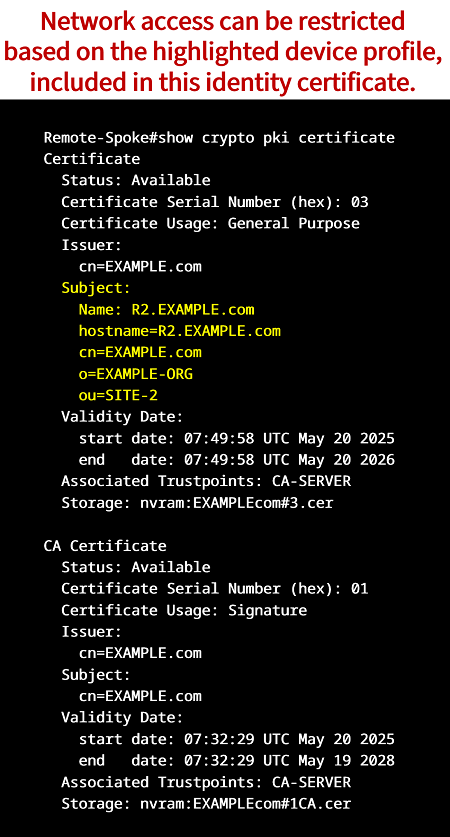
Authenticating with Digital Certificates (PKI) is generally considered more secure than pre-shared keys. There are networks where PKI is implemented due to regulatory requirements.
How to configure DMVPN with PKI Authentication?
In the following scenario DMVPN Phase 3 is configured with IPSec IKEv2 in a VRF and using PKI (Digital Certificates) for authentication. The routing protocol iBGP is deployed between the Hub and Spokes, and the Hub router only advertises a single default route.
The VRF configuration is implemented so that the transport ISP internet connection can use a default route, and the DMVPN overlay network can also use a separate default route in the VRF. The following table lists a step-by-step approach to configuring this example network.
| Step | Description |
|---|---|
| #1 Base configuration, basic connectivity | First, basic connectivity needs to be configured between each router. The internet-facing physical interfaces on R1, R2 and R3 use the 172.16.X.0/30 subnets. The host-facing subinterfaces are configured in VRF Gold and use VLAN 1 (native VLAN) encapsulation. |
| #2 DMVPN configuration, Tunnel interfaces | Next, tunnel interfaces are configured in VRF Gold, and DMVPN Phase 3 commands are added (NHRP redirect on Hub, and NHRP shortcut on Spokes). Since iBGP will be the routing protocol, there is no need for NHRP multicast mapping configuration. |
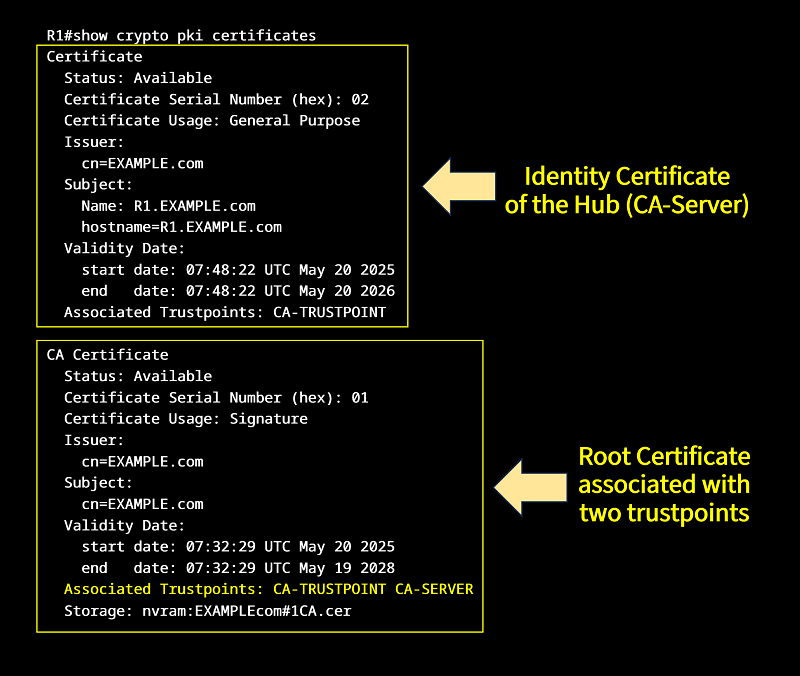
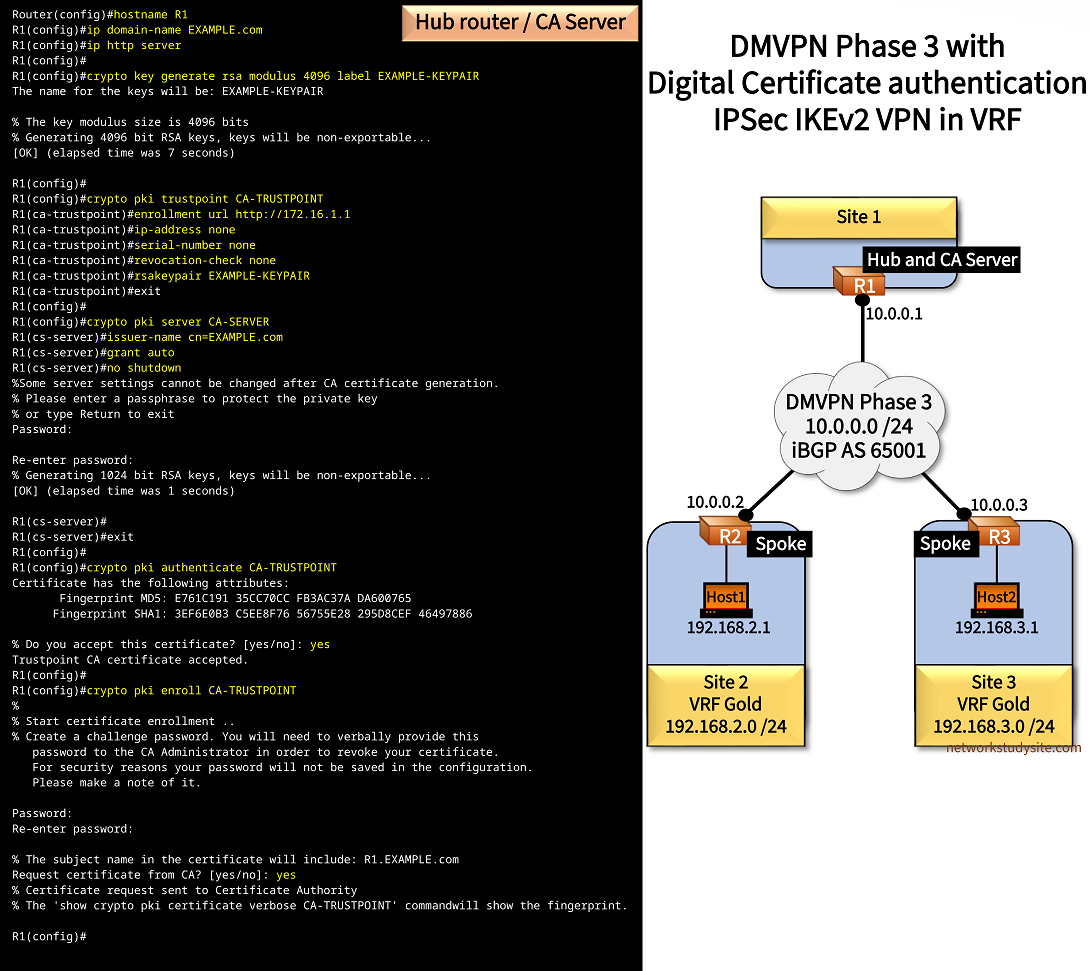
| #3 PKI Digital Certificates, enrollment | Compared to PKI with a dedicated Certificate Authority (CA) Server, this configuration is different because the Hub router is also the CA-Server. The Hub is a CA-Server and PKI Client at the same time as it participates in the IPSec authentication process with the Spokes. This means, there is an RSA key-pair created on the Hub, and used by a trustpoint (also configured on the Hub) to authenticate and enroll with itself. The enrollment url on the Hub points to the internet-facing physical interface on the Hub (points to itself). |
| #4 IPSec IKEv2 configuration | Finally, IPSec IKEv2 security is configured and instructed to use the PKI authentication process. Tunnel protection is added as the final step. Detailed configurations are shown below. |
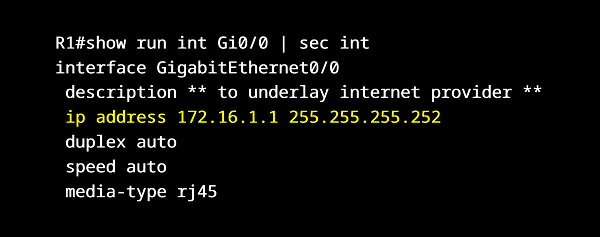
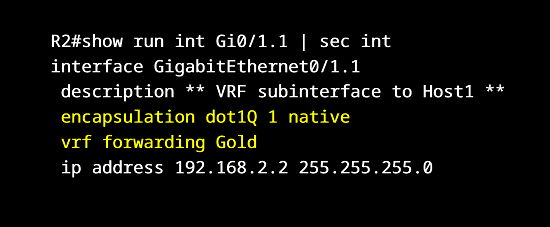
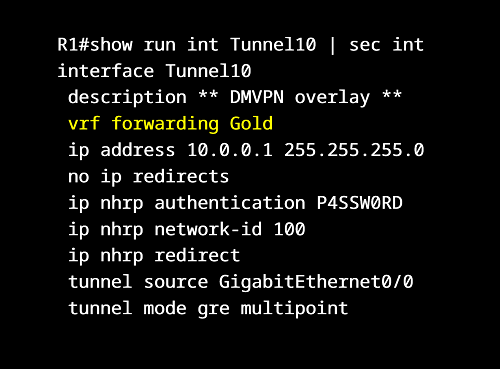
Configuration:
R1 (Hub router and CA Server)
###################################################################
##                                                               ##
##  PKI (CA Server, trustpoint, enrollment) configuration below  ##
##                                                               ##
###################################################################

Router(config)#hostname R1
R1(config)#ip domain-name EXAMPLE.com
R1(config)#ip http server
R1(config)#
R1(config)#crypto key generate rsa modulus 4096 label EXAMPLE-KEYPAIR
The name for the keys will be: R2.EXAMPLE.com

% The key modulus size is 4096 bits
% Generating 4096 bit RSA keys, keys will be non-exportable...
[OK] (elapsed time was 6 seconds)

R1(config)#
R1(config)#crypto pki trustpoint CA-TRUSTPOINT
R1(ca-trustpoint)#enrollment url http://172.16.1.1
R1(ca-trustpoint)#ip-address none
R1(ca-trustpoint)#serial-number none
R1(ca-trustpoint)#revocation-check none
R1(ca-trustpoint)#rsakeypair EXAMPLE-KEYPAIR
R1(ca-trustpoint)#exit
R1(config)#
R1(config)#crypto pki server CA-SERVER
R1(cs-server)#issuer-name cn=EXAMPLE.com
R1(cs-server)#grant auto
R1(cs-server)#no shutdown
%Some server settings cannot be changed after CA certificate generation.
% Please enter a passphrase to protect the private key
% or type Return to exit
Password:

Re-enter password:
% Generating 1024 bit RSA keys, keys will be non-exportable...
[OK] (elapsed time was 1 seconds)

R1(cs-server)#
R1(cs-server)#exit
R1(config)#
R1(config)#crypto pki authenticate CA-TRUSTPOINT
Certificate has the following attributes:
       Fingerprint MD5: E761C191 35CC70CC FB3AC37A DA600765
      Fingerprint SHA1: 3EF6E0B3 C5EE8F76 56755E28 295D8CEF 46497886

% Do you accept this certificate? [yes/no]: yes
Trustpoint CA certificate accepted.
R1(config)#
R1(config)#crypto pki enroll CA-TRUSTPOINT
%
% Start certificate enrollment ..
% Create a challenge password. You will need to verbally provide this
   password to the CA Administrator in order to revoke your certificate.
   For security reasons your password will not be saved in the configuration.
   Please make a note of it.

Password:
Re-enter password:

% The subject name in the certificate will include: R1.EXAMPLE.com
Request certificate from CA? [yes/no]: yes
% Certificate request sent to Certificate Authority
% The 'show crypto pki certificate verbose CA-TRUSTPOINT' commandwill show the fingerprint.

R1(config)#


#######################################
##                                   ##
##  IPSec IKEv2 configuration below  ##
##                                   ##
#######################################


R1(config)#
R1(config)#crypto ikev2 proposal CRYPTO-PROPOSAL
IKEv2 proposal MUST either have a set of an encryption algorithm other than aes-gcm, an integrity algorithm and a DH group configured or
 encryption algorithm aes-gcm, a prf algorithm and a DH group configured
R1(config-ikev2-proposal)#encryption aes-cbc-256
R1(config-ikev2-proposal)#integrity sha256
R1(config-ikev2-proposal)#group 24
R1(config-ikev2-proposal)#exit
R1(config)#
R1(config)#
R1(config)#crypto ikev2 policy CRYPTO-POLICY
IKEv2 policy MUST have atleast one complete proposal attached
R1(config-ikev2-policy)#match address local 172.16.1.1
R1(config-ikev2-policy)#proposal CRYPTO-PROPOSAL
R1(config-ikev2-policy)#exit
R1(config)#
R1(config)#
R1(config)#crypto pki certificate map EXAMPLE-MAP 10
R1(ca-certificate-map)#issuer-name eq cn=EXAMPLE.com
R1(ca-certificate-map)#exit
R1(config)#
R1(config)#
R1(config)#crypto ikev2 profile CRYPTO-IKEV2-PROFILE
IKEv2 profile MUST have:
   1. A local and a remote authentication method.
   2. A match identity or a match certificate or match any statement.
R1(config-ikev2-profile)#match identity remote address 0.0.0.0
R1(config-ikev2-profile)#authentication remote rsa-sig
R1(config-ikev2-profile)#authentication local rsa-sig
R1(config-ikev2-profile)#pki trustpoint CA-TRUSTPOINT
R1(config-ikev2-profile)#exit
R1(config)#
R1(config)#
R1(config)#crypto ipsec transform-set CRYPTO-TRANSFORM esp-aes
R1(cfg-crypto-trans)#mode transport
R1(cfg-crypto-trans)#exit
R1(config)#
R1(config)#
R1(config)#crypto ipsec profile CRYPTO-IPSEC-PROFILE
R1(ipsec-profile)#set transform-set CRYPTO-TRANSFORM
R1(ipsec-profile)#set ikev2-profile CRYPTO-IKEV2-PROFILE
R1(ipsec-profile)#exit
R1(config)#
R1(config)#
R1(config)#interface Tunnel10
R1(config-if)#tunnel protection ipsec profile CRYPTO-IPSEC-PROFILE
R1(config-if)#


##################################################################
##                                                              ##
##  Base configuration below (VRF, interfaces, routing, DMVPN)  ##
##                                                              ##
##################################################################

R1#show run | sec ^vrf
vrf definition Gold
 rd 1:1
 !
 address-family ipv4
 exit-address-family

R1#show run int Gi0/0 | sec int
interface GigabitEthernet0/0
 description ** to underlay internet provider **
 ip address 172.16.1.1 255.255.255.252
 duplex auto
 speed auto
 media-type rj45

R1#show run int Tunnel 10 | sec int
interface Tunnel10
 description ** DMVPN overlay **
 vrf forwarding Gold
 ip address 10.0.0.1 255.255.255.0
 no ip redirects
 ip nhrp authentication P4SSW0RD
 ip nhrp network-id 100
 ip nhrp redirect
 tunnel source GigabitEthernet0/0
 tunnel mode gre multipoint
 tunnel protection ipsec profile CRYPTO-IPSEC-PROFILE

R1#show run | sec ^router
router bgp 65001
 bgp router-id 1.1.1.1
 bgp log-neighbor-changes
 !
 address-family ipv4 vrf Gold
  neighbor 10.0.0.2 remote-as 65001
  neighbor 10.0.0.2 activate
  neighbor 10.0.0.2 default-originate
  neighbor 10.0.0.2 route-map RM-DEFAULT out
  neighbor 10.0.0.3 remote-as 65001
  neighbor 10.0.0.3 activate
  neighbor 10.0.0.3 default-originate
  neighbor 10.0.0.3 route-map RM-DEFAULT out
 exit-address-family

R1#show run | sec ^ip prefix
ip prefix-list PL-DEFAULT seq 5 permit 0.0.0.0/0
ip prefix-list PL-DEFAULT seq 10 deny 0.0.0.0/0 le 32

R1#show run | sec ^route-map
route-map RM-DEFAULT permit 10
 match ip address prefix-list PL-DEFAULT

R1#show run | sec ^ip route
ip route 0.0.0.0 0.0.0.0 GigabitEthernet0/0 172.16.1.2
R2 (Spoke and PKI Client)
###################################################################
##                                                               ##
##  PKI (CA Server, trustpoint, enrollment) configuration below  ##
##                                                               ##
###################################################################

R2(config)#
R2(config)#ip domain name EXAMPLE.com
R2(config)#
R2(config)#crypto key generate rsa modulus 4096
The name for the keys will be: R2.EXAMPLE.com

% The key modulus size is 4096 bits
% Generating 4096 bit RSA keys, keys will be non-exportable...
[OK] (elapsed time was 6 seconds)

R2(config)#
R2(config)#crypto pki trustpoint CA-SERVER
R2(ca-trustpoint)#enrollment url http://172.16.1.1
R2(ca-trustpoint)#source interface Gi0/0
R2(ca-trustpoint)#ip-address none
R2(ca-trustpoint)#serial-number none
R2(ca-trustpoint)#revocation-check none
R2(ca-trustpoint)#subject-name CN=EXAMPLE.com, O=EXAMPLE-ORG, OU=SITE-2
R2(ca-trustpoint)#fqdn R2.EXAMPLE.com
R2(ca-trustpoint)#exit
R2(config)#
R2(config)#crypto pki authenticate CA-SERVER
Certificate has the following attributes:
       Fingerprint MD5: E761C191 35CC70CC FB3AC37A DA600765
      Fingerprint SHA1: 3EF6E0B3 C5EE8F76 56755E28 295D8CEF 46497886

% Do you accept this certificate? [yes/no]: yes
Trustpoint CA certificate accepted.
R2(config)#
R2(config)#crypto pki enroll CA-SERVER
%
% Start certificate enrollment ..
% Create a challenge password. You will need to verbally provide this
   password to the CA Administrator in order to revoke your certificate.
   For security reasons your password will not be saved in the configuration.
   Please make a note of it.

Password:
Re-enter password:

% The subject name in the certificate will include: CN=EXAMPLE.com, O=EXAMPLE-ORG, OU=SITE-2
% The subject name in the certificate will include: R2.EXAMPLE.com
Request certificate from CA? [yes/no]: yes
% Certificate request sent to Certificate Authority
% The 'show crypto pki certificate verbose CA-SERVER' commandwill show the fingerprint.

R2(config)#


#######################################
##                                   ##
##  IPSec IKEv2 configuration below  ##
##                                   ##
#######################################


R2(config)#
R2(config)#crypto ikev2 proposal CRYPTO-PROPOSAL
IKEv2 proposal MUST either have a set of an encryption algorithm other than aes-gcm, an integrity algorithm and a DH group configured or
 encryption algorithm aes-gcm, a prf algorithm and a DH group configured
R2(config-ikev2-proposal)#encryption aes-cbc-256
R2(config-ikev2-proposal)#integrity sha256
R2(config-ikev2-proposal)#group 24
R2(config-ikev2-proposal)#exit
R2(config)#
R2(config)#
R2(config)#crypto ikev2 policy CRYPTO-POLICY
IKEv2 policy MUST have atleast one complete proposal attached
R2(config-ikev2-policy)#match address local 172.16.2.1
R2(config-ikev2-policy)#proposal CRYPTO-PROPOSAL
R2(config-ikev2-policy)#exit
R2(config)#
R2(config)#
R2(config)#crypto pki certificate map EXAMPLE-MAP 10
R2(ca-certificate-map)#issuer-name eq cn=EXAMPLE.com
R2(ca-certificate-map)#exit
R2(config)#
R2(config)#
R2(config)#crypto ikev2 profile CRYPTO-IKEV2-PROFILE
IKEv2 profile MUST have:
   1. A local and a remote authentication method.
   2. A match identity or a match certificate or match any statement.
R2(config-ikev2-profile)#match identity remote address 0.0.0.0
R2(config-ikev2-profile)#authentication remote rsa-sig
R2(config-ikev2-profile)#authentication local rsa-sig
R2(config-ikev2-profile)#pki trustpoint CA-SERVER
R2(config-ikev2-profile)#exit
R2(config)#
R2(config)#
R2(config)#crypto ipsec transform-set CRYPTO-TRANSFORM esp-aes
R2(cfg-crypto-trans)#mode transport
R2(cfg-crypto-trans)#exit
R2(config)#
R2(config)#
R2(config)#crypto ipsec profile CRYPTO-IPSEC-PROFILE
R2(ipsec-profile)#set transform-set CRYPTO-TRANSFORM
R2(ipsec-profile)#set ikev2-profile CRYPTO-IKEV2-PROFILE
R2(ipsec-profile)#exit
R2(config)#
R2(config)#
R2(config)#interface Tunnel10
R2(config-if)#tunnel protection ipsec profile CRYPTO-IPSEC-PROFILE
R2(config-if)#


##################################################################
##                                                              ##
##  Base configuration below (VRF, interfaces, routing, DMVPN)  ##
##                                                              ##
##################################################################


R2#show run | sec ^vrf
vrf definition Gold
 rd 1:1
 !
 address-family ipv4
 exit-address-family

R2#show run interface Gi0/0 | sec int
interface GigabitEthernet0/0
 description ** to underlay internet provider **
 ip address 172.16.2.1 255.255.255.252
 duplex auto
 speed auto
 media-type rj45

R2#show run interface Gi0/1 | sec int
interface GigabitEthernet0/1
 description ** physical interface to Host1 **
 no ip address
 duplex auto
 speed auto

R2#show run interface Gi0/1.1 | sec int
interface GigabitEthernet0/1.1
 description ** VRF subinterface to Host1 **
 encapsulation dot1Q 1 native
 vrf forwarding Gold
 ip address 192.168.2.2 255.255.255.0

R2#show run interface Tunnel 10 | sec int
interface Tunnel10
 description ** DMVPN overlay **
 vrf forwarding Gold
 ip address 10.0.0.2 255.255.255.0
 no ip redirects
 ip nhrp authentication P4SSW0RD
 ip nhrp map 10.0.0.1 172.16.1.1
 ip nhrp network-id 100
 ip nhrp nhs 10.0.0.1
 ip nhrp shortcut
 tunnel source GigabitEthernet0/0
 tunnel mode gre multipoint
 tunnel protection ipsec profile CRYPTO-IPSEC-PROFILE

R2#show run | sec ^router
router bgp 65001
 bgp router-id 2.2.2.2
 bgp log-neighbor-changes
 !
 address-family ipv4 vrf Gold
  network 192.168.2.0
  neighbor 10.0.0.1 remote-as 65001
  neighbor 10.0.0.1 activate
 exit-address-family

R2#show run | sec ^ip route
ip route 0.0.0.0 0.0.0.0 GigabitEthernet0/0 172.16.2.2
R3 (Spoke and PKI Client)
###################################################################
##                                                               ##
##  PKI (CA Server, trustpoint, enrollment) configuration below  ##
##                                                               ##
###################################################################

R3(config)#
R3(config)#ip domain name EXAMPLE.com
R3(config)#
R3(config)#crypto key generate rsa modulus 4096
The name for the keys will be: R3.EXAMPLE.com

% The key modulus size is 4096 bits
% Generating 4096 bit RSA keys, keys will be non-exportable...
[OK] (elapsed time was 5 seconds)

R3(config)#
R3(config)#crypto pki trustpoint CA-SERVER
R3(ca-trustpoint)#enrollment url http://172.16.1.1
R3(ca-trustpoint)#source interface Gi0/0
R3(ca-trustpoint)#ip-address none
R3(ca-trustpoint)#serial-number none
R3(ca-trustpoint)#revocation-check none
R3(ca-trustpoint)#subject-name CN=EXAMPLE.com, O=EXAMPLE-ORG, OU=SITE-3
R3(ca-trustpoint)#fqdn R3.EXAMPLE.com
R3(ca-trustpoint)#exit
R3(config)#
R3(config)#crypto pki authenticate CA-SERVER
Certificate has the following attributes:
       Fingerprint MD5: E761C191 35CC70CC FB3AC37A DA600765
      Fingerprint SHA1: 3EF6E0B3 C5EE8F76 56755E28 295D8CEF 46497886

% Do you accept this certificate? [yes/no]: yes
Trustpoint CA certificate accepted.
R3(config)#
R3(config)#crypto pki enroll CA-SERVER
%
% Start certificate enrollment ..
% Create a challenge password. You will need to verbally provide this
   password to the CA Administrator in order to revoke your certificate.
   For security reasons your password will not be saved in the configuration.
   Please make a note of it.

Password:
Re-enter password:

% The subject name in the certificate will include: CN=EXAMPLE.com, O=EXAMPLE-ORG, OU=SITE-3
% The subject name in the certificate will include: R3.EXAMPLE.com
Request certificate from CA? [yes/no]: yes
% Certificate request sent to Certificate Authority
% The 'show crypto pki certificate verbose CA-SERVER' commandwill show the fingerprint.

R3(config)#


#######################################
##                                   ##
##  IPSec IKEv2 configuration below  ##
##                                   ##
#######################################


R3(config)#
R3(config)#crypto ikev2 proposal CRYPTO-PROPOSAL
IKEv2 proposal MUST either have a set of an encryption algorithm other than aes-gcm, an integrity algorithm and a DH group configured or
 encryption algorithm aes-gcm, a prf algorithm and a DH group configured
R3(config-ikev2-proposal)#encryption aes-cbc-256
R3(config-ikev2-proposal)#integrity sha256
R3(config-ikev2-proposal)#group 24
R3(config-ikev2-proposal)#exit
R3(config)#
R3(config)#
R3(config)#crypto ikev2 policy CRYPTO-POLICY
IKEv2 policy MUST have atleast one complete proposal attached
R3(config-ikev2-policy)#match address local 172.16.3.1
R3(config-ikev2-policy)#proposal CRYPTO-PROPOSAL
R3(config-ikev2-policy)#exit
R3(config)#
R3(config)#
R3(config)#crypto pki certificate map EXAMPLE-MAP 10
R3(ca-certificate-map)#issuer-name eq cn=EXAMPLE.com
R3(ca-certificate-map)#exit
R3(config)#
R3(config)#
R3(config)#crypto ikev2 profile CRYPTO-IKEV2-PROFILE
IKEv2 profile MUST have:
   1. A local and a remote authentication method.
   2. A match identity or a match certificate or match any statement.
R3(config-ikev2-profile)#match identity remote address 0.0.0.0
R3(config-ikev2-profile)#authentication remote rsa-sig
R3(config-ikev2-profile)#authentication local rsa-sig
R3(config-ikev2-profile)#pki trustpoint CA-SERVER
R3(config-ikev2-profile)#exit
R3(config)#
R3(config)#
R3(config)#crypto ipsec transform-set CRYPTO-TRANSFORM esp-aes
R3(cfg-crypto-trans)#mode transport
R3(cfg-crypto-trans)#exit
R3(config)#
R3(config)#
R3(config)#crypto ipsec profile CRYPTO-IPSEC-PROFILE
R3(ipsec-profile)#set transform-set CRYPTO-TRANSFORM
R3(ipsec-profile)#set ikev2-profile CRYPTO-IKEV2-PROFILE
R3(ipsec-profile)#exit
R3(config)#
R3(config)#
R3(config)#interface Tunnel10
R3(config-if)#tunnel protection ipsec profile CRYPTO-IPSEC-PROFILE
R3(config-if)#


##################################################################
##                                                              ##
##  Base configuration below (VRF, interfaces, routing, DMVPN)  ##
##                                                              ##
##################################################################


R3#show run | sec ^vrf
vrf definition Gold
 rd 1:1
 !
 address-family ipv4
 exit-address-family

R3#show run int Gi0/0 | sec int
interface GigabitEthernet0/0
 description ** to underlay internet provider **
 ip address 172.16.3.1 255.255.255.252
 duplex auto
 speed auto
 media-type rj45

R3#show run int Gi0/1 | sec int
interface GigabitEthernet0/1
 description ** physical interface to Host2 **
 no ip address
 duplex auto
 speed auto

R3#show run int Gi0/1.1 | sec int
interface GigabitEthernet0/1.1
 description ** VRF subinterface to Host2 **
 encapsulation dot1Q 1 native
 vrf forwarding Gold
 ip address 192.168.3.2 255.255.255.0

R3#show run int Tu10 | sec int
interface Tunnel10
 description ** DMVPN overlay **
 vrf forwarding Gold
 ip address 10.0.0.3 255.255.255.0
 no ip redirects
 ip nhrp authentication P4SSW0RD
 ip nhrp map 10.0.0.1 172.16.1.1
 ip nhrp network-id 100
 ip nhrp nhs 10.0.0.1
 ip nhrp shortcut
 tunnel source GigabitEthernet0/0
 tunnel mode gre multipoint
 tunnel protection ipsec profile CRYPTO-IPSEC-PROFILE

R3#show run | sec ^router
router bgp 65001
 bgp router-id 3.3.3.3
 bgp log-neighbor-changes
 !
 address-family ipv4 vrf Gold
  network 192.168.3.0
  neighbor 10.0.0.1 remote-as 65001
  neighbor 10.0.0.1 activate
 exit-address-family

R3#show run | sec ^ip route
ip route 0.0.0.0 0.0.0.0 GigabitEthernet0/0 172.16.3.2
Host1
Host1#show run int Gi0/0 | sec int
interface GigabitEthernet0/0
 description ** to R2 **
 ip address 192.168.2.1 255.255.255.0
 duplex auto
 speed auto
 media-type rj45

Host1#show run | sec ^ip route
ip route 0.0.0.0 0.0.0.0 GigabitEthernet0/0 192.168.2.2
R1#show dmvpn | begin Inter
Interface: Tunnel10, IPv4 NHRP Details
Type:Hub, NHRP Peers:2,

 # Ent  Peer NBMA Addr Peer Tunnel Add State  UpDn Tm Attrb
 ----- --------------- --------------- ----- -------- -----
     1 172.16.2.1             10.0.0.2    UP 03:54:41     D           « DMVPN Spoke is registered with the Hub
     1 172.16.3.1             10.0.0.3    UP 03:54:34     D


R1#show crypto session brief
Status: A- Active, U - Up, D - Down, I - Idle, S - Standby, N - Negotiating
        K - No IKE
ivrf = Gold
Peer            I/F          Username        Group/Phase1_id          Uptime   Status
172.16.3.1      Tu10                         172.16.3.1               03:54:49 UA     « IPSec Security Association established
172.16.2.1      Tu10                         172.16.2.1               03:54:56 UA


R1#show crypto session
Crypto session current status

Interface: Tunnel10
Profile: CRYPTO-IKEV2-PROFILE
Session status: UP-ACTIVE
Peer: 172.16.3.1 port 500
  Session ID: 5
  IKEv2 SA: local 172.16.1.1/500 remote 172.16.3.1/500 Active        « IKEv2 is used between Hub and Spokes
  IPSEC FLOW: permit 47 host 172.16.1.1 host 172.16.3.1
        Active SAs: 2, origin: crypto map

Interface: Tunnel10
Profile: CRYPTO-IKEV2-PROFILE
Session status: UP-ACTIVE
Peer: 172.16.2.1 port 500
  Session ID: 3
  IKEv2 SA: local 172.16.1.1/500 remote 172.16.2.1/500 Active
  IPSEC FLOW: permit 47 host 172.16.1.1 host 172.16.2.1
        Active SAs: 2, origin: crypto map


R1#show crypto ikev2 sa
 IPv4 Crypto IKEv2  SA

Tunnel-id Local                 Remote                fvrf/ivrf            Status
1         172.16.1.1/500        172.16.2.1/500        none/Gold            READY                             « Inside VRF (ivrf) Gold is used
      Encr: AES-CBC, keysize: 256, PRF: SHA256, Hash: SHA256, DH Grp:24, Auth sign: RSA, Auth verify: RSA    « PKI Authentication used
      Life/Active Time: 86400/14124 sec

Tunnel-id Local                 Remote                fvrf/ivrf            Status
2         172.16.1.1/500        172.16.3.1/500        none/Gold            READY
      Encr: AES-CBC, keysize: 256, PRF: SHA256, Hash: SHA256, DH Grp:24, Auth sign: RSA, Auth verify: RSA
      Life/Active Time: 86400/14117 sec

 IPv6 Crypto IKEv2  SA


R1#show ip bgp vpnv4 vrf Gold | beg Ne
     Network          Next Hop            Metric LocPrf Weight Path
Route Distinguisher: 1:1 (default for vrf Gold)
      0.0.0.0          0.0.0.0                                0 i
 *>i  192.168.2.0      10.0.0.2                 0    100      0 i            « Hub learns site prefix through iBGP
 *>i  192.168.3.0      10.0.0.3                 0    100      0 i


Host1#ping 192.168.3.1
Type escape sequence to abort.
Sending 5, 100-byte ICMP Echos to 192.168.3.1, timeout is 2 seconds:
!!!!!
Success rate is 100 percent (5/5), round-trip min/avg/max = 95/101/108 ms    « Host1 (Site 2) can communicate with Host2 (Site 3)


Host1#trace 192.168.3.1 probe 1
Type escape sequence to abort.
Tracing the route to 192.168.3.1
VRF info: (vrf in name/id, vrf out name/id)
  1 192.168.2.2 2 msec
  2 10.0.0.3 48 msec             « Direct spoke-to-spoke connection is established
  3 192.168.3.1 50 msec


R2#show ip route vrf Gold | beg Ga
Gateway of last resort is 10.0.0.1 to network 0.0.0.0

B*    0.0.0.0/0 [200/0] via 10.0.0.1, 03:43:32
      10.0.0.0/8 is variably subnetted, 3 subnets, 2 masks
C        10.0.0.0/24 is directly connected, Tunnel10
L        10.0.0.2/32 is directly connected, Tunnel10
H        10.0.0.3/32 is directly connected, 00:00:15, Tunnel10           « NHRP installs shortcut route on Spoke R2
      192.168.2.0/24 is variably subnetted, 2 subnets, 2 masks
C        192.168.2.0/24 is directly connected, GigabitEthernet0/1.1
L        192.168.2.2/32 is directly connected, GigabitEthernet0/1.1
H     192.168.3.0/24 [250/255] via 10.0.0.3, 00:00:15, Tunnel10


R2#show ip nhrp
10.0.0.1/32 (Gold) via 10.0.0.1
   Tunnel10 created 06:55:39, never expire
   Type: static, Flags: used
   NBMA address: 172.16.1.1
10.0.0.3/32 (Gold) via 10.0.0.3                         « VRF Gold is used
   Tunnel10 created 00:00:27, expire 00:09:33
   Type: dynamic, Flags: router nhop rib                « Dynamically created route displayed in NHRP cache
   NBMA address: 172.16.3.1
192.168.2.0/24 (Gold) via 10.0.0.2
   Tunnel10 created 00:00:27, expire 00:09:34
   Type: dynamic, Flags: router unique local
   NBMA address: 172.16.2.1
    (no-socket)
192.168.3.0/24 (Gold) via 10.0.0.3
   Tunnel10 created 00:00:26, expire 00:09:33
   Type: dynamic, Flags: router rib
   NBMA address: 172.16.3.1


R2#show ip nhrp shortcut              « NHRP shortcut routes created on Spoke R2
10.0.0.3/32 via 10.0.0.3
   Tunnel10 created 00:00:36, expire 00:09:24
   Type: dynamic, Flags: router nhop rib
   NBMA address: 172.16.3.1
192.168.3.0/24 via 10.0.0.3
   Tunnel10 created 00:00:35, expire 00:09:24
   Type: dynamic, Flags: router rib
   NBMA address: 172.16.3.1


R2#show crypto pki certificates
Certificate
  Status: Available
  Certificate Serial Number (hex): 05
  Certificate Usage: General Purpose       « Identity Certificate on Spoke R2 received after enrollment
  Issuer:
    cn=EXAMPLE.com
  Subject:
    Name: R2.EXAMPLE.com
    hostname=R2.EXAMPLE.com
    cn=EXAMPLE.com
    o=EXAMPLE-ORG
    ou=SITE-2
  Validity Date:
    start date: 15:36:31 UTC Nov 12 2024
    end   date: 15:36:31 UTC Nov 12 2025
  Associated Trustpoints: CA-SERVER

CA Certificate
  Status: Available
  Certificate Serial Number (hex): 01
  Certificate Usage: Signature             « CA Server's Root Certificate installed on Spoke R2
  Issuer:
    cn=EXAMPLE.com
  Subject:
    cn=EXAMPLE.com
  Validity Date:
    start date: 15:24:32 UTC Nov 12 2024
    end   date: 15:24:32 UTC Nov 12 2027
  Associated Trustpoints: CA-SERVER


R2#show crypto session brief
Status: A- Active, U - Up, D - Down, I - Idle, S - Standby, N - Negotiating
        K - No IKE
ivrf = Gold
Peer            I/F          Username        Group/Phase1_id          Uptime   Status
172.16.3.1      Tu10                         172.16.3.1               00:00:06 UA       « Dynamically created IPSec tunnel
172.16.1.1      Tu10                         172.16.1.1               04:07:50 UA


R2#show crypto ikev2 sa
 IPv4 Crypto IKEv2  SA

Tunnel-id Local                 Remote                fvrf/ivrf            Status
2         172.16.2.1/500        172.16.3.1/500        none/Gold            READY
      Encr: AES-CBC, keysize: 256, PRF: SHA256, Hash: SHA256, DH Grp:24, Auth sign: RSA, Auth verify: RSA   « Digital Certificates used
      Life/Active Time: 86400/17 sec

Tunnel-id Local                 Remote                fvrf/ivrf            Status
1         172.16.2.1/500        172.16.1.1/500        none/Gold            READY
      Encr: AES-CBC, keysize: 256, PRF: SHA256, Hash: SHA256, DH Grp:24, Auth sign: RSA, Auth verify: RSA
      Life/Active Time: 86400/14881 sec

 IPv6 Crypto IKEv2  SA