IS-IS Networking Basic Introduction NET Address & Areas
Table of Contents
- What is the IS-IS NET address? ‹
- Unique System ID required ‹
- Different area ID, no Level-1 adjacency ‹
- Same area ID, no attached bit ‹
- Download section ‹
What is the IS-IS NET address?
The IS-IS NET address uniquely identifies a device within an IS-IS topology, and assigns specific characteristics to that device. For example, the NET address encodes the area ID and the system ID which are used by routers to build an IS-IS topology. Note that a NET address is assigned per device and not per interface. The following output taken from R1 shows the NET address.
R1#show clns
Global CLNS Information:
  1 Interfaces Enabled for CLNS
  Configuration Timer: 60, Default Holding Timer: 300, Packet Lifetime 64
  ERPDU's requested on locally generated packets
  Running IS-IS in IP-only mode (CLNS forwarding not allowed)
  NET: 49.0005.0000.0000.0001.00
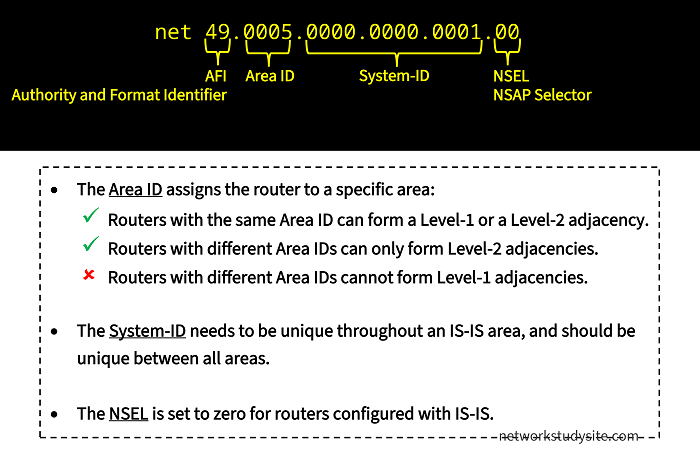
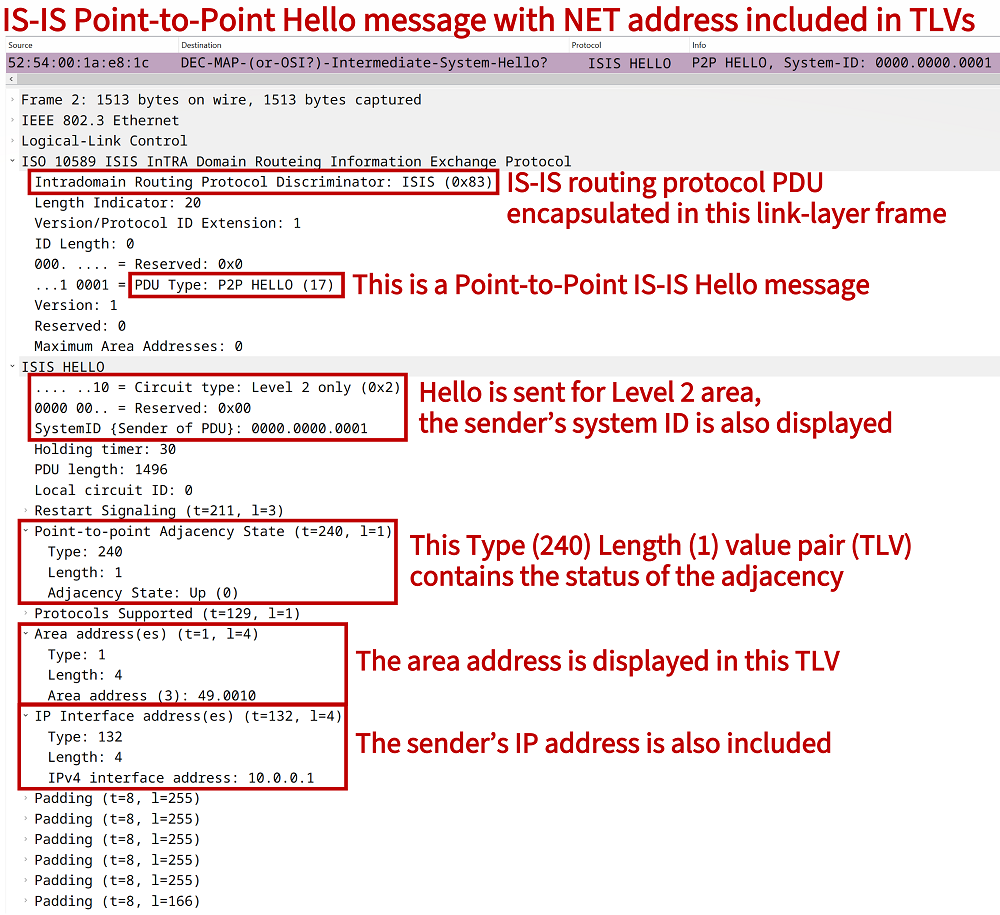
The NET address is the abbreviation of Network Entity Title address, and is also called NSAP (Network Service Access Point) address. It was initially developed not for IP routing but as part of the Connectionless Network Protocol (CLNP). The following packet capture shows an IS-IS Hello packet which contains details (area address, system ID) that are included in the NET address. The IS-IS Hello message uses Type-Length value pairs (TLV) to advertise this information.
Unique System ID required
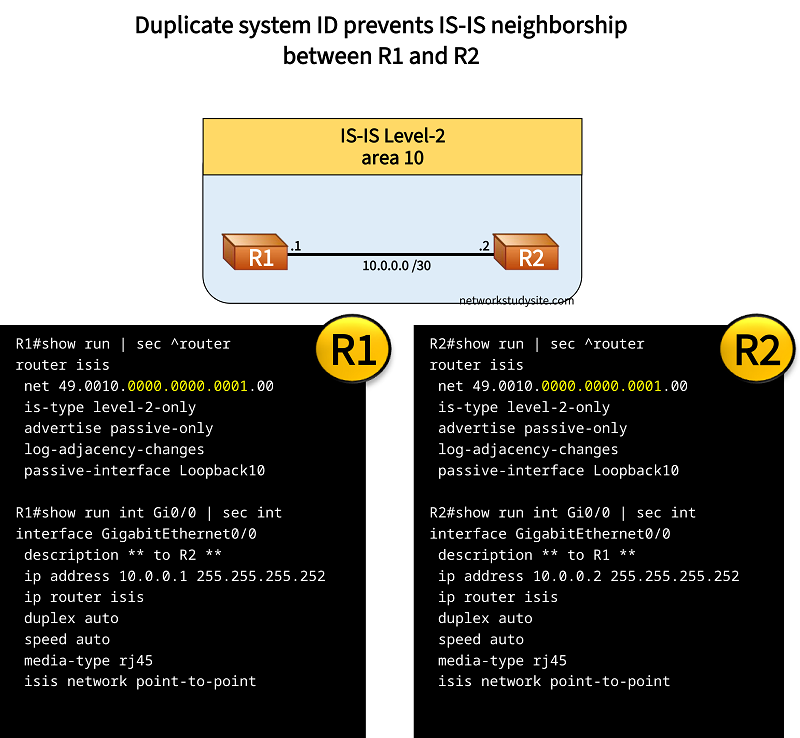
The IS-IS system ID needs to be unique in an IS-IS area. Even across Level-1 and Level-2 areas, each router should have a unique system ID. The following image shows two routers in the same area and with the same system ID. As a result, an IS-IS neighborship does not establish.
Configuration:
R1
R1#show run | sec ^router
router isis
 net 49.0010.0000.0000.0001.00
 is-type level-2-only
 advertise passive-only
 log-adjacency-changes
 passive-interface Loopback10

R1#show run int Gi0/0 | sec int
interface GigabitEthernet0/0
 description ** to R2 **
 ip address 10.0.0.1 255.255.255.252
 ip router isis
 duplex auto
 speed auto
 media-type rj45
 isis network point-to-point

R1#show run int Lo10 | sec int
interface Loopback10
 ip address 1.1.1.1 255.255.255.255
R2
R2#show run | sec ^router
router isis
 net 49.0010.0000.0000.0001.00
 is-type level-2-only
 advertise passive-only
 log-adjacency-changes
 passive-interface Loopback10

R2#show run int Gi0/0 | sec int
interface GigabitEthernet0/0
 description ** to R1 **
 ip address 10.0.0.2 255.255.255.252
 ip router isis
 duplex auto
 speed auto
 media-type rj45
 isis network point-to-point

R2#show run int Lo10 | sec int
interface Loopback10
 ip address 2.2.2.2 255.255.255.255
R2#show log | beg Log Buffer
Log Buffer (8192 bytes):

%SYS-5-CONFIG_I: Configured from console by console
ISIS-Adj: Sending serial IIH on GigabitEthernet0/0, 3way state:DOWN, length 1496
ISIS-Adj: Rec serial IIH from 5254.000c.6731 (GigabitEthernet0/0), cir type L2, cir id 00, length 1496
ISIS-Adj: Duplicate system id
ISIS-Adj: Sending serial IIH on GigabitEthernet0/0, 3way state:DOWN, length 1496
ISIS-Adj: Rec serial IIH from 5254.000c.6731 (GigabitEthernet0/0), cir type L2, cir id 00, length 1496
ISIS-Adj: Duplicate system id
ISIS-Adj: Sending serial IIH on GigabitEthernet0/0, 3way state:DOWN, length 1496
The command debug isis adj-packets is issued on R2, and details are logged about the duplicate system ID. The output from R2 is shown above. In certain scenarios, a duplicate system ID is accidentally configured on non-adjacent IS-IS routers in the same area. This can occur when adding a new IS-IS router. As a result, the following message is logged on all routers that have the same system ID.
R1#show log | beg Log Buffer
Log Buffer (8192 bytes):

%CLNS-4-DUPSYSTEM: ISIS: possible duplicate system ID 0000.0000.0003 detected
%CLNS-4-DUPSYSTEM: ISIS: possible duplicate system ID 0000.0000.0003 detected
%CLNS-4-DUPSYSTEM: ISIS: possible duplicate system ID 0000.0000.0003 detected
Note that between two IS-IS areas the L1/L2 router creates a boundary. The L1/L2 router only advertises the attached bit into the Level-1 area and translates L1 into L2 LSPs for the Level-2 area. As a result, a Level-1 router may have the same system ID as a Level-2 router without causing a network outage, however this is not advised and system IDs should be unique in the entire IS-IS domain.
Different area ID, no Level-1 adjacency
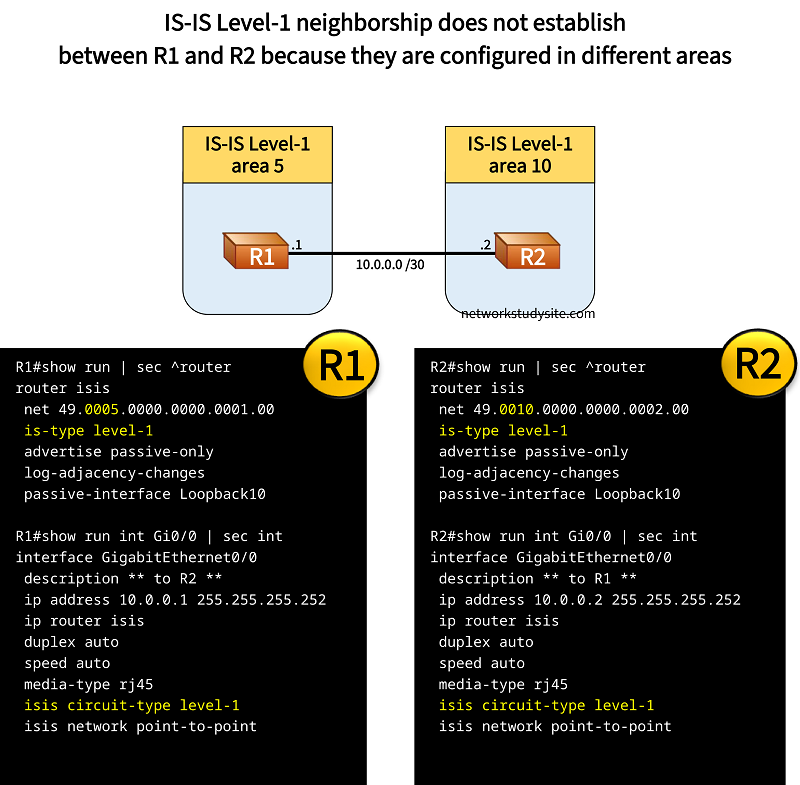
In the following example, two IS-IS Level-1 routers are configured in different areas. As a result, an IS-IS Level-1 neighborship does not establish. Routers configured with IS-IS need to have the same area ID to form a Level-1 adjacency.
Configuration:
R1
R1#show run | sec ^router
router isis
 net 49.0005.0000.0000.0001.00
 is-type level-1
 advertise passive-only
 log-adjacency-changes
 passive-interface Loopback10

R1#show run int Gi0/0 | sec int
interface GigabitEthernet0/0
 description ** to R2 **
 ip address 10.0.0.1 255.255.255.252
 ip router isis
 duplex auto
 speed auto
 media-type rj45
 isis circuit-type level-1
 isis network point-to-point

R1#show run int Lo10 | sec int
interface Loopback10
 ip address 1.1.1.1 255.255.255.255
R2
R2#show run | sec ^router
router isis
 net 49.0010.0000.0000.0002.00
 is-type level-1
 advertise passive-only
 log-adjacency-changes
 passive-interface Loopback10

R2#show run int Gi0/0 | sec int
interface GigabitEthernet0/0
 description ** to R1 **
 ip address 10.0.0.2 255.255.255.252
 ip router isis
 duplex auto
 speed auto
 media-type rj45
 isis circuit-type level-1
 isis network point-to-point

R2#show run int Lo10 | sec int
interface Loopback10
 ip address 2.2.2.2 255.255.255.255
R2#show log | beg Log Buffer
Log Buffer (8192 bytes):

ISIS-Adj: Rec serial IIH from 5254.000c.6731 (GigabitEthernet0/0), cir type L1, cir id 00, length 1496
ISIS-Adj: newstate:0, state_changed:0, going_up:0, going_down:0
ISIS-Adj: No matching areas
ISIS-Adj: Action = GOING DOWN
ISIS-Adj: Sending serial IIH on GigabitEthernet0/0, 3way state:UP, length 1496
ISIS-Adj: Rec serial IIH from 5254.000c.6731 (GigabitEthernet0/0), cir type L1, cir id 00, length 1496
ISIS-Adj: newstate:0, state_changed:0, going_up:0, going_down:0
ISIS-Adj: No matching areas
ISIS-Adj: Action = GOING DOWN
Same area ID, no attached bit
In this example scenario, the L1/L2 router R2 connects a Level-1 area and a Level-2 area. However, the L1 and L2 area have the same area ID configured. As a result, the L1/L2 router does not advertise the attached bit and neither does it advertise any Level-2 prefixes into the Level-1 area. So in fact the Level-1 area is cut off from the rest of the network.
It is important to configure different area IDs between Level-1 and Level-2 areas.
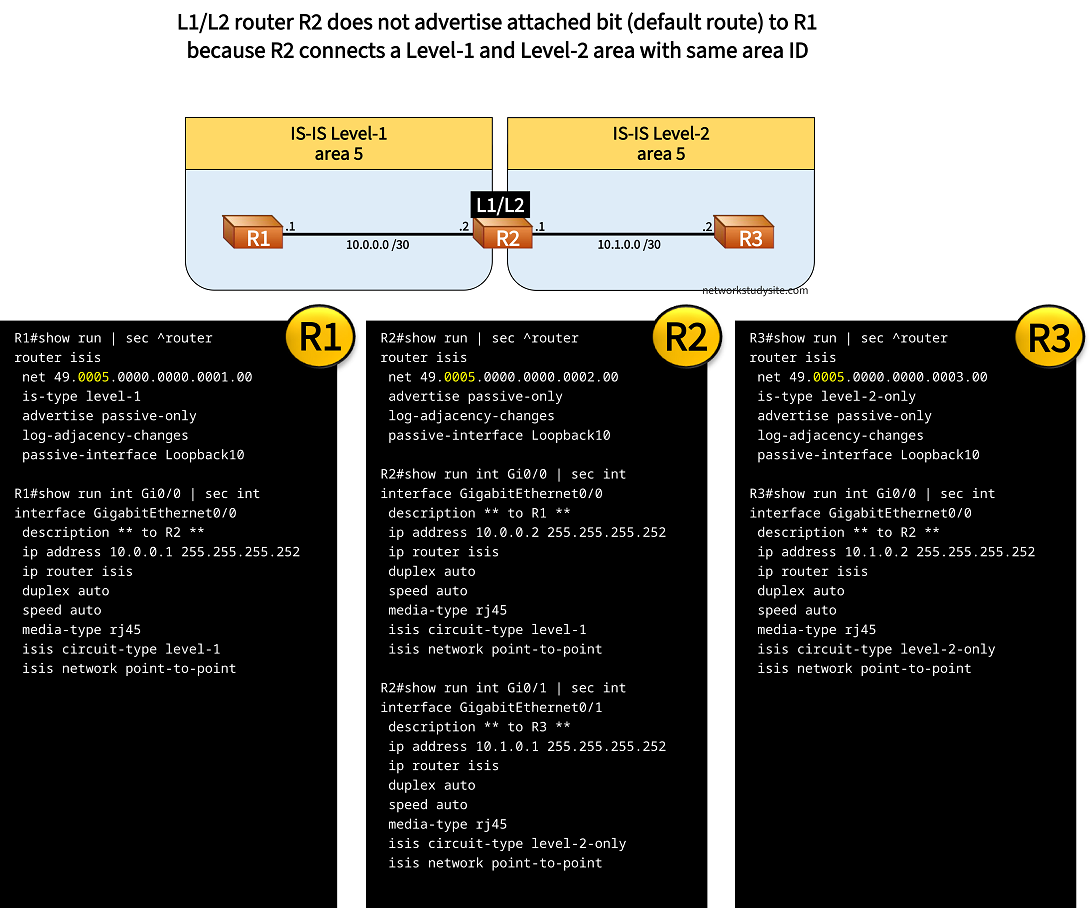
Configuration:
R1
R1#show run | sec ^router
router isis
 net 49.0005.0000.0000.0001.00
 is-type level-1
 advertise passive-only
 log-adjacency-changes
 passive-interface Loopback10

R1#show run int Gi0/0 | sec int
interface GigabitEthernet0/0
 description ** to R2 **
 ip address 10.0.0.1 255.255.255.252
 ip router isis
 duplex auto
 speed auto
 media-type rj45
 isis circuit-type level-1
 isis network point-to-point

R1#show run int Lo10 | sec int
interface Loopback10
 ip address 1.1.1.1 255.255.255.255
R2
R2#show run | sec ^router
router isis
 net 49.0005.0000.0000.0002.00
 advertise passive-only
 log-adjacency-changes
 passive-interface Loopback10

R2#show run int Gi0/0 | sec int
interface GigabitEthernet0/0
 description ** to R1 **
 ip address 10.0.0.2 255.255.255.252
 ip router isis
 duplex auto
 speed auto
 media-type rj45
 isis circuit-type level-1
 isis network point-to-point

R2#show run int Gi0/1 | sec int
interface GigabitEthernet0/1
 description ** to R3 **
 ip address 10.1.0.1 255.255.255.252
 ip router isis
 duplex auto
 speed auto
 media-type rj45
 isis circuit-type level-2-only
 isis network point-to-point

R2#show run int Lo10 | sec int
interface Loopback10
 ip address 2.2.2.2 255.255.255.255
R3
R3#show run | sec ^router
router isis
 net 49.0005.0000.0000.0003.00
 is-type level-2-only
 advertise passive-only
 log-adjacency-changes
 passive-interface Loopback10

R3#show run int Gi0/0 | sec int
interface GigabitEthernet0/0
 description ** to R2 **
 ip address 10.1.0.2 255.255.255.252
 ip router isis
 duplex auto
 speed auto
 media-type rj45
 isis circuit-type level-2-only
 isis network point-to-point

R3#show run int lo10 | sec int
interface Loopback10
 ip address 3.3.3.3 255.255.255.255
R1#show ip route isis | beg Ga
Gateway of last resort is not set

      2.0.0.0/32 is subnetted, 1 subnets
i L1     2.2.2.2 [115/10] via 10.0.0.2, 00:17:09, GigabitEthernet0/0


R2#show isis neighbors

System Id       Type Interface     IP Address      State Holdtime Circuit Id
R1              L1   Gi0/0         10.0.0.1        UP    26       00
R3              L2   Gi0/1         10.1.0.2        UP    29       00


R2#show isis topology

IS-IS TID 0 paths to level-1 routers
System Id            Metric     Next-Hop             Interface   SNPA
R1                   10         R1                   Gi0/0       5254.000c.6731
R2                   --

IS-IS TID 0 paths to level-2 routers
System Id            Metric     Next-Hop             Interface   SNPA
R2                   --
R3                   10         R3                   Gi0/1       5254.001d.566b


R3#show ip route isis | beg Ga
Gateway of last resort is not set

      1.0.0.0/32 is subnetted, 1 subnets
i L2     1.1.1.1 [115/20] via 10.1.0.1, 00:12:22, GigabitEthernet0/0
      2.0.0.0/32 is subnetted, 1 subnets
i L2     2.2.2.2 [115/10] via 10.1.0.1, 00:12:22, GigabitEthernet0/0