NHRP Static Mapping Example for IPv4 and IPv6
Table of Contents
- What is NHRP NBMA-to-Tunnel mapping? ‹
- Configuring IPv4 overlay with static routes ‹
- Configuring IPv4 overlay with BGP ‹
- Configuring IPv6 over IPv4 with EIGRP static neighbors ‹
- Download section ‹
What is NHRP NBMA-to-Tunnel mapping?
The Next Hop Resolution Protocol enables a network device to learn the IP address of another device in order to encapsulate tunneled traffic. For example, if two routers can connect with each other over a Non-Broadcast Multi-Access network (such as the internet), they could create a multipoint tunnel overlay with the help of NHRP.
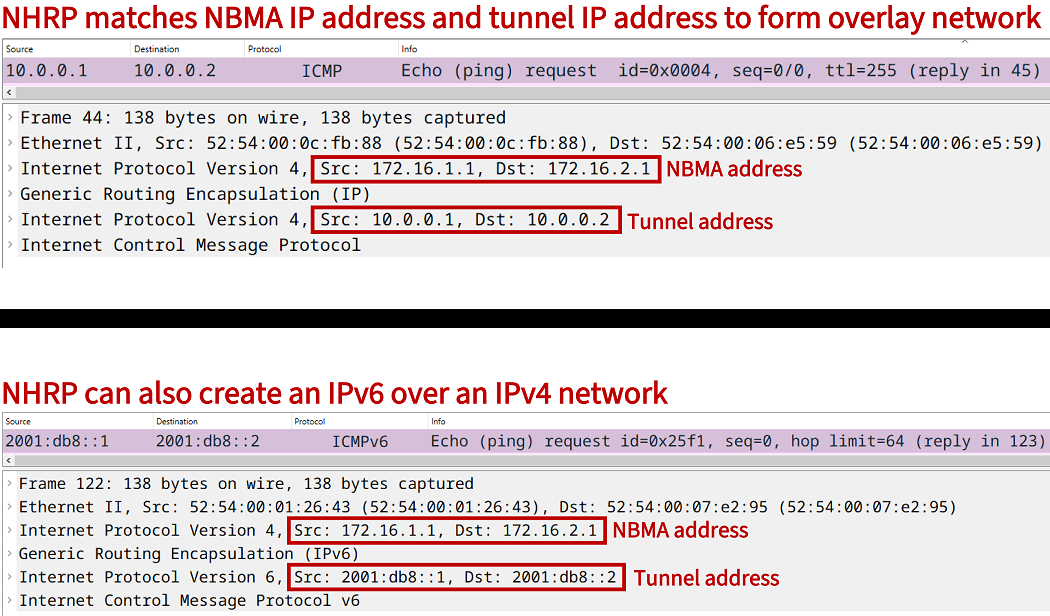
Tunneled traffic is encapsulated in an outer NBMA IP header, and it is necessary for each tunnel endpoint to know which outer IP header belongs to which inner IP header. The inner header is the tunnel overlay IP address.
The above mapping information can be learned dynamically through NHRP such as with DMVPN. Or this information can also be manually configured using static NHRP mappings. The following output shows such a static binding of NBMA-to-tunnel addresses. Note how NHRP is similar to Address Resolution Protocol (ARP) in binding together addresses to create a mapping table.
R2#show ip nhrp brief
****************************************************************************
    NOTE: Link-Local, No-socket and Incomplete entries are not displayed
****************************************************************************
Legend: Type --> S - Static, D - Dynamic
        Flags --> u - unique, r - registered, e - temporary, c - claimed
        a - authoritative, t - route
============================================================================

Intf     NextHop Address                                    NBMA Address
         Target Network                              T/Flag
-------- ------------------------------------------- ------ ----------------
Tu10     10.0.0.1                                           172.16.1.1
         10.0.0.1/32                                 S/
Tu10     10.0.0.3                                           172.16.3.1
         10.0.0.3/32                                 S/
Configuring IPv4 overlay with static routes
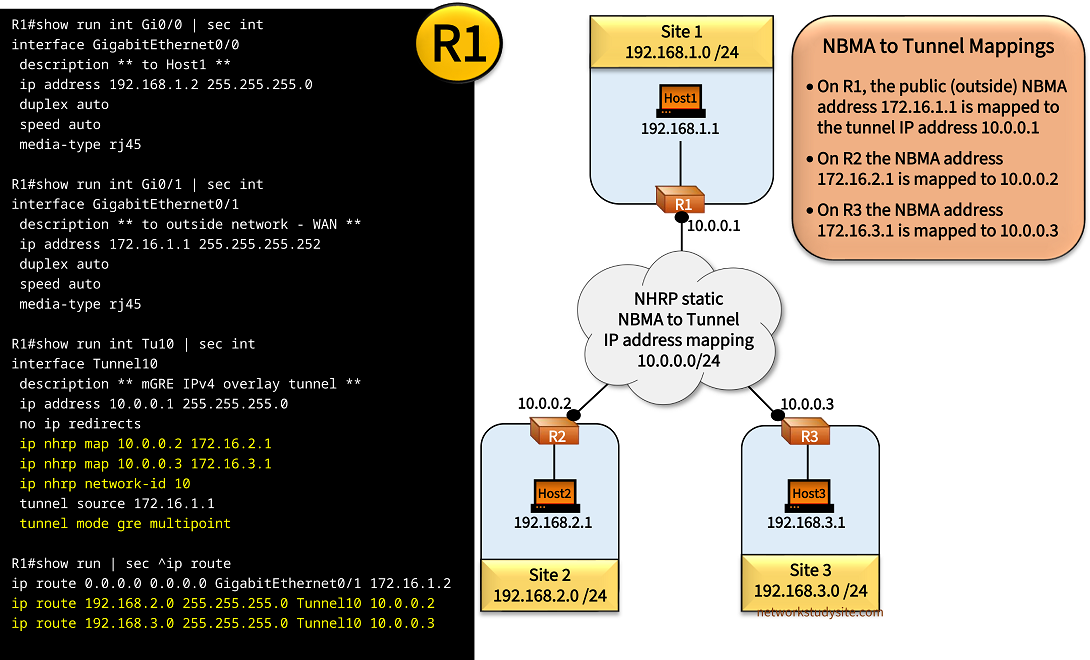
In the following example topology three sites are connected through an overlay multipoint GRE tunnel using NHRP static NBMA to tunnel IP address mappings. This means, the mGRE overlay is essentially a multiaccess network connecting the three sites in the subnet 10.0.0.0/24 (tunnel IP). The underlay network uses the NBMA outside IP addresses assigned to the physical interfaces which are used as the tunnel source.
Note there is no dynamic discovery or NHRP registration of NBMA-to-Tunnel address mappings. But instead, each mapping is statically added on the routers. Furthermore, instead of deploying a dynamic routing protocol, static routes are configured to connect the site-local prefixes (Hosts) with each other. This is not a hub and spoke network, each router can directly communicate with any other router.
Configuration:
R1
R1#show run int Gi0/0 | sec int
interface GigabitEthernet0/0
 description ** to Host1 **
 ip address 192.168.1.2 255.255.255.0
 duplex auto
 speed auto
 media-type rj45

R1#show run int Gi0/1 | sec int
interface GigabitEthernet0/1
 description ** to outside network - WAN **
 ip address 172.16.1.1 255.255.255.252
 duplex auto
 speed auto
 media-type rj45

R1#show run int Tu10 | sec int
interface Tunnel10
 description ** mGRE IPv4 overlay tunnel **
 ip address 10.0.0.1 255.255.255.0
 no ip redirects
 ip nhrp map 10.0.0.2 172.16.2.1
 ip nhrp map 10.0.0.3 172.16.3.1
 ip nhrp network-id 10
 tunnel source 172.16.1.1
 tunnel mode gre multipoint

R1#show run | sec ^ip route
ip route 0.0.0.0 0.0.0.0 GigabitEthernet0/1 172.16.1.2
ip route 192.168.2.0 255.255.255.0 Tunnel10 10.0.0.2
ip route 192.168.3.0 255.255.255.0 Tunnel10 10.0.0.3
R2
R2#show run int Gi0/0 | sec int
interface GigabitEthernet0/0
 description ** to Host2 **
 ip address 192.168.2.2 255.255.255.0
 duplex auto
 speed auto
 media-type rj45

R2#show run int Gi0/1 | sec int
interface GigabitEthernet0/1
 description ** to outside network - WAN **
 ip address 172.16.2.1 255.255.255.252
 duplex auto
 speed auto
 media-type rj45

R2#show run int Tu10 | sec int
interface Tunnel10
 description ** mGRE IPv4 overlay tunnel **
 ip address 10.0.0.2 255.255.255.0
 no ip redirects
 ip nhrp map 10.0.0.1 172.16.1.1
 ip nhrp map 10.0.0.3 172.16.3.1
 ip nhrp network-id 10
 tunnel source 172.16.2.1
 tunnel mode gre multipoint

R2#show run | sec ^ip route
ip route 0.0.0.0 0.0.0.0 GigabitEthernet0/1 172.16.2.2
ip route 192.168.1.0 255.255.255.0 Tunnel10 10.0.0.1
ip route 192.168.3.0 255.255.255.0 Tunnel10 10.0.0.3
R3
R3#show run int Gi0/0 | sec int
interface GigabitEthernet0/0
 description ** to Host3 **
 ip address 192.168.3.2 255.255.255.0
 duplex auto
 speed auto
 media-type rj45

R3#show run int Gi0/1 | sec int
interface GigabitEthernet0/1
 description ** to outside network - WAN **
 ip address 172.16.3.1 255.255.255.252
 duplex auto
 speed auto
 media-type rj45

R3#show run int Tu10 | sec int
interface Tunnel10
 description ** mGRE IPv4 overlay tunnel **
 ip address 10.0.0.3 255.255.255.0
 no ip redirects
 ip nhrp map 10.0.0.2 172.16.2.1
 ip nhrp map 10.0.0.1 172.16.1.1
 ip nhrp network-id 10
 tunnel source 172.16.3.1
 tunnel mode gre multipoint

R3#show run | sec ^ip route
ip route 0.0.0.0 0.0.0.0 GigabitEthernet0/1 172.16.3.2
ip route 192.168.1.0 255.255.255.0 Tunnel10 10.0.0.1
ip route 192.168.2.0 255.255.255.0 Tunnel10 10.0.0.2
Host1
Host1#show run int Gi0/0 | sec int
interface GigabitEthernet0/0
 description ** to R1 **
 ip address 192.168.1.1 255.255.255.0
 duplex auto
 speed auto
 media-type rj45

Host1#show run | sec ^ip route
ip route 0.0.0.0 0.0.0.0 GigabitEthernet0/0 192.168.1.2
R2#show ip nhrp
10.0.0.1/32 via 10.0.0.1                « Tunnel IP address
   Tunnel10 created 00:12:34, never expire
   Type: static, Flags:
   NBMA address: 172.16.1.1             « Physical outside underlay IP address
10.0.0.3/32 via 10.0.0.3
   Tunnel10 created 00:12:34, never expire
   Type: static, Flags:
   NBMA address: 172.16.3.1


R2#show ip nhrp brief
****************************************************************************
    NOTE: Link-Local, No-socket and Incomplete entries are not displayed
****************************************************************************
Legend: Type --> S - Static, D - Dynamic
        Flags --> u - unique, r - registered, e - temporary, c - claimed
        a - authoritative, t - route
============================================================================

Intf     NextHop Address                                    NBMA Address
         Target Network                              T/Flag
-------- ------------------------------------------- ------ ----------------
Tu10     10.0.0.1                                           172.16.1.1
         10.0.0.1/32                                 S/                       « Static NHRP mappings
Tu10     10.0.0.3                                           172.16.3.1
         10.0.0.3/32                                 S/


R2#show ip route | beg Ga
Gateway of last resort is 172.16.2.2 to network 0.0.0.0

S*    0.0.0.0/0 [1/0] via 172.16.2.2, GigabitEthernet0/1            « Default route used for underlay network
      10.0.0.0/8 is variably subnetted, 2 subnets, 2 masks
C        10.0.0.0/24 is directly connected, Tunnel10
L        10.0.0.2/32 is directly connected, Tunnel10
      172.16.0.0/16 is variably subnetted, 2 subnets, 2 masks
C        172.16.2.0/30 is directly connected, GigabitEthernet0/1
L        172.16.2.1/32 is directly connected, GigabitEthernet0/1
S     192.168.1.0/24 [1/0] via 10.0.0.1, Tunnel10                   « Static route for site-local prefix points to tunnel
      192.168.2.0/24 is variably subnetted, 2 subnets, 2 masks
C        192.168.2.0/24 is directly connected, GigabitEthernet0/0
L        192.168.2.2/32 is directly connected, GigabitEthernet0/0
S     192.168.3.0/24 [1/0] via 10.0.0.3, Tunnel10


Host1#ping 192.168.2.1
Type escape sequence to abort.
Sending 5, 100-byte ICMP Echos to 192.168.2.1, timeout is 2 seconds:
!!!!!
Success rate is 100 percent (5/5), round-trip min/avg/max = 45/46/47 ms        « Host1 (Site 1) can reach Host2 (Site 2)


Host1#ping 192.168.3.1
Type escape sequence to abort.
Sending 5, 100-byte ICMP Echos to 192.168.3.1, timeout is 2 seconds:
!!!!!
Success rate is 100 percent (5/5), round-trip min/avg/max = 45/46/47 ms        « Host1 (Site 1) can reach Host3 (Site 3)


Host1#trace 192.168.2.1 probe 1
Type escape sequence to abort.
Tracing the route to 192.168.2.1
VRF info: (vrf in name/id, vrf out name/id)
  1 192.168.1.2 2 msec
  2 10.0.0.2 46 msec                 « The mGRE tunnel is used to reach other sites
  3 192.168.2.1 47 msec


Host1#trace 192.168.3.1 probe 1
Type escape sequence to abort.
Tracing the route to 192.168.3.1
VRF info: (vrf in name/id, vrf out name/id)
  1 192.168.1.2 2 msec
  2 10.0.0.3 47 msec
  3 192.168.3.1 47 msec
Configuring IPv4 overlay with BGP
In the following example scenario, three sites are connected with an mGRE tunnel overlay network using static NHRP NBMA-to-Tunnel address mappings. R1 is the Hub router, and the Spokes are R2 and R3. The routing protocol BGP is configured over the mGRE tunnel subnet 10.0.0.0/24 with the Hub R1 using a BGP listen range. Also, the R1 is a BGP Route Reflector.
Thus, the Spokes R2 and R3 receive each others' prefixes from the Hub router. The next-hop IP address of the received prefixes points to the originating router. In other words, when R2 receives the Site 3 prefix 192.168.3.0/24, it will have R3's tunnel interface IP address as the next-hop. Due to the NHRP static mappings configured on each router's tunnel interface, the next-hop address can be resolved, and there is direct spoke-to-spoke communication.

Configuration:
R1 (Hub)
R1#show run int Gi0/0 | sec int
interface GigabitEthernet0/0
 description ** to Host1 **
 ip address 192.168.1.2 255.255.255.0
 duplex auto
 speed auto
 media-type rj45

R1#show run int Gi0/1 | sec int
interface GigabitEthernet0/1
 description ** to outside network - WAN **
 ip address 172.16.1.1 255.255.255.252
 duplex auto
 speed auto
 media-type rj45

R1#show run int Tu10 | sec int
interface Tunnel10
 description ** mGRE IPv4 overlay tunnel **
 ip address 10.0.0.1 255.255.255.0
 no ip redirects
 ip nhrp map 10.0.0.2 172.16.2.1
 ip nhrp map 10.0.0.3 172.16.3.1
 ip nhrp network-id 10
 tunnel source 172.16.1.1
 tunnel mode gre multipoint

R1#show run | sec ^router
router bgp 65100
 bgp router-id 1.1.1.1
 bgp log-neighbor-changes
 bgp listen range 10.0.0.0/24 peer-group EXAMPLE-PG
 network 192.168.1.0
 neighbor EXAMPLE-PG peer-group
 neighbor EXAMPLE-PG remote-as 65100
 neighbor EXAMPLE-PG route-reflector-client

R1#show run | sec ^ip route
ip route 0.0.0.0 0.0.0.0 GigabitEthernet0/1 172.16.1.2
R2 (Spoke)
R2#show run int Gi0/0 | sec int
interface GigabitEthernet0/0
 description ** to Host2 **
 ip address 192.168.2.2 255.255.255.0
 duplex auto
 speed auto
 media-type rj45

R2#show run int Gi0/1 | sec int
interface GigabitEthernet0/1
 description ** to outside network - WAN **
 ip address 172.16.2.1 255.255.255.252
 duplex auto
 speed auto
 media-type rj45

R2#show run int Tu10 | sec int
interface Tunnel10
 description ** mGRE IPv4 overlay tunnel **
 ip address 10.0.0.2 255.255.255.0
 no ip redirects
 ip nhrp map 10.0.0.1 172.16.1.1
 ip nhrp map 10.0.0.3 172.16.3.1
 ip nhrp network-id 10
 tunnel source 172.16.2.1
 tunnel mode gre multipoint

R2#show run | sec ^router
router bgp 65100
 bgp router-id 2.2.2.2
 bgp log-neighbor-changes
 network 192.168.2.0
 neighbor 10.0.0.1 remote-as 65100

R2#show run | sec ^ip route
ip route 0.0.0.0 0.0.0.0 GigabitEthernet0/1 172.16.2.2
R3 (Spoke)
R3#show run int Gi0/0 | sec int
interface GigabitEthernet0/0
 description ** to Host3 **
 ip address 192.168.3.2 255.255.255.0
 duplex auto
 speed auto
 media-type rj45

R3#show run int Gi0/1 | sec int
interface GigabitEthernet0/1
 description ** to outside network - WAN **
 ip address 172.16.3.1 255.255.255.252
 duplex auto
 speed auto
 media-type rj45

R3#show run int Tu10 | sec int
interface Tunnel10
 description ** mGRE IPv4 overlay tunnel **
 ip address 10.0.0.3 255.255.255.0
 no ip redirects
 ip nhrp map 10.0.0.2 172.16.2.1
 ip nhrp map 10.0.0.1 172.16.1.1
 ip nhrp network-id 10
 tunnel source 172.16.3.1
 tunnel mode gre multipoint

R3#show run | sec ^router
router bgp 65100
 bgp router-id 3.3.3.3
 bgp log-neighbor-changes
 network 192.168.3.0
 neighbor 10.0.0.1 remote-as 65100

R3#show run | sec ^ip route
ip route 0.0.0.0 0.0.0.0 GigabitEthernet0/1 172.16.3.2
R1#show ip bgp sum | beg Ne
Neighbor        V           AS MsgRcvd MsgSent   TblVer  InQ OutQ Up/Down  State/PfxRcd
*10.0.0.2       4        65100      68      71        4    0    0 00:57:56        1
*10.0.0.3       4        65100      69      67        4    0    0 00:57:57        1
* Dynamically created based on a listen range command
Dynamically created neighbors: 2, Subnet ranges: 1                    « BGP dynamic neighbors configures

BGP peergroup EXAMPLE-PG listen range group members:
  10.0.0.0/24

Total dynamically created neighbors: 2/(100 max), Subnet ranges: 1


R1#show ip bgp | beg Ne
     Network          Next Hop            Metric LocPrf Weight Path
 *>   192.168.1.0      0.0.0.0                  0         32768 i
 *>i  192.168.2.0      10.0.0.2                 0    100      0 i     « Site-local prefixes with spoke router as next-hop
 *>i  192.168.3.0      10.0.0.3                 0    100      0 i


R2#show ip bgp 192.168.3.0
BGP routing table entry for 192.168.3.0/24, version 13                « Site 3 prefix received on Spoke R2
Paths: (1 available, best #1, table default)
  Not advertised to any peer
  Refresh Epoch 2
  Local
    10.0.0.3 from 10.0.0.1 (1.1.1.1)                                  « R3 tunnel interface IP address is next-hop
      Origin IGP, metric 0, localpref 100, valid, internal, best
      Originator: 3.3.3.3, Cluster list: 1.1.1.1
      rx pathid: 0, tx pathid: 0x0


R2#show ip nhrp
10.0.0.1/32 via 10.0.0.1
   Tunnel10 created 00:09:45, never expire
   Type: static, Flags: used
   NBMA address: 172.16.1.1
10.0.0.3/32 via 10.0.0.3
   Tunnel10 created 00:09:45, never expire
   Type: static, Flags:
   NBMA address: 172.16.3.1           « R3 NBMA-to-Tunnel IP mapping can be resolved due to static NHRP mapping


Host2#trace 192.168.3.1 probe 1
Type escape sequence to abort.
Tracing the route to 192.168.3.1
VRF info: (vrf in name/id, vrf out name/id)
  1 192.168.2.2 2 msec
  2 10.0.0.3 48 msec                 « Direct spoke-to-spoke connectivity due to static NHRP mapping
  3 192.168.3.1 46 msec
Configuring IPv6 over IPv4 with EIGRP static neighbors
In the following example scenario, NHRP static mapping is configured between an IPv4 NBMA address and an IPv6 tunnel address. As a result, an IPv6 overlay network is created using an IPv4 underlay. The dynamic routing protocol EIGRP connects the sites in the IPv6 overlay network. EIGRP neighbors are statically configured.

Notice there is a full-mesh of EIGRP neighborships configured. This is in contrast of a hub-and-spoke EIGRP design where the hub router advertises EIGRP routes between the spokes. Also, the tunnels and protocol neighborships are always-on since they are statically configured with NHRP and EIGRP.

Configuration:
R1 (Hub)
R1#show run | sec ^ipv6 u
ipv6 unicast-routing

R1#show run int Gi0/0 | sec int
interface GigabitEthernet0/0
 description ** to Host1 **
 no ip address
 duplex auto
 speed auto
 media-type rj45
 ipv6 address FE80::2 link-local
 ipv6 address 2001:DB8:1::2/64

R1#show run int Gi0/1 | sec int
interface GigabitEthernet0/1
 description ** to outside network - WAN **
 ip address 172.16.1.1 255.255.255.252
 duplex auto
 speed auto
 media-type rj45

R1#show run int Tu10 | sec int
interface Tunnel10
 description ** mGRE IPv6 overlay tunnel **
 no ip address
 no ip redirects
 ipv6 address FE80::1 link-local
 ipv6 address 2001:DB8::1/64
 ipv6 nhrp map 2001:DB8::2/128 172.16.2.1
 ipv6 nhrp map 2001:DB8::3/128 172.16.3.1
 ipv6 nhrp network-id 10
 tunnel source GigabitEthernet0/1
 tunnel mode gre multipoint

R1#show run | sec ^router
router eigrp NAMED-EIGRP-IPV6
 !
 address-family ipv6 unicast autonomous-system 10
  !
  topology base
  exit-af-topology
  neighbor 2001:DB8::2 Tunnel10 remote 100
  neighbor 2001:DB8::3 Tunnel10 remote 100
  eigrp router-id 1.1.1.1
 exit-address-family

R1#show run | sec ^ip route
ip route 172.16.0.0 255.255.0.0 GigabitEthernet0/1 172.16.1.2
R2 (Spoke)
R2#show run | sec ^ipv6 u
ipv6 unicast-routing

R2#show run int Gi0/0 | sec int
interface GigabitEthernet0/0
 description ** to Host2 (Site 2 LAN) **
 no ip address
 duplex auto
 speed auto
 media-type rj45
 ipv6 address FE80::2 link-local
 ipv6 address 2001:DB8:2::2/64

R2#show run int Gi0/1 | sec int
interface GigabitEthernet0/1
 description ** to outside network - WAN **
 ip address 172.16.2.1 255.255.255.252
 duplex auto
 speed auto
 media-type rj45

R2#show run int Tu10 | sec int
interface Tunnel10
 description ** mGRE IPv6 overlay tunnel **
 no ip address
 no ip redirects
 ipv6 address FE80::2 link-local
 ipv6 address 2001:DB8::2/64
 ipv6 nhrp map 2001:DB8::1/128 172.16.1.1
 ipv6 nhrp map 2001:DB8::3/128 172.16.3.1
 ipv6 nhrp network-id 10
 tunnel source GigabitEthernet0/1
 tunnel mode gre multipoint

R2#show run | sec ^router
router eigrp NAMED-EIGRP-IPV6
 !
 address-family ipv6 unicast autonomous-system 10
  !
  topology base
  exit-af-topology
  neighbor 2001:DB8::3 Tunnel10 remote 100
  neighbor 2001:DB8::1 Tunnel10 remote 100
  eigrp router-id 2.2.2.2
 exit-address-family

R2#show run | sec ^ip route
ip route 172.16.0.0 255.255.0.0 GigabitEthernet0/1 172.16.2.2
R3 (Spoke)
R3#show run | sec ^ipv6 u
ipv6 unicast-routing

R3#show run int Gi0/0 | sec int
interface GigabitEthernet0/0
 description ** to Host3 (Site 3 LAN) **
 no ip address
 duplex auto
 speed auto
 media-type rj45
 ipv6 address FE80::2 link-local
 ipv6 address 2001:DB8:3::2/64

R3#show run int Gi0/1 | sec int
interface GigabitEthernet0/1
 description ** to outside network - WAN **
 ip address 172.16.3.1 255.255.255.252
 duplex auto
 speed auto
 media-type rj45

R3#show run int Tu10 | sec int
interface Tunnel10
 description ** mGRE IPv6 overlay tunnel **
 no ip address
 no ip redirects
 ipv6 address FE80::3 link-local
 ipv6 address 2001:DB8::3/64
 ipv6 nhrp map 2001:DB8::2/128 172.16.2.1
 ipv6 nhrp map 2001:DB8::1/128 172.16.1.1
 ipv6 nhrp network-id 10
 tunnel source GigabitEthernet0/1
 tunnel mode gre multipoint

R3#show run | sec ^router
router eigrp NAMED-EIGRP-IPV6
 !
 address-family ipv6 unicast autonomous-system 10
  !
  topology base
  exit-af-topology
  neighbor 2001:DB8::2 Tunnel10 remote 100
  neighbor 2001:DB8::1 Tunnel10 remote 100
  eigrp router-id 3.3.3.3
 exit-address-family

R3#show run | sec ^ip route
ip route 172.16.0.0 255.255.0.0 GigabitEthernet0/1 172.16.3.2
Host3
Host3#show run int Gi0/0 | sec int
interface GigabitEthernet0/0
 description ** to R3 **
 no ip address
 duplex auto
 speed auto
 media-type rj45
 ipv6 address FE80::1 link-local
 ipv6 address 2001:DB8:3::1/64

Host3#show run | sec ^ipv6 route
ipv6 route ::/0 GigabitEthernet0/0 2001:DB8:3::2
R2#show eigrp address-family ipv6 neighbors
EIGRP-IPv6 VR(NAMED-EIGRP-IPV6) Address-Family Neighbors for AS(10)
H   Address                 Interface              Hold Uptime   SRTT   RTO  Q  Seq
                                                   (sec)         (ms)       Cnt Num
1   Global address:         Tu10                     12 00:35:23    4  5000  0  4               « EIGRP neighborship over Tunnel interface
    2001:DB8::1                                                                                 « Global Unicast address is used instead of link-local
0   Global address:         Tu10                     12 00:35:28  166  5000  0  6
    2001:DB8::3


R2#show eigrp address-family ipv6 10 neighbors detail
EIGRP-IPv6 VR(NAMED-EIGRP-IPV6) Address-Family Neighbors for AS(10)
H   Address                 Interface              Hold Uptime   SRTT   RTO  Q  Seq
                                                   (sec)         (ms)       Cnt Num
1   Global address:         Tu10                     13 00:36:43    4  5000  0  4
    2001:DB8::1
   Remote Static neighbor (static multihop)                                    « EIGRP neighbor is statically configured
   Version 23.0/2.0, Retrans: 2, Retries: 0, Prefixes: 2
   Topology-ids from peer - 0
   Topologies advertised to peer:   base

0   Global address:         Tu10                     14 00:36:48  166  5000  0  6
    2001:DB8::3
   Remote Static neighbor (static multihop)
   Version 23.0/2.0, Retrans: 1, Retries: 0, Prefixes: 2
   Topology-ids from peer - 0
   Topologies advertised to peer:   base

Max Nbrs: 0, Current Nbrs: 0


R2#show ipv6 route eigrp
IPv6 Routing Table - default - 7 entries
Codes: C - Connected, L - Local, S - Static, U - Per-user Static route
       B - BGP, HA - Home Agent, MR - Mobile Router, R - RIP
       H - NHRP, I1 - ISIS L1, I2 - ISIS L2, IA - ISIS interarea
       IS - ISIS summary, D - EIGRP, EX - EIGRP external, NM - NEMO
       ND - ND Default, NDp - ND Prefix, DCE - Destination, NDr - Redirect
       RL - RPL, O - OSPF Intra, OI - OSPF Inter, OE1 - OSPF ext 1
       OE2 - OSPF ext 2, ON1 - OSPF NSSA ext 1, ON2 - OSPF NSSA ext 2
       la - LISP alt, lr - LISP site-registrations, ld - LISP dyn-eid
       lA - LISP away, a - Application
D   2001:DB8:1::/64 [90/76805120]                                     « Remote site subnet learned through Tunnel and EIGRP
     via 2001:DB8::1, Tunnel10
D   2001:DB8:3::/64 [90/76805120]
     via 2001:DB8::3, Tunnel10


Host2#trace 2001:DB8:1::1
Type escape sequence to abort.
Tracing the route to 2001:DB8:1::1

  1 2001:DB8:2::2 2 msec 1 msec 1 msec
  2 2001:DB8::1 3 msec 3 msec 4 msec                                  « Remote site can be reached throught tunnel
  3 2001:DB8:1::1 3 msec 4 msec 4 msec


Host2#trace 2001:DB8:3::1
Type escape sequence to abort.
Tracing the route to 2001:DB8:3::1

  1 2001:DB8:2::2 1 msec 1 msec 1 msec
  2 2001:DB8::3 3 msec 2 msec 3 msec
  3 2001:DB8:3::1 10 msec 3 msec 3 msec